

Web Service Toolkit: what changed
Revision 0 to 1. Removed lines have a minus sign; added lines have a plus sign.
Title: Web Service Toolkit
| Old | New | Line | |
|---|---|---|---|
| 1 | + | "Web Service Toolkit” is a web services package for FPC, Lazarus and Delphi; “Web Service Toolkit” is meant to ease web services consumption and creation by FPC, Lazarus and Delphi users. | |
| 2 | + | ||
| 3 | + | ## Client Side ( service consumption ) | |
| 4 | + | ||
| 5 | + | Mailing list: <http://groups.google.com/group/wst-list> | |
| 6 | + | ||
| 7 | + | Subversion checkout: svn co <https://svn.code.sf.net/p/lazarus-ccr/svn/wst/trunk> | |
| 8 | + | ||
| 9 | + | ### Overview | |
| 10 | + | ||
| 11 | + | “Web Service Toolkit” is made of two parts : | |
| 12 | + | ||
| 13 | + | - a set of programs : “typ_lib_edtr” a WSDL based type library editor, a command line tool “ws_helper” and a Lazarus integration package which contains some wizards, | |
| 14 | + | - a collection of runtime units. | |
| 15 | + | ||
| 16 | + | Given an interface definition file(a WSDL file or a pascal file describing a web service), “ws_helper” (or within Lazarus, the WSDL file importer wizard) will create a object pascal unit containing a proxy implementing that interface. At runtime when a call targeting the web service is issued, the proxy's role is to : | |
| 17 | + | ||
| 18 | + | - marshall the call parameters, | |
| 19 | + | - make the call to the target web service, | |
| 20 | + | - receive the call return and unmarshall output parameters to the caller. | |
| 21 | + | ||
| 22 | + | Behind the scene, the proxy will take care of the SOAP plumbing details. | |
| 23 | + | ||
| 24 | + | ### Example | |
| 25 | + | ||
| 26 | + | We will use the “user service” sample that ships with WST. The schema that describes the service is located in the *\samples* folder, the file is *user_service_intf.wsdl*. In order to use this service, we have to translate the service’s publicly exposed interface, which is express using the *Web Services Description Language(WSDL)*, to Object Pascal language. We will have to compile and execute the server that provides this service. To do so, please compile the project that is located at *\samples\http_server*, then run the resulting program to actually provide the service; Note that on recent Microsoft Windows operating systems (OS) you may have to enable the service to have network capabilities in order to run properly. To translate the service definition to Object Pascal language, within Lazarus we can use the import wizard; we can also use ***ws_helper*** as a standalone program. | |
| 27 | + | ||
| 28 | + | #### The “WSDL importer” wizard | |
| 29 | + | ||
| 30 | + | This wizard is contained in the wst_design.lpk package located in the \ide\lazarus directory of the toolkit. Once the package installed, it adds a menu section “Web Services Toolkit” with two (2) sub-menus items to the Lazarus “Project” menu : | |
| 31 | + | ||
| 32 | + | - Import WSDL file ... | |
| 33 | + | - Type Library Editor ... | |
| 34 | + | ||
| 35 | + | 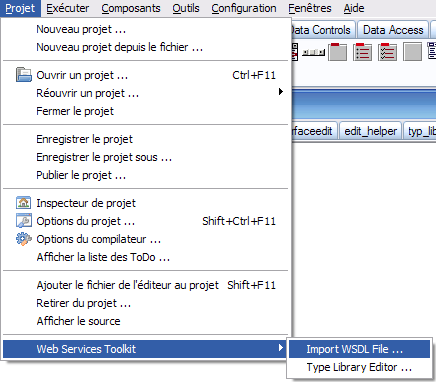 | |
| 36 | + | ||
| 37 | + | Click on the first menu item (Import WSDL file ...), it will bring up the dialog below. We specify the WSDL file and the directory where to store the generated files and click on OK button to finish. | |
| 38 | + | ||
| 39 | + | 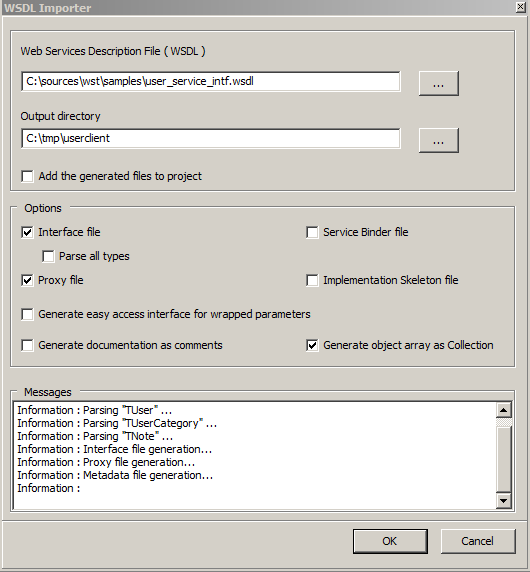 | |
| 40 | + | ||
| 41 | + | It will produce two (2) pascal source files : | |
| 42 | + | ||
| 43 | + | - user_service_intf.pas, the service definition file (Pascal equivalent of the WSDL file) | |
| 44 | + | - user_service_intf_proxy.pas, this file contains a proxy which implements the service interface defined in the first file. | |
| 45 | + | ||
| 46 | + | #### Import by ws_helper. | |
| 47 | + | ||
| 48 | + | The **ws_helper** program is a command line version of the import wizard. In order to present its capabilities, below are printed the command line arguments it supports. | |
| 49 | + | ||
| 50 | + | ws_helper [-uMODE] [-gOPTION] [-p] [-b] [-i] [-w] [-x] [-y] [-d] -[fSPECIFCATIONS] [-oPATH] [-aPATH] inputFilename | |
| 51 | + | -u MODE Generate the pascal translation of the WSDL input file | |
| 52 | + | MODE value may be U for used types or A for all types | |
| 53 | + | -g Code generation option, with the following options : | |
| 54 | + | A : object arrays are generated as "array" derived from TBaseObjectArrayRemotable | |
| 55 | + | C : object arrays are generated as "collection" derived from TObjectCollectionRemotable | |
| 56 | + | EP : enum type's items are prefixed with the enum name | |
| 57 | + | EN : enum type's items are not prefixed with the enum name, the default | |
| 58 | + | -p Generate service proxy | |
| 59 | + | -b Generate service binder | |
| 60 | + | -i Generate service minimal implementation. This will erase any existing implementation file! | |
| 61 | + | -o PATH Relative output directory | |
| 62 | + | -a PATH Absolute output directory | |
| 63 | + | -w Generate WSDL file; Can be used to get wsdl from pascal | |
| 64 | + | -x Generate XSD file; Can be used to get xsd from pascal | |
| 65 | + | -y Generate easy access interface for wrapped parameters | |
| 66 | + | -d Generate documentation as comment in the interface file | |
| 67 | + | -c Indicate the parser's case sensitivity : | |
| 68 | + | S : the paser is case sensitive | |
| 69 | + | I : the paser is not case sensitive | |
| 70 | + | -f Specify unit(s) renaming option : oldName= NewName(;oldName= NewName)* | |
| 71 | + | ||
| 72 | + | To translate the *user service* WDSL file of the sample execute the following command at the prompt: | |
| 73 | + | ||
| 74 | + | ws_helper.exe -uA -p -o. user_service_intf.wsdl | |
| 75 | + | ws_helper, Web Service Toolkit 0.6 Copyright (c) 2006-2014 by Inoussa OUEDRAOGO | |
| 76 | + | ||
| 77 | + | Parsing the file : user_service_intf.wsdl | |
| 78 | + | (...) | |
| 79 | + | Interface file generation... | |
| 80 | + | Proxy file generation... | |
| 81 | + | Metadata file generation... | |
| 82 | + | File "user_service_intf.wsdl" parsed successfully. | |
| 83 | + | ||
| 84 | + | below is printed an extract of both files: | |
| 85 | + | ||
| 86 | + | ``` pascal | |
| 87 | + | unit user_service_intf; | |
| 88 | + | (...) | |
| 89 | + | interface | |
| 90 | + | ||
| 91 | + | uses SysUtils, Classes, TypInfo, base_service_intf, service_intf; | |
| 92 | + | ||
| 93 | + | const | |
| 94 | + | sNAME_SPACE = 'urn:UserService'; | |
| 95 | + | sUNIT_NAME = 'user_service_intf'; | |
| 96 | + | ||
| 97 | + | type | |
| 98 | + | ||
| 99 | + | TUserArray = class; | |
| 100 | + | TUser = class; | |
| 101 | + | TNote = class; | |
| 102 | + | (...) | |
| 103 | + | UserService = interface(IInvokable) | |
| 104 | + | ['{7537A085-DCD1-4B24-8B74-BC35ACB4896D}'] | |
| 105 | + | function GetList():TUserArray; | |
| 106 | + | procedure Add( | |
| 107 | + | const AUser : TUser | |
| 108 | + | ); | |
| 109 | + | procedure Update( | |
| 110 | + | const AUser : TUser | |
| 111 | + | ); | |
| 112 | + | function Find( | |
| 113 | + | const AName : string | |
| 114 | + | ):TUser; | |
| 115 | + | function Delete( | |
| 116 | + | const AName : string | |
| 117 | + | ):boolean; | |
| 118 | + | end; | |
| 119 | + | ||
| 120 | + | procedure Register_user_service_intf_ServiceMetadata(); | |
| 121 | + | ``` | |
| 122 | + | ||
| 123 | + | ``` pascal | |
| 124 | + | Unit user_service_intf_proxy; | |
| 125 | + | {$IFDEF FPC} {$mode objfpc}{$H+} {$ENDIF} | |
| 126 | + | Interface | |
| 127 | + | ||
| 128 | + | Uses SysUtils, Classes, TypInfo, base_service_intf, service_intf, user_service_intf; | |
| 129 | + | ||
| 130 | + | Type | |
| 131 | + | ||
| 132 | + | TUserService_Proxy=class(TBaseProxy,UserService) | |
| 133 | + | Protected | |
| 134 | + | class function GetServiceType() : PTypeInfo;override; | |
| 135 | + | function GetList():TUserArray; | |
| 136 | + | procedure Add( | |
| 137 | + | const AUser : TUser | |
| 138 | + | ); | |
| 139 | + | procedure Update( | |
| 140 | + | const AUser : TUser | |
| 141 | + | ); | |
| 142 | + | function Find( | |
| 143 | + | const AName : string | |
| 144 | + | ):TUser; | |
| 145 | + | function Delete( | |
| 146 | + | const AName : string | |
| 147 | + | ):boolean; | |
| 148 | + | End; | |
| 149 | + | ||
| 150 | + | Function wst_CreateInstance_UserService(const AFormat : string = 'SOAP:'; const ATransport : string = 'HTTP:'; const AAddress : string = ''):UserService; | |
| 151 | + | ||
| 152 | + | Implementation | |
| 153 | + | uses wst_resources_imp, metadata_repository; | |
| 154 | + | ||
| 155 | + | Function wst_CreateInstance_UserService(const AFormat : string; const ATransport : string; const AAddress : string):UserService; | |
| 156 | + | Var | |
| 157 | + | locAdr : string; | |
| 158 | + | Begin | |
| 159 | + | locAdr := AAddress; | |
| 160 | + | if ( locAdr = '' ) then | |
| 161 | + | locAdr := GetServiceDefaultAddress(TypeInfo(UserService)); | |
| 162 | + | Result := TUserService_Proxy.Create('UserService',AFormat+GetServiceDefaultFormatProperties(TypeInfo(UserService)),ATransport + 'address=' + locAdr); | |
| 163 | + | End; | |
| 164 | + | ||
| 165 | + | function TUserService_Proxy.GetList():TUserArray; | |
| 166 | + | Var | |
| 167 | + | locSerializer : IFormatterClient; | |
| 168 | + | locCallContext : ICallContext; | |
| 169 | + | locStrPrmName : string; | |
| 170 | + | Begin | |
| 171 | + | locCallContext := Self as ICallContext; | |
| 172 | + | locSerializer := GetSerializer(); | |
| 173 | + | Try | |
| 174 | + | locSerializer.BeginCall('GetList', GetTarget(),locCallContext); | |
| 175 | + | locSerializer.EndCall(); | |
| 176 | + | ||
| 177 | + | MakeCall(); | |
| 178 | + | ||
| 179 | + | locSerializer.BeginCallRead(locCallContext); | |
| 180 | + | TObject(Result) := Nil; | |
| 181 | + | locStrPrmName := 'result'; | |
| 182 | + | locSerializer.Get(TypeInfo(TUserArray), locStrPrmName, Result); | |
| 183 | + | ||
| 184 | + | Finally | |
| 185 | + | locSerializer.Clear(); | |
| 186 | + | End; | |
| 187 | + | End; | |
| 188 | + | (...) | |
| 189 | + | ``` | |
| 190 | + | ||
| 191 | + | We are now ready to build a simple program for the service. This sample client program invokes the **GetList** method of the service in order to retrieve the list of users already registered in the service; The list is then print to the screen : | |
| 192 | + | ||
| 193 | + | ``` pascal | |
| 194 | + | program user_client_console; | |
| 195 | + | uses SysUtils, fpc_http_protocol, soap_formatter, | |
| 196 | + | user_service_intf_proxy, user_service_intf; | |
| 197 | + | ||
| 198 | + | var | |
| 199 | + | locService : UserService; | |
| 200 | + | items : TUserArray; | |
| 201 | + | item : TUser; | |
| 202 | + | i : Integer; | |
| 203 | + | begin | |
| 204 | + | FPC_RegisterHTTP_Transport(); | |
| 205 | + | locService := wst_CreateInstance_UserService(); | |
| 206 | + | items := locService.GetList(); | |
| 207 | + | try | |
| 208 | + | WriteLn('WST User Service Sample',sLineBreak); | |
| 209 | + | if (items.Length = 0) then | |
| 210 | + | WriteLn(' No user found.') | |
| 211 | + | else | |
| 212 | + | WriteLn(Format(' %d user(s) found : ',[items.Length])); | |
| 213 | + | for i := 0 to items.Length - 1 do begin | |
| 214 | + | item := items[i]; | |
| 215 | + | WriteLn(Format(' Name= "%s", e-Mail= "%s"',[item.UserName,item.eMail])); | |
| 216 | + | end; | |
| 217 | + | finally | |
| 218 | + | items.Free(); | |
| 219 | + | end; | |
| 220 | + | end. | |
| 221 | + | ``` | |
| 222 | + | ||
| 223 | + | The units *base_service_intf, service_intf, soap_formatter, fpc_http_protocol, wst_resources_imp and metadata_repository* are provided by the toolkit; Below is the result of an execution session: | |
| 224 | + | ||
| 225 | + | WST User Service Sample | |
| 226 | + | ||
| 227 | + | 2 user(s) found : | |
| 228 | + | Name= "Lazarus FreePascal", e-Mail= "Lazarus@FreePascal.wst" | |
| 229 | + | Name= "Inoussa OUEDRAOGO", e-Mail= "sample@example.wst" | |
| 230 | + | ||
| 231 | + | It finds two (2) users. The *wst_CreateInstance_UserService()* function, located in the *user_service_intf.pas* file, creates a proxy instance based on the service's informations contained in the WSDL file. The complete source code of this example is shipped with the toolkit in the *\samples\user_client_console* directory; Note that the sample as it is provided in this directory is more completed that the code presented here. | |
| 232 | + | ||
| 233 | + | ### Connection Parameters | |
| 234 | + | ||
| 235 | + | The general format is: | |
| 236 | + | ||
| 237 | + | protocol:paramName=paramValue(;paramName=paramValue)* | |
| 238 | + | ||
| 239 | + | #### HTTP Basic Authentication | |
| 240 | + | ||
| 241 | + | The toolkit has 3 HTTP implementations based on FPC's native implementation(fpc_http_server.pas), Synapse ( synapse_http_protocol.pas ) and Indy ( indy_http_protocol.pas ) | |
| 242 | + | ||
| 243 | + | In case of Synapse library (synapse_http_protocol.pas) add 2 lines to THTTPTransport constructor. | |
| 244 | + | ||
| 245 | + | ``` pascal | |
| 246 | + | constructor THTTPTransport.Create(); | |
| 247 | + | begin | |
| 248 | + | inherited Create(); | |
| 249 | + | FConnection := THTTPSend.Create(); | |
| 250 | + | FConnection.Protocol := '1.1'; | |
| 251 | + | ||
| 252 | + | //basic Authentication | |
| 253 | + | FConnection.UserName := <user name>; | |
| 254 | + | FConnection.Password := <password>; | |
| 255 | + | end; | |
| 256 | + | ``` | |
| 257 | + | ||
| 258 | + | #### HTTP Proxy Parameters | |
| 259 | + | ||
| 260 | + | For HTTP the supported parameters are: | |
| 261 | + | ||
| 262 | + | - Address **( required for a service supporting a unique address )** | |
| 263 | + | - ProxyServer | |
| 264 | + | - ProxyPort | |
| 265 | + | - ProxyUsername | |
| 266 | + | - ProxyPassword | |
| 267 | + | ||
| 268 | + | HTTP Connection through proxy are supported. Below is an example address string. | |
| 269 | + | ||
| 270 | + | ``` pascal | |
| 271 | + | const | |
| 272 | + | sADDRESS = 'http:address=http://webservices.amazon.com/AWSECommerceService/2007-04-04'+ | |
| 273 | + | ';ProxyServer=197.150.10.10;ProxyPort=9881'+ | |
| 274 | + | ';ProxyUsername=inoussa;ProxyPassword=wst'; | |
| 275 | + | ``` | |
| 276 | + | ||
| 277 | + | The toolkit has 3 HTTP implementations based on FPC's native implementation(fpc_http_server.pas), Synapse ( synapse_http_protocol.pas ) and Indy ( indy_http_protocol.pas ). | |
| 278 | + | ||
| 279 | + | #### HTTPS connection | |
| 280 | + | ||
| 281 | + | The toolkit has 3 HTTP implementations based on FPC's native implementation(fpc_http_server.pas), Synapse ( synapse_http_protocol.pas ) and Indy ( indy_http_protocol.pas ) | |
| 282 | + | ||
| 283 | + | To use openssl1.x add ssl_openssl to uses section, for openssl3 - ssl_openssl3. Copy ssleay32.dll(so) and libeay32.dll(so) for openssl1.x, liblibssl-3.dll(so) and libcrypto-3.dll(so) - openssl3 to the project directory. In case of Synapse library (synapse_http_protocol.pas) add 2 lines to THTTPTransport constructor for openssl1.x or openssl3. | |
| 284 | + | ||
| 285 | + | ``` pascal | |
| 286 | + | constructor THTTPTransport.Create(); | |
| 287 | + | begin | |
| 288 | + | inherited Create(); | |
| 289 | + | FConnection := THTTPSend.Create(); | |
| 290 | + | FConnection.Protocol := '1.1'; | |
| 291 | + | ||
| 292 | + | //OpenSSL v1.x | |
| 293 | + | FConnection.Sock.CreateWithSSL(TSSLOpenSSL); | |
| 294 | + | FConnection.Sock.SSLDoConnect; | |
| 295 | + | ||
| 296 | + | //OpenSSL v3 | |
| 297 | + | FConnection.Sock.CreateWithSSL(TSSLOpenSSL3); | |
| 298 | + | FConnection.Sock.SSLDoConnect; | |
| 299 | + | end; | |
| 300 | + | ``` | |
| 301 | + | ||
| 302 | + | #### TCP connection Parameters | |
| 303 | + | ||
| 304 | + | TCP supported parameters are: | |
| 305 | + | ||
| 306 | + | - address ( required for a service supporting a unique address ) | |
| 307 | + | - Port | |
| 308 | + | - target( the target service ) | |
| 309 | + | ||
| 310 | + | Below is an example address string. | |
| 311 | + | ||
| 312 | + | ``` pascal | |
| 313 | + | Const | |
| 314 | + | sADDRESS = 'TCP:Address=10.0.0.3;Port=1234;target=UserService'; | |
| 315 | + | ``` | |
| 316 | + | ||
| 317 | + | The toolkit has 3 TCP implementations based on FPC's native implementation(fpc_tcp_server.pas), Synapse (synapse_tcp_protocol.pas) and Indy (indy_tcp_protocol.pas). | |
| 318 | + | ||
| 319 | + | #### LIBRARY ( LIB ) connection Parameters | |
| 320 | + | ||
| 321 | + | The idea behind this protocol is to be able to host services in dynamic libraries ( DLL/DSO ). It can be viewed as a plug-in framework where plug-ins ( services ) are provided by dynamic libraries. | |
| 322 | + | ||
| 323 | + | LIB supported parameters are: | |
| 324 | + | ||
| 325 | + | - FileName ( the DLL/SO filename ) | |
| 326 | + | - target( the target service ) | |
| 327 | + | ||
| 328 | + | Below is an example address string. | |
| 329 | + | ||
| 330 | + | ``` pascal | |
| 331 | + | Const | |
| 332 | + | sADDRESS = 'LIB:FileName=..\library_server\lib_server.dll;target=UserService'; | |
| 333 | + | ``` | |
| 334 | + | ||
| 335 | + | The toolkit has one LIB implementation ( library_protocol.pas ). | |
| 336 | + | ||
| 337 | + | ***The samples folder contains 4 projects user_client_console, tcp_server, http_server and library_server which demonstrate the TCP, HTTP and LIBRARY protocols.*** | |
| 338 | + | ||
| 339 | + | #### Same Process (SAME_PROCESS) connection Parameters | |
| 340 | + | ||
| 341 | + | The idea behind this protocol is to be able to host services in the client process. It allows the build of a layered application within a unique program that can latter be transformed to a fully multi-layered application. It can also be used to facilitate debugging during the project development. | |
| 342 | + | ||
| 343 | + | SAME_PROCESS supported parameters are: | |
| 344 | + | ||
| 345 | + | - Address (the target service) | |
| 346 | + | ||
| 347 | + | Below is an example address string. | |
| 348 | + | ||
| 349 | + | ``` pascal | |
| 350 | + | Const | |
| 351 | + | sADDRESS = 'SAME_PROCESS:Address=UserService'; | |
| 352 | + | ``` | |
| 353 | + | ||
| 354 | + | The toolkit has one implementation (same_process_protocol.pas). | |
| 355 | + | ||
| 356 | + | #### Multi-Address service ( Address per operation ) | |
| 357 | + | ||
| 358 | + | Certain services ( like the eBay SOAP services ) use a address per operation. The toolkit uses extended meta data ( see the services meta data chapter below ) to set operation's addresses. The “eBay” SOAP sample located under the tests\ebay folder demonstrates the operation's address setting. | |
| 359 | + | ||
| 360 | + | ### Troubleshooting | |
| 361 | + | ||
| 362 | + | #### 'Invalid parameter : "AProtocolData"' error message | |
| 363 | + | ||
| 364 | + | This happens when it is not clear wich protocol to use. Make sure that a valid formatter is selected (for example: 'SOAP:') and that the corresponding formatter is registered. This is done by adding the appropriate xxx_formatter unit to your uses-clausule. (for example: soap_formatter) | |
| 365 | + | ||
| 366 | + | ## Server Side ( service creation ) | |
| 367 | + | ||
| 368 | + | ### Overview | |
| 369 | + | ||
| 370 | + | Web Service Toolkit contains a server side framework and a WSDL based type library editor for service creation. Key features are: | |
| 371 | + | ||
| 372 | + | - Service definition ( interface ) is separated from implementation, | |
| 373 | + | - Interface and implementations are not bound to message protocol, | |
| 374 | + | - WSDL generation | |
| 375 | + | - Support for SOAP 1.1 serialization | |
| 376 | + | - Support for XMLRPC serialization | |
| 377 | + | - Support for custom binary serialization | |
| 378 | + | - The framework is not bound to a transport protocol | |
| 379 | + | - Easy to add support for application servers. | |
| 380 | + | ||
| 381 | + | ### Example | |
| 382 | + | ||
| 383 | + | In order to create a service, we have to: | |
| 384 | + | ||
| 385 | + | - define its interface, | |
| 386 | + | - provide an implementation and register that one for the service, | |
| 387 | + | - provide a binder that will route calls targeting the service to the implementation and register that one, | |
| 388 | + | - host the service into an application server( TCP server, HTTP Server, LIBRARY server, ... ). | |
| 389 | + | ||
| 390 | + | #### Defining the service Interface | |
| 391 | + | ||
| 392 | + | Starting from the 0.5 version, the WST provides a WSDL based Type library Editor to define types and services used by an implementation. The figure (3) below presents the general interface of this tool. The Type library Editor is provided as: | |
| 393 | + | ||
| 394 | + | - a Lazarus wizard as a menu item “Project/Web Services Toolkit/Type Library Editor..” | |
| 395 | + | - a standalone program typ_lib_edtr.exe. | |
| 396 | + | ||
| 397 | + | 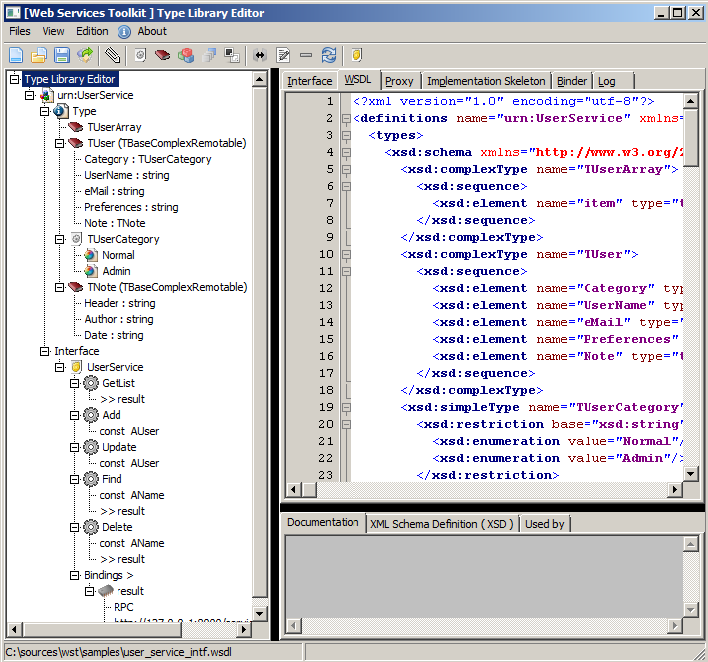 | |
| 398 | + | ||
| 399 | + | Type Library Editor features: | |
| 400 | + | ||
| 401 | + | - Graphical user interface | |
| 402 | + | - WSDL source view | |
| 403 | + | - Pascal source view of the library | |
| 404 | + | - Pascal Proxy source view | |
| 405 | + | - Pascal implementation skeleton source view | |
| 406 | + | - Pascal Proxy binder view | |
| 407 | + | - enumeration creation interface | |
| 408 | + | - class creation interface | |
| 409 | + | - array creation interface | |
| 410 | + | - type alias creation interface | |
| 411 | + | - service interface creation interface. | |
| 412 | + | ||
| 413 | + | Below some sample images are shown. We will use the user_service_intf.wsdl file located in the \samples directory for our sample. | |
| 414 | + | ||
| 415 | + | 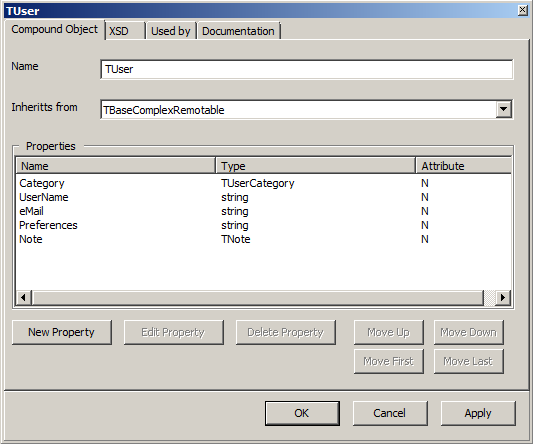 | |
| 416 | + | ||
| 417 | + | 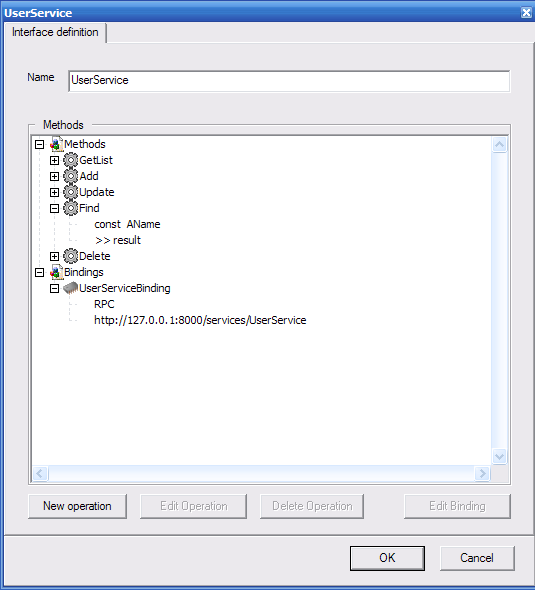 | |
| 418 | + | ||
| 419 | + | ##### Export the pascal files. | |
| 420 | + | ||
| 421 | + | The Type Library Editor has option to generate the pascal version of the WSDL file. To do so, click on the “Files\Save generated files ...” (it can also be done through the contextual menu ); It will bring up the dialog box shown in the following image. | |
| 422 | + | ||
| 423 | + | 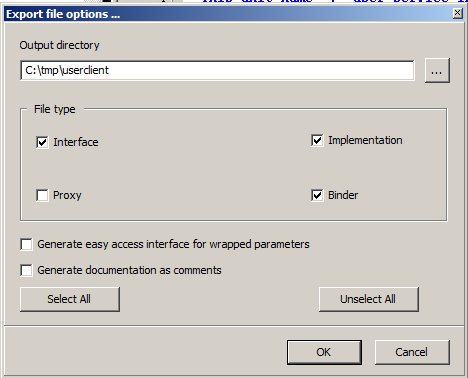 | |
| 424 | + | ||
| 425 | + | Click OK the button to complete. The program **ws_helper** has the same capabilities and the files can be generated with the following command : | |
| 426 | + | ||
| 427 | + | ws_helper\ws_helper.exe -i -b -o. user_service_intf.wsdl | |
| 428 | + | ws_helper, Web Service Toolkit 0.5 Copyright (c) 2006, 2007 by Inoussa OUEDRAOGO | |
| 429 | + | Parsing the file : user_service_intf.wsdl | |
| 430 | + | Information : Parsing "tns:TUserArray" ... | |
| 431 | + | Information : Parsing "tns:TUser" ... | |
| 432 | + | Information : Parsing "tns:TUser" ... | |
| 433 | + | Information : Parsing "xsd:string" ... | |
| 434 | + | Information : Parsing "tns:TUser" ... | |
| 435 | + | Information : Parsing "xsd:string" ... | |
| 436 | + | Information : Parsing "xsd:boolean" ... | |
| 437 | + | Information : Parsing "TUserArray" ... | |
| 438 | + | Information : Parsing "TUser" ... | |
| 439 | + | Information : Parsing "TUserCategory" ... | |
| 440 | + | Information : Parsing "TNote" ... | |
| 441 | + | Interface file generation... | |
| 442 | + | Proxy file generation... | |
| 443 | + | Metadata file generation... | |
| 444 | + | File "user_service_intf.wsdl" parsed succesfully. | |
| 445 | + | ||
| 446 | + | The complete projects of the example is located in the folder “samples”. Below is printed a extract of the generated interface file. | |
| 447 | + | ||
| 448 | + | ``` pascal | |
| 449 | + | unit user_service_intf; | |
| 450 | + | {$IFDEF FPC} {$mode objfpc}{$H+} {$ENDIF} | |
| 451 | + | interface | |
| 452 | + | ||
| 453 | + | uses SysUtils, Classes, TypInfo, base_service_intf, service_intf; | |
| 454 | + | ||
| 455 | + | const | |
| 456 | + | sNAME_SPACE = 'urn:UserService'; | |
| 457 | + | sUNIT_NAME = 'user_service_intf'; | |
| 458 | + | ||
| 459 | + | type | |
| 460 | + | ||
| 461 | + | TUser = class; | |
| 462 | + | TUserArray = class; | |
| 463 | + | ||
| 464 | + | TUserCategory = ( | |
| 465 | + | Normal | |
| 466 | + | ,Admin | |
| 467 | + | ); | |
| 468 | + | ||
| 469 | + | TUser = class(TBaseComplexRemotable) | |
| 470 | + | published | |
| 471 | + | property Category : TUserCategory read FCategory write FCategory; | |
| 472 | + | property UserName : string read FUserName write FUserName; | |
| 473 | + | property eMail : string read FeMail write FeMail; | |
| 474 | + | property Preferences : string read FPreferences write FPreferences; | |
| 475 | + | property Note : TNote read FNote write FNote; | |
| 476 | + | end; | |
| 477 | + | ||
| 478 | + | TUserArray = class(TBaseObjectArrayRemotable) | |
| 479 | + | private | |
| 480 | + | function GetItem(AIndex: Integer): TUser; | |
| 481 | + | public | |
| 482 | + | class function GetItemClass():TBaseRemotableClass;override; | |
| 483 | + | property Item[AIndex:Integer] : TUser Read GetItem;Default; | |
| 484 | + | end; | |
| 485 | + | ||
| 486 | + | UserService = interface(IInvokable) | |
| 487 | + | ['{CA6F6192-C3DE-4D9C-B3DF-E616376A0DC9}'] | |
| 488 | + | function GetList():TUserArray; | |
| 489 | + | procedure Add( | |
| 490 | + | Const AUser : TUser | |
| 491 | + | ); | |
| 492 | + | procedure Update( | |
| 493 | + | Const AUser : TUser | |
| 494 | + | ); | |
| 495 | + | function Find( | |
| 496 | + | Const AName : string | |
| 497 | + | ):TUser; | |
| 498 | + | function Delete( | |
| 499 | + | Const AName : string | |
| 500 | + | ):boolean; | |
| 501 | + | end; | |
| 502 | + | (...) | |
| 503 | + | ``` | |
| 504 | + | ||
| 505 | + | #### Providing an implementation for the service | |
| 506 | + | ||
| 507 | + | The user_service_intf_imp.pas unit generated above contains a skeleton implementation class for the interface. It defines a procedure named RegisterUserServiceImplementationFactory. The procedure registers the class as the service implementation provider in the implementation registry. | |
| 508 | + | ||
| 509 | + | ``` pascal | |
| 510 | + | Unit user_service_intf_imp; | |
| 511 | + | {$IFDEF FPC} {$mode objfpc}{$H+} {$ENDIF} | |
| 512 | + | Interface | |
| 513 | + | Uses SysUtils, Classes, | |
| 514 | + | base_service_intf, server_service_intf, server_service_imputils, | |
| 515 | + | user_service_intf, cursor_intf; | |
| 516 | + | ||
| 517 | + | Type | |
| 518 | + | { TUserService_ServiceImp } | |
| 519 | + | ||
| 520 | + | TUserService_ServiceImp=class(TBaseServiceImplementation,UserService) | |
| 521 | + | Protected | |
| 522 | + | function GetList():TUserArray; | |
| 523 | + | procedure Add( | |
| 524 | + | Const AUser : TUser | |
| 525 | + | ); | |
| 526 | + | procedure Update( | |
| 527 | + | Const AUser : TUser | |
| 528 | + | ); | |
| 529 | + | function Find( | |
| 530 | + | Const AName : string | |
| 531 | + | ):TUser; | |
| 532 | + | function Delete( | |
| 533 | + | Const AName : string | |
| 534 | + | ):boolean; | |
| 535 | + | End; | |
| 536 | + | ||
| 537 | + | procedure RegisterUserServiceImplementationFactory(); | |
| 538 | + | ||
| 539 | + | Implementation | |
| 540 | + | (...) | |
| 541 | + | ||
| 542 | + | procedure TUserService_ServiceImp.Add(Const AUser : TUser); | |
| 543 | + | var | |
| 544 | + | locObj : TUser; | |
| 545 | + | Begin | |
| 546 | + | locObj := Find(AUser.UserName); | |
| 547 | + | if ( locObj <> nil ) then | |
| 548 | + | raise Exception.CreateFmt('Duplicated user : "%s"',[AUser.UserName]); | |
| 549 | + | locObj := TUser.Create(); | |
| 550 | + | locObj.Assign(AUser); | |
| 551 | + | FUserList.Add(locObj); | |
| 552 | + | End; | |
| 553 | + | ||
| 554 | + | procedure RegisterUserServiceImplementationFactory(); | |
| 555 | + | Begin | |
| 556 | + | GetServiceImplementationRegistry().Register( | |
| 557 | + | 'UserService', | |
| 558 | + | TImplementationFactory.Create(TUserService_ServiceImp) as IServiceImplementationFactory); | |
| 559 | + | End; | |
| 560 | + | ||
| 561 | + | (...) | |
| 562 | + | ``` | |
| 563 | + | ||
| 564 | + | “ws_helper” has options to generate proxy file, basic implementation skeleton file and a binder file (see the following listing). | |
| 565 | + | ||
| 566 | + | ws_helper, Web Service Toolkit 0.4 Copyright (c) 2006, 2007 by Inoussa OUEDRAOGO | |
| 567 | + | ws_helper [-uMODE] [-p] [-b] [-i] [-oPATH] inputFilename | |
| 568 | + | -u MODE Generate the pascal translation of the WSDL input file | |
| 569 | + | MODE value may be U for used types or A for all types | |
| 570 | + | -p Generate service proxy | |
| 571 | + | -b Generate service binder | |
| 572 | + | -i Generate service minimal implementation | |
| 573 | + | -o PATH Relative output directory | |
| 574 | + | -a PATH Absolute output directory | |
| 575 | + | ||
| 576 | + | The starting implementation file could also be create using **ws_helper** with the -i and -b options as above; | |
| 577 | + | ||
| 578 | + | ws_helper\ws_helper.exe -i -b -o. user_service_intf.wsdl | |
| 579 | + | ws_helper, Web Service Toolkit 0.4 Copyright (c) 2006, 2007 by Inoussa OUEDRAOGO | |
| 580 | + | Parsing the file : user_service_intf.wsdl | |
| 581 | + | Proxy file generation... | |
| 582 | + | Binder file generation... | |
| 583 | + | Implementation file generation... | |
| 584 | + | Metadata file generation... | |
| 585 | + | File "user_service_intf.wsdl" parsed succesfully.. | |
| 586 | + | ||
| 587 | + | #### Providing a binder for the service | |
| 588 | + | ||
| 589 | + | The binder's role is to: | |
| 590 | + | ||
| 591 | + | - unpack the incoming message, | |
| 592 | + | - set up the call stack, | |
| 593 | + | - make the call against the registered implementation, | |
| 594 | + | - serialize the execution stack to create the return message. | |
| 595 | + | ||
| 596 | + | The user_service_intf_binder.pas unit generated above, contains: | |
| 597 | + | ||
| 598 | + | - TUserService_ServiceBinder : the actual binder class, | |
| 599 | + | - TUserService_ServiceBinderFactory a factory class for the binder and | |
| 600 | + | - Server_service_RegisterUserServiceService : the binder factory registration procedure. | |
| 601 | + | ||
| 602 | + | The following code extract shows the unit interface part and a method handler of the binder. | |
| 603 | + | ||
| 604 | + | ``` pascal | |
| 605 | + | unit user_service_intf_binder; | |
| 606 | + | {$IFDEF FPC} {$mode objfpc}{$H+} {$ENDIF} | |
| 607 | + | interface | |
| 608 | + | uses SysUtils, Classes, base_service_intf, server_service_intf, user_service_intf; | |
| 609 | + | ||
| 610 | + | type | |
| 611 | + | TUserService_ServiceBinder=class(TBaseServiceBinder) | |
| 612 | + | Protected | |
| 613 | + | procedure GetListHandler(AFormatter:IFormatterResponse); | |
| 614 | + | procedure AddHandler(AFormatter:IFormatterResponse); | |
| 615 | + | procedure UpdateHandler(AFormatter:IFormatterResponse); | |
| 616 | + | procedure FindHandler(AFormatter:IFormatterResponse); | |
| 617 | + | procedure DeleteHandler(AFormatter:IFormatterResponse); | |
| 618 | + | Public | |
| 619 | + | constructor Create(); | |
| 620 | + | End; | |
| 621 | + | ||
| 622 | + | TUserService_ServiceBinderFactory = class(TInterfacedObject,IItemFactory) | |
| 623 | + | protected | |
| 624 | + | function CreateInstance():IInterface; | |
| 625 | + | End; | |
| 626 | + | ||
| 627 | + | procedure Server_service_RegisterUserServiceService(); | |
| 628 | + | ||
| 629 | + | (...) | |
| 630 | + | ||
| 631 | + | procedure TUserService_ServiceBinder.AddHandler(AFormatter:IFormatterResponse); | |
| 632 | + | Var | |
| 633 | + | cllCntrl : ICallControl; | |
| 634 | + | tmpObj : UserService; | |
| 635 | + | callCtx : ICallContext; | |
| 636 | + | strPrmName : string; | |
| 637 | + | procName,trgName : string; | |
| 638 | + | AUser : TUser; | |
| 639 | + | Begin | |
| 640 | + | callCtx := GetCallContext(); | |
| 641 | + | TObject(AUser) := Nil; | |
| 642 | + | ||
| 643 | + | strPrmName := 'AUser'; AFormatter.Get(TypeInfo(TUser),strPrmName,AUser); | |
| 644 | + | If Assigned(Pointer(AUser)) Then | |
| 645 | + | callCtx.AddObjectToFree(TObject(AUser)); | |
| 646 | + | ||
| 647 | + | tmpObj := Self.GetFactory().CreateInstance() as UserService; | |
| 648 | + | if Supports(tmpObj,ICallControl,cllCntrl) then | |
| 649 | + | cllCntrl.SetCallContext(GetCallContext()); | |
| 650 | + | ||
| 651 | + | tmpObj.Add(AUser); | |
| 652 | + | ||
| 653 | + | procName := AFormatter.GetCallProcedureName(); | |
| 654 | + | trgName := AFormatter.GetCallTarget(); | |
| 655 | + | AFormatter.Clear(); | |
| 656 | + | AFormatter.BeginCallResponse(procName,trgName); | |
| 657 | + | AFormatter.EndCallResponse(); | |
| 658 | + | ||
| 659 | + | callCtx := Nil; | |
| 660 | + | End; | |
| 661 | + | ``` | |
| 662 | + | ||
| 663 | + | #### Host the service into an application server | |
| 664 | + | ||
| 665 | + | The application server's role is to route incoming service requests to the Web Service Toolkit runtime. For the runtime to process service requests: | |
| 666 | + | ||
| 667 | + | - The services and their implementations have to be registered , | |
| 668 | + | - The message protocol (SOAP, binary,...) have to be registered. | |
| 669 | + | ||
| 670 | + | The runtime interface is defined in the server_service_intf unit. This unit contains : | |
| 671 | + | ||
| 672 | + | - GetServerServiceRegistry, which returns the service registry, | |
| 673 | + | - GetServiceImplementationRegistry which returns the service implementation registry, | |
| 674 | + | - GetFormatterRegistry which returns the message format registry and | |
| 675 | + | - HandleServiceRequest which is the unique entry point for request processing. | |
| 676 | + | ||
| 677 | + | Starting from the version 0.5, the toolkit provides a simplified model to develop applications server . This is achieved using the listener classes. A listener implements a transport between the server and its clients. The toolkit provides two (2) HTTP listeners implementations: | |
| 678 | + | ||
| 679 | + | - TwstFPHttpListener (fpc_http_server.pas), using the FPC's native network component. | |
| 680 | + | - TwstIndyHttpListener ( indy_http_server.pas ), | |
| 681 | + | ||
| 682 | + | Three (3) TCP listeners implementations are provided: | |
| 683 | + | ||
| 684 | + | - TwstFPCTcpListener (fpc_tcp_server.pas), using the FPC's native network component. | |
| 685 | + | - TwstIndyTcpListener ( indy_tcp_server.pas ) and | |
| 686 | + | - TwstSynapseTcpListener ( synapse_tcp_server.pas ). | |
| 687 | + | ||
| 688 | + | All listeners derive from TwstListener defined in the server_listener.pas file. | |
| 689 | + | ||
| 690 | + | Below is printed an HTTP server sample. The code is divided into three (3) parts : | |
| 691 | + | ||
| 692 | + | - messaging format registration: | |
| 693 | + | ||
| 694 | + | ``` pascal | |
| 695 | + | Server_service_RegisterSoapFormat(); | |
| 696 | + | Server_service_RegisterXmlRpcFormat(); | |
| 697 | + | Server_service_RegisterBinaryFormat() ; | |
| 698 | + | ``` | |
| 699 | + | ||
| 700 | + | - service implementation and binder registration: | |
| 701 | + | ||
| 702 | + | ``` pascal | |
| 703 | + | RegisterUserServiceImplementationFactory(); | |
| 704 | + | Server_service_RegisterUserServiceService(); | |
| 705 | + | ``` | |
| 706 | + | ||
| 707 | + | - the listner creation and starting; the listener is created and started by the lines: | |
| 708 | + | ||
| 709 | + | ``` pascal | |
| 710 | + | AppObject := TwstFPHttpListener.Create(); | |
| 711 | + | AppObject.Start(); | |
| 712 | + | ``` | |
| 713 | + | ||
| 714 | + | Complete listing: | |
| 715 | + | ||
| 716 | + | ``` pascal | |
| 717 | + | program http_server; | |
| 718 | + | {$mode objfpc}{$H+} | |
| 719 | + | uses | |
| 720 | + | {$IFDEF UNIX}{$IFDEF UseCThreads} | |
| 721 | + | cthreads, | |
| 722 | + | {$ENDIF}{$ENDIF} | |
| 723 | + | Classes, SysUtils, | |
| 724 | + | fpc_http_server, metadata_service, logger_extension, server_listener, | |
| 725 | + | server_service_soap, server_binary_formatter, server_service_xmlrpc, config_objects, | |
| 726 | + | user_service_intf, user_service_intf_binder, user_service_intf_imp; | |
| 727 | + | var | |
| 728 | + | AppObject : TwstListener; | |
| 729 | + | begin | |
| 730 | + | Server_service_RegisterBinaryFormat(); | |
| 731 | + | Server_service_RegisterSoapFormat(); | |
| 732 | + | Server_service_RegisterXmlRpcFormat(); | |
| 733 | + | ||
| 734 | + | RegisterUserServiceImplementationFactory(); | |
| 735 | + | Server_service_RegisterUserServiceService(); | |
| 736 | + | AppObject := TwstFPHttpListener.Create(); | |
| 737 | + | try | |
| 738 | + | WriteLn('"Web Service Toolkit" HTTP Server sample listening at:'); | |
| 739 | + | WriteLn(''); | |
| 740 | + | WriteLn('http://127.0.0.1:8000/'); | |
| 741 | + | WriteLn(''); | |
| 742 | + | WriteLn('Press enter to quit.'); | |
| 743 | + | AppObject.Start(); | |
| 744 | + | ReadLn(); | |
| 745 | + | finally | |
| 746 | + | FreeAndNil(AppObject); | |
| 747 | + | end; | |
| 748 | + | end. | |
| 749 | + | ``` | |
| 750 | + | ||
| 751 | + | Server_service_RegisterUserServiceService located in the user_service_intf_binder unit ( generated by ws_helper ) registers the UserService service by calling in turn GetServerServiceRegistry: | |
| 752 | + | ||
| 753 | + | ``` pascal | |
| 754 | + | procedure Server_service_RegisterUserServiceService(); | |
| 755 | + | Begin | |
| 756 | + | GetServerServiceRegistry().Register( | |
| 757 | + | 'UserService',TUserService_ServiceBinderFactory.Create() as IitemFactory | |
| 758 | + | ); | |
| 759 | + | End; | |
| 760 | + | ``` | |
| 761 | + | ||
| 762 | + | Server_service_RegisterSoapFormat located in the server_service_soap unit ( provided by the toolkit ) registers the SOAP implementation by calling in turn GetFormatterRegistry: | |
| 763 | + | ||
| 764 | + | ``` pascal | |
| 765 | + | procedure Server_service_RegisterSoapFormat(); | |
| 766 | + | begin | |
| 767 | + | GetFormatterRegistry().Register( | |
| 768 | + | sPROTOCOL_NAME, | |
| 769 | + | sSOAP_CONTENT_TYPE, | |
| 770 | + | TSimpleItemFactory.Create(TSOAPFormatter) as IitemFactory | |
| 771 | + | ); | |
| 772 | + | RegisterStdTypes(); | |
| 773 | + | end; | |
| 774 | + | ``` | |
| 775 | + | ||
| 776 | + | Server_service_RegisterBinaryFormat located in the server_binary_formatter unit ( provided by the toolkit ) registers the Binary message implementation by calling in turn GetFormatterRegistry: | |
| 777 | + | ||
| 778 | + | ``` pascal | |
| 779 | + | procedure Server_service_RegisterBinaryFormat(); | |
| 780 | + | begin | |
| 781 | + | GetFormatterRegistry().Register( | |
| 782 | + | sPROTOCOL_NAME, | |
| 783 | + | sBINARY_CONTENT_TYPE, | |
| 784 | + | TBinaryFormatterFactory.Create() as IitemFactory | |
| 785 | + | ); | |
| 786 | + | end; | |
| 787 | + | ``` | |
| 788 | + | ||
| 789 | + | Server_service_RegisterXmlRpcFormat located in the server_service_xmlrpc unit ( provided by the toolkit ) registers the XMLRPC message implementation by calling in turn GetFormatterRegistry: | |
| 790 | + | ||
| 791 | + | ``` pascal | |
| 792 | + | procedure Server_service_RegisterXmlRpcFormat(); | |
| 793 | + | begin | |
| 794 | + | GetFormatterRegistry().Register( | |
| 795 | + | sPROTOCOL_NAME, | |
| 796 | + | sXMLRPC_CONTENT_TYPE, | |
| 797 | + | TSimpleItemFactory.Create(TXmlRpcFormatter) as IItemFactory | |
| 798 | + | ); | |
| 799 | + | end; | |
| 800 | + | ``` | |
| 801 | + | ||
| 802 | + | In order to give it a try one have to: | |
| 803 | + | ||
| 804 | + | 1. compile the server ( \samples\tcp_server\tcp_server.lpi it is a console program), | |
| 805 | + | 2. compile the client application ( \samples\user_client_console\user_client_console.lpi ), | |
| 806 | + | 3. execute the server and start listening, | |
| 807 | + | 4. execute the client. | |
| 808 | + | ||
| 809 | + | ### WSDL generation | |
| 810 | + | ||
| 811 | + | Services in the toolkit are organized into meta data repositories. Conceptually a repository corresponds: | |
| 812 | + | ||
| 813 | + | - at compile time to the pascal unit containing the service definition | |
| 814 | + | - at runtime to a name space. | |
| 815 | + | ||
| 816 | + | The repository is the toolkit WSDL generation unit. | |
| 817 | + | ||
| 818 | + | #### The Metadata Service | |
| 819 | + | ||
| 820 | + | The toolkit is provided with an easy to use metadata service implementation which in turn uses the raw interface defined in the metadata_repository unit (see above). A Lazarus GUI client application is located in the **tests\metadata_browser** folder. | |
| 821 | + | ||
| 822 | + | #### WSDL generation API | |
| 823 | + | ||
| 824 | + | The **metadata_wsdl** pascal unit contains the **GenerateWSDL** function for WSDL generation from a repository (see the signature below). | |
| 825 | + | ||
| 826 | + | ``` pascal | |
| 827 | + | PServiceRepository = ^TServiceRepository; | |
| 828 | + | TServiceRepository = record | |
| 829 | + | NameSpace : ShortString; | |
| 830 | + | Name : ShortString; | |
| 831 | + | RootAddress : ShortString; | |
| 832 | + | ServicesCount : Byte; | |
| 833 | + | Services : PService; | |
| 834 | + | end; | |
| 835 | + | ||
| 836 | + | procedure GenerateWSDL(AMdtdRep : PServiceRepository; ADoc : TDOMDocument); | |
| 837 | + | ``` | |
| 838 | + | ||
| 839 | + | ##### WSDL Customization | |
| 840 | + | ||
| 841 | + | The WSDL generation is based on the **IWsdlTypeHandler** and the **IWsdlTypeHandlerRegistry** interfaces located in the **metadata_wsdl** unit. In order to customize the generated WSDL, one has to provide a class implementing the **IWsdlTypeHandler** interface. Then that class has to be registered in the registry. The **metadata_wsdl** unit contains implementations for pascal enumerations, **TBaseComplexRemotable** descendants, and **TBaseArrayRemotable** descendants. | |
| 842 | + | ||
| 843 | + | #### Sample | |
| 844 | + | ||
| 845 | + | A functional sample project is located under **\samples\http_server**. It is an Indy base http server. | |
| 846 | + | ||
| 847 | + | ### Services Extensions | |
| 848 | + | ||
| 849 | + | Services extensions provide a mean to hook into all the services request processing stages. Services extensions may be used, for example, to implement authentication, request logging, data compression, etc. The **IServiceExtension** below is the interface used by the toolkit runtime to call services extensions. | |
| 850 | + | ||
| 851 | + | ``` pascal | |
| 852 | + | TMessageStage = ( | |
| 853 | + | msAfterDeserialize, msAfterSerialize, msBeforeDeserialize, msBeforeSerialize | |
| 854 | + | ); | |
| 855 | + | ||
| 856 | + | IServiceExtension = interface | |
| 857 | + | ['{E192E6B3-7932-4D44-A8AC-135D7A0B8C93}'] | |
| 858 | + | procedure ProcessMessage( | |
| 859 | + | const AMessageStage : TMessageStage; | |
| 860 | + | ACallContext : ICallContext; | |
| 861 | + | AMsgData : IInterface | |
| 862 | + | ); | |
| 863 | + | end; | |
| 864 | + | ``` | |
| 865 | + | ||
| 866 | + | The **AMsgData** parameter actual type depends on the message processing state and corresponds to: | |
| 867 | + | ||
| 868 | + | - **IRequestBuffer** on "msBeforeDeserialize" and "msAfterSerialize" | |
| 869 | + | - **IFormatterResponse** on "msAfterDeserialize" and "msBeforeSerialize" | |
| 870 | + | ||
| 871 | + | These types are located in the **server_service_intf** unit. Extensions have to be registered in the extensions registry ( located in the server_service_intf unit ) printed below | |
| 872 | + | ||
| 873 | + | ``` pascal | |
| 874 | + | IServiceExtensionRegistry = Interface | |
| 875 | + | ['{68DC78F1-E6CF-4D6B-8473-75288794769C}'] | |
| 876 | + | function Find(const AName : string):IServiceExtension; | |
| 877 | + | procedure Register( | |
| 878 | + | const AName : string; | |
| 879 | + | AFactory : IItemFactory | |
| 880 | + | ); | |
| 881 | + | end; | |
| 882 | + | ``` | |
| 883 | + | ||
| 884 | + | In order for an service implementation to use a service extension, it has to register himself to that extension. To that end, the IServiceImplementationFactory interface provides the RegisterExtension method. A complete sample is included in the \samples\http_server sample ( implemented in **\samples\logger_extension.pas** ). | |
| 885 | + | ||
| 886 | + | ## Services meta data | |
| 887 | + | ||
| 888 | + | Services in the toolkit are organized into ***meta data repositories( see the “services's meta data” below )***. Conceptually a repository corresponds: | |
| 889 | + | ||
| 890 | + | - at compile time to the pascal unit containing the service definition | |
| 891 | + | - at runtime to a name space. | |
| 892 | + | ||
| 893 | + | The **ws_helper** tool, when parsing the interface definition file, records the meta data of the services contained in the file to a Lazarus resource file. The resource file is then embedded into the generated binder's unit file( see the unit **“initialization”** part ). At runtime the service's recorded meta data are accessible through the interface **IModuleMetadataMngr** defined in the **metadata_repository** unit ( see below ). The **GetModuleMetadataMngr** function defined in the same unit returns an instance of an object supporting that interface. | |
| 894 | + | ||
| 895 | + | ``` pascal | |
| 896 | + | IModuleMetadataMngr = interface | |
| 897 | + | ['{B10ACF6A-A599-45A3-B083-BEEFB810C889}'] | |
| 898 | + | function IndexOfName(const ARepName : shortstring):Integer; | |
| 899 | + | function GetCount():Integer; | |
| 900 | + | function GetRepositoryName(const AIndex : Integer):shortstring; | |
| 901 | + | procedure SetRepositoryNameSpace(const ARepName,ANameSpace : shortstring); | |
| 902 | + | function LoadRepositoryName( | |
| 903 | + | const ARepName,ARootAddress : shortstring; | |
| 904 | + | out ARepository : PServiceRepository | |
| 905 | + | ):Integer; | |
| 906 | + | procedure ClearRepository(var ARepository : PServiceRepository); | |
| 907 | + | procedure SetServiceCustomData( | |
| 908 | + | const ARepName : shortstring; | |
| 909 | + | const AServiceName : shortstring; | |
| 910 | + | const ADataName, | |
| 911 | + | AData : string | |
| 912 | + | ); | |
| 913 | + | procedure SetOperationCustomData( | |
| 914 | + | const ARepName : shortstring; | |
| 915 | + | const AServiceName : shortstring; | |
| 916 | + | const AOperationName : shortstring; | |
| 917 | + | const ADataName, | |
| 918 | + | AData : string | |
| 919 | + | ); | |
| 920 | + | function GetServiceMetadata(const ARepName,AServiceName : shortstring) : PService; | |
| 921 | + | procedure ClearServiceMetadata(var AService : PService); | |
| 922 | + | end; | |
| 923 | + | ``` | |
| 924 | + | ||
| 925 | + | ### Extended Meta data | |
| 926 | + | ||
| 927 | + | The meta data interface provides a way to add custom data to recorded ones. Services's metadata can be set through **SetServiceCustomData**, operation's metadata be set through the **SetOperationCustomData** method. | |
| 928 | + | ||
| 929 | + | A repository's extended meta data has to be registered after the service meta data recorded in the resource file have been registered. So for client application the generated proxy unit contains a conditional code fragment to call a registration procedure like shown below for the eBay sample located in the **tests\ebay** folder. The procedure name is obtained from the interface unit name ( the repository's name ) : **Register_%UNIT_NAME%_ServiceMetadata** . | |
| 930 | + | ||
| 931 | + | ``` pascal | |
| 932 | + | initialization | |
| 933 | + | {$i ebay.lrs} | |
| 934 | + | ||
| 935 | + | {$IF DECLARED(Register_ebay_ServiceMetadata)} | |
| 936 | + | Register_ebay_ServiceMetadata(); | |
| 937 | + | {$ENDIF} | |
| 938 | + | End. | |
| 939 | + | ``` | |
| 940 | + | ||
| 941 | + | ## Headers support | |
| 942 | + | ||
| 943 | + | ### The THeaderBlock class | |
| 944 | + | ||
| 945 | + | ``` pascal | |
| 946 | + | THeaderBlock = class(TBaseComplexRemotable) | |
| 947 | + | public | |
| 948 | + | property Direction : THeaderDirection read FDirection write FDirection; | |
| 949 | + | property Understood : Boolean read FUnderstood write FUnderstood; | |
| 950 | + | published | |
| 951 | + | property mustUnderstand : Integer read FmustUnderstand write SetmustUnderstand | |
| 952 | + | stored HasmustUnderstand; | |
| 953 | + | end; | |
| 954 | + | ``` | |
| 955 | + | ||
| 956 | + | The **THeaderBlock** shown above ( the private part has been omitted for brevity), located in the **base_service_intf** unit, is the root class all header classes are derived from.. The **Direction** property indicate whether it is an incoming header or an outgoing one. The **mustUnderstand** property define whether the header is a mandatory one. | |
| 957 | + | ||
| 958 | + | ### Defining header class | |
| 959 | + | ||
| 960 | + | Soap headers are derived from the **THeaderBlock** base class located in the **base_service_intf** unit. They have to be registered in the type registry. Below is reproduced an header example extracted from the “calculator” sample project. | |
| 961 | + | ||
| 962 | + | ``` pascal | |
| 963 | + | TCalcHeader = class(THeaderBlock) | |
| 964 | + | published | |
| 965 | + | property Login : string read FLogin write FLogin; | |
| 966 | + | property Password : string read FPassword write FPassword; | |
| 967 | + | property WantedPrecision : Integer read FWantedPrecision write FWantedPrecision; | |
| 968 | + | end; | |
| 969 | + | ``` | |
| 970 | + | ||
| 971 | + | ### The ICallContext interface | |
| 972 | + | ||
| 973 | + | ``` pascal | |
| 974 | + | ICallContext = Interface | |
| 975 | + | ['{855EB8E2-0700-45B1-B852-2101023200E0}'] | |
| 976 | + | procedure AddObjectToFree(const AObject : TObject); | |
| 977 | + | procedure Clear(); | |
| 978 | + | function AddHeader( | |
| 979 | + | const AHeader : THeaderBlock; | |
| 980 | + | const AKeepOwnership : Boolean | |
| 981 | + | ):Integer;overload; | |
| 982 | + | function AddHeader( | |
| 983 | + | const AHeader : TBaseRemotable; | |
| 984 | + | const AKeepOwnership : Boolean; | |
| 985 | + | const AName : string = '' | |
| 986 | + | ):Integer;overload; | |
| 987 | + | function GetHeaderCount(const ADirections : THeaderDirections):Integer; | |
| 988 | + | function GetHeader(const AIndex : Integer) : THeaderBlock; | |
| 989 | + | procedure ClearHeaders(const ADirection : THeaderDirection); | |
| 990 | + | End; | |
| 991 | + | ``` | |
| 992 | + | ||
| 993 | + | The **ICallContext** interface defined in the **base_service_intf** unit represents the service call context. The **AddHeader** method allows headers sending while the **GetHeader** method retrieves header in the call context. | |
| 994 | + | ||
| 995 | + | ### Client side headers | |
| 996 | + | ||
| 997 | + | An **ICallContext** reference may be obtained from the current service proxy instance simply by querying it for that interface as shown in the code fragment below extracted from the “calculator” client example project. | |
| 998 | + | ||
| 999 | + | ``` pascal | |
| 1000 | + | var | |
| 1001 | + | ch : TCalcHeader; | |
| 1002 | + | hdrs : ICallContext; | |
| 1003 | + | begin | |
| 1004 | + | FObj := TCalculator_Proxy.Create('Calculator', edtFormat.Text, edtAddress.Text); | |
| 1005 | + | ||
| 1006 | + | ch := TCalcHeader.Create(); | |
| 1007 | + | ch.mustUnderstand := 1; | |
| 1008 | + | ch.Login := 'azerty'; | |
| 1009 | + | ch.Password := 'qwerty'; | |
| 1010 | + | ch.WantedPrecision := 1210; | |
| 1011 | + | hdrs := FObj as ICallContext; | |
| 1012 | + | hdrs.AddHeader(ch,true); | |
| 1013 | + | ``` | |
| 1014 | + | ||
| 1015 | + | A header may be made mandatory by setting its **mustUnderstand** property to 1 as in the code above. | |
| 1016 | + | ||
| 1017 | + | ### Server side headers | |
| 1018 | + | ||
| 1019 | + | #### The ICallControl interface | |
| 1020 | + | ||
| 1021 | + | ``` pascal | |
| 1022 | + | ICallControl = interface | |
| 1023 | + | ['{7B4B7192-EE96-4B52-92C7-AE855FBC31E7}'] | |
| 1024 | + | procedure SetCallContext(ACallContext : ICallContext); | |
| 1025 | + | function GetCallContext():ICallContext; | |
| 1026 | + | end; | |
| 1027 | + | ``` | |
| 1028 | + | ||
| 1029 | + | The **ICallControl** interface, located in the **server_service_intf** unit, is used by the toolkit runtime to share the executing call environment with service implementation classes. When the runtime is about to issue a call against a implementation class instance, it queries that instance for ICallControl interface support; If the implementation has ICallControl interface support then the obtained reference is used to set the call context through the **SetCallContext** method. The implementation instance can then access the call context by calling the **GetCallContex** method. | |
| 1030 | + | ||
| 1031 | + | The toolkit provides the **TBaseServiceImplementation** class which has support for the ICallControl interface and can be used as a base implementation class. It is the base class used by the **ws_helper** generated skeleton implementation class when invoked with the **-i** command line option. | |
| 1032 | + | ||
| 1033 | + | The method printed below, extracted from the calculator sample service demonstrates the access to headers for read and write. | |
| 1034 | + | ||
| 1035 | + | ``` pascal | |
| 1036 | + | function TCalculator_ServiceImp.AddInt( | |
| 1037 | + | Const A : Integer; | |
| 1038 | + | Const B : Integer | |
| 1039 | + | ):TBinaryArgsResult; | |
| 1040 | + | var | |
| 1041 | + | hdr : TCalcResultHeader; | |
| 1042 | + | h : TCalcHeader; | |
| 1043 | + | cc : ICallContext; | |
| 1044 | + | Begin | |
| 1045 | + | hdr := TCalcResultHeader.Create(); | |
| 1046 | + | cc := GetCallContext(); | |
| 1047 | + | if Assigned(cc) and ( cc.GetHeaderCount([hdIn]) > 0 ) and ( cc.GetHeader(0).InheritsFrom(TCalcHeader) ) then begin | |
| 1048 | + | h := cc.GetHeader(0) as TCalcHeader; | |
| 1049 | + | h.Understood := True; | |
| 1050 | + | hdr.Assign(h); | |
| 1051 | + | end; | |
| 1052 | + | hdr.TimeStamp := DateTimeToStr(Now()); | |
| 1053 | + | hdr.SessionID := 'testSession'; | |
| 1054 | + | cc.AddHeader(hdr,True); | |
| 1055 | + | hdr := nil; | |
| 1056 | + | Result := TBinaryArgsResult.Create(); | |
| 1057 | + | Try | |
| 1058 | + | Result.Arg_OP := '+'; | |
| 1059 | + | Result.Arg_OpEnum := coAdd; | |
| 1060 | + | Result.Arg_A := A; | |
| 1061 | + | Result.Arg_B := B; | |
| 1062 | + | Result.Arg_R := A + B; | |
| 1063 | + | Result.Comment := 'Doing an + operation'; | |
| 1064 | + | Except | |
| 1065 | + | FreeAndNil(Result); | |
| 1066 | + | Raise; | |
| 1067 | + | End; | |
| 1068 | + | End; | |
| 1069 | + | ``` | |
| 1070 | + | ||
| 1071 | + | ### Headers that does not derived from THeaderBlock | |
| 1072 | + | ||
| 1073 | + | Classes that inherit from *TBaseRemotable* can also be used as headers; In that case a *THeaderBlockProxy*’s instance is automatically created and used as a wrapper to allow a *TBaseRemotable* instance to be sent and received as a header block. The *ICallContext* has an overloaded *AddHeader* method that accepts *TBaseRemotable*’s instances. | |
| 1074 | + | ||
| 1075 | + | ## SOAP Specific | |
| 1076 | + | ||
| 1077 | + | ### Binding style | |
| 1078 | + | ||
| 1079 | + | The binding style is used to indicate whether the service is **RPC** oriented or **Document** oriented. | |
| 1080 | + | ||
| 1081 | + | #### Client side | |
| 1082 | + | ||
| 1083 | + | The binding style may be specified in the SOAP protocol string on the creation of a service proxy. The default value for the binding style is **RPC**. Below is printed a sample code that demonstrates the use of Document style. | |
| 1084 | + | ||
| 1085 | + | ``` pascal | |
| 1086 | + | locService := TSampleService_Proxy.Create( | |
| 1087 | + | 'SampleService', | |
| 1088 | + | 'SOAP:Style=Document;EncodingStyle=Literal', | |
| 1089 | + | 'http:Address=http://127.0.0.1/services/SampleService' | |
| 1090 | + | ); | |
| 1091 | + | ``` | |
| 1092 | + | ||
| 1093 | + | #### Server side | |
| 1094 | + | ||
| 1095 | + | Currently services created with the toolkit use the **RPC** binding style. | |
| 1096 | + | ||
| 1097 | + | ### Encoding style | |
| 1098 | + | ||
| 1099 | + | The encoding style indicates the rules used to encode types in XML. Supported values are **Encoded** and **Literal**. | |
| 1100 | + | ||
| 1101 | + | #### Client side | |
| 1102 | + | ||
| 1103 | + | The encoding style may be specified in the SOAP protocol string on the creation of a service proxy. The default value for the encoding style is **Encoded**. The above sample demonstrates the use of **Literal** style. | |
| 1104 | + | ||
| 1105 | + | #### Server side | |
| 1106 | + | ||
| 1107 | + | Currently services created with the toolkit use the **Encoded** encoding style. | |
| 1108 | + | ||
| 1109 | + | ## Provided examples | |
| 1110 | + | ||
| 1111 | + | The samples are located under the **“tests”** folder. | |
| 1112 | + | ||
| 1113 | + | ### Client side examples ( tested on Windows XP, Ubuntu and MacOS on PowerPC) | |
| 1114 | + | ||
| 1115 | + | - UserService, samples\http_server, samples\tcp_server, samples\user_client_console, sample\library_server : the client console uses the three client and server protocols (HTTP, TCP, LIBRARY) | |
| 1116 | + | - Google sample : It demonstrates use of class and array data types . | |
| 1117 | + | - Metadata Browser : This sample demonstrates use of class and array data types and mainly the toolkit metadata service. | |
| 1118 | + | - eBay sample, this sample uses OpenSLL which can be found at <http://www.openssl.org> and SYNAPSE ( <http://www.ararat.cz/synapse/> ). | |
| 1119 | + | - \samples\delphi\\ : This folder contains Delphi ( compile with Delphi 7) client and server samples. Used protocol : the TCP, HTTP, LIBRARY; Used format : SOAP, XMLRPC and BINARY. | |
| 1120 | + | ||
| 1121 | + | ### Server side examples | |
| 1122 | + | ||
| 1123 | + | - samples\tcp_server : This is a sample TCP server based on the Synapse components. It uses the UserService. | |
| 1124 | + | - samples\http_server : This is a sample HTTP server based on the Indy10 components. It uses the UserService and the toolkit metadata service. It demonstrates the WSDL generation. | |
| 1125 | + | - samples\apache_module : Apache module sample, this sample demonstrates the hosting of the toolkit into the Apache HTTP web server. It is based on Sekelsenmat's Apache headers translation. It uses the UserService service and the toolkit metadata service. It demonstrates the WSDL generation. | |
| 1126 | + | ||
| 1127 | + | ## Status | |
| 1128 | + | ||
| 1129 | + | The toolkit is usable for simple types and for class types. The serialization is designed to allow customization of basic types and class types by implementing classes derived from “TBaseRemotable”. This classes have to be registered in the type registry. | |
| 1130 | + | ||
| 1131 | + | ### Serialization | |
| 1132 | + | ||
| 1133 | + | The serialization is based on the IFormatterBase interface located in the **base_service_intf** unit. | |
| 1134 | + | ||
| 1135 | + | The toolkit has four serializers implementations : the SOAP serializer, the XMLRPC serializer, the JSONRPC serializer and a binary serializer. This serializers has been tested on fpc 2.x and Delphi 7. | |
| 1136 | + | ||
| 1137 | + | #### *SOAP serializer* | |
| 1138 | + | ||
| 1139 | + | The SOAP serializer implements SOAP 1.1. It has support for the following pascal types: | |
| 1140 | + | ||
| 1141 | + | - Available integers: | |
| 1142 | + | - Byte mapped to unsignedByte | |
| 1143 | + | - ShortInt mapped to byte | |
| 1144 | + | - SmallInt mapped to short | |
| 1145 | + | - Word mapped to unsignedShort | |
| 1146 | + | - LongInt mapped to int | |
| 1147 | + | - LongWord mapped to unsignedInt | |
| 1148 | + | - Int64 mapped to long | |
| 1149 | + | - QWord mapped to int | |
| 1150 | + | ||
| 1151 | + | - String mapped to string | |
| 1152 | + | - Boolean mapped to boolean | |
| 1153 | + | - Enumerations mapped to their string representation | |
| 1154 | + | ||
| 1155 | + | - Float types : | |
| 1156 | + | - Single mapped to float | |
| 1157 | + | - Double mapped to double | |
| 1158 | + | - Extended mapped to double | |
| 1159 | + | - Currency mapped to float | |
| 1160 | + | ||
| 1161 | + | - Object (class instances, not TP ones ) : The toolkit has support for instances of classes derived from TBaseRemotable. TBaseRemotable is the base class used by the formatter interface to allow customization of the serialization. The toolkit provides the TBaseComplexRemotable class which implements serialization for its ( or its descendants ) published properties. | |
| 1162 | + | ||
| 1163 | + | #### *Binary serializer* | |
| 1164 | + | ||
| 1165 | + | The Binary serializer is more efficient in time and space compared to the SOAP serializer . It uses big endian to stream data. It has support for the following pascal types: | |
| 1166 | + | ||
| 1167 | + | - Available integers : | |
| 1168 | + | - Byte | |
| 1169 | + | - ShortInt | |
| 1170 | + | - SmallInt | |
| 1171 | + | - Word | |
| 1172 | + | - LongInt | |
| 1173 | + | - LongWord | |
| 1174 | + | - Int64 | |
| 1175 | + | - QWord | |
| 1176 | + | ||
| 1177 | + | - String | |
| 1178 | + | - Boolean | |
| 1179 | + | - Enumerations | |
| 1180 | + | ||
| 1181 | + | - Float types : | |
| 1182 | + | - Single | |
| 1183 | + | - Double | |
| 1184 | + | - Extended | |
| 1185 | + | - Currency | |
| 1186 | + | ||
| 1187 | + | - Object (class instances, not TP ones ) :The toolkit has support for instances of classes derived from **TBaseRemotable**. TBaseRemotable is the base class used by the formatter interface to allow customization of the serialization. The toolkit provides the TBaseComplexRemotable class which implements serialization for its ( or its descendants ) published properties. | |
| 1188 | + | ||
| 1189 | + | #### *Class type serialization* | |
| 1190 | + | ||
| 1191 | + | The toolkit has support for instances of classes derived from **TBaseRemotable**. TBaseRemotable is the abstract base class used by the formatter interface to allow customization of the serialization. The toolkit provides the TBaseComplexRemotable class which implements serialization for its descendants classes published properties. It also provides TBaseObjectArrayRemotable class for serialization of array of TBaseRemotable descendant classes. | |
| 1192 | + | ||
| 1193 | + | ##### The root **“TBaseRemotable”** class | |
| 1194 | + | ||
| 1195 | + | ``` pascal | |
| 1196 | + | TBaseRemotable = class(TPersistent) | |
| 1197 | + | Public | |
| 1198 | + | constructor Create();virtual; | |
| 1199 | + | class procedure Save( | |
| 1200 | + | AObject : TBaseRemotable; | |
| 1201 | + | AStore : IFormatterBase; | |
| 1202 | + | Const AName : String; | |
| 1203 | + | Const ATypeInfo : PTypeInfo | |
| 1204 | + | );virtual;abstract; | |
| 1205 | + | class procedure Load( | |
| 1206 | + | Var AObject : TObject; | |
| 1207 | + | AStore : IFormatterBase; | |
| 1208 | + | var AName : String; | |
| 1209 | + | const ATypeInfo : PTypeInfo | |
| 1210 | + | );virtual;abstract; | |
| 1211 | + | End; | |
| 1212 | + | ``` | |
| 1213 | + | ||
| 1214 | + | **TBaseRemotable** is the abstract base class used by the formatter interface to allow customization of the serialization. This class defines a **virtual constructor** and mainly two(2) virtual abstract class methods : | |
| 1215 | + | ||
| 1216 | + | - **Save** : this method is called when the toolkit needs to serialize the **AObject** parameter. | |
| 1217 | + | - **Load**: this method is called when the toolkit needs to un-serialize to the **AObject** parameter. | |
| 1218 | + | ||
| 1219 | + | ##### The “TBaseComplexRemotable” serialization | |
| 1220 | + | ||
| 1221 | + | ``` pascal | |
| 1222 | + | TBaseComplexRemotable = class(TAbstractComplexRemotable) | |
| 1223 | + | public | |
| 1224 | + | class procedure Save( | |
| 1225 | + | AObject : TBaseRemotable; | |
| 1226 | + | AStore : IFormatterBase; | |
| 1227 | + | const AName : string; | |
| 1228 | + | const ATypeInfo : PTypeInfo | |
| 1229 | + | );override; | |
| 1230 | + | class procedure Load( | |
| 1231 | + | var AObject : TObject; | |
| 1232 | + | AStore : IFormatterBase; | |
| 1233 | + | var AName : string; | |
| 1234 | + | const ATypeInfo : PTypeInfo | |
| 1235 | + | );override; | |
| 1236 | + | class procedure RegisterAttributeProperty(const AProperty : shortstring);virtual; | |
| 1237 | + | class procedure RegisterAttributeProperties(const APropertList : array of shortstring);virtual; | |
| 1238 | + | class function IsAttributeProperty(const AProperty : shortstring):Boolean; | |
| 1239 | + | procedure Assign(Source: TPersistent); override; | |
| 1240 | + | end; | |
| 1241 | + | ``` | |
| 1242 | + | ||
| 1243 | + | **TBaseComplexRemotable** implements serialization for its descendants classes published properties. The serialization is based on runtime type information (RTTI) and can be customized to: | |
| 1244 | + | ||
| 1245 | + | - ignore always some published properties. | |
| 1246 | + | - ignore conditionally some published properties. | |
| 1247 | + | ||
| 1248 | + | The following class shows a the serialization's customization sample. | |
| 1249 | + | ||
| 1250 | + | ``` pascal | |
| 1251 | + | TSampleClass = class(TBaseComplexRemotable) | |
| 1252 | + | private | |
| 1253 | + | FProp_Always: Integer; | |
| 1254 | + | FProp_Never: Integer; | |
| 1255 | + | FProp_Optional: Integer; | |
| 1256 | + | function GetStoredProp_Optional: boolean; | |
| 1257 | + | published | |
| 1258 | + | //This property will always be serialized | |
| 1259 | + | property Prop_Always : Integer read FProp_Always write FProp_Always; | |
| 1260 | + | //This property will never be serialized | |
| 1261 | + | property Prop_Never : Integer read FProp_Never write FProp_Never stored False; | |
| 1262 | + | //This property will be serialized if "Self.GetStoredProp_Optional() = True" | |
| 1263 | + | property Prop_Optional : Integer read FProp_Optional write FProp_Optional stored GetStoredProp_Optional; | |
| 1264 | + | End; | |
| 1265 | + | ``` | |
| 1266 | + | ||
| 1267 | + | - Attribute properties | |
| 1268 | + | ||
| 1269 | + | TBaseComplexRemotable allows properties serialization as attributes. Theses properties have to be registered as such with the RegisterAttributeProperty class method or RegisterAttributeProperties one. | |
| 1270 | + | ||
| 1271 | + | ##### TBaseComplexRemotable | |
| 1272 | + | ||
| 1273 | + | **TBaseComplexSimpleContentRemotable** provides implementation for the “XML Schema” complex types which extend simple types with attributes. The following example illustrates this : | |
| 1274 | + | ||
| 1275 | + | ``` xml | |
| 1276 | + | <xs:complexType name="DecimalWithUnits"> | |
| 1277 | + | <xs:simpleContent> | |
| 1278 | + | <xs:extension base="xs:decimal"> | |
| 1279 | + | <xs:attribute name="Units" type="xs:string" | |
| 1280 | + | use="required"/> | |
| 1281 | + | </xs:extension> | |
| 1282 | + | </xs:simpleContent> | |
| 1283 | + | </xs:complexType> | |
| 1284 | + | ``` | |
| 1285 | + | ||
| 1286 | + | This type will be translate by ws_helper to Pascal as: | |
| 1287 | + | ||
| 1288 | + | ``` pascal | |
| 1289 | + | DecimalWithUnits = class(TComplexFloatExtendedContentRemotable) | |
| 1290 | + | private | |
| 1291 | + | FUnits : string; | |
| 1292 | + | published | |
| 1293 | + | property Units : string read FUnits write FUnits; | |
| 1294 | + | end; | |
| 1295 | + | ``` | |
| 1296 | + | ||
| 1297 | + | using the predefined types ( in base_service_intf.pas ) | |
| 1298 | + | ||
| 1299 | + | ``` pascal | |
| 1300 | + | TBaseComplexSimpleContentRemotable = | |
| 1301 | + | class(TAbstractComplexRemotable) | |
| 1302 | + | protected | |
| 1303 | + | class procedure SaveValue( | |
| 1304 | + | AObject : TBaseRemotable; | |
| 1305 | + | AStore : IformatterBase | |
| 1306 | + | );virtual;abstract; | |
| 1307 | + | class procedure LoadValue( | |
| 1308 | + | var AObject : TObject; | |
| 1309 | + | AStore : IformatterBase | |
| 1310 | + | );virtual;abstract; | |
| 1311 | + | public | |
| 1312 | + | class procedure Save( | |
| 1313 | + | AObject : TBaseRemotable; | |
| 1314 | + | AStore : IFormatterBase; | |
| 1315 | + | const AName : string; | |
| 1316 | + | const ATypeInfo : PTypeInfo | |
| 1317 | + | );override; | |
| 1318 | + | class procedure Load( | |
| 1319 | + | var AObject : TObject; | |
| 1320 | + | AStore : IFormatterBase; | |
| 1321 | + | var AName : string; | |
| 1322 | + | const ATypeInfo : PTypeInfo | |
| 1323 | + | );override; | |
| 1324 | + | end; | |
| 1325 | + | ||
| 1326 | + | TComplexFloatExtendedContentRemotable = | |
| 1327 | + | class(TBaseComplexSimpleContentRemotable) | |
| 1328 | + | private | |
| 1329 | + | FValue: Extended; | |
| 1330 | + | protected | |
| 1331 | + | class procedure SaveValue( | |
| 1332 | + | AObject : TBaseRemotable; | |
| 1333 | + | AStore : IformatterBase | |
| 1334 | + | );override; | |
| 1335 | + | class procedure LoadValue( | |
| 1336 | + | var AObject : TObject; | |
| 1337 | + | AStore : IformatterBase | |
| 1338 | + | );override; | |
| 1339 | + | public | |
| 1340 | + | property Value : Extended read FValue write FValue; | |
| 1341 | + | end; | |
| 1342 | + | ``` | |
| 1343 | + | ||
| 1344 | + | An instance of this type looks like the one below. Every attribute must be registered using the **RegisterAttributeProperty()** method. The toolkit provides class for Pascal basic types( TComplexInt8UContentRemotable, TComplexInt8SContentRemotable, TComplexInt16SContentRemotable, ...). | |
| 1345 | + | ||
| 1346 | + | ``` xml | |
| 1347 | + | <example Units = "meter"> | |
| 1348 | + | 12.10 | |
| 1349 | + | </example> | |
| 1350 | + | ``` | |
| 1351 | + | ||
| 1352 | + | ##### Provided array implementations | |
| 1353 | + | ||
| 1354 | + | The toolkit provides array implementation for basic types ( in the **base_service_intf** unit ) listed below. The implementations are based on the serialization's customization. | |
| 1355 | + | ||
| 1356 | + | - Available integers : | |
| 1357 | + | - Byte **TArrayOfInt8URemotable** | |
| 1358 | + | - ShortInt **TArrayOfInt8SRemotable** | |
| 1359 | + | - SmallInt **TArrayOfInt16SRemotable** | |
| 1360 | + | - Word **TArrayOfInt16URemotable** | |
| 1361 | + | - LongInt **TArrayOfInt32SRemotable** | |
| 1362 | + | - LongWord **TArrayOfInt32URemotable** | |
| 1363 | + | - Int64 **TArrayOfInt64SRemotable** | |
| 1364 | + | - Qword **TArrayOfInt64URemotable** | |
| 1365 | + | - String **TarrayOfStringRemotable**( AnsiString ) | |
| 1366 | + | - Boolean **TArrayOfBooleanRemotable** | |
| 1367 | + | - Float types : | |
| 1368 | + | - Single **TArrayOfFloatSingleRemotable** | |
| 1369 | + | - Double **TArrayOfFloatDoubleRemotable** | |
| 1370 | + | - Extended **TArrayOfFloatExtendedRemotable** | |
| 1371 | + | - Currency **TArrayOfFloatCurrencyRemotable** | |
| 1372 | + | ||
| 1373 | + | The toolkit array's implementation support “embedded” array serialization. This type of array occurs typically with types like the following one ( the "ResponseGroup" may be repeated ): | |
| 1374 | + | ||
| 1375 | + | ``` xml | |
| 1376 | + | <xs:complexType name="CustomerContentSearchRequest"> | |
| 1377 | + | <xs:sequence> | |
| 1378 | + | <xs:element name="CustomerPage" type="xs:positiveInteger" | |
| 1379 | + | minOccurs="0"/> | |
| 1380 | + | <xs:element name="Email" type="xs:string" minOccurs="0"/> | |
| 1381 | + | <xs:element name="Name" type="xs:string" minOccurs="0"/> | |
| 1382 | + | <xs:element name="ResponseGroup" type="xs:string" | |
| 1383 | + | minOccurs="0" maxOccurs="unbounded"/> | |
| 1384 | + | </xs:sequence> | |
| 1385 | + | </xs:complexType> | |
| 1386 | + | ``` | |
| 1387 | + | ||
| 1388 | + | which could be instantiated as | |
| 1389 | + | ||
| 1390 | + | ``` xml | |
| 1391 | + | <search> | |
| 1392 | + | <CustomerPage> 1 </CustomerPage> | |
| 1393 | + | <Name>Sample name</Name> | |
| 1394 | + | <ResponseGroup>Group 1</ResponseGroup> | |
| 1395 | + | <ResponseGroup>Group 2</ResponseGroup> | |
| 1396 | + | <ResponseGroup>Group 3</ResponseGroup> | |
| 1397 | + | </search> | |
| 1398 | + | ``` | |
| 1399 | + | ||
| 1400 | + | This type will be translate to Pascal by ws_helper as (the private and protected parts are omitted to be short) | |
| 1401 | + | ||
| 1402 | + | ``` pascal | |
| 1403 | + | (...) | |
| 1404 | + | CustomerContentSearchRequest_ResponseGroupArray = | |
| 1405 | + | class(TBaseSimpleTypeArrayRemotable) | |
| 1406 | + | public | |
| 1407 | + | class function GetItemTypeInfo():PTypeInfo;override; | |
| 1408 | + | procedure SetLength(const ANewSize : Integer);override; | |
| 1409 | + | property Item[AIndex:Integer] : string | |
| 1410 | + | read GetItem write SetItem; default; | |
| 1411 | + | end; | |
| 1412 | + | ||
| 1413 | + | CustomerContentSearchRequest = class(TBaseComplexRemotable) | |
| 1414 | + | published | |
| 1415 | + | property CustomerPage : positiveInteger | |
| 1416 | + | read FCustomerPage | |
| 1417 | + | write FCustomerPage stored HasCustomerPage; | |
| 1418 | + | property Email : string | |
| 1419 | + | read FEmail | |
| 1420 | + | write FEmail | |
| 1421 | + | stored HasEmail; | |
| 1422 | + | property Name : string read FName write FName stored HasName; | |
| 1423 | + | property ResponseGroup : | |
| 1424 | + | CustomerContentSearchRequest_ResponseGroupArray | |
| 1425 | + | read FResponseGroup | |
| 1426 | + | write FResponseGroup; | |
| 1427 | + | end; | |
| 1428 | + | ||
| 1429 | + | implementation | |
| 1430 | + | (...) | |
| 1431 | + | GetTypeRegistry().ItemByTypeInfo[ | |
| 1432 | + | TypeInfo(CustomerContentSearchRequest_ResponseGroupArray)] | |
| 1433 | + | .RegisterExternalPropertyName(sARRAY_STYLE,sEmbedded); | |
| 1434 | + | (...) | |
| 1435 | + | ``` | |
| 1436 | + | ||
| 1437 | + | The last instruction set the array style to “Embedded” and so the SOAP formatter will serialize the array accordingly. | |
| 1438 | + | ||
| 1439 | + | #### *Test cases* | |
| 1440 | + | ||
| 1441 | + | - The toolkit uses FPCUnit for test cases. The test project is located in the \tests\test_suite folder. | |
| 1442 | + | - The Delphi tests suite is based on Dunit and is located in the \tests\test_suite\delphi folder. | |
| 1443 | + | ||
| 1444 | + | ## TODO | |
| 1445 | + | ||
| 1446 | + | ### TODO Common | |
| 1447 | + | ||
| 1448 | + | - Simple type support in headers | |
| 1449 | + | - Header support for the binary format | |
| 1450 | + | - True Attribute serialization support for the binary format | |
| 1451 | + | ||
| 1452 | + | ### TODO Client-Side | |
| 1453 | + | ||
| 1454 | + | - ~~Basic array support~~ for SOAP | |
| 1455 | + | - ~~Basic array support~~ for Binary format | |
| 1456 | + | - ~~XML-RPC formatter~~ | |
| 1457 | + | - More documentation and samples ! | |
| 1458 | + | - ~~eBay basic client~~ : demonstrates the **GetPopularKeywords** operation call | |
| 1459 | + | - ~~"Amazon E-Commerce Service" sample~~ | |
| 1460 | + | - ~~WSDL to pascal compiler~~ | |
| 1461 | + | - ~~Enhance the pascal parser~~ : the toolkit now uses the fcl-passrc | |
| 1462 | + | - ~~Client side services extensions~~ (See Data Filters) | |
| 1463 | + | - import functions from XMLRPC server via introspect <http://scripts.incutio.com/xmlrpc/introspection.html> | |
| 1464 | + | ||
| 1465 | + | ### TODO Server-Side | |
| 1466 | + | ||
| 1467 | + | Extend the toolkit to Server side for : | |
| 1468 | + | ||
| 1469 | + | - ~~SOAP~~ | |
| 1470 | + | - ~~Binary serialization~~ | |
| 1471 | + | - ~~Bytes ordering in binary serialization : alaways use big-endian~~ | |
| 1472 | + | - ~~XML-RPC~~ | |
| 1473 | + | - ~~TCP transport~~ ( first implementation). | |
| 1474 | + | - ~~WSDL generation~~ | |
| 1475 | + | - More documentation and samples ! | |
| 1476 | + | - ~~Apache support~~ : services as Apache modules using Sekelsenmat 's \[\[:fpc:FPC_and_Apache_Modules \| Apache headers translation | |
| 1477 | + | ||
| 1478 | + | \]\] | |
| 1479 | + | ||
| 1480 | + | - - See the **apache_module** sample located in the ***tests\apache_module*** folder | |
| 1481 | + | - ~~Classes inheritance generation in WSDL~~ | |
| 1482 | + | ||
| 1483 | + | ## License | |
| 1484 | + | ||
| 1485 | + | All the code in WST is under the FPC' RTL license (modified LGPL). | |
| 1486 | + | ||
| 1487 | + | ## Download & NewsGroup | |
| 1488 | + | ||
| 1489 | + | - The lastest version can be found at <http://inoussa12.googlepages.com/webservicetoolkitforfpc%26lazarus> and from [Lazarus-CCR sourceforge site](http://sourceforge.net/project/showfiles.php?group_id=92177&package_id=196167). | |
| 1490 | + | - The discussion list is at <http://groups.google.com/group/wst-list> | |
| 1491 | + | ||
| 1492 | + | ## FAQ | |
| 1493 | + | ||
| 1494 | + | The [[Web Service Toolkit:FAQ]]. | |
| 1495 | + | ||
| 1496 | + | ## Changes Log | |
| 1497 | + | ||
| 1498 | + | ### Version 0.7 | |
| 1499 | + | ||
| 1500 | + | - FPC 3.1.1+ support | |
| 1501 | + | - Many fixes and enhancements (Please see the commit log). | |
| 1502 | + | ||
| 1503 | + | ### Version 0.6 | |
| 1504 | + | ||
| 1505 | + | - License change : | |
| 1506 | + | - All the code in WST is now using the FPC' RTL license (modified LGPL see COPYING.modifiedLGPL) | |
| 1507 | + | ||
| 1508 | + | - WSDL/XSD Parsers : | |
| 1509 | + | - Referenced external schemes parsing : \<import\> and \<include\> handling | |
| 1510 | + | - Pascal Unit renaming | |
| 1511 | + | - Handle top level(global) declared attribute and references | |
| 1512 | + | - More XSD constructs parsing | |
| 1513 | + | - Parser case sensitivity can be enabled or disabled | |
| 1514 | + | - Document wrapped parameters handling : generation of an easy access interface | |
| 1515 | + | ||
| 1516 | + | - Type Library Editor | |
| 1517 | + | - Beautification : +images for menu items, +Tool bar | |
| 1518 | + | - Support for External XSD Schema referencing | |
| 1519 | + | - Documentation for objects | |
| 1520 | + | - Show object dependency | |
| 1521 | + | - Show object XSD schema | |
| 1522 | + | - Collection based arrays support | |
| 1523 | + | - Items cloning | |
| 1524 | + | - Better WSDL generation | |
| 1525 | + | ||
| 1526 | + | - Run Time : | |
| 1527 | + | - FPC's Native HTTP Client transport | |
| 1528 | + | - FPC's Native TCP Client transport | |
| 1529 | + | - FPC's Native HTTP Server | |
| 1530 | + | - FPC's Native TCP Server | |
| 1531 | + | - iOS http transport | |
| 1532 | + | - Client Data Filter (interceptors used to manipulate the payload : encrypt, compress, ...) | |
| 1533 | + | - Client side HTTP Cookie management | |
| 1534 | + | - Better SOAP headers support | |
| 1535 | + | - Better WSDL generation | |
| 1536 | + | ||
| 1537 | + | - Other : | |
| 1538 | + | - Documentation updated : the sample used for the tutorial is now one of the WST samples | |
| 1539 | + | - More test cases | |
| 1540 | + | - Bug Fixes | |
| 1541 | + | ||
| 1542 | + | ### Version 0.5 | |
| 1543 | + | ||
| 1544 | + | - Lazarus IDE WSDL importer wizard | |
| 1545 | + | - WSDL GUI editor ( Type library editor ) | |
| 1546 | + | - Listener design : easy server development | |
| 1547 | + | - Indy HTTP server listener | |
| 1548 | + | - Indy TCP server listener | |
| 1549 | + | - Synapse TCP server listener | |
| 1550 | + | - XMLRPC support : client and server | |
| 1551 | + | - Switch from the custom pascal parser to fcl-passrc | |
| 1552 | + | - Server side : implementation objects pooling | |
| 1553 | + | - Better Delphi support | |
| 1554 | + | - SOAP XMLRPC and binary format support | |
| 1555 | + | - DUnit test suite | |
| 1556 | + | - WST has been tested on | |
| 1557 | + | - Windows | |
| 1558 | + | - Linux | |
| 1559 | + | - macOS PowerPC | |
| 1560 | + | - Better WSDL parsing | |
| 1561 | + | - Services configuration in external file | |
| 1562 | + | - TStringBufferRemotable ( reading a node's raw buffer ) | |
| 1563 | + | - Bugs fixes | |
| 1564 | + | ||
| 1565 | + | ### Version 0.4 | |
| 1566 | + | ||
| 1567 | + | - WSDL to Pascal translation support in "ws_helper" | |
| 1568 | + | - new TCP transport implementation ( using synapse library ) in synapse_tcp_protocol.pas | |
| 1569 | + | - new library protocol implementation in library_protocol.pas | |
| 1570 | + | - TCP server implementation ( using synapse library ) in synapse_tcp_server.pas | |
| 1571 | + | - Delphi : first binary format support | |
| 1572 | + | - Embedded array support | |
| 1573 | + | - Object Pascal reserved words can now be used as service methods's name, enumeration, ... ( see TTypeRegistryItem.RegisterExternalPropertyName() ) | |
| 1574 | + | - The toolkit can now be used with FPC without Lazarus | |
| 1575 | + | - "Amazon E-Commerce Service" sample | |
| 1576 | + | - Bugs Fixes. | |
| 1577 | + | ||
| 1578 | + | ### Version 0.3.1 ( 21 August 2006 ) | |
| 1579 | + | ||
| 1580 | + | - Apache Web Server support : services hosting as Apache's module. | |
| 1581 | + | - See the **apache_module** sample located in the ***tests\apache_module*** folder. | |
| 1582 | + | - Important : In the connection string the address token was mis-spelled as **adress** (one letter "d" instead of two), it has been corrected to **address**. | |
| 1583 | + | - Bugs Fixes. | |
| 1584 | + | ||
| 1585 | + | ### Version 0.3 ( 5 August 2006 ) | |
| 1586 | + | ||
| 1587 | + | - Header support ( client and server side ) | |
| 1588 | + | - Server side service extensions | |
| 1589 | + | - Attribute serialization | |
| 1590 | + | - New transport implementation : Synapse HTTP client support | |
| 1591 | + | - Address per operation support ( client side ) | |
| 1592 | + | - Extended meta data | |
| 1593 | + | - Bug Fixes | |
| 1594 | + | ||
| 1595 | + | ### Version 0.2.3.2 ( 5 July 2006 ) | |
| 1596 | + | ||
| 1597 | + | - ICS and Indy HTTP Proxy "user" and "password" support. | |
| 1598 | + | ||
| 1599 | + | ### Version 0.2.3 ( 4 July 2006 ) | |
| 1600 | + | ||
| 1601 | + | - WSDL generation | |
| 1602 | + | - Metadata service | |
| 1603 | + | - Metadata Browser sample | |
| 1604 | + | - HTTP server sample | |
| 1605 | + | - Pascal basic types array implementation | |
| 1606 | + | - The ws_helper's parser now supports: | |
| 1607 | + | - {} comment style in the input file | |
| 1608 | + | - service interfaces may have GUID | |
| 1609 | + | - more test cases | |
| 1610 | + | - bug fix | |
| 1611 | + | ||
| 1612 | + | ### Version 0.2.2 ( 7 June 2006 ) | |
| 1613 | + | ||
| 1614 | + | - All pascal basic types are supported by the **SOAP serializer** and the **Binary serializer** ( Available integers, available floats, string, boolean, Enumerations, class intances ) | |
| 1615 | + | - Array support for Binary serializer | |
| 1616 | + | - FPCUnit test cases | |
| 1617 | + | - SOAP serializer ( basic types and classes instances ) | |
| 1618 | + | - Binary serializer ( basic types and classes instances ) | |
| 1619 | + | - All interfaces now have GUID | |
| 1620 | + | ||
| 1621 | + | ## Author | |
| 1622 | + | ||
| 1623 | + | Inoussa OUEDRAOGO, <http://inoussa12.googlepages.com/> | |
| 1624 | + | ||
| 1625 | + | ## See also | |
| 1626 | + | ||
| 1627 | + | - [[fcl-web]] FPC/Lazarus web server components | |
| 1628 | + | - [1](http://www.freepascal.org/~michael/articles/fpcrpc/fpcrpc.pdf) Article on WST. Though written a while ago, it may still be useful | |
| 1629 | + | ||
| 1630 | + | --- | |
| 1631 | + | *From the Free Pascal wiki, page "Web Service Toolkit", as it stood on 2024-02-22 after a change by Mig-31, out of the wiki's dump of 2024-05-26. Copyright stays with the author who wrote it, according to the old wiki's [[Licensing]] page. If you have concerns about this material, [message the admin](/wiki-contact).* |