

Web Service Toolkit/ru: what changed
Revision 0 to 1. Removed lines have a minus sign; added lines have a plus sign.
Title: Web Service Toolkit/ru
| Old | New | Line | |
|---|---|---|---|
| 1 | + | «Web Service Toolkit» - это пакет веб-сервисов для FPC, Lazarus и Delphi, «Web Service Toolkit» предназначен для облегчения использования и обслуживания веб-сервисов пользователями FPC, Lazarus и Delphi. | |
| 2 | + | ||
| 3 | + | ## Сторона клиента (использование сервиса) | |
| 4 | + | ||
| 5 | + | Mailing list: <http://groups.google.com/group/wst-list> | |
| 6 | + | ||
| 7 | + | Subversion checkout: svn co <https://svn.code.sf.net/p/lazarus-ccr/svn/wst/trunk> | |
| 8 | + | ||
| 9 | + | ### Обзор | |
| 10 | + | ||
| 11 | + | “Web Service Toolkit” состоит из двух частей : | |
| 12 | + | ||
| 13 | + | - набор программ: “typ_lib_edtr” редактор библиотеки типов WSDL, утилита командной строки “ws_helper” и пакет интеграции Lazarus, содержащий несколько "мастеров", | |
| 14 | + | - набор модулей времени выполнения. | |
| 15 | + | ||
| 16 | + | На основе файла описания интерфейса (файл WSDL или файл pascal, описывающий веб-сервис) «ws_helper» (или мастера импорта файлов WSDL в самом Lazarus) создаст модуль объектного Паскаля, содержащего прокси, который и реализует этот интерфейс. Во время выполнения, когда происходит вызов работы веб сервиса, роль прокси модуля заключается в следующем: | |
| 17 | + | ||
| 18 | + | - передача параметров вызова (запроса), | |
| 19 | + | - выполнение вызова требуемого веб-сервиса, | |
| 20 | + | - получение ответа запроса и демаршализация выходных параметров вызывающему. | |
| 21 | + | ||
| 22 | + | Таким образом, прокси модуль позаботится о деталях \[или скроет их\] реализации SOAP. | |
| 23 | + | ||
| 24 | + | ### Пример | |
| 25 | + | ||
| 26 | + | Мы будем использовать пример «сервиса пользователя» («user service»), который поставляется с WST. Схема, описывающая службу, находится в папке *\samples*, файл - *user_service_intf.wsdl*. Чтобы использовать эту службу, мы должны перевести открытый интерфейс службы, который представен *Языком описания веб-сервисов* (т.е. WSDL) на язык Object Pascal. Нам потребуется скомпилировать и запустить сервер, предоставляющий этот сервис. Чтобы сделать это, пожалуйста, скомпилируйте проект, который находится в *\samples\http_server*, затем запустите полученную программу, чтобы в реальности запустить данный сервис; Обратите внимание, что в последних выпусках ОС Microsoft Windows Вам также может потребоваться включить службу для обеспечения правильной работы в сети. Чтобы перевести определения службы на язык Object Pascal в Lazarus мы можем использовать "мастер" импорта; мы можем также использовать ***'ws_helper***' как отдельную программу. | |
| 27 | + | ||
| 28 | + | #### Мастер “импорта WSDL” | |
| 29 | + | ||
| 30 | + | Этот мастер содержится в пакете wst_design.lpk, расположенном в каталоге *\ide\lazarus* данного инструментария (WST). После установки пакета в меню «Проект» в Lazarus добавляется раздел «Web Services Toolkit» («Инструментарий веб служб») с двумя подменю: | |
| 31 | + | ||
| 32 | + | - *Import WSDL file...* (импорт файла WSDL) | |
| 33 | + | - *Type Library Editor...* (Редактор библиотеки типов) | |
| 34 | + | ||
| 35 | + | 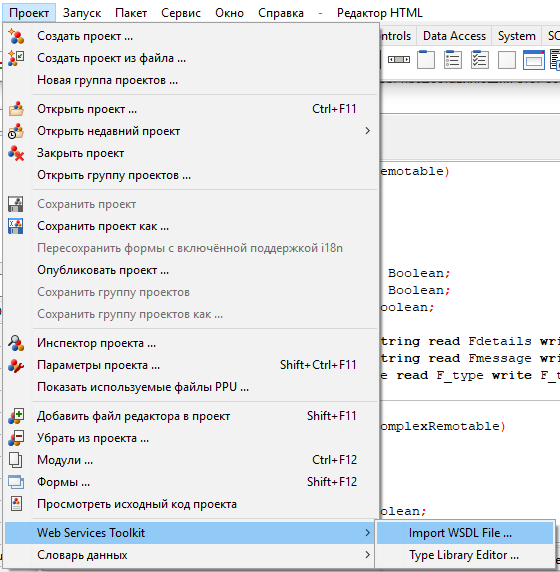 | |
| 36 | + | ||
| 37 | + | При клике на первом пункте меню (*Import WSDL file...*) вызывается диалоговое окно. Мы указываем WSDL файл и папку, в которой будут сохраняться сгенерированные файлы и нажимаем кнопку OK для завершения. | |
| 38 | + | ||
| 39 | + | 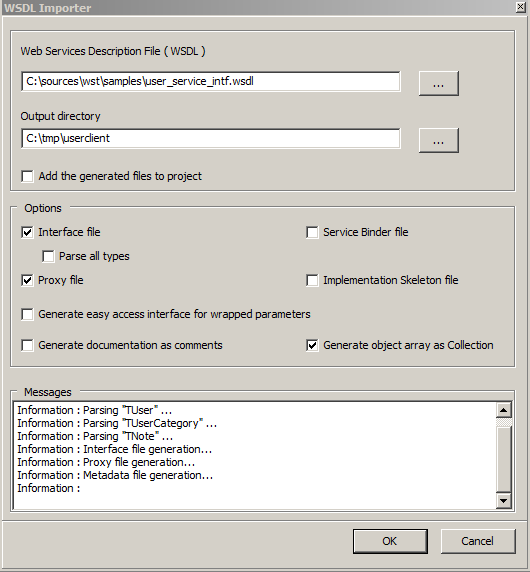 | |
| 40 | + | ||
| 41 | + | Мастер генерирует два файла: | |
| 42 | + | ||
| 43 | + | - *user_service_intf.pas*, файл описания сервиса(Pascal-эквивалент WSDL) | |
| 44 | + | - *user_service_intf_proxy.pas*, этот файл содержит прокси, который реализует службу интерфейса, описанного в первом файле. | |
| 45 | + | ||
| 46 | + | #### Импорт при помощи ws_helper. | |
| 47 | + | ||
| 48 | + | Программа **ws_helper** это версия для командной строки программы-мастера импорта. Для того, чтобы представить его возможности, ниже дан вывод утилиты с описанием ключей командной строки. | |
| 49 | + | ||
| 50 | + | ws_helper [-uMODE] [-gOPTION] [-p] [-b] [-i] [-w] [-x] [-y] [-d] -[fSPECIFACTIONS] [-oPATH] [-aPATH] inputFilename | |
| 51 | + | -u MODE Generate the pascal translation of the WSDL input file | |
| 52 | + | MODE value may be U for used types or A for all types | |
| 53 | + | -g Code generation option, with the following options : | |
| 54 | + | A : object arrays are generated as "array" derived from TBaseObjectArrayRemotable | |
| 55 | + | C : object arrays are generated as "collection" derived from TObjectCollectionRemotable | |
| 56 | + | EP : enum type's items are prefixed with the enum name | |
| 57 | + | EN : enum type's items are not prefixed with the enum name, the default | |
| 58 | + | -p Generate service proxy | |
| 59 | + | -b Generate service binder | |
| 60 | + | -i Generate service minimal implementation. This will erase any existing implementation file! | |
| 61 | + | -o PATH Relative output directory | |
| 62 | + | -a PATH Absolute output directory | |
| 63 | + | -w Generate WSDL file; Can be used to get wsdl from pascal | |
| 64 | + | -x Generate XSD file; Can be used to get xsd from pascal | |
| 65 | + | -y Generate easy access interface for wrapped parameters | |
| 66 | + | -d Generate documentation as comment in the interface file | |
| 67 | + | -c Indicate the parser's case sensitivity : | |
| 68 | + | S : the paser is case sensitive | |
| 69 | + | I : the paser is not case sensitive | |
| 70 | + | -f Specify unit(s) renaming option : oldName= NewName(;oldName= NewName)* | |
| 71 | + | ||
| 72 | + | Для перевода *user service* файла WDSL примера запустите нижеследующую команду: | |
| 73 | + | ||
| 74 | + | ws_helper.exe -uA -p -o. user_service_intf.wsdl | |
| 75 | + | ws_helper, Web Service Toolkit 0.6 Copyright (c) 2006-2014 by Inoussa OUEDRAOGO | |
| 76 | + | ||
| 77 | + | Parsing the file : user_service_intf.wsdl | |
| 78 | + | (...) | |
| 79 | + | Interface file generation... | |
| 80 | + | Proxy file generation... | |
| 81 | + | Metadata file generation... | |
| 82 | + | File "user_service_intf.wsdl" parsed succesfully. | |
| 83 | + | ||
| 84 | + | ниже показан вывод обоих файлов: | |
| 85 | + | ||
| 86 | + | ``` pascal | |
| 87 | + | unit user_service_intf; | |
| 88 | + | (...) | |
| 89 | + | interface | |
| 90 | + | ||
| 91 | + | uses SysUtils, Classes, TypInfo, base_service_intf, service_intf; | |
| 92 | + | ||
| 93 | + | const | |
| 94 | + | sNAME_SPACE = 'urn:UserService'; | |
| 95 | + | sUNIT_NAME = 'user_service_intf'; | |
| 96 | + | ||
| 97 | + | type | |
| 98 | + | ||
| 99 | + | TUserArray = class; | |
| 100 | + | TUser = class; | |
| 101 | + | TNote = class; | |
| 102 | + | (...) | |
| 103 | + | UserService = interface(IInvokable) | |
| 104 | + | ['{7537A085-DCD1-4B24-8B74-BC35ACB4896D}'] | |
| 105 | + | function GetList():TUserArray; | |
| 106 | + | procedure Add( | |
| 107 | + | const AUser : TUser | |
| 108 | + | ); | |
| 109 | + | procedure Update( | |
| 110 | + | const AUser : TUser | |
| 111 | + | ); | |
| 112 | + | function Find( | |
| 113 | + | const AName : string | |
| 114 | + | ):TUser; | |
| 115 | + | function Delete( | |
| 116 | + | const AName : string | |
| 117 | + | ):boolean; | |
| 118 | + | end; | |
| 119 | + | ||
| 120 | + | procedure Register_user_service_intf_ServiceMetadata(); | |
| 121 | + | ``` | |
| 122 | + | ||
| 123 | + | ``` pascal | |
| 124 | + | Unit user_service_intf_proxy; | |
| 125 | + | {$IFDEF FPC} {$mode objfpc}{$H+} {$ENDIF} | |
| 126 | + | Interface | |
| 127 | + | ||
| 128 | + | Uses SysUtils, Classes, TypInfo, base_service_intf, service_intf, user_service_intf; | |
| 129 | + | ||
| 130 | + | Type | |
| 131 | + | ||
| 132 | + | TUserService_Proxy=class(TBaseProxy,UserService) | |
| 133 | + | Protected | |
| 134 | + | class function GetServiceType() : PTypeInfo;override; | |
| 135 | + | function GetList():TUserArray; | |
| 136 | + | procedure Add( | |
| 137 | + | const AUser : TUser | |
| 138 | + | ); | |
| 139 | + | procedure Update( | |
| 140 | + | const AUser : TUser | |
| 141 | + | ); | |
| 142 | + | function Find( | |
| 143 | + | const AName : string | |
| 144 | + | ):TUser; | |
| 145 | + | function Delete( | |
| 146 | + | const AName : string | |
| 147 | + | ):boolean; | |
| 148 | + | End; | |
| 149 | + | ||
| 150 | + | Function wst_CreateInstance_UserService(const AFormat : string = 'SOAP:'; const ATransport : string = 'HTTP:'; const AAddress : string = ''):UserService; | |
| 151 | + | ||
| 152 | + | Implementation | |
| 153 | + | uses wst_resources_imp, metadata_repository; | |
| 154 | + | ||
| 155 | + | Function wst_CreateInstance_UserService(const AFormat : string; const ATransport : string; const AAddress : string):UserService; | |
| 156 | + | Var | |
| 157 | + | locAdr : string; | |
| 158 | + | Begin | |
| 159 | + | locAdr := AAddress; | |
| 160 | + | if ( locAdr = '' ) then | |
| 161 | + | locAdr := GetServiceDefaultAddress(TypeInfo(UserService)); | |
| 162 | + | Result := TUserService_Proxy.Create('UserService',AFormat+GetServiceDefaultFormatProperties(TypeInfo(UserService)),ATransport + 'address=' + locAdr); | |
| 163 | + | End; | |
| 164 | + | ||
| 165 | + | function TUserService_Proxy.GetList():TUserArray; | |
| 166 | + | Var | |
| 167 | + | locSerializer : IFormatterClient; | |
| 168 | + | locCallContext : ICallContext; | |
| 169 | + | locStrPrmName : string; | |
| 170 | + | Begin | |
| 171 | + | locCallContext := Self as ICallContext; | |
| 172 | + | locSerializer := GetSerializer(); | |
| 173 | + | Try | |
| 174 | + | locSerializer.BeginCall('GetList', GetTarget(),locCallContext); | |
| 175 | + | locSerializer.EndCall(); | |
| 176 | + | ||
| 177 | + | MakeCall(); | |
| 178 | + | ||
| 179 | + | locSerializer.BeginCallRead(locCallContext); | |
| 180 | + | TObject(Result) := Nil; | |
| 181 | + | locStrPrmName := 'result'; | |
| 182 | + | locSerializer.Get(TypeInfo(TUserArray), locStrPrmName, Result); | |
| 183 | + | ||
| 184 | + | Finally | |
| 185 | + | locSerializer.Clear(); | |
| 186 | + | End; | |
| 187 | + | End; | |
| 188 | + | (...) | |
| 189 | + | ``` | |
| 190 | + | ||
| 191 | + | Теперь мы готовы собрать простую программу для этого сервиса. Это простая клиентская программа вызывает метод **GetList** данного сервиса, чтобы получить список пользователей, которые уже зарегистрированы в этой службе; Список в этом случае выводится на экран: | |
| 192 | + | ||
| 193 | + | ``` pascal | |
| 194 | + | program user_client_console; | |
| 195 | + | uses SysUtils, fpc_http_protocol, soap_formatter, | |
| 196 | + | user_service_intf_proxy, user_service_intf; | |
| 197 | + | ||
| 198 | + | var | |
| 199 | + | locService : UserService; | |
| 200 | + | items : TUserArray; | |
| 201 | + | item : TUser; | |
| 202 | + | i : Integer; | |
| 203 | + | begin | |
| 204 | + | FPC_RegisterHTTP_Transport(); | |
| 205 | + | locService := wst_CreateInstance_UserService(); | |
| 206 | + | items := locService.GetList(); | |
| 207 | + | try | |
| 208 | + | WriteLn('WST User Service Sample',sLineBreak); | |
| 209 | + | if (items.Length = 0) then | |
| 210 | + | WriteLn(' No user found.') | |
| 211 | + | else | |
| 212 | + | WriteLn(Format(' %d user(s) found : ',[items.Length])); | |
| 213 | + | for i := 0 to items.Length - 1 do begin | |
| 214 | + | item := items[i]; | |
| 215 | + | WriteLn(Format(' Name= "%s", e-Mail= "%s"',[item.UserName,item.eMail])); | |
| 216 | + | end; | |
| 217 | + | finally | |
| 218 | + | items.Free(); | |
| 219 | + | end; | |
| 220 | + | end. | |
| 221 | + | ``` | |
| 222 | + | ||
| 223 | + | Модули *base_service_intf, service_intf, soap_formatter, fpc_http_protocol, wst_resources_imp and metadata_repository* предоставлены wst; Ниже результат выполнения: | |
| 224 | + | ||
| 225 | + | WST User Service Sample | |
| 226 | + | ||
| 227 | + | 2 user(s) found : | |
| 228 | + | Name= "Lazarus FreePascal", e-Mail= "Lazarus@FreePascal.wst" | |
| 229 | + | Name= "Inoussa OUEDRAOGO", e-Mail= "sample@example.wst" | |
| 230 | + | ||
| 231 | + | Найдено два пользователя. Функция *wst_CreateInstance_UserService()*, расположенная в файле *user_service_intf.pas*, создает экземпляр прокси, основанная на информации службы, содержащейся в файле WSDL. Полностью исходный код примера поставляется вместе с инструментарием WST библиотеки в папке *\samples\user_client_console*; Обратите внимание, что пример, представленной в этой папке более полный, чем приведенный на этой странице | |
| 232 | + | ||
| 233 | + | ### Параметры соединения | |
| 234 | + | ||
| 235 | + | Основной формат: | |
| 236 | + | ||
| 237 | + | protocol:paramName=paramValue(;paramName=paramValue)* | |
| 238 | + | ||
| 239 | + | #### Параметры HTTP прокси | |
| 240 | + | ||
| 241 | + | Для HTTP поддерживаемые параметры приведены ниже: | |
| 242 | + | ||
| 243 | + | - Address **( требуется для адресов, поддердивающих уникальные адреса )** | |
| 244 | + | - ProxyServer | |
| 245 | + | - ProxyPort | |
| 246 | + | - ProxyUsername | |
| 247 | + | - ProxyPassword | |
| 248 | + | ||
| 249 | + | HTTP соединение через прокси поддерживается. Ниже пример адресной строки. | |
| 250 | + | ||
| 251 | + | ``` pascal | |
| 252 | + | const | |
| 253 | + | sADDRESS = 'http:address=http://webservices.amazon.com/AWSECommerceService/2007-04-04'+ | |
| 254 | + | ';ProxyServer=197.150.10.10;ProxyPort=9881'+ | |
| 255 | + | ';ProxyUsername=inoussa;ProxyPassword=wst'; | |
| 256 | + | ``` | |
| 257 | + | ||
| 258 | + | Инструментарий имеет 3 HTTP реализации, основанная на встроеной реализации FPC (fpc_http_server.pas), Synapse ( synapse_http_protocol.pas ) и Indy (indy_http_protocol.pas). | |
| 259 | + | ||
| 260 | + | #### Параметры TCP соединения | |
| 261 | + | ||
| 262 | + | Поддерживаемые TCP параметры: | |
| 263 | + | ||
| 264 | + | - address ( требуется для служб, поддерживающие уникальные адреса) | |
| 265 | + | - Port | |
| 266 | + | - target( целевая служба ) | |
| 267 | + | ||
| 268 | + | Ниже приведена примерная адресная строка | |
| 269 | + | ||
| 270 | + | ``` pascal | |
| 271 | + | Const | |
| 272 | + | sADDRESS = 'TCP:Address=10.0.0.3;Port=1234;target=UserService'; | |
| 273 | + | ``` | |
| 274 | + | ||
| 275 | + | Инструментарий имеет 3 TCP реализации, основанные на встроенной реализации в FPC (fpc_tcp_server.pas), Synapse (synapse_tcp_protocol.pas) и Indy (indy_tcp_protocol.pas). | |
| 276 | + | ||
| 277 | + | #### Параметры соединения через библиотеки (LIB) | |
| 278 | + | ||
| 279 | + | Идея этого протокола в том, чтобы иметь возможность подключаться к службам через динамические библиотеки (DLL/DSO). Это может рассматриваться как плагин фреймворк, где плагины (службы) обеспечены динамическими библиотеками. | |
| 280 | + | ||
| 281 | + | Параметры соединения LIB: | |
| 282 | + | ||
| 283 | + | - FileName (имя файла DLL/SO) | |
| 284 | + | - target (целевая служба) | |
| 285 | + | ||
| 286 | + | Ниже пример адресной строки | |
| 287 | + | ||
| 288 | + | ``` pascal | |
| 289 | + | Const | |
| 290 | + | sADDRESS = 'LIB:FileName=..\library_server\lib_server.dll;target=UserService'; | |
| 291 | + | ``` | |
| 292 | + | ||
| 293 | + | Инструментарий имеет одну реализацию LIB соединения (library_protocol.pas). | |
| 294 | + | ||
| 295 | + | ***Папка с примерами содержит 4 проекта user_client_console, tcp_server, http_server и library_server, которые демонстрируют протоколы TCP, HTTP и протокол типа "библиотека"*** | |
| 296 | + | ||
| 297 | + | #### Параметры соединения с тем же процессом (SAME_PROCESS) | |
| 298 | + | ||
| 299 | + | Идея этого протокола, дать возможность подключаться к службе в самом клиентском процессе. Это позволит собрать многоуровневое приложение в рамках уникальной программы, которая может быть преобразована в полностью многоуровневое приложение. Это также может быть использовано для облегчения отладки приложения | |
| 300 | + | ||
| 301 | + | SAME_PROCESS поддерживает следующие параметры: | |
| 302 | + | ||
| 303 | + | - Address (целевая служба) | |
| 304 | + | ||
| 305 | + | Ниже пример адресной строки | |
| 306 | + | ||
| 307 | + | ``` pascal | |
| 308 | + | Const | |
| 309 | + | sADDRESS = 'SAME_PROCESS:Address=UserService'; | |
| 310 | + | ``` | |
| 311 | + | ||
| 312 | + | Инструментарий имеют одну реализацию (same_process_protocol.pas). | |
| 313 | + | ||
| 314 | + | #### Мульти-адресный сервис (Адрес на операцию) | |
| 315 | + | ||
| 316 | + | Некоторые сервисы (как пример, eBay SOAP сервисы) используют отдельный адрес на каждую операцию. Инструментарий использует расширенные мета данные (см. главу о мета данных сервисов) для установки адресов операций. “Ebay” SOAP пример, расположенный в tests\ebay папке демонстрирует настройку адреса операции. | |
| 317 | + | ||
| 318 | + | ### Решение проблем | |
| 319 | + | ||
| 320 | + | #### 'Сообщение об ошибке: Invalid parameter : "AProtocolData"' | |
| 321 | + | ||
| 322 | + | Это случается, когда неизвестно какой протокол следует использовать. Убедитесь, что правильный форматтер выбран (к примеру: 'SOAP:') и что указанные форматтер зарегистрирован. Это делается добавлением соответствующего модуля xxx_formatter в Ваш блок uses. (для примера: soap_formatter) | |
| 323 | + | ||
| 324 | + | ## Сторона сервера (создание сервиса) | |
| 325 | + | ||
| 326 | + | ### Обзор | |
| 327 | + | ||
| 328 | + | Инструментарий веб-сервиса содержит фреймворк для серверной стороны и редактор библиотеки типов на базе языка WSDL для создания сервиса. Ключевые особенности: | |
| 329 | + | ||
| 330 | + | - Описание сервиса (интерфейса) отделено от реализации, | |
| 331 | + | - Интерфейс и реализация не связаны с протоколом сообщений, | |
| 332 | + | - генератор WSDL | |
| 333 | + | - Поддержка для сериализации SOAP 1.1 | |
| 334 | + | - Поддержка для сериализации xmlrpc | |
| 335 | + | - Поддержка пользовательской бинарной сериализации | |
| 336 | + | - Платформа не привязана к транспортному протоколу | |
| 337 | + | - Легко добавить поддержку для серверов приложений. | |
| 338 | + | ||
| 339 | + | ### Пример | |
| 340 | + | ||
| 341 | + | Для того, чтобы создать сервис,Вы должны: | |
| 342 | + | ||
| 343 | + | - описать его интерфейс, | |
| 344 | + | - обеспечить реализацию и зарегистрировать его для сервиса, | |
| 345 | + | - обеспечить связку, которая будет перенаправлять запросы на целевой сервис на реализацию и ее регистрацию, | |
| 346 | + | - разместить сервис на сервере приложения (TCP сервер, HTTP сервер, LIBRARY сервер, ...). | |
| 347 | + | ||
| 348 | + | #### Описание Интерфейса (Interface) сервиса | |
| 349 | + | ||
| 350 | + | Начиная с версии 0.5, WST обеспечивает редактор библиотеки типов WSDL для описания типов и сервисов, используемых при реализации. Рисунок (3) ниже представляет основной интерфейс этого инструмента. Редактор библиотеки типов представлен как | |
| 351 | + | ||
| 352 | + | - "мастер" Lazarus в виде пункта меню “Проект/Web Services Toolkit/Type Library Editor...” | |
| 353 | + | - отдельная программа typ_lib_edtr.exe. | |
| 354 | + | ||
| 355 | + | 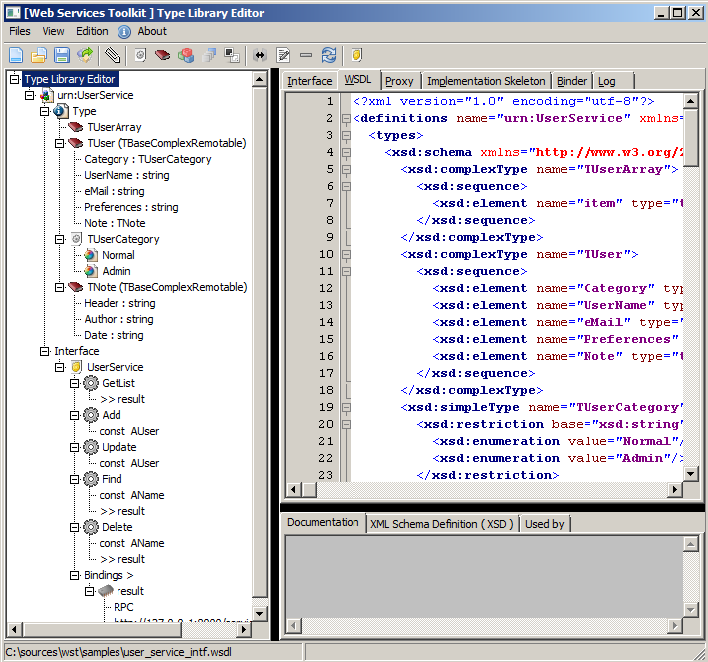 | |
| 356 | + | ||
| 357 | + | Особенности Редактора Библиотеки Типов: | |
| 358 | + | ||
| 359 | + | - Графический интерфейс пользователя | |
| 360 | + | - Просмотр исходных текстов WSDL | |
| 361 | + | - Просмотр Pascal код библиотеки | |
| 362 | + | - Просмотр Pascal кода прокси | |
| 363 | + | - Просмотр "скелета" кода Pascal | |
| 364 | + | - Просмотр Pascal прокси биндера (связки) | |
| 365 | + | - создание интерфейса перечисления | |
| 366 | + | - интерфейс создания классов | |
| 367 | + | - интерфейс создания массивов | |
| 368 | + | - интерфейс создания алиасов типов | |
| 369 | + | - интерфейс создания интерфейсов сервисов. | |
| 370 | + | ||
| 371 | + | Ниже приведен пример на изображении. Мы будем использовать файл user_service_intf.wsdl, расположенный в \samples directory для нашего примера. | |
| 372 | + | ||
| 373 | + | 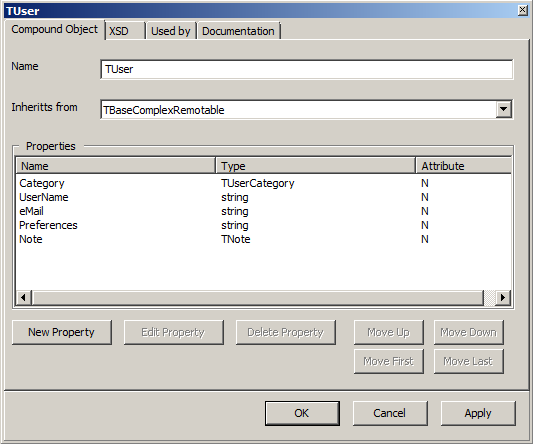 | |
| 374 | + | ||
| 375 | + | 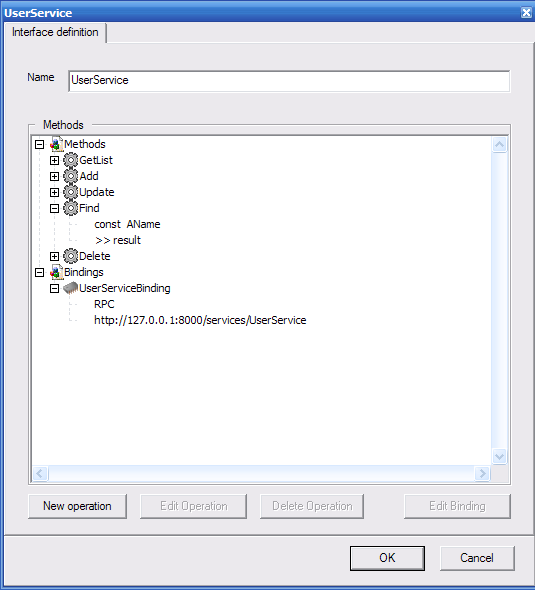 | |
| 376 | + | ||
| 377 | + | ##### Экспорт файлов Pascal. | |
| 378 | + | ||
| 379 | + | Редактор Библиотеки Типов имеет возможность генерировать Pascal версию файла WSDL. Чтобы сделать это, следует кликнуть “Files\Save generated files ...” (это также может быть сделано через контекстное меню); Это вызовет диалоговое окошко как показано в изображении ниже. 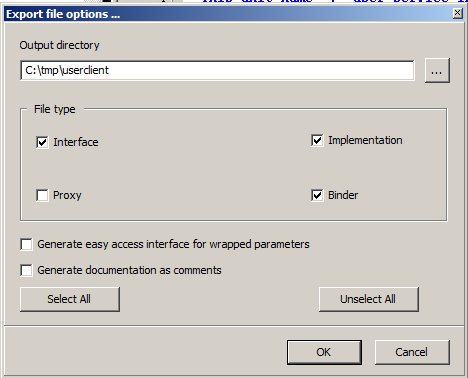 | |
| 380 | + | ||
| 381 | + | Нажмите OK для завершения. Программа **ws_helper** имеет те же возможности и файлы могут сгенерированы с помощью нижеследующей команды: | |
| 382 | + | ||
| 383 | + | ws_helper\ws_helper.exe -i -b -o. user_service_intf.wsdl | |
| 384 | + | ws_helper, Web Service Toolkit 0.5 Copyright (c) 2006, 2007 by Inoussa OUEDRAOGO | |
| 385 | + | Parsing the file : user_service_intf.wsdl | |
| 386 | + | Information : Parsing "tns:TUserArray" ... | |
| 387 | + | Information : Parsing "tns:TUser" ... | |
| 388 | + | Information : Parsing "tns:TUser" ... | |
| 389 | + | Information : Parsing "xsd:string" ... | |
| 390 | + | Information : Parsing "tns:TUser" ... | |
| 391 | + | Information : Parsing "xsd:string" ... | |
| 392 | + | Information : Parsing "xsd:boolean" ... | |
| 393 | + | Information : Parsing "TUserArray" ... | |
| 394 | + | Information : Parsing "TUser" ... | |
| 395 | + | Information : Parsing "TUserCategory" ... | |
| 396 | + | Information : Parsing "TNote" ... | |
| 397 | + | Interface file generation... | |
| 398 | + | Proxy file generation... | |
| 399 | + | Metadata file generation... | |
| 400 | + | File "user_service_intf.wsdl" parsed succesfully. | |
| 401 | + | ||
| 402 | + | Полностью проект расположен в папке “samples”. Ниже приведен вывод сгенерированных файлов интерфейса. | |
| 403 | + | ||
| 404 | + | ``` pascal | |
| 405 | + | unit user_service_intf; | |
| 406 | + | {$IFDEF FPC} {$mode objfpc}{$H+} {$ENDIF} | |
| 407 | + | interface | |
| 408 | + | ||
| 409 | + | uses SysUtils, Classes, TypInfo, base_service_intf, service_intf; | |
| 410 | + | ||
| 411 | + | const | |
| 412 | + | sNAME_SPACE = 'urn:UserService'; | |
| 413 | + | sUNIT_NAME = 'user_service_intf'; | |
| 414 | + | ||
| 415 | + | type | |
| 416 | + | ||
| 417 | + | TUser = class; | |
| 418 | + | TUserArray = class; | |
| 419 | + | ||
| 420 | + | TUserCategory = ( | |
| 421 | + | Normal | |
| 422 | + | ,Admin | |
| 423 | + | ); | |
| 424 | + | ||
| 425 | + | TUser = class(TBaseComplexRemotable) | |
| 426 | + | published | |
| 427 | + | property Category : TUserCategory read FCategory write FCategory; | |
| 428 | + | property UserName : string read FUserName write FUserName; | |
| 429 | + | property eMail : string read FeMail write FeMail; | |
| 430 | + | property Preferences : string read FPreferences write FPreferences; | |
| 431 | + | property Note : TNote read FNote write FNote; | |
| 432 | + | end; | |
| 433 | + | ||
| 434 | + | TUserArray = class(TBaseObjectArrayRemotable) | |
| 435 | + | private | |
| 436 | + | function GetItem(AIndex: Integer): TUser; | |
| 437 | + | public | |
| 438 | + | class function GetItemClass():TBaseRemotableClass;override; | |
| 439 | + | property Item[AIndex:Integer] : TUser Read GetItem;Default; | |
| 440 | + | end; | |
| 441 | + | ||
| 442 | + | UserService = interface(IInvokable) | |
| 443 | + | ['{CA6F6192-C3DE-4D9C-B3DF-E616376A0DC9}'] | |
| 444 | + | function GetList():TUserArray; | |
| 445 | + | procedure Add( | |
| 446 | + | Const AUser : TUser | |
| 447 | + | ); | |
| 448 | + | procedure Update( | |
| 449 | + | Const AUser : TUser | |
| 450 | + | ); | |
| 451 | + | function Find( | |
| 452 | + | Const AName : string | |
| 453 | + | ):TUser; | |
| 454 | + | function Delete( | |
| 455 | + | Const AName : string | |
| 456 | + | ):boolean; | |
| 457 | + | end; | |
| 458 | + | (...) | |
| 459 | + | ``` | |
| 460 | + | ||
| 461 | + | #### Обеспечение реализации сервиса | |
| 462 | + | ||
| 463 | + | Модуль user_service_intf_imp.pas, сгенерированный выше содержит скелет реализации класса для интерфейса. Это определяет процедуру, названную RegisterUserServiceImplementationFactory. Процедура регистрирует класс как провайдер реализации сервиса в реестре реализаций. | |
| 464 | + | ||
| 465 | + | ``` pascal | |
| 466 | + | Unit user_service_intf_imp; | |
| 467 | + | {$IFDEF FPC} {$mode objfpc}{$H+} {$ENDIF} | |
| 468 | + | Interface | |
| 469 | + | Uses SysUtils, Classes, | |
| 470 | + | base_service_intf, server_service_intf, server_service_imputils, | |
| 471 | + | user_service_intf, cursor_intf; | |
| 472 | + | ||
| 473 | + | Type | |
| 474 | + | { TUserService_ServiceImp } | |
| 475 | + | ||
| 476 | + | TUserService_ServiceImp=class(TBaseServiceImplementation,UserService) | |
| 477 | + | Protected | |
| 478 | + | function GetList():TUserArray; | |
| 479 | + | procedure Add( | |
| 480 | + | Const AUser : TUser | |
| 481 | + | ); | |
| 482 | + | procedure Update( | |
| 483 | + | Const AUser : TUser | |
| 484 | + | ); | |
| 485 | + | function Find( | |
| 486 | + | Const AName : string | |
| 487 | + | ):TUser; | |
| 488 | + | function Delete( | |
| 489 | + | Const AName : string | |
| 490 | + | ):boolean; | |
| 491 | + | End; | |
| 492 | + | ||
| 493 | + | procedure RegisterUserServiceImplementationFactory(); | |
| 494 | + | ||
| 495 | + | Implementation | |
| 496 | + | (...) | |
| 497 | + | ||
| 498 | + | procedure TUserService_ServiceImp.Add(Const AUser : TUser); | |
| 499 | + | var | |
| 500 | + | locObj : TUser; | |
| 501 | + | Begin | |
| 502 | + | locObj := Find(AUser.UserName); | |
| 503 | + | if ( locObj <> nil ) then | |
| 504 | + | raise Exception.CreateFmt('Duplicated user : "%s"',[AUser.UserName]); | |
| 505 | + | locObj := TUser.Create(); | |
| 506 | + | locObj.Assign(AUser); | |
| 507 | + | FUserList.Add(locObj); | |
| 508 | + | End; | |
| 509 | + | ||
| 510 | + | procedure RegisterUserServiceImplementationFactory(); | |
| 511 | + | Begin | |
| 512 | + | GetServiceImplementationRegistry().Register( | |
| 513 | + | 'UserService', | |
| 514 | + | TImplementationFactory.Create(TUserService_ServiceImp) as IServiceImplementationFactory); | |
| 515 | + | End; | |
| 516 | + | ||
| 517 | + | (...) | |
| 518 | + | ``` | |
| 519 | + | ||
| 520 | + | “ws_helper” имеет возможность генерировать прокси файл, файл скелета реализации и биндер файл (файл связки) (см. листинг ниже). | |
| 521 | + | ||
| 522 | + | ws_helper, Web Service Toolkit 0.4 Copyright (c) 2006, 2007 by Inoussa OUEDRAOGO | |
| 523 | + | ws_helper [-uMODE] [-p] [-b] [-i] [-oPATH] inputFilename | |
| 524 | + | -u MODE Generate the pascal translation of the WSDL input file | |
| 525 | + | MODE value may be U for used types or A for all types | |
| 526 | + | -p Generate service proxy | |
| 527 | + | -b Generate service binder | |
| 528 | + | -i Generate service minimal implementation | |
| 529 | + | -o PATH Relative output directory | |
| 530 | + | -a PATH Absolute output directory | |
| 531 | + | ||
| 532 | + | Начало файла реализации может также создать, используя **ws_helper** с ключами -i и -b как упомянуто выше; | |
| 533 | + | ||
| 534 | + | ws_helper\ws_helper.exe -i -b -o. user_service_intf.wsdl | |
| 535 | + | ws_helper, Web Service Toolkit 0.4 Copyright (c) 2006, 2007 by Inoussa OUEDRAOGO | |
| 536 | + | Parsing the file : user_service_intf.wsdl | |
| 537 | + | Proxy file generation... | |
| 538 | + | Binder file generation... | |
| 539 | + | Implementation file generation... | |
| 540 | + | Metadata file generation... | |
| 541 | + | File "user_service_intf.wsdl" parsed succesfully.. | |
| 542 | + | ||
| 543 | + | #### Обеспечение биндера для веб-сервиса | |
| 544 | + | ||
| 545 | + | Роль биндера (связки) в следующем: | |
| 546 | + | ||
| 547 | + | - распаковка входящих сообщений, | |
| 548 | + | - установка стека вызовов, | |
| 549 | + | - сделать вызов от зарегистрированной реализации, | |
| 550 | + | - сериализовать стека выполнения для создания ответного сообщения. | |
| 551 | + | ||
| 552 | + | Модуль user_service_intf_binder.pas, сгенерированный выше, содержит: | |
| 553 | + | ||
| 554 | + | - TUserService_ServiceBinder: действительный класс биндера, | |
| 555 | + | - TUserService_ServiceBinderFactory: фабрика классов для биндера и | |
| 556 | + | - Server_service_RegisterUserServiceService: процедура регистрации фабрики биндера. | |
| 557 | + | ||
| 558 | + | Нижеследующий код вывода показывает интерфейсную часть модуля и обработчик метода биндера. | |
| 559 | + | ||
| 560 | + | ``` pascal | |
| 561 | + | unit user_service_intf_binder; | |
| 562 | + | {$IFDEF FPC} {$mode objfpc}{$H+} {$ENDIF} | |
| 563 | + | interface | |
| 564 | + | uses SysUtils, Classes, base_service_intf, server_service_intf, user_service_intf; | |
| 565 | + | ||
| 566 | + | type | |
| 567 | + | TUserService_ServiceBinder=class(TBaseServiceBinder) | |
| 568 | + | Protected | |
| 569 | + | procedure GetListHandler(AFormatter:IFormatterResponse); | |
| 570 | + | procedure AddHandler(AFormatter:IFormatterResponse); | |
| 571 | + | procedure UpdateHandler(AFormatter:IFormatterResponse); | |
| 572 | + | procedure FindHandler(AFormatter:IFormatterResponse); | |
| 573 | + | procedure DeleteHandler(AFormatter:IFormatterResponse); | |
| 574 | + | Public | |
| 575 | + | constructor Create(); | |
| 576 | + | End; | |
| 577 | + | ||
| 578 | + | TUserService_ServiceBinderFactory = class(TInterfacedObject,IItemFactory) | |
| 579 | + | protected | |
| 580 | + | function CreateInstance():IInterface; | |
| 581 | + | End; | |
| 582 | + | ||
| 583 | + | procedure Server_service_RegisterUserServiceService(); | |
| 584 | + | ||
| 585 | + | (...) | |
| 586 | + | ||
| 587 | + | procedure TUserService_ServiceBinder.AddHandler(AFormatter:IFormatterResponse); | |
| 588 | + | Var | |
| 589 | + | cllCntrl : ICallControl; | |
| 590 | + | tmpObj : UserService; | |
| 591 | + | callCtx : ICallContext; | |
| 592 | + | strPrmName : string; | |
| 593 | + | procName,trgName : string; | |
| 594 | + | AUser : TUser; | |
| 595 | + | Begin | |
| 596 | + | callCtx := GetCallContext(); | |
| 597 | + | TObject(AUser) := Nil; | |
| 598 | + | ||
| 599 | + | strPrmName := 'AUser'; AFormatter.Get(TypeInfo(TUser),strPrmName,AUser); | |
| 600 | + | If Assigned(Pointer(AUser)) Then | |
| 601 | + | callCtx.AddObjectToFree(TObject(AUser)); | |
| 602 | + | ||
| 603 | + | tmpObj := Self.GetFactory().CreateInstance() as UserService; | |
| 604 | + | if Supports(tmpObj,ICallControl,cllCntrl) then | |
| 605 | + | cllCntrl.SetCallContext(GetCallContext()); | |
| 606 | + | ||
| 607 | + | tmpObj.Add(AUser); | |
| 608 | + | ||
| 609 | + | procName := AFormatter.GetCallProcedureName(); | |
| 610 | + | trgName := AFormatter.GetCallTarget(); | |
| 611 | + | AFormatter.Clear(); | |
| 612 | + | AFormatter.BeginCallResponse(procName,trgName); | |
| 613 | + | AFormatter.EndCallResponse(); | |
| 614 | + | ||
| 615 | + | callCtx := Nil; | |
| 616 | + | End; | |
| 617 | + | ``` | |
| 618 | + | ||
| 619 | + | #### Host the service into an application server. | |
| 620 | + | ||
| 621 | + | The application server's role is to route incoming service requests to the Web Service Toolkit runtime. For the runtime to process service requests : | |
| 622 | + | ||
| 623 | + | - The services and their implementations have to be registered , | |
| 624 | + | - The message protocol (SOAP, binary,...) have to be registered. | |
| 625 | + | ||
| 626 | + | The runtime interface is defined in the server_service_intf unit. This unit contains : | |
| 627 | + | ||
| 628 | + | - GetServerServiceRegistry, which returns the service registry, | |
| 629 | + | - GetServiceImplementationRegistry which returns the service implementation registry, | |
| 630 | + | - GetFormatterRegistry which returns the message format registry and | |
| 631 | + | - HandleServiceRequest which is the unique entry point for request processing. | |
| 632 | + | ||
| 633 | + | Starting from the version 0.5, the toolkit provides a simplified model to develop applications server . This is achieved using the listener classes. A listener implements a transport between the server and its clients. The toolkit provides two (2) HTTP listeners implementations: | |
| 634 | + | ||
| 635 | + | - TwstFPHttpListener (fpc_http_server.pas), using the FPC's native network component. | |
| 636 | + | - TwstIndyHttpListener ( indy_http_server.pas ), | |
| 637 | + | ||
| 638 | + | Three (3) TCP listeners implementations are provided: | |
| 639 | + | ||
| 640 | + | - TwstFPCTcpListener (fpc_tcp_server.pas), using the FPC's native network component. | |
| 641 | + | - TwstIndyTcpListener ( indy_tcp_server.pas ) and | |
| 642 | + | - TwstSynapseTcpListener ( synapse_tcp_server.pas ). | |
| 643 | + | ||
| 644 | + | All listeners derive from TwstListener defined in the server_listener.pas file. | |
| 645 | + | ||
| 646 | + | Below is printed an HTTP server sample. The code is divided into three (3) parts : | |
| 647 | + | ||
| 648 | + | - messaging format registration : | |
| 649 | + | ||
| 650 | + | ``` pascal | |
| 651 | + | Server_service_RegisterSoapFormat(); | |
| 652 | + | Server_service_RegisterXmlRpcFormat(); | |
| 653 | + | Server_service_RegisterBinaryFormat() ; | |
| 654 | + | ``` | |
| 655 | + | ||
| 656 | + | - service implementation and binder registration : | |
| 657 | + | ||
| 658 | + | ``` pascal | |
| 659 | + | RegisterUserServiceImplementationFactory(); | |
| 660 | + | Server_service_RegisterUserServiceService(); | |
| 661 | + | ``` | |
| 662 | + | ||
| 663 | + | - the listner creation and starting : the listener is created and started by the lines | |
| 664 | + | ||
| 665 | + | ``` pascal | |
| 666 | + | AppObject := TwstFPHttpListener.Create(); | |
| 667 | + | AppObject.Start(); | |
| 668 | + | ``` | |
| 669 | + | ||
| 670 | + | Complete listing : | |
| 671 | + | ||
| 672 | + | ``` pascal | |
| 673 | + | program http_server; | |
| 674 | + | {$mode objfpc}{$H+} | |
| 675 | + | uses | |
| 676 | + | {$IFDEF UNIX}{$IFDEF UseCThreads} | |
| 677 | + | cthreads, | |
| 678 | + | {$ENDIF}{$ENDIF} | |
| 679 | + | Classes, SysUtils, | |
| 680 | + | fpc_http_server, metadata_service, logger_extension, server_listener, | |
| 681 | + | server_service_soap, server_binary_formatter, server_service_xmlrpc, config_objects, | |
| 682 | + | user_service_intf, user_service_intf_binder, user_service_intf_imp; | |
| 683 | + | var | |
| 684 | + | AppObject : TwstListener; | |
| 685 | + | begin | |
| 686 | + | Server_service_RegisterBinaryFormat(); | |
| 687 | + | Server_service_RegisterSoapFormat(); | |
| 688 | + | Server_service_RegisterXmlRpcFormat(); | |
| 689 | + | ||
| 690 | + | RegisterUserServiceImplementationFactory(); | |
| 691 | + | Server_service_RegisterUserServiceService(); | |
| 692 | + | AppObject := TwstFPHttpListener.Create(); | |
| 693 | + | try | |
| 694 | + | WriteLn('"Web Service Toolkit" HTTP Server sample listening at:'); | |
| 695 | + | WriteLn(''); | |
| 696 | + | WriteLn('http://127.0.0.1:8000/'); | |
| 697 | + | WriteLn(''); | |
| 698 | + | WriteLn('Press enter to quit.'); | |
| 699 | + | AppObject.Start(); | |
| 700 | + | ReadLn(); | |
| 701 | + | finally | |
| 702 | + | FreeAndNil(AppObject); | |
| 703 | + | end; | |
| 704 | + | end. | |
| 705 | + | ``` | |
| 706 | + | ||
| 707 | + | Server_service_RegisterUserServiceService located in the user_service_intf_binder unit ( generated by ws_helper ) registers the UserService service by calling in turn GetServerServiceRegistry: | |
| 708 | + | ||
| 709 | + | ``` pascal | |
| 710 | + | procedure Server_service_RegisterUserServiceService(); | |
| 711 | + | Begin | |
| 712 | + | GetServerServiceRegistry().Register( | |
| 713 | + | 'UserService',TUserService_ServiceBinderFactory.Create() as IitemFactory | |
| 714 | + | ); | |
| 715 | + | End; | |
| 716 | + | ``` | |
| 717 | + | ||
| 718 | + | Server_service_RegisterSoapFormat located in the server_service_soap unit ( provided by the toolkit ) registers the SOAP implementation by calling in turn GetFormatterRegistry: | |
| 719 | + | ||
| 720 | + | ``` pascal | |
| 721 | + | procedure Server_service_RegisterSoapFormat(); | |
| 722 | + | begin | |
| 723 | + | GetFormatterRegistry().Register( | |
| 724 | + | sPROTOCOL_NAME, | |
| 725 | + | sSOAP_CONTENT_TYPE, | |
| 726 | + | TSimpleItemFactory.Create(TSOAPFormatter) as IitemFactory | |
| 727 | + | ); | |
| 728 | + | RegisterStdTypes(); | |
| 729 | + | end; | |
| 730 | + | ``` | |
| 731 | + | ||
| 732 | + | Server_service_RegisterBinaryFormat located in the server_binary_formatter unit ( provided by the toolkit ) registers the Binary message implementation by calling in turn GetFormatterRegistry: | |
| 733 | + | ||
| 734 | + | ``` pascal | |
| 735 | + | procedure Server_service_RegisterBinaryFormat(); | |
| 736 | + | begin | |
| 737 | + | GetFormatterRegistry().Register( | |
| 738 | + | sPROTOCOL_NAME, | |
| 739 | + | sBINARY_CONTENT_TYPE, | |
| 740 | + | TBinaryFormatterFactory.Create() as IitemFactory | |
| 741 | + | ); | |
| 742 | + | end; | |
| 743 | + | ``` | |
| 744 | + | ||
| 745 | + | Server_service_RegisterXmlRpcFormat located in the server_service_xmlrpc unit ( provided by the toolkit ) registers the XMLRPC message implementation by calling in turn GetFormatterRegistry: | |
| 746 | + | ||
| 747 | + | ``` pascal | |
| 748 | + | procedure Server_service_RegisterXmlRpcFormat(); | |
| 749 | + | begin | |
| 750 | + | GetFormatterRegistry().Register( | |
| 751 | + | sPROTOCOL_NAME, | |
| 752 | + | sXMLRPC_CONTENT_TYPE, | |
| 753 | + | TSimpleItemFactory.Create(TXmlRpcFormatter) as IItemFactory | |
| 754 | + | ); | |
| 755 | + | end; | |
| 756 | + | ``` | |
| 757 | + | ||
| 758 | + | In order to give it a try one have to : | |
| 759 | + | ||
| 760 | + | 1. compile the server ( \samples\tcp_server\tcp_server.lpi it is a console program), | |
| 761 | + | 2. compile the client application ( \samples\user_client_console\user_client_console.lpi ), | |
| 762 | + | 3. execute the server and start listening, | |
| 763 | + | 4. execute the client. | |
| 764 | + | ||
| 765 | + | ### WSDL generation | |
| 766 | + | ||
| 767 | + | Services in the toolkit are organized into meta data repositories. Conceptually a repository corresponds : | |
| 768 | + | ||
| 769 | + | - at compile time to the pascal unit containing the service definition | |
| 770 | + | - at runtime to a name space. | |
| 771 | + | ||
| 772 | + | The repository is the toolkit WSDL generation unit. | |
| 773 | + | ||
| 774 | + | #### The Metadata Service | |
| 775 | + | ||
| 776 | + | The toolkit is provided with an easy to use metadata service implementation which in turn uses the raw interface defined in the metadata_repository unit (see above). A Lazarus GUI client application is located in the **tests\metadata_browser** folder. | |
| 777 | + | ||
| 778 | + | #### WSDL generation API | |
| 779 | + | ||
| 780 | + | The **metadata_wsdl** pascal unit contains the **GenerateWSDL** function for WSDL generation from a repository (see the signature below). | |
| 781 | + | ||
| 782 | + | ``` pascal | |
| 783 | + | PServiceRepository = ^TServiceRepository; | |
| 784 | + | TServiceRepository = record | |
| 785 | + | NameSpace : ShortString; | |
| 786 | + | Name : ShortString; | |
| 787 | + | RootAddress : ShortString; | |
| 788 | + | ServicesCount : Byte; | |
| 789 | + | Services : PService; | |
| 790 | + | end; | |
| 791 | + | ||
| 792 | + | procedure GenerateWSDL(AMdtdRep : PServiceRepository; ADoc : TDOMDocument); | |
| 793 | + | ``` | |
| 794 | + | ||
| 795 | + | ##### WSDL Customization | |
| 796 | + | ||
| 797 | + | The WSDL generation is based on the **IWsdlTypeHandler** and the **IWsdlTypeHandlerRegistry** interfaces located in the **metadata_wsdl** unit. In order to customize the generated WSDL, one has to provide a class implementing the **IWsdlTypeHandler** interface. Then that class has to be registered in the registry. The **metadata_wsdl** unit contains implementations for pascal enumerations, **TBaseComplexRemotable** descendants, and **TBaseArrayRemotable** descendants. | |
| 798 | + | ||
| 799 | + | #### Sample | |
| 800 | + | ||
| 801 | + | A functional sample project is located under **\samples\http_server** . It is an Indy base http server. | |
| 802 | + | ||
| 803 | + | ### Расширения сервисов | |
| 804 | + | ||
| 805 | + | Расширения сервисов позволяют подключаться ко всем этапам обработки сервисных запросов. Расширения сервисов могут быть использованы, к примеру, для реализации авторизации, записи запросов в журнал, сжатия данных и т.д.. **IServiceExtension** ниже - это интерфейс, используемые инструментарием во время выполнения для вызова расширений сервисов. | |
| 806 | + | ||
| 807 | + | ``` pascal | |
| 808 | + | TMessageStage = ( | |
| 809 | + | msAfterDeserialize, msAfterSerialize, msBeforeDeserialize, msBeforeSerialize | |
| 810 | + | ); | |
| 811 | + | ||
| 812 | + | IServiceExtension = interface | |
| 813 | + | ['{E192E6B3-7932-4D44-A8AC-135D7A0B8C93}'] | |
| 814 | + | procedure ProcessMessage( | |
| 815 | + | const AMessageStage : TMessageStage; | |
| 816 | + | ACallContext : ICallContext; | |
| 817 | + | AMsgData : IInterface | |
| 818 | + | ); | |
| 819 | + | end; | |
| 820 | + | ``` | |
| 821 | + | ||
| 822 | + | Фактический тип параметра **AMsgData** зависит от стадии обработки сообщения и соответствует: | |
| 823 | + | ||
| 824 | + | - **IRequestBuffer** на "msBeforeDeserialize" и "msAfterSerialize" | |
| 825 | + | - **IFormatterResponse** на "msAfterDeserialize" и "msBeforeSerialize" | |
| 826 | + | ||
| 827 | + | Эти типы расположены в модуле **server_service_intf**. Расширения должны быть зарегистрированы в реестре расширений (расположенном в модуле server_service_intf), приведенном ниже | |
| 828 | + | ||
| 829 | + | ``` pascal | |
| 830 | + | IServiceExtensionRegistry = Interface | |
| 831 | + | ['{68DC78F1-E6CF-4D6B-8473-75288794769C}'] | |
| 832 | + | function Find(const AName : string):IServiceExtension; | |
| 833 | + | procedure Register( | |
| 834 | + | const AName : string; | |
| 835 | + | AFactory : IItemFactory | |
| 836 | + | ); | |
| 837 | + | end; | |
| 838 | + | ``` | |
| 839 | + | ||
| 840 | + | Чтобы реализация сервиса могла использовать расширение сервиса, она должна зарегистрироваться в этом расширении. С этой целью Интерфейс IServiceImplementationFactory предоставляет метод RegisterExtension. Код примера полностью представлен в \samples\http_server (реализуется в **\samples\logger_extension.pas**). | |
| 841 | + | ||
| 842 | + | ## Метаданные служб | |
| 843 | + | ||
| 844 | + | Службы в инструментарии организованы в ***репозитории мета данных (смотрите “Метаданные служб” ниже)***. Концептуально репозитории соответствуют: | |
| 845 | + | ||
| 846 | + | - во время компиляции модулю Pascal, содержащего определение службы | |
| 847 | + | - во время выполнения пространство имен. | |
| 848 | + | ||
| 849 | + | Инструмент **ws_helper**, когда парсит файл описания интерфейса, записывает мета данные служб, содержащихся в файле в ресурсный файл Lazarus. Ресурсный файл в этом случай встроен в сгенерированный файл модуля биндера (смотрите часть **“initialization”** модуля). Во время выполнения мета данных службы доступны через интерфейс **IModuleMetadataMngr**, определенный в модуле **metadata_repository** (смотрите ниже). Функция **GetModuleMetadataMngr**, определенная в том же модуле, возвращает экземпляр объекта, поддерживающего этот интерфейс. | |
| 850 | + | ||
| 851 | + | ``` pascal | |
| 852 | + | IModuleMetadataMngr = interface | |
| 853 | + | ['{B10ACF6A-A599-45A3-B083-BEEFB810C889}'] | |
| 854 | + | function IndexOfName(const ARepName : shortstring):Integer; | |
| 855 | + | function GetCount():Integer; | |
| 856 | + | function GetRepositoryName(const AIndex : Integer):shortstring; | |
| 857 | + | procedure SetRepositoryNameSpace(const ARepName,ANameSpace : shortstring); | |
| 858 | + | function LoadRepositoryName( | |
| 859 | + | const ARepName,ARootAddress : shortstring; | |
| 860 | + | out ARepository : PServiceRepository | |
| 861 | + | ):Integer; | |
| 862 | + | procedure ClearRepository(var ARepository : PServiceRepository); | |
| 863 | + | procedure SetServiceCustomData( | |
| 864 | + | const ARepName : shortstring; | |
| 865 | + | const AServiceName : shortstring; | |
| 866 | + | const ADataName, | |
| 867 | + | AData : string | |
| 868 | + | ); | |
| 869 | + | procedure SetOperationCustomData( | |
| 870 | + | const ARepName : shortstring; | |
| 871 | + | const AServiceName : shortstring; | |
| 872 | + | const AOperationName : shortstring; | |
| 873 | + | const ADataName, | |
| 874 | + | AData : string | |
| 875 | + | ); | |
| 876 | + | function GetServiceMetadata(const ARepName,AServiceName : shortstring) : PService; | |
| 877 | + | procedure ClearServiceMetadata(var AService : PService); | |
| 878 | + | end; | |
| 879 | + | ``` | |
| 880 | + | ||
| 881 | + | ### Расширенные мета данные | |
| 882 | + | ||
| 883 | + | Интерфейс мета данных обеспечивает способ для добавления пользовательских данных в уже записанные. Метаданные служб могут быть установлены через **SetServiceCustomData**, а операции метаданных могут быть установлен через метод **SetOperationCustomData**. Расширенные метаданных репозитория должны быть зарегистрированы после регистрации метаданных сервиса, записанных в файле ресурса. ТАким образом, для клиентского приложения сгенерированный прокси модуль содержит условный фрагмент кода для вызова процедуры регистрации как показано ниже с примером eBay, расположенном в папке **tests\ebay**. Имя процедуры получены из имени интерфейса модуля (имя репозитория): **Register_%UNIT_NAME%_ServiceMetadata**. | |
| 884 | + | ||
| 885 | + | ``` pascal | |
| 886 | + | initialization | |
| 887 | + | {$i ebay.lrs} | |
| 888 | + | ||
| 889 | + | {$IF DECLARED(Register_ebay_ServiceMetadata)} | |
| 890 | + | Register_ebay_ServiceMetadata(); | |
| 891 | + | {$ENDIF} | |
| 892 | + | End. | |
| 893 | + | ``` | |
| 894 | + | ||
| 895 | + | ## Поддержка заголовков (Headers) | |
| 896 | + | ||
| 897 | + | ### Класс THeaderBlock | |
| 898 | + | ||
| 899 | + | ``` pascal | |
| 900 | + | THeaderBlock = class(TBaseComplexRemotable) | |
| 901 | + | public | |
| 902 | + | property Direction : THeaderDirection read FDirection write FDirection; | |
| 903 | + | property Understood : Boolean read FUnderstood write FUnderstood; | |
| 904 | + | published | |
| 905 | + | property mustUnderstand : Integer read FmustUnderstand write SetmustUnderstand | |
| 906 | + | stored HasmustUnderstand; | |
| 907 | + | end; | |
| 908 | + | ``` | |
| 909 | + | ||
| 910 | + | Показанный выше заголовок **THeaderBlock** (часть private была пропущена для краткости), расположенный в модуле **base_service_intf**, корневной класс для всех классов заголовков, наследуемых от него. Свойство **Direction** показывает является ли заголовок входящим или исходящим. Свойство **mustUnderstand** определяется является ли оно обязательным. | |
| 911 | + | ||
| 912 | + | ### Определение классов заголовков | |
| 913 | + | ||
| 914 | + | Заголовки SOAP наследуются от базового класса **THeaderBlock**, расположенного в модуле **base_service_intf**. Они регистрируются в реестре типов. Ниже воспроизведен пример заголовка, извлеченного и примера проекта "Калькулятор". | |
| 915 | + | ||
| 916 | + | ``` pascal | |
| 917 | + | TCalcHeader = class(THeaderBlock) | |
| 918 | + | published | |
| 919 | + | property Login : string read FLogin write FLogin; | |
| 920 | + | property Password : string read FPassword write FPassword; | |
| 921 | + | property WantedPrecision : Integer read FWantedPrecision write FWantedPrecision; | |
| 922 | + | end; | |
| 923 | + | ``` | |
| 924 | + | ||
| 925 | + | ### Интерфейс ICallContext | |
| 926 | + | ||
| 927 | + | ``` pascal | |
| 928 | + | ICallContext = Interface | |
| 929 | + | ['{855EB8E2-0700-45B1-B852-2101023200E0}'] | |
| 930 | + | procedure AddObjectToFree(const AObject : TObject); | |
| 931 | + | procedure Clear(); | |
| 932 | + | function AddHeader( | |
| 933 | + | const AHeader : THeaderBlock; | |
| 934 | + | const AKeepOwnership : Boolean | |
| 935 | + | ):Integer;overload; | |
| 936 | + | function AddHeader( | |
| 937 | + | const AHeader : TBaseRemotable; | |
| 938 | + | const AKeepOwnership : Boolean; | |
| 939 | + | const AName : string = '' | |
| 940 | + | ):Integer;overload; | |
| 941 | + | function GetHeaderCount(const ADirections : THeaderDirections):Integer; | |
| 942 | + | function GetHeader(const AIndex : Integer) : THeaderBlock; | |
| 943 | + | procedure ClearHeaders(const ADirection : THeaderDirection); | |
| 944 | + | End; | |
| 945 | + | ``` | |
| 946 | + | ||
| 947 | + | Интерфейс **ICallContext**, определенный в модуле **base_service_intf** представляет контекст вызова сервиса. Метод **AddHeader** позволяет отправлять заголовки, тогда как метод **GetHeader** извлекает заголовок в контексте вызова. | |
| 948 | + | ||
| 949 | + | ### Заголовки клиентской стороны | |
| 950 | + | ||
| 951 | + | Ссылка **ICallContext** может быть получена из текущего экземпляра прокси просто запросив его для этого интерфейса как показано в фрагменте коде ниже, взятого из примера проекта-клиента "калькулятор". | |
| 952 | + | ||
| 953 | + | ``` pascal | |
| 954 | + | var | |
| 955 | + | ch : TCalcHeader; | |
| 956 | + | hdrs : ICallContext; | |
| 957 | + | begin | |
| 958 | + | FObj := TCalculator_Proxy.Create('Calculator', edtFormat.Text, edtAddress.Text); | |
| 959 | + | ||
| 960 | + | ch := TCalcHeader.Create(); | |
| 961 | + | ch.mustUnderstand := 1; | |
| 962 | + | ch.Login := 'azerty'; | |
| 963 | + | ch.Password := 'qwerty'; | |
| 964 | + | ch.WantedPrecision := 1210; | |
| 965 | + | hdrs := FObj as ICallContext; | |
| 966 | + | hdrs.AddHeader(ch,true); | |
| 967 | + | ``` | |
| 968 | + | ||
| 969 | + | Заголовок может быть сделан обязательным установкой его свойства **mustUnderstand** в 1 как показано в коде выше. | |
| 970 | + | ||
| 971 | + | ### Server side headers | |
| 972 | + | ||
| 973 | + | #### The ICallControl interface | |
| 974 | + | ||
| 975 | + | ``` pascal | |
| 976 | + | ICallControl = interface | |
| 977 | + | ['{7B4B7192-EE96-4B52-92C7-AE855FBC31E7}'] | |
| 978 | + | procedure SetCallContext(ACallContext : ICallContext); | |
| 979 | + | function GetCallContext():ICallContext; | |
| 980 | + | end; | |
| 981 | + | ``` | |
| 982 | + | ||
| 983 | + | The **ICallControl** interface, located in the **server_service_intf** unit, is used by the toolkit runtime to share the executing call environment with service implementation classes. When the runtime is about to issue a call against a implementation class instance, it queries that instance for ICallControl interface support; If the implementation has ICallControl interface support then the obtained reference is used to set the call context through the **SetCallContext** method. The implementation instance can then access the call context by calling the **GetCallContex** method. The toolkit provides the **TBaseServiceImplementation** class which has support for the ICallControl interface and can be used as a base implementation class. It is the base class used by the **ws_helper** generated skeleton implementation class when invoked with the **-i** command line option. The method printed below, extracted from the calculator sample service demonstrates the access to headers for read and write. | |
| 984 | + | ||
| 985 | + | ``` pascal | |
| 986 | + | function TCalculator_ServiceImp.AddInt( | |
| 987 | + | Const A : Integer; | |
| 988 | + | Const B : Integer | |
| 989 | + | ):TBinaryArgsResult; | |
| 990 | + | var | |
| 991 | + | hdr : TCalcResultHeader; | |
| 992 | + | h : TCalcHeader; | |
| 993 | + | cc : ICallContext; | |
| 994 | + | Begin | |
| 995 | + | hdr := TCalcResultHeader.Create(); | |
| 996 | + | cc := GetCallContext(); | |
| 997 | + | if Assigned(cc) and ( cc.GetHeaderCount([hdIn]) > 0 ) and ( cc.GetHeader(0).InheritsFrom(TCalcHeader) ) then begin | |
| 998 | + | h := cc.GetHeader(0) as TCalcHeader; | |
| 999 | + | h.Understood := True; | |
| 1000 | + | hdr.Assign(h); | |
| 1001 | + | end; | |
| 1002 | + | hdr.TimeStamp := DateTimeToStr(Now()); | |
| 1003 | + | hdr.SessionID := 'testSession'; | |
| 1004 | + | cc.AddHeader(hdr,True); | |
| 1005 | + | hdr := nil; | |
| 1006 | + | Result := TBinaryArgsResult.Create(); | |
| 1007 | + | Try | |
| 1008 | + | Result.Arg_OP := '+'; | |
| 1009 | + | Result.Arg_OpEnum := coAdd; | |
| 1010 | + | Result.Arg_A := A; | |
| 1011 | + | Result.Arg_B := B; | |
| 1012 | + | Result.Arg_R := A + B; | |
| 1013 | + | Result.Comment := 'Doing an + operation'; | |
| 1014 | + | Except | |
| 1015 | + | FreeAndNil(Result); | |
| 1016 | + | Raise; | |
| 1017 | + | End; | |
| 1018 | + | End; | |
| 1019 | + | ``` | |
| 1020 | + | ||
| 1021 | + | ### Headers that does not derived from THeaderBlock. | |
| 1022 | + | ||
| 1023 | + | Classes that inherit from *TBaseRemotable* can also be used as headers; In that case a *THeaderBlockProxy*’s instance is automatically created and used as a wrapper to allow a *TBaseRemotable* instance to be sent and received as a header block. The *ICallContext* has an overloaded *AddHeader* method that accepts *TBaseRemotable*’s instances. | |
| 1024 | + | ||
| 1025 | + | ## Специфика SOAP | |
| 1026 | + | ||
| 1027 | + | ### Стиль связывания | |
| 1028 | + | ||
| 1029 | + | Стиль связывания используется для определения того, что сервис - **RPC**-ориентированный или **Document**-ориентированный. | |
| 1030 | + | ||
| 1031 | + | #### Клиентская часть | |
| 1032 | + | ||
| 1033 | + | Стиль связывания может быть прописан в строке SOAP протокола при создании прокси сервиса. Значение по умолчанию для стиля связывания **RPC**. Ниже показан пример, демонстрирующий использования Document-стиля. | |
| 1034 | + | ||
| 1035 | + | ``` pascal | |
| 1036 | + | locService := TSampleService_Proxy.Create( | |
| 1037 | + | 'SampleService', | |
| 1038 | + | 'SOAP:Style=Document;EncodingStyle=Literal', | |
| 1039 | + | 'http:Address=http://127.0.0.1/services/SampleService' | |
| 1040 | + | ); | |
| 1041 | + | ``` | |
| 1042 | + | ||
| 1043 | + | #### Серверная сторона | |
| 1044 | + | ||
| 1045 | + | На настоящий момент сервисы, созданные в инструментарии используют стиль связывания **RPC** | |
| 1046 | + | ||
| 1047 | + | ### Стиль кодирования | |
| 1048 | + | ||
| 1049 | + | Стиль кодирования показывает правила, используемые для кодирования типов в XML. Поддерживаемые значения **Encoded** и **Literal**. | |
| 1050 | + | ||
| 1051 | + | #### Клиентская часть | |
| 1052 | + | ||
| 1053 | + | Стиль кодирования может быть указан с помощью строки протокола SOAP при создании прокси сервиса. Значение по умолчанию для стиля кодирования - **Encoded**. Вышеприведенный пример демонстрирует использования стиля **Literal**. | |
| 1054 | + | ||
| 1055 | + | #### Серверная часть | |
| 1056 | + | ||
| 1057 | + | На настоящий момент сервисы, который создаются с помощью инструментария используют стиль кодирования **Encoded**. | |
| 1058 | + | ||
| 1059 | + | ## Приведенные примеры | |
| 1060 | + | ||
| 1061 | + | Примеры, расположенные в папке **“tests”**. | |
| 1062 | + | ||
| 1063 | + | ### Примеры на стороне клиента ( протестировано на Windows XP, Ubuntu и MacOS на PowerPC) | |
| 1064 | + | ||
| 1065 | + | - UserService, samples\http_server, samples\tcp_server, samples\user_client_console, sample\library_server: клиентская консоль использует три клиент-серверных протокола (HTTP, TCP, LIBRARY) | |
| 1066 | + | - Google пример: Демонстрирует использование классов и типов массива данных. | |
| 1067 | + | - Metadata Браузер: Этот пример демонстрирует использование класса и типа массивов данных и, главным образом, инструментария сервиса метаданных. | |
| 1068 | + | - eBay пример, этот пример использует OpenSLL, который может быть найден на <http://www.openssl.org> и SYNAPSE (http://www.ararat.cz/synapse/). | |
| 1069 | + | - \samples\delphi\\ : эта папка содержит Delphi (компилируется с Delphi 7) примеры клиента и сервера. Используемый протокол: TCP, HTTP, LIBRARY; Используемые форматы: SOAP, XMLRPC и BINARY. | |
| 1070 | + | ||
| 1071 | + | ### Примеры со стороны сервера | |
| 1072 | + | ||
| 1073 | + | - samples\tcp_server : это пример TCP сервера, основанного на компонентах Synapse. Использует UserService. | |
| 1074 | + | - samples\http_server : Это пример HTTP сервера, основанного на компонентах Indy10. Использует UserService инструментарий сервиса метаданных. Демонстрирует генерация WSDL. | |
| 1075 | + | - samples\apache_module : Пример модуля Apache, этот пример демонстрирует размещение инструментария на веб-сервере Apache. Основан на переводе (Sekelsenmat) заголовков Apache. Использует сервис UserService и инструментарий сервиса метаданных. Демонстрирует генерацию WSDL. | |
| 1076 | + | ||
| 1077 | + | ## Статус | |
| 1078 | + | ||
| 1079 | + | Инструментарий может использоваться как для простых типов, так и для типов классов. Сериализация предназначена для настройки базовых типов и типов классов путем реализации классов, производных от “TBaseRemotable”. Эти классы должны быть зарегистрированы в реестре типа. | |
| 1080 | + | ||
| 1081 | + | ### Сериализация | |
| 1082 | + | ||
| 1083 | + | Сериализация основана на интерфейсе IFormatterBase, расположенном в модуле **base_service_sintf**. | |
| 1084 | + | ||
| 1085 | + | Инструментарий содержит четыре реализации сериализаторов: сериализатор SOAP, сериализатор XMLRPC, сериализатор JSONRPC и бинарный сериализатор. Этот сериализатор был протестирован на FPC 2.x и Delphi 7. | |
| 1086 | + | ||
| 1087 | + | #### *сериализатор SOAP* | |
| 1088 | + | ||
| 1089 | + | Сериализатор SOAP реализует SOAP 1.1. Он поддерживает следующие типы Pascal: | |
| 1090 | + | ||
| 1091 | + | - Доступные целочисленные типы: | |
| 1092 | + | - Byte приводится к unsignedByte | |
| 1093 | + | - ShortInt приводится к byte | |
| 1094 | + | - SmallInt приводится к short | |
| 1095 | + | - Word приводится к unsignedShort | |
| 1096 | + | - LongInt приводится к int | |
| 1097 | + | - LongWord приводится к unsignedInt | |
| 1098 | + | - Int64 приводится к long | |
| 1099 | + | - QWord приводится к int | |
| 1100 | + | ||
| 1101 | + | - String приводится к string | |
| 1102 | + | - Boolean приводится к boolean | |
| 1103 | + | - Enumerations приводится к их строковому представлению | |
| 1104 | + | ||
| 1105 | + | - Float types : | |
| 1106 | + | - Single приводится к float | |
| 1107 | + | - Double приводится к double | |
| 1108 | + | - Extended приводится к double | |
| 1109 | + | - Currency приводится к float | |
| 1110 | + | ||
| 1111 | + | - Object (экземпляр класса): Инструментарий имеет поддержку экземпляров классов, наследуемых от TBaseRemotable. TBaseRemotable это базовый класс, использованный в форматтере интерфейса для возможности настройки сериализации. Инструментарий предоставляет класс TBaseComplexRemotable, который реализует сериализацию для него (или его потомков) опубликованных \[published\] свойств. | |
| 1112 | + | ||
| 1113 | + | #### *Бинарный сериализатор* | |
| 1114 | + | ||
| 1115 | + | Бинарный сериализатор более оптимизирован по скорости и размеру в сравнении с SOAP сериализацией. Используется big-endian для потоковой передачи данных. Имеет поддержку нижеприведенных паскалевских типов: | |
| 1116 | + | ||
| 1117 | + | - Доступные целочисленные: | |
| 1118 | + | - Byte | |
| 1119 | + | - ShortInt | |
| 1120 | + | - SmallInt | |
| 1121 | + | - Word | |
| 1122 | + | - LongInt | |
| 1123 | + | - LongWord | |
| 1124 | + | - Int64 | |
| 1125 | + | - QWord | |
| 1126 | + | ||
| 1127 | + | - String | |
| 1128 | + | - Boolean | |
| 1129 | + | - Enumerations | |
| 1130 | + | ||
| 1131 | + | - Типы с плавающей запятой: | |
| 1132 | + | - Single | |
| 1133 | + | - Double | |
| 1134 | + | - Extended | |
| 1135 | + | - Currency | |
| 1136 | + | ||
| 1137 | + | - Object (экземпляр класса): Инструментарий имеет поддержку экземпляров классов, наследуемых от **TBaseRemotable**. TBaseRemotable базовый класс, используемый интерфейсом форматтера для возможностей настройки сериализации. Инструментарий обеспечивает класс TBaseComplexRemotable, который реализует сериализацию для их (или его наследников) опубликованных ("published") свойств. | |
| 1138 | + | ||
| 1139 | + | #### *Сериализация типа класса* | |
| 1140 | + | ||
| 1141 | + | Инструментарий имеет поддержку для экземпляров классов, наследуемых от **TBaseRemotable**. TBaseRemotable - абстрактный базовый класс, используемый интерфейсом класса для возможности настройки сериализации. Инструментарий обеспечивает класс TBaseComplexRemotable, который реализует сериализацию опубликованных (published) свойств для его классов-наследников. Также обеспечивается классом TBaseObjectArrayRemotable сериализация массивов классов-наследников TBaseRemotable. | |
| 1142 | + | ||
| 1143 | + | ##### Корневой класс **“TBaseRemotable”** | |
| 1144 | + | ||
| 1145 | + | ``` pascal | |
| 1146 | + | TBaseRemotable = class(TPersistent) | |
| 1147 | + | Public | |
| 1148 | + | constructor Create();virtual; | |
| 1149 | + | class procedure Save( | |
| 1150 | + | AObject : TBaseRemotable; | |
| 1151 | + | AStore : IFormatterBase; | |
| 1152 | + | Const AName : String; | |
| 1153 | + | Const ATypeInfo : PTypeInfo | |
| 1154 | + | );virtual;abstract; | |
| 1155 | + | class procedure Load( | |
| 1156 | + | Var AObject : TObject; | |
| 1157 | + | AStore : IFormatterBase; | |
| 1158 | + | var AName : String; | |
| 1159 | + | const ATypeInfo : PTypeInfo | |
| 1160 | + | );virtual;abstract; | |
| 1161 | + | End; | |
| 1162 | + | ``` | |
| 1163 | + | ||
| 1164 | + | **TBaseRemotable** это абстрактный базовый класс, используемый интерфейсом форматтера для возможностей настройки сериализации. Этот класс определяется **виртуальный конструктором**/**virtual constructor** и, главным образом, двумя виртуальными абстрактными методами класса: | |
| 1165 | + | ||
| 1166 | + | - **Save**: этот метод вызывается, когда инструментарию требуется сериализация параметра **AObject**. | |
| 1167 | + | - **Load**: этот метод вызывается, когда инструментарию требуется де-сериализация параметра **AObject**. | |
| 1168 | + | ||
| 1169 | + | ##### Сериализация “TBaseComplexRemotable” | |
| 1170 | + | ||
| 1171 | + | ``` pascal | |
| 1172 | + | TBaseComplexRemotable = class(TAbstractComplexRemotable) | |
| 1173 | + | public | |
| 1174 | + | class procedure Save( | |
| 1175 | + | AObject : TBaseRemotable; | |
| 1176 | + | AStore : IFormatterBase; | |
| 1177 | + | const AName : string; | |
| 1178 | + | const ATypeInfo : PTypeInfo | |
| 1179 | + | );override; | |
| 1180 | + | class procedure Load( | |
| 1181 | + | var AObject : TObject; | |
| 1182 | + | AStore : IFormatterBase; | |
| 1183 | + | var AName : string; | |
| 1184 | + | const ATypeInfo : PTypeInfo | |
| 1185 | + | );override; | |
| 1186 | + | class procedure RegisterAttributeProperty(const AProperty : shortstring);virtual; | |
| 1187 | + | class procedure RegisterAttributeProperties(const APropertList : array of shortstring);virtual; | |
| 1188 | + | class function IsAttributeProperty(const AProperty : shortstring):Boolean; | |
| 1189 | + | procedure Assign(Source: TPersistent); override; | |
| 1190 | + | end; | |
| 1191 | + | ``` | |
| 1192 | + | ||
| 1193 | + | **TBaseComplexRemotable** реализует сериализацию для наследников опубликованных ("published") свойств классов-наследников. Сериализация основана на информации типов времени выполнения ("runtime type information" RTTI) и может быть настроена для случаев: | |
| 1194 | + | ||
| 1195 | + | - всегда игнорировать некоторые опубликованные свойства. | |
| 1196 | + | - игнорировать при определенных условиях некоторые опубликованные свойств. | |
| 1197 | + | ||
| 1198 | + | Нижеприведенный класс демонстрирует пример настройки сериализации. | |
| 1199 | + | ||
| 1200 | + | ``` pascal | |
| 1201 | + | TSampleClass = class(TBaseComplexRemotable) | |
| 1202 | + | private | |
| 1203 | + | FProp_Always: Integer; | |
| 1204 | + | FProp_Never: Integer; | |
| 1205 | + | FProp_Optional: Integer; | |
| 1206 | + | function GetStoredProp_Optional: boolean; | |
| 1207 | + | published | |
| 1208 | + | //Это свойство всегда будет сериализоваться | |
| 1209 | + | property Prop_Always : Integer read FProp_Always write FProp_Always; | |
| 1210 | + | //Это свойство никогда не будет сериализоваться | |
| 1211 | + | property Prop_Never : Integer read FProp_Never write FProp_Never stored False; | |
| 1212 | + | //Это свойство будет сериализоваться, если "Self.GetStoredProp_Optional() = True" | |
| 1213 | + | property Prop_Optional : Integer read FProp_Optional write FProp_Optional stored GetStoredProp_Optional; | |
| 1214 | + | End; | |
| 1215 | + | ``` | |
| 1216 | + | ||
| 1217 | + | - Свойства атрибутов | |
| 1218 | + | ||
| 1219 | + | TBaseComplexRemotable позволяет сериализацию свойств как атрибутов. Свойства должны быть зарегистрированы в качестве таковых с помощью метода класса RegisterAttributeProperty или метода RegisterAttributeProperties. | |
| 1220 | + | ||
| 1221 | + | ##### TBaseComplexRemotable | |
| 1222 | + | ||
| 1223 | + | **TBaseComplexSimpleContentRemotable** обеспечивает реализацию комплексных типов “XML Схемы”, которые расширяют простые типы атрибутами. Нижеследующий пример иллюстрирет это: | |
| 1224 | + | ||
| 1225 | + | ``` xml | |
| 1226 | + | <xs:complexType name="DecimalWithUnits"> | |
| 1227 | + | <xs:simpleContent> | |
| 1228 | + | <xs:extension base="xs:decimal"> | |
| 1229 | + | <xs:attribute name="Units" type="xs:string" | |
| 1230 | + | use="required"/> | |
| 1231 | + | </xs:extension> | |
| 1232 | + | </xs:simpleContent> | |
| 1233 | + | </xs:complexType> | |
| 1234 | + | ``` | |
| 1235 | + | ||
| 1236 | + | Этот тип будет приведен с помощью ws_helper к Pascal как | |
| 1237 | + | ||
| 1238 | + | ``` pascal | |
| 1239 | + | DecimalWithUnits = class(TComplexFloatExtendedContentRemotable) | |
| 1240 | + | private | |
| 1241 | + | FUnits : string; | |
| 1242 | + | published | |
| 1243 | + | property Units : string read FUnits write FUnits; | |
| 1244 | + | end; | |
| 1245 | + | ``` | |
| 1246 | + | ||
| 1247 | + | использование предустановленных типов ( в base_service_intf.pas ) | |
| 1248 | + | ||
| 1249 | + | ``` pascal | |
| 1250 | + | TBaseComplexSimpleContentRemotable = | |
| 1251 | + | class(TAbstractComplexRemotable) | |
| 1252 | + | protected | |
| 1253 | + | class procedure SaveValue( | |
| 1254 | + | AObject : TBaseRemotable; | |
| 1255 | + | AStore : IformatterBase | |
| 1256 | + | );virtual;abstract; | |
| 1257 | + | class procedure LoadValue( | |
| 1258 | + | var AObject : TObject; | |
| 1259 | + | AStore : IformatterBase | |
| 1260 | + | );virtual;abstract; | |
| 1261 | + | public | |
| 1262 | + | class procedure Save( | |
| 1263 | + | AObject : TBaseRemotable; | |
| 1264 | + | AStore : IFormatterBase; | |
| 1265 | + | const AName : string; | |
| 1266 | + | const ATypeInfo : PTypeInfo | |
| 1267 | + | );override; | |
| 1268 | + | class procedure Load( | |
| 1269 | + | var AObject : TObject; | |
| 1270 | + | AStore : IFormatterBase; | |
| 1271 | + | var AName : string; | |
| 1272 | + | const ATypeInfo : PTypeInfo | |
| 1273 | + | );override; | |
| 1274 | + | end; | |
| 1275 | + | ||
| 1276 | + | TComplexFloatExtendedContentRemotable = | |
| 1277 | + | class(TBaseComplexSimpleContentRemotable) | |
| 1278 | + | private | |
| 1279 | + | FValue: Extended; | |
| 1280 | + | protected | |
| 1281 | + | class procedure SaveValue( | |
| 1282 | + | AObject : TBaseRemotable; | |
| 1283 | + | AStore : IformatterBase | |
| 1284 | + | );override; | |
| 1285 | + | class procedure LoadValue( | |
| 1286 | + | var AObject : TObject; | |
| 1287 | + | AStore : IformatterBase | |
| 1288 | + | );override; | |
| 1289 | + | public | |
| 1290 | + | property Value : Extended read FValue write FValue; | |
| 1291 | + | end; | |
| 1292 | + | ``` | |
| 1293 | + | ||
| 1294 | + | An instance of this type looks like the one below. Every attribute must be registered using the **RegisterAttributeProperty()** method. The toolkit provides class for Pascal basic types( TComplexInt8UContentRemotable, TComplexInt8SContentRemotable, TComplexInt16SContentRemotable, ...). | |
| 1295 | + | ||
| 1296 | + | ``` xml | |
| 1297 | + | <example Units = "meter"> | |
| 1298 | + | 12.10 | |
| 1299 | + | </example> | |
| 1300 | + | ``` | |
| 1301 | + | ||
| 1302 | + | ##### Provided array implementations | |
| 1303 | + | ||
| 1304 | + | The toolkit provides array implementation for basic types ( in the **base_service_intf** unit ) listed below. The implementations are based on the serialization's customization. | |
| 1305 | + | ||
| 1306 | + | - Available integers : | |
| 1307 | + | - Byte **TArrayOfInt8URemotable** | |
| 1308 | + | - ShortInt **TArrayOfInt8SRemotable** | |
| 1309 | + | - SmallInt **TArrayOfInt16SRemotable** | |
| 1310 | + | - Word **TArrayOfInt16URemotable** | |
| 1311 | + | - LongInt **TArrayOfInt32SRemotable** | |
| 1312 | + | - LongWord **TArrayOfInt32URemotable** | |
| 1313 | + | - Int64 **TArrayOfInt64SRemotable** | |
| 1314 | + | - Qword **TArrayOfInt64URemotable** | |
| 1315 | + | - String **TarrayOfStringRemotable**( AnsiString ) | |
| 1316 | + | - Boolean **TArrayOfBooleanRemotable** | |
| 1317 | + | - Float types : | |
| 1318 | + | - Single **TArrayOfFloatSingleRemotable** | |
| 1319 | + | - Double **TArrayOfFloatDoubleRemotable** | |
| 1320 | + | - Extended **TArrayOfFloatExtendedRemotable** | |
| 1321 | + | - Currency **TArrayOfFloatCurrencyRemotable** | |
| 1322 | + | ||
| 1323 | + | The toolkit array's implementation support “embedded” array serialization. This type of array occurs typically with types like the following one ( the "ResponseGroup" may be repeated ): | |
| 1324 | + | ||
| 1325 | + | ``` xml | |
| 1326 | + | <xs:complexType name="CustomerContentSearchRequest"> | |
| 1327 | + | <xs:sequence> | |
| 1328 | + | <xs:element name="CustomerPage" type="xs:positiveInteger" | |
| 1329 | + | minOccurs="0"/> | |
| 1330 | + | <xs:element name="Email" type="xs:string" minOccurs="0"/> | |
| 1331 | + | <xs:element name="Name" type="xs:string" minOccurs="0"/> | |
| 1332 | + | <xs:element name="ResponseGroup" type="xs:string" | |
| 1333 | + | minOccurs="0" maxOccurs="unbounded"/> | |
| 1334 | + | </xs:sequence> | |
| 1335 | + | </xs:complexType> | |
| 1336 | + | ``` | |
| 1337 | + | ||
| 1338 | + | which could be instantiated as | |
| 1339 | + | ||
| 1340 | + | ``` xml | |
| 1341 | + | <search> | |
| 1342 | + | <CustomerPage> 1 </CustomerPage> | |
| 1343 | + | <Name>Sample name</Name> | |
| 1344 | + | <ResponseGroup>Group 1</ResponseGroup> | |
| 1345 | + | <ResponseGroup>Group 2</ResponseGroup> | |
| 1346 | + | <ResponseGroup>Group 3</ResponseGroup> | |
| 1347 | + | </search> | |
| 1348 | + | ``` | |
| 1349 | + | ||
| 1350 | + | This type will be translate to Pascal by ws_helper as (the private and protected parts are omitted to be short) | |
| 1351 | + | ||
| 1352 | + | ``` pascal | |
| 1353 | + | (...) | |
| 1354 | + | CustomerContentSearchRequest_ResponseGroupArray = | |
| 1355 | + | class(TBaseSimpleTypeArrayRemotable) | |
| 1356 | + | public | |
| 1357 | + | class function GetItemTypeInfo():PTypeInfo;override; | |
| 1358 | + | procedure SetLength(const ANewSize : Integer);override; | |
| 1359 | + | property Item[AIndex:Integer] : string | |
| 1360 | + | read GetItem write SetItem; default; | |
| 1361 | + | end; | |
| 1362 | + | ||
| 1363 | + | CustomerContentSearchRequest = class(TBaseComplexRemotable) | |
| 1364 | + | published | |
| 1365 | + | property CustomerPage : positiveInteger | |
| 1366 | + | read FCustomerPage | |
| 1367 | + | write FCustomerPage stored HasCustomerPage; | |
| 1368 | + | property Email : string | |
| 1369 | + | read FEmail | |
| 1370 | + | write FEmail | |
| 1371 | + | stored HasEmail; | |
| 1372 | + | property Name : string read FName write FName stored HasName; | |
| 1373 | + | property ResponseGroup : | |
| 1374 | + | CustomerContentSearchRequest_ResponseGroupArray | |
| 1375 | + | read FResponseGroup | |
| 1376 | + | write FResponseGroup; | |
| 1377 | + | end; | |
| 1378 | + | ||
| 1379 | + | implementation | |
| 1380 | + | (...) | |
| 1381 | + | GetTypeRegistry().ItemByTypeInfo[ | |
| 1382 | + | TypeInfo(CustomerContentSearchRequest_ResponseGroupArray)] | |
| 1383 | + | .RegisterExternalPropertyName(sARRAY_STYLE,sEmbedded); | |
| 1384 | + | (...) | |
| 1385 | + | ``` | |
| 1386 | + | ||
| 1387 | + | The last instruction set the array style to “Embedded” and so the SOAP formatter will serialize the array accordingly. | |
| 1388 | + | ||
| 1389 | + | #### *Test cases* | |
| 1390 | + | ||
| 1391 | + | - The toolkit uses FPCUnit for test cases. The test project is located in the \tests\test_suite folder. | |
| 1392 | + | - The Delphi tests suite is based on Dunit and is located in the \tests\test_suite\delphi folder. | |
| 1393 | + | ||
| 1394 | + | ## TODO | |
| 1395 | + | ||
| 1396 | + | ### TODO Common | |
| 1397 | + | ||
| 1398 | + | - Simple type support in headers | |
| 1399 | + | - Header support for the binary format | |
| 1400 | + | - True Attribute serialization support for the binary format | |
| 1401 | + | ||
| 1402 | + | ### TODO Client-Side | |
| 1403 | + | ||
| 1404 | + | - ~~Basic array support~~ for SOAP | |
| 1405 | + | - ~~Basic array support~~ for Binary format | |
| 1406 | + | - ~~XML-RPC formatter~~ | |
| 1407 | + | - More documentation and samples ! | |
| 1408 | + | - ~~eBay basic client~~ : demonstrates the **GetPopularKeywords** operation call | |
| 1409 | + | - ~~"Amazon E-Commerce Service" sample~~ | |
| 1410 | + | - ~~WSDL to pascal compiler~~ | |
| 1411 | + | - ~~Enhance the pascal parser~~ : the toolkit now uses the fcl-passrc | |
| 1412 | + | - ~~Client side services extensions~~ (See Data Filters) | |
| 1413 | + | - import functions from XMLRPC server via introspect <http://scripts.incutio.com/xmlrpc/introspection.html> | |
| 1414 | + | ||
| 1415 | + | ### TODO Server-Side | |
| 1416 | + | ||
| 1417 | + | Extend the toolkit to Server side for : | |
| 1418 | + | ||
| 1419 | + | - ~~SOAP~~ | |
| 1420 | + | - ~~Binary serialization~~ | |
| 1421 | + | - ~~Bytes ordering in binary serialization : alaways use big-endian~~ | |
| 1422 | + | - ~~XML-RPC~~ | |
| 1423 | + | - ~~TCP transport~~ ( first implementation). | |
| 1424 | + | - ~~WSDL generation~~ | |
| 1425 | + | - More documentation and samples ! | |
| 1426 | + | - ~~Apache support~~ : services as Apache modules using Sekelsenmat 's \[\[:fpc:FPC_and_Apache_Modules \| Apache headers translation | |
| 1427 | + | ||
| 1428 | + | \]\] | |
| 1429 | + | ||
| 1430 | + | - - See the **apache_module** sample located in the ***tests\apache_module*** folder | |
| 1431 | + | - ~~Classes inheritance generation in WSDL~~ | |
| 1432 | + | ||
| 1433 | + | ## Лицензия | |
| 1434 | + | ||
| 1435 | + | Весь код в WST под лицензией FPC' RTL (modified LGPL). | |
| 1436 | + | ||
| 1437 | + | ## Загрузка и NewsGroup | |
| 1438 | + | ||
| 1439 | + | - Последняя версия может быть найдена на <http://inoussa12.googlepages.com/webservicetoolkitforfpc%26lazarus> или на [Lazarus-CCR сайт sourceforge](http://sourceforge.net/project/showfiles.php?group_id=92177&package_id=196167). | |
| 1440 | + | - Текущий разрабатываемый исходный код можно получить по svn на <https://lazarus-ccr.svn.sourceforge.net/svnroot/lazarus-ccr/wst/trunk> | |
| 1441 | + | - Список обсуждений <http://groups.google.com/group/wst-list> | |
| 1442 | + | ||
| 1443 | + | ## FAQ | |
| 1444 | + | ||
| 1445 | + | Вопросы и ответы по WST [[Web Service Toolkit:FAQ]]. | |
| 1446 | + | ||
| 1447 | + | ## Журнал изменений | |
| 1448 | + | ||
| 1449 | + | ### Version 0.7 | |
| 1450 | + | ||
| 1451 | + | - Поддержка FPC 3.1.1+ | |
| 1452 | + | - Множество исправлений и улучшений (Смотрите журнал фиксаций). | |
| 1453 | + | ||
| 1454 | + | ### Version 0.6 | |
| 1455 | + | ||
| 1456 | + | - License change : | |
| 1457 | + | - All the code in WST is now using the FPC' RTL license (modified LGPL see COPYING.modifiedLGPL) | |
| 1458 | + | ||
| 1459 | + | - WSDL/XSD Parsers : | |
| 1460 | + | - Referenced external schemes parsing : \<import\> and \<include\> handling | |
| 1461 | + | - Pascal Unit renaming | |
| 1462 | + | - Handle top level(global) declared attribute and references | |
| 1463 | + | - More XSD constructs parsing | |
| 1464 | + | - Parser case sensitivity can be enabled or disabled | |
| 1465 | + | - Document wrapped parameters handling : generation of an easy access interface | |
| 1466 | + | ||
| 1467 | + | - Type Library Editor | |
| 1468 | + | - Beautification : +images for menu items, +Tool bar | |
| 1469 | + | - Support for External XSD Schema referencing | |
| 1470 | + | - Documentation for objects | |
| 1471 | + | - Show object dependency | |
| 1472 | + | - Show object XSD schema | |
| 1473 | + | - Collection based arrays support | |
| 1474 | + | - Items cloning | |
| 1475 | + | - Better WSDL generation | |
| 1476 | + | ||
| 1477 | + | - Run Time : | |
| 1478 | + | - FPC's Native HTTP Client transport | |
| 1479 | + | - FPC's Native TCP Client transport | |
| 1480 | + | - FPC's Native HTTP Server | |
| 1481 | + | - FPC's Native TCP Server | |
| 1482 | + | - iOS http transport | |
| 1483 | + | - Client Data Filter (interceptors used to manipulate the payload : encrypt, compress, ...) | |
| 1484 | + | - Client side HTTP Cookie management | |
| 1485 | + | - Better SOAP headers support | |
| 1486 | + | - Better WSDL generation | |
| 1487 | + | ||
| 1488 | + | - Other : | |
| 1489 | + | - Documentation updated : the sample used for the tutorial is now one of the WST samples | |
| 1490 | + | - More test cases | |
| 1491 | + | - Bug Fixes | |
| 1492 | + | ||
| 1493 | + | ### Version 0.5 | |
| 1494 | + | ||
| 1495 | + | - Lazarus IDE WSDL importer wizard | |
| 1496 | + | - WSDL GUI editor ( Type library editor ) | |
| 1497 | + | - Listener design : easy server development | |
| 1498 | + | - Indy HTTP server listener | |
| 1499 | + | - Indy TCP server listener | |
| 1500 | + | - Synapse TCP server listener | |
| 1501 | + | - XMLRPC support : client and server | |
| 1502 | + | - Switch from the custom pascal parser to fcl-passrc | |
| 1503 | + | - Server side : implementation objects pooling | |
| 1504 | + | - Better Delphi support | |
| 1505 | + | - SOAP XMLRPC and binary format support | |
| 1506 | + | - DUnit test suite | |
| 1507 | + | - WST has been tested on | |
| 1508 | + | - Windows | |
| 1509 | + | - Linux | |
| 1510 | + | - Mac OS X PowerPC | |
| 1511 | + | - Better WSDL parsing | |
| 1512 | + | - Services configuration in external file | |
| 1513 | + | - TStringBufferRemotable ( reading a node's raw buffer ) | |
| 1514 | + | - Bugs fixes | |
| 1515 | + | ||
| 1516 | + | ### Version 0.4 | |
| 1517 | + | ||
| 1518 | + | - WSDL to Pascal translation support in "ws_helper" | |
| 1519 | + | - new TCP transport implementation ( using synapse library ) in synapse_tcp_protocol.pas | |
| 1520 | + | - new library protocol implementation in library_protocol.pas | |
| 1521 | + | - TCP server implementation ( using synapse library ) in synapse_tcp_server.pas | |
| 1522 | + | - Delphi : first binary format support | |
| 1523 | + | - Embedded array support | |
| 1524 | + | - Object Pascal reserved words can now be used as service methods's name, enumeration, ... ( see TTypeRegistryItem.RegisterExternalPropertyName() ) | |
| 1525 | + | - The toolkit can now be used with FPC without Lazarus | |
| 1526 | + | - "Amazon E-Commerce Service" sample | |
| 1527 | + | - Bugs Fixes. | |
| 1528 | + | ||
| 1529 | + | ### Version 0.3.1 ( 21 August 2006 ) | |
| 1530 | + | ||
| 1531 | + | - Apache Web Server support : services hosting as Apache's module. | |
| 1532 | + | - See the **apache_module** sample located in the ***tests\apache_module*** folder. | |
| 1533 | + | - Important : In the connection string the address token was mis-spelled as **adress** (one letter "d" instead of two), it has been corrected to **address**. | |
| 1534 | + | - Bugs Fixes. | |
| 1535 | + | ||
| 1536 | + | ### Version 0.3 ( 5 August 2006 ) | |
| 1537 | + | ||
| 1538 | + | - Header support ( client and server side ) | |
| 1539 | + | - Server side service extensions | |
| 1540 | + | - Attribute serialization | |
| 1541 | + | - New transport implementation : Synapse HTTP client support | |
| 1542 | + | - Address per operation support ( client side ) | |
| 1543 | + | - Extended meta data | |
| 1544 | + | - Bug Fixes | |
| 1545 | + | ||
| 1546 | + | ### Version 0.2.3.2 ( 5 July 2006 ) | |
| 1547 | + | ||
| 1548 | + | - ICS and Indy HTTP Proxy "user" and "password" support. | |
| 1549 | + | ||
| 1550 | + | ### Version 0.2.3 ( 4 July 2006 ) | |
| 1551 | + | ||
| 1552 | + | - WSDL generation | |
| 1553 | + | - Metadata service | |
| 1554 | + | - Metadata Browser sample | |
| 1555 | + | - HTTP server sample | |
| 1556 | + | - Pascal basic types array implementation | |
| 1557 | + | - The ws_helper's parser now supports: | |
| 1558 | + | - {} comment style in the input file | |
| 1559 | + | - service interfaces may have GUID | |
| 1560 | + | - more test cases | |
| 1561 | + | - bug fix | |
| 1562 | + | ||
| 1563 | + | ### Version 0.2.2 ( 7 June 2006 ) | |
| 1564 | + | ||
| 1565 | + | - All pascal basic types are supported by the **SOAP serializer** and the **Binary serializer** ( Available integers, available floats, string, boolean, Enumerations, class intances ) | |
| 1566 | + | - Array support for Binary serializer | |
| 1567 | + | - FPCUnit test cases | |
| 1568 | + | - SOAP serializer ( basic types and classes instances ) | |
| 1569 | + | - Binary serializer ( basic types and classes instances ) | |
| 1570 | + | - All interfaces now have GUID | |
| 1571 | + | ||
| 1572 | + | ## Автор | |
| 1573 | + | ||
| 1574 | + | Inoussa OUEDRAOGO, <http://inoussa12.googlepages.com/> | |
| 1575 | + | ||
| 1576 | + | ## См. также | |
| 1577 | + | ||
| 1578 | + | - [[fcl-web]] FPC/Lazarus компоненты веб-сервера | |
| 1579 | + | - [1](http://www.freepascal.org/~michael/articles/fpcrpc/fpcrpc.pdf) Статья о WST. Несмотря на то, что написана давно, но до сих пор может оказаться полезной для чтения | |
| 1580 | + | ||
| 1581 | + | --- | |
| 1582 | + | *From the Free Pascal wiki, page "Web Service Toolkit/ru", as it stood on 2020-03-04 after a change by Trev, out of the wiki's dump of 2024-05-26. Copyright stays with the author who wrote it, according to the old wiki's [[Licensing]] page. If you have concerns about this material, [message the admin](/wiki-contact).* |