

Web Service Toolkit/ru
English · Français · Português · Русский
«Web Service Toolkit» - это пакет веб-сервисов для FPC, Lazarus и Delphi, «Web Service Toolkit» предназначен для облегчения использования и обслуживания веб-сервисов пользователями FPC, Lazarus и Delphi.
Сторона клиента (использование сервиса)
Mailing list: http://groups.google.com/group/wst-list
Subversion checkout: svn co https://svn.code.sf.net/p/lazarus-ccr/svn/wst/trunk
Обзор
“Web Service Toolkit” состоит из двух частей :
- набор программ: “typ_lib_edtr” редактор библиотеки типов WSDL, утилита командной строки “ws_helper” и пакет интеграции Lazarus, содержащий несколько "мастеров",
- набор модулей времени выполнения.
На основе файла описания интерфейса (файл WSDL или файл pascal, описывающий веб-сервис) «ws_helper» (или мастера импорта файлов WSDL в самом Lazarus) создаст модуль объектного Паскаля, содержащего прокси, который и реализует этот интерфейс. Во время выполнения, когда происходит вызов работы веб сервиса, роль прокси модуля заключается в следующем:
- передача параметров вызова (запроса),
- выполнение вызова требуемого веб-сервиса,
- получение ответа запроса и демаршализация выходных параметров вызывающему.
Таким образом, прокси модуль позаботится о деталях [или скроет их] реализации SOAP.
Пример
Мы будем использовать пример «сервиса пользователя» («user service»), который поставляется с WST. Схема, описывающая службу, находится в папке \samples, файл - user_service_intf.wsdl. Чтобы использовать эту службу, мы должны перевести открытый интерфейс службы, который представен Языком описания веб-сервисов (т.е. WSDL) на язык Object Pascal. Нам потребуется скомпилировать и запустить сервер, предоставляющий этот сервис. Чтобы сделать это, пожалуйста, скомпилируйте проект, который находится в \samples\http_server, затем запустите полученную программу, чтобы в реальности запустить данный сервис; Обратите внимание, что в последних выпусках ОС Microsoft Windows Вам также может потребоваться включить службу для обеспечения правильной работы в сети. Чтобы перевести определения службы на язык Object Pascal в Lazarus мы можем использовать "мастер" импорта; мы можем также использовать 'ws_helper' как отдельную программу.
Мастер “импорта WSDL”
Этот мастер содержится в пакете wst_design.lpk, расположенном в каталоге \ide\lazarus данного инструментария (WST). После установки пакета в меню «Проект» в Lazarus добавляется раздел «Web Services Toolkit» («Инструментарий веб служб») с двумя подменю:
- Import WSDL file... (импорт файла WSDL)
- Type Library Editor... (Редактор библиотеки типов)
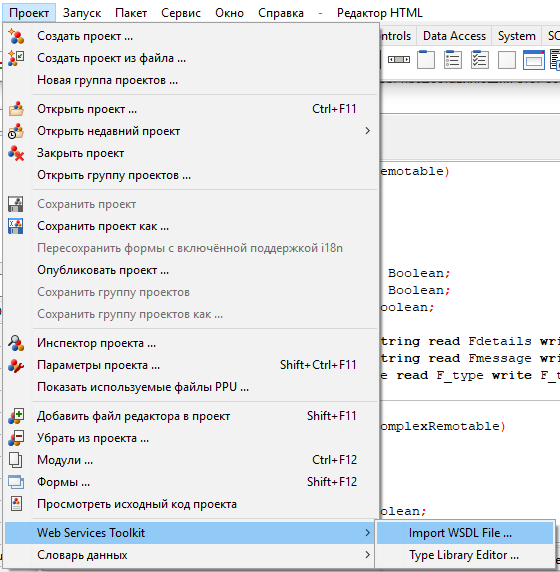
При клике на первом пункте меню (Import WSDL file...) вызывается диалоговое окно. Мы указываем WSDL файл и папку, в которой будут сохраняться сгенерированные файлы и нажимаем кнопку OK для завершения.
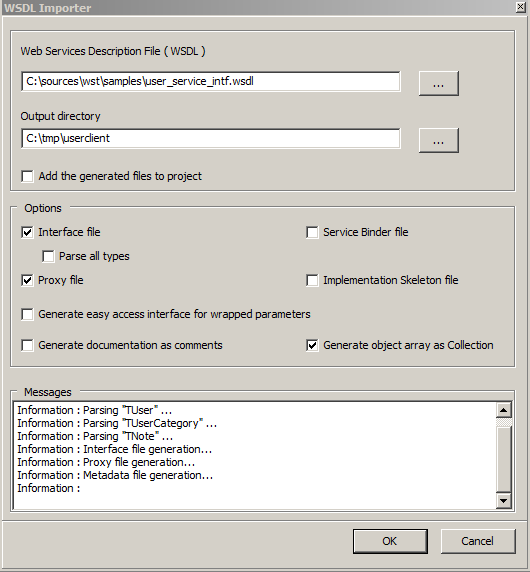
Мастер генерирует два файла:
- user_service_intf.pas, файл описания сервиса(Pascal-эквивалент WSDL)
- user_service_intf_proxy.pas, этот файл содержит прокси, который реализует службу интерфейса, описанного в первом файле.
Импорт при помощи ws_helper.
Программа ws_helper это версия для командной строки программы-мастера импорта. Для того, чтобы представить его возможности, ниже дан вывод утилиты с описанием ключей командной строки.
ws_helper [-uMODE] [-gOPTION] [-p] [-b] [-i] [-w] [-x] [-y] [-d] -[fSPECIFACTIONS] [-oPATH] [-aPATH] inputFilename
  -u MODE Generate the pascal translation of the WSDL input file
    MODE value may be U for used types or A for all types
  -g  Code generation option, with the following options :
    A  : object arrays are generated as "array" derived from TBaseObjectArrayRemotable
    C  : object arrays are generated as "collection" derived from TObjectCollectionRemotable
    EP : enum type's items are prefixed with the enum name
    EN : enum type's items are not prefixed with the enum name, the default
  -p  Generate service proxy
  -b  Generate service binder
  -i  Generate service minimal implementation. This will erase any existing implementation file!
  -o  PATH  Relative output directory
  -a  PATH  Absolute output directory
  -w  Generate WSDL file; Can be used to get wsdl from pascal
  -x  Generate XSD file; Can be used to get xsd from pascal
  -y  Generate easy access interface for wrapped parameters
  -d  Generate documentation as comment in the interface file
  -c  Indicate the parser's case sensitivity :
    S  : the paser is case sensitive
    I  : the paser is not case sensitive
  -f  Specify unit(s) renaming option : oldName= NewName(;oldName= NewName)*
Для перевода user service файла WDSL примера запустите нижеследующую команду:
ws_helper.exe -uA -p -o. user_service_intf.wsdl
ws_helper, Web Service Toolkit 0.6 Copyright (c) 2006-2014 by Inoussa OUEDRAOGOParsing the file : user_service_intf.wsdl
(...)
Interface file generation...
Proxy file generation...
Metadata file generation...
File "user_service_intf.wsdl" parsed succesfully.ниже показан вывод обоих файлов:
unit user_service_intf;
(...)
interface

uses SysUtils, Classes, TypInfo, base_service_intf, service_intf;

const
  sNAME_SPACE = 'urn:UserService';
  sUNIT_NAME = 'user_service_intf';

type

  TUserArray = class;
  TUser = class;
  TNote = class;
(...)
  UserService = interface(IInvokable)
    ['{7537A085-DCD1-4B24-8B74-BC35ACB4896D}']
    function GetList():TUserArray;
    procedure Add(
      const  AUser : TUser
    );
    procedure Update(
      const  AUser : TUser
    );
    function Find(
      const  AName : string
    ):TUser;
    function Delete(
      const  AName : string
    ):boolean;
  end;

procedure Register_user_service_intf_ServiceMetadata();Unit user_service_intf_proxy;
{$IFDEF FPC} {$mode objfpc}{$H+} {$ENDIF}
Interface
Uses SysUtils, Classes, TypInfo, base_service_intf, service_intf, user_service_intf;
Type
TUserService_Proxy=class(TBaseProxy,UserService)
Protected
class function GetServiceType() : PTypeInfo;override;
function GetList():TUserArray;
procedure Add(
const AUser : TUser
);
procedure Update(
const AUser : TUser
);
function Find(
const AName : string
):TUser;
function Delete(
const AName : string
):boolean;
End;
Function wst_CreateInstance_UserService(const AFormat : string = 'SOAP:'; const ATransport : string = 'HTTP:'; const AAddress : string = ''):UserService;
Implementation
uses wst_resources_imp, metadata_repository;
Function wst_CreateInstance_UserService(const AFormat : string; const ATransport : string; const AAddress : string):UserService;
Var
locAdr : string;
Begin
locAdr := AAddress;
if ( locAdr = '' ) then
locAdr := GetServiceDefaultAddress(TypeInfo(UserService));
Result := TUserService_Proxy.Create('UserService',AFormat+GetServiceDefaultFormatProperties(TypeInfo(UserService)),ATransport + 'address=' + locAdr);
End;
function TUserService_Proxy.GetList():TUserArray;
Var
locSerializer : IFormatterClient;
locCallContext : ICallContext;
locStrPrmName : string;
Begin
locCallContext := Self as ICallContext;
locSerializer := GetSerializer();
Try
locSerializer.BeginCall('GetList', GetTarget(),locCallContext);
locSerializer.EndCall();
MakeCall();
locSerializer.BeginCallRead(locCallContext);
TObject(Result) := Nil;
locStrPrmName := 'result';
locSerializer.Get(TypeInfo(TUserArray), locStrPrmName, Result);
Finally
locSerializer.Clear();
End;
End;
(...)Теперь мы готовы собрать простую программу для этого сервиса. Это простая клиентская программа вызывает метод GetList данного сервиса, чтобы получить список пользователей, которые уже зарегистрированы в этой службе; Список в этом случае выводится на экран:
program user_client_console;
uses SysUtils, fpc_http_protocol, soap_formatter,
     user_service_intf_proxy, user_service_intf;

var
  locService : UserService;
  items : TUserArray;
  item : TUser;
  i : Integer;
begin
  FPC_RegisterHTTP_Transport();
  locService := wst_CreateInstance_UserService();
  items := locService.GetList();
  try
    WriteLn('WST User Service Sample',sLineBreak);
    if (items.Length = 0) then
      WriteLn('  No user found.')
    else
      WriteLn(Format('  %d user(s) found : ',[items.Length]));
    for i := 0 to items.Length - 1 do begin
      item := items[i];
      WriteLn(Format('    Name= "%s", e-Mail= "%s"',[item.UserName,item.eMail]));
    end;
  finally
    items.Free();
  end;
end.
Модули base_service_intf, service_intf, soap_formatter, fpc_http_protocol, wst_resources_imp and metadata_repository предоставлены wst; Ниже результат выполнения:
WST User Service Sample2 user(s) found :
Name= "Lazarus FreePascal", e-Mail= "Lazarus@FreePascal.wst"
Name= "Inoussa OUEDRAOGO", e-Mail= "sample@example.wst"Найдено два пользователя. Функция wst_CreateInstance_UserService(), расположенная в файле user_service_intf.pas, создает экземпляр прокси, основанная на информации службы, содержащейся в файле WSDL. Полностью исходный код примера поставляется вместе с инструментарием WST библиотеки в папке \samples\user_client_console; Обратите внимание, что пример, представленной в этой папке более полный, чем приведенный на этой странице
Параметры соединения
Основной формат:
protocol:paramName=paramValue(;paramName=paramValue)*Параметры HTTP прокси
Для HTTP поддерживаемые параметры приведены ниже:
- Address ( требуется для адресов, поддердивающих уникальные адреса )
- ProxyServer
- ProxyPort
- ProxyUsername
- ProxyPassword
HTTP соединение через прокси поддерживается. Ниже пример адресной строки.
  const
    sADDRESS = 'http:address=http://webservices.amazon.com/AWSECommerceService/2007-04-04'+
                 ';ProxyServer=197.150.10.10;ProxyPort=9881'+
                 ';ProxyUsername=inoussa;ProxyPassword=wst';
Инструментарий имеет 3 HTTP реализации, основанная на встроеной реализации FPC (fpc_http_server.pas), Synapse ( synapse_http_protocol.pas ) и Indy (indy_http_protocol.pas).
Параметры TCP соединения
Поддерживаемые TCP параметры:
- address ( требуется для служб, поддерживающие уникальные адреса)
- Port
- target( целевая служба )
Ниже приведена примерная адресная строка
  Const
    sADDRESS = 'TCP:Address=10.0.0.3;Port=1234;target=UserService';
Инструментарий имеет 3 TCP реализации, основанные на встроенной реализации в FPC (fpc_tcp_server.pas), Synapse (synapse_tcp_protocol.pas) и Indy (indy_tcp_protocol.pas).
Параметры соединения через библиотеки (LIB)
Идея этого протокола в том, чтобы иметь возможность подключаться к службам через динамические библиотеки (DLL/DSO). Это может рассматриваться как плагин фреймворк, где плагины (службы) обеспечены динамическими библиотеками.
Параметры соединения LIB:
- FileName (имя файла DLL/SO)
- target (целевая служба)
Ниже пример адресной строки
  Const
    sADDRESS = 'LIB:FileName=..\library_server\lib_server.dll;target=UserService';
Инструментарий имеет одну реализацию LIB соединения (library_protocol.pas).
Папка с примерами содержит 4 проекта user_client_console, tcp_server, http_server и library_server, которые демонстрируют протоколы TCP, HTTP и протокол типа "библиотека"
Параметры соединения с тем же процессом (SAME_PROCESS)
Идея этого протокола, дать возможность подключаться к службе в самом клиентском процессе. Это позволит собрать многоуровневое приложение в рамках уникальной программы, которая может быть преобразована в полностью многоуровневое приложение. Это также может быть использовано для облегчения отладки приложения
SAME_PROCESS поддерживает следующие параметры:
- Address (целевая служба)
Ниже пример адресной строки
  Const
    sADDRESS = 'SAME_PROCESS:Address=UserService';
Инструментарий имеют одну реализацию (same_process_protocol.pas).
Мульти-адресный сервис (Адрес на операцию)
Некоторые сервисы (как пример, eBay SOAP сервисы) используют отдельный адрес на каждую операцию. Инструментарий использует расширенные мета данные (см. главу о мета данных сервисов) для установки адресов операций. “Ebay” SOAP пример, расположенный в tests\ebay папке демонстрирует настройку адреса операции.
Решение проблем
'Сообщение об ошибке: Invalid parameter : "AProtocolData"'
Это случается, когда неизвестно какой протокол следует использовать. Убедитесь, что правильный форматтер выбран (к примеру: 'SOAP:') и что указанные форматтер зарегистрирован. Это делается добавлением соответствующего модуля xxx_formatter в Ваш блок uses. (для примера: soap_formatter)
Сторона сервера (создание сервиса)
Обзор
Инструментарий веб-сервиса содержит фреймворк для серверной стороны и редактор библиотеки типов на базе языка WSDL для создания сервиса. Ключевые особенности:
- Описание сервиса (интерфейса) отделено от реализации,
- Интерфейс и реализация не связаны с протоколом сообщений,
- генератор WSDL
- Поддержка для сериализации SOAP 1.1
- Поддержка для сериализации xmlrpc
- Поддержка пользовательской бинарной сериализации
- Платформа не привязана к транспортному протоколу
- Легко добавить поддержку для серверов приложений.
Пример
Для того, чтобы создать сервис,Вы должны:
- описать его интерфейс,
- обеспечить реализацию и зарегистрировать его для сервиса,
- обеспечить связку, которая будет перенаправлять запросы на целевой сервис на реализацию и ее регистрацию,
- разместить сервис на сервере приложения (TCP сервер, HTTP сервер, LIBRARY сервер, ...).
Описание Интерфейса (Interface) сервиса
Начиная с версии 0.5, WST обеспечивает редактор библиотеки типов WSDL для описания типов и сервисов, используемых при реализации. Рисунок (3) ниже представляет основной интерфейс этого инструмента. Редактор библиотеки типов представлен как
- "мастер" Lazarus в виде пункта меню “Проект/Web Services Toolkit/Type Library Editor...”
- отдельная программа typ_lib_edtr.exe.
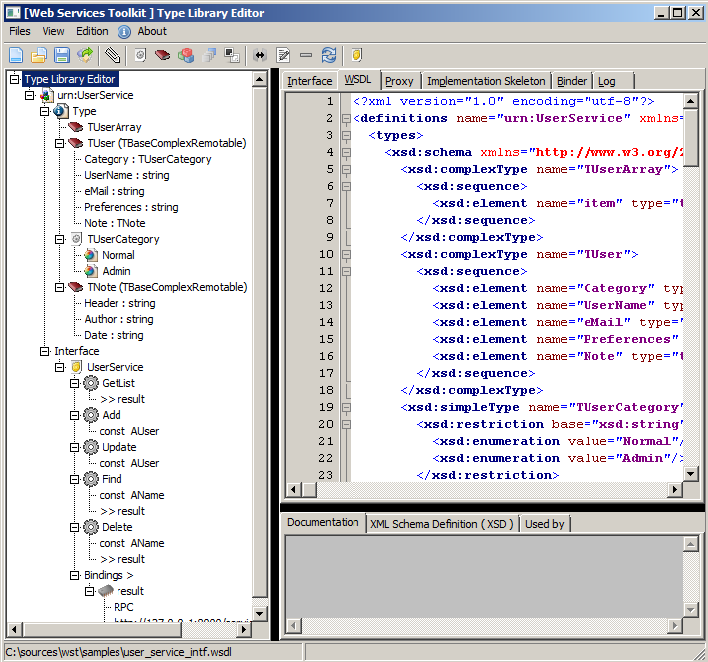
Особенности Редактора Библиотеки Типов:
- Графический интерфейс пользователя
- Просмотр исходных текстов WSDL
- Просмотр Pascal код библиотеки
- Просмотр Pascal кода прокси
- Просмотр "скелета" кода Pascal
- Просмотр Pascal прокси биндера (связки)
- создание интерфейса перечисления
- интерфейс создания классов
- интерфейс создания массивов
- интерфейс создания алиасов типов
- интерфейс создания интерфейсов сервисов.
Ниже приведен пример на изображении. Мы будем использовать файл user_service_intf.wsdl, расположенный в \samples directory для нашего примера.
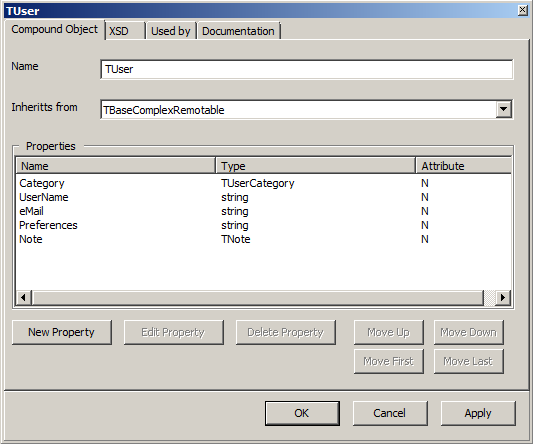
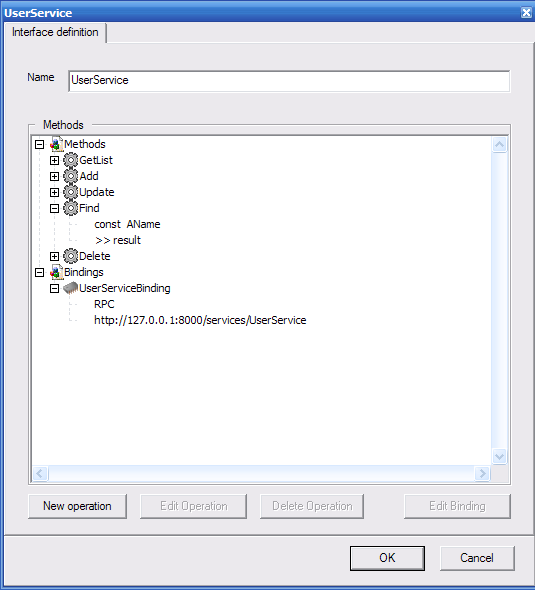
Экспорт файлов Pascal.
Редактор Библиотеки Типов имеет возможность генерировать Pascal версию файла WSDL. Чтобы сделать это, следует кликнуть “Files\Save generated files ...” (это также может быть сделано через контекстное меню); Это вызовет диалоговое окошко как показано в изображении ниже. 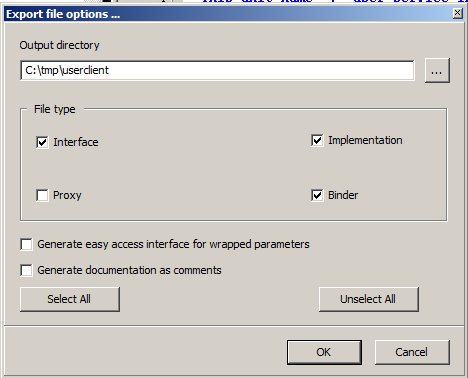
Нажмите OK для завершения. Программа ws_helper имеет те же возможности и файлы могут сгенерированы с помощью нижеследующей команды:
ws_helper\ws_helper.exe -i -b -o. user_service_intf.wsdl
ws_helper, Web Service Toolkit 0.5 Copyright (c) 2006, 2007 by Inoussa OUEDRAOGO
Parsing the file : user_service_intf.wsdl
Information : Parsing "tns:TUserArray" ...
Information : Parsing "tns:TUser" ...
Information : Parsing "tns:TUser" ...
Information : Parsing "xsd:string" ...
Information : Parsing "tns:TUser" ...
Information : Parsing "xsd:string" ...
Information : Parsing "xsd:boolean" ...
Information : Parsing "TUserArray" ...
Information : Parsing "TUser" ...
Information : Parsing "TUserCategory" ...
Information : Parsing "TNote" ...
Interface file generation...
Proxy file generation...
Metadata file generation...
File "user_service_intf.wsdl" parsed succesfully.
Полностью проект расположен в папке “samples”. Ниже приведен вывод сгенерированных файлов интерфейса.
unit user_service_intf;
{$IFDEF FPC} {$mode objfpc}{$H+} {$ENDIF}
interface

uses SysUtils, Classes, TypInfo, base_service_intf, service_intf;

const
  sNAME_SPACE = 'urn:UserService';
  sUNIT_NAME = 'user_service_intf';

type

  TUser = class;
  TUserArray = class;

  TUserCategory = (
    Normal
    ,Admin
  );

  TUser = class(TBaseComplexRemotable)
  published
    property Category : TUserCategory read FCategory write FCategory;
    property UserName : string read FUserName write FUserName;
    property eMail : string read FeMail write FeMail;
    property Preferences : string read FPreferences write FPreferences;
    property Note : TNote read FNote write FNote;
  end;

  TUserArray = class(TBaseObjectArrayRemotable)
  private
    function GetItem(AIndex: Integer): TUser;
  public
    class function GetItemClass():TBaseRemotableClass;override;
    property Item[AIndex:Integer] : TUser Read GetItem;Default;
  end;

  UserService = interface(IInvokable)
    ['{CA6F6192-C3DE-4D9C-B3DF-E616376A0DC9}']
    function GetList():TUserArray;
    procedure Add(
      Const AUser : TUser
    );
    procedure Update(
      Const AUser : TUser
    );
    function Find(
      Const AName : string
    ):TUser;
    function Delete(
      Const AName : string
    ):boolean;
  end;
(...)
Обеспечение реализации сервиса
Модуль user_service_intf_imp.pas, сгенерированный выше содержит скелет реализации класса для интерфейса. Это определяет процедуру, названную RegisterUserServiceImplementationFactory. Процедура регистрирует класс как провайдер реализации сервиса в реестре реализаций.
Unit user_service_intf_imp;
{$IFDEF FPC} {$mode objfpc}{$H+} {$ENDIF}
Interface
Uses SysUtils, Classes,
     base_service_intf, server_service_intf, server_service_imputils,
     user_service_intf, cursor_intf;

Type
  { TUserService_ServiceImp }

  TUserService_ServiceImp=class(TBaseServiceImplementation,UserService)
  Protected
    function GetList():TUserArray;
    procedure Add(
      Const AUser : TUser
    );
    procedure Update(
      Const AUser : TUser
    );
    function Find(
      Const AName : string
    ):TUser;
    function Delete(
      Const AName : string
    ):boolean;
  End;

  procedure RegisterUserServiceImplementationFactory();

Implementation
(...)

procedure TUserService_ServiceImp.Add(Const AUser : TUser);
var
  locObj : TUser;
Begin
  locObj := Find(AUser.UserName);
  if ( locObj <> nil ) then
    raise Exception.CreateFmt('Duplicated user : "%s"',[AUser.UserName]);
  locObj := TUser.Create();
  locObj.Assign(AUser);
  FUserList.Add(locObj);
End;

procedure RegisterUserServiceImplementationFactory();
Begin
  GetServiceImplementationRegistry().Register(
    'UserService',
TImplementationFactory.Create(TUserService_ServiceImp) as IServiceImplementationFactory);
End;

(...)
“ws_helper” имеет возможность генерировать прокси файл, файл скелета реализации и биндер файл (файл связки) (см. листинг ниже).
ws_helper, Web Service Toolkit 0.4 Copyright (c) 2006, 2007 by Inoussa OUEDRAOGO
ws_helper [-uMODE] [-p] [-b] [-i] [-oPATH] inputFilename
  -u MODE Generate the pascal translation of the WSDL input file
       MODE value may be U for used types or A for all types
  -p  Generate service proxy
  -b  Generate service binder
  -i  Generate service minimal implementation
  -o  PATH  Relative output directory
  -a  PATH  Absolute output directory
Начало файла реализации может также создать, используя ws_helper с ключами -i и -b как упомянуто выше;
ws_helper\ws_helper.exe -i -b -o. user_service_intf.wsdl
ws_helper, Web Service Toolkit 0.4 Copyright (c) 2006, 2007 by Inoussa OUEDRAOGO
Parsing the file : user_service_intf.wsdl
Proxy file generation...
Binder file generation...
Implementation file generation...
Metadata file generation...
File "user_service_intf.wsdl" parsed succesfully..
Обеспечение биндера для веб-сервиса
Роль биндера (связки) в следующем:
- распаковка входящих сообщений,
- установка стека вызовов,
- сделать вызов от зарегистрированной реализации,
- сериализовать стека выполнения для создания ответного сообщения.
Модуль user_service_intf_binder.pas, сгенерированный выше, содержит:
- TUserService_ServiceBinder: действительный класс биндера,
- TUserService_ServiceBinderFactory: фабрика классов для биндера и
- Server_service_RegisterUserServiceService: процедура регистрации фабрики биндера.
Нижеследующий код вывода показывает интерфейсную часть модуля и обработчик метода биндера.
unit user_service_intf_binder;
{$IFDEF FPC} {$mode objfpc}{$H+} {$ENDIF}
interface
uses SysUtils, Classes, base_service_intf, server_service_intf, user_service_intf;

type
  TUserService_ServiceBinder=class(TBaseServiceBinder)
  Protected
    procedure GetListHandler(AFormatter:IFormatterResponse);
    procedure AddHandler(AFormatter:IFormatterResponse);
    procedure UpdateHandler(AFormatter:IFormatterResponse);
    procedure FindHandler(AFormatter:IFormatterResponse);
    procedure DeleteHandler(AFormatter:IFormatterResponse);
  Public
    constructor Create();
  End;

  TUserService_ServiceBinderFactory = class(TInterfacedObject,IItemFactory)
  protected
    function CreateInstance():IInterface;
  End;

  procedure Server_service_RegisterUserServiceService();

(...)

procedure TUserService_ServiceBinder.AddHandler(AFormatter:IFormatterResponse);
Var
  cllCntrl : ICallControl;
  tmpObj : UserService;
  callCtx : ICallContext;
  strPrmName : string;
  procName,trgName : string;
  AUser : TUser;
Begin
  callCtx := GetCallContext();
  TObject(AUser) := Nil;

  strPrmName := 'AUser';  AFormatter.Get(TypeInfo(TUser),strPrmName,AUser);
  If Assigned(Pointer(AUser)) Then
    callCtx.AddObjectToFree(TObject(AUser));

  tmpObj := Self.GetFactory().CreateInstance() as UserService;
  if Supports(tmpObj,ICallControl,cllCntrl) then
    cllCntrl.SetCallContext(GetCallContext());

  tmpObj.Add(AUser);

  procName := AFormatter.GetCallProcedureName();
  trgName := AFormatter.GetCallTarget();
  AFormatter.Clear();
  AFormatter.BeginCallResponse(procName,trgName);
  AFormatter.EndCallResponse();

  callCtx := Nil;
End;
Host the service into an application server.
The application server's role is to route incoming service requests to the Web Service Toolkit runtime. For the runtime to process service requests :
- The services and their implementations have to be registered ,
- The message protocol (SOAP, binary,...) have to be registered.
The runtime interface is defined in the server_service_intf unit. This unit contains :
- GetServerServiceRegistry, which returns the service registry,
- GetServiceImplementationRegistry which returns the service implementation registry,
- GetFormatterRegistry which returns the message format registry and
- HandleServiceRequest which is the unique entry point for request processing.
Starting from the version 0.5, the toolkit provides a simplified model to develop applications server . This is achieved using the listener classes. A listener implements a transport between the server and its clients. The toolkit provides two (2) HTTP listeners implementations:
- TwstFPHttpListener (fpc_http_server.pas), using the FPC's native network component.
- TwstIndyHttpListener ( indy_http_server.pas ),
Three (3) TCP listeners implementations are provided:
- TwstFPCTcpListener (fpc_tcp_server.pas), using the FPC's native network component.
- TwstIndyTcpListener ( indy_tcp_server.pas ) and
- TwstSynapseTcpListener ( synapse_tcp_server.pas ).
All listeners derive from TwstListener defined in the server_listener.pas file.
Below is printed an HTTP server sample. The code is divided into three (3) parts :
- messaging format registration :
  Server_service_RegisterSoapFormat();
  Server_service_RegisterXmlRpcFormat();
Server_service_RegisterBinaryFormat() ;- service implementation and binder registration :
  RegisterUserServiceImplementationFactory();
Server_service_RegisterUserServiceService();- the listner creation and starting : the listener is created and started by the lines
  AppObject  := TwstFPHttpListener.Create();
  AppObject.Start();
Complete listing :
program http_server;
{$mode objfpc}{$H+}
uses
  {$IFDEF UNIX}{$IFDEF UseCThreads}
  cthreads,
  {$ENDIF}{$ENDIF}
  Classes, SysUtils,
  fpc_http_server, metadata_service, logger_extension, server_listener,
  server_service_soap, server_binary_formatter, server_service_xmlrpc, config_objects,
  user_service_intf, user_service_intf_binder, user_service_intf_imp;
var
  AppObject : TwstListener;
begin
  Server_service_RegisterBinaryFormat();
  Server_service_RegisterSoapFormat();
  Server_service_RegisterXmlRpcFormat();

  RegisterUserServiceImplementationFactory();
  Server_service_RegisterUserServiceService();
  AppObject := TwstFPHttpListener.Create();
  try
    WriteLn('"Web Service Toolkit" HTTP Server sample listening at:');
    WriteLn('');
    WriteLn('http://127.0.0.1:8000/');
    WriteLn('');
    WriteLn('Press enter to quit.');
    AppObject.Start();
    ReadLn();
  finally
    FreeAndNil(AppObject);
  end;
end.
Server_service_RegisterUserServiceService located in the user_service_intf_binder unit ( generated by ws_helper ) registers the UserService service by calling in turn GetServerServiceRegistry:
procedure Server_service_RegisterUserServiceService();
Begin
  GetServerServiceRegistry().Register(
    'UserService',TUserService_ServiceBinderFactory.Create() as IitemFactory
  );
End;
Server_service_RegisterSoapFormat located in the server_service_soap unit ( provided by the toolkit ) registers the SOAP implementation by calling in turn GetFormatterRegistry:
  procedure Server_service_RegisterSoapFormat();
  begin
    GetFormatterRegistry().Register(
      sPROTOCOL_NAME,
      sSOAP_CONTENT_TYPE,
      TSimpleItemFactory.Create(TSOAPFormatter) as IitemFactory
    );
    RegisterStdTypes();
  end;
Server_service_RegisterBinaryFormat located in the server_binary_formatter unit ( provided by the toolkit ) registers the Binary message implementation by calling in turn GetFormatterRegistry:
  procedure Server_service_RegisterBinaryFormat();
  begin
    GetFormatterRegistry().Register(
      sPROTOCOL_NAME,
      sBINARY_CONTENT_TYPE,
      TBinaryFormatterFactory.Create() as IitemFactory
    );
  end;
Server_service_RegisterXmlRpcFormat located in the server_service_xmlrpc unit ( provided by the toolkit ) registers the XMLRPC message implementation by calling in turn GetFormatterRegistry:
  procedure Server_service_RegisterXmlRpcFormat();
  begin
    GetFormatterRegistry().Register(
      sPROTOCOL_NAME,
      sXMLRPC_CONTENT_TYPE,
      TSimpleItemFactory.Create(TXmlRpcFormatter) as IItemFactory
    );
  end;
In order to give it a try one have to :
- compile the server ( \samples\tcp_server\tcp_server.lpi it is a console program),
- compile the client application ( \samples\user_client_console\user_client_console.lpi ),
- execute the server and start listening,
- execute the client.
WSDL generation
Services in the toolkit are organized into meta data repositories. Conceptually a repository corresponds :
- at compile time to the pascal unit containing the service definition
- at runtime to a name space.
The repository is the toolkit WSDL generation unit.
The Metadata Service
The toolkit is provided with an easy to use metadata service implementation which in turn uses the raw interface defined in the metadata_repository unit (see above). A Lazarus GUI client application is located in the tests\metadata_browser folder.
WSDL generation API
The metadata_wsdl pascal unit contains the GenerateWSDL function for WSDL generation from a repository (see the signature below).
  PServiceRepository = ^TServiceRepository;
  TServiceRepository = record
    NameSpace        : ShortString;
    Name             : ShortString;
    RootAddress      : ShortString;
    ServicesCount    : Byte;
    Services         : PService;
  end;

  procedure GenerateWSDL(AMdtdRep : PServiceRepository; ADoc : TDOMDocument);
WSDL Customization
The WSDL generation is based on the IWsdlTypeHandler and the IWsdlTypeHandlerRegistry interfaces located in the metadata_wsdl unit. In order to customize the generated WSDL, one has to provide a class implementing the IWsdlTypeHandler interface. Then that class has to be registered in the registry. The metadata_wsdl unit contains implementations for pascal enumerations, TBaseComplexRemotable descendants, and TBaseArrayRemotable descendants.
Sample
A functional sample project is located under \samples\http_server . It is an Indy base http server.
Расширения сервисов
Расширения сервисов позволяют подключаться ко всем этапам обработки сервисных запросов. Расширения сервисов могут быть использованы, к примеру, для реализации авторизации, записи запросов в журнал, сжатия данных и т.д.. IServiceExtension ниже - это интерфейс, используемые инструментарием во время выполнения для вызова расширений сервисов.
  TMessageStage = (
    msAfterDeserialize, msAfterSerialize, msBeforeDeserialize, msBeforeSerialize
  );

  IServiceExtension = interface
    ['{E192E6B3-7932-4D44-A8AC-135D7A0B8C93}']
    procedure ProcessMessage(
      const AMessageStage     : TMessageStage;
               ACallContext   : ICallContext;
               AMsgData       : IInterface
    );
  end;
Фактический тип параметра AMsgData зависит от стадии обработки сообщения и соответствует:
- IRequestBuffer на "msBeforeDeserialize" и "msAfterSerialize"
- IFormatterResponse на "msAfterDeserialize" и "msBeforeSerialize"
Эти типы расположены в модуле server_service_intf. Расширения должны быть зарегистрированы в реестре расширений (расположенном в модуле server_service_intf), приведенном ниже
  IServiceExtensionRegistry = Interface
    ['{68DC78F1-E6CF-4D6B-8473-75288794769C}']
    function Find(const AName : string):IServiceExtension;
    procedure Register(
      const AName    : string;
            AFactory : IItemFactory
    );
  end;
Чтобы реализация сервиса могла использовать расширение сервиса, она должна зарегистрироваться в этом расширении. С этой целью Интерфейс IServiceImplementationFactory предоставляет метод RegisterExtension. Код примера полностью представлен в \samples\http_server (реализуется в \samples\logger_extension.pas).
Метаданные служб
Службы в инструментарии организованы в ***репозитории мета данных (смотрите “Метаданные служб” ниже)***. Концептуально репозитории соответствуют:
- во время компиляции модулю Pascal, содержащего определение службы
- во время выполнения пространство имен.
Инструмент ws_helper, когда парсит файл описания интерфейса, записывает мета данные служб, содержащихся в файле в ресурсный файл Lazarus. Ресурсный файл в этом случай встроен в сгенерированный файл модуля биндера (смотрите часть “initialization” модуля). Во время выполнения мета данных службы доступны через интерфейс IModuleMetadataMngr, определенный в модуле metadata_repository (смотрите ниже). Функция GetModuleMetadataMngr, определенная в том же модуле, возвращает экземпляр объекта, поддерживающего этот интерфейс.
  IModuleMetadataMngr = interface
    ['{B10ACF6A-A599-45A3-B083-BEEFB810C889}']
    function IndexOfName(const ARepName : shortstring):Integer;
    function GetCount():Integer;
    function GetRepositoryName(const AIndex : Integer):shortstring;
    procedure SetRepositoryNameSpace(const ARepName,ANameSpace : shortstring);
    function LoadRepositoryName(
      const ARepName,ARootAddress  : shortstring;
      out   ARepository  : PServiceRepository
    ):Integer;
    procedure ClearRepository(var ARepository : PServiceRepository);
    procedure SetServiceCustomData(
      const ARepName       : shortstring;
      const AServiceName   : shortstring;
      const ADataName,
            AData          : string
    );
    procedure SetOperationCustomData(
      const ARepName       : shortstring;
      const AServiceName   : shortstring;
      const AOperationName : shortstring;
      const ADataName,
            AData          : string
    );
    function GetServiceMetadata(const ARepName,AServiceName : shortstring) : PService;
    procedure ClearServiceMetadata(var AService : PService);
  end;
Расширенные мета данные
Интерфейс мета данных обеспечивает способ для добавления пользовательских данных в уже записанные. Метаданные служб могут быть установлены через SetServiceCustomData, а операции метаданных могут быть установлен через метод SetOperationCustomData. Расширенные метаданных репозитория должны быть зарегистрированы после регистрации метаданных сервиса, записанных в файле ресурса. ТАким образом, для клиентского приложения сгенерированный прокси модуль содержит условный фрагмент кода для вызова процедуры регистрации как показано ниже с примером eBay, расположенном в папке tests\ebay. Имя процедуры получены из имени интерфейса модуля (имя репозитория): Register_%UNIT_NAME%_ServiceMetadata.
  initialization
    {$i ebay.lrs}

    {$IF DECLARED(Register_ebay_ServiceMetadata)}
    Register_ebay_ServiceMetadata();
    {$ENDIF}
  End.
Поддержка заголовков (Headers)
Класс THeaderBlock
  THeaderBlock = class(TBaseComplexRemotable)
  public
    property Direction : THeaderDirection read FDirection write FDirection;
    property Understood : Boolean read FUnderstood write FUnderstood;
  published
    property mustUnderstand : Integer read FmustUnderstand write SetmustUnderstand
      stored HasmustUnderstand;
  end;
Показанный выше заголовок THeaderBlock (часть private была пропущена для краткости), расположенный в модуле base_service_intf, корневной класс для всех классов заголовков, наследуемых от него. Свойство Direction показывает является ли заголовок входящим или исходящим. Свойство mustUnderstand определяется является ли оно обязательным.
Определение классов заголовков
Заголовки SOAP наследуются от базового класса THeaderBlock, расположенного в модуле base_service_intf. Они регистрируются в реестре типов. Ниже воспроизведен пример заголовка, извлеченного и примера проекта "Калькулятор".
  TCalcHeader = class(THeaderBlock)
  published
    property Login : string read FLogin write FLogin;
    property Password : string read FPassword write FPassword;
    property WantedPrecision : Integer read FWantedPrecision write FWantedPrecision;
  end;
Интерфейс ICallContext
  ICallContext = Interface
    ['{855EB8E2-0700-45B1-B852-2101023200E0}']
    procedure AddObjectToFree(const AObject : TObject);
    procedure Clear();
    function AddHeader(
      const AHeader        : THeaderBlock;
      const AKeepOwnership : Boolean
    ):Integer;overload;
    function AddHeader(
      const AHeader        : TBaseRemotable;
      const AKeepOwnership : Boolean;
      const AName          : string = ''
    ):Integer;overload;
    function GetHeaderCount(const ADirections : THeaderDirections):Integer;
    function GetHeader(const AIndex : Integer) : THeaderBlock;
    procedure ClearHeaders(const ADirection : THeaderDirection);
  End;
Интерфейс ICallContext, определенный в модуле base_service_intf представляет контекст вызова сервиса. Метод AddHeader позволяет отправлять заголовки, тогда как метод GetHeader извлекает заголовок в контексте вызова.
Заголовки клиентской стороны
Ссылка ICallContext может быть получена из текущего экземпляра прокси просто запросив его для этого интерфейса как показано в фрагменте коде ниже, взятого из примера проекта-клиента "калькулятор".
  var
    ch : TCalcHeader;
    hdrs : ICallContext;
  begin
    FObj := TCalculator_Proxy.Create('Calculator', edtFormat.Text, edtAddress.Text);

    ch := TCalcHeader.Create();
    ch.mustUnderstand := 1;
    ch.Login := 'azerty';
    ch.Password := 'qwerty';
    ch.WantedPrecision := 1210;
    hdrs := FObj as ICallContext;
    hdrs.AddHeader(ch,true);
Заголовок может быть сделан обязательным установкой его свойства mustUnderstand в 1 как показано в коде выше.
Server side headers
The ICallControl interface
  ICallControl = interface
    ['{7B4B7192-EE96-4B52-92C7-AE855FBC31E7}']
    procedure SetCallContext(ACallContext : ICallContext);
    function GetCallContext():ICallContext;
  end;
The ICallControl interface, located in the server_service_intf unit, is used by the toolkit runtime to share the executing call environment with service implementation classes. When the runtime is about to issue a call against a implementation class instance, it queries that instance for ICallControl interface support; If the implementation has ICallControl interface support then the obtained reference is used to set the call context through the SetCallContext method. The implementation instance can then access the call context by calling the GetCallContex method. The toolkit provides the TBaseServiceImplementation class which has support for the ICallControl interface and can be used as a base implementation class. It is the base class used by the ws_helper generated skeleton implementation class when invoked with the -i command line option. The method printed below, extracted from the calculator sample service demonstrates the access to headers for read and write.
  function TCalculator_ServiceImp.AddInt(
    Const A : Integer;
    Const B : Integer
  ):TBinaryArgsResult;
  var
    hdr : TCalcResultHeader;
    h : TCalcHeader;
    cc : ICallContext;
  Begin
    hdr := TCalcResultHeader.Create();
    cc := GetCallContext();
    if Assigned(cc) and ( cc.GetHeaderCount([hdIn]) > 0 ) and ( cc.GetHeader(0).InheritsFrom(TCalcHeader) ) then begin
      h := cc.GetHeader(0) as TCalcHeader;
      h.Understood := True;
      hdr.Assign(h);
    end;
    hdr.TimeStamp := DateTimeToStr(Now());
    hdr.SessionID := 'testSession';
    cc.AddHeader(hdr,True);
    hdr := nil;
    Result := TBinaryArgsResult.Create();
    Try
      Result.Arg_OP := '+';
      Result.Arg_OpEnum := coAdd;
      Result.Arg_A := A;
      Result.Arg_B := B;
      Result.Arg_R := A + B;
      Result.Comment := 'Doing an + operation';
    Except
      FreeAndNil(Result);
      Raise;
    End;
  End;
Headers that does not derived from THeaderBlock.
Classes that inherit from TBaseRemotable can also be used as headers; In that case a THeaderBlockProxy’s instance is automatically created and used as a wrapper to allow a TBaseRemotable instance to be sent and received as a header block. The ICallContext has an overloaded AddHeader method that accepts TBaseRemotable’s instances.
Специфика SOAP
Стиль связывания
Стиль связывания используется для определения того, что сервис - RPC-ориентированный или Document-ориентированный.
Клиентская часть
Стиль связывания может быть прописан в строке SOAP протокола при создании прокси сервиса. Значение по умолчанию для стиля связывания RPC. Ниже показан пример, демонстрирующий использования Document-стиля.
  locService := TSampleService_Proxy.Create(
                  'SampleService',
                  'SOAP:Style=Document;EncodingStyle=Literal',
                  'http:Address=http://127.0.0.1/services/SampleService'
                );
Серверная сторона
На настоящий момент сервисы, созданные в инструментарии используют стиль связывания RPC
Стиль кодирования
Стиль кодирования показывает правила, используемые для кодирования типов в XML. Поддерживаемые значения Encoded и Literal.
Клиентская часть
Стиль кодирования может быть указан с помощью строки протокола SOAP при создании прокси сервиса. Значение по умолчанию для стиля кодирования - Encoded. Вышеприведенный пример демонстрирует использования стиля Literal.
Серверная часть
На настоящий момент сервисы, который создаются с помощью инструментария используют стиль кодирования Encoded.
Приведенные примеры
Примеры, расположенные в папке “tests”.
Примеры на стороне клиента ( протестировано на Windows XP, Ubuntu и MacOS на PowerPC)
- UserService, samples\http_server, samples\tcp_server, samples\user_client_console, sample\library_server: клиентская консоль использует три клиент-серверных протокола (HTTP, TCP, LIBRARY)
- Google пример: Демонстрирует использование классов и типов массива данных.
- Metadata Браузер: Этот пример демонстрирует использование класса и типа массивов данных и, главным образом, инструментария сервиса метаданных.
- eBay пример, этот пример использует OpenSLL, который может быть найден на http://www.openssl.org и SYNAPSE (http://www.ararat.cz/synapse/))
- \samples\delphi\ : эта папка содержит Delphi (компилируется с Delphi 7) примеры клиента и сервера. Используемый протокол: TCP, HTTP, LIBRARY; Используемые форматы: SOAP, XMLRPC и BINARY.
Примеры со стороны сервера
- samples\tcp_server : это пример TCP сервера, основанного на компонентах Synapse. Использует UserService.
- samples\http_server : Это пример HTTP сервера, основанного на компонентах Indy10. Использует UserService инструментарий сервиса метаданных. Демонстрирует генерация WSDL.
- samples\apache_module : Пример модуля Apache, этот пример демонстрирует размещение инструментария на веб-сервере Apache. Основан на переводе (Sekelsenmat) заголовков Apache. Использует сервис UserService и инструментарий сервиса метаданных. Демонстрирует генерацию WSDL.
Статус
Инструментарий может использоваться как для простых типов, так и для типов классов. Сериализация предназначена для настройки базовых типов и типов классов путем реализации классов, производных от “TBaseRemotable”. Эти классы должны быть зарегистрированы в реестре типа.
Сериализация
Сериализация основана на интерфейсе IFormatterBase, расположенном в модуле base_service_sintf.
Инструментарий содержит четыре реализации сериализаторов: сериализатор SOAP, сериализатор XMLRPC, сериализатор JSONRPC и бинарный сериализатор. Этот сериализатор был протестирован на FPC 2.x и Delphi 7.
сериализатор SOAP
Сериализатор SOAP реализует SOAP 1.1. Он поддерживает следующие типы Pascal:
- Доступные целочисленные типы:
- Byte приводится к unsignedByte
- ShortInt приводится к byte
- SmallInt приводится к short
- Word приводится к unsignedShort
- LongInt приводится к int
- LongWord приводится к unsignedInt
- Int64 приводится к long
- QWord приводится к int
- String приводится к string
- Boolean приводится к boolean
- Enumerations приводится к их строковому представлению
- Float types :
- Single приводится к float
- Double приводится к double
- Extended приводится к double
- Currency приводится к float
- Object (экземпляр класса): Инструментарий имеет поддержку экземпляров классов, наследуемых от TBaseRemotable. TBaseRemotable это базовый класс, использованный в форматтере интерфейса для возможности настройки сериализации. Инструментарий предоставляет класс TBaseComplexRemotable, который реализует сериализацию для него (или его потомков) опубликованных [published] свойств.
Бинарный сериализатор
Бинарный сериализатор более оптимизирован по скорости и размеру в сравнении с SOAP сериализацией. Используется big-endian для потоковой передачи данных. Имеет поддержку нижеприведенных паскалевских типов:
- Доступные целочисленные:
- Byte
- ShortInt
- SmallInt
- Word
- LongInt
- LongWord
- Int64
- QWord
- String
- Boolean
- Enumerations
- Типы с плавающей запятой:
- Single
- Double
- Extended
- Currency
- Object (экземпляр класса): Инструментарий имеет поддержку экземпляров классов, наследуемых от TBaseRemotable. TBaseRemotable базовый класс, используемый интерфейсом форматтера для возможностей настройки сериализации. Инструментарий обеспечивает класс TBaseComplexRemotable, который реализует сериализацию для их (или его наследников) опубликованных ("published") свойств.
Сериализация типа класса
Инструментарий имеет поддержку для экземпляров классов, наследуемых от TBaseRemotable. TBaseRemotable - абстрактный базовый класс, используемый интерфейсом класса для возможности настройки сериализации. Инструментарий обеспечивает класс TBaseComplexRemotable, который реализует сериализацию опубликованных (published) свойств для его классов-наследников. Также обеспечивается классом TBaseObjectArrayRemotable сериализация массивов классов-наследников TBaseRemotable.
Корневой класс “TBaseRemotable”
  TBaseRemotable = class(TPersistent)
  Public
    constructor Create();virtual;
    class procedure Save(
            AObject   : TBaseRemotable;
            AStore    : IFormatterBase;
      Const AName     : String;
      Const ATypeInfo : PTypeInfo
    );virtual;abstract;
    class procedure Load(
      Var   AObject   : TObject;
            AStore    : IFormatterBase;
      var   AName     : String;
      const ATypeInfo : PTypeInfo
    );virtual;abstract;
  End;
TBaseRemotable это абстрактный базовый класс, используемый интерфейсом форматтера для возможностей настройки сериализации. Этот класс определяется виртуальный конструктором/virtual constructor и, главным образом, двумя виртуальными абстрактными методами класса:
- Save: этот метод вызывается, когда инструментарию требуется сериализация параметра AObject.
- Load: этот метод вызывается, когда инструментарию требуется де-сериализация параметра AObject.
Сериализация “TBaseComplexRemotable”
  TBaseComplexRemotable = class(TAbstractComplexRemotable)
  public
    class procedure Save(
            AObject   : TBaseRemotable;
            AStore    : IFormatterBase;
      const AName     : string;
      const ATypeInfo : PTypeInfo
    );override;
    class procedure Load(
      var   AObject   : TObject;
            AStore    : IFormatterBase;
      var   AName     : string;
      const ATypeInfo : PTypeInfo
    );override;
    class procedure RegisterAttributeProperty(const AProperty : shortstring);virtual;
    class procedure RegisterAttributeProperties(const APropertList : array of shortstring);virtual;
    class function IsAttributeProperty(const AProperty : shortstring):Boolean;
    procedure Assign(Source: TPersistent); override;
  end;
TBaseComplexRemotable реализует сериализацию для наследников опубликованных ("published") свойств классов-наследников. Сериализация основана на информации типов времени выполнения ("runtime type information" RTTI) и может быть настроена для случаев:
- всегда игнорировать некоторые опубликованные свойства.
- игнорировать при определенных условиях некоторые опубликованные свойств.
Нижеприведенный класс демонстрирует пример настройки сериализации.
  TSampleClass = class(TBaseComplexRemotable)
  private
    FProp_Always: Integer;
    FProp_Never: Integer;
    FProp_Optional: Integer;
    function GetStoredProp_Optional: boolean;
  published
    //Это свойство всегда будет сериализоваться
    property Prop_Always : Integer read FProp_Always write FProp_Always;
    //Это свойство никогда не будет сериализоваться
    property Prop_Never : Integer read FProp_Never write FProp_Never stored False;
    //Это свойство будет сериализоваться, если "Self.GetStoredProp_Optional() = True"
    property Prop_Optional : Integer read FProp_Optional write FProp_Optional stored GetStoredProp_Optional;
End;- Свойства атрибутов
TBaseComplexRemotable позволяет сериализацию свойств как атрибутов. Свойства должны быть зарегистрированы в качестве таковых с помощью метода класса RegisterAttributeProperty или метода RegisterAttributeProperties.
TBaseComplexRemotable
TBaseComplexSimpleContentRemotable обеспечивает реализацию комплексных типов “XML Схемы”, которые расширяют простые типы атрибутами. Нижеследующий пример иллюстрирет это:
  <xs:complexType name="DecimalWithUnits">
    <xs:simpleContent>
      <xs:extension base="xs:decimal">
        <xs:attribute name="Units" type="xs:string"
                      use="required"/>
      </xs:extension>
    </xs:simpleContent>
  </xs:complexType>
Этот тип будет приведен с помощью ws_helper к Pascal как
  DecimalWithUnits = class(TComplexFloatExtendedContentRemotable)
  private
    FUnits : string;
  published
    property Units : string read FUnits write FUnits;
  end;
использование предустановленных типов ( в base_service_intf.pas )
  TBaseComplexSimpleContentRemotable =
     class(TAbstractComplexRemotable)
  protected
    class procedure SaveValue(
      AObject : TBaseRemotable;
      AStore : IformatterBase
    );virtual;abstract;
    class procedure LoadValue(
      var AObject : TObject;
      AStore : IformatterBase
    );virtual;abstract;
  public
    class procedure Save(
            AObject   : TBaseRemotable;
            AStore    : IFormatterBase;
      const AName     : string;
      const ATypeInfo : PTypeInfo
    );override;
    class procedure Load(
      var   AObject   : TObject;
            AStore    : IFormatterBase;
      var   AName     : string;
      const ATypeInfo : PTypeInfo
    );override;
  end;

  TComplexFloatExtendedContentRemotable =
     class(TBaseComplexSimpleContentRemotable)
  private
    FValue: Extended;
  protected
    class procedure SaveValue(
      AObject : TBaseRemotable;
      AStore : IformatterBase
    );override;
    class procedure LoadValue(
       var AObject : TObject;
       AStore : IformatterBase
    );override;
  public
    property Value : Extended read FValue write FValue;
  end;
An instance of this type looks like the one below. Every attribute must be registered using the RegisterAttributeProperty() method. The toolkit provides class for Pascal basic types( TComplexInt8UContentRemotable, TComplexInt8SContentRemotable, TComplexInt16SContentRemotable, ...).
  <example Units = "meter">
    12.10
  </example>
Provided array implementations
The toolkit provides array implementation for basic types ( in the base_service_intf unit ) listed below. The implementations are based on the serialization's customization.
- Available integers :
- Byte TArrayOfInt8URemotable
- ShortInt TArrayOfInt8SRemotable
- SmallInt TArrayOfInt16SRemotable
- Word TArrayOfInt16URemotable
- LongInt TArrayOfInt32SRemotable
- LongWord TArrayOfInt32URemotable
- Int64 TArrayOfInt64SRemotable
- Qword TArrayOfInt64URemotable
- String TarrayOfStringRemotable( AnsiString )
- Boolean TArrayOfBooleanRemotable
- Float types :
- Single TArrayOfFloatSingleRemotable
- Double TArrayOfFloatDoubleRemotable
- Extended TArrayOfFloatExtendedRemotable
- Currency TArrayOfFloatCurrencyRemotable
The toolkit array's implementation support “embedded” array serialization. This type of array occurs typically with types like the following one ( the "ResponseGroup" may be repeated ):
  <xs:complexType name="CustomerContentSearchRequest">
    <xs:sequence>
      <xs:element name="CustomerPage" type="xs:positiveInteger"
         minOccurs="0"/>
      <xs:element name="Email" type="xs:string" minOccurs="0"/>
      <xs:element name="Name" type="xs:string" minOccurs="0"/>
      <xs:element name="ResponseGroup" type="xs:string"
           minOccurs="0" maxOccurs="unbounded"/>
    </xs:sequence>
  </xs:complexType>
which could be instantiated as
  <search>
    <CustomerPage> 1 </CustomerPage>
    <Name>Sample name</Name>
    <ResponseGroup>Group 1</ResponseGroup>
    <ResponseGroup>Group 2</ResponseGroup>
    <ResponseGroup>Group 3</ResponseGroup>
  </search>
This type will be translate to Pascal by ws_helper as (the private and protected parts are omitted to be short)
(...)
  CustomerContentSearchRequest_ResponseGroupArray =
    class(TBaseSimpleTypeArrayRemotable)
  public
    class function GetItemTypeInfo():PTypeInfo;override;
    procedure SetLength(const ANewSize : Integer);override;
    property Item[AIndex:Integer] : string
      read GetItem write SetItem; default;
  end;

  CustomerContentSearchRequest = class(TBaseComplexRemotable)
  published
    property CustomerPage : positiveInteger
       read FCustomerPage
       write FCustomerPage stored HasCustomerPage;
    property Email : string
       read FEmail
       write FEmail
       stored HasEmail;
    property Name : string read FName write FName stored HasName;
    property ResponseGroup :
       CustomerContentSearchRequest_ResponseGroupArray
       read FResponseGroup
       write FResponseGroup;
  end;

implementation
(...)
  GetTypeRegistry().ItemByTypeInfo[
    TypeInfo(CustomerContentSearchRequest_ResponseGroupArray)]
    .RegisterExternalPropertyName(sARRAY_STYLE,sEmbedded);
(...)
The last instruction set the array style to “Embedded” and so the SOAP formatter will serialize the array accordingly.
Test cases
- The toolkit uses FPCUnit for test cases. The test project is located in the \tests\test_suite folder.
- The Delphi tests suite is based on Dunit and is located in the \tests\test_suite\delphi folder.
TODO
TODO Common
- Simple type support in headers
- Header support for the binary format
- True Attribute serialization support for the binary format
TODO Client-Side
Basic array supportfor SOAPBasic array supportfor Binary formatXML-RPC formatter- More documentation and samples !
eBay basic client: demonstrates the GetPopularKeywords operation call"Amazon E-Commerce Service" sample
WSDL to pascal compilerEnhance the pascal parser: the toolkit now uses the fcl-passrcClient side services extensions(See Data Filters)- import functions from XMLRPC server via introspect http://scripts.incutio.com/xmlrpc/introspection.html
TODO Server-Side
Extend the toolkit to Server side for :
SOAPBinary serializationBytes ordering in binary serialization : alaways use big-endianXML-RPCTCP transport( first implementation).WSDL generation- More documentation and samples !
Apache support: services as Apache modules using Sekelsenmat 's [[:fpc:FPC_and_Apache_Modules | Apache headers translation
]]
- See the apache_module sample located in the tests\apache_module folder
Classes inheritance generation in WSDL
Лицензия
Весь код в WST под лицензией FPC' RTL (modified LGPL).
Загрузка и NewsGroup
- Последняя версия может быть найдена на http://inoussa12.googlepages.com/webservicetoolkitforfpc%26lazarus или на Lazarus-CCR сайт sourceforge.
- Текущий разрабатываемый исходный код можно получить по svn на https://lazarus-ccr.svn.sourceforge.net/svnroot/lazarus-ccr/wst/trunk
- Список обсуждений http://groups.google.com/group/wst-list
FAQ
Вопросы и ответы по WST Web Service Toolkit:FAQ.
Журнал изменений
Version 0.7
- Поддержка FPC 3.1.1+
- Множество исправлений и улучшений (Смотрите журнал фиксаций).
Version 0.6
- License change :
- All the code in WST is now using the FPC' RTL license (modified LGPL see COPYING.modifiedLGPL)
- WSDL/XSD Parsers :
- Referenced external schemes parsing : <import> and <include> handling
- Pascal Unit renaming
- Handle top level(global) declared attribute and references
- More XSD constructs parsing
- Parser case sensitivity can be enabled or disabled
- Document wrapped parameters handling : generation of an easy access interface
- Type Library Editor
- Beautification : +images for menu items, +Tool bar
- Support for External XSD Schema referencing
- Documentation for objects
- Show object dependency
- Show object XSD schema
- Collection based arrays support
- Items cloning
- Better WSDL generation
- Run Time :
- FPC's Native HTTP Client transport
- FPC's Native TCP Client transport
- FPC's Native HTTP Server
- FPC's Native TCP Server
- iOS http transport
- Client Data Filter (interceptors used to manipulate the payload : encrypt, compress, ...)
- Client side HTTP Cookie management
- Better SOAP headers support
- Better WSDL generation
- Other :
- Documentation updated : the sample used for the tutorial is now one of the WST samples
- More test cases
- Bug Fixes
Version 0.5
- Lazarus IDE WSDL importer wizard
- WSDL GUI editor ( Type library editor )
- Listener design : easy server development
- Indy HTTP server listener
- Indy TCP server listener
- Synapse TCP server listener
- XMLRPC support : client and server
- Switch from the custom pascal parser to fcl-passrc
- Server side : implementation objects pooling
- Better Delphi support
- SOAP XMLRPC and binary format support
- DUnit test suite
- WST has been tested on
- Windows
- Linux
- Mac OS X PowerPC
- Better WSDL parsing
- Services configuration in external file
- TStringBufferRemotable ( reading a node's raw buffer )
- Bugs fixes
Version 0.4
- WSDL to Pascal translation support in "ws_helper"
- new TCP transport implementation ( using synapse library ) in synapse_tcp_protocol.pas
- new library protocol implementation in library_protocol.pas
- TCP server implementation ( using synapse library ) in synapse_tcp_server.pas
- Delphi : first binary format support
- Embedded array support
- Object Pascal reserved words can now be used as service methods's name, enumeration, ... ( see TTypeRegistryItem.RegisterExternalPropertyName() )
- The toolkit can now be used with FPC without Lazarus
- "Amazon E-Commerce Service" sample
- Bugs Fixes.
Version 0.3.1 ( 21 August 2006 )
- Apache Web Server support : services hosting as Apache's module.
- See the apache_module sample located in the tests\apache_module folder.
- Important : In the connection string the address token was mis-spelled as adress (one letter "d" instead of two), it has been corrected to address.
- Bugs Fixes.
Version 0.3 ( 5 August 2006 )
- Header support ( client and server side )
- Server side service extensions
- Attribute serialization
- New transport implementation : Synapse HTTP client support
- Address per operation support ( client side )
- Extended meta data
- Bug Fixes
Version 0.2.3.2 ( 5 July 2006 )
- ICS and Indy HTTP Proxy "user" and "password" support.
Version 0.2.3 ( 4 July 2006 )
- WSDL generation
- Metadata service
- Metadata Browser sample
- HTTP server sample
- Pascal basic types array implementation
- The ws_helper's parser now supports:
- {} comment style in the input file
- service interfaces may have GUID
- more test cases
- bug fix
Version 0.2.2 ( 7 June 2006 )
- All pascal basic types are supported by the SOAP serializer and the Binary serializer ( Available integers, available floats, string, boolean, Enumerations, class intances )
- Array support for Binary serializer
- FPCUnit test cases
- SOAP serializer ( basic types and classes instances )
- Binary serializer ( basic types and classes instances )
- All interfaces now have GUID
Автор
Inoussa OUEDRAOGO, http://inoussa12.googlepages.com/
См. также
- fcl-web FPC/Lazarus компоненты веб-сервера
- 1 Статья о WST. Несмотря на то, что написана давно, но до сих пор может оказаться полезной для чтения
From the Free Pascal wiki, page "Web Service Toolkit/ru", as it stood on 2020-03-04 after a change by Trev, out of the wiki's dump of 2024-05-26. Copyright stays with the author who wrote it, according to the old wiki's Licensing page. If you have concerns about this material, message the admin.
Talk about this page
Nobody has opened a bench for this page yet. Sign in to open one.