

Using macOS Sheets: what changed
Revision 1 to 2. Removed lines have a minus sign; added lines have a plus sign.
| Old | New | Line | |
|---|---|---|---|
| 1 | 1 | *(macOS only)* | |
| 2 | 2 | ||
| 3 | 3 | A sheet is a modal dialog that’s attached to a particular window—usually a document—and prevents further interaction with the window until the sheet is dismissed. It is the Apple recommended way to request user input before proceeding with a document-specific action, such as attaching files, exporting, saving, and printing. Sheets are also used to present information to the user before the next step, for example, a licensing agreement that requires acceptance. | |
| 4 | 4 | ||
| 5 | 5 | According to Apple's [Human Interface Guidelines](https://developer.apple.com/design/human-interface-guidelines/macos/windows-and-views/sheets/), you should only use a sheet when a window has a frame. Sheets should always emerge from a window’s frame above the body area. Here is an example: | |
| 6 | 6 | ||
| 7 | - | ||
| 7 | + | 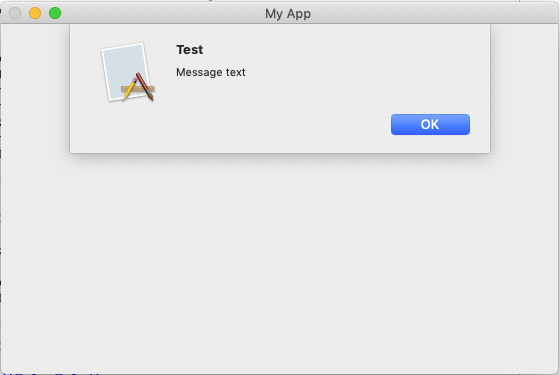 | |
| 8 | 8 | ||
| 9 | 9 | The code below creates the sheet as shown in the above example (Tested working on Mojave and Catalina). | |
| 10 | 10 | ||
| 11 | 11 | ``` pascal | |
| 12 | 12 | unit unit1; | |
| 13 | 13 | ||
| 14 | 14 | {$modeswitch objectivec1} | |
| 15 | 15 | ||
| 16 | 16 | interface | |
| 17 | 17 | ||
| 18 | 18 | uses | |
| 19 | 19 | ... | |
| 20 | 20 | MacOSAll, CocoaAll, LCLType, | |
| 21 | 21 | ... | |
| 22 | 22 | ; | |
| 23 | 23 | ||
| 24 | 24 | type | |
| 25 | 25 | ||
| 26 | 26 | { TForm1 } | |
| 27 | 27 | ||
| 28 | 28 | TForm1 = class(TForm) | |
| 29 | 29 | ... | |
| 30 | 30 | ||
| 31 | 31 | private | |
| 32 | 32 | ||
| 33 | 33 | public | |
| 34 | 34 | ||
| 35 | 35 | end; | |
| 36 | 36 | ||
| 37 | 37 | var | |
| 38 | 38 | Form1: TForm1; | |
| 39 | 39 | ||
| 40 | 40 | implementation | |
| 41 | 41 | ||
| 42 | 42 | {$R *.lfm} | |
| 43 | 43 | ||
| 44 | 44 | { TForm1 } | |
| 45 | 45 | ||
| 46 | 46 | ... | |
| 47 | 47 | ||
| 48 | 48 | procedure ShowAlertSheet(FormHandle: HWND; const TitleStr, MessageStr: string); | |
| 49 | 49 | var | |
| 50 | 50 | tNSStr, mNSStr, okNSStr, fNSStr: NSString; | |
| 51 | 51 | theWindow : NSWindow; | |
| 52 | 52 | theID : id; | |
| 53 | 53 | begin | |
| 54 | 54 | theID := NSView(FormHandle).window; | |
| 55 | 55 | theWindow := NSView(FormHandle).window; | |
| 56 | 56 | ||
| 57 | 57 | tNSStr := NSString(CFStringCreateWithPascalString(kCFAllocatorDefault, TitleStr, kCFStringEncodingUTF8)); // title | |
| 58 | 58 | mNSStr := NSString(CFStringCreateWithPascalString(kCFAllocatorDefault, MessageStr, kCFStringEncodingUTF8));// message | |
| 59 | 59 | okNSStr:= NSString(CFStringCreateWithPascalString(kCFAllocatorDefault, 'OK', kCFStringEncodingUTF8)); // button caption | |
| 60 | 60 | fNSStr := NSString(CFStringCreateWithPascalString(kCFAllocatorDefault, '%@', kCFStringEncodingUTF8)); // format | |
| 61 | 61 | ||
| 62 | 62 | NSBeginAlertSheet(tNSStr,okNSStr,nil,nil,theWindow,theID,nil,nil,nil,fNSStr, mNSStr); | |
| 63 | 63 | end; | |
| 64 | 64 | ||
| 65 | 65 | ... | |
| 66 | 66 | ||
| 67 | 67 | end. | |
| 68 | 68 | ``` | |
| 69 | 69 | ||
| 70 | 70 | You can replace *NSBeginAlertSheet()* for *NSInformationalAlertSheet()* or *NSBeginCriticalAlertSheet()* which have different visual attributes. In particular, when using *NSBeginCriticalAlertSheet()*, the sheet presented to the user is badged with a caution icon. Critical alerts should be used only as specified in the "Alerts" section of the UI Element Guidelines Windows chapter of [macOS Human Interface Guidelines](https://developer.apple.com/library/archive/documentation/UserExperience/Conceptual/OSXHIGuidelines/index.html). | |
| 71 | 71 | ||
| 72 | 72 | To call the **ShowAlertSheet** procedure from, for example, a menu item: | |
| 73 | 73 | ||
| 74 | 74 | ``` pascal | |
| 75 | 75 | procedure TForm1.MenuItem3Click(Sender: TObject); | |
| 76 | 76 | begin | |
| 77 | 77 | ShowAlertSheet(Form1.Handle, 'Test', 'Message text'); | |
| 78 | 78 | end; | |
| 79 | 79 | ``` | |
| 80 | 80 | ||
| 81 | 81 | ## See also | |
| 82 | 82 | ||
| 83 | 83 | - [[macOS Big Sur changes for developers|macOS Big Sur changes for developers - Sheets]] | |
| 84 | 84 | ||
| 85 | 85 | --- | |
| 86 | 86 | *From the Free Pascal wiki, page "Using macOS Sheets", as it stood on 2020-11-29 after a change by Trev, out of the wiki's dump of 2024-05-26. Copyright stays with the author who wrote it, according to the old wiki's [[Licensing]] page. If you have concerns about this material, [message the admin](/wiki-contact).* |