

Revision 1 of 4, by Rlukasiak on 5-24-2024. The page as it is now.
UserSuppliedSchemeSettings
Introduction
It is possible to change how languages are highlighted. Within the IDE, select Tools > Options (or shift-control-d [shift=option-d on Mac) A dialog box will appear. These options are in Editor > Display > Colors.
One color scheme defines the color for all languages. However, in the options, you can specify which scheme to use language by language by using the second drop down menu. So you may override the language highlighting for one specific language by choosing a theme just for this language even if you don't use the rest of the color scheme.
Adding custom schemes
There are many color schemes available by default. However an additional color scheme can be described by an XML file. Additional schemes can be added by copying them into a folder called "userschemes" in the primary-config-path. The list of schemes is determined on Lazarus startup.
To know where the folder is, click on the icon to save/export the selected scheme from the IDE (after the scheme drop down menu). This will popup a dialog with the directory of custom themes. The location may change if you have multiple installations of Lazarus.
Related
Color schemes
This is a selection of user-defined schemes for the Lazarus IDE:
Name
Example
Comments
Default
<img src="Default_ColorScheme.png" title="Default colour scheme" width="240" />
Example of the default color scheme provided with Lazarus 1.2.x
<img src="buenanoche_ColorScheme.png" title="Buena Noche colour scheme" width="240" />
This is the dark theme (black background, white text) that I use. -Seth Grover
<img src="Cyber_ColorScheme.png" title="Cyber colour scheme" width="240" />
Color scheme in the spirit of late mainframe consoles by Control Data Corporation (by jwdietrich)
<img src="Marina_ColorScheme.png" title="Marina colour scheme" width="240" />
by jwdietrich
<img src="Monokai-ColorScheme.png" title="Monokai colour scheme" width="240" />
Try Monospace, size 9, as font, by cpicanco and "icetear"
<img src="RedSand_ColorScheme.png" title="Red Sand colour scheme" width="240" />
Color scheme inspired by the "Red Sands" preset in Apple's terminal shell, by jwdietrich
<img src="Nortonic_ColorScheme.png" title="Nortonic colour scheme" width="240" />
best used with FIXEDSYS or Consolas fonts. By Avra
<img src="ZenBurn_ColorScheme.png" title="Zenburn colour scheme" width="240" />
by cjrh, See also "here"
<img src="Theos_ColorScheme.png" title="Theos colour scheme" width="240" />
I don't know when I have started using this scheme. I was using it in D3-D6, K1-K3. Most people hate it, but I don't feel at home without it ;-) See also "show"

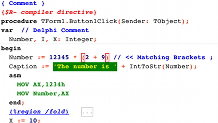
<img src="Solarized_ColorScheme.png" title="Solarized colour scheme" width="240" />
Based on "Solarized" palette by Ask
<img src="Solarized2Day.png" title="Example screen shot of Solarized2 day version" width="240" />
A theme for comfortable coding
Based on "Solarized" palette but edited for better look in Lazarus
<img src="Solarized2Night.png" title="Example screen shot of Solarized2 night version" width="240" />
A theme for comfortable coding
"Edited Solarized2 night version"
<img src="Solarized2NightEdited.png" title="Example screen shot of edited Solarized2 night version." width="240" />
A theme for comfortable coding
<img src="Antarctica-ColourScheme.png" title="Antarctica colour scheme" width="240" />
this is what I use --Zoran
<img src="MellowEvening-ColorScheme.png" title="Mellow Evening color scheme" width="240" />
I created this theme to be easy on the eyes for many hours of continuous coding. --ddsol
<img src="color_scheme.png" title="creaothceann's color scheme" width="240" />
Classic Turbo Pascal colors, but with some modifications.
font: Fixedsys Excelsior
tab size: 8 characters, not replaced by spaces, "cursor skips tabs" enabled
<img src="FOREST.png" title="FOREST" width="240" />
Into The Green :-)
<img src="INTO_THE_BLUE.png" title="INTO THE BLUE" width="240" />
-)
<img src="MEADOW.png" title="SNOW WALKER" width="240" />
If a white background is really necessary
<img src="NEBULA.png" title="NEBULA" width="240" />
N I C E ! ! ! My favorite :-)
<img src="Lazarus-Breeze-Dark-Screenshot.png" title="Breeze Dark" width="240" />
This will fit nicely into the Kubuntu dark standard theme which happens to go by the same name ;-)
<img src="deep_black.png" title="Deep Black" width="240" />
Deep Black by Mariusz Kasperkiewicz where ported from Notepad++ by GintasDX.
<img src="hello_kitty.png" title="Hello Kitty" width="240" />
Hello Kitty theme where ported from Notepad++ by GintasDX.
<img src="obsidian.png" title="Obsidian" width="240" />
Obsidian theme by Joni Eskelinen where ported from Notepad++ by GintasDX.
<img src="GitHub_theme_preview.png" title="Obsidian" width="240" />
Dark theme inspired from GitHub syntax coloring.
<img src="EclipseEditorColors.png" title="Eclipse colour scheme" width="240" />
A dark, high contrast scheme (by 440bx)
<img src="ColorVSCLight_scheme_screenshot.png" title="VS Code Light" width="240" />
Theme inspired by VS Code Light, made by regs01 (original merge request).
<img src="vscode_dark.png" title="VS Code Dark" width="240" />
Theme inspired by VS Code Dark, made by assisdantas (Github repo).
<img src="KurwishDark.png" title="Kurwish Dark" width="240" />
A dark color scheme, clean, neat and featuring subdued colors. (Github repo).
Delphi themes can be exported to Lazarus by using the Delphi IDE Theme Editor.
Mouse setting schemes
Some space to link or upload all the user defined schemes
From the Free Pascal wiki, page "UserSuppliedSchemeSettings", as it stood on 2024-05-24 after a change by Rlukasiak, out of the wiki's dump of 2024-05-26. Copyright stays with the author who wrote it, according to the old wiki's Licensing page. If you have concerns about this material, message the admin.