

uE Controls: what changed
Revision 0 to 1. Removed lines have a minus sign; added lines have a plus sign.
Title: uE Controls
| Old | New | Line | |
|---|---|---|---|
| 1 | + | ### About | |
| 2 | + | ||
| 3 | + |  | |
| 4 | + | ||
| 5 | + | uE Controls is a open source set of instrumentation controls for Lazarus and Free Pascal, compilable under Windows and Linux. It uses the excellent graphic library [[BGRABitmap]]. | |
| 6 | + | ||
| 7 | + | To reset to the default image of each component only clear its image property. | |
| 8 | + | ||
| 9 | + | ### TuERotImage | |
| 10 | + | ||
| 11 | + | 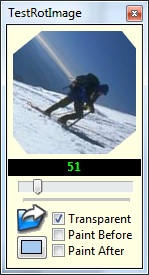 | |
| 12 | + | ||
| 13 | + | TuERotImage is an image viewer control similar to TImage with the ability to show the image rotated at an arbitrary angle. | |
| 14 | + | ||
| 15 | + | ### TuELed | |
| 16 | + | ||
| 17 | + | 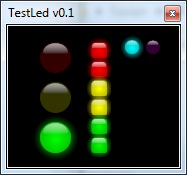 | |
| 18 | + | ||
| 19 | + | TuELed is [LED (Light Emitting Diode)](http://en.wikipedia.org/wiki/Light-emitting_diode) simulation visual control. It contains 2 different shapes (Square and round) LED simulations with ON/OFF, colour selection and automatic off color. | |
| 20 | + | ||
| 21 | + | ### TuETileImage | |
| 22 | + | ||
| 23 | + | TuETileImage allows to put an image as a texture for make beautifuls backgrounds. The image is copied into the canvas automatically to fill the size of the control. | |
| 24 | + | ||
| 25 | + | ### TuETilePanel | |
| 26 | + | ||
| 27 | + | As the TuETileImage but with TPanel properties. | |
| 28 | + | ||
| 29 | + | ### TuEKnob | |
| 30 | + | ||
| 31 | + | 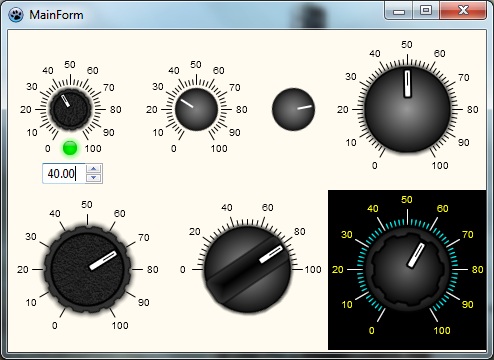 | |
| 32 | + | ||
| 33 | + | This component emulate the rotatory knob seen in some analog devices, designed for professional instrumentation, multimedia or skinned software developers. It has a default look but can load an user image, also have a customizable scale. | |
| 34 | + | ||
| 35 | + | ### TuESelector | |
| 36 | + | ||
| 37 | + | 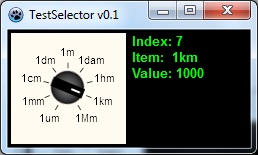 | |
| 38 | + | ||
| 39 | + | This component emulate the rotatory selector, designed for professional instrumentation, multimedia or skinned software developers. It has a default look but can load an user image, also have a customizable scale. | |
| 40 | + | ||
| 41 | + | ### TuEMultiturn | |
| 42 | + | ||
| 43 | + | Allows to have a multiturn (no angle limit) knob. | |
| 44 | + | ||
| 45 | + | ### TuEGauge | |
| 46 | + | ||
| 47 | + | 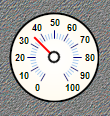 | |
| 48 | + | ||
| 49 | + | Gauge control with loadable image properties for background and Needle, also the range of the angle can be customized. | |
| 50 | + | ||
| 51 | + | ### TuEButton | |
| 52 | + | ||
| 53 | + | 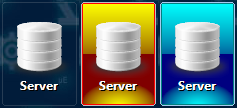 | |
| 54 | + | ||
| 55 | + | - support for load images from object inspector | |
| 56 | + | - can draw default images by it self | |
| 57 | + | - support for Glyphs | |
| 58 | + | - support for button layouts | |
| 59 | + | - shadow for text (use clNone for disable shadow) | |
| 60 | + | - redraw when properties (caption, font, etc.) are changed | |
| 61 | + | ||
| 62 | + | ### More info & Download: | |
| 63 | + | ||
| 64 | + | After installing the *uecontrols.lpk* file, the controls will be available in a separate tab in the Lazarus IDE. | |
| 65 | + | ||
| 66 | + | [uEControls web](http://ue.accesus.com/uecontrols) | |
| 67 | + | ||
| 68 | + | [SourceForge web](http://sourceforge.net/projects/uecontrols/) | |
| 69 | + | ||
| 70 | + | [Official GitHub repository](https://github.com/mriscoc/uEControls) | |
| 71 | + | ||
| 72 | + | ### Installation | |
| 73 | + | ||
| 74 | + | For use these controls you must first download the graphics library **BGRABitmap**: [1](http://wiki.lazarus.freepascal.org/BGRABitmap) [2](https://github.com/bgrabitmap/bgrabitmap/releases) | |
| 75 | + | ||
| 76 | + | --- | |
| 77 | + | *From the Free Pascal wiki, page "uE Controls", as it stood on 2018-02-05 after a change by Mrisco, out of the wiki's dump of 2024-05-26. Copyright stays with the author who wrote it, according to the old wiki's [[Licensing]] page. If you have concerns about this material, [message the admin](/wiki-contact).* | |
| 78 | + | Category: Components |