

Turn warnings and hints on or off: what changed
Revision 2 to 3. Removed lines have a minus sign; added lines have a plus sign.
| Old | New | Line | |
|---|---|---|---|
| 1 | - | ||
| 2 | - | ||
| 3 | - | ||
| 1 | + | There are several ways to control the behavior of warnings in both the Lazarus IDE and in the source code itself. Some warnings and hints are not very useful in a particular case so you want to hide them from view. On the other hand, if you would hide warnings or hints globally, you may want to turn a particular warning or hint explicitly on for a particular piece of your code. | |
| 2 | + | ``` | |
| 4 | 3 | procedure TForm.Button1Click(sender:Tobject); | |
| 5 | - | ||
| 6 | - | ||
| 7 | - | ||
| 8 | - | ||
| 4 | + | begin | |
| 5 | + | // Do something that does not use sender | |
| 6 | + | Form1.Button1.Caption := 'Test'; | |
| 7 | + | end; | |
| 9 | 8 | ``` | |
| 10 | 9 | ||
| 11 | - | ||
| 10 | + | This will generate a hint that parameter sender is not used. Doh. I can see that! Problem is that this hint turns up all over the place and I know what it means. How do I hide them? | |
| 12 | 11 | ||
| 13 | 12 | # Lazarus IDE options | |
| 14 | 13 | ||
| 15 | - | ||
| 14 | + | The Lazarus IDE can control hints and warnings in two ways: | |
| 16 | 15 | ||
| 17 | - | ||
| 18 | - | ||
| 16 | + | * Globally through the Project Options menu | |
| 17 | + | * Using an IDE macro | |
| 19 | 18 | ||
| 20 | 19 | ## Global IDE option | |
| 21 | 20 | ||
| 22 | - | ||
| 21 | + | Go to the Project Options->Compiler Options->Messages and uncheck 'Hint:Paramater "$1" not used'. | |
| 23 | 22 | ||
| 24 | - | ||
| 25 | - | ||
| 23 | + | This will turn of this particular hint for your whole project. | |
| 24 | + | If you would like to turn off this hint for all your projects, you can check the left bottom checkbox 'Set compiler options as default'. | |
| 26 | 25 | ||
| 27 | - | ||
| 26 | + | [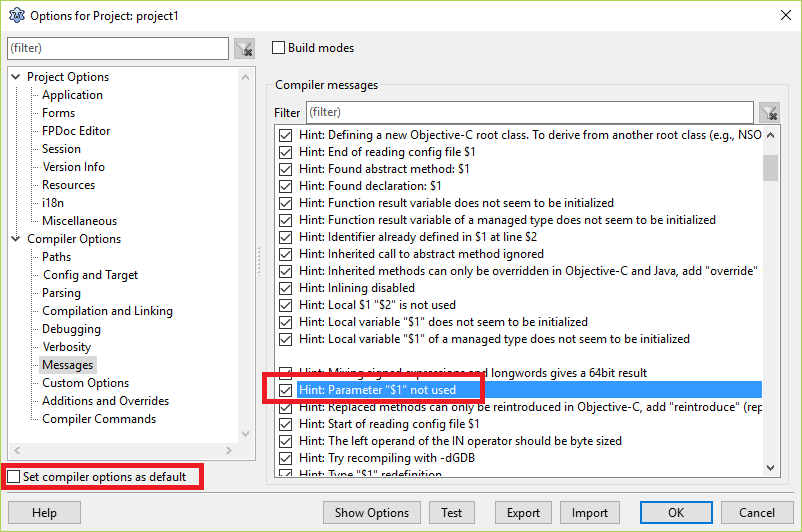](</File:lazarusglobal.png>) | |
| 28 | 27 | ||
| 29 | 28 | ## Local IDE option | |
| 30 | 29 | ||
| 31 | - | ||
| 32 | - | ||
| 33 | - | ||
| 34 | - | ||
| 35 | - | ||
| 36 | - | ||
| 30 | + | In the Lazarus IDE you can make use of the {%H-} IDE macro to turn hints off for a particular parameter. | |
| 31 | + | Of course {%H+} will turn hints on. | |
| 37 | 32 | ``` | |
| 33 | + | procedure FormMouseDown(Sender: TObject; {%H-}Button: TMouseButton; | |
| 34 | + | {%H-}Shift: TShiftState; {%H-}X, {%H-}Y: Integer); | |
| 35 | + | ``` | |
| 38 | 36 | ||
| 39 | - | ||
| 37 | + | Note that this turns off ALL hints for that parameter, not just the 'is not used' hint, so be careful. | |
| 40 | 38 | ||
| 41 | 39 | # Source code and compiler options | |
| 42 | 40 | ||
| 43 | - | ||
| 41 | + | The options as described above will only work within the Lazarus IDE. | |
| 44 | 42 | ||
| 45 | - | ||
| 43 | + | It won't work in any other IDE, not even de FPC textmode IDE. The compiler output will still emit warnings and hints. | |
| 46 | 44 | ||
| 47 | - | ||
| 45 | + | Luckily there are several other options to control hints and warnings in the source code itself. | |
| 48 | 46 | ||
| 49 | 47 | ## Control all warnings per unit: | |
| 50 | 48 | ||
| 51 | - | ||
| 52 | - | ||
| 53 | - | ||
| 49 | + | Add | |
| 50 | + | ``` | |
| 54 | 51 | {$warnings off} | |
| 55 | 52 | ``` | |
| 56 | 53 | ||
| 57 | - | ||
| 58 | - | ||
| 59 | - | ||
| 54 | + | or resp. | |
| 55 | + | ``` | |
| 60 | 56 | {$warnings on} | |
| 61 | 57 | ``` | |
| 62 | 58 | ||
| 63 | - | ||
| 59 | + | just after the unit name. | |
| 64 | 60 | ||
| 65 | 61 | ## Control all hints per unit: | |
| 66 | 62 | ||
| 67 | - | ||
| 68 | - | ||
| 69 | - | ||
| 63 | + | Add | |
| 64 | + | ``` | |
| 70 | 65 | {$hints off} | |
| 71 | 66 | ``` | |
| 72 | 67 | ||
| 73 | - | ||
| 74 | - | ||
| 75 | - | ||
| 68 | + | or resp. | |
| 69 | + | ``` | |
| 76 | 70 | {$hints on} | |
| 77 | 71 | ``` | |
| 78 | 72 | ||
| 79 | - | ||
| 73 | + | just after the unit name. | |
| 80 | 74 | ||
| 81 | 75 | ## Control specific warnings: | |
| 82 | 76 | ||
| 83 | - | ||
| 84 | - | ||
| 85 | - | ||
| 77 | + | Add | |
| 78 | + | ``` | |
| 86 | 79 | {$warn <number> off} | |
| 87 | 80 | ``` | |
| 88 | 81 | ||
| 89 | - | ||
| 90 | - | ||
| 91 | - | ||
| 82 | + | just after the unit name. See the example below. You can also use this construct if you want all warnings off but some specific warning(s) on: | |
| 83 | + | ``` | |
| 92 | 84 | {$warnings off}{$warn <number> on} | |
| 93 | 85 | ``` | |
| 94 | 86 | ||
| 95 | 87 | ## Control Specific Warnings or hints per piece of code: | |
| 96 | 88 | ||
| 97 | - | ||
| 98 | - | ||
| 99 | - | ||
| 89 | + | You can control this very finely grained by using {$push} and {$pop} around a block of code. This does not have to be a method body as long it is a block, e.g. begin/end,repeat/until,/while do, try/finally etc. | |
| 90 | + | ``` | |
| 100 | 91 | procedure withunusedparameter(const testme:integer); | |
| 101 | - | ||
| 102 | - | ||
| 103 | - | ||
| 104 | - | ||
| 105 | - | ||
| 106 | - | ||
| 107 | - | ||
| 108 | - | ||
| 92 | + | {$push}{$warn 5024 off} | |
| 93 | + | begin | |
| 94 | + | // | |
| 95 | + | end; | |
| 96 | + | {$pop} | |
| 97 | + | begin | |
| 98 | + | withunusedparameter(100); | |
| 99 | + | end. | |
| 109 | 100 | ``` | |
| 110 | 101 | ||
| 111 | 102 | # Obtaining the warnings and hints numbers to suppress | |
| 112 | 103 | ||
| 113 | - | ||
| 104 | + | You can obtain the needed numbers by compiling your code once with line info on and with -vwhilq | |
| 114 | 105 | ||
| 115 | - | ||
| 106 | + | This will show both the numbers and the messages and the line numbers where they are found. | |
| 116 | 107 | ||
| 117 | - | ||
| 108 | + | The other way to obtain hint, notice or warning number is to search inside FP repository for source of your current FPC version. | |
| 118 | 109 | ||
| 119 | - | ||
| 110 | + | All of the messages with its own description is stored in <FPC source dir>/msg/error<language>.msg | |
| 120 | 111 | ||
| 121 | - | ||
| 112 | + | Note: the language codes are not all the same as the standard [[Language Codes|ISO 639-1 2-letter language codes]]. The current files are: | |
| 122 | 113 | ||
| 123 | - | ||
| 114 | + | | File Name | Language | |
| 115 | + | ---|--- | |
| 116 | + | errorct.msg | Catalan / català | |
| 117 | + | errord.msg | German / Deutsch (alternative, US-DOS) | |
| 118 | + | errorda.msg | Danish / dansk | |
| 119 | + | errordu.msg | German / Deutsch (UTF-8) | |
| 120 | + | errore.msg | English (default) | |
| 121 | + | errores.msg | Spanish / Español (CP 28605) | |
| 122 | + | errorf.msg | French / français (CP 850) | |
| 123 | + | | File Name | Language | |
| 124 | + | ---|--- | |
| 125 | + | errorfi.msg | French / français (ISO 8859-1) | |
| 126 | + | errorhe.msg | Hebrew / עִברִית (CP 1255) | |
| 127 | + | errorheu.msg | Hebrew / עִברִית (UTF-8) | |
| 128 | + | errorid.msg | Indondesian / Indonesia | |
| 129 | + | erroriu.msg | Italian / italiana | |
| 130 | + | errorn.msg | Dutch / Nederlands | |
| 131 | + | errorpl.msg | Polish / Polski (CP 852) | |
| 132 | + | | File Name | Language | |
| 133 | + | ---|--- | |
| 134 | + | errorpli.msg | Polish / Polski | |
| 135 | + | errorpt.msg | Portugese / portuguesa (CP 850) | |
| 136 | + | errorptu.msg | Portugese / portuguesa (UTF-8) | |
| 137 | + | errorr.msg | Russian / russa (CP 866) | |
| 138 | + | errorru.msg | Russian / russa (UTF-8) | |
| 139 | + | errorues.msg | Spanish / Español (CP 65001) | |
| 140 | + | ||
| 141 | + | This file also has a header, which provides explanation how error/notice/hint/warning constants are constructed. | |
| 124 | 142 | ||
| 125 | - | ||
| 143 | + | For the English language it contains the following: | |
| 144 | + | ``` | |
| 126 | 145 | # CodePage 20127 | |
| 127 | - | ||
| 128 | - | ||
| 129 | - | ||
| 130 | - | ||
| 131 | - | ||
| 132 | - | ||
| 133 | - | ||
| 134 | - | ||
| 135 | - | ||
| 136 | - | ||
| 137 | - | ||
| 138 | - | ||
| 139 | - | ||
| 140 | - | ||
| 141 | - | ||
| 142 | - | ||
| 143 | - | ||
| 144 | - | ||
| 145 | - | ||
| 146 | - | ||
| 147 | - | ||
| 148 | - | ||
| 149 | - | ||
| 150 | - | ||
| 151 | - | ||
| 152 | - | ||
| 153 | - | ||
| 154 | - | ||
| 155 | - | ||
| 156 | - | ||
| 157 | - | ||
| 158 | - | ||
| 159 | - | ||
| 160 | - | ||
| 161 | - | ||
| 162 | - | ||
| 146 | + | ||
| 147 | + | # | |
| 148 | + | # The constants are build in the following order: | |
| 149 | + | # <part>_<type>_<txtidentifier> | |
| 150 | + | # | |
| 151 | + | # <part> is the part of the compiler the message is used | |
| 152 | + | # asmr_ assembler parsing | |
| 153 | + | # asmw_ assembler writing/binary writers | |
| 154 | + | # unit_ unit handling | |
| 155 | + | # option_ command line parameter parsing | |
| 156 | + | # scan_ scanner | |
| 157 | + | # parser_ parser | |
| 158 | + | # type_ type checking | |
| 159 | + | # general_ general info | |
| 160 | + | # exec_ calls to assembler, external linker, binder | |
| 161 | + | # link_ internal linker | |
| 162 | + | # package_ package handling | |
| 163 | + | # | |
| 164 | + | # <type> the type of the message it should normally used for | |
| 165 | + | # f_ fatal error | |
| 166 | + | # e_ error | |
| 167 | + | # w_ warning | |
| 168 | + | # n_ note | |
| 169 | + | # h_ hint | |
| 170 | + | # i_ info | |
| 171 | + | # l_ add linenumber | |
| 172 | + | # u_ used | |
| 173 | + | # t_ tried | |
| 174 | + | # c_ conditional | |
| 175 | + | # d_ debug message | |
| 176 | + | # x_ executable informations | |
| 177 | + | # o_ normal (e.g., "press enter to continue") | |
| 178 | + | # | |
| 179 | + | # <type> can contain a minus sign at the beginning to mark that | |
| 180 | + | # the message is off by default. Look at type_w_explicit_string_cast | |
| 181 | + | # for example. | |
| 163 | 182 | ``` | |
| 164 | 183 | ||
| 165 | - | ||
| 166 | - | ||
| 167 | - | ||
| 184 | + | So, to find your warning/notice/etc, you just need to search the message body. For the example, it can be <unit "Pas2Js.pas" not used in main.pas>, to find this warning, you need to replace all of the local data in message body with $< data number >, | |
| 185 | + | ``` | |
| 168 | 186 | for this situation it will be: <Unit "$1" not used in $2>; | |
| 169 | 187 | ``` | |
| 170 | 188 | ||
| 171 | - | ||
| 172 | - | ||
| 173 | - | ||
| 189 | + | After that, you can find the required message just by finding its body in errors<language>.msg file, you will find the following: | |
| 190 | + | ``` | |
| 174 | 191 | sym_n_unit_not_used=05023_H_Unit "$1" not used in $2 | |
| 175 | - | ||
| 192 | + | % The unit referenced in the \var{uses} clause is not used. | |
| 176 | 193 | ``` | |
| 177 | 194 | ||
| 178 | - | ||
| 179 | - | ||
| 180 | - | ||
| 195 | + | So, the actual notice number is 05023. | |
| 181 | 196 | ||
| 182 | - | ||
| 197 | + | Based on that number you can decide to suppress the warning or hint globally, per unit or per routine, depending on what you need. | |
| 183 | 198 | ||
| 184 | - | ||
| 199 | + | For example, if you want to suppress unused parameters you can subsequently compile with -vm5024. | |
| 185 | 200 | ||
| 186 | - | ||
| 201 | + | With the -vm compiler option you can use multiple warning and hint numbers separated by a comma. Or you can write: | |
| 202 | + | ``` | |
| 187 | 203 | {$warn 5024 off} | |
| 188 | 204 | ``` | |
| 189 | 205 | ||
| 190 | - | ||
| 206 | + | This needs to be done for each number separately. | |
| 191 | 207 | ||
| 192 | - | ||
| 208 | + | See also: | |
| 193 | 209 | ||
| 210 | + | Directives, definitions and conditionals definitions | |
| 211 | + | --- | |
| 212 | + | [[global compiler directives]] • [[local compiler directives]] · [[Conditional Compiler Options]] • [[Conditional compilation]] • [[Macros and Conditionals]] • [[Platform defines]] · [[$IF]] | |
| 213 | + | ||
| 194 | 214 | --- | |
| 195 | - | ||
| 215 | + | *From the Free Pascal wiki, page "Turn warnings and hints on or off", as the Internet Archive kept it on 2025-02-11, last changed on 2024-10-10. Copyright stays with the author who wrote it, according to the old wiki's [[Licensing]] page. If you have concerns about this material, [message the admin](/wiki-contact).* |