

TsWorksheetChartSource: what changed
Revision 0 to 1. Removed lines have a minus sign; added lines have a plus sign.
Title: TsWorksheetChartSource
| Old | New | Line | |
|---|---|---|---|
| 1 | + | ## Overview | |
| 2 | + | ||
| 3 | + | TsWorksheetChartSource is a charting component which is available in the source code of the [[FPSpreadsheet]] library. It is a chart data source component designed to work with the TChart component from the [[TAChart|TAChartLazarusPkg package]], which usually comes pre-installed with Lazarus. | |
| 4 | + | ||
| 5 | + | ## Usage | |
| 6 | + | ||
| 7 | + | At the moment TsWorksheetChartSource has the following properties to control its behavior: | |
| 8 | + | ||
| 9 | + | ``` pascal | |
| 10 | + | published | |
| 11 | + | property PointsNumber: Integer read FPointsNumber write SetPointsNumber default 0; | |
| 12 | + | property XFirstCellCol: Integer read FXFirstCellCol write SetXFirstCellCol default 0; | |
| 13 | + | property XFirstCellRow: Integer read FXFirstCellRow write SetXFirstCellRow default 0; | |
| 14 | + | property YFirstCellCol: Integer read FYFirstCellCol write SetYFirstCellCol default 0; | |
| 15 | + | property YFirstCellRow: Integer read FYFirstCellRow write SetYFirstCellRow default 0; | |
| 16 | + | property XSelectionDirection: TsSelectionDirection read FXSelectionDirection write SetXSelectionDirection; | |
| 17 | + | property YSelectionDirection: TsSelectionDirection read FYSelectionDirection write SetYSelectionDirection; | |
| 18 | + | end; | |
| 19 | + | ``` | |
| 20 | + | ||
| 21 | + | The Chart will display an amount of PointsNumber points, being that on the coordinates of the X-Axis will be collected from the worksheet starting in the position (XFirstCellRow, XFirstCellCol). Subsequent X-Axis values will be taken from the cells directly to the right of the first cell, if XSelectionDirection has value fpsHorizontalSelection, or below the first cell, if XSelectionDirection has value fpsVerticalSelection. The values will be taken in sequence so if another layout of the data exists, such as each second cell or going up, it can be created by copying the relevant data to a new TsWorksheet. | |
| 22 | + | ||
| 23 | + | The same is valid for the Y-Axis value, but applies to the properties YFirstCellCol, YFirstCellRow and YSelectionDirection. The property PointsNumber is valid for both axis. | |
| 24 | + | ||
| 25 | + | Be careful that if a value could not be read from the worksheet it's value will be considered zero. | |
| 26 | + | ||
| 27 | + | The values for Worksheet coordinates use the same values as the FPSpreadsheet API, that is, they are zero-based. So, for example, to select the cell B2 as the starting position for X-Axis values the following values should be used: XFirstCellCol = 1 and XFirstCellRow = 1 | |
| 28 | + | ||
| 29 | + | ## Example | |
| 30 | + | ||
| 31 | + | A simple example is present in the fpspreadsheet svn repository, located at fpspreadsheet/examples/fpchart/fpchart.lpi | |
| 32 | + | ||
| 33 | + | Please see the image below to see how the components are connected at design time. The TChart component can be edited by double-clicking. Then use the menus of the editor to add a new line series and connect this line series to our WorksheetChartSource by setting its Source property. | |
| 34 | + | ||
| 35 | + | 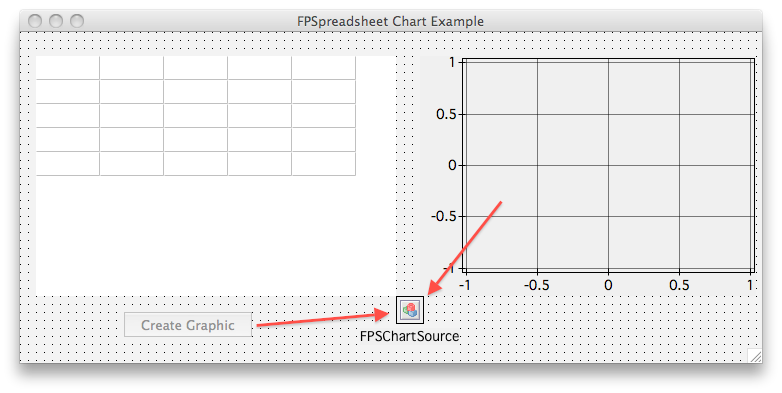 | |
| 36 | + | ||
| 37 | + | To load the data from the grid and into the chart, a button was created with the following code. Notice that we can't just use any Grid, it has to be an FPSpreadsheet Grid, which has the class TsWorksheetGrid: | |
| 38 | + | ||
| 39 | + | ``` pascal | |
| 40 | + | type | |
| 41 | + | ||
| 42 | + | { TFPSChartForm } | |
| 43 | + | ||
| 44 | + | TFPSChartForm = class(TForm) | |
| 45 | + | btnCreateGraphic: TButton; | |
| 46 | + | MyChart: TChart; | |
| 47 | + | FPSChartSource: TsWorksheetChartSource; | |
| 48 | + | MyChartLineSeries: TLineSeries; | |
| 49 | + | WorksheetGrid: TsWorksheetGrid; | |
| 50 | + | procedure btnCreateGraphicClick(Sender: TObject); | |
| 51 | + | private | |
| 52 | + | { private declarations } | |
| 53 | + | public | |
| 54 | + | { public declarations } | |
| 55 | + | end; | |
| 56 | + | ||
| 57 | + | ... | |
| 58 | + | ||
| 59 | + | procedure TFPSChartForm.btnCreateGraphicClick(Sender: TObject); | |
| 60 | + | begin | |
| 61 | + | FPSChartSource.LoadFromWorksheetGrid(WorksheetGrid); | |
| 62 | + | end; | |
| 63 | + | ``` | |
| 64 | + | ||
| 65 | + | And finally we can see how this works nicely in a running application in the picture below: | |
| 66 | + | ||
| 67 | + | 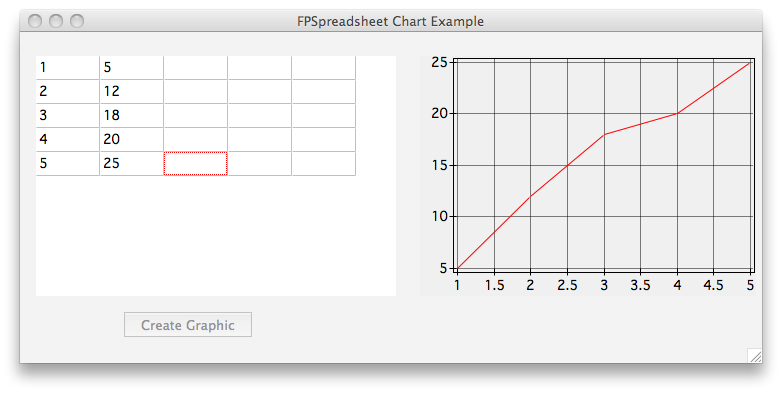 | |
| 68 | + | ||
| 69 | + | ## See also | |
| 70 | + | ||
| 71 | + | - [[FPSpreadsheet]] | |
| 72 | + | ||
| 73 | + | --- | |
| 74 | + | *From the Free Pascal wiki, page "TsWorksheetChartSource", as it stood on 2020-03-02 after a change by Trev, out of the wiki's dump of 2024-05-26. Copyright stays with the author who wrote it, according to the old wiki's [[Licensing]] page. If you have concerns about this material, [message the admin](/wiki-contact).* |