

TortoiseSvn
Usage
TortoiseSVN integrates itself with Windows Explorer. After installation, all commands are available from inside Windows Explorer through right-clicking on a directory or file.
Check out a working copy using TortoiseSVN, go to Run and paste the command below:
tsvn:https://svn.freepascal.org/svn/lazarus/trunk
To get Lazarus for the first time:
- Open Windows Explorer
- Create a directory where you want to put the files from the SVN server
- Right click on the newly created directory
- Select SVN Checkout... on the popup menu
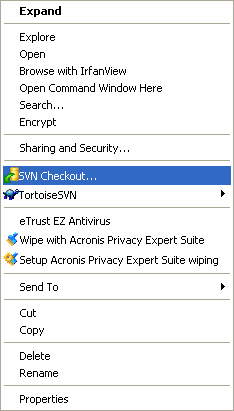
- In the next dialog you enter the URL for Lazarus server source:
https://svn.freepascal.org/svn/lazarus/trunk
- Watch how TortoiseSVN imports the file tree from the server. This can take some time to complete.
To update Lazarus sources:
- Open Windows Explorer
- Right click on the source directory
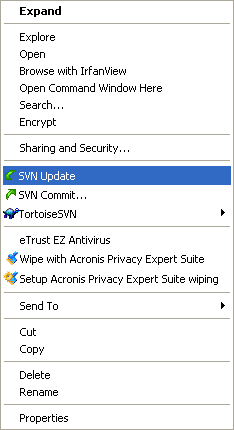
- Select SVN Update on the popup menu
Troubleshooting
TortoiseSvn includes a svn command line version, too. If you get an error
- svn command not found
or similar then most probably you do not have svn.exe in your PATH environment variable. The following steps should fix this problem:
Temporarily add svn directory to path
- Locate svn.exe using the Find Files feature of your Start menu.
- Once you have located svn.exe you need to add the directory it is in to your PATH.
As an example: From the command prompt type:
set PATH=%PATH%;"C:\Program Files\TortoiseSVN\"Note: The directory containing svn.exe might not be the same on your computer as the one used in this document. It is used here only as an example.
Permanently add svn directory to path
While this section is optional, it saves you from changing the path all the time. You can add this directory to your PATH by:
- Right-Clicking on "My Computer"
- Select "Properties"
- Choose the "Advanced" tab.
- Click the "Environment Variables" button.
- Locate the "Path" line in "System Variables" and add: ;"C:\Program Files\TortoiseSVN\" to the end.
Note: Your directory containing svn.exe might not be the same on your computer as the one used in this document. It is used here only as an example.
From the Free Pascal wiki, page "TortoiseSvn", as it stood on 2018-12-30 after a change by Thaddy, out of the wiki's dump of 2024-05-26. Copyright stays with the author who wrote it, according to the old wiki's Licensing page. If you have concerns about this material, message the admin.
Talk about this page
Nobody has opened a bench for this page yet. Sign in to open one.