

Theme library
What is a Theme manager?
The Theme manager was originally created by Mike Lischke (see http://www.soft-gems.net/) to enable Windows XP theme painting in Borland Delphi and Borland C++ Builder applications.
Why do we need a Theme manager?
It gives the ability to have ownerdraw controls with the same look and feel as native controls.
What ownerdraw controls do we have?
- TCustomSpeedButton descendants (TSpeedButton)
- TCustomSplitter descendants (TSplitter)
- TCustomGrid descendants (TStringGrid, TDBGrid)
- TCustomUpDown descendants (TUpDown)
- ...
What is the current state of implementation?
Windows XP and Vista applications with manifest - fully implemented since theme manager originally created for Windows XP.
| Element | default | gtk | gtk2 | carbon | qt | Used in components |
|---|---|---|---|---|---|---|
| teButton | Partially Implemented | Partially Implemented | Partially Implemented | Partially Implemented | Partially Implemented | TSpeedButton |
| teHeader | Partially Implemented | Partially Implemented | Partially Implemented | Not Implemented | Partially Implemented | TCustomGrid |
| teRebar | Partially Implemented | Partially Implemented | Partially Implemented | Partially Implemented | Not Implemented | TSplitter |
| teToolBar | Partially Implemented | Partially Implemented | Partially Implemented | Partially Implemented | Partially Implemented | TSpeedButton |
How to use ThemeServices class for painting?
Simply proceed as follows. Create an empty form and paint a push button on it with normal state.
 unit Unit1;
 {$mode objfpc}{$H+}

 interface
 uses
   Classes, SysUtils, LResources, Forms, Controls, Graphics;

 type
   TForm1 = class(TForm)
   private
     { private declarations }
   public
     procedure Paint; override;
   end;

 var
   Form1: TForm1;

 implementation
 {$R manifest.res}

 uses
   LCLType, Themes;

 procedure TForm1.Paint;
 var
   Details: TThemedElementDetails;
   PaintRect: TRect;
 begin
   inherited Paint;
   PaintRect := Rect(10, 10, 80, 50);
   Details := ThemeServices.GetElementDetails(tbPushButtonNormal);
   ThemeServices.DrawElement(Canvas.Handle, Details, PaintRect, nil);
   PaintRect := ThemeServices.ContentRect(Canvas.Handle, Details, PaintRect);
   ThemeServices.DrawText(Canvas, Details, 'Test caption', PaintRect,
     DT_CENTER or DT_VCENTER or DT_SINGLELINE, 0);
 end;

 initialization
   {$I unit1.lrs}
 end.
And the result will look so:
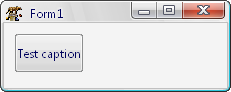
--Paul Ishenin 20:31, 9 June 2007 (CEST)
From the Free Pascal wiki, page "Theme library", as it stood on 2020-01-29 after a change by Bart, out of the wiki's dump of 2024-05-26. Copyright stays with the author who wrote it, according to the old wiki's Licensing page. If you have concerns about this material, message the admin.
Talk about this page
Nobody has opened a bench for this page yet. Sign in to open one.