

TXMLPropStorage: what changed
Revision 0 to 1. Removed lines have a minus sign; added lines have a plus sign.
Title: TXMLPropStorage
| Old | New | Line | |
|---|---|---|---|
| 1 | + | **TXMLPropStorage**  is a component to save and restore selected properties (either [[TForm]] or any control on it). It works with the [[doc:lcl/forms/tform.sessionproperties.html|TForm.SessionProperties]] property. It is available on the [[Misc tab]] of the [[Component Palette]]. | |
| 2 | + | ||
| 3 | + | ## Basic Usage | |
| 4 | + | ||
| 5 | + | 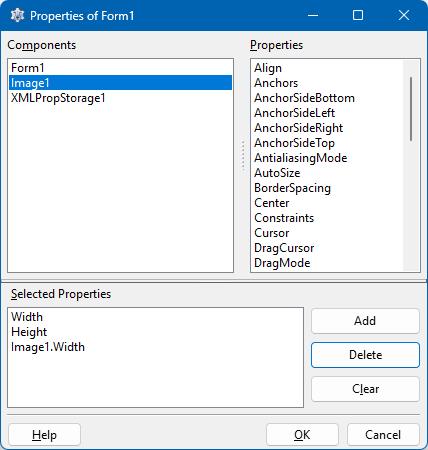 | |
| 6 | + | ||
| 7 | + | - Drop a `TXMLPropStorage` component on the form and set the `Filename` property as needed, for example: `session.xml`. The `FileName` even can be left empty - see below. | |
| 8 | + | - Select the form, go to the Object Inspector and select the property [[doc:lcl/forms/tform.sessionproperties.html|SessionProperties]]. There are two ways to enter here the properties to be stored: | |
| 9 | + | ||
| 10 | + | 1. Click on the ellipsis button '...' next to the property to open the SessionProperties editor. The components of the form are displayed in the left list "Components". Select the first component for which you want to store a property - the published properties of the selected component appear in the right list, "Properties". Select here the property to be stored and click "Add". Now the property is listed in the bottom listbox, "Selected Properties". Repeat with other properties of the selected component, and repeat with other components. If you changed your mind and want to removed one specific property from the "Selected Properties" list, select it and click "Delete". "Clear" deletes the entire "Selected Properties" list. | |
| 11 | + | 2. The selected properties are displayed as a semi-colon separated string in the `SessionProperties` line of the Object Inspector. Instead of using the SessionProperties editor you can also type here the names of the properties to be stored. Subproperties or properties of components on the form must be listed in dot-notation. Example: `Width;Height;Image1.Width`. | |
| 12 | + | ||
| 13 | + | - Compile and run the application. Your application now will store the selected properties in the session file when the application terminates, and it will read them when it is restarted another time and it will apply them automatically at runtime. | |
| 14 | + | ||
| 15 | + | The [[TINIPropStorage]] and [[TJsonPropStorage]] components work in the same way as `TXMLPropStorage`. The only difference is that they store the session information in an [IniFile](http://lazarus-ccr.sourceforge.net/docs/fcl/inifiles/index.html) or a JSON file, respectively. | |
| 16 | + | ||
| 17 | + | ## StoredValues property | |
| 18 | + | ||
| 19 | + | `TXMLPropStorage` has a `StoredValues` property which allows to store non-published properties or other values; this can be useful to avoid an additional configuration file. | |
| 20 | + | ||
| 21 | + | Let's write a simple demo which uses a `TCheckGroup`. It has a `Checked[index]` property with the information whether the item at the given index is checked or not. This property, however, is only public and thus is not seen by the automatic storage mechanism of the PropStorage components considering only published properties. By means of the `StoredValues` property of `TXMLPropStorage`, however, this can be done manually: | |
| 22 | + | ||
| 23 | + | - Run Lazarus and start a new application. | |
| 24 | + | - Drop a `TXMLPropStorage` and `TCheckGroup` component. | |
| 25 | + | - Add some items to the `TCheckGroup`. | |
| 26 | + | - Click in `XMLPropStorage1` and access the `StoredValues` node in the object tree above the object inspector. | |
| 27 | + | - Right-click on this node and select "Add item" to add new value with an arbitrary, but unique `Name` (e.g. `CheckGroup1.Item0_Checked`) and the corresponding initial \<tt\<Value = `true`. Repeat accordingly with the other items. | |
| 28 | + | - In the `OnRestoreProperties` event add this code: | |
| 29 | + | ||
| 30 | + | ``` pascal | |
| 31 | + | CheckGroup1.Checked[0] := StrToBool(XMLPropStorage1.StoredValue['CheckGroup1.Item0_Checked']); | |
| 32 | + | CheckGroup1.Checked[1] := StrToBool(XMLPropStorage1.StoredValue['CheckGroup1.Item1_Checked']); | |
| 33 | + | ``` | |
| 34 | + | ||
| 35 | + | - In the `OnSavingProperties` event add this code (do NOT use the `OnSaveProperties`!): | |
| 36 | + | ||
| 37 | + | ``` pascal | |
| 38 | + | XMLPropStorage1.StoredValue['CheckGroup1.Item0_Checked'] := BoolToStr(CheckGroup1.Checked[0], true); | |
| 39 | + | XMLPropStorage1.StoredValue['CheckGroup1.Item1_Checked'] := BoolToStr(CheckGroup1.Checked[1], true); | |
| 40 | + | ``` | |
| 41 | + | ||
| 42 | + | - Run the demo program, change the checked properties of the `CheckGroup`, close the form and re-open it. Your changes are saved and restored! | |
| 43 | + | ||
| 44 | + | You can set a value for the *KeyString* property of `StoredValue[n]` if you're saving some confidental information (it uses XOREncode and XORDecode functions of RTL on saving and restoring routines). | |
| 45 | + | ||
| 46 | + | ## Property Storage on Frames | |
| 47 | + | ||
| 48 | + | The `TXMLPropStorage` works only on forms by default. To use it on frames, some manual coding has to be done. | |
| 49 | + | ||
| 50 | + | - Place a `TXMLPropStorage` on the frame. | |
| 51 | + | - Set the property `RootNodePath` to something like `TApplication/Frame1`. Without setting this property, TXMLPropStorage won't find the saved values upon loading. If you want to reuse the frame multiple times and save the diffrent settings, you should set this in the frame's constructor depending on the situation. | |
| 52 | + | - Set the property `SessionProperties` of the frame in the frames constructor. | |
| 53 | + | - Call `Restore` in the frame's constructor and `Save` in the frame's destructor. | |
| 54 | + | ||
| 55 | + | ``` pascal | |
| 56 | + | constructor TFrame1.Create(TheOwner: TComponent); | |
| 57 | + | begin | |
| 58 | + | inherited Create(TheOwner); | |
| 59 | + | SessionProperties := 'Panel1.Width;Panel3.Width'; | |
| 60 | + | XMLPropStorage1.RootNodePath := 'TApplication/Frame1'; // if the frame is used multiple times and shall not share their settings, set an individual value for each instance | |
| 61 | + | XMLPropStorage1.Restore; | |
| 62 | + | end; | |
| 63 | + | ||
| 64 | + | destructor TFrame1.Destroy; | |
| 65 | + | begin | |
| 66 | + | XMLPropStorage1.Save; | |
| 67 | + | inherited Destroy; | |
| 68 | + | end; | |
| 69 | + | ``` | |
| 70 | + | ||
| 71 | + | ## Notes | |
| 72 | + | ||
| 73 | + | `TXMLPropStorage` has a default handler if you don't set a `FileName`. | |
| 74 | + | ||
| 75 | + | - Under Windows the settings will be saved in the application directory as PROGRAMNAME.xml. | |
| 76 | + | - Under Unix/Linux/macOS it will be saved in the home directory of the current user as .PROGRAMNAME | |
| 77 | + | ||
| 78 | + | It is therefore a very good idea to leave the filename blank for unix programs meant to be run by normal users. | |
| 79 | + | ||
| 80 | + | According to bug report [13949, note 28856](http://bugs.freepascal.org/view.php?id=13949): "The StoredValues\[\] array can only be used during the OnRestoreProperties or OnSaveProperties events. Outside these events, the values will not be stored." and "If you want to save/load values that are not published properties of a component or control, you should save them in a OnSaveProperties event, and load them using the OnRestoreProperties event." | |
| 81 | + | ||
| 82 | + | ## See also | |
| 83 | + | ||
| 84 | + | - [[TINIPropStorage]] | |
| 85 | + | - [[TJsonPropStorage]] | |
| 86 | + | - [[doc:lcl/xmlpropstorage/txmlpropstorage.html|TXMLPropStorage doc]] | |
| 87 | + | - [[doc:lcl/forms/tform.sessionproperties.html|SessionProperties doc]] | |
| 88 | + | ||
| 89 | + | --- | |
| 90 | + | *From the Free Pascal wiki, page "TXMLPropStorage", as it stood on 2023-10-14 after a change by Wp, out of the wiki's dump of 2024-05-26. Copyright stays with the author who wrote it, according to the old wiki's [[Licensing]] page. If you have concerns about this material, [message the admin](/wiki-contact).* |