

TValueListEditor
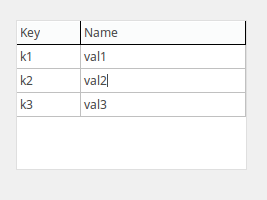 A TValueListEditor
 is a component that provides a box with key-value-pairs that is user editable. It is available from the Additional tab of the Component Palette. A TValueListEditor acts similar as two-column TStringGrid.
The key-value-pairs are provided in the property Strings, a TValueListString type.
Counts and indices
TValueListEditor may have column head or column title row, which is similar to fixed row of TStringGrid. You can set this visible or not by setting doColumnTitles (this is in DisplayOptions) to true or false.
RowCount property is number of rows including title row.
There should be always one VISIBLE row except title row, even a blank row in TValueListEditor. So the minimum RowCount is 2 if column titles are visible, and 1 if column titles are not visible.
The content of TValueListEditor is stored in its Strings property. When there is only one blank row in the visible TValueListEditor, its Strings.Count=1. But if you call TValueListEditor.Clear, then its Strings.Count becomes 0.
So, the number of key-value-pairs is not exactly the same as RowCount. It is the same as Strings.count.
Index of currently selected row is returned as property Row (or you may set its value in the program). Assuming that column titles are visible, the index of first row just below column titles is 1.
Miscellanies
function InsertRow(const Key, Value:string;append:boolean): integer;
- There is an append parameter. If set true, new row is inserted after current row, not at the end of whole list of pairs.
- In order to append a new string at the end of the whole list, users may call TValueListEditor.Strings.Append procedure or TValueListEditor.Strings.Add function. But there is a very tricky issue. When there is only one single empty row (i.e. no key-value pair exist), TValueListEditor.InsertRow will fill in the first blank row. But Strings.Add or Strings.Append will append a new visible row next to the blank row, which results to RowCount=3.
- The returned function result value is index within Strings property (zero-based). If column title row is visible, returned value is less than Row property by 1.
Event handlers of OnBeforeSelection and OnSelection
When you change row selection, OnBeforeSelection and OnSelection events may be called, if assigned. Procedures are:
procedure TForm1.ValueListEditorBeforeSelection(Sender: TObject; aCol, aRow: Integer);
procedure TForm1.ValueListEditorSelection(Sender: TObject; aCol, aRow: Integer);
OnBeforeSelection is called first, and then OnSelection is called. This allows uses to do something with focus-losing row, before new row is selected. This feature is provided with many list-related components, including TListView, TTreeView, etc. But in the two procedures above, value of one parameter, aRow is the same, which is indexing newly selected row. It's not possible to do anything with old row with aRow parameter. Instead, users may use Row property, which will index old row.
Let's asume that you have changed focus from row 10 to row 4, by clicking on row 4. Value of parameter aRow is 4 (index of newly selected row) in both procedures. But values of ValueListEditor.Row are different. It will return 10 within OnBeforeSelection, and 4 within OnSelection.
See also
From the Free Pascal wiki, page "TValueListEditor", as it stood on 2022-08-23 after a change by Egsuh, out of the wiki's dump of 2024-05-26. Copyright stays with the author who wrote it, according to the old wiki's Licensing page. If you have concerns about this material, message the admin.
Talk about this page
Nobody has opened a bench for this page yet. Sign in to open one.