

TToggleBox: what changed
Revision 0 to 1. Removed lines have a minus sign; added lines have a plus sign.
Title: TToggleBox
| Old | New | Line | |
|---|---|---|---|
| 1 | + | A **TToggleBox**  is a two state labeled button that is enabled or disabled with a single click. It is available on the [[Standard tab]] of the [[Component Palette]]. | |
| 2 | + | ||
| 3 | + | Anywhere in your [[Source code|source code]], you can check the status, whether active or inactive, by query **`Status := <ToggleBox>.Checked;`**. You can use *Checked* as a normal [[Boolean]]. Thus, even an assignment, **`<ToggleBox>.Checked := True;`**, is possible. | |
| 4 | + | ||
| 5 | + | ### A simple example | |
| 6 | + | ||
| 7 | + | - Create a new [[Application|application]] and drop three TToggleBoxes on the [[TForm|form]]. | |
| 8 | + | - Change the captions of ToggleBox1...3 to *Red*, *Green* and *Blue* and it names to *tbRed*, *tbGreen* and *tbBlue*. | |
| 9 | + | - Add to your form a [[TButton]] and change its caption to *Paint new* and its name to *btnPaint*. | |
| 10 | + | - Create the *OnClick* event handler for the TButton: go in the Object Inspector tab events, select the *OnClick* event and the \[...\] button or simple doubleclick it on the form. | |
| 11 | + | - Add following code in the event handler of *btnPaint*: | |
| 12 | + | ||
| 13 | + | ``` pascal | |
| 14 | + | procedure TForm1.btnPaintClick(Sender: TObject); | |
| 15 | + | var | |
| 16 | + | aColor: TColor; | |
| 17 | + | begin | |
| 18 | + | aColor:=0; //Background color of Form1 is set according to the Toggleboxes | |
| 19 | + | if tbRed.Checked then aColor:=aColor + $0000FF; | |
| 20 | + | if tbGreen.Checked then aColor:=aColor + $00FF00; | |
| 21 | + | if tbBlue.Checked then aColor:=aColor + $FF0000; | |
| 22 | + | Color := aColor; //the change of the property <Formular>.Color causes a redrawing of the form | |
| 23 | + | end; | |
| 24 | + | ``` | |
| 25 | + | ||
| 26 | + | - Start your [[Program|program]], it should look something like: | |
| 27 | + | ||
| 28 | + | 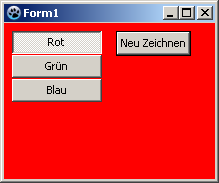 -\> 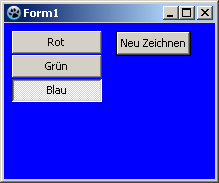 | |
| 29 | + | ||
| 30 | + | ### Use an event | |
| 31 | + | ||
| 32 | + | The difference to the previous example is, the form would not be repainted by a button click, but already by clicking on one of the toggleboxes itself. | |
| 33 | + | ||
| 34 | + | You can modify the previous example, by deleting the button and its *OnClick* event handler in the source code. But also easy, you can create a new example: | |
| 35 | + | ||
| 36 | + | - Create a new application and drop three TToggleBoxes on the form. | |
| 37 | + | - Change the captions of ToggleBox1...3 to *Red*, *Green* and *Blue* and it names to *tbRed*, *tbGreen* and *tbBlue*. | |
| 38 | + | - Create a *OnChange* event handler for one of the ToggleBoxes, e.g. **`TForm1.tbRedChange(Sender: TObject);`** and also connect the other ToggleBoxes with it: | |
| 39 | + | - Doubleclick *tbRed* on your form or select *tbRed* on your form and go in the Object Inspector on the tab events, select the *OnChange* event and click on the button \[...\]. | |
| 40 | + | - It creates the [[Procedure|procedure]] *tbRedChange*. | |
| 41 | + | - Now select *tbGreen* on your form. | |
| 42 | + | - Go in the Object Inspector to the tab events, choose the *OnChange* event and select *tbRedChange* in the adjacent combobox. | |
| 43 | + | - Now on your form, select *tbBlue* and proceed as with *tbGreen*. | |
| 44 | + | - Get the event handler *OnChange* of the ToggleBoxes the colors of the form, according to *\<ToggleBox\>.Checked*, change: | |
| 45 | + | ||
| 46 | + | ``` pascal | |
| 47 | + | procedure TForm1.tbRedChange(Sender: TObject); | |
| 48 | + | var | |
| 49 | + | aColor: TColor; | |
| 50 | + | begin | |
| 51 | + | aColor:=0; //Background color of Form1 is set according to the Toggleboxes | |
| 52 | + | if ToggleBox1.Checked then aColor:=aColor + $0000FF; | |
| 53 | + | if ToggleBox2.Checked then aColor:=aColor + $00FF00; | |
| 54 | + | if ToggleBox3.Checked then aColor:=aColor + $FF0000; | |
| 55 | + | Color := aColor; //the change of the property <Formular>.Color causes a redrawing of the form | |
| 56 | + | end; | |
| 57 | + | ``` | |
| 58 | + | ||
| 59 | + | ## See also | |
| 60 | + | ||
| 61 | + | - [[doc:lcl/stdctrls/ttogglebox.html|TToggleBox doc]] | |
| 62 | + | - [[TButton]] | |
| 63 | + | - [[TCheckBox]] | |
| 64 | + | - [[TRadioButton]] | |
| 65 | + | ||
| 66 | + | --- | |
| 67 | + | *From the Free Pascal wiki, page "TToggleBox", as it stood on 2019-11-09 after a change by Djzepi, out of the wiki's dump of 2024-05-26. Copyright stays with the author who wrote it, according to the old wiki's [[Licensing]] page. If you have concerns about this material, [message the admin](/wiki-contact).* |