

TToggleBox/fr: what changed
Revision 0 to 1. Removed lines have a minus sign; added lines have a plus sign.
Title: TToggleBox/fr
| Old | New | Line | |
|---|---|---|---|
| 1 | + | Un **TToggleBox**  est un bouton étiqueté à deux états qui est activé ou désactivé avec un simple clic. | |
| 2 | + | ||
| 3 | + | Partout dans votre code source, vous pouvez contrôler l'état actif ou inactif, en interrogeant **`Status := <ToggleBox>.Checked;`**. Vous pouvez aussi utiliser Checked comme un [[Boolean/fr|booléen]] normal. Il en est ainsi même en affection **`<ToggleBox>.Checked := True;`**. | |
| 4 | + | ||
| 5 | + | # Un simple exemple | |
| 6 | + | ||
| 7 | + | - Créez une nouvelle application et placez trois TToggleBoxes sur la fiche. | |
| 8 | + | - Modifiez les propriétés Caption des ToggleBox1...3 en *Red*, *Green* et *Blue* et nommez-les *tbRed*, *tbGreen* et *tbBlue*. | |
| 9 | + | - Ajoutez à la fiche un [[TButton/fr|TButton]] et changez son intitulé en *Paint new* et son nom en *btnPaint*. | |
| 10 | + | - Créez le gestionnaire d'événement *OnClick* du TButton, allez sur l'onglet Evénements de l'inspecteur d'objet, sélectionnez l'événement *OnClick* et le bouton \[...\] ou faites un simple double-clic sur le bouton. | |
| 11 | + | - Ajoutez le code suivant dans le gestionnaire d'événement de *btnPaint* : | |
| 12 | + | ||
| 13 | + | ``` pascal | |
| 14 | + | procedure TForm1.btnPaintClick(Sender: TObject); | |
| 15 | + | var | |
| 16 | + | aColor: TColor; | |
| 17 | + | begin | |
| 18 | + | aColor:=0; //Background color of Form1 is set according to the Toggleboxes | |
| 19 | + | if tbRed.Checked then aColor:=aColor + $0000FF; | |
| 20 | + | if tbGreen.Checked then aColor:=aColor + $00FF00; | |
| 21 | + | if tbBlue.Checked then aColor:=aColor + $FF0000; | |
| 22 | + | Color := aColor; //the change of the property <Formular>.Color causes a redrawing of the form | |
| 23 | + | end; | |
| 24 | + | ``` | |
| 25 | + | ||
| 26 | + | - Démarrez votre programmen il devrait ressembler à ceci : | |
| 27 | + | ||
| 28 | + | 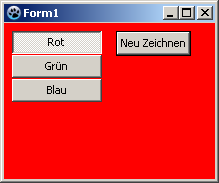 -\> 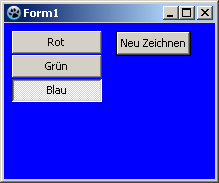 | |
| 29 | + | ||
| 30 | + | # Utiliser un événement | |
| 31 | + | ||
| 32 | + | La différence avec l'exemple précédent est que la fiche ne sera pas repainte avec un clic sur un bouton mais directement en cliquant sur l'un des TToggleBox lui-même. | |
| 33 | + | ||
| 34 | + | Vous pouvez modifier l'exemple précédent en supprimant le bouton et son gestionnaire d'événement *OnClick* dans le code source. Mais tout aussi simple vous pouvez créer un nouvel exemple : | |
| 35 | + | ||
| 36 | + | - Créez une nouvelle application et placez trois TToggleBoxes sur la fiche. | |
| 37 | + | - Modifiez les propriétés Caption des ToggleBox1...3 en *Red*, *Green* et *Blue* et nommez-les *tbRed*, *tbGreen* et *tbBlue*. | |
| 38 | + | - Créez un gestionnaire d'événement *OnChange* pour l'un des TToggleBox p.ex. **`TForm1.tbRedChange(Sender: TObject);`** et associez-le aux événements *OnChange* des autres TToggleBox : | |
| 39 | + | - Double-cliquez *tbRed* sur votre fiche ou sélectionnez *tbRed* sur votre fiche, allez sur l'onglet de l'inspecteur d'objet, sélectionnez l'événement *OnChange* et cliquez sur le bouton \[...\]. | |
| 40 | + | - Cela crée la méthode *tbRedChange*. | |
| 41 | + | - Maintenant sélectionnez *tbGreen* sur votre fiche. | |
| 42 | + | - Allez dans l'onglet Evénements de l'inspecteur d'objet, choisissez l'événement *OnChange* et sélectionnez *tbRedChange* dans le ComboBox adjacent. | |
| 43 | + | - Maintenant sur votre fiche, sélectionnez *tbBlue* et procédez de la même façon qu'avec *tbGreen*. | |
| 44 | + | - Dans le gestionnaire d'événement *tbRedChange*, la couleur de la fiche est modifiée selon l'état des boutons : | |
| 45 | + | ||
| 46 | + | ``` pascal | |
| 47 | + | procedure TForm1.tbRedChange(Sender: TObject); | |
| 48 | + | var | |
| 49 | + | aColor: TColor; | |
| 50 | + | begin | |
| 51 | + | aColor:=0; //Background color of Form1 is set according to the Toggleboxes | |
| 52 | + | if ToggleBox1.Checked then aColor:=aColor + $0000FF; | |
| 53 | + | if ToggleBox2.Checked then aColor:=aColor + $00FF00; | |
| 54 | + | if ToggleBox3.Checked then aColor:=aColor + $FF0000; | |
| 55 | + | Color := aColor; //the change of the property <Formular>.Color causes a redrawing of the form | |
| 56 | + | end; | |
| 57 | + | ``` | |
| 58 | + | ||
| 59 | + | # Voir aussi | |
| 60 | + | ||
| 61 | + | - [[doc:lcl/stdctrls/ttogglebox.html|Doc. TToggleBox]] | |
| 62 | + | - [[TButton/fr|TButton]] | |
| 63 | + | - [[TCheckBox/fr|TCheckBox]] | |
| 64 | + | - [[TRadioButton/fr|TRadioButton]] | |
| 65 | + | ||
| 66 | + | --- | |
| 67 | + | *From the Free Pascal wiki, page "TToggleBox/fr", as it stood on 2020-12-13 after a change by Beuz, out of the wiki's dump of 2024-05-26. Copyright stays with the author who wrote it, according to the old wiki's [[Licensing]] page. If you have concerns about this material, [message the admin](/wiki-contact).* |