

TTaskDialog: what changed
Revision 0 to 1. Removed lines have a minus sign; added lines have a plus sign.
Title: TTaskDialog
| Old | New | Line | |
|---|---|---|---|
| 1 | + | **TTaskDialog**  is a non-visual component, which shows full-featured dialogs at runtime, dialogs with rich features like Windows TaskDialog API has. It is available on the [[Dialogs tab]] of the [[Component Palette]]. It is available since Lazarus 1.8. | |
| 2 | + | ||
| 3 | + | 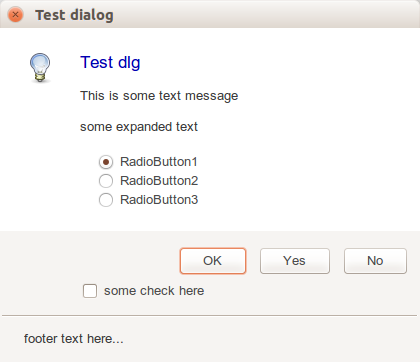 | |
| 4 | + | ||
| 5 | + | Dialog is shown with the Execute() method, and if this returns [[True]], property ModalResult has ModalResult of the pressed button: | |
| 6 | + | ||
| 7 | + | - ModalResult of standard button (mrOK, mrCancel, mrYes etc) | |
| 8 | + | - ModalResult of custom button, which was specified in each button's ModalResult | |
| 9 | + | ||
| 10 | + | Execute returns `True` if the dialog was opened successfully. On Windows Vista and up, a native dialog is show, which may fail (because of inconsistent parameters), in which case an emulated taskdialog is shown. On all other platforms the emulated dialog is shown. So, in effect the result value of Execute will always be `True`. | |
| 11 | + | ||
| 12 | + | Property MainIcon can be set to values for standard icons: none, warning, error, information, shield. | |
| 13 | + | ||
| 14 | + | Property RadioButton has the radio-button object, which was clicked. | |
| 15 | + | ||
| 16 | + | ## Example | |
| 17 | + | ||
| 18 | + | This example shows how to create dialog in runtime, and to add custom buttons in runtime: | |
| 19 | + | ||
| 20 | + | ``` pascal | |
| 21 | + | with TTaskDialog.Create(self) do | |
| 22 | + | try | |
| 23 | + | Title := 'Confirm removal'; | |
| 24 | + | Caption := 'Confirm'; | |
| 25 | + | Text := 'Remove selected item?'; | |
| 26 | + | CommonButtons := []; | |
| 27 | + | with TTaskDialogButtonItem(Buttons.Add) do | |
| 28 | + | begin | |
| 29 | + | Caption := 'Remove'; | |
| 30 | + | ModalResult := mrYes; | |
| 31 | + | end; | |
| 32 | + | with TTaskDialogButtonItem(Buttons.Add) do | |
| 33 | + | begin | |
| 34 | + | Caption := 'Keep'; | |
| 35 | + | ModalResult := mrNo; | |
| 36 | + | end; | |
| 37 | + | MainIcon := tdiQuestion; | |
| 38 | + | if Execute then | |
| 39 | + | if ModalResult = mrYes then | |
| 40 | + | ShowMessage('Item removed'); | |
| 41 | + | finally | |
| 42 | + | Free; | |
| 43 | + | end | |
| 44 | + | ``` | |
| 45 | + | ||
| 46 | + | 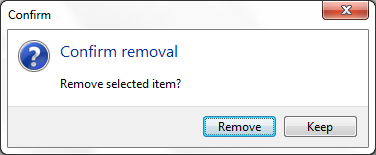 | |
| 47 | + | ||
| 48 | + | ## See also | |
| 49 | + | ||
| 50 | + | - [[Dialog Examples]] | |
| 51 | + | - [Hint on stackoverflow.com](https://stackoverflow.com/questions/4979556/how-to-use-the-ttaskdialog) | |
| 52 | + | ||
| 53 | + | --- | |
| 54 | + | *From the Free Pascal wiki, page "TTaskDialog", as it stood on 2023-11-11 after a change by Bart, out of the wiki's dump of 2024-05-26. Copyright stays with the author who wrote it, according to the old wiki's [[Licensing]] page. If you have concerns about this material, [message the admin](/wiki-contact).* |