

TTaskDialog/zh CN: what changed
Revision 0 to 1. Removed lines have a minus sign; added lines have a plus sign.
Title: TTaskDialog/zh CN
| Old | New | Line | |
|---|---|---|---|
| 1 | + | **TTaskDialog**  是不可见控件, 运行时会显示完整的对话框, 具有 Windows TaskDialog API 的功能. 在 [[Dialogs tab]] 的 [[Component Palette]]. Lazarus 1.8以后包含此控件. | |
| 2 | + | ||
| 3 | + | 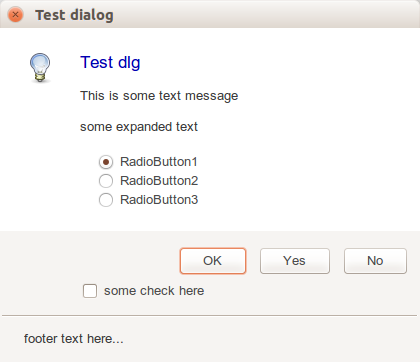 | |
| 4 | + | ||
| 5 | + | 调用方法:Execute(), 假如获得 [[True]], 属性 ModalResult 具有如下: | |
| 6 | + | ||
| 7 | + | - 标准按钮 (OK, Cancel, Yes 等) | |
| 8 | + | - 自定义, 在ModalResult中详细指定 | |
| 9 | + | ||
| 10 | + | 假如窗口成功打开则返回[[True]]. 对话框无法为不同参数显示对话框, 这种情况下就不执行,则返回[[False]]. | |
| 11 | + | ||
| 12 | + | 属性 MainIcon 可以设置弹窗对应的图标 : none, warning, error, information, shield. | |
| 13 | + | ||
| 14 | + | 属性 RadioButton 有单选按钮对象。 | |
| 15 | + | ||
| 16 | + | ## 样例 | |
| 17 | + | ||
| 18 | + | This example shows how to create dialog in runtime, and to add custom buttons in runtime: | |
| 19 | + | ||
| 20 | + | ``` pascal | |
| 21 | + | with TTaskDialog.Create(self) do | |
| 22 | + | try | |
| 23 | + | Title := 'Confirm removal'; | |
| 24 | + | Caption := 'Confirm'; | |
| 25 | + | Text := 'Remove selected item?'; | |
| 26 | + | CommonButtons := []; | |
| 27 | + | with TTaskDialogButtonItem(Buttons.Add) do | |
| 28 | + | begin | |
| 29 | + | Caption := 'Remove'; | |
| 30 | + | ModalResult := mrYes; | |
| 31 | + | end; | |
| 32 | + | with TTaskDialogButtonItem(Buttons.Add) do | |
| 33 | + | begin | |
| 34 | + | Caption := 'Keep'; | |
| 35 | + | ModalResult := mrNo; | |
| 36 | + | end; | |
| 37 | + | MainIcon := tdiQuestion; | |
| 38 | + | if Execute then | |
| 39 | + | if ModalResult = mrYes then | |
| 40 | + | ShowMessage('Item removed'); | |
| 41 | + | finally | |
| 42 | + | Free; | |
| 43 | + | end | |
| 44 | + | ``` | |
| 45 | + | ||
| 46 | + | 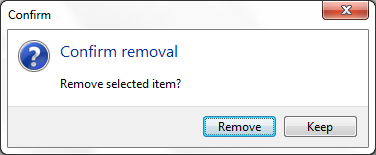 | |
| 47 | + | ||
| 48 | + | ## 参考资料 | |
| 49 | + | ||
| 50 | + | - [[Dialog Examples]] | |
| 51 | + | ||
| 52 | + | --- | |
| 53 | + | *From the Free Pascal wiki, page "TTaskDialog/zh CN", as it stood on 2020-05-03 after a change by TyphonFinger, out of the wiki's dump of 2024-05-26. Copyright stays with the author who wrote it, according to the old wiki's [[Licensing]] page. If you have concerns about this material, [message the admin](/wiki-contact).* |