

TShellListView: what changed
Revision 0 to 1. Removed lines have a minus sign; added lines have a plus sign.
Title: TShellListView
| Old | New | Line | |
|---|---|---|---|
| 1 | + | > **Note:** This documentation is not intended to be thorough, but it is enough to get a beginner started on the use of the object. This particular discussion is biased to MS-Windows, and particularly Windows 7. At any-rate, its functionality appears to be OS-Specific, and care must be taken when porting code using this object to another OS. | |
| 2 | + | > | |
| 3 | + | > The default behavior appears to be to list only filenames. While the behavior can be made to be Explorer-like, icons do not appear by default. | |
| 4 | + | ||
| 5 | + | **TShellListView**   displays files according to its Root property. Its available under the [[Misc tab]] of [[Component Palette]]. The Root property contains the whole path from the drive letter to the current directory. If using it to show the complete path including a selected file, then you need to append a slash ('\\' or '/' in UNIX) to Root, as in: | |
| 6 | + | ||
| 7 | + | ``` pascal | |
| 8 | + | pathname := '"' + svList.Root + '\' + svList.Selected.Caption + '"'; | |
| 9 | + | ``` | |
| 10 | + | ||
| 11 | + | where `svList` is the name of a TShellListView object, and `svList.Selected.Caption` contains the name of a file selected by the user. `pathname` is a string variable containing the entire path from the drive letter to the file name and extension. The double quotes are recommended to be applied in MS-Windows if the path contains spaces. This makes the usual process of escaping spaces in filenames with `%20` unnecessary in Windows. | |
| 12 | + | ||
| 13 | + | 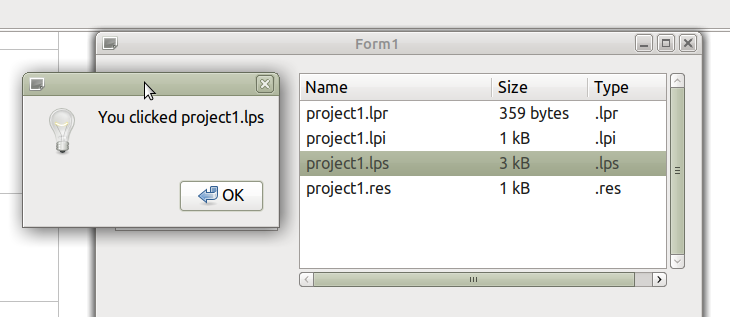 | |
| 14 | + | ||
| 15 | + | (This image is, obviously, text based. Its implied an Icon view is also possible but its not clear how, at least on Linux) | |
| 16 | + | ||
| 17 | + | The selected file name is ShellListView1.Selected.Caption and other parts, such as file size and type is in ShellListView1.Selected.SubItems... | |
| 18 | + | ||
| 19 | + | ### Talking to TShellTreeView | |
| 20 | + | ||
| 21 | + | There is little coding to do in getting TShellListView to communicate with [[Shell Controls|TShellTreeView]]. In the Object Inspector for TShellTreeView, set the property `ShellListView` to the name of your TShellListView object. This ought to be already stored on a dropdown menu if both TShellListView and TShellTreeView objects are deployed on your form. For completeness, so that both objects respond to each other, set the ShellTreeView event of TShellListView to the name of your TShellTreeView object. | |
| 22 | + | ||
| 23 | + | Alternatively, if we let svList be the TShellListView object; and svTree be the TShellTreeView object, then these properties can be set programmatically: | |
| 24 | + | ||
| 25 | + | ``` pascal | |
| 26 | + | svList.ShellTreeView := svTree; | |
| 27 | + | svTree.ShellListView := svList; | |
| 28 | + | ``` | |
| 29 | + | ||
| 30 | + | The result is to invoke Explorer-like behavior in their responsiveness. | |
| 31 | + | ||
| 32 | + | ### Opening documents | |
| 33 | + | ||
| 34 | + | In Windows, the generic command for opening a file in TShellListView is [[OpenDocument]]`(pathname)`, where `pathname` is the path to the file. For this you should remember to add `lclintf` to your `uses` clause. Other operating systems can get away with using `OpenURL(pathname)`, except that spaces must be escaped with a `%20` string, and [`file://`](file://) must prepend the pathname. Example: | |
| 35 | + | ||
| 36 | + | ``` pascal | |
| 37 | + | OpenURL('file:///home/joe/text/foo%20bar.txt'); | |
| 38 | + | ``` | |
| 39 | + | ||
| 40 | + | Contrast this with the Windows convention: | |
| 41 | + | ||
| 42 | + | ``` pascal | |
| 43 | + | OpenDocument('C:\Users\Joe\My Documents\xyz.txt'); | |
| 44 | + | ``` | |
| 45 | + | ||
| 46 | + | [[OpenURL]] is not recommended for use in Windows for opening documents using the <file://> URI scheme. | |
| 47 | + | ||
| 48 | + | Because `OpenDocument` also acts as a Boolean function, it returns false if there is no way in the registry to open the file. If we let `pathname` be the full path to the file from the drive letter to the filename, this statement will open the document if `OpenDocument(pathname)` returns `True`: | |
| 49 | + | ||
| 50 | + | ``` pascal | |
| 51 | + | if not OpenDocument(pathname) then // no method to display this file type | |
| 52 | + | ShowMessage('Cannot display ' + pathname); | |
| 53 | + | ``` | |
| 54 | + | ||
| 55 | + | ### Dealing with strangeness | |
| 56 | + | ||
| 57 | + | When running a program with this object, you may notice that double-clicking on a filename will allow you to edit it or delete its name entirely by default. These sorts of changes are not propagated to the underlying filesystem. To stop this behavior, set the ReadOnly property to True. | |
| 58 | + | ||
| 59 | + | ## See also | |
| 60 | + | ||
| 61 | + | [[FindAllFiles]] | |
| 62 | + | ||
| 63 | + | [[TFileListBox]] | |
| 64 | + | ||
| 65 | + | --- | |
| 66 | + | *From the Free Pascal wiki, page "TShellListView", as it stood on 2021-04-01 after a change by Trev, out of the wiki's dump of 2024-05-26. Copyright stays with the author who wrote it, according to the old wiki's [[Licensing]] page. If you have concerns about this material, [message the admin](/wiki-contact).* |