

TScrollBar
Deutsch · English · Français · Suomi · 日本語
A TScrollBar  is a control that allows the user to scroll the content of an associated control by moving an slider.
Usage
To use a TScrollBar on a form, you can simply select it on the Standard tab of the Component Palette and place it by clicking on the form.
Small example
Move an image on your form depending on the scrollbar positions
- place two TScrollBars on your form
- in the object Inspector change the first scrollbar properties "Name" in "sbVert", "Kind" in "sbVertical" and "Align" in "alRight"
- in the object Inspector change the second scrollbar properties "Name" in "sbHori" and "Align" in "alBottom"
- add a TPaintBox (additional component palette) to the form and set its "align" on "alClient"
- add a TImageList (common controls component palette) to the form
- upload an image in the ImageList:
- right-click the ImageList1 and select the ImageList Editor... from the pop-up menu
- Click on add and select an image (preferably a small icon 16 x 16 for example, Lazarus/images/icons/lazarus16x16)
- finish your selection with OK
- Choose your PaintBox, in the object inspector under events, create the event handler for the event OnPaint and write following code:
procedure TForm1.PaintBox1Paint(Sender: TObject);
begin
  ImageList1.Draw(
    Paintbox1.Canvas,
    sbHori.Position * (PaintBox1.ClientWidth  - ImageList1.Width)  div sbHori.Max,
    sbVert.Position * (Paintbox1.ClientHeight - ImageList1.Height) div sbVert.Max,
    0);
end;
</source>
* Now let any change of the scrollbar positions repaint the form: create the event handler ''OnChange'' for a scrollbar and also call this for the other scrollbar:
<source>
procedure TForm1.sbVertChange(Sender: TObject);
begin
  RePaint;
end;
Your little program could look like:
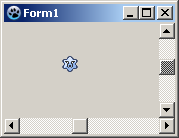
See also
From the Free Pascal wiki, page "TScrollBar", as it stood on 2020-03-01 after a change by Trev, out of the wiki's dump of 2024-05-26. Copyright stays with the author who wrote it, according to the old wiki's Licensing page. If you have concerns about this material, message the admin.
Talk about this page
Nobody has opened a bench for this page yet. Sign in to open one.