

TRadioGroup: what changed
Revision 1 to 2. Removed lines have a minus sign; added lines have a plus sign.
| Old | New | Line | |
|---|---|---|---|
| 1 | - | ||
| 1 | + | [](</File:RadioButtonsRadioGroup.png>) | |
| 2 | 2 | ||
| 3 | - | ||
| 3 | + | Comparison of several [[TRadioButton]] and a TRadioGroup with the characteristical properties given in the infobox. | |
| 4 | 4 | ||
| 5 | - | ||
| 5 | + | **TRadioGroup** [](</File:tradiogroup.png>) is a group of related but mutually exclusive [[TRadioButton|TRadioButtons]], requiring the user to select one of a set of alternatives. It's like a [[TGroupBox]] with integrated [[TRadioButton|TRadioButtons]]. To use a TRadioGroup on a [[TForm|form]], you can simply select it on the [[Standard tab]] of the [[Component Palette]] and place it by clicking on the form. | |
| 6 | 6 | ||
| 7 | - | ||
| 7 | + | TRadioGroup manages its items as a TStrings list in the **Items** property. The Object Inspector provides a small text input where each line represents one entry in the radio group box. | |
| 8 | + | With the **Columns** property the layout can be easily adapted to a column-layout. The property **ColumnLayout** allows choosing the insertion direction "horizontal then vertical" or vice versa. | |
| 9 | + | The currently selected item is not determined via a _checked_ property as the TRadioButton provided, instead an **ItemIndex** is used here. -1 is equal to "no selection", 0 selects the first option, 1 the second and so forth. ItemIndex is both readable and writable. | |
| 10 | + | The caption of the group can be changed by using the **Caption** property. Changes on the **Font** property influence the caption as well as the text of the items inside the box. | |
| 8 | 11 | ||
| 9 | - | ||
| 12 | + | Code Examples: | |
| 13 | + | ``` | |
| 14 | + | // Configuration: | |
| 15 | + | with RadioGroup1 do | |
| 16 | + | begin | |
| 17 | + | caption := 'My Group 1'; | |
| 18 | + | itemIndex := 0; | |
| 19 | + | font.size := 12; | |
| 20 | + | end; | |
| 21 | + | ||
| 22 | + | // Conditional Check: | |
| 23 | + | if RadioGroup1.ItemIndex = 0 then | |
| 24 | + | begin | |
| 25 | + | ... | |
| 26 | + | end; | |
| 27 | + | ||
| 28 | + | // Conditional Check with Case: | |
| 29 | + | case RadioGroup1.ItemIndex of | |
| 30 | + | 0: begin | |
| 31 | + | firstOption; | |
| 32 | + | ... | |
| 33 | + | end; | |
| 34 | + | 1: begin | |
| 35 | + | secondOption; | |
| 36 | + | ... | |
| 37 | + | end; | |
| 38 | + | 2: thirdOption; | |
| 39 | + | 3: fourthOption; | |
| 40 | + | ... | |
| 41 | + | end; | |
| 42 | + | ``` | |
| 10 | 43 | ||
| 11 | - | ||
| 12 | - | ||
| 13 | - | ||
| 14 | - | ||
| 15 | - | ||
| 16 | - | ||
| 17 | - | ||
| 18 | - | ||
| 19 | - | ||
| 20 | - | ||
| 21 | - | ||
| 22 | - | ||
| 23 | - | ||
| 24 | - | ||
| 25 | - | ||
| 44 | + | ||
| 26 | 45 | ||
| 27 | - | ||
| 46 | + | ## Examples | |
| 47 | + | ||
| 48 | + | ### Drawing random shapes on a form | |
| 49 | + | ||
| 50 | + | [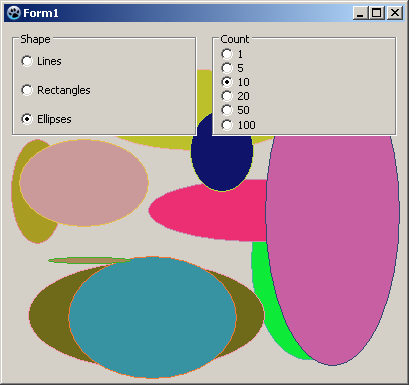](</File:ExampleTRadioGroup.png>) | |
| 51 | + | ||
| 52 | + | Example screenshot of the finished program. | |
| 53 | + | ||
| 54 | + | Geometric figures should be drawn randomly and depending on the TRadioGroups to the form. The first RadioGroup determines the shape, the second RadioGroup detrmines the number. | |
| 55 | + | ||
| 56 | + | * create a new application and place two TRadioGroups on your form | |
| 57 | + | * change in the Object Inspector the [[Property|property]] _Name_ of _RadioGroup1_ to _rgShape_ , also _RadioGroup2_ to _rgCount_ | |
| 58 | + | * change identical _Caption_ of _rgShape_ to _Shape_ and that of _rgCount_ to _Count_ | |
| 59 | + | * add the RadioButtons for _rgShape_ : | |
| 60 | + | * in the Object Inspector select the property _Items_ of _rgShape_ | |
| 61 | + | * click on the button [...], the character chain editor opens | |
| 62 | + | * write among each other _Lines Rectangles Ellipses_ and complete the entry with the button _OK_ | |
| 63 | + | * add identical the RadioButtons for _rgCount_ (written among each other): _1 5 10 20 50 100_ | |
| 64 | + | * set the first RadioButton as the _currently selected_ , by setting the property _ItemIndex_ of _rgShape_ and _rgCount_ from _-1_ to _0_ | |
| 65 | + | * create the _OnClick_ event handler of _rgShape_ by double clicking _rgShape_ | |
| 66 | + | * also use these event handler for _rgCount_ : | |
| 67 | + | * in the Object Inspector select _rgCount_ | |
| 68 | + | * now select the tab _Events_ in the Object Inspector | |
| 69 | + | * go to the _OnClick_ event and select in the adjacent ComboBox _rgShapeClick_ | |
| 70 | + | * whenever _rgShape_ or _rgCount_ is clicked, the form should be redrawn, therefore write following code in the event handler: | |
| 71 | + | ||
| 72 | + | ``` | |
| 28 | 73 | procedure TForm1.rgShapeClick(Sender: TObject); | |
| 29 | - | ||
| 30 | - | ||
| 31 | - | ||
| 74 | + | begin | |
| 75 | + | Repaint; | |
| 76 | + | end; | |
| 32 | 77 | ``` | |
| 33 | 78 | ||
| 34 | - | ||
| 35 | - | ||
| 36 | - | ||
| 37 | - | ||
| 38 | - | ||
| 79 | + | * whenever the form is redrawn, the shapes should be drawn: | |
| 80 | + | * in the Object Inspector select _Form1_ | |
| 81 | + | * select the tab _Events_ | |
| 82 | + | * click on the button [...] next to the event _OnPaint_ | |
| 83 | + | * the handler is created, enter the following code: | |
| 39 | 84 | ||
| 40 | - | ||
| 85 | + | ``` | |
| 41 | 86 | procedure TForm1.FormPaint(Sender: TObject); | |
| 42 | - | ||
| 43 | - | ||
| 44 | - | ||
| 45 | - | ||
| 46 | - | ||
| 47 | - | ||
| 48 | - | ||
| 49 | - | ||
| 50 | - | ||
| 51 | - | ||
| 52 | - | ||
| 53 | - | ||
| 87 | + | var | |
| 88 | + | i: Integer; | |
| 89 | + | begin | |
| 90 | + | if TryStrToInt(rgCount.Items[rgCount.ItemIndex], i) then | |
| 91 | + | for i:=1 to i do begin | |
| 92 | + | Canvas.Pen.Color:=Random($1000000); | |
| 93 | + | Canvas.Brush.Color:=Random($1000000); | |
| 94 | + | case rgShape.Items[rgShape.ItemIndex] of | |
| 95 | + | 'Lines': Canvas.Line(Random(ClientWidth), Random(ClientHeight), Random(ClientWidth), Random(ClientHeight)); | |
| 96 | + | 'Rectangles': Canvas.Rectangle(Random(ClientWidth), Random(ClientHeight), Random(ClientWidth), Random(ClientHeight)); | |
| 97 | + | 'Ellipses': Canvas.Ellipse(Random(ClientWidth), Random(ClientHeight), Random(ClientWidth), Random(ClientHeight)); | |
| 98 | + | end; | |
| 99 | + | end; | |
| 54 | 100 | end; | |
| 55 | - | ||
| 56 | 101 | ``` | |
| 57 | 102 | ||
| 58 | - | ||
| 59 | - | ||
| 60 | - | ||
| 103 | + | * start your program. An example of how it could look like is given on the screenshot to the right. | |
| 61 | 104 | ||
| 62 | 105 | ## See also | |
| 63 | 106 | ||
| 64 | - | ||
| 65 | - | ||
| 66 | - | ||
| 107 | + | * [TRadioGroup doc](<http://lazarus-ccr.sourceforge.net/docs/lcl/extctrls/tradiogroup.html> "doc:lcl/extctrls/tradiogroup.html") | |
| 108 | + | * [](</File:tradiobutton.png>)[[TRadioButton]] \- Single radio button elements | |
| 109 | + | * [](</File:tcheckbox.png>)[[TCheckBox]] \- Alternative to radio buttons, representing an on/off state of a single option | |
| 110 | + | * [](</File:tcheckgroup.png>)[[TCheckGroup]] \- Similar to a TRadioGroup but with checkboxes as elements | |
| 111 | + | * [](</File:tchecklistbox.png>)[[TCheckListBox]] \- Alternative element to select several options in a list with checkmark boxes | |
| 112 | + | * [](</File:tpanel.png>)[[TPanel]] \- General grouping element, usable to group TRadioButtons for example | |
| 113 | + | * [](</File:tgroupbox.png>)[[TGroupBox]] \- General grouping of elements with a titled box | |
| 114 | + | * [](</File:tflowpanel.png>)[[TFlowPanel]] \- General grouping element which provides an automatic flow layouting of its children | |
| 115 | + | * [](</File:tcombobox.png>)[[TComboBox]] \- Alternative element to select a single option from a drop-down list | |
| 67 | 116 | ||
| 117 | + | ||
| 118 | + | ||
| 119 | + | [[LCL Components]] Component Tab | Components | |
| 120 | + | ---|--- | |
| 121 | + | [[Standard tab|Standard]] | [[TMainMenu]] • [[TPopupMenu]] • [[TButton]] • [[TLabel]] • [[TEdit]] • [[TMemo]] • [[TToggleBox]] • [[TCheckBox]] • [[TRadioButton]] • [[TListBox]] • [[TComboBox]] • [[TScrollBar]] • [[TGroupBox]] • TRadioGroup • [[TCheckGroup]] • [[TPanel]] • [[TFrame]] • [[TActionList]] | |
| 122 | + | [[Additional tab|Additional]] | [[TBitBtn]] • [[TSpeedButton]] • [[TStaticText]] • [[TImage]] • [[TShape]] • [[TBevel]] • [[TPaintBox]] • [[TNotebook]] • [[TLabeledEdit]] • [[TSplitter]] • [[TTrayIcon]] • [[TControlBar]] • [[TFlowPanel]] • [[TMaskEdit]] • [[TCheckListBox]] • [[TScrollBox]] • [[TApplicationProperties]] • [[TStringGrid]] • [[TDrawGrid]] • [[TPairSplitter]] • [[TColorBox]] • [[TColorListBox]] • [[TValueListEditor]] | |
| 123 | + | [[Common Controls tab|Common Controls]] | [[TTrackBar]] • [[TProgressBar]] • [[TTreeView]] • [[TListView]] • [[TStatusBar]] • [[TToolBar]] • [[TCoolBar]] • [[TUpDown]] • [[TPageControl]] • [[TTabControl]] • [[THeaderControl]] • [[TImageList]] • [[TPopupNotifier]] • [[TDateTimePicker]] | |
| 124 | + | [[Dialogs tab|Dialogs]] | [[TOpenDialog]] • [[TSaveDialog]] • [[TSelectDirectoryDialog]] • [[TColorDialog]] • [[TFontDialog]] • [[TFindDialog]] • [[TReplaceDialog]] • [[TTaskDialog]] • [[TOpenPictureDialog]] • [[TSavePictureDialog]] • [[TCalendarDialog]] • [[TCalculatorDialog]] • [[TPrinterSetupDialog]] • [[TPrintDialog]] • [[TPageSetupDialog]] | |
| 125 | + | [[Data Controls tab|Data Controls]] | [[TDBNavigator]] • [[TDBText]] • [[TDBEdit]] • [[TDBMemo]] • [[TDBImage]] • [[TDBListBox]] • [[TDBLookupListBox]] • [[TDBComboBox]] • [[TDBLookupComboBox]] • [[TDBCheckBox]] • [[TDBRadioGroup]] • [[TDBCalendar]] • [[TDBGroupBox]] • [[TDBGrid]] • [[TDBDateTimePicker]] | |
| 126 | + | [[Data Access tab|Data Access]] | [[TDataSource]] • [[TCSVDataSet]] • [[TSdfDataSet]] • [[TBufDataset]] • [[TFixedFormatDataSet]] • [[TDbf]] • [[TMemDataset]] | |
| 127 | + | [[System tab|System]] | [[TTimer]] • [[TIdleTimer]] • [[TLazComponentQueue]] • [[THTMLHelpDatabase]] • [[THTMLBrowserHelpViewer]] • [[TAsyncProcess]] • [[TProcessUTF8]] • [[TProcess]] • [[TSimpleIPCClient]] • [[TSimpleIPCServer]] • [[TXMLConfig]] • [[TEventLog]] • [[TServiceManager]] • [[TCHMHelpDatabase]] • [[TLHelpConnector]] | |
| 128 | + | [[Misc tab|Misc]] | [[TColorButton]] • [[TSpinEdit]] • [[TFloatSpinEdit]] • [[TArrow]] • [[TCalendar]] • [[TEditButton]] • [[TFileNameEdit]] • [[TDirectoryEdit]] • [[TDateEdit]] • [[TTimeEdit]] • [[TCalcEdit]] • [[TFileListBox]] • [[TFilterComboBox]] • [[TComboBoxEx]] • [[TCheckComboBox]] • [[TButtonPanel]] • [[TShellTreeView]] • [[TShellListView]] • [[TXMLPropStorage]] • [[TINIPropStorage]] • [[TJSONPropStorage]] • [[TIDEDialogLayoutStorage]] • [[TMRUManager]] • [[TStrHolder]] | |
| 129 | + | [[LazControls tab|LazControls]] | [[TCheckBoxThemed]] • [[TDividerBevel]] • [[TExtendedNotebook]] • [[TListFilterEdit]] • [[TListViewFilterEdit]] • [[TLvlGraphControl]] • [[TShortPathEdit]] • [[TSpinEditEx]] • [[TFloatSpinEditEx]] • [[TTreeFilterEdit]] • [[TExtendedTabControl]] • | |
| 130 | + | [[RTTI tab|RTTI]] | [[TTIEdit]] • [[TTIComboBox]] • [[TTIButton]] • [[TTICheckBox]] • [[TTILabel]] • [[TTIGroupBox]] • [[TTIRadioGroup]] • [[TTICheckGroup]] • [[TTICheckListBox]] • [[TTIListBox]] • [[TTIMemo]] • [[TTICalendar]] • [[TTIImage]] • [[TTIFloatSpinEdit]] • [[TTISpinEdit]] • [[TTITrackBar]] • [[TTIProgressBar]] • [[TTIMaskEdit]] • [[TTIColorButton]] • [[TMultiPropertyLink]] • [[TTIPropertyGrid]] • [[TTIGrid]] | |
| 131 | + | [[SQLdb tab|SQLdb]] | [[TSQLQuery]] • [[TSQLTransaction]] • [[TSQLScript]] • [[TSQLConnector]] • [[TMSSQLConnection]] • [[TSybaseConnection]] • [[TPQConnection]] • [[TPQTEventMonitor]] • [[TOracleConnection]] • [[TODBCConnection]] • [[TMySQL40Connection]] • [[TMySQL41Connection]] • [[TMySQL50Connection]] • [[TMySQL51Connection]] • [[TMySQL55Connection]] • [[TMySQL56Connection]] • [[TMySQL57Connection]] • [[TSQLite3Connection]] • [[TIBConnection]] • [[TFBAdmin]] • [[TFBEventMonitor]] • [[TSQLDBLibraryLoader]] | |
| 132 | + | [[Pascal Script tab|Pascal Script]] | [[TPSScript]] • [[TPSScriptDebugger]] • [[TPSDllPlugin]] • [[TPSImport Classes]] • [[TPSImport DateUtils]] • [[TPSImport ComObj]] • [[TPSImport DB]] • [[TPSImport Forms]] • [[TPSImport Controls]] • [[TPSImport StdCtrls]] • [[TPSCustomPlugin]] | |
| 133 | + | [[SynEdit tab|SynEdit]] | [[TSynEdit]] • [[TSynCompletion]] • [[TSynAutoComplete]] • [[TSynMacroRecorder]] • [[TSynExporterHTML]] • [[TSynPluginSyncroEdit]] • [[TSynPasSyn]] • [[TSynFreePascalSyn]] • [[TSynCppSyn]] • [[TSynJavaSyn]] • [[TSynPerlSyn]] • [[TSynHTMLSyn]] • [[TSynXMLSyn]] • [[TSynLFMSyn]] • [[TSynDiffSyn]] • [[TSynUNIXShellScriptSyn]] • [[TSynCssSyn]] • [[TSynPHPSyn]] • [[TSynTeXSyn]] • [[TSynSQLSyn]] • [[TSynPythonSyn]] • [[TSynVBSyn]] • [[TSynAnySyn]] • [[TSynMultiSyn]] • [[TSynBatSyn]] • [[TSynIniSyn]] • [[TSynPoSyn]] | |
| 134 | + | [[Chart tab|Chart]] | [[TChart]] • [[TListChartSource]] • [[TRandomChartSource]] • [[TUserDefinedChartSource]] • [[TCalculatedChartSource]] • [[TDbChartSource]] • [[TChartToolset]] • [[TChartAxisTransformations]] • [[TChartStyles]] • [[TChartLegendPanel]] • [[TChartNavScrollBar]] • [[TChartNavPanel]] • [[TIntervalChartSource]] • [[TDateTimeIntervalChartSource]] • [[TChartListBox]] • [[TChartExtentLink]] • [[TChartImageList]] | |
| 135 | + | [[IPro tab|IPro]] | [[TIpFileDataProvider]] • [[TIpHtmlDataProvider]] • [[TIpHttpDataProvider]] • [[TIpHtmlPanel]] | |
| 136 | + | [[Virtual Controls tab|Virtual Controls]] | [[TVirtualDrawTree]] • [[TVirtualStringTree]] • [[TVTHeaderPopupMenu]] | |
| 137 | + | ||
| 68 | 138 | --- | |
| 69 | - | ||
| 139 | + | *From the Free Pascal wiki, page "TRadioGroup", as the Internet Archive kept it on 2025-06-16, last changed on 2024-11-22. Copyright stays with the author who wrote it, according to the old wiki's [[Licensing]] page. If you have concerns about this material, [message the admin](/wiki-contact).* |