

TRadioGroup: what changed
Revision 0 to 1. Removed lines have a minus sign; added lines have a plus sign.
Title: TRadioGroup
| Old | New | Line | |
|---|---|---|---|
| 1 | + | A **TRadioGroup**  is a group of related but mutually exclusive [[TRadioButton|TRadioButtons]], requiring the user to select one of a set of alternatives. It's like a [[TGroupBox]] with integrated [[TRadioButton|TRadioButtons]]. | |
| 2 | + | ||
| 3 | + | ## Usage | |
| 4 | + | ||
| 5 | + | To use a TRadioGroup on a [[TForm|form]], you can simply select it on the [[Standard tab]] of the [[Component Palette]] and place it by clicking on the form. | |
| 6 | + | ||
| 7 | + | ### Small example | |
| 8 | + | ||
| 9 | + | Geometric figures should be drawn randomly and depending on the TRadioGroups to the form. The first RadioGroup determines the shape, the second RadioGroup detrmines the number. | |
| 10 | + | ||
| 11 | + | - create a new application and place two TRadioGroups on your form | |
| 12 | + | - change in the Object Inspector the [[Property|property]] *Name* of *RadioGroup1* to *rgShape*, also *RadioGroup2* to *rgCount* | |
| 13 | + | - change identical *Caption* of *rgShape* to *Shape* and that of *rgCount* to *Count* | |
| 14 | + | - add the RadioButtons for *rgShape*: | |
| 15 | + | - in the Object Inspector select the property *Items* of *rgShape* | |
| 16 | + | - click on the button \[...\], the character chain editor opens | |
| 17 | + | - write among each other *Lines Rectangles Ellipses* and complete the entry with the button *OK* | |
| 18 | + | - add identical the RadioButtons for *rgCount* (written among each other): *1 5 10 20 50 100* | |
| 19 | + | - set the first RadioButton as the *currently selected*, by setting the property *ItemIndex* of *rgShape* and *rgCount* from *-1* to *0* | |
| 20 | + | - create the *OnClick* event handler of *rgShape* by double clicking *rgShape* | |
| 21 | + | - also use these event handler for *rgCount*: | |
| 22 | + | - in the Object Inspector select *rgCount* | |
| 23 | + | - now select the tab *Events* in the Object Inspector | |
| 24 | + | - go to the *OnClick* event and select in the adjacent ComboBox *rgShapeClick* | |
| 25 | + | - whenever *rgShape* or *rgCount* is clicked, the form should be redrawn, therefore write following code in the event handler: | |
| 26 | + | ||
| 27 | + | ``` pascal | |
| 28 | + | procedure TForm1.rgShapeClick(Sender: TObject); | |
| 29 | + | begin | |
| 30 | + | Repaint; | |
| 31 | + | end; | |
| 32 | + | ``` | |
| 33 | + | ||
| 34 | + | - whenever the form is redrawn, the shapes should be drawn: | |
| 35 | + | - in the Object Inspector select *Form1* | |
| 36 | + | - select the tab *Events* | |
| 37 | + | - click on the button \[...\] next to the event *OnPaint* | |
| 38 | + | - the handler is created, enter the following code: | |
| 39 | + | ||
| 40 | + | ``` pascal | |
| 41 | + | procedure TForm1.FormPaint(Sender: TObject); | |
| 42 | + | var | |
| 43 | + | i: Integer; | |
| 44 | + | begin | |
| 45 | + | if TryStrToInt(rgCount.Items[rgCount.ItemIndex], i) then | |
| 46 | + | for i:=1 to i do begin | |
| 47 | + | Canvas.Pen.Color:=Random($1000000); | |
| 48 | + | Canvas.Brush.Color:=Random($1000000); | |
| 49 | + | case rgShape.Items[rgShape.ItemIndex] of | |
| 50 | + | 'Lines': Canvas.Line(Random(ClientWidth), Random(ClientHeight), Random(ClientWidth), Random(ClientHeight)); | |
| 51 | + | 'Rectangles': Canvas.Rectangle(Random(ClientWidth), Random(ClientHeight), Random(ClientWidth), Random(ClientHeight)); | |
| 52 | + | 'Ellipses': Canvas.Ellipse(Random(ClientWidth), Random(ClientHeight), Random(ClientWidth), Random(ClientHeight)); | |
| 53 | + | end; | |
| 54 | + | end; | |
| 55 | + | end; | |
| 56 | + | ``` | |
| 57 | + | ||
| 58 | + | - start your program, it could look like: | |
| 59 | + | ||
| 60 | + | 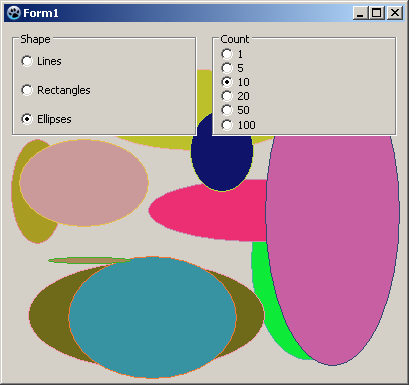 | |
| 61 | + | ||
| 62 | + | ## See also | |
| 63 | + | ||
| 64 | + | - [[doc:lcl/extctrls/tradiogroup.html|TRadioGroup doc]] | |
| 65 | + | - [[TRadioButton]] | |
| 66 | + | - [[TGroupBox]] | |
| 67 | + | ||
| 68 | + | --- | |
| 69 | + | *From the Free Pascal wiki, page "TRadioGroup", as it stood on 2022-04-17 after a change by Bart, out of the wiki's dump of 2024-05-26. Copyright stays with the author who wrote it, according to the old wiki's [[Licensing]] page. If you have concerns about this material, [message the admin](/wiki-contact).* |