

TRadioButton: what changed
Revision 1 to 2. Removed lines have a minus sign; added lines have a plus sign.
| Old | New | Line | |
|---|---|---|---|
| 1 | - | ||
| 1 | + | [](</File:RadioButtonsRadioGroup.png>) | |
| 2 | 2 | ||
| 3 | - | ||
| 4 | - | ||
| 3 | + | Comparison of several TRadioButton and a [[TRadioGroup]] with the characteristical properties given in the infobox. | |
| 5 | 4 | ||
| 6 | - | ||
| 5 | + | **TRadioButton** [](</File:tradiobutton.png>) provides an option to select "one-of-many" in a mutually exclusive way - if one RadioButton is selected, all others in the group are automatically deselected. The state of the **Checked** property is managed automatically among all RadioButtons belonging to the same parent component (there is no _ButtonGroup_ property that needs to be set manually). | |
| 7 | 6 | ||
| 8 | - | ||
| 7 | + | TRadioButtons are offered in the [[Standard tab]] of the [[Component Palette]]. To use a TRadioButton on a [[TForm|Form]], you can simply select it on the component palette and place it, with one click on the form. | |
| 9 | 8 | ||
| 10 | - | ||
| 11 | - | ||
| 12 | - | ||
| 13 | - | ||
| 14 | - | ||
| 15 | - | ||
| 9 | + | It usually does not make sense to use a single radiobutton, because radiobuttons are intended to provide several options to chose from. Instead of individual radiobuttons you can also use a [[TRadioGroup]] or other elements like a [[TComboBox]] to let the user select an option from a list. | |
| 16 | 10 | ||
| 17 | - | ||
| 11 | + | In your source code, you can get the status of the radiobuttons, whether active or inactive, by using the _Checked_ property. This is of the type [[Boolean]], thus the querying and the assignment of Boolean values are both possible. | |
| 12 | + | ``` | |
| 13 | + | // Assignment: | |
| 14 | + | RadioButton1.checked := true; | |
| 15 | + | ||
| 16 | + | // Query: | |
| 17 | + | var x: Boolean; | |
| 18 | + | x := RadioButton1.checked; | |
| 19 | + | ||
| 20 | + | // Conditional Check: | |
| 21 | + | if RadioButton1.checked then | |
| 22 | + | begin | |
| 23 | + | ... | |
| 24 | + | end; | |
| 25 | + | ``` | |
| 26 | + | ||
| 27 | + | ## Examples | |
| 28 | + | ||
| 29 | + | ### Using an OnPaint event handler | |
| 30 | + | ||
| 31 | + | * Create a new application and drop three TRadioButtons on the form. | |
| 32 | + | * In the Object Inspector tab properties change the name the _RadioButton1...3_ to _rbRed_ , _rbGreen_ and _rbBlue_. | |
| 33 | + | * Similarly, you change the captions of the radiobuttons to _Red_ , _Green_ and _Blue_ there. | |
| 34 | + | * Add your form a [[TButton]] and change its caption to _Draw new_ and its name to _btnPaint_. | |
| 35 | + | * Create the _OnClick_ event handler for the TButton, by using the Object Inspector tab events, select the _OnClick_ event and click the button [...] or double click the button in the form. | |
| 36 | + | * Add following code: | |
| 37 | + | ||
| 38 | + | ``` | |
| 18 | 39 | procedure TForm1.btnPaintClick(Sender: TObject); | |
| 19 | - | ||
| 20 | - | ||
| 21 | - | ||
| 22 | - | ||
| 23 | - | ||
| 40 | + | begin | |
| 41 | + | if rbRed.Checked then Color:=clRed; | |
| 42 | + | if rbGreen.Checked then Color:=clLime; | |
| 43 | + | if rbBlue.Checked then Color:=clBlue; | |
| 44 | + | end; | |
| 24 | 45 | ``` | |
| 25 | 46 | ||
| 26 | - | ||
| 47 | + | * Open your application, it should look something like: | |
| 27 | 48 | ||
| 28 | - | ||
| 49 | + | [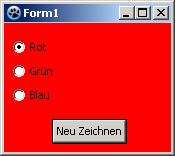](</File:RadioButtonExample1.png>) -> [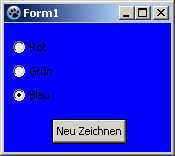](</File:RadioButtonExample2.png>) | |
| 29 | 50 | ||
| 30 | - | ||
| 51 | + | ### Using an OnChange event handler | |
| 31 | 52 | ||
| 32 | - | ||
| 53 | + | The difference to the previous example is, we repaint the form not by a button click, but already by clicking one of the radio buttons themselves. | |
| 33 | 54 | ||
| 34 | - | ||
| 55 | + | You can modify the previous example, by deleting the button and its _OnClick_ event handler in the source code. You can create a new example but also easy: | |
| 35 | 56 | ||
| 36 | - | ||
| 37 | - | ||
| 38 | - | ||
| 39 | - | ||
| 40 | - | ||
| 57 | + | * Create a new application and drop three TRadioButtons on the form. | |
| 58 | + | * In the Object Inspector tab properties change the name the _RadioButton1...3_ to _rbRed_ , _rbGreen_ and _rbBlue_. | |
| 59 | + | * Similarly, you change the captions of the radiobuttons to _Red_ , _Green_ and _Blue_ there. | |
| 60 | + | * Now you can create the _OnChange_ event handlers for the radiobuttons. For every radiobutton, you can use the Object Inspector tab events, select the _Onchange_ event and click the button [...], but you can also doubleclick on it. | |
| 61 | + | * Let the event handler _OnChange_ of the radio buttons change the colors of the form, according to clicked radio button: | |
| 41 | 62 | ||
| 42 | - | ||
| 63 | + | ``` | |
| 43 | 64 | procedure TForm1.rbRedChange(Sender: TObject); | |
| 44 | - | ||
| 45 | - | ||
| 46 | - | ||
| 65 | + | begin | |
| 66 | + | Self.Color:=clRed; //with "Self", you select the object in which the method exists (method: rbRedChange / object: Form1) | |
| 67 | + | end; | |
| 68 | + | ||
| 69 | + | procedure TForm1.rbGreenChange(Sender: TObject); | |
| 70 | + | begin | |
| 71 | + | Form1.Color:=clLime; //You can directly select the object ''Form1'', but poor, | |
| 72 | + | //because then no other object of class 'TForm1' can be created | |
| 73 | + | end; | |
| 74 | + | ||
| 75 | + | procedure TForm1.rbBlueChange(Sender: TObject); | |
| 76 | + | begin | |
| 77 | + | Color:=clBlue; //or you leave out "Self" and the compiler will automatically detect its own object | |
| 78 | + | end; | |
| 79 | + | ``` | |
| 47 | 80 | ||
| 48 | - | ||
| 49 | - | ||
| 50 | - | ||
| 51 | - | ||
| 52 | - | ||
| 81 | + | * Open your application, it should look something like: | |
| 53 | 82 | ||
| 54 | - | ||
| 55 | - | ||
| 56 | - | ||
| 57 | - | ||
| 58 | - | ||
| 83 | + | [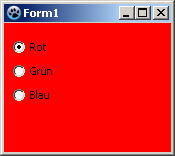](</File:RadioButtonExample3.png>) -> [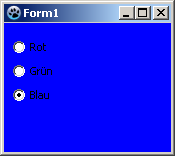](</File:RadioButtonExample4.png>) | |
| 59 | 84 | ||
| 60 | - | ||
| 85 | + | ## Grouping | |
| 61 | 86 | ||
| 62 | - | ||
| 87 | + | If you add a radiobutton to your form it is added to a parent control (normally the [[TForm]] or a [[TPanel]]) which also determines their _group_ a TRadioButton belongs to. With each change of the state of one of the radio buttons in the group (no matter whether via code or user clicking on it) it is automatically checked whether a different radiobutton is already Checked and if yes, the property _Checked_ of this would be changed to _False_. | |
| 63 | 88 | ||
| 64 | - | ||
| 89 | + | If you need to have multiple selections by RadioButtons on your form, which are meant to provide different, independent choices, you must group the radio buttons by placing them into a common parent container component like a [[TGroupBox]] or a [[TPanel]] for example (there are many others like a [[TPageControl]], [[TNotebook]], [[TScrollBox]] that are capable of providing a container for child elements). There is also a [[TRadioGroup]] component which provides a combination of grouping and layouting several radio buttons together. | |
| 65 | 90 | ||
| 66 | - | ||
| 67 | - | ||
| 68 | - | ||
| 91 | + | ### Example | |
| 69 | 92 | ||
| 70 | - | ||
| 93 | + | The following example shows how you can group radio buttons: | |
| 71 | 94 | ||
| 72 | - | ||
| 73 | - | ||
| 74 | - | ||
| 75 | - | ||
| 76 | - | ||
| 77 | - | ||
| 78 | - | ||
| 79 | - | ||
| 80 | - | ||
| 95 | + | You can change the example [[TRadioButton|A simple example]] or create a new application: | |
| 81 | 96 | ||
| 82 | - | ||
| 97 | + | * As first you would need to place a [[TGroupBox]] of the standard component palette onto your form. | |
| 98 | + | * You change its name to _gbColor_ and its caption to _Color_. | |
| 99 | + | * Now you subclass this GroupBox that radio buttons _rbRed_ , _rbGreen_ and _rbBlue_ : | |
| 100 | + | * In the modified project, you can sequentially move the radiobuttons **in the Object Inspector** by drag and drop to _gbColor_. | |
| 101 | + | * In a new project, you can insert the three radiobuttons one after the other, by clicking to insert in the GroupBox, then change the names to _rbRed_ , _rbGreen_ and _rbBlue_ and the captions to _Red_ , _Green_ and _Blue_. | |
| 102 | + | * Now place a second TGroupBox on your form named _gbBrightness_ with the caption _Brightness_. | |
| 103 | + | * Add this GroupBox also three radio buttons and give it the name _rbBrightDark_ , _rbBrightMedDark_ and _rbBrightBright_ and the captions _Dark_ , _MediumDark_ and _Bright_. | |
| 104 | + | * If you have created a new application, you must add a button with name _btnPaint_ and caption _Draw new_ to the form. | |
| 105 | + | * In the _OnClick_ event handler of _btnPaint_ change the code to: | |
| 106 | + | ||
| 107 | + | ``` | |
| 83 | 108 | procedure TForm1.btnPaintClick(Sender: TObject); | |
| 84 | - | ||
| 85 | - | ||
| 86 | - | ||
| 87 | - | ||
| 88 | - | ||
| 109 | + | begin | |
| 110 | + | if rbRed.Checked then Color:=Brightness or clRed; | |
| 111 | + | if rbGreen.Checked then Color:=Brightness or clLime; | |
| 112 | + | if rbBlue.Checked then Color:=Brightness or clBlue; | |
| 113 | + | end; | |
| 89 | 114 | ``` | |
| 90 | 115 | ||
| 91 | - | ||
| 116 | + | * Now create even the function Brightness, by enter the _private_ section of TForm1, write **`function Brightness: TColor;`** and press the keys [CTRL] + [Shift] + [c] (code completion). The function is created. Enter there following code: | |
| 92 | 117 | ||
| 93 | - | ||
| 118 | + | ``` | |
| 94 | 119 | function TForm1.Brightness: TColor; | |
| 95 | - | ||
| 96 | - | ||
| 97 | - | ||
| 98 | - | ||
| 99 | - | ||
| 120 | + | begin | |
| 121 | + | Result:=0; | |
| 122 | + | if rbBrightMedDark.Checked then Result:=$888888; | |
| 123 | + | if rbBrightBright.Checked then Result:=$DDDDDD; | |
| 124 | + | end; | |
| 100 | 125 | ``` | |
| 101 | 126 | ||
| 102 | - | ||
| 127 | + | * Start your application, you can use the grouped radio buttons separate, so it could look like: | |
| 103 | 128 | ||
| 104 | - | ||
| 129 | + | [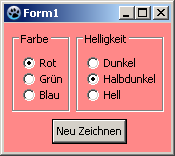](</File:RadioButtonExample5.png>) -> [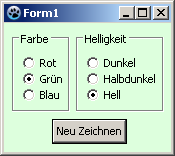](</File:RadioButtonExample6.png>) | |
| 105 | 130 | ||
| 106 | 131 | ## See also | |
| 107 | 132 | ||
| 108 | - | ||
| 109 | - | ||
| 110 | - | ||
| 111 | - | ||
| 133 | + | * [TRadioButton doc](<http://lazarus-ccr.sourceforge.net/docs/lcl/stdctrls/tradiobutton.html> "doc:lcl/stdctrls/tradiobutton.html") | |
| 134 | + | * [](</File:tradiogroup.png>)[[TRadioGroup]] \- Combined element providing some more layouting and grouping options | |
| 135 | + | * [](</File:tcheckbox.png>)[[TCheckBox]] \- Alternative to radio buttons, representing an on/off state of a single option | |
| 136 | + | * [](</File:tcheckgroup.png>)[[TCheckGroup]] \- Similar group as a TRadioGroup but with checkboxes as elements | |
| 137 | + | * [](</File:tchecklistbox.png>)[[TCheckListBox]] \- Alternative element to select several options in a list with checkmark boxes | |
| 138 | + | * [](</File:tpanel.png>)[[TPanel]] \- General grouping element, usable to group TRadioButtons for example | |
| 139 | + | * [](</File:tgroupbox.png>)[[TGroupBox]] \- General grouping of elements with a titled box | |
| 140 | + | * [](</File:tflowpanel.png>)[[TFlowPanel]] \- General grouping element which provides an automatic flow layouting ("line breaks") of its children | |
| 141 | + | * [](</File:tcombobox.png>)[[TComboBox]] \- Alternative element to select a single option from a drop-down list | |
| 142 | + | * [](</File:ttogglebox.png>)[[TToggleBox]] \- Alternative button element providing a toggle option (pressed down, not pressed down) | |
| 112 | 143 | ||
| 144 | + | ||
| 145 | + | ||
| 146 | + | **[[LCL Components]]** | |
| 147 | + | ||
| 148 | + | | Component Tab | Components | | | |
| 149 | + | |---|---|---| | |
| 150 | + | | [[Standard tab\|Standard]] | [[TMainMenu]] • [[TPopupMenu]] • [[TButton]] • [[TLabel]] • [[TEdit]] • [[TMemo]] • [[TToggleBox]] • [[TCheckBox]] • TRadioButton • [[TListBox]] • [[TComboBox]] • [[TScrollBar]] • [[TGroupBox]] • [[TRadioGroup]] • [[TCheckGroup]] • [[TPanel]] • [[TFrame]] • [[TActionList]] | | | |
| 151 | + | | [[Additional tab\|Additional]] | [[TBitBtn]] • [[TSpeedButton]] • [[TStaticText]] • [[TImage]] • [[TShape]] • [[TBevel]] • [[TPaintBox]] • [[TNotebook]] • [[TLabeledEdit]] • [[TSplitter]] • [[TTrayIcon]] • [[TControlBar]] • [[TFlowPanel]] • [[TMaskEdit]] • [[TCheckListBox]] • [[TScrollBox]] • [[TApplicationProperties]] • [[TStringGrid]] • [[TDrawGrid]] • [[TPairSplitter]] • [[TColorBox]] • [[TColorListBox]] • [[TValueListEditor]] | | | |
| 152 | + | | [[Common Controls tab\|Common Controls]] | [[TTrackBar]] • [[TProgressBar]] • [[TTreeView]] • [[TListView]] • [[TStatusBar]] • [[TToolBar]] • [[TCoolBar]] • [[TUpDown]] • [[TPageControl]] • [[TTabControl]] • [[THeaderControl]] • [[TImageList]] • [[TPopupNotifier]] • [[TDateTimePicker]] | | | |
| 153 | + | | [[Dialogs tab\|Dialogs]] | [[TOpenDialog]] • [[TSaveDialog]] • [[TSelectDirectoryDialog]] • [[TColorDialog]] • [[TFontDialog]] • [[TFindDialog]] • [[TReplaceDialog]] • [[TTaskDialog]] • [[TOpenPictureDialog]] • [[TSavePictureDialog]] • [[TCalendarDialog]] • [[TCalculatorDialog]] • [[TPrinterSetupDialog]] • [[TPrintDialog]] • [[TPageSetupDialog]] | | | |
| 154 | + | | [[Data Controls tab\|Data Controls]] | [[TDBNavigator]] • [[TDBText]] • [[TDBEdit]] • [[TDBMemo]] • [[TDBImage]] • [[TDBListBox]] • [[TDBLookupListBox]] • [[TDBComboBox]] • [[TDBLookupComboBox]] • [[TDBCheckBox]] • [[TDBRadioGroup]] • [[TDBCalendar]] • [[TDBGroupBox]] • [[TDBGrid]] • [[TDBDateTimePicker]] | | | |
| 155 | + | | [[Data Access tab\|Data Access]] | [[TDataSource]] • [[TCSVDataSet]] • [[TSdfDataSet]] • [[TBufDataset]] • [[TFixedFormatDataSet]] • [[TDbf]] • [[TMemDataset]] | | | |
| 156 | + | | [[System tab\|System]] | [[TTimer]] • [[TIdleTimer]] • [[TLazComponentQueue]] • [[THTMLHelpDatabase]] • [[THTMLBrowserHelpViewer]] • [[TAsyncProcess]] • [[TProcessUTF8]] • [[TProcess]] • [[TSimpleIPCClient]] • [[TSimpleIPCServer]] • [[TXMLConfig]] • [[TEventLog]] • [[TServiceManager]] • [[TCHMHelpDatabase]] • [[TLHelpConnector]] | | | |
| 157 | + | | [[Misc tab\|Misc]] | [[TColorButton]] • [[TSpinEdit]] • [[TFloatSpinEdit]] • [[TArrow]] • [[TCalendar]] • [[TEditButton]] • [[TFileNameEdit]] • [[TDirectoryEdit]] • [[TDateEdit]] • [[TTimeEdit]] • [[TCalcEdit]] • [[TFileListBox]] • [[TFilterComboBox]] • [[TComboBoxEx]] • [[TCheckComboBox]] • [[TButtonPanel]] • [[TShellTreeView]] • [[TShellListView]] • [[TXMLPropStorage]] • [[TINIPropStorage]] • [[TJSONPropStorage]] • [[TIDEDialogLayoutStorage]] • [[TMRUManager]] • [[TStrHolder]] | | | |
| 158 | + | | [[LazControls tab\|LazControls]] | [[TCheckBoxThemed]] • [[TDividerBevel]] • [[TExtendedNotebook]] • [[TListFilterEdit]] • [[TListViewFilterEdit]] • [[TLvlGraphControl]] • [[TShortPathEdit]] • [[TSpinEditEx]] • [[TFloatSpinEditEx]] • [[TTreeFilterEdit]] • [[TExtendedTabControl]] • | | | |
| 159 | + | | [[RTTI tab\|RTTI]] | [[TTIEdit]] • [[TTIComboBox]] • [[TTIButton]] • [[TTICheckBox]] • [[TTILabel]] • [[TTIGroupBox]] • [[TTIRadioGroup]] • [[TTICheckGroup]] • [[TTICheckListBox]] • [[TTIListBox]] • [[TTIMemo]] • [[TTICalendar]] • [[TTIImage]] • [[TTIFloatSpinEdit]] • [[TTISpinEdit]] • [[TTITrackBar]] • [[TTIProgressBar]] • [[TTIMaskEdit]] • [[TTIColorButton]] • [[TMultiPropertyLink]] • [[TTIPropertyGrid]] • [[TTIGrid]] | | | |
| 160 | + | | [[SQLdb tab\|SQLdb]] | [[TSQLQuery]] • [[TSQLTransaction]] • [[TSQLScript]] • [[TSQLConnector]] • [[TMSSQLConnection]] • [[TSybaseConnection]] • [[TPQConnection]] • [[TPQTEventMonitor]] • [[TOracleConnection]] • [[TODBCConnection]] • [[TMySQL40Connection]] • [[TMySQL41Connection]] • [[TMySQL50Connection]] • [[TMySQL51Connection]] • [[TMySQL55Connection]] • [[TMySQL56Connection]] • [[TMySQL57Connection]] • [[TSQLite3Connection]] • [[TIBConnection]] • [[TFBAdmin]] • [[TFBEventMonitor]] • [[TSQLDBLibraryLoader]] | | | |
| 161 | + | | [[Pascal Script tab\|Pascal Script]] | [[TPSScript]] • [[TPSScriptDebugger]] • [[TPSDllPlugin]] • [[TPSImport Classes]] • [[TPSImport DateUtils]] • [[TPSImport ComObj]] • [[TPSImport DB]] • [[TPSImport Forms]] • [[TPSImport Controls]] • [[TPSImport StdCtrls]] • [[TPSCustomPlugin]] | | | |
| 162 | + | | [[SynEdit tab\|SynEdit]] | [[TSynEdit]] • [[TSynCompletion]] • [[TSynAutoComplete]] • [[TSynMacroRecorder]] • [[TSynExporterHTML]] • [[TSynPluginSyncroEdit]] • [[TSynPasSyn]] • [[TSynFreePascalSyn]] • [[TSynCppSyn]] • [[TSynJavaSyn]] • [[TSynPerlSyn]] • [[TSynHTMLSyn]] • [[TSynXMLSyn]] • [[TSynLFMSyn]] • [[TSynDiffSyn]] • [[TSynUNIXShellScriptSyn]] • [[TSynCssSyn]] • [[TSynPHPSyn]] • [[TSynTeXSyn]] • [[TSynSQLSyn]] • [[TSynPythonSyn]] • [[TSynVBSyn]] • [[TSynAnySyn]] • [[TSynMultiSyn]] • [[TSynBatSyn]] • [[TSynIniSyn]] • [[TSynPoSyn]] | | | |
| 163 | + | | [[Chart tab\|Chart]] | [[TChart]] • [[TListChartSource]] • [[TRandomChartSource]] • [[TUserDefinedChartSource]] • [[TCalculatedChartSource]] • [[TDbChartSource]] • [[TChartToolset]] • [[TChartAxisTransformations]] • [[TChartStyles]] • [[TChartLegendPanel]] • [[TChartNavScrollBar]] • [[TChartNavPanel]] • [[TIntervalChartSource]] • [[TDateTimeIntervalChartSource]] • [[TChartListBox]] • [[TChartExtentLink]] • [[TChartImageList]] | | | |
| 164 | + | | [[IPro tab\|IPro]] | [[TIpFileDataProvider]] • [[TIpHtmlDataProvider]] • [[TIpHttpDataProvider]] • [[TIpHtmlPanel]] | | | |
| 165 | + | | [[Virtual Controls tab\|Virtual Controls]] | [[TVirtualDrawTree]] • [[TVirtualStringTree]] • [[TVTHeaderPopupMenu]] | | | |
| 166 | + | ||
| 113 | 167 | --- | |
| 114 | - | ||
| 168 | + | *From the Free Pascal wiki, page "TRadioButton", as the Internet Archive kept it on 2025-01-21, last changed on 2024-11-22. Copyright stays with the author who wrote it, according to the old wiki's [[Licensing]] page. If you have concerns about this material, [message the admin](/wiki-contact).* |