

TRadioButton: what changed
Revision 0 to 1. Removed lines have a minus sign; added lines have a plus sign.
Title: TRadioButton
| Old | New | Line | |
|---|---|---|---|
| 1 | + | A **TRadioButton**  is a component that displays a selection button that works with other Radio Buttons in a mutually exclusive way - if one button is selected, none of the others in the group can be selected. TRadioButtons are selectable from the [[Standard tab]] of the [[Component Palette]]. | |
| 2 | + | ||
| 3 | + | To use a TRadioButton on a [[TForm|Form]], you can simply select it on the component palette *Standard* and place it, with one click on the form.\ | |
| 4 | + | It usually does not make sense to use a single radiobutton, because radiobuttons are intended to select anything. Thus, you can instead of individual radiobuttons also a [[TRadioGroup]] use. | |
| 5 | + | ||
| 6 | + | Anywhere in your source code, you can get the status of the radiobuttons, whether active or inactive, by query **`Status := <RadioButton>.Checked;`**. You can use *Checked* as a normal [[Boolean]]. Thus, the allocation **`<RadioButton>.Checked := True;`** is possible. | |
| 7 | + | ||
| 8 | + | ### A simple example | |
| 9 | + | ||
| 10 | + | - Create a new application and drop three TRadioButtons on the form. | |
| 11 | + | - In the Object Inspector tab properties change the name the *RadioButton1...3* to *rbRed*, *rbGreen* and *rbBlue*. | |
| 12 | + | - Similarly, you change the captions of the radiobuttons to *Red*, *Green* and *Blue* there. | |
| 13 | + | - Add your form a [[TButton]] and change its caption to *Draw new* and its name to *btnPaint*. | |
| 14 | + | - Create the *OnClick* event handler for the TButton, by using the Object Inspector tab events, select the *OnClick* event and click the button \[...\] or double click the button in the form. | |
| 15 | + | - Add following code: | |
| 16 | + | ||
| 17 | + | ``` pascal | |
| 18 | + | procedure TForm1.btnPaintClick(Sender: TObject); | |
| 19 | + | begin | |
| 20 | + | if rbRed.Checked then Color:=clRed; | |
| 21 | + | if rbGreen.Checked then Color:=clLime; | |
| 22 | + | if rbBlue.Checked then Color:=clBlue; | |
| 23 | + | end; | |
| 24 | + | ``` | |
| 25 | + | ||
| 26 | + | - Open your application, it should look something like: | |
| 27 | + | ||
| 28 | + | 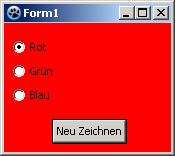 -\> 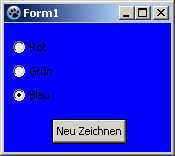 | |
| 29 | + | ||
| 30 | + | ### Usage of a event | |
| 31 | + | ||
| 32 | + | The difference to the previous example is, we repaint the form not by a button click, but already by clicking one of the radio buttons themselves. | |
| 33 | + | ||
| 34 | + | You can modify the previous example, by deleting the button and its *OnClick* event handler in the source code. You can create a new example but also easy: | |
| 35 | + | ||
| 36 | + | - Create a new application and drop three TRadioButtons on the form. | |
| 37 | + | - In the Object Inspector tab properties change the name the *RadioButton1...3* to *rbRed*, *rbGreen* and *rbBlue*. | |
| 38 | + | - Similarly, you change the captions of the radiobuttons to *Red*, *Green* and *Blue* there. | |
| 39 | + | - Now you can create the *OnChange* event handlers for the radiobuttons. For every radiobutton, you can use the Object Inspector tab events, select the *Onchange* event and click the button \[...\], but you can also doubleclick on it. | |
| 40 | + | - Let the event handler *OnChange* of the radio buttons change the colors of the form, according to clicked radio button: | |
| 41 | + | ||
| 42 | + | ``` pascal | |
| 43 | + | procedure TForm1.rbRedChange(Sender: TObject); | |
| 44 | + | begin | |
| 45 | + | Self.Color:=clRed; //with "Self", you select the object in which the method exists (method: rbRedChange / object: Form1) | |
| 46 | + | end; | |
| 47 | + | ||
| 48 | + | procedure TForm1.rbGreenChange(Sender: TObject); | |
| 49 | + | begin | |
| 50 | + | Form1.Color:=clLime; //You can directly select the object ''Form1'', but poor, | |
| 51 | + | //because then no other object of class 'TForm1' can be created | |
| 52 | + | end; | |
| 53 | + | ||
| 54 | + | procedure TForm1.rbBlueChange(Sender: TObject); | |
| 55 | + | begin | |
| 56 | + | Color:=clBlue; //or you leave out "Self" and the compiler will automatically detect its own object | |
| 57 | + | end; | |
| 58 | + | ``` | |
| 59 | + | ||
| 60 | + | - Open your application, it should look something like: | |
| 61 | + | ||
| 62 | + | 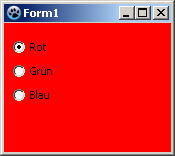 -\> 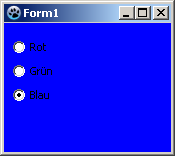 | |
| 63 | + | ||
| 64 | + | ### Grouping | |
| 65 | + | ||
| 66 | + | If you add a radiobutton to your form is its [[Parent|parent]] (control, which includes the radio button) your form. By each setting (no matter whether via code or user button click) of a **`<RadioButton>.Checked:=True;`** is checked whether a different radiobutton, with this parent, is selected and if yes, the property *Checked* of this would be changed to *False*.\ | |
| 67 | + | If you want to use multiple radiobuttons on your form, that are designed to provide different, independent choices, you must group the radio buttons. There are a finished component [[TRadioGroup]] or you group on a control (e.g. [[TPanel]], [[TGroupBox]], [[TNotebook]], [[TPageControl]] etc.).\ | |
| 68 | + | The following example shows how you can group radio buttons: | |
| 69 | + | ||
| 70 | + | You can change the example [[TRadioButton|A simple example]] or create a new application: | |
| 71 | + | ||
| 72 | + | - As first you would need to place a [[TGroupBox]] of the standard component palette onto your form. | |
| 73 | + | - You change its name to *gbColor* and its caption to *Color*. | |
| 74 | + | - Now you subclass this GroupBox that radio buttons *rbRed*, *rbGreen* and *rbBlue*: | |
| 75 | + | - In the modified project, you can sequentially move the radiobuttons **in the Object Inspector** by drag and drop to *gbColor*. | |
| 76 | + | - In a new project, you can insert the three radiobuttons one after the other, by clicking to insert in the GroupBox, then change the names to *rbRed*, *rbGreen* and *rbBlue* and the captions to *Red*, *Green* and *Blue*. | |
| 77 | + | - Now place a second TGroupBox on your form named *gbBrightness* with the caption *Brightness*. | |
| 78 | + | - Add this GroupBox also three radio buttons and give it the name *rbBrightDark*, *rbBrightMedDark* and *rbBrightBright* and the captions *Dark*, *MediumDark* and *Bright*. | |
| 79 | + | - If you have created a new application, you must add a button with name *btnPaint* and caption *Draw new* to the form. | |
| 80 | + | - In the *OnClick* event handler of *btnPaint* change the code to: | |
| 81 | + | ||
| 82 | + | ``` pascal | |
| 83 | + | procedure TForm1.btnPaintClick(Sender: TObject); | |
| 84 | + | begin | |
| 85 | + | if rbRed.Checked then Color:=Brightness or clRed; | |
| 86 | + | if rbGreen.Checked then Color:=Brightness or clLime; | |
| 87 | + | if rbBlue.Checked then Color:=Brightness or clBlue; | |
| 88 | + | end; | |
| 89 | + | ``` | |
| 90 | + | ||
| 91 | + | - Now create even the function Brightness, by enter the *private* section of TForm1, write **`function Brightness: TColor;`** and press the keys \[CTRL\] + \[Shift\] + \[c\] (code completion). The function is created. Enter there following code: | |
| 92 | + | ||
| 93 | + | ``` pascal | |
| 94 | + | function TForm1.Brightness: TColor; | |
| 95 | + | begin | |
| 96 | + | Result:=0; | |
| 97 | + | if rbBrightMedDark.Checked then Result:=$888888; | |
| 98 | + | if rbBrightBright.Checked then Result:=$DDDDDD; | |
| 99 | + | end; | |
| 100 | + | ``` | |
| 101 | + | ||
| 102 | + | - Start your application, you can use the grouped radio buttons separate, so it could look like: | |
| 103 | + | ||
| 104 | + | 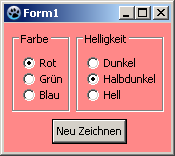 -\> 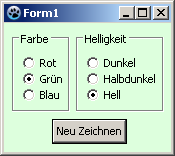 | |
| 105 | + | ||
| 106 | + | ## See also | |
| 107 | + | ||
| 108 | + | - [[doc:lcl/stdctrls/tradiobutton.html|TRadioButton doc]] | |
| 109 | + | - [[TRadioGroup]] - Usage of RadioGroups\ | |
| 110 | + | - [[TToggleBox]] - Usage of Toggleboxes\ | |
| 111 | + | - [[TCheckBox]] - Usage of CheckBoxes\ | |
| 112 | + | ||
| 113 | + | --- | |
| 114 | + | *From the Free Pascal wiki, page "TRadioButton", as it stood on 2020-03-01 after a change by Trev, out of the wiki's dump of 2024-05-26. Copyright stays with the author who wrote it, according to the old wiki's [[Licensing]] page. If you have concerns about this material, [message the admin](/wiki-contact).* |