

TMPlayerControl: what changed
Revision 2 to 3. Removed lines have a minus sign; added lines have a plus sign.
| Old | New | Line | |
|---|---|---|---|
| 1 | 1 | ## Introduction | |
| 2 | 2 | ||
| 3 | 3 | TMPlayerControl is a LCL control that embeds "mplayer" - a movie player available on several platforms. TMPlayerControl only works under X/gtk2 and Windows. TMPlayerControl can be used to play any mplayer supported video or audio file. | |
| 4 | 4 | ||
| 5 | 5 | ### Authors | |
| 6 | 6 | ||
| 7 | 7 | Mattias Gaertner (package maintainer)\ | |
| 8 | 8 | Michael Koecher (contributor)\ | |
| 9 | 9 | Mike Thompson (contributor) | |
| 10 | 10 | ||
| 11 | 11 | ### License | |
| 12 | 12 | ||
| 13 | 13 | [Modified](http://svn.freepascal.org/svn/lazarus/trunk/COPYING.modifiedLGPL.txt) [LGPL](http://svn.freepascal.org/svn/lazarus/trunk/COPYING.LGPL.txt) (same as FPC RTL and Lazarus LCL). | |
| 14 | 14 | ||
| 15 | 15 | ### Download | |
| 16 | 16 | ||
| 17 | 17 | The latest stable release can be found at svn: | |
| 18 | 18 | ||
| 19 | 19 | svn checkout svn://svn.code.sf.net/p/lazarus-ccr/svn/components/mplayer mplayer | |
| 20 | 20 | ||
| 21 | 21 | mplayer, and additional codecs, can be downloaded from <http://www.mplayerhq.hu/>. The additional codecs must be installed separately, but are not necessary for many common formats. | |
| 22 | 22 | ||
| 23 | 23 | ## Distributing mplayer | |
| 24 | 24 | ||
| 25 | 25 | > **Warning:** mplayer can be easily bundled with your application installation. However mplayer uses FFmpeg and the legal licensing warning at <http://www.ffmpeg.org/legal.html> could also apply (see last question under Mini-Patent FAQ).\ | |
| 26 | 26 | > It is recommended that the end-user install mplayer on their system instead of it being distributed with your application. | |
| 27 | 27 | ||
| 28 | 28 | ## Usage | |
| 29 | 29 | ||
| 30 | 30 | The control can be dropped on any form, and incorporates the video playback area.\ | |
| 31 | 31 | Additional controls such as Trackbars for progess/volume and buttons for playback control need to be added manually, with their values being set during the appropriate events. | |
| 32 | 32 | ||
| 33 | 33 | mplayer must be available on the end user system. Either installed with the mplayer folder being in the PATH environment variable, or with the MPlayerPath property pointing to the mplayer executable. | |
| 34 | 34 | ||
| 35 | 35 | TMPlayerControl only implements a very small set of mplayer features: **Play**, **Stop**, **Pause**, **Loop**, **Volume**, **Duration**, **Position** and **GrabImage**, essentially focusing on anything required for multimedia playback. | |
| 36 | 36 | ||
| 37 | 37 | TMPlayerControl sets a minor selection of mplayer properties at run time. Additional parameters can be set via **StartParam**.\ | |
| 38 | 38 | See <http://mplayerhq.hu/DOCS/man/en/mplayer.1.html#GENERAL%20OPTIONS> for a full list of available parameters. | |
| 39 | 39 | ||
| 40 | 40 | TMPlayerControl controls mplayer in slave mode. Slave commands can be sent directly to mplayer after multimedia is loaded (i.e. after calling Play) by using **SendMPlayerCommand(Cmd: string);**\ | |
| 41 | 41 | **SendMPlayerCommand** is not needed for simple video playback, and is made available for advanced mplayer features.\ | |
| 42 | 42 | For a full list of available slave comamnds visit <http://www.mplayerhq.hu/DOCS/tech/slave.txt> or enter the following at the command prompt. | |
| 43 | 43 | ||
| 44 | 44 | ``` bash | |
| 45 | 45 | mplayer -input cmdlist | |
| 46 | 46 | ``` | |
| 47 | 47 | ||
| 48 | 48 | ### Example | |
| 49 | 49 | ||
| 50 | 50 | In the examples folder, see FullFeatured\mplayerTestHarness.lpr for a full demonstration of TMPlayerControl capabilities, as well as additional functionality for querying mplayer for available commands. | |
| 51 | 51 | ||
| 52 | - | ||
| 52 | + | 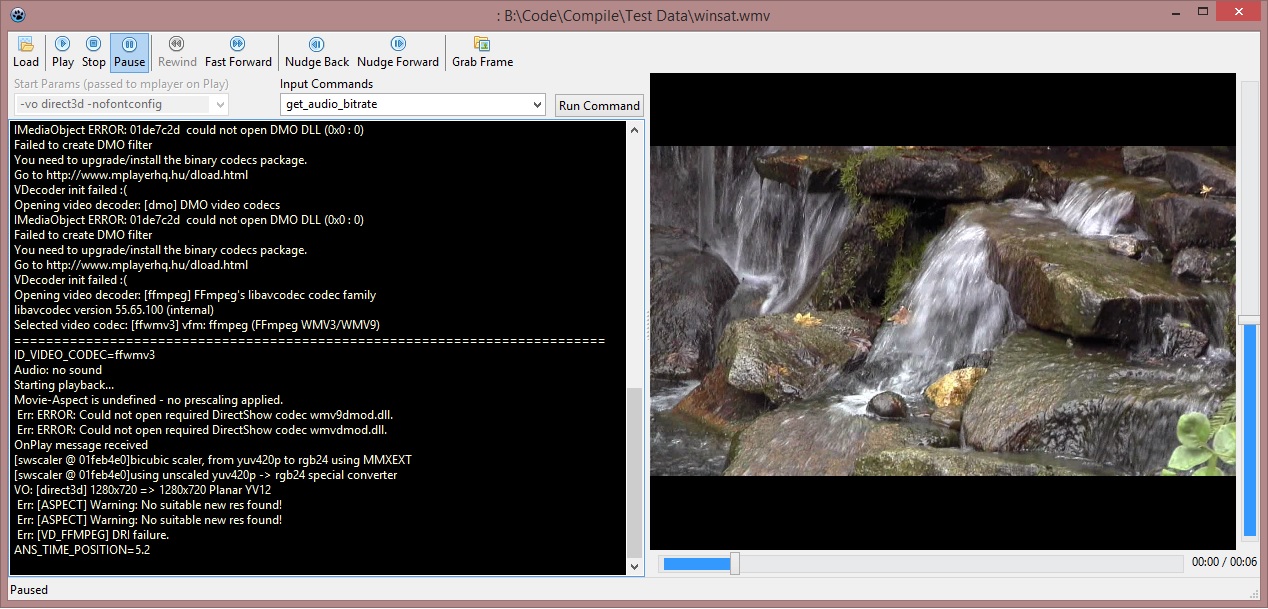 | |
| 53 | 53 | ||
| 54 | 54 | ### Methods | |
| 55 | 55 | ||
| 56 | 56 | The following Methods and Properties are available: | |
| 57 | 57 | ||
| 58 | 58 | | Method | Description | | |
| 59 | 59 | |----|----| | |
| 60 | 60 | | function FindMPlayerPath : Boolean; | TMPlayerControl searches for mplayer in the PATH or in a subfolder of the application folder called "mplayer". If found, then sets MPlayerPath and returns True | | |
| 61 | 61 | | property MPlayerPath: string; | R/W. Full path to the mplayer executable. Either populated by FindMPlayerPath, or programmatically | | |
| 62 | 62 | | property StartParam: string; | R/W. Any additional parameters to be sent to mplayer before the multimedia file is initialised. See <http://mplayerhq.hu/DOCS/man/en/mplayer.1.html#GENERAL%20OPTIONS> for a full set of available parameters | | |
| 63 | 63 | | property Filename: string; | R/W. The multimedia file to be played | | |
| 64 | 64 | | procedure Play; | All the above must be configured correct before this command is called. This initialises mplayer, putting it into slave mode with the file loaded. mplayer will automatically start playing the file. | | |
| 65 | 65 | | procedure Stop; | This stops the video file playing, which in turn stops mplayer. After this is called, many of the properties will no longer be available. | | |
| 66 | 66 | | property Loop: integer; | R/W. This instructs mplayer to loop the video. -1 no, 0 forever, 1 once, 2 twice, ... | | |
| 67 | 67 | | property Paused: boolean; | R/W. Either set or retrieve the paused state. | | |
| 68 | 68 | | function Running: boolean; | R/O. Is mplayer running? | | |
| 69 | 69 | | function Playing: boolean; | R/O. Is mplaying running with a file loaded? There is only a small window in time between the file stopping and mplayer itself stopping running. | | |
| 70 | 70 | | property ImagePath: string; | R/W. The folder you want captured image grabs to be saved in. | | |
| 71 | 71 | | procedure GrabImage; | Instruct mplayer to grab an image. In testing, success of this call is dependent upon a combination of the codec mplayer is using, and the renderer being used. Under windows, optimal results were returned with the direct3d renderer (-vo direct3d) | | |
| 72 | 72 | | property LastImageFilename: String; | R/O. The filename of the last image grabbed. The filename of the last image grabbed is also passed as a parameter to the OnGrabImage event. | | |
| 73 | 73 | | property Volume: integer; | R/W. 0 = mute. 100 = max | | |
| 74 | 74 | | property Rate: single; | R/W. Playback rate. 1 = normal speed. mplayer allows values between 0.1 and 100 (i.e. no reverse) | | |
| 75 | 75 | | property Duration: single; | R/O. The length of the loaded video file in seconds. | | |
| 76 | 76 | | property Position: single; | R/W. Used to set or retrieve the current position of the video file in seconds. Current video position is queried every half second, so during playback at normal speed, there is only a half second accuracy. | | |
| 77 | 77 | | property VideoInfo: TVideoInfo; | R/O. Only populated after OnPlay event. Record containing Codec, bitrate, width, height etc | | |
| 78 | 78 | | property AudioInfo: TAudioInfo; | R/O. Only populated after OnPlay event. Record containing Codec, SampleRate, Bitrate etc. | | |
| 79 | 79 | | procedure SendMPlayerCommand(Cmd: string); | Additional commands can be sent directly to mplayer, and the results can be queried with the OnFeedback event. See <http://www.mplayerhq.hu/DOCS/tech/slave.txt> for a full list of available commands | | |
| 80 | 80 | ||
| 81 | 81 | ### Events | |
| 82 | 82 | ||
| 83 | 83 | The following events are available: | |
| 84 | 84 | ||
| 85 | 85 | | Event | Description | | |
| 86 | 86 | |----|----| | |
| 87 | 87 | | OnPlay | This event is broadcast immediately after mplayer finishes initialising the file to be played. At the point this event is launched the VideoInfo and AudioInfo records will be populated | | |
| 88 | 88 | | OnPlaying | This event is broadcast regularly while the multimedia file is playing. You can use this event to keep a TTrackbar synchronised with the playback | | |
| 89 | 89 | | OnStop | This event is broadcast when the multimedia file stops. As soon as this event is launched the VideoInfo and AudioInfo records are cleared | | |
| 90 | 90 | | OnFeedback | mplayer is polled frequently by TMPlayerControl. Most text output on the standard console will be available through the TStringList parameter. Some housekeeping information (such as the frequent requests for video position) are removed from this TStringList parameter. | | |
| 91 | 91 | | OnError | mplayer is polled frequently by TMPlayerControl. All text output on the error console will be available through the TStringList parameter. | | |
| 92 | 92 | | OnGrabImage | This event is raised following an GrabImage request. If successfull, then the filename to the image is returned. | | |
| 93 | 93 | | OnClick, OnMouseUp, OnMouseDown, OnMouseWheel | Standard LCL events. OnMouseWheel can be used to allow the video to scroll through the video. An example of this is provided in the FullFeatured demo. | | |
| 94 | 94 | ||
| 95 | 95 | ## See also | |
| 96 | 96 | ||
| 97 | 97 | [[Video Playback Libraries]] | |
| 98 | 98 | ||
| 99 | 99 | --- | |
| 100 | 100 | *From the Free Pascal wiki, page "TMPlayerControl", as it stood on 2019-12-28 after a change by Trev, out of the wiki's dump of 2024-05-26. Copyright stays with the author who wrote it, according to the old wiki's [[Licensing]] page. If you have concerns about this material, [message the admin](/wiki-contact).* | |
| 101 | 101 | Category: Lazarus-CCR | |
| 102 | 102 | Category: Multimedia | |
| 103 | 103 | Category: Video |