

TListViewFilterEdit: what changed
Revision 1 to 2. Removed lines have a minus sign; added lines have a plus sign.
| Old | New | Line | |
|---|---|---|---|
| 1 | - | ||
| 2 | - | ||
| 3 | - | ||
| 4 | - | ||
| 1 | + | 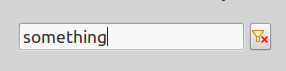 | |
| 5 | 2 | ||
| 6 | 3 | A **TListViewFilterEdit** is a control, based on TEdit that can manage filtering of the content of a TListView component. It is available from the [[LazControls tab]] of the [[Component Palette]]. | |
| 7 | 4 | ||
| 8 | 5 | ## Usage | |
| 9 | 6 | ||
| 10 | 7 | Normally you would place a TListViewFilterEdit near its associated TListView and set a number of properties of the two components, typically - | |
| 11 | 8 | ||
| 12 | 9 | - ListView1.ViewStyle := vsReport; | |
| 13 | 10 | - ListViewFilterEdit1.FilteredListview := ListView1; | |
| 14 | 11 | - ListViewFilterEdit1.TextHint := 'Search Here'; | |
| 15 | 12 | - ListViewFilterEdit1.CharCase := ecNormal; | |
| 16 | 13 | - Possibly create one or more columns in the ListView | |
| 17 | 14 | ||
| 18 | 15 | ### Adding Data | |
| 19 | 16 | ||
| 20 | 17 | Data is added via the TListViewFilterEdit and it takes care of passing that data to the TListView. For example, to populate two columns of the TListView you might - | |
| 21 | 18 | ||
| 22 | 19 | ``` pascal | |
| 23 | 20 | procedure TForm1.AddLVItem(St1, St2 : string); | |
| 24 | 21 | var | |
| 25 | 22 | ListItem: TListViewDataItem; | |
| 26 | 23 | begin | |
| 27 | 24 | ListItem.Data := Nil; | |
| 28 | 25 | SetLength(ListItem.StringArray, 2); | |
| 29 | 26 | ListItem.StringArray[0] := St1; | |
| 30 | 27 | ListItem.StringArray[1] := St2; | |
| 31 | 28 | ListViewFilterEdit1.Items.Add(ListItem); | |
| 32 | 29 | end; | |
| 33 | 30 | ||
| 34 | 31 | procedure TForm1.LoadSomeData(); | |
| 35 | 32 | begin | |
| 36 | 33 | ListView1.BeginUpdate; | |
| 37 | 34 | AddLVItem('String1', 'String2'); | |
| 38 | 35 | AddLVItem('String3', 'String4'); | |
| 39 | 36 | AddLVItem('A String', 'another String'); | |
| 40 | 37 | AddLVItem('x string', 'Extra String'); | |
| 41 | 38 | ListViewFilterEdit1.InvalidateFilter; | |
| 42 | 39 | ListViewFilterEdit1.ResetFilter; | |
| 43 | 40 | ListViewFilterEdit1.Text:=''; | |
| 44 | 41 | ListView1.EndUpdate; | |
| 45 | 42 | end; | |
| 46 | 43 | ``` | |
| 47 | 44 | ||
| 48 | 45 | ### Filter Data | |
| 49 | 46 | ||
| 50 | 47 | By default, TListViewFilterEdit filters only on data in the first column. You can tell it to look at all columns, suppose you have a checkbox called CheckBothColumns - | |
| 51 | 48 | ||
| 52 | 49 | ``` pascal | |
| 53 | 50 | ListViewFilterEdit1.ByAllFields := CheckBothColumns.Checked; | |
| 54 | 51 | ListViewFilterEdit1.InvalidateFilter; | |
| 55 | 52 | ``` | |
| 56 | 53 | ||
| 57 | 54 | ### Case Sensitive | |
| 58 | 55 | ||
| 59 | 56 | Again, by default, TListViewFilterEdit is not case sensitive but can easily be made so. Again, suppose we have a checkbox, this time called CheckCaseSensitive - | |
| 60 | 57 | ||
| 61 | 58 | ``` pascal | |
| 62 | 59 | if CheckCaseSensitive.checked then | |
| 63 | 60 | ListViewFilterEdit1.FilterOptions := | |
| 64 | 61 | ListViewFilterEdit1.FilterOptions + [fsoCaseSensitive] | |
| 65 | 62 | else | |
| 66 | 63 | ListViewFilterEdit1.FilterOptions := | |
| 67 | 64 | ListViewFilterEdit1.FilterOptions - [fsoCaseSensitive]; | |
| 68 | 65 | ListViewFilterEdit1.InvalidateFilter; | |
| 69 | 66 | ``` | |
| 70 | 67 | ||
| 71 | 68 | ### Other Notes | |
| 72 | 69 | ||
| 73 | 70 | - You cannot use TListViewFilterEdit with a TListView in Owner Data Mode. | |
| 74 | 71 | - TListViewFilterEdit will only work with data loaded into the TListViewFilterEdit TListView combination, it cannot be made to look at associated data. | |
| 75 | 72 | ||
| 76 | 73 | The above code can be found in a Lazarus Example that may, at some point in time find its way into the Lazarus Source tree. | |
| 77 | 74 | ||
| 78 | 75 | ## See Also | |
| 79 | 76 | ||
| 80 | 77 | - [[TEdit]] | |
| 81 | 78 | - [[TListView]] | |
| 82 | 79 | - [provisional documentation on TListViewFilterEdit](https://dsiders.gitlab.io/lazdocsnext/lazcontrols/listviewfilteredit/tlistviewfilteredit.html) - external | |
| 83 | 80 | - [Parent Class](https://lazarus-ccr.sourceforge.io/docs/lcl/editbtn/tcustomcontrolfilteredit.html) - official documentation | |
| 84 | 81 | ||
| 85 | 82 | --- | |
| 86 | 83 | *From the Free Pascal wiki, page "TListViewFilterEdit", as it stood on 2022-12-07 after a change by Dbannon, out of the wiki's dump of 2024-05-26. Copyright stays with the author who wrote it, according to the old wiki's [[Licensing]] page. If you have concerns about this material, [message the admin](/wiki-contact).* |