

TListView: what changed
Revision 1 to 2. Removed lines have a minus sign; added lines have a plus sign.
| Old | New | Line | |
|---|---|---|---|
| 1 | 1 | **TListView**  is a visible component on the [[Common Controls tab]] of the [[Component Palette]] that provides a list view of its associated Items. Items can be represented by an icon from each of the associated [[TImageList|TImageLists]]: SmallImages, LargeImages and StateImages. | |
| 2 | 2 | ||
| 3 | 3 | ## Notes | |
| 4 | 4 | ||
| 5 | 5 | - **GetNextItem**() requires StartItem to be provided. This is incompatible with Delphi's GetNextItem(), where startItem is allowed to be **nil**, which will perform the search from the relative (direction driven) start. | |
| 6 | 6 | ||
| 7 | 7 | ## Sorting | |
| 8 | 8 | ||
| 9 | 9 | `TODO: add description on how OwnerData affects the sorting` | |
| 10 | 10 | ||
| 11 | 11 | Sorting is (typically?) applied when using **vsReport** ViewStyle, as it's column driven (with Sortcolumn index required). Sorting might be a time consuming for a larger data scale (when comparison of items takes a considerable time). | |
| 12 | 12 | ||
| 13 | 13 | **SortType** is the key property in order to perform any sorting in TListView. | |
| 14 | 14 | ||
| 15 | 15 | ||
| 16 | 16 | **stNone** - (the default value) that no sorting should be for the control. | |
| 17 | 17 | ||
| 18 | 18 | **stText** - the text of a cells would be used for item comparison. The actual text entry is controlled by **SortColumn** property. Note the default sorting comparison is actually treats the text as Ansi, rather than UTF8. Thus the result might be undesired for the non-English texts | |
| 19 | 19 | ||
| 20 | 20 | **stData** - the default sorting comparison treats **Data** property as an integer value (by casting pointer to an integer) and sorts the according to value. (in most cases such sorting is useless, unless "Data" is an actual integer casted to the pointer) | |
| 21 | 21 | ||
| 22 | 22 | **stBoth** - treated as **stText** for in the default sorting comparison. | |
| 23 | 23 | ||
| 24 | 24 | Unless using text sorting, the default comparison method is not the best approach, instead a custom comparison could be used. The custom comparison is assigned with **OnCompare** event of TListView. The following parameters are passed: | |
| 25 | 25 | ||
| 26 | 26 | ||
| 27 | 27 | **Sender** - TListview that's being sorted | |
| 28 | 28 | ||
| 29 | 29 | **Item1** - one TListItem being compared | |
| 30 | 30 | ||
| 31 | 31 | **Item2** - another TListItem being compared to the one | |
| 32 | 32 | ||
| 33 | 33 | **Data** - is not used and is always passed as zero. (provided for Delphi compatibility) | |
| 34 | 34 | ||
| 35 | 35 | **Compare** - the result of the comparison, that must be populated by the event. The following values should be assigned to the **Compare** argument. | |
| 36 | 36 | ||
| 37 | 37 | ||
| 38 | 38 | -1 - if Item1 should show up "earlier" in Ascending order, than Item2. (Item1 is less than Item2) | |
| 39 | 39 | ||
| 40 | 40 | 0 - if two items are equal | |
| 41 | 41 | ||
| 42 | 42 | 1 - if Item2 should show up "earlier" in Ascending order, than Item1. (Item2 is less than Item1) | |
| 43 | 43 | ||
| 44 | 44 | It's a normal practice to reverse the comparison result value, if SortDirection is descending. I.e.: | |
| 45 | 45 | ||
| 46 | 46 | ```delphi | |
| 47 | 47 | procedure TForm1.ListView1OnCompare(Sender: TObject; Item1, Item2: TListItem; | |
| 48 | 48 | Data: Integer; var Compare: Integer) | |
| 49 | 49 | begin | |
| 50 | 50 | ... do the comparison... | |
| 51 | 51 | ||
| 52 | 52 | if TListView(Sender).SortDirection = sdDescending then | |
| 53 | 53 | Compare := -Compare; | |
| 54 | 54 | end; | |
| 55 | 55 | ``` | |
| 56 | 56 | ||
| 57 | 57 | The OnCompare event should check for **SortType**, **SortColumn** and **SortDirection** properties of TListView, and do adjust the comparison result respectively of those properties. | |
| 58 | 58 | ||
| 59 | 59 | Method **Sort** performs of items, if **SortType** is other than **stNone** and SortColumn is assigned to a valid column index. | |
| 60 | 60 | ||
| 61 | 61 | Method **CustomSort** performs a one-time sorting using a provided sorting function. | |
| 62 | 62 | ||
| 63 | 63 | ||
| 64 | 64 | ASortProc: TLVCompare - sorting function | |
| 65 | 65 | ||
| 66 | 66 | AOptionalParam: PtrInt - sorting parameter | |
| 67 | 67 | ||
| 68 | 68 | Sorting parameter is ignored (provided for the Delphi compatibility). If **ASortProc** is passed as nil, then the either sorting OnCompare is used or default sorting. | |
| 69 | 69 | ||
| 70 | 70 | Typically the sorting can be requested by a user. Whenever a user clicks on a column header, that requires to either sort (initially ascendancy) or to switch to the opposite sorting order (either from ascendant to descendant, or back). It's not a rule, but a common expectation. For some data sets selecting sorting might not make any sense. **AutoSort** (default value is true)the property of TListview controls, if the listview should be sorted automatically, as soon as user clicks on a column header. **AutoSort** will have no effect, while **SortType** is set to **stNone**. | |
| 71 | 71 | ||
| 72 | 72 | **AlphaSort** is a convenience method, that changes the settings to ascending sort (SortDirection=sdAscending) based on the text (SortType=stText) of the first column (SortColumn=0). Note that the actual properties are changed. | |
| 73 | 73 | ||
| 74 | 74 | ### Sort Indicator | |
| 75 | 75 | ||
| 76 | 76 | Originating from: <https://bugs.freepascal.org/view.php?id=36281> | |
| 77 | 77 | ||
| 78 | 78 | In trunk since r62567 | |
| 79 | 79 | ||
| 80 | 80 | 1\) Add a new property **SortIndicator** to TListViewColumn. The property controls system native sort indicator. | |
| 81 | 81 | ||
| 82 | 82 | The indicator is acting solely as a decorative feature. (Doesn't have any effect on the sorting). The indicator has 3 possible values | |
| 83 | 83 | ||
| 84 | 84 | ||
| 85 | 85 | **siNone** - no sort indicator should be shown | |
| 86 | 86 | ||
| 87 | 87 | **siAscending** - ascending indicator should be shown | |
| 88 | 88 | ||
| 89 | 89 | **siDescending** - descending indicator should be shown | |
| 90 | 90 | ||
| 91 | 91 | The property can work independently of other TListview sorting properties. | |
| 92 | 92 | ||
| 93 | - | ||
| 94 | - | ||
| 95 | - | ||
| 96 | - | ||
| 93 | + | 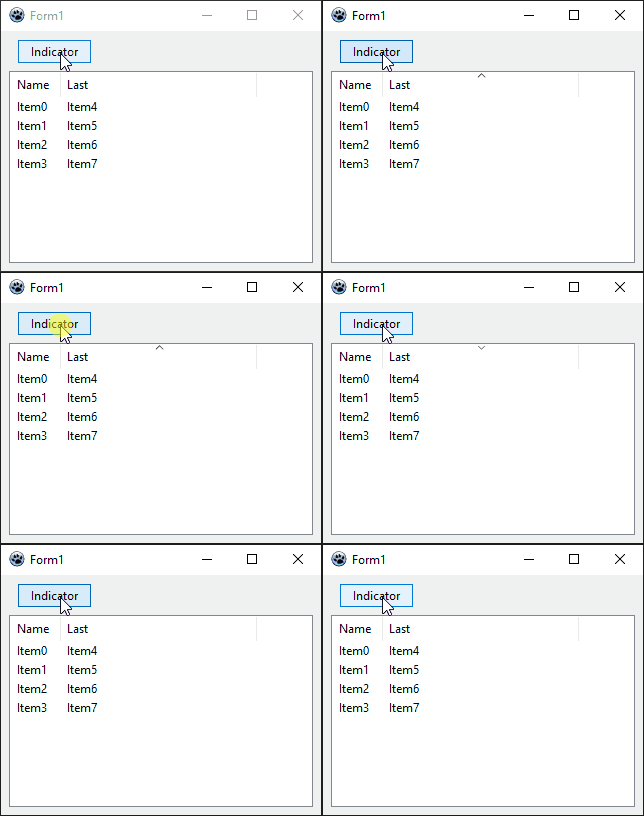 | |
| 97 | 94 | ||
| 98 | 95 | 2\) Add new property **AutoSortIndicator** to TListView. The property is intended to be used as a compliment to **AutoSort** property. If both are enabled, LCL code controls the current selection of the column sortindicator according to **AutoSort** rules. | |
| 99 | 96 | ||
| 100 | - | ||
| 101 | - | ||
| 102 | - | ||
| 103 | - | ||
| 97 | + | 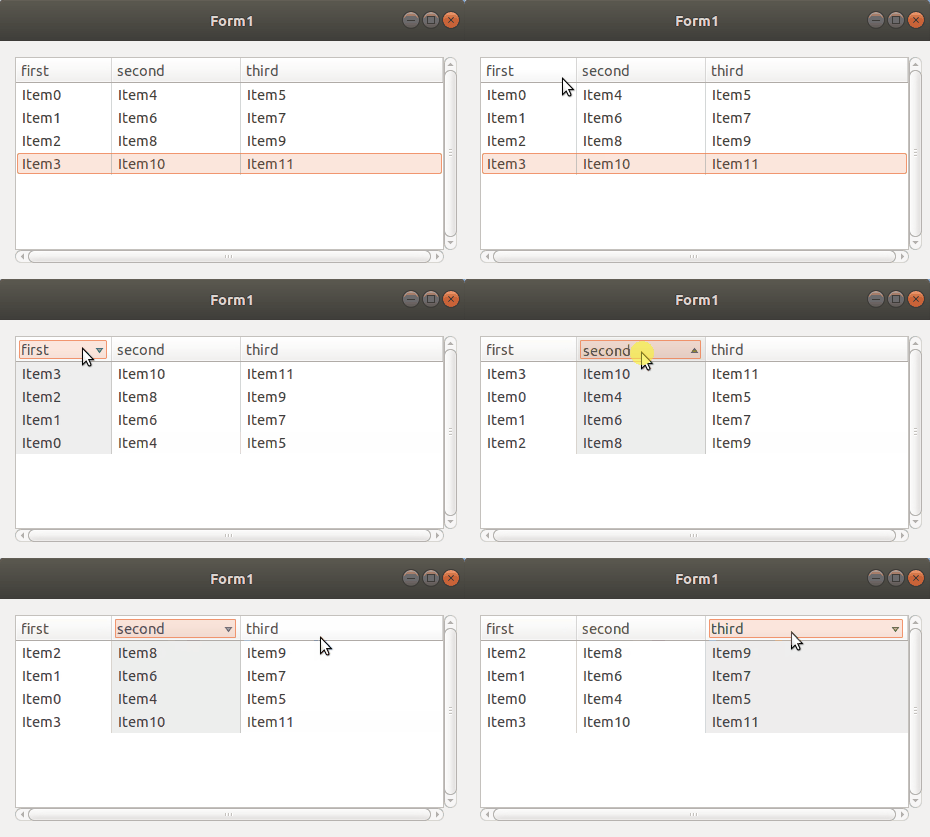 | |
| 104 | 98 | ||
| 105 | 99 | Early 2021 it was noticed that if you are using Qt5 and you have TListView.SortDirection set to sdAscending (the default), then setting a column's Sort Indicator to siDescending displays an ascending indicator. This does not happen with GTK2 or GTK3. Setting SortDirection to sdDescending makes all other combinations work fine so, seems an easy solution. Logged <https://bugs.freepascal.org/view.php?id=38393> | |
| 106 | 100 | ||
| 107 | 101 | ## Custom drawing | |
| 108 | 102 | ||
| 109 | 103 | There is a good article on custom-drawing `TListView`: <https://delphidabbler.com/articles/article-16>. Most of the sample code in this article is working in Lazarus, too, however only **on Windows**. Here are some excerpts: | |
| 110 | 104 | ||
| 111 | 105 | Note: Keep the `OwnerDraw` property of the `TListView` at `false`. | |
| 112 | 106 | ||
| 113 | 107 | ### Alternating row colors | |
| 114 | 108 | ||
| 115 | 109 | 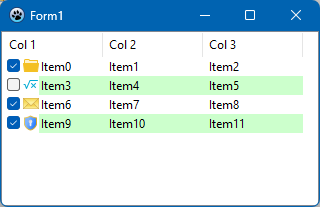 Attach this handler for the `OnCustomDrawItem` event which is responsible for painting a full row. When the `DefaultDraw` parameter of the event handler is unchanged (i.e., `true`) then control still paints the text and additional gimmicks such as icons or checkboxes (see screenshot at the right): | |
| 116 | 110 | ||
| 117 | 111 | ``` Pascal | |
| 118 | 112 | procedure TForm1.ListView1CustomDrawItem(Sender: TCustomListView; | |
| 119 | 113 | Item: TListItem; State: TCustomDrawState; var DefaultDraw: Boolean); | |
| 120 | 114 | begin | |
| 121 | 115 | if Odd(Item.Index) then | |
| 122 | 116 | // odd list items have green background | |
| 123 | 117 | ListView1.Canvas.Brush.Color := clMoneyGreen | |
| 124 | 118 | else | |
| 125 | 119 | // even list items have window colour background | |
| 126 | 120 | ListView1.Canvas.Brush.Color := clWindow; | |
| 127 | 121 | end; | |
| 128 | 122 | ``` | |
| 129 | 123 | ||
| 130 | 124 | ### Individual column colors | |
| 131 | 125 | ||
| 132 | 126 | At first prepare a procedure to set the brush color for each ListView column: | |
| 133 | 127 | ||
| 134 | 128 | ``` Pascal | |
| 135 | 129 | { Sets the brush colour for the column. Our ListView has 3 columns } | |
| 136 | 130 | procedure TForm1.SetLVColumnColour(AColIndex: Integer); | |
| 137 | 131 | const | |
| 138 | 132 | cRainbow: array[0..2] of TColor = ($FFCCCC, $CCFFCC, $CCCCFF); | |
| 139 | 133 | begin | |
| 140 | 134 | ListView1.Canvas.Brush.Color := cRainBow[AColumnIndex]; | |
| 141 | 135 | end; | |
| 142 | 136 | ``` | |
| 143 | 137 | ||
| 144 | 138 | Then provide a handler of the `OnCustomDrawItem` event which is responsible for painting of the entire row and, in particular, of the 1st column, and the `OnCustomDrawSubItem` event which is called when the other columns are painted: 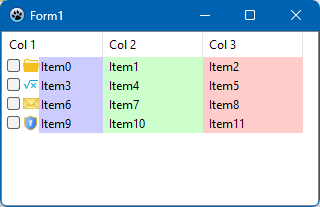 | |
| 145 | 139 | ||
| 146 | 140 | ``` Pascal | |
| 147 | 141 | { Draw the "Caption" column } | |
| 148 | 142 | procedure TForm1.ListView1CustomDrawItem(Sender: TCustomListView; | |
| 149 | 143 | Item: TListItem; State: TCustomDrawState; var DefaultDraw: Boolean); | |
| 150 | 144 | begin | |
| 151 | 145 | SetLVColumnColour(0); | |
| 152 | 146 | end; | |
| 153 | 147 | ||
| 154 | 148 | { Draw the sub item columns } | |
| 155 | 149 | procedure TForm1.ListView1CustomDrawSubItem(Sender: TCustomListView; | |
| 156 | 150 | Item: TListItem; SubItem: Integer; State: TCustomDrawState; | |
| 157 | 151 | var DefaultDraw: Boolean); | |
| 158 | 152 | begin | |
| 159 | 153 | SetLVColumnColour(SubItem); | |
| 160 | 154 | end; | |
| 161 | 155 | ``` | |
| 162 | 156 | ||
| 163 | 157 | ## Widgetset Implementation | |
| 164 | 158 | ||
| 165 | 159 | ListView is implemented via TWSCustomListViewClassinterface. | |
| 166 | 160 | ||
| 167 | - | ||
| 168 | - | ||
| 169 | - | ||
| 170 | - | ||
| 171 | - | ||
| 172 | - | ||
| 173 | - | ||
| 174 | - | ||
| 175 | - | ||
| 176 | - | ||
| 177 | - | ||
| 178 | - | ||
| 179 | - | ||
| 180 | - | ||
| 181 | - | ||
| 182 | - | ||
| 161 | + | **Method** | |
| 162 | + | ||
| 163 | + | **Description** | |
| 164 | + | ||
| 165 | + | SelectAll | |
| 166 | + | ||
| 167 | + | The method provides a parameter **AIsSet**. | |
| 168 | + | ||
| 169 | + | If the parameter is set to **true** then all items should selected in the view. If it's **false** then, all parameters should deselected. | |
| 170 | + | ||
| 171 | + | It's important that the event shouldn't trigger any events, as LCL will call SelectChange event by itself. | |
| 183 | 172 | ||
| 184 | 173 | ## See also | |
| 185 | 174 | ||
| 186 | 175 | - [[doc:lcl/comctrls/tlistview.html|Doc. TListView]] | |
| 187 | 176 | - [[TTreeView]] | |
| 188 | 177 | - [[TShellListView]] | |
| 189 | 178 | ||
| 190 | 179 | --- | |
| 191 | 180 | *From the Free Pascal wiki, page "TListView", as it stood on 2023-04-28 after a change by Wp, out of the wiki's dump of 2024-05-26. Copyright stays with the author who wrote it, according to the old wiki's [[Licensing]] page. If you have concerns about this material, [message the admin](/wiki-contact).* |