

TListBox: what changed
Revision 0 to 1. Removed lines have a minus sign; added lines have a plus sign.
Title: TListBox
| Old | New | Line | |
|---|---|---|---|
| 1 | + | A **TListBox**  is a component that shows a (scrollable) list of (short) strings where user is to select one. It is available from the [[Standard tab]] of the [[Component Palette]]. | |
| 2 | + | ||
| 3 | + | In the TListBox, the stored [[String|strings]] are stored in the property *Items*, that is of type [[TStrings]]. Thus you can assign or remove strings in the ListBox, as in a [[TStringList]] or its parent [[TStringList-TStrings Tutorial|TStrings]]. | |
| 4 | + | ||
| 5 | + | Here are a few examples of how to use a TListBox *ListBox1* on a form *Form1*: | |
| 6 | + | ||
| 7 | + | ## Fill ListBox | |
| 8 | + | ||
| 9 | + | ### by the Object Inspector | |
| 10 | + | ||
| 11 | + | - Select the ListBox on your form with one click. | |
| 12 | + | - Go in the Object Inspector in the Properties tab on the property *Items*. | |
| 13 | + | - Click on the button with the three dots. The String Editor opens. | |
| 14 | + | - Enter your text and confirm your work with *OK*. | |
| 15 | + | ||
| 16 | + | ### by code in button click | |
| 17 | + | ||
| 18 | + | Add your form a [[TButton]] with the name *btnFill* and caption *fill ListBox*. In the event handler *OnClick* of the button, you write the following code: | |
| 19 | + | ||
| 20 | + | ``` pascal | |
| 21 | + | procedure TForm1.btnFillClick(Sender: TObject); | |
| 22 | + | begin | |
| 23 | + | ListBox1.Items.Clear; //Delete all existing strings | |
| 24 | + | ListBox1.Items.Add('First line'); | |
| 25 | + | ListBox1.Items.Add('Line with random number '+IntToStr(Random(100))); | |
| 26 | + | ListBox1.Items.Add('Third line'); | |
| 27 | + | ListBox1.Items.Add('Even a random number '+IntToStr(Random(100))); | |
| 28 | + | end; | |
| 29 | + | ``` | |
| 30 | + | ||
| 31 | + | ## Assignment of a StringList | |
| 32 | + | ||
| 33 | + | Add your form a [[TButton]] with the name *btnFill* and caption *fill ListBox*. In the event handler *OnClick* of the button, you write the following code: | |
| 34 | + | ||
| 35 | + | ``` pascal | |
| 36 | + | procedure TForm1.btnFillClick(Sender: TObject); | |
| 37 | + | var | |
| 38 | + | myStringList: TStringList; | |
| 39 | + | begin | |
| 40 | + | myStringList:=TStringList.Create; //Create my StringList | |
| 41 | + | myStringList.Add('This is the first line.'); //This add a row | |
| 42 | + | myStringList.Add('This is the second first line.'); | |
| 43 | + | myStringList.Add('This is the third line.'); | |
| 44 | + | myStringList.Add('etc.'); | |
| 45 | + | ListBox1.Items.Assign(myStringList); //assign the ListBox1 the text content of my StringList | |
| 46 | + | myStringList.Free; //Free my StringList in memory | |
| 47 | + | end; | |
| 48 | + | ``` | |
| 49 | + | ||
| 50 | + | ## Add string | |
| 51 | + | ||
| 52 | + | - Extend the example [[TListBox|Fill ListBox by code in button click]] to a [[TEdit]] and a [[TButton]] with the name *btnAdd* and caption *add string*. Change of *Edit1* the property *Text* to "" - empty string. | |
| 53 | + | - In the event handler *OnClick* of the button, you write the following code: | |
| 54 | + | ||
| 55 | + | ``` pascal | |
| 56 | + | procedure TForm1.btnAddClick(Sender: TObject); | |
| 57 | + | begin | |
| 58 | + | ListBox1.Items.Add(Edit1.Text); | |
| 59 | + | Edit1.Text:=''; | |
| 60 | + | end; | |
| 61 | + | ``` | |
| 62 | + | ||
| 63 | + | ## Delete string | |
| 64 | + | ||
| 65 | + | By default is set that you can select only one row in your list box. Do you want to select several of the lines in your ListBox, you would have the property *MultiSelect* to make *True*. | |
| 66 | + | ||
| 67 | + | ### at ItemIndex | |
| 68 | + | ||
| 69 | + | - Extend the example [[TListBox|Add string]] to a [[TButton]] with the name "btnDel" and caption "delete string". | |
| 70 | + | - In the event handler *OnClick* of the button, you write the following code: | |
| 71 | + | ||
| 72 | + | ``` pascal | |
| 73 | + | procedure TForm1.btnDelClick(Sender: TObject); | |
| 74 | + | begin | |
| 75 | + | if ListBox1.ItemIndex > -1 then //Delete only when a string in the listbox is selected | |
| 76 | + | ListBox1.Items.Delete(ListBox1.ItemIndex); | |
| 77 | + | end; | |
| 78 | + | ``` | |
| 79 | + | ||
| 80 | + | ### all selected strings | |
| 81 | + | ||
| 82 | + | - Extend the example [[TListBox|Add string]] to a [[TButton]] with the name "btnDel" and caption "delete string". | |
| 83 | + | - In the event handler *OnClick* of the button, you write the following code: | |
| 84 | + | ||
| 85 | + | ``` pascal | |
| 86 | + | procedure TForm1.btnDelClick(Sender: TObject); | |
| 87 | + | var | |
| 88 | + | i: Integer; | |
| 89 | + | begin | |
| 90 | + | if ListBox1.SelCount > 0 then //Delete only if at least one string in the list box is selected | |
| 91 | + | for i:=ListBox1.Items.Count - 1 downto 0 do //Iterate through all the items | |
| 92 | + | if ListBox1.Selected[i] then //If selected... | |
| 93 | + | ListBox1.Items.Delete(i); //...delete the item (String) | |
| 94 | + | end; | |
| 95 | + | ``` | |
| 96 | + | ||
| 97 | + | ## Owner-drawn ListBox | |
| 98 | + | ||
| 99 | + | In general, it is advantageous to let the ListBox follow the [theme](http://en.wikipedia.org/wiki/Skin_%28computing%29) set by the user. In some cases (for example, to program a game with a colorful surface), you can deviate from this standard and draw the control according to your own choice. You can try this now: | |
| 100 | + | ||
| 101 | + | - You can modify the previous sample or create a new application with a TListBox *ListBox1*. | |
| 102 | + | - In the Object Inspector, change *ListBox1* property *Style* to *lbOwnerDrawFixed*. | |
| 103 | + | - With the Object Inspector, tab events, create the event handler for the event *OnDrawItem*, by clicking on the button \[...\]. | |
| 104 | + | - You add the following code to the handler: | |
| 105 | + | ||
| 106 | + | ``` pascal | |
| 107 | + | procedure TForm1.ListBox1DrawItem(Control: TWinControl; Index: Integer; | |
| 108 | + | ARect: TRect; State: TOwnerDrawState); | |
| 109 | + | var | |
| 110 | + | aColor: TColor; //Background color | |
| 111 | + | begin | |
| 112 | + | if (Index mod 2 = 0) //Index tells which item it is | |
| 113 | + | then aColor:=$FFFFFF //every second item gets white as the background color | |
| 114 | + | else aColor:=$EEEEFF; //every second item gets pink background color | |
| 115 | + | if odSelected in State then aColor:=$0000FF; //If item is selected, then red as background color | |
| 116 | + | ListBox1.Canvas.Brush.Color:=aColor; //Set background color | |
| 117 | + | ListBox1.Canvas.FillRect(ARect); //Draw a filled rectangle | |
| 118 | + | ||
| 119 | + | ListBox1.Canvas.Font.Bold:=True; //Set the font to "bold" | |
| 120 | + | ListBox1.Canvas.TextRect(ARect, 2, ARect.Top+2, ListBox1.Items[Index]); //Draw Itemtext | |
| 121 | + | end; | |
| 122 | + | ``` | |
| 123 | + | ||
| 124 | + | > **Note:** **Parameters of ListBoxDrawItem:**\ | |
| 125 | + | > \ | |
| 126 | + | > **Control:**\ | |
| 127 | + | > If multiple controls (E.g. multiple ListBoxes) access this event handle, you know which threw this event. You could in our example, instead of ''' | |
| 128 | + | > | |
| 129 | + | > ``` pascal | |
| 130 | + | > ListBox1.Canvas.FillRect(ARect) | |
| 131 | + | > ``` | |
| 132 | + | > | |
| 133 | + | > **also** | |
| 134 | + | > | |
| 135 | + | > ``` pascal | |
| 136 | + | > TListBox(Control).Canvas.FillRect(ARect) | |
| 137 | + | > ``` | |
| 138 | + | > | |
| 139 | + | > ''' write, where you should query still possible before, whether it is a TListBox: | |
| 140 | + | > | |
| 141 | + | > ``` pascal | |
| 142 | + | > if Control is TListBox then | |
| 143 | + | > TListBox(Control).Canvas.FillRect(ARect); | |
| 144 | + | > ``` | |
| 145 | + | > | |
| 146 | + | > **Index:** Specifies the item location, so you have access to the string ''' | |
| 147 | + | > | |
| 148 | + | > ``` pascal | |
| 149 | + | > <ListBox>.Items[Index] | |
| 150 | + | > ``` | |
| 151 | + | > | |
| 152 | + | > **.** | |
| 153 | + | > ARect:**Describes the rectangle, which is necessary for drawing the background.** | |
| 154 | + | > State:''' Status of the items, whether normal, focused, selected etc. | |
| 155 | + | ||
| 156 | + | - Your example could look like: | |
| 157 | + | ||
| 158 | + | 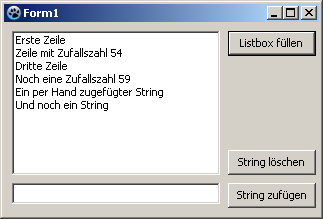 -\> 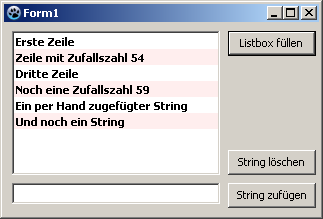 | |
| 159 | + | ||
| 160 | + | ## See also | |
| 161 | + | ||
| 162 | + | - [[doc:lcl/stdctrls/tlistbox.html|TListBox doc]] | |
| 163 | + | - [[TDBListBox]] | |
| 164 | + | - [[ListBox with separators]] | |
| 165 | + | - [tutorial about TListBox](http://forum.codecall.net/topic/73705-the-basic-working-with-tlistbox/) | |
| 166 | + | ||
| 167 | + | --- | |
| 168 | + | *From the Free Pascal wiki, page "TListBox", as it stood on 2021-07-19 after a change by Dianelos, out of the wiki's dump of 2024-05-26. Copyright stays with the author who wrote it, according to the old wiki's [[Licensing]] page. If you have concerns about this material, [message the admin](/wiki-contact).* |