

TGroupBox/fr: what changed
Revision 0 to 1. Removed lines have a minus sign; added lines have a plus sign.
Title: TGroupBox/fr
| Old | New | Line | |
|---|---|---|---|
| 1 | + | Un **TGroupBox**  est un conteneur (notion liée ici à celle de Parent) qui permet à un ensemble de composant visuels d'être groupés physiquement et conceptuellement sur la fiche. | |
| 2 | + | ||
| 3 | + | # Emploi | |
| 4 | + | ||
| 5 | + | Pour utiliser un [[doc:lcl/stdctrls/tgroupbox.html|TGroupBox]] sur une [[TForm/fr|fiche]], vous pouvez simplement le sélectionner depuis l'[[Standard tab/fr|onglet Standard]] et le placer en cliquant sur la fiche. | |
| 6 | + | ||
| 7 | + | # Petit exemple | |
| 8 | + | ||
| 9 | + | - Créez une nouvelle application et placez deux TGroupBox sur la fiche. | |
| 10 | + | - Dans le GroupBox1 insérer un [[TButton/fr|bouton]] *Button1* et dans le GroupBox2 un autre *Button2*. | |
| 11 | + | - Posez sur votre fiche, en dehors des GroupBox deux [[TRadioButton/fr|boutons radio]]. | |
| 12 | + | - Modifiez depuis l'inspecteur d'objet l'intitulé du RadioButton1 en *User* et celui de RadioButton2 en *Administrator*. | |
| 13 | + | - Modifiez le propriété *Checked* du RadioButton2 en *True*. | |
| 14 | + | - Créez le gestionnaire d'événement *OnChange* du RadioButton1 en double-cliquant *RadioGroup1* | |
| 15 | + | - Utilisez ce gestionnaire aussi pour RadioButton2. | |
| 16 | + | - Choisissez dans l'inspecteur d'objet *RadioButton2* | |
| 17 | + | - Maintenant sélectionnez dans l'onglet *Evénements* dans l'inspecteur d'objet. | |
| 18 | + | - Allez vers l'événement *OnChange* et sélectionnez dans le ComboBox adjacent *RadioButton1Change* | |
| 19 | + | - Rendre *GroupBox2* invisible pour 'user' en choisissant le bouton radio | |
| 20 | + | - Ecrivez le code suivant dans le gestionnaire des boutons radio depuis l'éditeur de source. | |
| 21 | + | ||
| 22 | + | ``` pascal | |
| 23 | + | procedure TForm1.RadioButton1Change(Sender: TObject); | |
| 24 | + | begin | |
| 25 | + | GroupBox2.Visible:=Radiobutton2.Checked; | |
| 26 | + | end; | |
| 27 | + | ``` | |
| 28 | + | ||
| 29 | + | - et un code comme suit pour les boutons : | |
| 30 | + | ||
| 31 | + | ``` pascal | |
| 32 | + | procedure TForm1.Button1Click(Sender: TObject); | |
| 33 | + | begin | |
| 34 | + | ShowMessage('Users and administrators can click this button'); | |
| 35 | + | end; | |
| 36 | + | ||
| 37 | + | procedure TForm1.Button2Click(Sender: TObject); | |
| 38 | + | begin | |
| 39 | + | ShowMessage('Only administrators can click this button'); | |
| 40 | + | end; | |
| 41 | + | ``` | |
| 42 | + | ||
| 43 | + | - Démarrez votre programme, il pourrait ressembler à ceci : | |
| 44 | + | ||
| 45 | + | 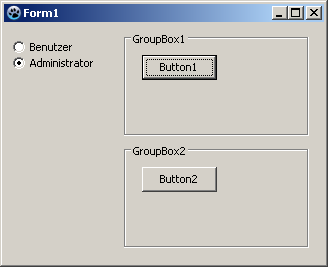 -\> 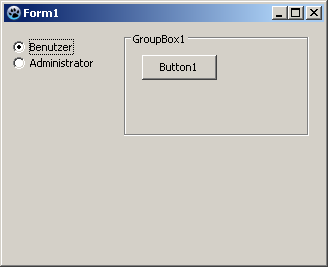 | |
| 46 | + | ||
| 47 | + | # Voir aussi | |
| 48 | + | ||
| 49 | + | - [[doc:lcl/stdctrls/tgroupbox.html|Doc. TGroupBox]] | |
| 50 | + | - [[TPairSplitter/fr|TPairSplitter]] | |
| 51 | + | - [[TNotebook/fr|TNotebook]] | |
| 52 | + | - [[TPageControl/fr|TPageControl]] | |
| 53 | + | - [[TTabControl/fr|TTabControl]] | |
| 54 | + | ||
| 55 | + | --- | |
| 56 | + | *From the Free Pascal wiki, page "TGroupBox/fr", as it stood on 2020-03-01 after a change by GAN, out of the wiki's dump of 2024-05-26. Copyright stays with the author who wrote it, according to the old wiki's [[Licensing]] page. If you have concerns about this material, [message the admin](/wiki-contact).* |