

TFindDialog/fr: what changed
Revision 1 to 2. Removed lines have a minus sign; added lines have a plus sign.
| Old | New | Line | |
|---|---|---|---|
| 1 | 1 | **TFindDialog**  est un composant non visuel qui donne accès à une boîte de dialogue qui assiste dans la sélection d'un texte à rechercher. . Pour activer un FindDialog, il suffit d'appeler sa méthode `Execute()`. Créez ensuite un gestionnaire pour l'événement `OnFind` pour réaliser le code de recherche. | |
| 2 | 2 | ||
| 3 | - | ||
| 4 | - | ||
| 5 | - | ||
| 6 | - | ||
| 3 | + | 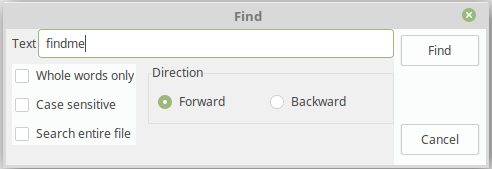 | |
| 7 | 4 | ||
| 8 | 5 | # Usage | |
| 9 | 6 | ||
| 10 | 7 | ``` pascal | |
| 11 | 8 | procedure TMyForm.Button1Click(Sender: TObject); | |
| 12 | 9 | begin | |
| 13 | 10 | FindDialog1.Execute(); | |
| 14 | 11 | end; | |
| 15 | 12 | ||
| 16 | 13 | procedure TMyForm.FindDialog1Find(Sender: TObject); | |
| 17 | 14 | var | |
| 18 | 15 | k: integer; | |
| 19 | 16 | begin | |
| 20 | 17 | with Sender as TFindDialog do begin | |
| 21 | 18 | k := Pos( FindText, Memo1.Lines.Text ); | |
| 22 | 19 | if k>0 then begin | |
| 23 | 20 | Memo1.Selstart := k; | |
| 24 | 21 | Memo1.SelLength := length( FindText ); | |
| 25 | 22 | end else | |
| 26 | 23 | Beep(); | |
| 27 | 24 | end; | |
| 28 | 25 | end; | |
| 29 | 26 | ``` | |
| 30 | 27 | ||
| 31 | 28 | # Voir aussi | |
| 32 | 29 | ||
| 33 | 30 | - [[doc:lcl/dialogs/tfinddialog.html|Doc. TFindDialog]] | |
| 34 | 31 | - [[TReplaceDialog/fr|TReplaceDialog]] | |
| 35 | 32 | ||
| 36 | 33 | --- | |
| 37 | 34 | *From the Free Pascal wiki, page "TFindDialog/fr", as it stood on 2020-03-01 after a change by Trev, out of the wiki's dump of 2024-05-26. Copyright stays with the author who wrote it, according to the old wiki's [[Licensing]] page. If you have concerns about this material, [message the admin](/wiki-contact).* |