

TFindDialog/fi: what changed
Revision 1 to 2. Removed lines have a minus sign; added lines have a plus sign.
| Old | New | Line | |
|---|---|---|---|
| 1 | 1 | **TFindDialog**  on komponentti, joka auttaa tiedon etsinnässä. Se löytyy [[Component Palette/fi|komponenttipaletin]] [[Dialogs tab/fi|Dialogs]]-välilehdeltä. On tärkeää tietää, että valintaikkuna ei itse tee hakua; se tarjoaa vain käyttöliittymän kaikille hakuparametreille. Aktivoi FindDialog kutsumalla sen `Execute()` [[Function/fi|funktiota]]. Luo `OnFind`-[[Method/fi|metodi]], jossa itse haku suoritetaan. | |
| 2 | 2 | ||
| 3 | - | ||
| 4 | - | ||
| 5 | - | ||
| 6 | - | ||
| 3 | + | 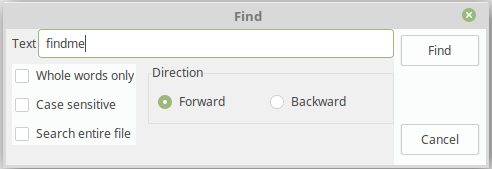 | |
| 7 | 4 | ||
| 8 | 5 | ## Käyttö | |
| 9 | 6 | ||
| 10 | 7 | Seuraavat esimerkit kuvaavat TFindDialog-sovelluksen käyttöä muistioon ([[TMemo/fi|TMemo]]) tallennetun tietyn lauseen etsimiseen. | |
| 11 | 8 | ||
| 12 | 9 | ``` pas | |
| 13 | 10 | procedure TForm1.Button1Click(Sender: TObject); | |
| 14 | 11 | begin | |
| 15 | 12 | FindDialog1.Execute(); | |
| 16 | 13 | end; | |
| 17 | 14 | ||
| 18 | 15 | procedure TForm1.FindDialog1Find(Sender: TObject); | |
| 19 | 16 | var | |
| 20 | 17 | k: integer; | |
| 21 | 18 | begin | |
| 22 | 19 | with Sender as TFindDialog do begin | |
| 23 | 20 | k := Pos(FindText, Memo1.Lines.Text); | |
| 24 | 21 | if k > 0 then begin | |
| 25 | 22 | Memo1.SelStart := k - 1; | |
| 26 | 23 | Memo1.SelLength := Length(FindText); | |
| 27 | 24 | end else | |
| 28 | 25 | Beep(); | |
| 29 | 26 | end; | |
| 30 | 27 | end; | |
| 31 | 28 | ``` | |
| 32 | 29 | ||
| 33 | 30 | Jos halutaan toistaa toimintoa useita kertoja samalla hakutekstillä, niin on muistettava viimeisin löydetty sijainti ja jatkettava hakua täältä - StrUtils-[[Unit/fi|käännösyksikön]] funktio `PosEx()` on täydellinen tähän tarkoitukseen: | |
| 34 | 31 | ||
| 35 | 32 | ``` pas | |
| 36 | 33 | uses | |
| 37 | 34 | StrUtils; | |
| 38 | 35 | ||
| 39 | 36 | type | |
| 40 | 37 | TForm1 = class(TForm) | |
| 41 | 38 | private | |
| 42 | 39 | FFoundPos: Integer; | |
| 43 | 40 | ... | |
| 44 | 41 | ||
| 45 | 42 | procedure TForm1.Button1Click(Sender: TObject); | |
| 46 | 43 | begin | |
| 47 | 44 | with FindDialog1 do | |
| 48 | 45 | begin | |
| 49 | 46 | if frEntireScope in Options then // Search begins at file start | |
| 50 | 47 | FFoundPos := 0 | |
| 51 | 48 | else | |
| 52 | 49 | FFoundPos := Memo1.SelStart; // Serach begins at current cursor position | |
| 53 | 50 | Execute; | |
| 54 | 51 | end; | |
| 55 | 52 | end; | |
| 56 | 53 | ||
| 57 | 54 | procedure TForm1.FindDialog1Find(Sender: TObject); | |
| 58 | 55 | begin | |
| 59 | 56 | with Sender as TFindDialog do | |
| 60 | 57 | begin | |
| 61 | 58 | FFoundPos := PosEx(FindText, Memo1.Lines.Text, FFoundPos+1); | |
| 62 | 59 | if FFoundPos > 0 then | |
| 63 | 60 | begin | |
| 64 | 61 | Memo1.SelStart := FFoundPos - 1; | |
| 65 | 62 | Memo1.SelLength := Length(FindText); | |
| 66 | 63 | end else | |
| 67 | 64 | Beep(); | |
| 68 | 65 | end; | |
| 69 | 66 | end; | |
| 70 | 67 | ``` | |
| 71 | 68 | ||
| 72 | 69 | ## Katso myös | |
| 73 | 70 | ||
| 74 | 71 | - [[doc:lcl/dialogs/tfinddialog.html|TFindDialog doc]] | |
| 75 | 72 | - [[TReplaceDialog/fi|TReplaceDialog]] | |
| 76 | 73 | ||
| 77 | 74 | --- | |
| 78 | 75 | *From the Free Pascal wiki, page "TFindDialog/fi", as it stood on 2019-10-13 after a change by Djzepi, out of the wiki's dump of 2024-05-26. Copyright stays with the author who wrote it, according to the old wiki's [[Licensing]] page. If you have concerns about this material, [message the admin](/wiki-contact).* |