

TFPCustomBrush: what changed
Revision 1 to 2. Removed lines have a minus sign; added lines have a plus sign.
| Old | New | Line | |
|---|---|---|---|
| 1 | 1 | **`TFPCustomBrush`** is a fundamental property of `TFPCustomCanvas` and defines how a geometric shape is filled in *fcl-image*. | |
| 2 | 2 | ||
| 3 | 3 | ## Properties | |
| 4 | 4 | ||
| 5 | 5 | - **`Canvas`**: points to the `TFPCustomCanvas` on which the brush operates. The property is inherited from the ancestor `TFPCanvasHelper`. | |
| 6 | 6 | - **`FPColor`**: specifies the basic color (type `TFPColor`) used to fill the shape (inherited from ancestor `TFPCanvasHelper`). | |
| 7 | 7 | - **`Style`**: an enumeration of type `TFPBrushStyle` which defines the pattern used for filling: | |
| 8 | 8 | - **`bsClear`**: no filling at all, `FPColor` is ignored. | |
| 9 | 9 | - **`bsSolid`**: uniform fill of the shape with the `FPColor` specified | |
| 10 | 10 | - The following styles define **hatch patterns** which are drawn in the `FPColor` specified. The background between the hatch lines is left empty, it can only be filled by drawing the shape with `bsSolid` before. | |
| 11 | 11 | - **`bsHorizontal`**, **`bsVertical`**, **`bsFDiagonal`**, **`bsBDiagonal`** define a single-line hatch pattern. | |
| 12 | 12 | - **`bsCross`** and **`bsDiagCross`** define a crossed pattern. | |
| 13 | 13 | - **`bsImage`**: fills the shape by tiling the picture given in property `Image` on the canvas. | |
| 14 | 14 | - **`bsPattern`**: uses a custom pattern to fill the shape. The pattern is given by property `Pattern`. See below. | |
| 15 | 15 | - **`Image`**: specifies the image (type `TFPCustomImage`) used when `Style` is `bsImage`. The alpha channel is respected. | |
| 16 | 16 | - **`Pattern`**: specifies the custom pattern for filling the shape when `Style` is `bsPattern`. The pattern is defined as a 32-element array of `LongInt` values. This sets up a matrix of 32x32 bits. Each one-bit corresponds to a colored pixel. Pixels corresponding to zero-bits are not drawn. | |
| 17 | 17 | ||
| 18 | 18 | These properties are applied in all subsequent drawing commands. | |
| 19 | 19 | ||
| 20 | 20 | > **Note:** The advanced styles `bsImage` and `bsPattern` are availabel for non-rectangular shapes only for FPC v3.3.1+ | |
| 21 | 21 | ||
| 22 | 22 | ## Methods | |
| 23 | 23 | ||
| 24 | 24 | - **`function CopyBrush: TFPCustomBrush`**: creates a new brush and copies the current properties to it. | |
| 25 | 25 | ||
| 26 | 26 | ## Sample code | |
| 27 | 27 | ||
| 28 | 28 | ### Filling a circle with an image pattern (`bsImage`) | |
| 29 | 29 | ||
| 30 | - | ||
| 31 | - | ||
| 32 | - | ||
| 33 | - | ||
| 30 | + | 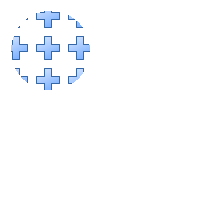 | |
| 34 | 31 | ||
| 35 | 32 | ``` Pascal | |
| 36 | 33 | program project1; | |
| 37 | 34 | ||
| 38 | 35 | uses | |
| 39 | 36 | classes, FPImage, FPCanvas, FPImgCanv, FPReadPNG, FPWritePNG; | |
| 40 | 37 | ||
| 41 | 38 | var | |
| 42 | 39 | image: TFPCustomImage; | |
| 43 | 40 | pattern: TFPCustomImage; | |
| 44 | 41 | canvas: TFPCustomCanvas; | |
| 45 | 42 | writer: TFPCustomImageWriter; | |
| 46 | 43 | ||
| 47 | 44 | begin | |
| 48 | 45 | // "pattern.png" is some png image (with alpha channel). | |
| 49 | 46 | // Select one from the Lazarus image collection in (lazarus)/images | |
| 50 | 47 | pattern := TFPMemoryImage.Create(0, 0); | |
| 51 | 48 | pattern.LoadFromFile('pattern.png'); | |
| 52 | 49 | ||
| 53 | 50 | image := TFPMemoryImage.Create(200,200); | |
| 54 | 51 | try | |
| 55 | 52 | canvas := TFPImageCanvas.Create(image); | |
| 56 | 53 | try | |
| 57 | 54 | // Set the pen style | |
| 58 | 55 | canvas.Pen.Mode := pmCopy; | |
| 59 | 56 | canvas.Pen.Style := psSolid; | |
| 60 | 57 | canvas.Pen.Width := 1; | |
| 61 | 58 | canvas.Pen.FPColor := colWhite; | |
| 62 | 59 | ||
| 63 | 60 | // Set the brush for the circle: the image stored in "pattern" | |
| 64 | 61 | canvas.Brush.Style := bsImage; | |
| 65 | 62 | canvas.Brush.Image := pattern; | |
| 66 | 63 | // Draw a circle filled by "pattern" | |
| 67 | 64 | canvas.Ellipse(10, 10, 90, 90); | |
| 68 | 65 | ||
| 69 | 66 | // Save to file | |
| 70 | 67 | writer := TFPWriterPNG.Create; | |
| 71 | 68 | try | |
| 72 | 69 | // Activate alpha channel in saved image | |
| 73 | 70 | TFPWriterPNG(writer).UseAlpha := true; | |
| 74 | 71 | // Write image to file | |
| 75 | 72 | image.SaveToFile('DrawTest.png', writer); | |
| 76 | 73 | finally | |
| 77 | 74 | writer.Free; | |
| 78 | 75 | end; | |
| 79 | 76 | ||
| 80 | 77 | finally | |
| 81 | 78 | canvas.Free; | |
| 82 | 79 | end; | |
| 83 | 80 | ||
| 84 | 81 | finally | |
| 85 | 82 | pattern.Free; | |
| 86 | 83 | image.Free; | |
| 87 | 84 | end; | |
| 88 | 85 | end. | |
| 89 | 86 | ``` | |
| 90 | 87 | ||
| 91 | 88 | ### Filling a rectangle with a custom pattern (`bsPattern`) | |
| 92 | 89 | ||
| 93 | - | ||
| 94 | - | ||
| 95 | - | ||
| 96 | - | ||
| 90 | + |  | |
| 97 | 91 | ||
| 98 | 92 | ``` pascal | |
| 99 | 93 | program project1; | |
| 100 | 94 | ||
| 101 | 95 | uses | |
| 102 | 96 | classes, sysutils, | |
| 103 | 97 | FPImage, FPCanvas, FPImgCanv, FPWritePNG; | |
| 104 | 98 | ||
| 105 | 99 | const | |
| 106 | 100 | BIT_PATTERN: TBrushPattern = ( | |
| 107 | 101 | %11111111111111111111111111111111, // 1 | |
| 108 | 102 | %11111111111000000000001111111111, // 2 | |
| 109 | 103 | %11111111110000000000000111111111, // 3 | |
| 110 | 104 | %11111111100000000000000011111111, // 4 | |
| 111 | 105 | %11111111000000000000000001111111, // 5 | |
| 112 | 106 | %11111110000000000000000000111111, // 6 | |
| 113 | 107 | %11111100000000000000000000011111, // 7 | |
| 114 | 108 | %11111000000000000000000000001111, // 8 | |
| 115 | 109 | %11110000000000000000000000000111, // 9 | |
| 116 | 110 | %11100000000000000000000000000011, // 10 | |
| 117 | 111 | %11000000000000001000000000000001, // 11 | |
| 118 | 112 | %10000000000000011100000000000000, // 12 | |
| 119 | 113 | %10000000000000111110000000000000, // 13 | |
| 120 | 114 | %10000000000001111111000000000000, // 14 | |
| 121 | 115 | %10000000000011110111100000000000, // 15 | |
| 122 | 116 | %10000000000111100011110000000000, // 16 | |
| 123 | 117 | %10000000000011110111100000000000, // 17 | |
| 124 | 118 | %10000000000001111111000000000000, // 18 | |
| 125 | 119 | %10000000000000111110000000000000, // 19 | |
| 126 | 120 | %10000000000000011100000000000000, // 20 | |
| 127 | 121 | %10000000000000001000000000000000, // 21 | |
| 128 | 122 | %10000000000000000000000000000000, // 22 | |
| 129 | 123 | %11000000000000000000000000000001, // 23 | |
| 130 | 124 | %11100000000000000000000000000011, // 24 | |
| 131 | 125 | %11110000000000000000000000000111, // 25 | |
| 132 | 126 | %11111000000000000000000000001111, // 26 | |
| 133 | 127 | %11111100000000000000000000011111, // 27 | |
| 134 | 128 | %11111110000000000000000000111111, // 28 | |
| 135 | 129 | %11111111000000000000000001111111, // 29 | |
| 136 | 130 | %11111111100000000000000011111111, // 30 | |
| 137 | 131 | %11111111110000000000000111111111, // 31 | |
| 138 | 132 | %11111111111000000000001111111111 // 32 | |
| 139 | 133 | ); | |
| 140 | 134 | ||
| 141 | 135 | var | |
| 142 | 136 | image: TFPCustomImage; | |
| 143 | 137 | canvas: TFPCustomCanvas; | |
| 144 | 138 | writer: TFPCustomImageWriter; | |
| 145 | 139 | ||
| 146 | 140 | begin | |
| 147 | 141 | image := TFPMemoryImage.Create(200, 200); | |
| 148 | 142 | try | |
| 149 | 143 | canvas := TFPImageCanvas.Create(image); | |
| 150 | 144 | try | |
| 151 | 145 | // Set the pen style | |
| 152 | 146 | canvas.Pen.Mode := pmCopy; | |
| 153 | 147 | canvas.Pen.Style := psSolid; | |
| 154 | 148 | canvas.Pen.Width := 3; | |
| 155 | 149 | canvas.Pen.FPColor := colNavy; | |
| 156 | 150 | ||
| 157 | 151 | // Set the brush for the rectangle: a bit pattern | |
| 158 | 152 | // Unless the shape should be transparent draw the background first | |
| 159 | 153 | canvas.Brush.Style := bsSolid; | |
| 160 | 154 | canvas.Brush.FPColor := colYellow; | |
| 161 | 155 | canvas.Rectangle(10, 110, 190, 190); | |
| 162 | 156 | // Now draw the pattern | |
| 163 | 157 | canvas.Brush.Style := bsPattern; | |
| 164 | 158 | canvas.Brush.FPColor := colBlue; // Color for every set bit (1) in the pattern | |
| 165 | 159 | canvas.Brush.Pattern := BIT_PATTERN; | |
| 166 | 160 | canvas.Rectangle(10, 110, 190, 190); | |
| 167 | 161 | ||
| 168 | 162 | // Save to file | |
| 169 | 163 | writer := TFPWriterPNG.Create; | |
| 170 | 164 | try | |
| 171 | 165 | // Activate alpha channel in saved image | |
| 172 | 166 | TFPWriterPNG(writer).UseAlpha := true; | |
| 173 | 167 | // Write image to file | |
| 174 | 168 | image.SaveToFile('DrawTest.png', writer); | |
| 175 | 169 | finally | |
| 176 | 170 | writer.Free; | |
| 177 | 171 | end; | |
| 178 | 172 | ||
| 179 | 173 | finally | |
| 180 | 174 | canvas.Free; | |
| 181 | 175 | end; | |
| 182 | 176 | finally | |
| 183 | 177 | image.Free; | |
| 184 | 178 | end; | |
| 185 | 179 | end. | |
| 186 | 180 | ``` | |
| 187 | 181 | ||
| 188 | 182 | --- | |
| 189 | 183 | *From the Free Pascal wiki, page "TFPCustomBrush", as it stood on 2023-11-24 after a change by Wp, out of the wiki's dump of 2024-05-26. Copyright stays with the author who wrote it, according to the old wiki's [[Licensing]] page. If you have concerns about this material, [message the admin](/wiki-contact).* |