

TEdit: what changed
Revision 1 to 2. Removed lines have a minus sign; added lines have a plus sign.
| Old | New | Line | |
|---|---|---|---|
| 1 | 1 | A **TEdit**  is a control with a single line of editable text. It is available from the [[Standard tab]] of the [[Component Palette]]. | |
| 2 | 2 | ||
| 3 | 3 | ## Usage | |
| 4 | 4 | ||
| 5 | 5 | You can add a TEdit text input field to your [[TForm|form]] by clicking on it in the Standard tab of the component palette and place it on your form with one click. You can now edit this single-line text field at run time. | |
| 6 | 6 | ||
| 7 | 7 | If you want to use this text elsewhere, you can use it like every other [[String]]. | |
| 8 | 8 | ||
| 9 | 9 | For example, if you have a TEdit *Edit1* on your form, you can use `myString := Edit1.Text;`. To change the shown text in *Edit1*, you can use `Edit1.Text := myString;`. | |
| 10 | 10 | ||
| 11 | 11 | If you want to display another text instead of the default text (e.g. *Edit1*) in a TEdit *Edit1* at the start of your application, you can proceed as follows: | |
| 12 | 12 | ||
| 13 | 13 | - Select the TEdit on your form with one click. | |
| 14 | 14 | - Go to the properties tab in the Object Inspector. | |
| 15 | 15 | - Select the property **Text** and change it in the neighbouring input field. | |
| 16 | 16 | - In the same way, you can select the property **Name** and give the TEdit a better name. | |
| 17 | 17 | ||
| 18 | 18 | ### Password input | |
| 19 | 19 | ||
| 20 | 20 | You can also easily use a TEdit to enter passwords. Then instead of the actually entered [[Char]] a PasswordChar is displayed. | |
| 21 | 21 | ||
| 22 | 22 | Little Example: | |
| 23 | 23 | ||
| 24 | 24 | - Create a new GUI application with a TEdit *Edit1* and a TButton *Button1* on the form. | |
| 25 | 25 | - In the Object Inspector set the property PasswordChar of *Edit1* to am asterisk ( * ). | |
| 26 | 26 | - In the event handler of *OnClick* of *Button1* show the entered password: `ShowMessage(Edit1.Text);`. | |
| 27 | 27 | ||
| 28 | 28 | ### TextHint | |
| 29 | 29 | ||
| 30 | 30 | Have you used a GUI that has, for example, a Search Box where you can type in a search term. And when unused, that Search Box displays something like "Search Here" so you know what it is for ? Well, TEdit has a property called TextHint for that purpose. Set TextHint to some appropriate text and if the normal 'Text' is empty and the Control is not in use, your Search Here message is displayed. On most Widget Sets, the TextHint is automatically cleared once the user starts typing in there. The exception is GTK2/3, they like to clear things as soon as the Control gets focus. | |
| 31 | 31 | ||
| 32 | 32 | The text from TextHint is displays a little greyer than normal text so the user is aware it is somehow special. Most people find this interface quite intuitive. | |
| 33 | 33 | ||
| 34 | 34 | ## Requested Features | |
| 35 | 35 | ||
| 36 | 36 | ### Embedding Button/Other Controls in TEdit | |
| 37 | 37 | ||
| 38 | 38 | It's a WinAPI feature to allow embedding any sort of control into a TEdit. | |
| 39 | 39 | ||
| 40 | 40 | Considerations. | |
| 41 | 41 | ||
| 42 | 42 | - The feature is not supported by all Widgetsets natively. For example: for Gtk2/Gtk3 it's not possible, as GtkEntry is not derived from a container. The SpinEdit control is a special kind of control in Gtk2. (This is the main reason on why [[TSpinEdit]] has its own WS class). | |
| 43 | 43 | ||
| 44 | 44 | - The placement of an embedded control (or controls) cannot be set by Left or Top properties (as normally happens). Instead the "Align" property should be used. | |
| 45 | 45 | ||
| 46 | 46 | ```delphi | |
| 47 | 47 | button1.Parent:=edit1; | |
| 48 | 48 | button1.Width:=20; | |
| 49 | 49 | button1.Align:=alRight; | |
| 50 | 50 | button1.Constraints.MaxHeight:=18; //edit1.Height; | |
| 51 | 51 | ``` | |
| 52 | 52 | ||
| 53 | 53 | - The "text" entry field must be limited by some TEdit property | |
| 54 | 54 | ||
| 55 | 55 | ||
| 56 | 56 | OR this should be done automatically by the widgetset. | |
| 57 | 57 | ||
| 58 | 58 | Without such a limitation, the entered text goes "underneath" the embedded button. | |
| 59 | 59 | ||
| 60 | - | ||
| 61 | - | ||
| 62 | - | ||
| 63 | - | ||
| 60 | + | 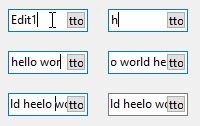 | |
| 64 | 61 | ||
| 65 | 62 | If using pure WinAPI, this can be achieved by using an EM_SETMARGINS message: | |
| 66 | 63 | ||
| 67 | 64 | ```delphi | |
| 68 | 65 | Uses | |
| 69 | 66 | Windows, ... | |
| 70 | 67 | ||
| 71 | 68 | ... | |
| 72 | 69 | ||
| 73 | 70 | SendMessage(Edit1.Handle, EM_SETMARGINS, EC_LEFTMARGIN or EC_RIGHTMARGIN, MakeLParam(0, button1.Width)) | |
| 74 | 71 | ``` | |
| 75 | 72 | ||
| 76 | - | ||
| 77 | - | ||
| 78 | - | ||
| 79 | - | ||
| 73 | + | 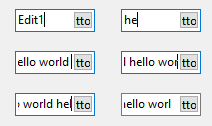 | |
| 80 | 74 | ||
| 81 | 75 | The Delphi VCL does provide a Margins property, but it is not mapped to EM_SETMARGINS and has a different meaning in the VCL. | |
| 82 | 76 | ||
| 83 | 77 | ## See also | |
| 84 | 78 | ||
| 85 | 79 | - [[doc:lcl/stdctrls/tedit.html|TEdit doc]] | |
| 86 | 80 | - [[TMemo]] - A multiline text edit box | |
| 87 | 81 | - [[TLabeledEdit]] - An edit field like a TEdit with a label | |
| 88 | 82 | - [[TMaskEdit]] - An edit field with an edit mask | |
| 89 | 83 | - [[TSpinEdit]] - An edit field for integers defined numbers range limits | |
| 90 | 84 | - [[TFloatSpinEdit]] - An edit field for tiles floating-point numbers with defined numbers range limits | |
| 91 | 85 | - [[TEditButton]] - An edit field like a TEdit with an attached button as a [[TSpeedBtn]] | |
| 92 | 86 | - [[TFileNameEdit]] - An edit field with attached [[TOpenDialog]], to enter a file name | |
| 93 | 87 | - [[TDirectoryEdit]] - An edit field with attached [[TSelectDirectoryDialog]], to enter a file path | |
| 94 | 88 | - [[TDateEdit]] - An edit field with attached [[TCalendarDialog]] (calendar), to enter a date | |
| 95 | 89 | - [[TCalcEdit]] - An input field with attached [[TCalculatorDialog]] (Calculator), to enter a number | |
| 96 | 90 | - [[TTIEdit]] - An RTTI capable input field | |
| 97 | 91 | ||
| 98 | 92 | --- | |
| 99 | 93 | *From the Free Pascal wiki, page "TEdit", as it stood on 2022-12-06 after a change by Dbannon, out of the wiki's dump of 2024-05-26. Copyright stays with the author who wrote it, according to the old wiki's [[Licensing]] page. If you have concerns about this material, [message the admin](/wiki-contact).* |