

TECTabCtrl: what changed
Revision 2 to 3. Removed lines have a minus sign; added lines have a plus sign.
| Old | New | Line | |
|---|---|---|---|
| 1 | 1 | **TECTabCtrl**  is advanced alternative [[TTabControl]]. It allows tab stacking, tabs in multiple rows, top/bottom/left/right orientation, reversed and right-to-left bi-directional mode, dragging tabs to move or fold them and many others. | |
| 2 | 2 | ||
| 3 | 3 | TECTabCtrl is installed to the (non-default) [[Eye-Candy Controls|EC tab]] on the Lazarus [[Component Palette]]. | |
| 4 | 4 | ||
| 5 | 5 | Image shows tab with close button and arrow-down area. | |
| 6 | 6 | ||
| 7 | 7 | 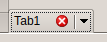 | |
| 8 | 8 | ||
| 9 | 9 | TECTabCtrl is part of [[Eye-Candy Controls]] (shortly ECControls or EC-Controls), see [[Eye-Candy Controls]], set of visual controls written for Lazarus. Its design is based on Themes, therefore its look is very native everywhere, no matter what widgetset you use. | |
| 10 | 10 | ||
| 11 | 11 | Each release is announced on Lazarus Forum in section Third Party Announcements. | |
| 12 | 12 | ||
| 13 | 13 | There are always attached files `README.txt` (list of all known issues) and `CHANGELOG.txt` (list of all changes from previous release). | |
| 14 | 14 | ||
| 15 | 15 | License | |
| 16 | 16 | ||
| 17 | 17 | GNU Lesser General Public License 2.0 with linking exception (a.k.a. Modified LGPL). File ectabctrl.pas contains license header. Also, files `COPYING.modifiedLGPL.txt` and `COPYING.LGPL.txt` are bundled to each archive. | |
| 18 | 18 | ||
| 19 | 19 | Author | |
| 20 | 20 | ||
| 21 | 21 | This component is written by Blaazen. Copyright notice and real name is mentioned in the header of the unit. You can contact author on Lazarus Forum (nickname: Blaazen) in any thread about EC-Controls. If you are logged in to forum, you can get author's e-mail or send him private message. | |
| 22 | 22 | ||
| 23 | 23 | Download and Install | |
| 24 | 24 | ||
| 25 | 25 | See [[Eye-Candy Controls|Eye-Candy Controls#Install]] | |
| 26 | 26 | ||
| 27 | 27 | ## Options | |
| 28 | 28 | ||
| 29 | 29 | Options (TECTabOption and TECTabCtrlOption) are shortly described (commented) in interface section of the unit `ectabctrl.pas`. | |
| 30 | 30 | ||
| 31 | 31 | ## Using the component | |
| 32 | 32 | ||
| 33 | 33 | Mouse | |
| 34 | 34 | ||
| 35 | 35 | - Left-click on a tab activates it. | |
| 36 | 36 | - Left-click on close-icon area closes tab. | |
| 37 | 37 | - Left-click on arrow-down area or right-click anywhere on the tab opens drop-down menu. | |
| 38 | 38 | - Middle-click closes tab (if option etcoMiddleBtnClose is set and tab is closeable). | |
| 39 | 39 | ||
| 40 | 40 | Dragging | |
| 41 | 41 | ||
| 42 | 42 | Dragging is realized by left mouse button or middle mouse button (if option etcoMiddleBtnClose is NOT set). | |
| 43 | 43 | ||
| 44 | 44 | When etcoFoldingPriority is NOT set: | |
| 45 | 45 | ||
| 46 | 46 | - Dragging moves a tab. | |
| 47 | 47 | - Dragging + CTRL key (exactly ssModifier) folds a tab. | |
| 48 | 48 | ||
| 49 | 49 | Setting etcoFoldingPriority causes opposite behaviour. | |
| 50 | 50 | ||
| 51 | 51 | Notes: | |
| 52 | 52 | ||
| 53 | 53 | - etcoFixedPosition: tabs cannot be moved | |
| 54 | 54 | - etoCanBeFolded: tab can be folded into another tab | |
| 55 | 55 | - etoCanFold: tab can fold another tabs | |
| 56 | 56 | ||
| 57 | 57 | Drop down menu | |
| 58 | 58 | ||
| 59 | 59 | Allows: | |
| 60 | 60 | ||
| 61 | 61 | - switching folded tabs | |
| 62 | 62 | - unfolding any or all folded tabs | |
| 63 | 63 | - closing any or all folded tabs | |
| 64 | 64 | - fold tab to any folder tab (includig its own folded tabs) | |
| 65 | 65 | - moving tab | |
| 66 | 66 | - closing respective tab | |
| 67 | 67 | ||
| 68 | 68 | Keyboard | |
| 69 | 69 | ||
| 70 | 70 | - Arrow keys change tab (only when focused). | |
| 71 | 71 | - Arrow keys + CTRL key (exactly ssModifier) move tab (only when focused). | |
| 72 | 72 | - Enter or Space opens drop-down menu of selected tab (only when focused). | |
| 73 | 73 | - Acceleration keys (Alt + Key) change tab (doesn't need to be focused). | |
| 74 | 74 | ||
| 75 | 75 | Note to multi-row tabs: the row with active tab is always placed on the baseline. Therefore, arrow keys Up and Down may sometime look like they work oppositely (assume horizontal position and active tab is NOT at the first row). It is by design. | |
| 76 | 76 | ||
| 77 | 77 | ## Code | |
| 78 | 78 | ||
| 79 | 79 | Each tab has two identificators: Index and ID. | |
| 80 | 80 | ||
| 81 | 81 | - ID is unique and never changes during the life of tab | |
| 82 | 82 | - Index is unique but it changes as tabs are moved, folded, unfolded, added or deleted. | |
| 83 | 83 | ||
| 84 | - | ||
| 84 | + | ``` pascal | |
| 85 | + | function IDToIndex(AID: Integer): Integer; | |
| 86 | + | ``` | |
| 85 | 87 | ||
| 86 | 88 | Returns index of tab AID. | |
| 87 | 89 | ||
| 88 | - | ||
| 90 | + | ``` pascal | |
| 91 | + | procedure ActivateTab(AIndex: Integer); | |
| 92 | + | ``` | |
| 89 | 93 | ||
| 90 | 94 | Activates tab AIndex. If tab is folded, folder and folded tab are switched. | |
| 91 | 95 | ||
| 92 | - | ||
| 96 | + | ``` pascal | |
| 97 | + | function AddTab(APosition: TECTabAdding; AActivate: Boolean): TECTab; | |
| 98 | + | ``` | |
| 93 | 99 | ||
| 94 | 100 | Adds a new tab. Must be specified where the tab will be positioned and whether it will be activated. | |
| 95 | 101 | ||
| 96 | - | ||
| 102 | + | ``` pascal | |
| 103 | + | procedure CloseAllFoldedTabs(AFolder: Integer); | |
| 104 | + | ``` | |
| 97 | 105 | ||
| 98 | 106 | Closes all tabs folded to AFolder. | |
| 99 | 107 | ||
| 100 | - | ||
| 108 | + | ``` pascal | |
| 109 | + | procedure DeleteTab(AIndex: Integer); | |
| 110 | + | ``` | |
| 101 | 111 | ||
| 102 | 112 | Deletes tab AIndex. | |
| 103 | 113 | ||
| 104 | - | ||
| 114 | + | ``` pascal | |
| 115 | + | function FindFolderOfTab(AIndex: Integer): Integer; | |
| 116 | + | ``` | |
| 105 | 117 | ||
| 106 | 118 | Returns index of folder which contains tab AIndex. Result is -1 when tab is not folded anywhere. | |
| 107 | 119 | ||
| 108 | - | ||
| 120 | + | ``` pascal | |
| 121 | + | procedure FoldTab(AIndex, AFolder: Integer); | |
| 122 | + | ``` | |
| 109 | 123 | ||
| 110 | 124 | Folds tab AIndex to folder AFolder. | |
| 111 | 125 | ||
| 112 | - | ||
| 126 | + | ``` pascal | |
| 127 | + | function IndexOfTabAt(X, Y: Integer): Integer; | |
| 128 | + | ``` | |
| 113 | 129 | ||
| 114 | 130 | Returns index of tab at coordinates X, Y. Result is -1 when there is no tab at X, Y. | |
| 115 | 131 | ||
| 116 | - | ||
| 132 | + | ``` pascal | |
| 133 | + | function IsTabVisible(AIndex: Integer): Boolean; | |
| 134 | + | ``` | |
| 117 | 135 | ||
| 118 | 136 | Returns True when tab AIndex is visible and is in visible area (i.e. is not scrolled out). | |
| 119 | 137 | ||
| 120 | - | ||
| 138 | + | ``` pascal | |
| 139 | + | procedure MakeTabAvailable(AIndex: Integer; AActivate: Boolean); | |
| 140 | + | ``` | |
| 121 | 141 | ||
| 122 | 142 | Makes tab AIndex available, i.e. moves tab to visible area (if necessary), switches it with its folder (if necessary) and activates it if AActivate is True. | |
| 123 | 143 | ||
| 124 | - | ||
| 144 | + | ``` pascal | |
| 145 | + | procedure MoveTab(AFrom, ATo: Integer); | |
| 146 | + | ``` | |
| 125 | 147 | ||
| 126 | 148 | Moves tab to a new position. | |
| 127 | 149 | ||
| 128 | - | ||
| 150 | + | ``` pascal | |
| 151 | + | procedure UnfoldTab(AID: Integer; AFolder: Integer=-1); | |
| 152 | + | ``` | |
| 129 | 153 | ||
| 130 | 154 | Unfolds tab AID. If its folder is known, caller can specify it. Otherwise, method attempts to find folder itself. | |
| 131 | 155 | ||
| 132 | 156 | ## Examples | |
| 133 | 157 | ||
| 134 | 158 | Screenshots are taken from Plasma5. Desktop theme for Examples 1-7 is Plastique, Example 8 is Breeze. | |
| 135 | 159 | ||
| 136 | 160 | Example 1 | |
| 137 | 161 | ||
| 138 | 162 | Basic layout. | |
| 139 | 163 | ||
| 140 | 164 |  | |
| 141 | 165 | ||
| 142 | 166 | Example 2 | |
| 143 | 167 | ||
| 144 | 168 | Tabs are in one row, their size exceeds width of component. Left-right buttons and optional Add button appear. | |
| 145 | 169 | ||
| 146 | 170 |  | |
| 147 | 171 | ||
| 148 | 172 | Example 3 | |
| 149 | 173 | ||
| 150 | 174 | Tabs are in two rows, their size exceeds width of component. Left-right buttons and optional Add button appear. | |
| 151 | 175 | ||
| 152 | 176 | 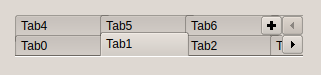 | |
| 153 | 177 | ||
| 154 | 178 | Example 4 | |
| 155 | 179 | ||
| 156 | 180 | Component is in reversed mode. Tabs are in three rows, their size exceeds width of component. Left-right buttons and optional Add button appear. Note that buttons are aligned differently when component has one/two/three or more rows. | |
| 157 | 181 | ||
| 158 | 182 | 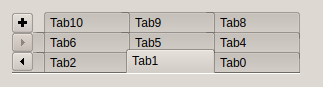 | |
| 159 | 183 | ||
| 160 | 184 | Example 5 | |
| 161 | 185 | ||
| 162 | 186 | Tab position is tpLeft. Tabs are in two rows. Close button on each tab is displayed. | |
| 163 | 187 | ||
| 164 | 188 | 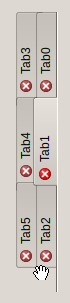 | |
| 165 | 189 | ||
| 166 | 190 | Example 6 | |
| 167 | 191 | ||
| 168 | 192 | Tab position is tpBottom. Tabs are in two rows. Close button on each tab is displayed. Drop-down menu is opened (Tab5, Tab12 and Tab13 are folded to Tab1). | |
| 169 | 193 | ||
| 170 | 194 | Close buttons cannot be enabled for the **entire** TECTabCtrl. They can be enabled per each separate tab by adding *etoClosabel* and *etoCloseBtn* to the *Options* property. | |
| 171 | 195 | ||
| 172 | 196 | 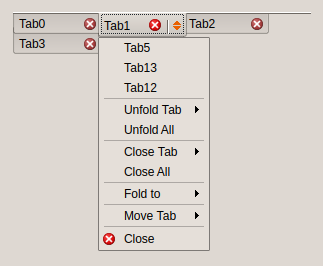 | |
| 173 | 197 | ||
| 174 | 198 | Example 7 | |
| 175 | 199 | ||
| 176 | 200 | Tab position is tpRight. Tabs are in two rows. Close button on each tab is displayed. Drop-down menu is opened (Tab5 is folded to Tab1). | |
| 177 | 201 | ||
| 178 | 202 | 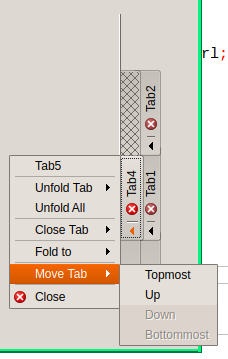 | |
| 179 | 203 | ||
| 180 | 204 | Example 8 | |
| 181 | 205 | ||
| 182 | 206 | Tabs are in two rows. Close button tab is displayed on the active tab only. Tabs are enlarges so they fulfil the width of component. Desktop theme is Breeze. | |
| 183 | 207 | ||
| 184 | 208 |  | |
| 185 | 209 | ||
| 186 | 210 | Example 9 | |
| 187 | 211 | ||
| 188 | 212 | Tab position is tpLeft but tabs are horizontal and reversed, i.e. from the bottom to the top (options etcoVertTabsHorizontal and etcoReversed). Close button on each tab is displayed. | |
| 189 | 213 | ||
| 190 | 214 | 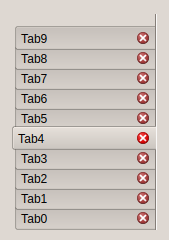 | |
| 191 | 215 | ||
| 192 | 216 | Example 10 | |
| 193 | 217 | ||
| 194 | 218 | Add a new tab and set its caption | |
| 195 | 219 | ||
| 196 | - | ||
| 197 | - | ||
| 220 | + | ``` pascal | |
| 221 | + | ECTabCtrl1.AddTab(etaLast, True); | |
| 222 | + | ECTabCtrl1.Tabs.Items[ECTabCtrl1.Tabs.Count-1].Text:='TabName'; | |
| 223 | + | ``` | |
| 198 | 224 | ||
| 199 | 225 | ## Issues | |
| 200 | 226 | ||
| 201 | 227 | Component can be visually "ugly" or "incorrect" with some desktop themes or some Style setting. (example: GTk2 and Style = eosThemedPanel). That's because unit Themes does not implement images for tabs and images for button are used instead. Some themes (Oxygen, Breeze) draws button smaller than its rectangle and the remaining area around is used for shiny effect. It may cause design issue. | |
| 202 | 228 | ||
| 203 | 229 | --- | |
| 204 | 230 | *From the Free Pascal wiki, page "TECTabCtrl", as it stood on 2018-01-21 after a change by Blaazen, out of the wiki's dump of 2024-05-26. Copyright stays with the author who wrote it, according to the old wiki's [[Licensing]] page. If you have concerns about this material, [message the admin](/wiki-contact).* | |
| 205 | 231 | Category: Components |