

TECGrid: what changed
Revision 2 to 3. Removed lines have a minus sign; added lines have a plus sign.
| Old | New | Line | |
|---|---|---|---|
| 1 | 1 | ## Overview | |
| 2 | 2 | ||
| 3 | 3 | **TECGrid**  is a lightweight grid component. It does not contain any strings, it has no [[TDataSource|DataSource]] connection and its is not possible to custom-draw each cell. Therefore it's not alternative to [[TStringGrid]], [[TDBGrid]] nor [[TDrawGrid]]. It is designed to show content of any data structure and all displayed strings are taken from OnGetHeaderText and OnGetDataCellText events. It features bi-directional mode, fixed columns, fixed rows, column moving, column sizing, various fixed-cell styles and many others, described below. | |
| 4 | 4 | ||
| 5 | 5 | 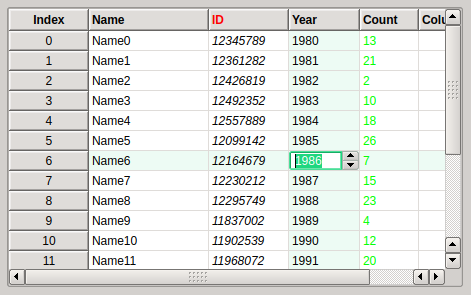 | |
| 6 | 6 | ||
| 7 | 7 | TECGrid is part of [[Eye-Candy Controls]] (shortly ECControls or EC-Controls) set of visual controls written for Lazarus. Their design is based on Themes, therefore its look is very native everywhere, no matter what widgetset you use. | |
| 8 | 8 | ||
| 9 | 9 | TECGrid is installed to the tab EC-C on the Lazarus component palette. | |
| 10 | 10 | ||
| 11 | 11 | Each release is announced on Lazarus Forum in section Third Party Announcements. There are always attached files `README.txt` (list of all known issues) and `CHANGELOG.txt` (list of all changes from previous release). | |
| 12 | 12 | ||
| 13 | 13 | ### License | |
| 14 | 14 | ||
| 15 | 15 | GNU Lesser General Public License 2.0 with linking exception (a.k.a. Modified LGPL). File ectabctrl.pas contains license header. Also, files `COPYING.modifiedLGPL.txt` and `COPYING.LGPL.txt` are bundled to each archive. | |
| 16 | 16 | ||
| 17 | 17 | ### Author | |
| 18 | 18 | ||
| 19 | 19 | This component is written by Blaazen. Copyright notice and real name is mentioned in the header of the unit. You can contact author on Lazarus Forum (nickname: Blaazen) in any thread about EC-Controls. If you are logged in to forum, you can get author's e-mail or send him private message. | |
| 20 | 20 | ||
| 21 | 21 | ### Download and Install | |
| 22 | 22 | ||
| 23 | 23 | See [[Eye-Candy Controls|Eye-Candy Controls#Install]] | |
| 24 | 24 | ||
| 25 | 25 | ## Options | |
| 26 | 26 | ||
| 27 | 27 | ### Property Options | |
| 28 | 28 | ||
| 29 | 29 | | Option | Description | | |
| 30 | 30 | |----|----| | |
| 31 | 31 | | egoAlwaysShowEditor | Editor is shown always; Grid and Column must not be egoReadOnly/ecoReadOnly | | |
| 32 | 32 | | egoColMoving | Columns can be moved by mouse; 1) Except fixed columns 2) Columns can be always moved by code | | |
| 33 | 33 | | egoColSizing | Columns can be resized by mouse; Column must be ecoSizing | | |
| 34 | 34 | | egoDottedGrid | Grid line is dotted | | |
| 35 | 35 | | egoEnlargeAlways | Column is enlarged even if Editor is not opened | | |
| 36 | 36 | | egoHeaderPushedLook | Column header has pushed look when clicked | | |
| 37 | 37 | | egoHilightCol | Whole column is highlighted | | |
| 38 | 38 | | egoHilightRow | Whole row is highlighted | | |
| 39 | 39 | | egoHorizontalLines | Show horizontal lines of grid | | |
| 40 | 40 | | egoReadOnly | Grid is ReadOnly, it never opens Editor | | |
| 41 | 41 | | egoScrollKeepVisible | Selection remains visible while scrolling (scrollbars/mouse wheel) | | |
| 42 | 42 | | egoSortArrow | Sorting arrow in title is visible; 1) Column must be ecoSorting 2) Grid must have FixedRows\>=1 | | |
| 43 | 43 | | egoTabs | Tab key goes through cells instead of other components | | |
| 44 | 44 | | egoUseOrder | Array OrderedCols is defined; flag excfOrder for Load/SaveColumnsToXML is available | | |
| 45 | 45 | | egoVerticalLines | Show vertical lines of grid | | |
| 46 | 46 | | egoWheelScrollsGrid | Mouse wheel scrolls the grid, selection does not change (i.e. it rolls away) | | |
| 47 | 47 | ||
| 48 | 48 | ### Other Grid Properties | |
| 49 | 49 | ||
| 50 | 50 | | | | | |
| 51 | 51 | |----|----| | |
| 52 | 52 | | AlternateColor | Color of even data rows | | |
| 53 | 53 | | AlternateTint | Tint of even data rows in percents, 0 = normal color, 100 = AlternateColor | | |
| 54 | 54 | | Columns | Collection of columns | | |
| 55 | 55 | | FixedCols | Number of fixed columns | | |
| 56 | 56 | | FixedRowHeight | Height of fixed (header) rows | | |
| 57 | 57 | | FixedRows | Number of fixed (header) rows | | |
| 58 | 58 | | GridLineColor | Color of grid lines (data area only) | | |
| 59 | 59 | | GridLineWidth | Width of grid lines (data area only) | | |
| 60 | 60 | | Images | ImageList for column headers; see Column.Title.ImageIndex property | | |
| 61 | 61 | | RowHeight | Height of data rows | | |
| 62 | 62 | | Style | Style of cells of fixed rows and/or fixed columns | | |
| 63 | 63 | ||
| 64 | 64 | ### Property Column.Option | |
| 65 | 65 | ||
| 66 | 66 | | Option | Description | | |
| 67 | 67 | |----|----| | |
| 68 | 68 | | ecoCellToHint | Content of data cell is shown as a Hint (tooltip) | | |
| 69 | 69 | | ecoEnlargePixels | Property EnlargeWidth means pixels, otherwise means percents | | |
| 70 | 70 | | ecoReadOnly | Column is ReadOnly (never shows editor) | | |
| 71 | 71 | | ecoSizing | Column can be resized by mouse; Grid must be egoColSizing | | |
| 72 | 72 | | ecoSorting | Sorting arrow in title is visible; Grid must be egoSortArrow and must have FixedRows\>=1 | | |
| 73 | 73 | | ecoVisible | Column is visible | | |
| 74 | 74 | ||
| 75 | 75 | ### Property Column.Title | |
| 76 | 76 | ||
| 77 | 77 | | Option | Description | | |
| 78 | 78 | |----|----| | |
| 79 | 79 | | Alignment | Text alignment of the column header; bi-directional mode is respected | | |
| 80 | 80 | | FontOptions | Font differences of the column header to Grid.Font | | |
| 81 | 81 | | ImageIndex | Image displayed in the column header; taken from Grid.Images | | |
| 82 | 82 | | Text | Caption of the column header; the only text that is not taken from events | | |
| 83 | 83 | ||
| 84 | 84 | ### Other Column Properties | |
| 85 | 85 | ||
| 86 | 86 | | Option | Description | | |
| 87 | 87 | |----|----| | |
| 88 | 88 | | Alignment | Text alignment of the column; bi-directional mode is respected | | |
| 89 | 89 | | Color | Background color of the column | | |
| 90 | 90 | | ColorTint | Tint of background color in percents, 0 = Grid.Color/Grid.AlternateColor, 100 = Column.Color | | |
| 91 | 91 | | EnlargeWidth | Increment to the column width; value means pixels or percents, depend on option ecoEnlargePixels | | |
| 92 | 92 | | FontOptions | Font differences to Grid.Font | | |
| 93 | 93 | | MaxWidth | Maximal width of the resizable column | | |
| 94 | 94 | | MinWidth | Minimal width of the resizable column | | |
| 95 | 95 | ||
| 96 | 96 | ## Using the Component | |
| 97 | 97 | ||
| 98 | 98 | ### Mouse | |
| 99 | 99 | ||
| 100 | 100 | Left button | |
| 101 | 101 | ||
| 102 | 102 | Click on a data-cell always selects it and possibly opens editor (depends on options egoAlwaysShowEditor, egoReadOnly, ecoReadOnly and implementation of OnSelectEditor event). | |
| 103 | 103 | ||
| 104 | 104 | Click on a cell of fixed columns changes row, which in turn changes selection and possibly opens editor (see above). | |
| 105 | 105 | ||
| 106 | 106 | Click on a cell of fixed rows changes SortIndex if option ecoSorting of Column is set. It happens even if option egoSortArrow is not set (arrow is invisibe). | |
| 107 | 107 | ||
| 108 | 108 | Middle button | |
| 109 | 109 | ||
| 110 | 110 | Does nothing. | |
| 111 | 111 | ||
| 112 | 112 | Right button | |
| 113 | 113 | ||
| 114 | 114 | Opens context menu. Note that Grid, Column and Column.Title can have different context menu. | |
| 115 | 115 | ||
| 116 | 116 | Dragging and Resizing | |
| 117 | 117 | ||
| 118 | 118 | Dragging is realized by left mouse button. Dragging moves column on the new position (egoColMoving must be set). Fixed columns cannot be moved. Data columns cannot be moved in front of fixed columns. Shape of the mouse cursor shows if the column can be moved to the new position or not. | |
| 119 | 119 | ||
| 120 | 120 | Resizing is realized by left mouse button. Mouse must be pushed on the right edge of the column header (or the left edge in right-to-left BiDiMode) - when mouse cursor changes its shape. Column width can be resized between MinWidth and MaxWidth. Both Options egoColSizing and ecoSizing must be set. | |
| 121 | 121 | ||
| 122 | 122 | Mouse Wheel | |
| 123 | 123 | ||
| 124 | 124 | Wheel moves selection up/down. | |
| 125 | 125 | ||
| 126 | 126 | Wheel + CTRL key (exactly ssModifier) scrolls grid. | |
| 127 | 127 | ||
| 128 | 128 | Option egoWheelScrollsGrid reverses this behaviour. | |
| 129 | 129 | ||
| 130 | 130 | ### Keyboard | |
| 131 | 131 | ||
| 132 | 132 | (Grid must be focused). | |
| 133 | 133 | ||
| 134 | 134 | Arrow keys change selection. | |
| 135 | 135 | ||
| 136 | 136 | Arrow keys + CTRL key (exactly ssModifier) scroll grid. | |
| 137 | 137 | ||
| 138 | 138 | Home/End keys skip to the first/last data column. | |
| 139 | 139 | ||
| 140 | 140 | Home/End keys + CTRL key (exactly ssModifier) skip to the first/last data row. | |
| 141 | 141 | ||
| 142 | 142 | PageUp/PageDown keys skip up/down by the number of visible rows. | |
| 143 | 143 | ||
| 144 | 144 | PageUp/PageDown keys + CTRL key (exactly ssModifier) scroll up/down by the number of visible rows. | |
| 145 | 145 | ||
| 146 | 146 | If option egoTabs is set, Tab key skips to the next data cell. If selection reaches the last column, it skips to the first column and the next row. Shift + Tab skips in the opposite direction. | |
| 147 | 147 | ||
| 148 | 148 | Enter, Space, F2, BackSpace and Delete keys open Editor (Grid/Column must not be egoReadOnly/ecoReadOnly). | |
| 149 | 149 | ||
| 150 | 150 | Keys 0..9 and A..Z also open Editor. | |
| 151 | 151 | ||
| 152 | 152 | CTRL+C copies content of the selection to the clipboard. | |
| 153 | 153 | ||
| 154 | 154 | ### Code | |
| 155 | 155 | ||
| 156 | - | ||
| 156 | + | ``` pascal | |
| 157 | + | procedure BeginUpdate; override; | |
| 158 | + | ``` | |
| 157 | 159 | ||
| 158 | 160 | Reduces number of calculations and repaints when multiple properties change. | |
| 159 | 161 | ||
| 160 | - | ||
| 162 | + | ``` pascal | |
| 163 | + | function CellRect(ACol, ARow: Integer): TRect; | |
| 164 | + | ``` | |
| 161 | 165 | ||
| 162 | 166 | Returns rectangle of the specified cell. | |
| 163 | 167 | ||
| 164 | - | ||
| 168 | + | ``` pascal | |
| 169 | + | function CellRectEditor(ACol, ADataRow: Integer): TRect; | |
| 170 | + | ``` | |
| 165 | 171 | ||
| 166 | 172 | Returns corrected rectangle of the specified cell, it takes care of the GridLineWidth. Recommended for opening Editor. | |
| 167 | 173 | ||
| 168 | - | ||
| 174 | + | ``` pascal | |
| 175 | + | procedure EndUpdate; override; | |
| 176 | + | ``` | |
| 169 | 177 | ||
| 170 | 178 | Each call of BeginUpdate; must be followed by EndUpdate. All changes will be processed. | |
| 171 | 179 | ||
| 172 | - | ||
| 180 | + | ``` pascal | |
| 181 | + | function IsCellFullyVisible(ACol, ARow: Integer): Boolean; | |
| 182 | + | ``` | |
| 173 | 183 | ||
| 174 | 184 | Returns True if specified cell is fully visible. | |
| 175 | 185 | ||
| 176 | - | ||
| 186 | + | ``` pascal | |
| 187 | + | function IsCellVisible(ACol, ARow: Integer): Boolean; | |
| 188 | + | ``` | |
| 177 | 189 | ||
| 178 | 190 | Returns True if specified cell is at least partially visible. | |
| 179 | 191 | ||
| 180 | - | ||
| 192 | + | ``` pascal | |
| 193 | + | function IsColFullyVisible(ACol: Integer): Boolean; | |
| 194 | + | ``` | |
| 181 | 195 | ||
| 182 | 196 | Returns True if AColl is fully visible. | |
| 183 | 197 | ||
| 184 | - | ||
| 198 | + | ``` pascal | |
| 199 | + | function IsColVisible(ACol: Integer): Boolean; | |
| 200 | + | ``` | |
| 185 | 201 | ||
| 186 | 202 | Returns True if ACol is at least partially visible. | |
| 187 | 203 | ||
| 188 | - | ||
| 204 | + | ``` pascal | |
| 205 | + | function IsRowFullyVisible(ARow: Integer): Boolean; | |
| 206 | + | ``` | |
| 189 | 207 | ||
| 190 | 208 | Returns True if ARow is fully visible. | |
| 191 | 209 | ||
| 192 | - | ||
| 210 | + | ``` pascal | |
| 211 | + | function IsRowVisible(ARow: Integer): Boolean; | |
| 212 | + | ``` | |
| 193 | 213 | ||
| 194 | 214 | Returns True if ARow is at least partially visible. | |
| 195 | 215 | ||
| 196 | - | ||
| 197 | - | ||
| 216 | + | ``` pascal | |
| 217 | + | procedure LoadColumnsFromXML(AColumnsNode: TDOMNode; AXMLFlags: TXMLColFlags = cXMLColFlagsAll); overload; | |
| 218 | + | procedure LoadColumnsFromXML(AFileName: string; AColumnsNode: DOMString; AXMLFlags: TXMLColFlags = cXMLColFlagsAll); overload; | |
| 219 | + | ``` | |
| 198 | 220 | ||
| 199 | 221 | Loads parameters of columns. Option egoUseOrder must be set for using the Order properties. | |
| 200 | 222 | ||
| 201 | - | ||
| 223 | + | ``` pascal | |
| 224 | + | function MakeCellFullyVisible(ACol, ARow: Integer; AForceColVisible: Boolean): Boolean; | |
| 225 | + | ``` | |
| 202 | 226 | ||
| 203 | 227 | Makes specified cell visible (without selecting it). If column is invisible, it can be forced to show by AForce parameter. | |
| 204 | 228 | ||
| 205 | - | ||
| 229 | + | ``` pascal | |
| 230 | + | procedure MouseToCell(AMouse: TPoint; out ACol, ARow: Integer); | |
| 231 | + | ``` | |
| 206 | 232 | ||
| 207 | 233 | Returns indexes of a cell placed on the coordinates AMouse. | |
| 208 | 234 | ||
| 209 | - | ||
| 210 | - | ||
| 235 | + | ``` pascal | |
| 236 | + | procedure SaveColumnsToXML(AXMLDoc: TXMLDocument; AColumnsNode: TDOMNode; AXMLFlags: TXMLColFlags = cXMLColFlagsAll); overload; | |
| 237 | + | procedure SaveColumnsToXML(AFileName: string; AColumnsNode: DOMString; AXMLFlags: TXMLColFlags = cXMLColFlagsAll); overload; | |
| 238 | + | ``` | |
| 211 | 239 | ||
| 212 | 240 | Saves parameters of columns. | |
| 213 | 241 | ||
| 214 | - | ||
| 242 | + | ``` pascal | |
| 243 | + | procedure SaveToCSVFile(AFileName: string; ADelimiter: Char = ','; AHeaders: Boolean = True; AVisibleColsOnly: Boolean = False); | |
| 244 | + | ``` | |
| 215 | 245 | ||
| 216 | 246 | Saves content of the grid to the text file. | |
| 217 | 247 | ||
| 218 | - | ||
| 248 | + | ``` pascal | |
| 249 | + | procedure SelectCell(ACol, ARow: Integer; ASelectEditor: TEditorSelection; AForce: Boolean = False); | |
| 250 | + | ``` | |
| 219 | 251 | ||
| 220 | 252 | Changes selection to the cell specified by ACol and ARow. If column is invisible, it can be forced to show by AForce parameter. ASelectEditor specifies whether Editor will be opened (esNative depends on the egoAlwaysShowEditor). | |
| 221 | 253 | ||
| 222 | - | ||
| 254 | + | ``` pascal | |
| 255 | + | procedure UpdateCell(ACol, ARow: Integer); | |
| 256 | + | ``` | |
| 223 | 257 | ||
| 224 | 258 | Updates single cell. | |
| 225 | 259 | ||
| 226 | - | ||
| 260 | + | ``` pascal | |
| 261 | + | procedure UpdateColumn(ACol: Integer; AHeader: Boolean = False; AData: Boolean = True); | |
| 262 | + | ``` | |
| 227 | 263 | ||
| 228 | 264 | Updates cells in column. | |
| 229 | 265 | ||
| 230 | - | ||
| 266 | + | ``` pascal | |
| 267 | + | procedure UpdateRow(ARow: Integer; AFixedCols: Boolean = False; AData: Boolean = True); | |
| 268 | + | ``` | |
| 231 | 269 | ||
| 232 | 270 | Updates visible cells in row. | |
| 233 | 271 | ||
| 234 | - | ||
| 272 | + | ``` pascal | |
| 273 | + | procedure UpdateRowCount; | |
| 274 | + | ``` | |
| 235 | 275 | ||
| 236 | 276 | Call if you need to change number of data rows immediately. That's because RowCount is taken from OnGetDataRowCount event. | |
| 237 | 277 | ||
| 238 | 278 | ## Workflow | |
| 239 | 279 | ||
| 240 | 280 | ECGrid itself does not contain any data (except column titles) and does not provide any built-in editor. All columns must be defined, setting ColCount (as it is with TStringGrid and TDrawGrid) is not enough, this property is read-only here. | |
| 241 | 281 | ||
| 242 | 282 | ### Displaying data | |
| 243 | 283 | ||
| 244 | 284 | Lets assume that data are stored in any general structure, for example TFPGObjectList. For displaying all desired data is necessary: | |
| 245 | 285 | ||
| 246 | 286 | - Create corresponding number of columns | |
| 247 | 287 | - Implement OnGetDataCellText event for each cell (for fixed columns too) | |
| 248 | 288 | - Implement OnGetDataRowCount event. Implementation of this event will return TFPGObjectList.Count (ADataRowCount parameter) | |
| 249 | 289 | ||
| 250 | 290 | Note: It is also possible to implement only one OnGetDataCellText event and assign it to all columns. This event has parameter AColumn, so it is possible to use **`case`**` AColumn.Index `**`of`** construction. | |
| 251 | 291 | ||
| 252 | 292 | ### Editing data | |
| 253 | 293 | ||
| 254 | 294 | - Create corresponding editors | |
| 255 | 295 | - Implement OnSelectEditor event | |
| 256 | 296 | - Implement OnChange or OnEditingDone events of the editors | |
| 257 | 297 | ||
| 258 | 298 | Editing: | |
| 259 | 299 | ||
| 260 | 300 | - Select cell and open editor (TEdit, TSpinEdit etc.). Example of implementation of the OnSelectEditor event: | |
| 261 | 301 | ||
| 262 | - | ||
| 263 | - | ||
| 264 | - | ||
| 265 | - | ||
| 266 | - | ||
| 267 | - | ||
| 302 | + | ``` pascal | |
| 303 | + | procedure TForm1.SelectEditor(Sender: TObject; ACol, ARow: Integer; var AEditor: TWinControl; AKey: Word); | |
| 304 | + | begin | |
| 305 | + | SpinEdit1.Value:=<span style="color: blue">{ fill appropriate value here }</span>; | |
| 306 | + | SpinEdit1.BoundsRect:=TECGrid(Sender).CellRectEditor(ACol, ARow); | |
| 307 | + | AEditor:=SpinEdit1; | |
| 308 | + | end; | |
| 309 | + | ``` | |
| 268 | 310 | ||
| 269 | 311 | - Change value of the editor (text, number) | |
| 270 | 312 | - Editor triggers OnChange or OnEditingDone event | |
| 271 | 313 | - Event will change the data | |
| 272 | 314 | - Call Grid.Invalidate to repaint, new data will appear | |
| 273 | 315 | ||
| 274 | 316 | Note: If number of items in list is changed (some items was added or deleted), it is necessary to call Grid.UpdateRows to display changes. | |
| 275 | 317 | ||
| 276 | 318 | ### Order of columns | |
| 277 | 319 | ||
| 278 | 320 | **Important:** Option egoUseOrder must be enabled for proper use of Orders. Do not change egoUseOrder during lifetime of the component. | |
| 279 | 321 | ||
| 280 | 322 | There are properties to get the relation of Indexes and Orders. | |
| 281 | 323 | ||
| 282 | 324 | Property | |
| 283 | 325 | ||
| 284 | - | ||
| 326 | + | ```text | |
| 327 | + | Columns[i].Order; | |
| 328 | + | ``` | |
| 285 | 329 | ||
| 286 | 330 | stores initial order of each column (column with Index=i in this case), while property | |
| 287 | 331 | ||
| 288 | - | ||
| 332 | + | ```text | |
| 333 | + | ColOrd[i]; | |
| 334 | + | ``` | |
| 289 | 335 | ||
| 290 | 336 | returns Index of column with Order=i. | |
| 291 | 337 | ||
| 292 | - | ||
| 338 | + | ```text | |
| 339 | + | CellOrd[i, j]; | |
| 340 | + | ``` | |
| 293 | 341 | ||
| 294 | 342 | is the same as | |
| 295 | 343 | ||
| 296 | - | ||
| 344 | + | ```text | |
| 345 | + | Cell[ColOrd[i], j];. | |
| 346 | + | ``` | |
| 297 | 347 | ||
| 298 | 348 | Example | |
| 299 | 349 | ||
| 300 | 350 | Lets assume that grid has three columns and their are movable (option egoColMoving is enabled). | |
| 301 | 351 | ||
| 302 | 352 | | Index | 0 | 1 | 2 | | |
| 303 | 353 | |-------|------|----------|-------| | |
| 304 | 354 | | Title | Name | Category | Count | | |
| 305 | 355 | | Order | 0 | 1 | 2 | | |
| 306 | 356 | ||
| 307 | 357 | If the first column (Name) is edited, grid will trigger event OnSelectEditor with parameter ACol=0. | |
| 308 | 358 | ||
| 309 | 359 | Now assume that user will move the first column to the third position. | |
| 310 | 360 | ||
| 311 | 361 | | Index | 0 | 1 | 2 | | |
| 312 | 362 | |-------|----------|-------|------| | |
| 313 | 363 | | Title | Category | Count | Name | | |
| 314 | 364 | | Order | 1 | 2 | 0 | | |
| 315 | 365 | ||
| 316 | 366 | If the same column is edited again, grid will trigger event OnSelectEditor, but parameter ACol=2 now, which may be difficult to maintain. | |
| 317 | 367 | ||
| 318 | 368 | Even more, user wants to save defined order of columns when session is over and load it back in the next session (for example restart of an application). | |
| 319 | 369 | ||
| 320 | 370 | For this use case, there are properties ColOrd and CellOrd. | |
| 321 | 371 | ||
| 322 | 372 | If we use: | |
| 323 | 373 | ||
| 324 | - | ||
| 325 | - | ||
| 326 | - | ||
| 327 | - | ||
| 328 | - | ||
| 329 | - | ||
| 330 | - | ||
| 331 | - | ||
| 374 | + | ``` pascal | |
| 375 | + | procedure TForm1.SelectEditor(Sender: TObject; ACol, ARow: Integer; var AEditor: TWinControl; AKey: Word); | |
| 376 | + | begin | |
| 377 | + | case ACol of | |
| 378 | + | 0: <span style="color: blue">{ set editor for column Name }</span>; | |
| 379 | + | 1: <span style="color: blue">{ set editor for column Category }</span>; | |
| 380 | + | 2: <span style="color: blue">{ set editor for column Count }</span>; | |
| 381 | + | end; | |
| 382 | + | end; | |
| 383 | + | ``` | |
| 332 | 384 | ||
| 333 | 385 | This code works well as long as the columns are in their initial order. | |
| 334 | 386 | ||
| 335 | 387 | But we need to select the right editors for all columns, regardless of their new poitions. We must modify the code: | |
| 336 | 388 | ||
| 337 | - | ||
| 338 | - | ||
| 339 | - | ||
| 340 | - | ||
| 341 | - | ||
| 342 | - | ||
| 343 | - | ||
| 344 | - | ||
| 389 | + | ``` pascal | |
| 390 | + | procedure TForm1.SelectEditor(Sender: TObject; ACol, ARow: Integer; var AEditor: TWinControl; AKey: Word); | |
| 391 | + | begin | |
| 392 | + | case ColOrd[ACol] of | |
| 393 | + | 0: <span style="color: blue">{ set editor for column Name }</span>; | |
| 394 | + | 1: <span style="color: blue">{ set editor for column Category }</span>; | |
| 395 | + | 2: <span style="color: blue">{ set editor for column Count }</span>; | |
| 396 | + | end; | |
| 397 | + | end; | |
| 398 | + | ``` | |
| 345 | 399 | ||
| 346 | 400 | There are methods LoadColumnsFromXML and SaveColumnsToXML which can store and refresh previous order of columns, but also their width and visibility (property Width and option ecoVisible). | |
| 347 | 401 | ||
| 348 | 402 | **Note:** When option egoUseOrder is disabled it reduces some calculations. Switch this property off if you extensively add and delete columns and/or if you disabled moving of columns (egoColMoving). | |
| 349 | 403 | ||
| 350 | 404 | --- | |
| 351 | 405 | *From the Free Pascal wiki, page "TECGrid", as it stood on 2017-03-29 after a change by Blaazen, out of the wiki's dump of 2024-05-26. Copyright stays with the author who wrote it, according to the old wiki's [[Licensing]] page. If you have concerns about this material, [message the admin](/wiki-contact).* | |
| 352 | 406 | Category: Components |