

TCheckListBox: what changed
Revision 1 to 2. Removed lines have a minus sign; added lines have a plus sign.
| Old | New | Line | |
|---|---|---|---|
| 1 | 1 | A **TCheckListBox**  is a component that shows a (scrollable) list of checkboxes where user can make multiple selections. It is available from the [[Additional tab]] of the [[Component Palette]]. | |
| 2 | 2 | ||
| 3 | - | ||
| 4 | - | ||
| 5 | - | ||
| 6 | - | ||
| 3 | + | 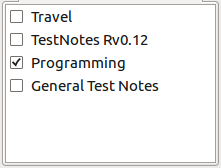 | |
| 7 | 4 | ||
| 8 | 5 | ## Usage | |
| 9 | 6 | ||
| 10 | 7 | Think of TCheckListBox as having two parts, the strings in a [[TListBox]] shown to the right and the checkboxes to the left. The strings are typically descriptions of what the user is selecting if they click a checkbox. The strings may be loaded individually using (eg) - | |
| 11 | 8 | ||
| 12 | 9 | ``` pascal | |
| 13 | 10 | CheckListBox1.AddItem('Line One', Nil); | |
| 14 | 11 | CheckListBox1.AddItem('Line Two', Nil); | |
| 15 | 12 | ``` | |
| 16 | 13 | ||
| 17 | 14 | Or you can assign an existing string list filled elsewhere - | |
| 18 | 15 | ||
| 19 | 16 | ``` pascal | |
| 20 | 17 | CheckListBox1.Items.Assign(MyStringList); | |
| 21 | 18 | ``` | |
| 22 | 19 | ||
| 23 | 20 | Its a good idea to then put the checkboxes in a know state - | |
| 24 | 21 | ||
| 25 | 22 | ``` pascal | |
| 26 | 23 | for I := 0 to CheckListBox1.Count-1 do | |
| 27 | 24 | CheckListBox1.Checked[I] := False; | |
| 28 | 25 | ``` | |
| 29 | 26 | ||
| 30 | 27 | TCheckListBox allows the user to select as many or as few checkboxes as they like. Use the OnItemClick event to force no more than one - | |
| 31 | 28 | ||
| 32 | 29 | ``` pascal | |
| 33 | 30 | procedure TNoteBookPick.CheckListBox1ItemClick(Sender: TObject; Index: integer); | |
| 34 | 31 | var | |
| 35 | 32 | I : integer; | |
| 36 | 33 | begin | |
| 37 | 34 | if (Sender as TCheckListBox).Checked[Index] then begin | |
| 38 | 35 | for I := 0 to CheckListBox1.Count -1 do | |
| 39 | 36 | CheckListBox1.Checked[I] := False; | |
| 40 | 37 | CheckListBox1.Checked[Index] := True; | |
| 41 | 38 | end; | |
| 42 | 39 | end; | |
| 43 | 40 | ``` | |
| 44 | 41 | ||
| 45 | 42 | To read the Check Boxes when (eg) the user has finished - | |
| 46 | 43 | ||
| 47 | 44 | ``` pascal | |
| 48 | 45 | for I := 0 to CheckListBox1.Count -1 do | |
| 49 | 46 | if CheckListBox1.Checked[I] then DebugLn('Checked Item ' + CheckListBox1.Items[I]); | |
| 50 | 47 | ``` | |
| 51 | 48 | ||
| 52 | 49 | ## Comparison with TCheckGroup | |
| 53 | 50 | ||
| 54 | 51 | There is a similar control named TCheckGroup on Standard component pallette tab. The differences are | |
| 55 | 52 | ||
| 56 | 53 | 1\) The items within TCheckGroup are spaced evenly, while TCheckListBox allows scroll down. | |
| 57 | 54 | ||
| 58 | 55 | 2\) TCheckListBox has property of AllowGrayed. | |
| 59 | 56 | ||
| 60 | 57 | ## See also | |
| 61 | 58 | ||
| 62 | 59 | - [[doc:lcl/checklst/tchecklistbox.html|TCheckListBox doc]] | |
| 63 | 60 | - [[TCheckBox]] | |
| 64 | 61 | - [[TListBox]] | |
| 65 | 62 | ||
| 66 | 63 | --- | |
| 67 | 64 | *From the Free Pascal wiki, page "TCheckListBox", as it stood on 2022-04-04 after a change by Egsuh, out of the wiki's dump of 2024-05-26. Copyright stays with the author who wrote it, according to the old wiki's [[Licensing]] page. If you have concerns about this material, [message the admin](/wiki-contact).* |