

TCheckGroup: what changed
Revision 1 to 2. Removed lines have a minus sign; added lines have a plus sign.
| Old | New | Line | |
|---|---|---|---|
| 1 | 1 | A **TCheckGroup**  is a control that comprises a group of [[TCheckBox]] items physically and logically grouped together on a container component. | |
| 2 | 2 | ||
| 3 | 3 | ## Usage | |
| 4 | 4 | ||
| 5 | 5 | To use a TCheckGroup on a [[TForm|form]], you can simply select it on the [[Standard tab]] of the [[Component Palette]] and place it by clicking on the form. | |
| 6 | 6 | ||
| 7 | 7 | ### Small example | |
| 8 | 8 | ||
| 9 | 9 | It changes the background color of a form. This color is determined by adding the individual color components: | |
| 10 | 10 | ||
| 11 | 11 | - create a new application and place a TCheckGroup on your form | |
| 12 | 12 | - in the object inspector change the property *Name* of *CheckGroup1* to *cgRed* and the caption to *Red* | |
| 13 | 13 | - add the checkboxes for *cgRed*: | |
| 14 | 14 | - in the object inspector select the property *Items* of *cgRed* | |
| 15 | 15 | - click on the button \[...\], the character chain editor opens | |
| 16 | 16 | - write among one another *1 2 4 8 16 32 64 128* and complete the entry with the *OK* button | |
| 17 | 17 | - copy this TCheckGroup by right click *cgRed* in the form and click on *Copy* | |
| 18 | 18 | - right-click the form and click on *Insert*, which creates TCheckGroup named *cgRed1* | |
| 19 | 19 | - now change the *Name* of *cgRed1* to *cgGreen* and the *Caption* to *Green* | |
| 20 | 20 | - insert even a TCheckGroup and change the name to *cgBlue* and the caption to *Blue* | |
| 21 | 21 | - whenever a CheckBox is clicked, the color will change: | |
| 22 | 22 | - in the object inspector create the *OnItemClick* event handler of *cgRed* by clicking the button \[...\] next to the event *OnItemClick* | |
| 23 | 23 | - select for *cgGreen* and *cgBlue* also this event handler, by choosing each next to the event *OnItemClick* ComboBox *cgRedItemClick* | |
| 24 | 24 | - write following code in the event handler: | |
| 25 | 25 | ||
| 26 | 26 | ``` pascal | |
| 27 | 27 | procedure TForm1.cgRedItemClick(Sender: TObject; Index: integer); | |
| 28 | 28 | var | |
| 29 | 29 | i, c: Integer; | |
| 30 | 30 | begin | |
| 31 | 31 | c := $000000; // first the color is black | |
| 32 | 32 | for i:=0 to 7 do begin // test Items 0..7 of all Checkgroups | |
| 33 | 33 | if cgRed.Checked[i] then c := c + 1 shl i; // amount of red $000000..$0000FF | |
| 34 | 34 | if cgGreen.Checked[i] then c := c + 1 shl (i + 8); // amount of green $000000..$00FF00 | |
| 35 | 35 | if cgBlue.Checked[i] then c := c + 1 shl (i + 16); // amount of blue $000000..$FF0000 | |
| 36 | 36 | end; | |
| 37 | 37 | Color := c; | |
| 38 | 38 | end; | |
| 39 | 39 | ``` | |
| 40 | 40 | ||
| 41 | 41 | - start your program, it could look like: | |
| 42 | 42 | ||
| 43 | - | ||
| 44 | - | ||
| 45 | - | ||
| 46 | - | ||
| 43 | + | 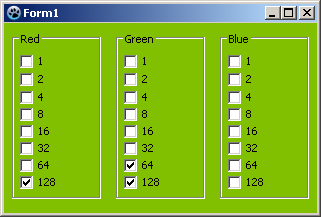 | |
| 47 | 44 | ||
| 48 | 45 | ## Accessing the Check Boxes | |
| 49 | 46 | ||
| 50 | 47 | Each item in the TCheckGroup has a Checked property, to set them all to checked do | |
| 51 | 48 | ||
| 52 | 49 | ``` pascal | |
| 53 | 50 | for i := 0 to MyCheckGroup.items.Count-1 do // check all the categories we found. | |
| 54 | 51 | MyCheckGroup.Checked[i] := true; | |
| 55 | 52 | ``` | |
| 56 | 53 | ||
| 57 | 54 | You can add items at run time by using TCheckGroup.Items, its a TStrings list. To add an new checkbox to the set, just do MyCheckGroup.Items.add('CheckThis'); Similarly, to remove all items, clear the list, MyCheckGroup.Items.clear; | |
| 58 | 55 | ||
| 59 | 56 | ## See also | |
| 60 | 57 | ||
| 61 | 58 | - [[doc:lcl/extctrls/tcheckgroup.html|TCheckGroup doc]] | |
| 62 | 59 | - [[TCheckBox]] | |
| 63 | 60 | - [[TGroupBox]] | |
| 64 | 61 | ||
| 65 | 62 | --- | |
| 66 | 63 | *From the Free Pascal wiki, page "TCheckGroup", as it stood on 2022-03-08 after a change by Dbannon, out of the wiki's dump of 2024-05-26. Copyright stays with the author who wrote it, according to the old wiki's [[Licensing]] page. If you have concerns about this material, [message the admin](/wiki-contact).* |