

TCalendarDialog/zh CN: what changed
Revision 1 to 2. Removed lines have a minus sign; added lines have a plus sign.
| Old | New | Line | |
|---|---|---|---|
| 1 | 1 | **TCalendarDialog**  就是能帮你选择日期的一个控件而已. 在 [[Dialogs tab]] 的 [[Component Palette]]. | |
| 2 | 2 | ||
| 3 | - | ||
| 4 | - | ||
| 5 | - | ||
| 6 | - | ||
| 3 | + | 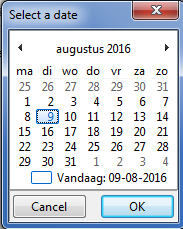 | |
| 7 | 4 | ||
| 8 | 5 | Execute [[Method|方法]] 来显示对话框. 选择日期后返回 [[True|true]] , 未选择就返回[[False|false]] . | |
| 9 | 6 | ||
| 10 | 7 | ## 样例 | |
| 11 | 8 | ||
| 12 | 9 | 1. 菜单中选择 工程/新建工程… | |
| 13 | 10 | 2. 添加 TCalendarDialog 控件  到 [[TForm|窗体]].\ | |
| 14 | 11 | 位置随意,因为此控件为不显示控件 [[runtime|run time]] 仅编辑状态可见. \<br \\\>  \<br \\\> 在 [[Dialogs tab]] 的 [[Component Palette|component palette]]\ | |
| 15 | 12 | 3. 添加 [[TButton|button]]  到窗体. | |
| 16 | 13 | 4. [[IDE Window: Object Inspector|对象查看器]] 中查看按钮的事件,在OnClick事件右侧点击 ... 按钮,添加对应的代码。 | |
| 17 | 14 | 5. 完成代码: | |
| 18 | 15 | ||
| 19 | 16 | ``` pascal | |
| 20 | 17 | procedure TForm1.Button1Click(Sender: TObject); | |
| 21 | 18 | var | |
| 22 | 19 | dt:tdatetime; | |
| 23 | 20 | calendarSettings:TDisplaySettings; | |
| 24 | 21 | begin | |
| 25 | 22 | dt:= now; | |
| 26 | 23 | CalendarDialog1.Date := dt; | |
| 27 | 24 | calendarSettings:= [dsShowWeekNumbers,dsStartMonday]; | |
| 28 | 25 | CalendarDialog1.Title:='Select a date'; | |
| 29 | 26 | CalendarDialog1.DisplaySettings:= calendarSettings; | |
| 30 | 27 | if CalendarDialog1.Execute then | |
| 31 | 28 | begin | |
| 32 | 29 | dt:= CalendarDialog1.Date; | |
| 33 | 30 | ShowMessage( 'The selected date is '+FormatDateTime( 'yyyy-mm-dd',dt )); | |
| 34 | 31 | end | |
| 35 | 32 | else | |
| 36 | 33 | ShowMessage( 'Today is '+FormatDateTime( 'yyyy-mm-dd',dt )); | |
| 37 | 34 | end; | |
| 38 | 35 | ``` | |
| 39 | 36 | ||
| 40 | 37 | ## 参考资料 | |
| 41 | 38 | ||
| 42 | 39 | - [[doc:lcl/dialogs/tcalendardialog.html|TCalendarDialog doc]] | |
| 43 | 40 | - [[TDBDateTimePicker]] | |
| 44 | 41 | - [[TDateTimePicker]] | |
| 45 | 42 | - [[TDateEdit]] | |
| 46 | 43 | - [[TTimeEdit]] | |
| 47 | 44 | - [[TDateTime]] | |
| 48 | 45 | ||
| 49 | 46 | --- | |
| 50 | 47 | *From the Free Pascal wiki, page "TCalendarDialog/zh CN", as it stood on 2020-05-03 after a change by TyphonFinger, out of the wiki's dump of 2024-05-26. Copyright stays with the author who wrote it, according to the old wiki's [[Licensing]] page. If you have concerns about this material, [message the admin](/wiki-contact).* |