

TCalendarDialog
English · Français · Suomi · Русский · 中文(中国)
TCalendarDialog  is a dialog that aids in selecting a date from a calendar. It can be found on the Dialogs tab of the Component Palette.
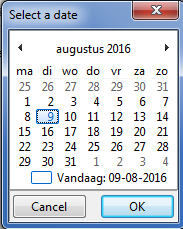
The Execute method displays the calendar dialog. It returns true when user has selected date, false when user has aborted.
Example
- From the menu choose Project/New Project…
- Place a TCalendarDialog widget on your form.
It can be placed anywhere as it is not visible during program run time but only during design time. <br \> <br \> It is located on the Dialogs tab of the component palette\
- Add a button
 in the form.
- The Object Inspector will display the properties of the object Button1. Click on the Events tab on the Object Inspector. Select the box to the right of OnClick: a smaller box with three dots (... ellipsis) appears. Click on this, you are taken automatically into the Source Editor and your cursor will be placed in a piece of code starting.
- Completion code:
uses
  ExtDlgs,   // for the CalendarDialog
  Calendar;  // for the DisplaySettings and FirstDayOfWeek enumerations

procedure TForm1.Button1Click(Sender: TObject);
var
  dt: TDate;
begin
  CalendarDialog1.Date := Now;
  CalendarDialog1.Title := 'Select a date';
  CalendarDialog1.DisplaySettings := [dsShowWeekNumbers];
  CalendarDialog1.FirstDayOfWeek := dowMonday;  // in Laz 3.99+
  if CalendarDialog1.Execute then
  begin
    dt := CalendarDialog1.Date;
    ShowMessage('The selected date is ' + FormatDateTime('yyyy-mm-dd', dt));
  end
  else
    ShowMessage('Today is ' + FormatDateTime('yyyy-mm-dd', dt));
end;
See also
From the Free Pascal wiki, page "TCalendarDialog", as it stood on 2023-09-09 after a change by Wp, out of the wiki's dump of 2024-05-26. Copyright stays with the author who wrote it, according to the old wiki's Licensing page. If you have concerns about this material, message the admin.
Talk about this page
Nobody has opened a bench for this page yet. Sign in to open one.