

TBrush: what changed
Revision 1 to 2. Removed lines have a minus sign; added lines have a plus sign.
| Old | New | Line | |
|---|---|---|---|
| 1 | 1 | Along with [[TPen]] and [[TFont]], **`TBrush`** belongs to the most fundamental properties of [[TCanvas]] and defines how a geometric shape is filled. | |
| 2 | 2 | ||
| 3 | 3 | ## Properties | |
| 4 | 4 | ||
| 5 | 5 | - **`Color`**: specifies the basic color (type `TColor`) used to fill the shape | |
| 6 | 6 | - **`Style`**: an enumeration of type `TBrushStyle` which defines the pattern used for filling | |
| 7 | 7 | - **`bsClear`**: no filling at all, `Color` is ignored. | |
| 8 | 8 | - **`bsSolid`**: uniform fill of the shape with the `Color` specified | |
| 9 | 9 | - The following styles define **hatch patterns** which are drawn in the `Color` specified. By default the background between the hatch lines is left empty. In Windows, gtk2 and qt5, it can be filled after calling `SetBkColor(Canvas.Handle, AColor)` if background mode has been set to `OPAQUE`: `SetBkMode(Canvas.Handle, OPAQUE)` which is the default, but can be reverted by calling with the argument `TRANSPARENT` instead of `OPAQUE`. Both functions require the units *LCLIntf* and *LCLType* in the *uses* clause. In other widgetsets the background has to be drawn twice, with `fsSolid` at first. Note that an alpha-channel for transparency seems to be ignored. | |
| 10 | 10 | - **`bsHorizontal`**, **`bsVertical`**, **`bsFDiagonal`**, **`bsBDiagonal`** define a single-line hatch pattern. | |
| 11 | 11 | - **`bsCross`** and **`bsDiagCross`** define a crossed pattern. | |
| 12 | 12 | - **`bsImage`** and **`bsPattern`** tile the shape with the image set to the **`Bitmap`** property of the `Brush`. | |
| 13 | 13 | - **`Bitmap`** defines the image which fills the shape by tiling if `Style` is `bsImage`. Any instance of a class descending from `TCustomBitmap` can be used here (`TBitmap`, `TJpegImage`, `TPortableNetworkgraphic`, etc). But note that `TCanvas.Bitmap` is not created and destroyed by the `Canvas`, it is your responsibility to take care of this. There are also **`Image`** (type `TFPCustomImage`) and **`Pattern`** (type `TBrushPattern`) properties which seem to have a similar purpose, but they are inherited from ancestor [[TFPCustomBrush]] and are ignored by `TCanvas`. Using a bitmap for filling the shape does not work on all widgetsets; at the time of this writing it was tested to work on win32/64, qt5 and cocoa. | |
| 14 | 14 | ||
| 15 | 15 | These properties are applied in all subsequent drawing commands. | |
| 16 | 16 | ||
| 17 | 17 | Above description is valid for Windows. Several restrictions may apply for other widgetsets. | |
| 18 | 18 | ||
| 19 | 19 | ## Sample code | |
| 20 | 20 | ||
| 21 | - | ||
| 22 | - | ||
| 23 | - | ||
| 24 | - | ||
| 21 | + | 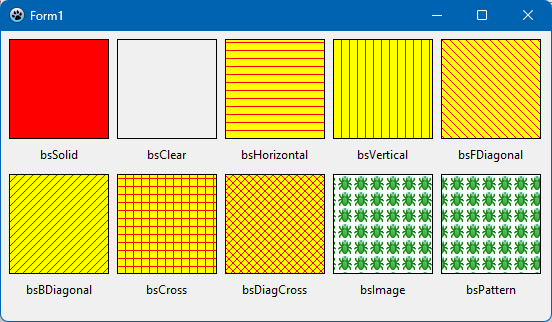 | |
| 25 | 22 | ||
| 26 | 23 | The following project draws ten rectangles on the canvas of a `TForm`, fills them with each style and labels them with the appropriate style name. The result is shown in the image above. | |
| 27 | 24 | ||
| 28 | 25 | ``` pascal | |
| 29 | 26 | type | |
| 30 | 27 | TForm1 = class(TForm) | |
| 31 | 28 | procedure FormCreate(Sender: TObject); | |
| 32 | 29 | procedure FormDestroy(Sender: TObject); | |
| 33 | 30 | procedure FormPaint(Sender: TObject); | |
| 34 | 31 | private | |
| 35 | 32 | FPattern: TCustomBitmap; | |
| 36 | 33 | public | |
| 37 | 34 | end; | |
| 38 | 35 | ||
| 39 | 36 | uses | |
| 40 | 37 | ..., | |
| 41 | 38 | LCLIntf, LCLType, // for SetBkColor, OPAQUE and TRANSPARENT | |
| 42 | 39 | Types, // for OffsetRect | |
| 43 | 40 | TypInfo; // for GetEnumName | |
| 44 | 41 | ||
| 45 | 42 | procedure TForm1.FormCreate(Sender: TObject); | |
| 46 | 43 | begin | |
| 47 | 44 | Width := 550; | |
| 48 | 45 | Height := 290; | |
| 49 | 46 | ||
| 50 | 47 | FPattern := TPortableNetworkGraphic.Create; | |
| 51 | 48 | FPattern.LoadFromFile('C:\Lazarus\images\debugger\debugger.png'); // path to the image used for filling | |
| 52 | 49 | end; | |
| 53 | 50 | ||
| 54 | 51 | procedure TForm1.FormDestroy(Sender: TObject); | |
| 55 | 52 | begin | |
| 56 | 53 | FPattern.Free; | |
| 57 | 54 | end; | |
| 58 | 55 | ||
| 59 | 56 | procedure TForm1.FormPaint(Sender: TObject); | |
| 60 | 57 | var | |
| 61 | 58 | R: TRect; | |
| 62 | 59 | bs: TBrushStyle; | |
| 63 | 60 | styleName: String; | |
| 64 | 61 | x, y, h: Integer; | |
| 65 | 62 | begin | |
| 66 | 63 | R := Rect(8, 8, 108, 108); | |
| 67 | 64 | h := Canvas.TextHeight('Tg'); | |
| 68 | 65 | ||
| 69 | 66 | // Set fill color | |
| 70 | 67 | Canvas.Brush.Color := clRed; | |
| 71 | 68 | ||
| 72 | 69 | // Set border color | |
| 73 | 70 | Canvas.Pen.Color := clBlack; | |
| 74 | 71 | ||
| 75 | 72 | // Iterate over all available brush styles | |
| 76 | 73 | for bs in TBrushStyle do | |
| 77 | 74 | begin | |
| 78 | 75 | // Set background color | |
| 79 | 76 | SetBkMode(Canvas.Handle, OPAQUE); | |
| 80 | 77 | SetBkColor(Canvas.Handle, clYellow); | |
| 81 | 78 | // Set brush style | |
| 82 | 79 | Canvas.Brush.Style := bs; | |
| 83 | 80 | if (bs = bsImage) or (bs =bsPattern) then | |
| 84 | 81 | Canvas.Brush.Bitmap := FPattern | |
| 85 | 82 | else | |
| 86 | 83 | Canvas.Brush.Bitmap := nil; | |
| 87 | 84 | // Fill a rectangle with the selected brush | |
| 88 | 85 | Canvas.Rectangle(R); | |
| 89 | 86 | // Get name of brush style and draw it below the rectangle | |
| 90 | 87 | styleName := GetEnumName(TypeInfo(TBrushStyle), ord(bs)); | |
| 91 | 88 | x := (R.Left + R.Right - Canvas.TextWidth(styleName)) div 2; | |
| 92 | 89 | y := R.Bottom + 8; | |
| 93 | 90 | // No text background | |
| 94 | 91 | SetBkMode(Canvas.Handle, TRANSPARENT); // or: Canvas.Brush.Style := bsClear; | |
| 95 | 92 | // Draw the brush name | |
| 96 | 93 | Canvas.TextOut(x, y, styleName); | |
| 97 | 94 | // Position the rectangle for next brush | |
| 98 | 95 | if ord(bs) = ord(High(bs)) div 2 then | |
| 99 | 96 | OffsetRect(R, -R.Left + 8, R.Height + 20 + h) | |
| 100 | 97 | else | |
| 101 | 98 | OffsetRect(R, R.Width + 8, 0); | |
| 102 | 99 | end; | |
| 103 | 100 | end; | |
| 104 | 101 | ``` | |
| 105 | 102 | ||
| 106 | 103 | --- | |
| 107 | 104 | *From the Free Pascal wiki, page "TBrush", as it stood on 2023-11-24 after a change by Wp, out of the wiki's dump of 2024-05-26. Copyright stays with the author who wrote it, according to the old wiki's [[Licensing]] page. If you have concerns about this material, [message the admin](/wiki-contact).* |