

TBrush
Along with TPen and TFont, TBrush belongs to the most fundamental properties of TCanvas and defines how a geometric shape is filled.
Properties
Color: specifies the basic color (typeTColor) used to fill the shapeStyle: an enumeration of typeTBrushStylewhich defines the pattern used for fillingbsClear: no filling at all,Coloris ignored.bsSolid: uniform fill of the shape with theColorspecified- The following styles define hatch patterns which are drawn in the
Colorspecified. By default the background between the hatch lines is left empty. In Windows, gtk2 and qt5, it can be filled after callingSetBkColor(Canvas.Handle, AColor)if background mode has been set toOPAQUE:SetBkMode(Canvas.Handle, OPAQUE)which is the default, but can be reverted by calling with the argumentTRANSPARENTinstead ofOPAQUE. Both functions require the units LCLIntf and LCLType in the uses clause. In other widgetsets the background has to be drawn twice, withfsSolidat first. Note that an alpha-channel for transparency seems to be ignored.bsHorizontal,bsVertical,bsFDiagonal,bsBDiagonaldefine a single-line hatch pattern.bsCrossandbsDiagCrossdefine a crossed pattern.
bsImageandbsPatterntile the shape with the image set to theBitmapproperty of theBrush.
Bitmapdefines the image which fills the shape by tiling ifStyleisbsImage. Any instance of a class descending fromTCustomBitmapcan be used here (TBitmap,TJpegImage,TPortableNetworkgraphic, etc). But note thatTCanvas.Bitmapis not created and destroyed by theCanvas, it is your responsibility to take care of this. There are alsoImage(typeTFPCustomImage) andPattern(typeTBrushPattern) properties which seem to have a similar purpose, but they are inherited from ancestor TFPCustomBrush and are ignored byTCanvas. Using a bitmap for filling the shape does not work on all widgetsets; at the time of this writing it was tested to work on win32/64, qt5 and cocoa.
These properties are applied in all subsequent drawing commands.
Above description is valid for Windows. Several restrictions may apply for other widgetsets.
Sample code
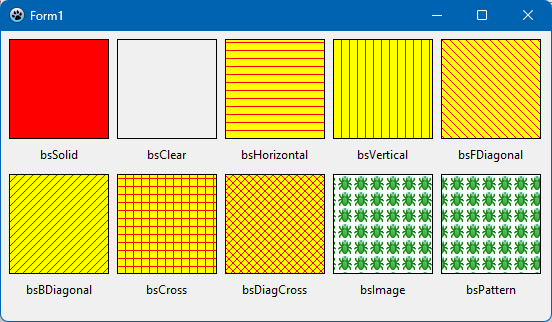
The following project draws ten rectangles on the canvas of a TForm, fills them with each style and labels them with the appropriate style name. The result is shown in the image above.
type
  TForm1 = class(TForm)
    procedure FormCreate(Sender: TObject);
    procedure FormDestroy(Sender: TObject);
    procedure FormPaint(Sender: TObject);
  private
    FPattern: TCustomBitmap;
  public
  end;

uses
  ...,
  LCLIntf, LCLType,  // for SetBkColor, OPAQUE and TRANSPARENT
  Types,             // for OffsetRect
  TypInfo;           // for GetEnumName

procedure TForm1.FormCreate(Sender: TObject);
begin
  Width := 550;
  Height := 290;

  FPattern := TPortableNetworkGraphic.Create;
  FPattern.LoadFromFile('C:\Lazarus\images\debugger\debugger.png');  // path to the image used for filling
end;

procedure TForm1.FormDestroy(Sender: TObject);
begin
  FPattern.Free;
end;

procedure TForm1.FormPaint(Sender: TObject);
var
  R: TRect;
  bs: TBrushStyle;
  styleName: String;
  x, y, h: Integer;
begin
  R := Rect(8, 8, 108, 108);
  h := Canvas.TextHeight('Tg');

  // Set fill color
  Canvas.Brush.Color := clRed;

  // Set border color
  Canvas.Pen.Color := clBlack;

  // Iterate over all available brush styles
  for bs in TBrushStyle do
  begin
    // Set background color
    SetBkMode(Canvas.Handle, OPAQUE);
    SetBkColor(Canvas.Handle, clYellow);
    // Set brush style
    Canvas.Brush.Style := bs;
    if (bs = bsImage) or (bs =bsPattern) then
      Canvas.Brush.Bitmap := FPattern
    else
      Canvas.Brush.Bitmap := nil;
    // Fill a rectangle with the selected brush
    Canvas.Rectangle(R);
    // Get name of brush style and draw it below the rectangle
    styleName := GetEnumName(TypeInfo(TBrushStyle), ord(bs));
    x := (R.Left + R.Right - Canvas.TextWidth(styleName)) div 2;
    y := R.Bottom + 8;
    // No text background
    SetBkMode(Canvas.Handle, TRANSPARENT);    // or: Canvas.Brush.Style := bsClear;
    // Draw the brush name
    Canvas.TextOut(x, y, styleName);
    // Position the rectangle for next brush
    if ord(bs) = ord(High(bs)) div 2 then
      OffsetRect(R, -R.Left + 8, R.Height + 20 + h)
    else
      OffsetRect(R, R.Width + 8, 0);
  end;
end;
From the Free Pascal wiki, page "TBrush", as it stood on 2023-11-24 after a change by Wp, out of the wiki's dump of 2024-05-26. Copyright stays with the author who wrote it, according to the old wiki's Licensing page. If you have concerns about this material, message the admin.
Talk about this page
Nobody has opened a bench for this page yet. Sign in to open one.