

SymbianOS: what changed
Revision 1 to 2. Removed lines have a minus sign; added lines have a plus sign.
| Old | New | Line | |
|---|---|---|---|
| 1 | 1 | > **Warning:** The work was too large, the platform changed too fast and now the entire SymbianOS is deprecated, so the port was abandoned | |
| 2 | 2 | ||
| 3 | 3 | ## Roadmap to port FPC to SymbianOS | |
| 4 | 4 | ||
| 5 | 5 | 1. ~~Develop a Hello World application on c++ for SymbianOS UIQ 3~~ - Felipe | |
| 6 | 6 | 2. ~~Convert the Build software from perl to our own building system, and make it build the c++ software~~ - Felipe | |
| 7 | 7 | 3. ~~Effectively start to port the Free Pascal Runtime Library~~ - Felipe | |
| 8 | 8 | 4. Convert some c++ symbian applications to check for errors on the port - Felipe - 1 trivial done, more to go | |
| 9 | 9 | 5. Complete the port of Free Pascal Runtime Library | |
| 10 | 10 | 6. Start developing with UIQ 2 SDK, and make adjustments for everything to work with it | |
| 11 | 11 | 7. Make sure everything works on the real Phone with UIQ 2 too | |
| 12 | 12 | ||
| 13 | 13 | ## Versions Roadmap | |
| 14 | 14 | ||
| 15 | 15 | The first target will be UIQ 3.0 for the Symbian OS on x86 architecture (the emulator). | |
| 16 | 16 | ||
| 17 | 17 | Next will be the UIQ 2 for x86 emulator, and last the UIQ 2 real device. | |
| 18 | 18 | ||
| 19 | 19 | ## Compiling Free Pascal for the Emulator | |
| 20 | 20 | ||
| 21 | 21 | 1 - Download the latest FPC from Subversion. Make sure you also have the latest stable FPC installed. | |
| 22 | 22 | ||
| 23 | 23 | 2 - Next you will need a assembler compatible with the Code Warrior linker. Currently this is the GNU Assembler. It´s a good coincidence that the emulator uses normal win32 PE executables, but of course it could use any other format, so FPC will expect a cross-assembler with the correct name. Because of this we can simply copy the as.exe file that comes with FPC releases and rename it. | |
| 24 | 24 | ||
| 25 | 25 | Suppose your win32 gnu assembler is located at: C:\Programas\lazarus20\fpc\2.0.4\bin\i386-win32\as.exe | |
| 26 | 26 | ||
| 27 | 27 | You should make a copy of it with this name: C:\Programas\lazarus20\fpc\2.0.4\bin\i386-win32\i386-symbian-as.exe | |
| 28 | 28 | ||
| 29 | 29 | 3 - Now, open a Windows Command Line session. The following batch script will execute a full compilation of FPC for the emulator. In this particular case lazarus was installed on C:\Programas\lazarus20 and the fpc 2.1 source code is on C:\Programas\fpc21 | |
| 30 | 30 | ||
| 31 | 31 | PATH=C:\Programas\lazarus20\fpc\2.0.4\bin\i386-win32 | |
| 32 | 32 | cd c:\Programas\fpc21 | |
| 33 | 33 | cd compiler | |
| 34 | 34 | make i386 | |
| 35 | 35 | cd .. | |
| 36 | 36 | cd rtl | |
| 37 | 37 | cd symbian | |
| 38 | 38 | make FPC=C:\Programas\fpc21\compiler\ppc386.exe | |
| 39 | 39 | ||
| 40 | 40 | 4 - Building the RTL only is not enougth to compile a Symbian OS application. We also need the c++ bindings which connect our RTL to the Symbian libraries. | |
| 41 | 41 | ||
| 42 | 42 | 4.1 - To build the bindings you will need the helper application called mksymbian. This application is included with the Free Pascal sources on the directory utils/mksymbian | |
| 43 | 43 | ||
| 44 | 44 | 4.2 - Next compile mksymbian. There is a lazarus project to help building it, but directly calling the compiler from command line works just as well, like this: | |
| 45 | 45 | ||
| 46 | 46 | `fpc mksymbian.pas` | |
| 47 | 47 | ||
| 48 | 48 | 4.3 - Copy the mksymbian executable to the fpc/rtl/symbian/bindings directory, open a console, go to the fpc/rtl/symbian/bindings directory and type this command: | |
| 49 | 49 | ||
| 50 | 50 | `mksymbian bindings` | |
| 51 | 51 | ||
| 52 | 52 | The resulting .o file(s) will be located on: C:\Programas\fpc21\rtl\units\i386-symbian | |
| 53 | 53 | ||
| 54 | 54 | 5 - Next you can go to the session "Building Symbian OS Applications" below, to learn how to use your compiler to generate a Object Pascal software for Symbian. | |
| 55 | 55 | ||
| 56 | 56 | The Symbian OS RTL will be located at: C:\Programas\fpc21\rtl\units\i386-symbian | |
| 57 | 57 | ||
| 58 | 58 | ## Compiling Free Pascal for the real device | |
| 59 | 59 | ||
| 60 | 60 | Not yet implemented. | |
| 61 | 61 | ||
| 62 | 62 | ## Building Symbian OS Applications | |
| 63 | 63 | ||
| 64 | 64 | ### Overview | |
| 65 | 65 | ||
| 66 | 66 | Building an application on Symbian OS requires some learning, because there are several unique things about Symbian which must be utilized even the most simple applications. For example the UIDs, the need to register a application on the Emulator, etc. | |
| 67 | 67 | ||
| 68 | 68 | The UIQ SDK has a very complex build system composed of several ten thousends lines of Perl code, batch files and Makefiles. It induces the software to have a specific directory structure, which is very bad to port existing software, as well as to write cross-platform software. Because cross-platform is a strong point on Free Pascal, we decided to simplify and improve the process when writing our build system for Symbian. We created a external build utility, called mksymbian, written in Pascal that auxiliates the build process. | |
| 69 | 69 | ||
| 70 | 70 | ### Guide for building applications for the Emulator | |
| 71 | 71 | ||
| 72 | 72 | You need first to write a .ini file that will contain Symbian OS specific information. Here is a example file called QPasHello.ini | |
| 73 | 73 | ||
| 74 | 74 | [Main] | |
| 75 | 75 | EXENAME=QPasHello.exe | |
| 76 | 76 | Language=Pascal | |
| 77 | 77 | ProjectType=EXE | |
| 78 | 78 | SDK=UIQ | |
| 79 | 79 | SDKVersion=3 | |
| 80 | 80 | Emulator=1 | |
| 81 | 81 | ||
| 82 | 82 | [FPC] | |
| 83 | 83 | CompilerPath=C:\Programas\fpc21\compiler\ppc386.exe | |
| 84 | 84 | AssemblerPath=C:\Programas\lazarus215\fpc\2.1.5\bin\i386-win32\as.exe | |
| 85 | 85 | RTLUnitsDir=C:\Programas\fpc21\rtl\units\i386-symbian\ | |
| 86 | 86 | ||
| 87 | 87 | [UIDs] | |
| 88 | 88 | UID2=0x100039CE | |
| 89 | 89 | UID3=0xE1000002 | |
| 90 | 90 | ||
| 91 | 91 | [Files] | |
| 92 | 92 | mainsource=QPasHello.pas | |
| 93 | 93 | mainresource=QPasHello_reg.rss | |
| 94 | 94 | ||
| 95 | 95 | [Objects] | |
| 96 | 96 | file0=qpashello.o | |
| 97 | 97 | ||
| 98 | 98 | And the respective QPasHello.pas source file: | |
| 99 | 99 | ||
| 100 | 100 | ``` pascal | |
| 101 | 101 | { | |
| 102 | 102 | QPasHello.pas | |
| 103 | 103 | ||
| 104 | 104 | ***************************************************************************** | |
| 105 | 105 | * * | |
| 106 | 106 | * This demonstration program is public domain, which means no copyright, * | |
| 107 | 107 | * but also no warranty! * | |
| 108 | 108 | * * | |
| 109 | 109 | * This program is distributed in the hope that it will be useful, * | |
| 110 | 110 | * but WITHOUT ANY WARRANTY; without even the implied warranty of * | |
| 111 | 111 | * MERCHANTABILITY or FITNESS FOR A PARTICULAR PURPOSE. * | |
| 112 | 112 | * * | |
| 113 | 113 | ***************************************************************************** | |
| 114 | 114 | ||
| 115 | 115 | This application will create a popup message 'My Hello World' and then quit | |
| 116 | 116 | ||
| 117 | 117 | The message will last a few seconds. | |
| 118 | 118 | ||
| 119 | 119 | Author: Felipe Monteiro de Carvalho | |
| 120 | 120 | } | |
| 121 | 121 | program QPasHello; | |
| 122 | 122 | ||
| 123 | 123 | uses symbian; | |
| 124 | 124 | ||
| 125 | 125 | begin | |
| 126 | 126 | User_InfoPrint('My Hello World'); | |
| 127 | 127 | end. | |
| 128 | 128 | ``` | |
| 129 | 129 | ||
| 130 | 130 | And also the main resource file QPasHello_reg.rss: | |
| 131 | 131 | ||
| 132 | 132 | // QHelloWorld_reg.rss | |
| 133 | 133 | #include <AppInfo.rh> | |
| 134 | 134 | UID2 0x100039CE | |
| 135 | 135 | UID3 0xE1000002 | |
| 136 | 136 | RESOURCE APP_REGISTRATION_INFO | |
| 137 | 137 | { | |
| 138 | 138 | // filename of app binary (minus extension) | |
| 139 | 139 | app_file = "QPasHello"; | |
| 140 | 140 | } | |
| 141 | 141 | ||
| 142 | 142 | Next use mksymbian to build your application, like this: | |
| 143 | 143 | ||
| 144 | 144 | `mksymbian build QPasHello.ini` | |
| 145 | 145 | ||
| 146 | 146 | If something goes wrong, check if mksymbian located your directories correctly: | |
| 147 | 147 | ||
| 148 | 148 | `mksymbian showpath` | |
| 149 | 149 | ||
| 150 | 150 | Also make sure to correct the paths according to your system on the ini file. | |
| 151 | 151 | ||
| 152 | 152 | ### Using mksymbian | |
| 153 | 153 | ||
| 154 | 154 | The syntax of this tool is: | |
| 155 | 155 | ||
| 156 | 156 | mksymbian \[action\] \[project file\] | |
| 157 | 157 | ||
| 158 | 158 | Action can be one of the following: | |
| 159 | 159 | ||
| 160 | 160 | - build - Compiles a project | |
| 161 | 161 | - bindings - Compiles the pascal bindings for Symbian OS. It supposes that the necessary files are on the location where the command is executed. | |
| 162 | 162 | - showpath - Shows the paths found for the Symbian SDKs and Free Pascal. Utilized to check if the tool was able to find the tools. | |
| 163 | 163 | ||
| 164 | 164 | The project file is a .ini file with many symbian os specific informations about a project, like the UIDs | |
| 165 | 165 | ||
| 166 | 166 | Target can be one of the following: | |
| 167 | 167 | ||
| 168 | 168 | - WinEmulator - Builds for the x86 emulator | |
| 169 | 169 | - ArmDevice - Builds a binary for use on PDAs and Smartphones | |
| 170 | 170 | ||
| 171 | 171 | Note: The tool parameters are not case-sensitive | |
| 172 | 172 | ||
| 173 | 173 | ## Screenshots | |
| 174 | 174 | ||
| 175 | 175 | First pascal symbian os UIQ 3 application: | |
| 176 | 176 | ||
| 177 | - | ||
| 178 | - | ||
| 179 | - | ||
| 180 | - | ||
| 177 | + | 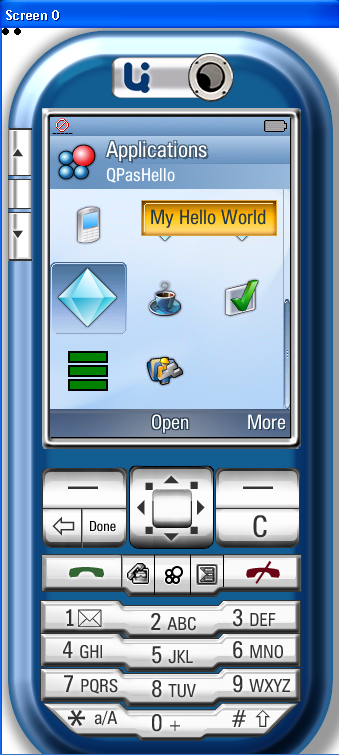 | |
| 181 | 178 | ||
| 182 | 179 | ## See Also | |
| 183 | 180 | ||
| 184 | 181 | - [[Programming in Symbian OS]] | |
| 185 | 182 | - [[Symbian OS Internals]] | |
| 186 | 183 | ||
| 187 | 184 | ## External Links | |
| 188 | 185 | ||
| 189 | 186 | - <http://developer.uiq.com/> - UIQ version 3 and superior developer community, with SDK download, Forum, Documentation and News. | |
| 190 | 187 | - [1](http://www.symbian.com/developer/techlib/v70sdocs/doc_source/reference/cpp/libc/index.html) docs for the POSIX layer | |
| 191 | 188 | - [2](http://www.symbian.com/developer/techlib/v70sdocs/doc_source/devguides/cpp/base/CStandardLibrary/DesignSTDLIB.html) a bit of description for the POSIX layer | |
| 192 | 189 | - [3](http://search.cpan.org/~rgarcia/perl-5.9.4/README.symbian) - Compiling perl for symbian. They mainly use the POSIX libraries... | |
| 193 | 190 | - [4](https://developer.uiq.com/forum/entry.jspa?externalID=31) - List of the UIQ Phones and the UIQ SDK version to use. | |
| 194 | 191 | - [5](https://developer.uiq.com/forum/kbclick.jspa?categoryID=21&externalID=26&searchID=101700) - APIs changed from UIQ 2.1 to UIQ 3 | |
| 195 | 192 | - [6](https://developer.uiq.com/forum/kbclick.jspa?categoryID=21&externalID=20&searchID=101700) - How to port my application from UIQ 2.x to UIQ 3 | |
| 196 | 193 | ||
| 197 | 194 | --- | |
| 198 | 195 | *From the Free Pascal wiki, page "SymbianOS", as it stood on 2021-06-06 after a change by Jwdietrich, out of the wiki's dump of 2024-05-26. Copyright stays with the author who wrote it, according to the old wiki's [[Licensing]] page. If you have concerns about this material, [message the admin](/wiki-contact).* | |
| 199 | 196 | Category: Historical | |
| 200 | 197 | Category: Mobile | |
| 201 | 198 | Category: Outdated information | |
| 202 | 199 | Category: Symbian |