

Sudoku: what changed
Revision 0 to 1. Removed lines have a minus sign; added lines have a plus sign.
Title: Sudoku
| Old | New | Line | |
|---|---|---|---|
| 1 | + | ### About | |
| 2 | + | ||
| 3 | + | There is very little to tell about this program. It is just an attempt to make a program which solves Sudoku puzzles. | |
| 4 | + | ||
| 5 | + | ### License | |
| 6 | + | ||
| 7 | + | See the sources. I just hope it is a useful demo. Useful as in you can learn something from it. | |
| 8 | + | ||
| 9 | + | ### Author | |
| 10 | + | ||
| 11 | + | Matthijs Willemstein\ | |
| 12 | + | Modifications by Bart | |
| 13 | + | ||
| 14 | + | ### Download | |
| 15 | + | ||
| 16 | + | The sources can be found at the Lazarus-CCR repository and can be obtained via svn: | |
| 17 | + | ||
| 18 | + | `svn co `[`https://svn.code.sf.net/p/lazarus-ccr/svn/applications/sudoku/`](https://svn.code.sf.net/p/lazarus-ccr/svn/applications/sudoku/)` local/path/to/sudoku` | |
| 19 | + | ||
| 20 | + | Alternatively you can view the sources through viewcv: | |
| 21 | + | ||
| 22 | + | <https://sourceforge.net/p/lazarus-ccr/svn/HEAD/tree/applications/sudoku/> | |
| 23 | + | ||
| 24 | + | ### Usage | |
| 25 | + | ||
| 26 | + | If you run the program you will see a grid, and two buttons. If you press the "Edit" button, you are able to edit the grid and place the numbers in the grid according to your puzzle.\ | |
| 27 | + | If you press the "Clean" button, the grid will be cleared.\ | |
| 28 | + | When you are finished entering the digits press "Solve" and the grid will be filled with the solution. | |
| 29 | + | ||
| 30 | + | If the program is unable to completely solve the Sudoku, a ScracthPad form will pop up.\ | |
| 31 | + | This form shows for each cell what possible options are left.\ | |
| 32 | + | Solved cells will contain a single number, unsolved will have a range of possibilities, shown as commaseparated values enclosed in brackets, arranged in rows of three:\ | |
| 33 | + | ||
| 34 | + | |1 | | |
| 35 | + | | 4 | | |
| 36 | + | |7 9| | |
| 37 | + | ||
| 38 | + | In the above example, the numbers 1, 4, 7, and 9 are in the range of possibilities.\ | |
| 39 | + | \ | |
| 40 | + | You can edit the grid and copy the values back to the main form, then try to solve it again.\ | |
| 41 | + | (Note: only cells that contain a single digit will be copied back to the main form.) | |
| 42 | + | ||
| 43 | + | The program also has the option to load and save sudoku files.\ | |
| 44 | + | A sample sudoku file is incuded in the svn repository. The file format is a simple textfile, it is explained in the sources. | |
| 45 | + | ||
| 46 | + | #### Example for using the ScratchPad functionality | |
| 47 | + | ||
| 48 | + | The sample file "*unsolvable.sudoku*" (included in the repository) cannot be solved by the program.\ | |
| 49 | + | If you load it and then click Solve, the ScratchPad will pop up.\ | |
| 50 | + | Now click on the second cell in the bottom row.\ | |
| 51 | + | An editor will pop up.\ | |
| 52 | + | The editor has 9 checkboxes. In this example the checkboxes for "2" and "6" should be checked.\ | |
| 53 | + | You can toggle a checkbox's state by either (as usual) clicking ont it, or pressing the number ("1".."9") on the keyboard.\ | |
| 54 | + | Pressing the Enter key will write back the changes to the ScratchPad, pressing Escape will discard the pop-up form.\ | |
| 55 | + | \ | |
| 56 | + | 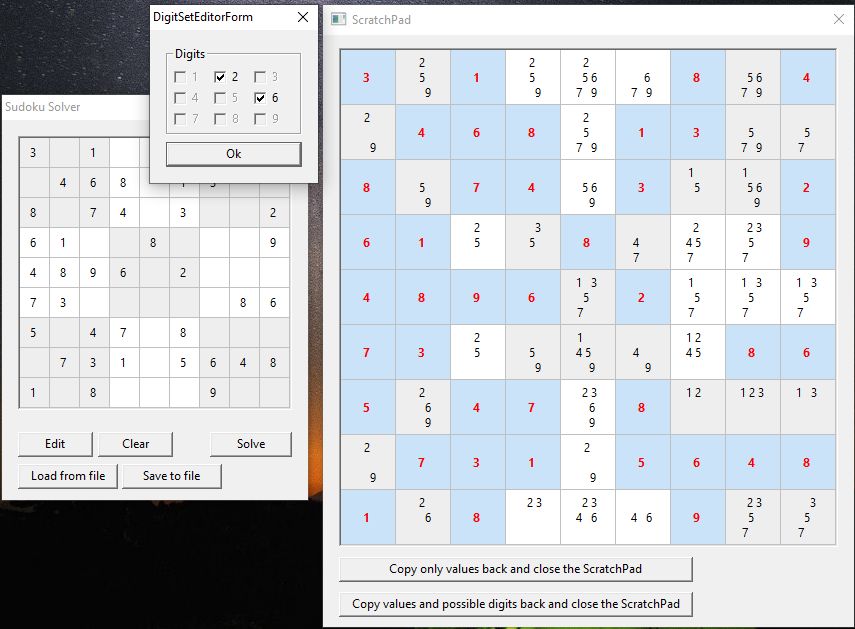\ | |
| 57 | + | In the example, if now uncheck "6" (leave the "2") and click Ok, then click the "Copy only values back..." button.\ | |
| 58 | + | The changes are propagated back to the main form.\ | |
| 59 | + | Again click the "Solve" button.\ | |
| 60 | + | The program now **will** be able to solve the Sudoku. | |
| 61 | + | ||
| 62 | + | ### Description | |
| 63 | + | ||
| 64 | + | The programs solves all Sudoku puzzles that can be solved by logic. It will not solve the puzzle where you need to guess for a solution. | |
| 65 | + | ||
| 66 | + | So it follows these rules (taken from [WebSudoku](http://www.websudoku.com/)): | |
| 67 | + | ||
| 68 | + | The rules of Sudoku are simple. Enter digits from 1 to 9 into the blank spaces. Every row must contain one of each digit. So must every column, as must every 3x3 square. Each Sudoku has a unique solution that can be reached logically without guessing. | |
| 69 | + | ||
| 70 | + | ### Related Sites | |
| 71 | + | ||
| 72 | + | [Sudoku Solver](http://sudokusolver.info/) Online Sudoku Solver Released Under The GNU public license. | |
| 73 | + | ||
| 74 | + | --- | |
| 75 | + | *From the Free Pascal wiki, page "Sudoku", as it stood on 2020-01-10 after a change by Bart, out of the wiki's dump of 2024-05-26. Copyright stays with the author who wrote it, according to the old wiki's [[Licensing]] page. If you have concerns about this material, [message the admin](/wiki-contact).* | |
| 76 | + | Category: Example programs | |
| 77 | + | Category: Game Development |