

SplashAbout/Advanced Use: what changed
Revision 2 to 3. Removed lines have a minus sign; added lines have a plus sign.
| Old | New | Line | |
|---|---|---|---|
| 1 | 1 | - For installation, download, version and other information, see the [[SplashAbout]] page | |
| 2 | 2 | ||
| 3 | 3 | ## SplashAbout properties tester Application | |
| 4 | 4 | ||
| 5 | 5 | - The distribution archive contains an example application with all the resources needed to experiment with advanced properties - pre-configured with Resource and External graphics, also sample license.txt and Credits | |
| 6 | 6 | - Click the \[Help\] button to view the readme | |
| 7 | 7 | ||
| 8 | 8 | 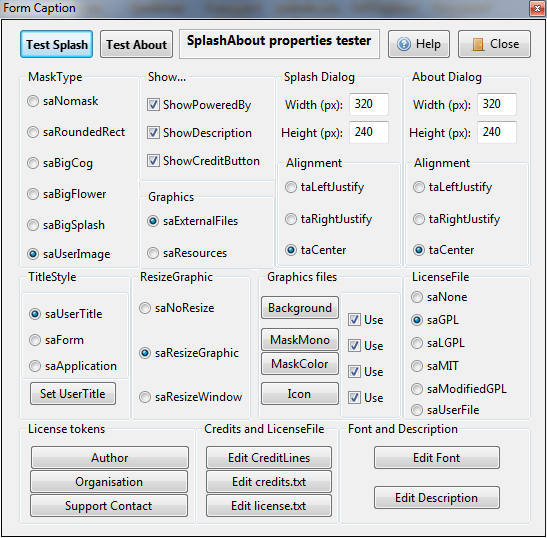 | |
| 9 | 9 | ||
| 10 | 10 | ------------------------------------------------------------------------ | |
| 11 | 11 | ||
| 12 | 12 | ## Properties | |
| 13 | 13 | ||
| 14 | 14 | When dropped onto a new application mainform, the property defaults will show a Splash Screen and About window that look something like this: | |
| 15 | 15 | ||
| 16 | 16 | 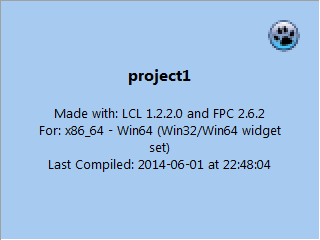 | |
| 17 | 17 | ||
| 18 | 18 | 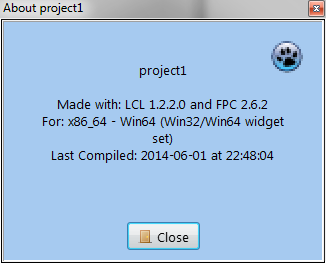 | |
| 19 | 19 | ||
| 20 | 20 | - A normal (borderless rectangle) Splash screen displayed for 2 seconds (ShowSplash method) | |
| 21 | 21 | - It will use the Application default icon (default=Lazarus icon) | |
| 22 | 22 | - Title will be the Application name (default='project1') | |
| 23 | 23 | - Colour will be clSkyBlue | |
| 24 | 24 | - No background image | |
| 25 | 25 | - No description | |
| 26 | 26 | - Window size = 320px x 240px | |
| 27 | 27 | - LCL and FPC build text | |
| 28 | 28 | - Compilation Date/Time text | |
| 29 | 29 | - The About screen will show (ShowAbout method) | |
| 30 | 30 | - No License or Credits buttons | |
| 31 | 31 | - The same text as the default Splash Screen | |
| 32 | 32 | ||
| 33 | 33 | The default screens are probably OK for a quick one-off app that is not for commercial use. It shows useful information for a developer. | |
| 34 | 34 | ||
| 35 | 35 | However; if you think they look a bit *uninspiring*, the SplashAbout component is capable of considerable customisation from its default settings, and there are many properties available to help you achieve *a unique and very inspiring result*. | |
| 36 | 36 | ||
| 37 | 37 | Here are the SplashAbout properties you can change for each kind of customisation: | |
| 38 | 38 | ||
| 39 | 39 | ### Personalising the Splash screen | |
| 40 | 40 | ||
| 41 | 41 | - Properties that affect the Splash Screen: | |
| 42 | 42 | - The Application Title,Icon and VersionInfo (set in Project/Options) | |
| 43 | 43 | - BackGroundColor | |
| 44 | 44 | - BitMapBackground | |
| 45 | 45 | - BitmapMaskColor | |
| 46 | 46 | - BitmapMaskMono | |
| 47 | 47 | - DelaySeconds | |
| 48 | 48 | - Description | |
| 49 | 49 | - Font | |
| 50 | 50 | - FormSplashHeight | |
| 51 | 51 | - FormSplashTextAlign | |
| 52 | 52 | - FormSplashWidth | |
| 53 | 53 | - Graphics | |
| 54 | 54 | - Icon | |
| 55 | 55 | - MaskType | |
| 56 | 56 | - Organisation | |
| 57 | 57 | - ShowDecription | |
| 58 | 58 | - ShowPoweredBy | |
| 59 | 59 | - TitleStyle | |
| 60 | 60 | - UserTitle | |
| 61 | 61 | ||
| 62 | 62 | ### Personalising the About screen | |
| 63 | 63 | ||
| 64 | 64 | - Properties that affect the About Screen: | |
| 65 | 65 | - The Application Title,Icon and VersionInfo (set in Project/Options) | |
| 66 | 66 | - Author | |
| 67 | 67 | - BackGroundColor | |
| 68 | 68 | - CreditLines | |
| 69 | 69 | - CreditsTextFileName | |
| 70 | 70 | - Description | |
| 71 | 71 | - Font | |
| 72 | 72 | - FormAboutHeight | |
| 73 | 73 | - FormAboutTextAlign | |
| 74 | 74 | - FormAboutWidth | |
| 75 | 75 | - Graphics | |
| 76 | 76 | - Icon | |
| 77 | 77 | - LicenseFile | |
| 78 | 78 | - Orgnisation | |
| 79 | 79 | - ShowCreditButton | |
| 80 | 80 | - ShowDecription | |
| 81 | 81 | - LicenseFile | |
| 82 | 82 | - SupportContact | |
| 83 | 83 | - TitleStyle | |
| 84 | 84 | - UserTitle | |
| 85 | 85 | ||
| 86 | 86 | ### Personalising the License Screen | |
| 87 | 87 | ||
| 88 | 88 | - Properties that affect the License Screen: | |
| 89 | 89 | - Author | |
| 90 | 90 | - LicenseFile | |
| 91 | 91 | - Organisation | |
| 92 | 92 | - SupportContact | |
| 93 | 93 | ||
| 94 | 94 | ### Personalising the Credits Screen | |
| 95 | 95 | ||
| 96 | 96 | - Properties that affect the Credits Screen: | |
| 97 | 97 | - CreditLines | |
| 98 | 98 | - CreditsTextFileName | |
| 99 | 99 | - ShowCreditButton | |
| 100 | 100 | ||
| 101 | 101 | ------------------------------------------------------------------------ | |
| 102 | 102 | ||
| 103 | 103 | ## How To... | |
| 104 | 104 | ||
| 105 | 105 | ### How to show a shaped Splash screen | |
| 106 | 106 | ||
| 107 | 107 | Properties to set: | |
| 108 | 108 | ||
| 109 | 109 | - BitmapMaskColor (Graphics=saResources) | |
| 110 | 110 | - BitmapMaskMono (Graphics=saResources) | |
| 111 | 111 | - MaskType | |
| 112 | 112 | - Graphics | |
| 113 | 113 | ||
| 114 | 114 | #### MaskType | |
| 115 | 115 | ||
| 116 | 116 | - Default=saNoMask | |
| 117 | 117 | ||
| 118 | 118 | The simple thing to do is to choose one of the built-in masks (saRoundedRect, saBigCog, saBigFlower and saBigSplash) If you choose saUserMask then you need to make a 2-colour mask graphic in the .BMP format. You can optionally also make a corresponding BitMapMaskColor image. Note: There are some example images deployed in the /exampleapp folder of the distribution archive | |
| 119 | 119 | ||
| 120 | 120 | ##### How to make a BitMapMaskMono image | |
| 121 | 121 | ||
| 122 | 122 | - Start with a black (RGB:0,0,0)background | |
| 123 | 123 | - Make your contigious shape using a white (RGB:255,255,255) shape | |
| 124 | 124 | - Reduce the image to a 2-color palette | |
| 125 | 125 | - Save the file as a Windows Bitmap (.BMP) and use it to set the BitmapMaskColor property | |
| 126 | 126 | - It should NOT be run-length encoded (RLE) | |
| 127 | 127 | ||
| 128 | 128 | If you want a shaped colour splash screen then you need to make a corresponding BitMapColor image | |
| 129 | 129 | ||
| 130 | 130 | ##### How to make a BitmapMaskColor image | |
| 131 | 131 | ||
| 132 | 132 | You would normally do this before making the BitmapMaskMono image | |
| 133 | 133 | ||
| 134 | 134 | - Make with an colour image that has a white (RGB:255,255,255) background | |
| 135 | 135 | - You can use a selection tool to isolate the background then paint it white in a graphics application | |
| 136 | 136 | - Save the file as a .JPG and use it to set the BitmapMaskColor property | |
| 137 | 137 | - To make a corresponding BitmapMaskColor image: | |
| 138 | 138 | - Invert the selection, and paint it black (RGB:0.0.0) | |
| 139 | 139 | - Reduce the image to a 2-color palette | |
| 140 | 140 | - Save the new image as a non-RLE Windows Bitmap file (.BMP) and use it to set the BitmapMaskMono property | |
| 141 | 141 | ||
| 142 | 142 | ------------------------------------------------------------------------ | |
| 143 | 143 | ||
| 144 | 144 | ### How to show a license button on the About screen | |
| 145 | 145 | ||
| 146 | 146 | Properties to set: | |
| 147 | 147 | ||
| 148 | 148 | - LicenseFile | |
| 149 | 149 | - Optional: | |
| 150 | 150 | - Author | |
| 151 | 151 | - Organisation | |
| 152 | 152 | - SupportContact | |
| 153 | 153 | ||
| 154 | 154 | #### LicenseFile | |
| 155 | 155 | ||
| 156 | 156 | - Default=saNone | |
| 157 | 157 | ||
| 158 | 158 | ##### Standard licences (GPL etc) | |
| 159 | 159 | ||
| 160 | 160 | - If you set LicenseFile to one of the standard license type (saGPL,saLGPL,saMIT or saModifiedGPL) then the License button will appear on the About dialog | |
| 161 | 161 | - When clicked, the License button shows a modal window with the appropriate license text | |
| 162 | 162 | - The text is stored as a resource, so no need for external files | |
| 163 | 163 | - The text of the standard license can be modified by setting the Author Organisation and SupportContact properties | |
| 164 | 164 | ||
| 165 | 165 | ##### User licenses | |
| 166 | 166 | ||
| 167 | 167 | - If you set LicenseFile to saUserFile then the License button will appear on the About dialog | |
| 168 | 168 | - When clicked, the License button shows a modal window with text | |
| 169 | 169 | - The text will come from a file you create yourself which must be called 'license.txt' and deployed in the same folder as your executable (see exampleapp) | |
| 170 | 170 | - You can use the following tokens in 'license.txt' | |
| 171 | 171 | - All instances of \<name of author\> are replaced with the Author property | |
| 172 | 172 | - All instances of \<contact\> are replaced with the SupportContact property | |
| 173 | 173 | - All instances of \<copyright holders\> are replaced with the Organisation property | |
| 174 | 174 | - All instances of \<year\> are replaced with the compilation date | |
| 175 | 175 | ||
| 176 | 176 | ------------------------------------------------------------------------ | |
| 177 | 177 | ||
| 178 | 178 | ### How to show a Credits button on the About screen | |
| 179 | 179 | ||
| 180 | 180 | Properties to set: | |
| 181 | 181 | ||
| 182 | 182 | - ShowCreditButton | |
| 183 | 183 | - CreditLines | |
| 184 | 184 | - Optional | |
| 185 | 185 | - Font (inherited) | |
| 186 | 186 | - BackgroundColor (inherited) | |
| 187 | 187 | - CreditTextFileName | |
| 188 | 188 | ||
| 189 | 189 | #### ShowCreditButton | |
| 190 | 190 | ||
| 191 | 191 | - Default-False | |
| 192 | 192 | - If set to True, then the Credits button will appear on the About dialog | |
| 193 | 193 | - When clicked it will show either: | |
| 194 | 194 | - The contents of CreditLines | |
| 195 | 195 | - or the contents of a text file (default name='credits.txt') deployed in the same folder as your executable | |
| 196 | 196 | - If both contain no text, then default text is shown | |
| 197 | 197 | - If both contain text, then 'credits'txt' will be shown in preference | |
| 198 | 198 | - The text will scroll upwards, and repeat until the user clicks the close button | |
| 199 | 199 | - The text will be centre-justified | |
| 200 | 200 | ||
| 201 | 201 | #### CreditLines | |
| 202 | 202 | ||
| 203 | 203 | - default=(empty) | |
| 204 | 204 | - Use the Object inspector to write your credits text. | |
| 205 | 205 | ||
| 206 | 206 | #### CreditTextFileName | |
| 207 | 207 | ||
| 208 | 208 | - This can be set so that is doesn't clash with any existing deployed text file | |
| 209 | 209 | ||
| 210 | 210 | ------------------------------------------------------------------------ | |
| 211 | 211 | ||
| 212 | 212 | ### How to show a 'Powered by Lazarus' pre-splash graphic | |
| 213 | 213 | ||
| 214 | 214 | Properties to set: | |
| 215 | 215 | ||
| 216 | 216 | - ShowPoweredBy | |
| 217 | 217 | ||
| 218 | 218 | That's it! | |
| 219 | 219 | ||
| 220 | 220 | ------------------------------------------------------------------------ | |
| 221 | 221 | ||
| 222 | 222 | ### How to show different text in the Splash and About screens | |
| 223 | 223 | ||
| 224 | 224 | Properties to set: | |
| 225 | 225 | ||
| 226 | 226 | - ShowDescription | |
| 227 | 227 | - Description | |
| 228 | 228 | - TitleStyle | |
| 229 | 229 | - UserTitle | |
| 230 | 230 | - Organisation | |
| 231 | 231 | - FormSplashTextAlign | |
| 232 | 232 | - FormAboutTextAlign | |
| 233 | 233 | - LicenseFile | |
| 234 | 234 | - Application VersionInfo | |
| 235 | 235 | ||
| 236 | 236 | ##### Description and ShowDescription | |
| 237 | 237 | ||
| 238 | 238 | - Use the Object Inspector to write a short description of your application and set ShowDescription=True | |
| 239 | 239 | - The Description text will show on both the Splash and About dialogs | |
| 240 | 240 | - The Description text will replace the Build and Platform information on both dialogs | |
| 241 | 241 | ||
| 242 | 242 | ##### TitleStyle and UserTitle | |
| 243 | 243 | ||
| 244 | 244 | - If TitleStyle=saUserTitle then the UserTitle text will appear on the Splash and About dialogs | |
| 245 | 245 | - If TitleStyle=saForm the Caption text of your mainform will be used | |
| 246 | 246 | - If TitleStyle=saApplication, the Application title (set in Project/Options) will be used | |
| 247 | 247 | - The text will also appear as the caption text of all dialogs | |
| 248 | 248 | ||
| 249 | 249 | ##### Organisation | |
| 250 | 250 | ||
| 251 | 251 | - If set, then the text will appear below the UserTitle on the Splash and About dialogs | |
| 252 | 252 | ||
| 253 | 253 | ##### FormSplashTextAlign and FormAboutTextAlign | |
| 254 | 254 | ||
| 255 | 255 | - You might want to set these if you have a background image that has a blank area for text on one side | |
| 256 | 256 | ||
| 257 | 257 | ##### LicenseFile | |
| 258 | 258 | ||
| 259 | 259 | - If this is anything other than LicenseFile=saNone, then the text 'Released under \<licensetype\> license' will appear at the bottom of the Splash and About dialogs where \<licensetype\> is | |
| 260 | 260 | - LicenseFile=saGPL: 'GPL' | |
| 261 | 261 | - LicenseFile=saLGPL: 'LGPL' | |
| 262 | 262 | - LicenseFile=saMIT: 'MIT' | |
| 263 | 263 | - LicenseFile=saModifiedGPL: 'Modified GPL' | |
| 264 | 264 | - LicenseFile=saUserFile: 'proprietry' | |
| 265 | 265 | ||
| 266 | 266 | ##### Application Version info | |
| 267 | 267 | ||
| 268 | 268 | - If you enable Version Information in the Project/Options then it will appear in both Splash and About dialogs | |
| 269 | 269 | ||
| 270 | 270 | ------------------------------------------------------------------------ | |
| 271 | 271 | ||
| 272 | 272 | ### How to show a graphic in the Splash and About screens | |
| 273 | 273 | ||
| 274 | 274 | Properties to set: | |
| 275 | 275 | ||
| 276 | 276 | - BitmapBackground | |
| 277 | 277 | - Optional: | |
| 278 | 278 | - FormSplashWidth | |
| 279 | 279 | - FormSplashHeight | |
| 280 | 280 | - FormAboutWidth | |
| 281 | 281 | - FormAboutHeight | |
| 282 | 282 | ||
| 283 | 283 | ##### BitmapBackground | |
| 284 | 284 | ||
| 285 | 285 | - Use the Object Inspector to load a graphic file (most types supported) | |
| 286 | 286 | - The graphic will override the BackgroundColor setting | |
| 287 | 287 | - The graphic will stretch to fit the Splash and About dialogs | |
| 288 | 288 | ||
| 289 | 289 | ##### FormSplashWidth/Height and FormAboutWidth/Height | |
| 290 | 290 | ||
| 291 | 291 | - You can set these to any reasonable values and the controls and background will stretch/move as necessary | |
| 292 | 292 | ||
| 293 | 293 | ------------------------------------------------------------------------ | |
| 294 | 294 | ||
| 295 | 295 | ### How to set a custom Icon | |
| 296 | 296 | ||
| 297 | 297 | Properties to set: | |
| 298 | 298 | ||
| 299 | 299 | - Icon | |
| 300 | 300 | - TitleStyle | |
| 301 | 301 | ||
| 302 | 302 | ##### TitleStyle | |
| 303 | 303 | ||
| 304 | 304 | - To show a custom Icon then TitleStyle must be set to saUserTitle | |
| 305 | 305 | ||
| 306 | 306 | ##### Icon | |
| 307 | 307 | ||
| 308 | 308 | - Use the Object Inspector to set an appropriate icon | |
| 309 | 309 | - It will be shown on all dialogs | |
| 310 | 310 | - If TitleStyle is set to saForm then the mainform's icon will always be shown | |
| 311 | 311 | - If TitleStyle is set to saApplication then the application's always icon will be shown | |
| 312 | 312 | - If no custom icons have been set for either, the the default Lazarus icon is displayed | |
| 313 | 313 | ||
| 314 | 314 | ------------------------------------------------------------------------ | |
| 315 | 315 | ||
| 316 | 316 | ### How (or why) to avoid a bigger executable by using external graphic files | |
| 317 | 317 | ||
| 318 | 318 | SplashAbout has been designed from the start to be very lightweight. Splash and About dialogs are hardly the most important part of an application so the component is designed to add as little as possible in both filesize and effort. Lazarus/fpc are extremely efficient in storing resources in executables, however adding SplashAbout with embedded graphics will make your executable bigger. If you choose to set a huge Splash and/or About dialog with correspondingly huge graphics, maybe it will be worth 'going external' | |
| 319 | 319 | ||
| 320 | 320 | Here are the stats: | |
| 321 | 321 | ||
| 322 | 322 | - Typical Win64 application using SplashAbout with every graphics property set and stored in the executable = 5MB | |
| 323 | 323 | - Typical Win64 application using SplashAbout with all graphics deployed externally=3.7MB | |
| 324 | 324 | ||
| 325 | 325 | If this difference is important to your particular deployment, then read on... | |
| 326 | 326 | ||
| 327 | 327 | Properties to set: | |
| 328 | 328 | ||
| 329 | 329 | - Graphics | |
| 330 | 330 | - ExternalFileBackgroundImage | |
| 331 | 331 | - ExternalFileIcon | |
| 332 | 332 | - ExternalFileMaskMonoImage | |
| 333 | 333 | - ExternalFileMaskColorImage | |
| 334 | 334 | - ExternalFileOptions | |
| 335 | 335 | ||
| 336 | 336 | ##### Graphics | |
| 337 | 337 | ||
| 338 | 338 | - Default=saUseResources | |
| 339 | 339 | - If Graphics=saExternalFiles then the ExternalFile\<propertyname\> properties will be used | |
| 340 | 340 | ||
| 341 | 341 | ##### ExternalFile\<propertyname\> | |
| 342 | 342 | ||
| 343 | 343 | - All ExternalFile properties accept a simple filename as text | |
| 344 | 344 | - All external files MUST be in the executable's deployed folder | |
| 345 | 345 | - SplashAbout will test at runtime to see if the appropriate file is present, and will display an error message if it is absent or in the wrong folder | |
| 346 | 346 | ||
| 347 | 347 | ##### ExternalFileOptions | |
| 348 | 348 | ||
| 349 | 349 | - Setting these will allow you to use some External files and some resources together | |
| 350 | 350 | ||
| 351 | 351 | ------------------------------------------------------------------------ | |
| 352 | 352 | ||
| 353 | 353 | ### How to use a large background image | |
| 354 | 354 | ||
| 355 | 355 | - By default, ShowSplash respects the dimensions you set in the Splash and About Formwidth and Formheight properties. It will stretch/compress any BackgroundImage to fit the window which is preferred behaviour. You may, however want to resize the Splash and About windows to fit your background graphic, or even avoid all resizing altogether. | |
| 356 | 356 | - Note: ResizeMode has no effect on shaped Splash screens - they are always resized to fit the mask. | |
| 357 | 357 | ||
| 358 | 358 | Properties to set: | |
| 359 | 359 | ||
| 360 | 360 | - ResizeMode | |
| 361 | 361 | - BackgroundImage | |
| 362 | 362 | ||
| 363 | 363 | ##### ResizeMode | |
| 364 | 364 | ||
| 365 | 365 | - Default=saResizeGraphic | |
| 366 | 366 | - If ResizeMode=saResizeWindow, then SplashAbout will resize the Splash and About windows to the loaded graphic dimensions. | |
| 367 | 367 | - If ResizeMode=saNoResize, then the Splash and About width/height properties will be respected, and the BackgroundImage will display without stretching or compressing. | |
| 368 | 368 | ||
| 369 | 369 | ------------------------------------------------------------------------ | |
| 370 | 370 | ||
| 371 | 371 | ### How to deploy an application that uses the SplashAbout component | |
| 372 | 372 | ||
| 373 | 373 | - If Graphics=saResources then no external files are necessary | |
| 374 | 374 | - If ShowCreditButton=True, CreditLines is empty then you will need to deploy a 'credits.txt' textfile (CreditsTextfileName can set the filename) in the same folder as your deployed executable. | |
| 375 | 375 | - This could be a good option if you want to update the Credits screen without recompiling and re-deploying the executable | |
| 376 | 376 | ||
| 377 | 377 | ------------------------------------------------------------------------ | |
| 378 | 378 | ||
| 379 | 379 | ## Is it OK to... | |
| 380 | 380 | ||
| 381 | 381 | Some information about licensing, updating the source etc. | |
| 382 | 382 | ||
| 383 | 383 | ### Is it OK to use SplashAbout in a commercial application? | |
| 384 | 384 | ||
| 385 | 385 | - Splashabout is released under the LGPL licence, so the short answer is 'yes' I would hope for a mention in the Credits screen :) | |
| 386 | 386 | - Here is the relevant text of the LGPL license: | |
| 387 | 387 | ||
| 388 | - | ||
| 389 | - | ||
| 390 | - | ||
| 391 | - | ||
| 392 | - | ||
| 393 | - | ||
| 394 | - | ||
| 395 | - | ||
| 388 | + | ``` pascal | |
| 389 | + | This library is free software; you can redistribute it and/or modify it | |
| 390 | + | under the terms of the GNU Library General Public License as published by | |
| 391 | + | the Free Software Foundation; either version 2 of the License, or (at your | |
| 392 | + | option) any later version. | |
| 393 | + | This program is distributed in the hope that it will be useful, but WITHOUT | |
| 394 | + | ANY WARRANTY; without even the implied warranty of MERCHANTABILITY or | |
| 395 | + | FITNESS FOR A PARTICULAR PURPOSE. See the GNU Library General Public License | |
| 396 | + | for more details. | |
| 397 | + | ``` | |
| 396 | 398 | ||
| 397 | 399 | ### Is it OK to alter/change the code for my own version of SplashAbout? | |
| 398 | 400 | ||
| 399 | 401 | - Of course! That's what open source software is all about | |
| 400 | 402 | - \[[mailto:minesadorada@charcodelvalle.com](mailto:minesadorada@charcodelvalle.com)\| Email me\] with your updates as a courtesy and perhaps I could incorporate them here | |
| 401 | 403 | - In the spirit of open source, please retain acknowledgement of my source code | |
| 402 | 404 | ||
| 403 | 405 | Page written by Torrenter 20:06, 2 June 2014 (CEST) | |
| 404 | 406 | ||
| 405 | 407 | ------------------------------------------------------------------------ | |
| 406 | 408 | ||
| 407 | 409 | ## See Also | |
| 408 | 410 | ||
| 409 | 411 | [[SplashAbout|SplashAbout component main page]] | |
| 410 | 412 | ||
| 411 | 413 | --- | |
| 412 | 414 | *From the Free Pascal wiki, page "SplashAbout/Advanced Use", as it stood on 2014-06-04 after a change by Torrenter, out of the wiki's dump of 2024-05-26. Copyright stays with the author who wrote it, according to the old wiki's [[Licensing]] page. If you have concerns about this material, [message the admin](/wiki-contact).* | |
| 413 | 415 | Category: Components |