

spelling: what changed
Revision 1 to 2. Removed lines have a minus sign; added lines have a plus sign.
| Old | New | Line | |
|---|---|---|---|
| 1 | 1 | ## Using Hunspell with Lazarus | |
| 2 | 2 | ||
| 3 | 3 | > **Note:** This page is current as of August, 2018 but things change... | |
| 4 | 4 | ||
| 5 | 5 | This page is about using the Hunspell library with Lazarus. It outlines a model that does, sort of, work. You will almost certainly need to make some changes for your specific purposes but hopefully, this page will give you a good start. | |
| 6 | 6 | ||
| 7 | 7 | Firstly, in the forum, there are several references to some code that will work with the Hunspell library. The hunspell.pas unit is based heavily on these blocks of code. Most have no license information and an assumption is being made that they are "common knowledge" and thus free of any constraint. I have added a bit that manages the problem of finding the library and dictionary files. And established a reasonable interface. | |
| 8 | 8 | ||
| 9 | 9 | Further, user **rvk** from the forum has build a windows 64 bit DLL as there seemed little alternative for Windows users. | |
| 10 | 10 | ||
| 11 | 11 | ## About Hunspell | |
| 12 | 12 | ||
| 13 | 13 | Hunspell is an active open source project, distributed under the Mozilla Public License. The hunspell library is used in products like Libra Office, Open Office and Firefox. Its can be made work on Windows, Linux and Mac (and probably heaps of other platforms). See the platform Specific pages below. Dictionaries for Hunspell are readily available and may already be installed on many machines. Even if you cannot access another application's library, you can use its dictionary. | |
| 14 | 14 | ||
| 15 | 15 | Dictionaries for Hunspell come as a *.dic and *.aff file pair. For example, the Australian dictionary consists of en_AU.dic and en_AU.aff . The 'en' indicates its english and the 'AU' says its specifically for Australia. As an English speaker, I note that the en_US dictionaries always seem to be installed and I add the Australian ones. I don't know how widespread this pattern is in non English speaking systems. You can find dictionaries here <https://github.com/LibreOffice/dictionaries> and also some information related to it here <https://wiki.documentfoundation.org/Development/Dictionaries> | |
| 16 | 16 | ||
| 17 | 17 | ## Note about dictionaries | |
| 18 | 18 | ||
| 19 | 19 | In some cases in order to display the suggested words correctly the dictionaries must be encoded in UTF-8. If you have notice that some words are not shown correctly--for example, 'apple' in Polish is 'jabłko' but you get 'jab�ko'--it means that dictionary pl_PL.aff and pl_PL.dic must be converted in UTF-8. To convert dictionaries into UTF-8 in Linux Debian (it should work in any Linux, converted dictionaries can be used in Windows, check also [this forum thread](http://forum.lazarus.freepascal.org/index.php/topic,44298.0.html)) follow below steps: | |
| 20 | 20 | ||
| 21 | 21 | 1\. Start terminal as root | |
| 22 | 22 | ||
| 23 | - | ||
| 23 | + | ```text | |
| 24 | + | su | |
| 25 | + | ``` | |
| 24 | 26 | ||
| 25 | 27 | 2\. If not yet installed, install hunspell (hunspell-pl is for Polish dictionary--more at [Debian Hunspell package](https://packages.debian.org/search?keywords=hunspell)) | |
| 26 | 28 | ||
| 27 | - | ||
| 28 | - | ||
| 29 | + | ```text | |
| 30 | + | apt-get install hunspell | |
| 31 | + | apt-get install hunspell-pl | |
| 32 | + | ``` | |
| 29 | 33 | ||
| 30 | 34 | 3\. Go to /usr/share/hunspell/ where dictionaries are kept and create folder dic | |
| 31 | 35 | ||
| 32 | - | ||
| 33 | - | ||
| 36 | + | ```text | |
| 37 | + | cd /usr/share/hunspell/ | |
| 38 | + | mkdir dic | |
| 39 | + | ``` | |
| 34 | 40 | ||
| 35 | 41 | 4\. Convert for example dictionary pl_PL.aff and pl_PL.dic. Use [ISO-8859-2](https://en.wikipedia.org/wiki/ISO/IEC_8859-2) (for Eastern Europe), [ISO-8859-1](https://en.wikipedia.org/wiki/ISO/IEC_8859-1) (or ISO-8859-15) for Western Europe, ISO-8859-5 for (Russian?), etc. | |
| 36 | 42 | ||
| 37 | - | ||
| 38 | - | ||
| 43 | + | ```text | |
| 44 | + | iconv -f ISO-8859-2 -t UTF-8 /usr/share/hunspell/pl_PL.aff | sed 's/^SET ISO8859-2$/SET UTF-8/g' > dic/pl_PL.aff | |
| 45 | + | iconv -f ISO-8859-2 -t UTF-8 /usr/share/hunspell/pl_PL.dic > dic/pl_PL.dic | |
| 46 | + | ``` | |
| 39 | 47 | ||
| 40 | 48 | 5\. Copy your 'dic' folder or dictionaries from 'dic' folder to your application. | |
| 41 | 49 | ||
| 42 | 50 | ## Platform Specific | |
| 43 | 51 | ||
| 44 | 52 | ### Linux | |
| 45 | 53 | ||
| 46 | 54 | Many Linux distributions will have Hunspell installed by default along with the appropriate language dictionaries. If not, its probably just a case of using the distribution's package manager. If all else fails, grab the source from the hunspell GitHub site and build it yourself. Linux users are like that. | |
| 47 | 55 | ||
| 48 | 56 | To see if you do in fact have a hunspell library installed, try this command. | |
| 49 | 57 | ||
| 50 | - | ||
| 58 | + | ```text | |
| 59 | + | ldconfig -p | grep hunspell | |
| 60 | + | ``` | |
| 51 | 61 | ||
| 52 | 62 | Similarly, you can probably find some dictionaries with | |
| 53 | 63 | ||
| 54 | - | ||
| 64 | + | ```text | |
| 65 | + | ls -l /usr/share/hunspell | |
| 66 | + | ``` | |
| 55 | 67 | ||
| 56 | 68 | If that does not work, try | |
| 57 | 69 | ||
| 58 | - | ||
| 70 | + | ```text | |
| 71 | + | find /usr -name *.aff | |
| 72 | + | ``` | |
| 59 | 73 | ||
| 60 | 74 | It will take a bit longer... | |
| 61 | 75 | ||
| 62 | 76 | ### Windows | |
| 63 | 77 | ||
| 64 | 78 | Installing the hunspell library on Windows is more of an issue. There is apparently no pre compiled 'kit' available and most Windows apps that use Hunspell appear to bind it staticly thus no hunspell.dll left lying around for you to use. But just to be sure, try searching for `*hunspell*.dll`. The Hunspell GitHub site lists a recipe to build one but it involves installing MSYS2 and is quite involved. The resulting DLL also needs a couple of GCC DLLs along as well. | |
| 65 | 79 | ||
| 66 | 80 | Fortunately user **rvk** on the Lazarus Forum has built us a nice statically (ie stand alone) linked DLL using Microsoft Visual Studio Community 2015. As such, you can use and distribute this DLL with your program subject to the Mozilla Public License. | |
| 67 | 81 | ||
| 68 | 82 | You will find this DLL bundled with its license file in <https://github.com/davidbannon/hunspell4pas>, click 'DLL', click the dll file, and you will get a 'Download' button. Don't forget to also get the license file, it should be distributed, one way or another with your app. | |
| 69 | 83 | ||
| 70 | 84 | ### macOS | |
| 71 | 85 | ||
| 72 | 86 | The author's Mac appears to have had the Hunspell library installed when Sierra was installed. But maybe, just maybe, it came along with Firefox. I'd like some feed back .... \[already installed on Mojave and Catalina\] | |
| 73 | 87 | ||
| 74 | 88 | > **Note:** See <https://opensource.apple.com/tarballs/hunspell/> for source download for v1.2.8. | |
| 75 | 89 | ||
| 76 | 90 | To see if you aleady have a hunspell library installed, try this command | |
| 77 | 91 | ||
| 78 | - | ||
| 92 | + | ```text | |
| 93 | + | find / 2>&1 | grep "\hunspell" | |
| 94 | + | ``` | |
| 79 | 95 | ||
| 80 | 96 | It will run for some time, depending on how many files on your system. It will likely find several files including some in your XCode directory. However, end users will probably not have XCode installed. The one particularly interesting file to me was | |
| 81 | 97 | ||
| 82 | - | ||
| 98 | + | ```text | |
| 99 | + | /usr/lib/libhunspell-1.2.dylib | |
| 100 | + | ``` | |
| 83 | 101 | ||
| 84 | 102 | Version 1.2 is a bit older than elsewhere but it worked fine. If you don't find a usable library, I suggest you install one using a package manager like MacPorts, Fink or brew. Next issue issue is you will need some dictionaries. Similar command, | |
| 85 | 103 | ||
| 86 | - | ||
| 104 | + | ```text | |
| 105 | + | find / 2>&1 | grep "\.aff" | |
| 106 | + | ``` | |
| 87 | 107 | ||
| 88 | 108 | again, slow, it searches your whole disk. I found | |
| 89 | 109 | ||
| 90 | - | ||
| 110 | + | ```text | |
| 111 | + | /Applications/Firefox.app/Contents/Resources/dictionaries/en-US.aff | |
| 112 | + | ``` | |
| 91 | 113 | ||
| 92 | 114 | And a quick 'ls' assured me that there was a matching 'en-US.dic' files so all good. A more experienced Mac user might like to suggest better search strategies. Please ! | |
| 93 | 115 | ||
| 94 | 116 | ## The Hunspell Unit | |
| 95 | 117 | ||
| 96 | 118 | When this page was initially created (2017 ?) I made a serious mistake and used some code that did not have a clear license or history. It has been suggested that by doing so, I breached the Hunspell license as has anyone who has used it since then. | |
| 97 | 119 | ||
| 98 | 120 | To correct this situation, I have now released a new version of the Hunspell Wrapper that has a quite small part, just the function definitions, with the Hunspell (License: MPL 1.1/GPL 2.0/LGPL 2.1) and the Hunspell Unit (License: The Clear BSD License) in seperate files. From a coding point of view, its almost identical to what used to be here. | |
| 99 | 121 | ||
| 100 | 122 | Please see <https://github.com/davidbannon/hunspell4pas> | |
| 101 | 123 | ||
| 102 | 124 | I have removed the hunspell wrapper that used to live on this page. The one on Github above is a drop in replacement, you need hunspell.pas and hunspell.inc. The remainder of the file make a basic test/demo command line Lazarus project that replaces Demo 1. | |
| 103 | 125 | ||
| 104 | 126 | ### Demo 2 in a Full GUI | |
| 105 | 127 | ||
| 106 | 128 | A Lazarus GUI demo makes a lot more sense and has been tested on Linux, Mac and Windows. But it is a bit harder to copy and paste. | |
| 107 | 129 | ||
| 108 | 130 | For this demo, you'll need a form with two TMemos, Memo1 and MemoMsg. A button, ButtonSpell, a Tlistbox, Listbox1. Make the following event handlers : FormCreate for the main form; a double click for the listbox and click on the Button. | |
| 109 | 131 | ||
| 110 | 132 | First you must create the hunspell object and see if it found a library its own way, here is an example in the FormCreate() method .... | |
| 111 | 133 | ||
| 112 | 134 | ``` pascal | |
| 113 | 135 | uses hunspell; // get hunspell.pas and hunspell.inc from https://github.com/davidbannon/hunspell4pas | |
| 114 | 136 | var | |
| 115 | 137 | Form1: TForm1; | |
| 116 | 138 | Sp: THunspell; | |
| 117 | 139 | DictPath : AnsiString; | |
| 118 | 140 | ||
| 119 | 141 | procedure TForm1.FormCreate(Sender: TObject); | |
| 120 | 142 | begin | |
| 121 | 143 | SetDefaultDicPath(); | |
| 122 | 144 | Sp := THunspell.Create(True); | |
| 123 | 145 | if Sp.ErrorMessage = '' then begin | |
| 124 | 146 | MemoMsg.append('Library Loaded =' + Sp.LibraryFullName); | |
| 125 | 147 | ButtonSpell.enabled := CheckForDict(); | |
| 126 | 148 | end else | |
| 127 | 149 | MemoMsg.append(SP.ErrorMessage); | |
| 128 | 150 | end; | |
| 129 | 151 | ``` | |
| 130 | 152 | ||
| 131 | 153 | In this example, we are writing some status message to MemoMsg, its an easy way to see whats happening. The ButtonSpell is NOT enabled until the dictionaries have been set. Wait for it .... | |
| 132 | 154 | ||
| 133 | 155 | We now need two methods, one reads a nominated directory looking for any likely dictionary files, the other manages the decisions. If we find just one dictionary set, use it, if we find none, complain. But if we find several, and thats most likely, we have to ask the user which dictionary (ie language) they wish to use. | |
| 134 | 156 | ||
| 135 | 157 | ``` pascal | |
| 136 | 158 | function TForm1.FindDictionary(const Dict : TStrings; const DPath : AnsiString) : boolean; | |
| 137 | 159 | var | |
| 138 | 160 | Info : TSearchRec; | |
| 139 | 161 | begin | |
| 140 | 162 | Dict.Clear; | |
| 141 | 163 | if FindFirst(AppendPathDelim(DPath) + '*.dic', faAnyFile and faDirectory, Info)=0 then begin | |
| 142 | 164 | repeat | |
| 143 | 165 | Dict.Add(Info.Name); | |
| 144 | 166 | until FindNext(Info) <> 0; | |
| 145 | 167 | end; | |
| 146 | 168 | FindClose(Info); | |
| 147 | 169 | Result := Dict.Count >= 1; | |
| 148 | 170 | end; | |
| 149 | 171 | ||
| 150 | 172 | function TForm1.CheckForDict() : boolean; | |
| 151 | 173 | begin | |
| 152 | 174 | Result := False; | |
| 153 | 175 | EditDictPath.Caption := DictPathAlt; | |
| 154 | 176 | if not FindDictionary(ListBox1.Items, DictPath) then | |
| 155 | 177 | MemoMsg.Append('ERROR - no dictionaries found in ' + DictPath); | |
| 156 | 178 | if ListBox1.Items.Count = 1 then begin // Exactly one returned. | |
| 157 | 179 | if not Sp.SetDictionary( AppendPathDelim(DictPath) + | |
| 158 | 180 | ListBox1.Items.Strings[0]) | |
| 159 | 181 | then | |
| 160 | 182 | MemoMsg.Append('ERROR ' + SP.ErrorMessage) | |
| 161 | 183 | else | |
| 162 | 184 | MemoMsg.Append('Dictionary set to ' + DictPath + | |
| 163 | 185 | ListBox1.Items.Strings[0]); | |
| 164 | 186 | end; | |
| 165 | 187 | Result := SP.GoodToGo; // only true if count was exactly one or FindDict failed and nothing changed | |
| 166 | 188 | end; | |
| 167 | 189 | ``` | |
| 168 | 190 | ||
| 169 | 191 | Ah, you say, but where are we looking for the dictionaries ? Sadly, I don't have a good solution for that. Here is where I found mine - | |
| 170 | 192 | ||
| 171 | 193 | ``` pascal | |
| 172 | 194 | procedure TForm1.SetDefaultDicPath(); | |
| 173 | 195 | begin | |
| 174 | 196 | {$ifdef LINUX} | |
| 175 | 197 | DictPath := '/usr/share/hunspell/'; | |
| 176 | 198 | {$ENDIF} | |
| 177 | 199 | {$ifdef WINDOWS} | |
| 178 | 200 | DictPath := ExtractFilePath(Application.ExeName); | |
| 179 | 201 | //DictPath := 'C:\Program Files\LibreOffice 5\share\extensions\dict-en\'; | |
| 180 | 202 | {$ENDIF} | |
| 181 | 203 | {$ifdef DARWIN} | |
| 182 | 204 | DictPath := '/Applications/Firefox.app/Contents/Resources/dictionaries/'; | |
| 183 | 205 | //DictPathAlt := ExtractFilePath(Application.ExeName); | |
| 184 | 206 | {$endif} | |
| 185 | 207 | end; | |
| 186 | 208 | ``` | |
| 187 | 209 | ||
| 188 | 210 | Maybe, if other users contribute where they found usable hunspell dictionaries, we can build a list for each platform. Or just take the easy way out and tell user to get some dictionaries and put them into the application directory on Windows and Mac. Your thoughts very welcome.... | |
| 189 | 211 | ||
| 190 | 212 | So far, if there is exactly one dictionary set in the indicated directory, all good. But what if there are several ? Our list box has a list of them, if the user double clicks one, they trigger this method - | |
| 191 | 213 | ||
| 192 | 214 | ``` pascal | |
| 193 | 215 | procedure TForm1.ListBox1DblClick(Sender: TObject); | |
| 194 | 216 | begin | |
| 195 | 217 | if ListBox1.ItemIndex > -1 then | |
| 196 | 218 | ButtonSpell.enabled := Sp.SetDictionary( AppendPathDelim(DictPath) + | |
| 197 | 219 | ListBox1.Items.Strings[ListBox1.ItemIndex]); | |
| 198 | 220 | if SP.ErrorMessage = '' then begin | |
| 199 | 221 | MemoMsg.Append('Good To Go =' + booltostr(Sp.GoodToGo, True)); | |
| 200 | 222 | MemoMsg.Append('Dictionary set to ' + AppendPathDelim(DictPath) + | |
| 201 | 223 | ListBox1.Items.Strings[ListBox1.ItemIndex]); | |
| 202 | 224 | end else | |
| 203 | 225 | MemoMsg.append('ERROR ' + SP.ErrorMessage); | |
| 204 | 226 | end; | |
| 205 | 227 | ``` | |
| 206 | 228 | ||
| 207 | 229 | Assuming we now have everything "good to go" we can press the Spell button and trigger this - | |
| 208 | 230 | ||
| 209 | 231 | ``` pascal | |
| 210 | 232 | procedure TForm1.ButtonSpellClick(Sender: TObject); | |
| 211 | 233 | begin | |
| 212 | 234 | if not Sp.Spell(Edit1.text) then begin | |
| 213 | 235 | Memo1.Lines.BeginUpdate; | |
| 214 | 236 | Sp.Suggest('badspeller', Memo1.lines); | |
| 215 | 237 | Memo1.Lines.EndUpdate; | |
| 216 | 238 | end else | |
| 217 | 239 | Memo1.Lines.Clear; | |
| 218 | 240 | end; | |
| 219 | 241 | ``` | |
| 220 | 242 | ||
| 221 | 243 | Memo1 now contains some suggestions for better ways to spell badspeller ! | |
| 222 | 244 | ||
| 223 | 245 | Important ! Don't forget to free up our hunspeller object, memory leaks are evil ! | |
| 224 | 246 | ||
| 225 | 247 | ``` pascal | |
| 226 | 248 | procedure TForm1.FormDestroy(Sender: TObject); | |
| 227 | 249 | begin | |
| 228 | 250 | Sp.free; | |
| 229 | 251 | Sp := nil; | |
| 230 | 252 | end; | |
| 231 | 253 | ``` | |
| 232 | 254 | ||
| 233 | 255 | This module will do considerably more but its presented here in its most stripped down form for readability. | |
| 234 | 256 | ||
| 235 | 257 | *A note to people new to Lazarus, methods with "(Sender: TObject)" shown above cannot just be pasted into your source, use the Form's Object Inspector to create the events first, then paste my sample code into the method.* | |
| 236 | 258 | ||
| 237 | 259 | ### Demo 3 - Lazspell - TMemo | |
| 238 | 260 | ||
| 239 | 261 | In this example TMemo component was used. | |
| 240 | 262 | ||
| 241 | 263 | 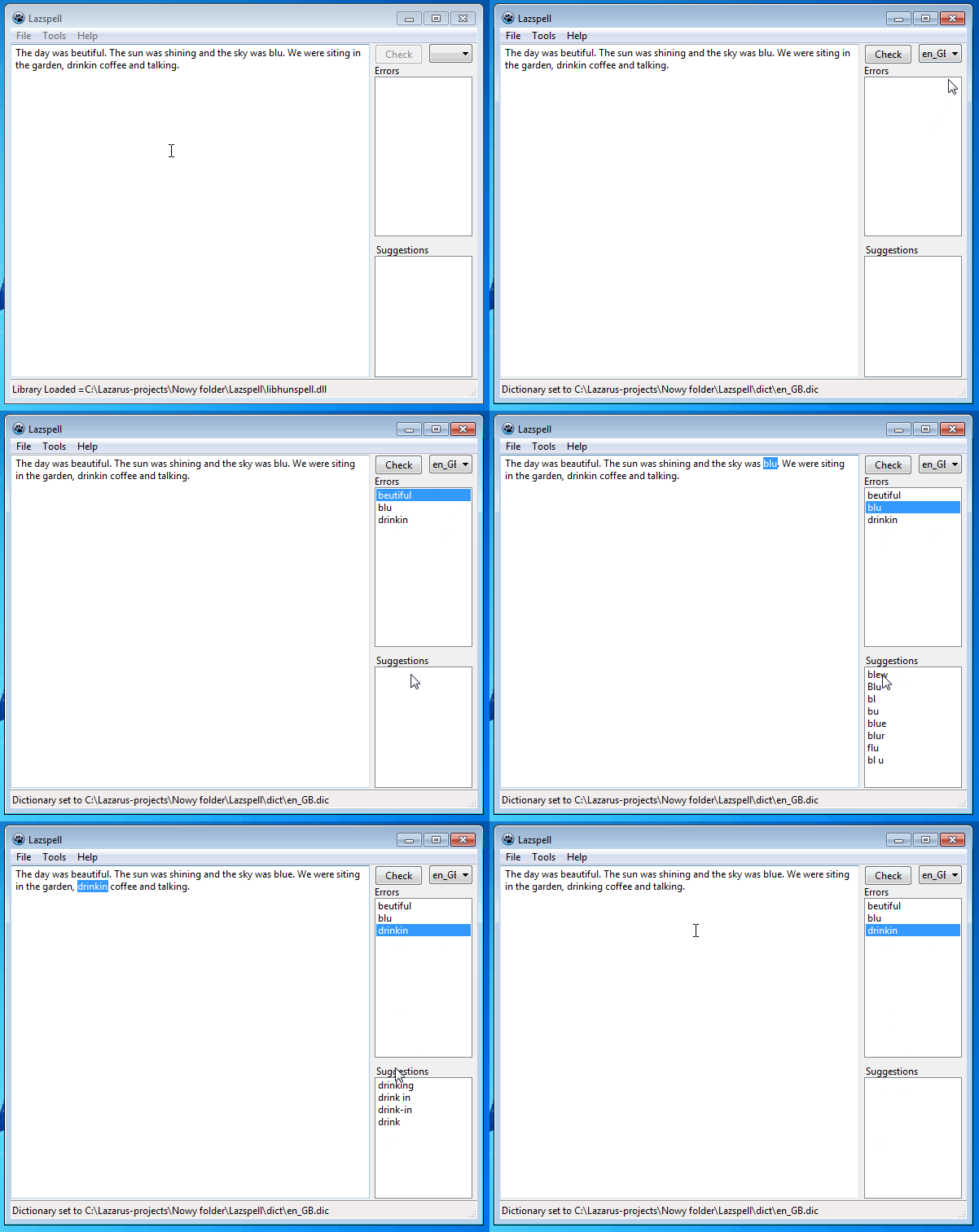 | |
| 242 | 264 | ||
| 243 | 265 | Lazspell - an example of spelling checker - from <https://github.com/Raf20076/Lazspell> | |
| 244 | 266 | ||
| 245 | 267 | ### Demo 4 - Lazspell 2 - TRichMemo | |
| 246 | 268 | ||
| 247 | 269 | In this example TRichMemo component was used. | |
| 248 | 270 | ||
| 249 | 271 | 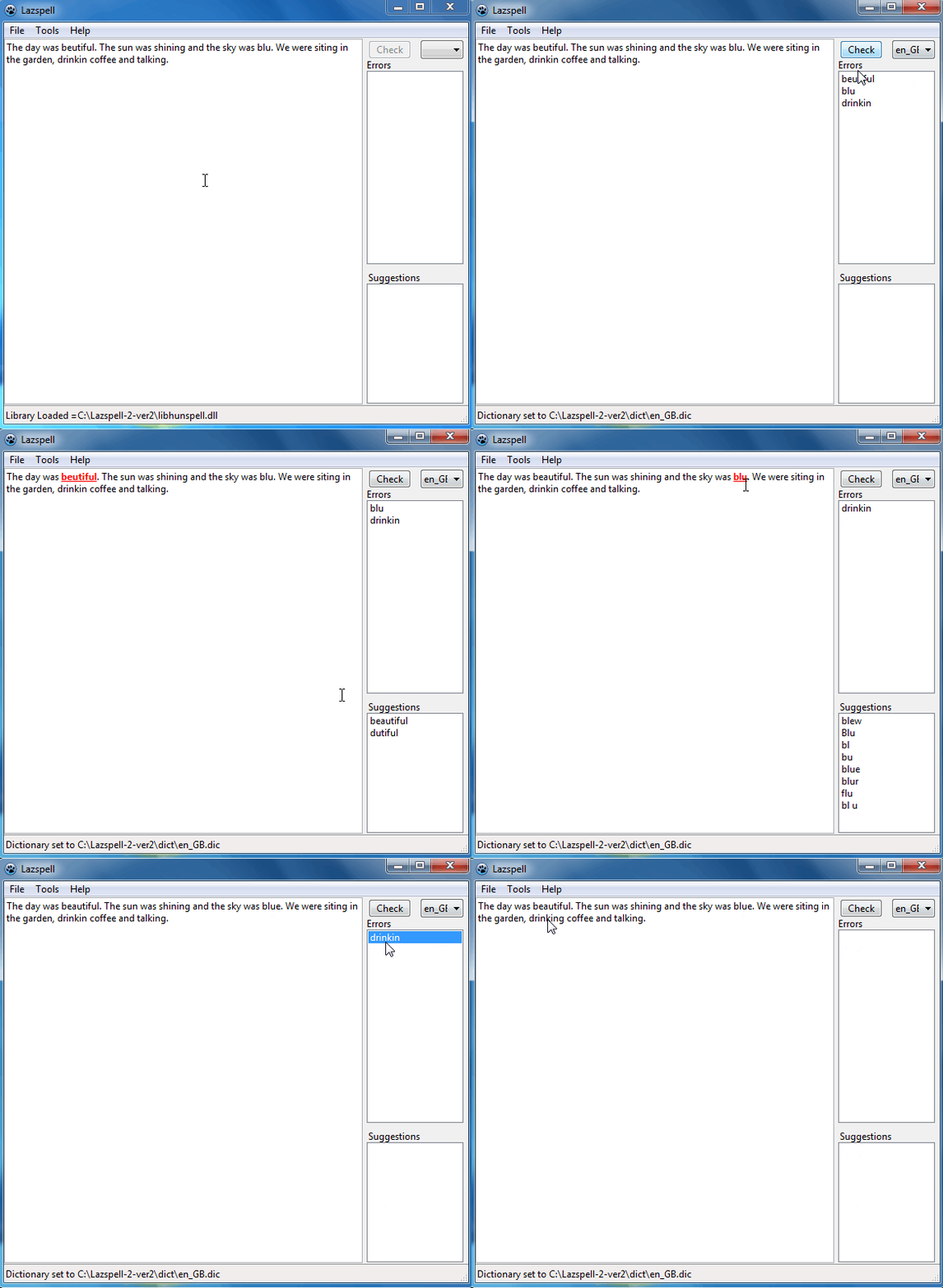 | |
| 250 | 272 | ||
| 251 | 273 | Lazspell 2 version 2 - an example of spelling checker - from <https://github.com/Raf20076/Lazspell-2-version-2> | |
| 252 | 274 | ||
| 253 | 275 | ### Demo 5 - Simple spelling checker | |
| 254 | 276 | ||
| 255 | 277 | 1\. Start Lazarus IDE | |
| 256 | 278 | ||
| 257 | 279 | 2\. Click Project -\> New Project -\> Choose -\> Application | |
| 258 | 280 | ||
| 259 | - | ||
| 281 | + | ```text | |
| 282 | + | You have just created a new application. Now save it | |
| 283 | + | ``` | |
| 260 | 284 | ||
| 261 | 285 | 3\. Click File -\> Save as | |
| 262 | 286 | ||
| 263 | - | ||
| 264 | - | ||
| 287 | + | ```text | |
| 288 | + | Choose a folder where your application will be saved | |
| 289 | + | First, project1.lpi will be saved, then unit1.pas | |
| 290 | + | ``` | |
| 265 | 291 | ||
| 266 | 292 | 4\. Place hunspell.pas and hunspell.inc (from <https://github.com/davidbannon/hunspell4pas>) in your folder. | |
| 267 | 293 | ||
| 268 | 294 | 5\. Place libhunspell.dll in your application folder (you can download it from here <https://github.com/Raf20076/Lazspell> or <https://github.com/davidbannon/hunspell4pas>) any options or compile by yourself. | |
| 269 | 295 | ||
| 270 | 296 | 6\. Place dictionary in your application folder, (two files) like pl_PL.aff, pl_PL.dic. Dictionaries must be encoded in UTF8. You can download them from here <https://github.com/Raf20076/Lazspell/tree/master/dict> | |
| 271 | 297 | ||
| 272 | 298 | 7\. On Form1 place component TButton (Button1) from Standard Tab | |
| 273 | 299 | ||
| 274 | 300 | 8\. On Form1 place component TMemo (Memo1) from Standard Tab | |
| 275 | 301 | ||
| 276 | 302 | 9\. On Form1 place component TListbox (ListBox1) from Standard Tab (here misspell words will be shown) | |
| 277 | 303 | ||
| 278 | 304 | 10\. Click once Button1 on Form1 then go to Object Inspector, click Events tab, and double click next to OnClick event: it creates OnClick event and paste code (see the code of the whole application) starts from | |
| 279 | 305 | ||
| 280 | 306 | ``` pascal | |
| 281 | 307 | ||
| 282 | 308 | {Check spelling} | |
| 283 | 309 | var | |
| 284 | 310 | i : Integer; | |
| 285 | 311 | MAX : Integer; | |
| 286 | 312 | FillInArrayWithWords:TStringArray; | |
| 287 | 313 | FillInString1: String; | |
| 288 | 314 | FillInString2: String; | |
| 289 | 315 | ``` | |
| 290 | 316 | ||
| 291 | 317 | till | |
| 292 | 318 | ||
| 293 | 319 | ``` pascal | |
| 294 | 320 | ||
| 295 | 321 | //If word is not in dictionary show it in Listbox as an error | |
| 296 | 322 | ``` | |
| 297 | 323 | ||
| 298 | 324 | 11\. Go to Object Inspector and click Form1, then click Events tab then double click next to OnCreate it creates OnCreate event and paste code (see the code of the whole application) | |
| 299 | 325 | ||
| 300 | 326 | ``` pascal | |
| 301 | 327 | SpellCheck := THunspell.Create(True); | |
| 302 | 328 | SpellCheck.SetDictionary('pl_PL.dic');//Load dictionary | |
| 303 | 329 | SpellCheck.GoodToGo := True; | |
| 304 | 330 | ``` | |
| 305 | 331 | ||
| 306 | 332 | 12\. Still in ObjectInspector click Form1,then click Events tab then double click next to OnDestroy it creates OnDestroy event and paste code (see the code of the whole application) | |
| 307 | 333 | ||
| 308 | - | ||
| 309 | - | ||
| 334 | + | ``` pascal | |
| 335 | + | SpellCheck.free; | |
| 336 | + | SpellCheck := nil; | |
| 337 | + | ``` | |
| 310 | 338 | ||
| 311 | 339 | 13\. Then in your code place functions like ArrayValueCount etc | |
| 312 | 340 | ||
| 313 | 341 | See Below the code of the whole application to compare with your one. | |
| 314 | 342 | ||
| 315 | 343 | ``` pascal | |
| 316 | 344 | //SpellChecker by Raf20076, Poland 2019 | |
| 317 | 345 | ||
| 318 | 346 | unit Unit1; | |
| 319 | 347 | ||
| 320 | 348 | {$mode objfpc}{$H+} | |
| 321 | 349 | ||
| 322 | 350 | interface | |
| 323 | 351 | ||
| 324 | 352 | uses | |
| 325 | 353 | Classes, SysUtils, Forms, Controls, Graphics, Dialogs, StdCtrls, | |
| 326 | 354 | LazFileUtils, LCLProc, LazUtils, LazUtf8; | |
| 327 | 355 | ||
| 328 | 356 | type | |
| 329 | 357 | TForm1 = class(TForm) | |
| 330 | 358 | Button1: TButton; | |
| 331 | 359 | Label1: TLabel; | |
| 332 | 360 | Label2: TLabel; | |
| 333 | 361 | ListBox1: TListBox; | |
| 334 | 362 | ListBox2: TListBox; | |
| 335 | 363 | Memo1: TMemo; | |
| 336 | 364 | procedure Button1Click(Sender: TObject); | |
| 337 | 365 | procedure FormCreate(Sender: TObject); | |
| 338 | 366 | procedure FormDestroy(Sender: TObject); | |
| 339 | 367 | end; | |
| 340 | 368 | ||
| 341 | 369 | var | |
| 342 | 370 | Form1: TForm1; | |
| 343 | 371 | ||
| 344 | 372 | implementation | |
| 345 | 373 | ||
| 346 | 374 | uses hunspell;//place hunspell.pas and hunspell .inc in your application folder | |
| 347 | 375 | //from https://github.com/davidbannon/hunspell4pas | |
| 348 | 376 | ||
| 349 | 377 | var | |
| 350 | 378 | SpellCheck: THunspell; | |
| 351 | 379 | ||
| 352 | 380 | {$R *.lfm} | |
| 353 | 381 | ||
| 354 | 382 | procedure TForm1.FormCreate(Sender: TObject); | |
| 355 | 383 | begin | |
| 356 | 384 | SpellCheck := THunspell.Create(True); | |
| 357 | 385 | SpellCheck.SetDictionary('pl_PL.dic');//Load dictionary | |
| 358 | 386 | SpellCheck.GoodToGo := True; | |
| 359 | 387 | end; | |
| 360 | 388 | ||
| 361 | 389 | {Extract words from string: non characters, spaces, carriagereturn aware} | |
| 362 | 390 | ||
| 363 | 391 | function ArrayValueCount(const InputArray: Array of string): Integer; | |
| 364 | 392 | {Count elements in array} | |
| 365 | 393 | var | |
| 366 | 394 | i:Integer; | |
| 367 | 395 | begin | |
| 368 | 396 | result := 0; | |
| 369 | 397 | for i := low(InputArray) to high(InputArray) do | |
| 370 | 398 | if InputArray[i] <> ' ' then // 'between them one space' | |
| 371 | 399 | inc(result); | |
| 372 | 400 | end; | |
| 373 | 401 | ||
| 374 | 402 | function StripOffNonCharacter(const aString: string): string; | |
| 375 | 403 | {Remove non characters from string} | |
| 376 | 404 | var | |
| 377 | 405 | a: Char; | |
| 378 | 406 | begin | |
| 379 | 407 | Result := ''; | |
| 380 | 408 | for a in aString do begin //below punctuation marks, numbers to remove from string | |
| 381 | 409 | if not CharInSet( a, ['.', ',', ';', ':', '!', '/', | |
| 382 | 410 | '?', '@', '#', '$', '%', '&', '*', '(', ')', '{', | |
| 383 | 411 | '}', '[', ']', '-', '\', '|', '<', '>', '''', '"', '^', | |
| 384 | 412 | '1', '2', '3', '4', '5', '6', '7', '8', '9', '0', '_', '+', | |
| 385 | 413 | '=', '~']) then //'„', '”'])these marks make error: Ordinal expression expected, need to be fixed | |
| 386 | 414 | begin | |
| 387 | 415 | Result := Result + a; | |
| 388 | 416 | end; | |
| 389 | 417 | end; | |
| 390 | 418 | end; | |
| 391 | 419 | ||
| 392 | 420 | function ReplaceCarriageReturn(s: string) : string; | |
| 393 | 421 | {Replace carriagereturn with one space} | |
| 394 | 422 | var | |
| 395 | 423 | i: Integer; | |
| 396 | 424 | begin | |
| 397 | 425 | Result:=s; | |
| 398 | 426 | for i := 1 to Length(Result) do | |
| 399 | 427 | if Result[i] in [#3..#13] then | |
| 400 | 428 | Result[i] := ' ';//'Between them one space' | |
| 401 | 429 | end; | |
| 402 | 430 | ||
| 403 | 431 | procedure TForm1.Button1Click(Sender: TObject); | |
| 404 | 432 | {Check spelling} | |
| 405 | 433 | var | |
| 406 | 434 | i : Integer; | |
| 407 | 435 | MAX : Integer; | |
| 408 | 436 | FillInArrayWithWords:TStringArray; | |
| 409 | 437 | FillInString1: String; | |
| 410 | 438 | FillInString2: String; | |
| 411 | 439 | begin | |
| 412 | 440 | ListBox1.clear; | |
| 413 | 441 | ListBox1.Items.Clear; | |
| 414 | 442 | ||
| 415 | 443 | FillInString1 := ReplaceCarriageReturn(Memo1.Lines.Text);//take text from Memo1; replace carriage return | |
| 416 | 444 | //with one space (using ReplaceCarriageReturn function) and put into FillInString1 | |
| 417 | 445 | ||
| 418 | 446 | FillInString2 := StripOffNonCharacter(FillInString1);//remove all non characters from FillInString1 | |
| 419 | 447 | //(using StripOffNonCharacter function) and put string without non charachters into FillInString2 | |
| 420 | 448 | ||
| 421 | 449 | FillInArrayWithWords := FillInString2.split(' '); //Split string into words with ' ' one space | |
| 422 | 450 | //(using .split) and put separate words into array FillInArrayWithWords | |
| 423 | 451 | ||
| 424 | 452 | MAX := ArrayValueCount(FillInArrayWithWords); //Give how many elements are in array | |
| 425 | 453 | //(using function ArrayValueCount) | |
| 426 | 454 | ||
| 427 | 455 | for i := 0 to MAX -1 do | |
| 428 | 456 | if not SpellCheck.Spell(FillInArrayWithWords[i]) then | |
| 429 | 457 | ListBox1.Items.add(FillInArrayWithWords[i]); | |
| 430 | 458 | //Take word from array and check in dictionary through hunspell (using SpellCheck.Spell function) | |
| 431 | 459 | //If word is not in dictionary show it in Listbox as an error | |
| 432 | 460 | end; | |
| 433 | 461 | ||
| 434 | 462 | procedure TForm1.FormDestroy(Sender: TObject); | |
| 435 | 463 | begin | |
| 436 | 464 | SpellCheck.free; | |
| 437 | 465 | SpellCheck := nil; | |
| 438 | 466 | end; | |
| 439 | 467 | ||
| 440 | 468 | end. | |
| 441 | 469 | ``` | |
| 442 | 470 | ||
| 443 | 471 | When you run your application and type some text in Memo and then press the button, the application will check if any errors are found, if found then shows them in ListBox. The main problem was how to remove carriage return and non characters and then how to split text into separate words. It's not an easy task. Therefore there are three functions to do this:ReplaceCarriageReturn function, StripOffNonCharacter function and FillInString2.split , function. The FillInString2.split function actually uses .split function from SysUtils. Hopefully the code of the whole application is self explanatory. | |
| 444 | 472 | ||
| 445 | 473 | ## Further Reading and Links | |
| 446 | 474 | ||
| 447 | 475 | - <https://github.com/hunspell/hunspell> | |
| 448 | 476 | - <https://github.com/davidbannon/hunspell4pas> - the (correctly licensed) hunspell object pascal unit. | |
| 449 | 477 | - <https://github.com/Homebrew> - probably sensible way to get hunspell on your Mac if it's not already there. | |
| 450 | 478 | - <https://github.com/tomboy-notes/tomboy-ng/releases> - Contains The 64bit Windows DLL in a tomboy-ng_win64_\<ver\>.zip | |
| 451 | 479 | - <https://github.com/cutec-chris/hunspell> | |
| 452 | 480 | - <https://forum.lazarus.freepascal.org/index.php/topic,50474.0.html> - FastHighliter code to use for highlighting misspelt words | |
| 453 | 481 | - <https://github.com/Raf20076> - Lazspell is an example of simple spelling checker application written in Lazarus IDE. | |
| 454 | 482 | - <https://forum.lazarus.freepascal.org/index.php/topic,46233.0.html> | |
| 455 | 483 | - <https://forum.lazarus.freepascal.org/index.php/topic,51569.0.html> | |
| 456 | 484 | - <https://forum.lazarus.freepascal.org/index.php?topic=44298.0> | |
| 457 | 485 | ||
| 458 | 486 | --- | |
| 459 | 487 | *From the Free Pascal wiki, page "spelling", as it stood on 2022-10-04 after a change by Alextp, out of the wiki's dump of 2024-05-26. Copyright stays with the author who wrote it, according to the old wiki's [[Licensing]] page. If you have concerns about this material, [message the admin](/wiki-contact).* |