

Setup Cross Compile For ARM: what changed
Revision 2 to 3. Removed lines have a minus sign; added lines have a plus sign.
| Old | New | Line | |
|---|---|---|---|
| 1 | 1 | ## How To setup Lazarus/FPC for arm-linux cross compiling. | |
| 2 | 2 | ||
| 3 | 3 | With this tutorial you can make a binary file that runs on arm-linux devices. This is tested with a Nokia N900 with "[Maemo 5 OS](http://maemo.org/)" (the gnu/linux Debian based OS, developed by [Nokia](http://maemo.nokia.com/videos/introducing-maemo-5/). It is an arm-linux device that runs GTK2 and QT4.6). | |
| 4 | 4 | ||
| 5 | 5 | If you need a simple "command prompt"/"terminal" program, after #FPC for ARM section skip to #APPENDIX A: Testing console programs. | |
| 6 | 6 | ||
| 7 | 7 | **NOTE 1**: All procedures are tested on a Virtual Machine with **Ubuntu 9.10 - x86** with Windows 7 as host and VirtualBox 3.0.12 as virtual machine. It is a fresh install, with all updates up to date. | |
| 8 | 8 | ||
| 9 | 9 | **NOTE 2**: Replace every */home/user/* with your real user path. All other paths are simply for explanation. If you use "[Maemo SDK Virtual Image](http://maemovmware.garage.maemo.org/2nd_edition/)", replace every */home/user/* with */home/maemo/* | |
| 10 | 10 | ||
| 11 | 11 | ## Automated Script | |
| 12 | 12 | ||
| 13 | 13 | The previously provided scripts are obsolete. Please see [HERE](http://wiki.lazarus.freepascal.org/Lazarus_Manager) (see discussion page for alternative. | |
| 14 | 14 | ||
| 15 | 15 | ## Generic things to do | |
| 16 | 16 | ||
| 17 | 17 | > **Warning:** These instructions are quite old - they refer to 2.2.4 while the current (December 2013) stable FPC is 2.6.2. Please adjust as you follow these and update the page. Thanks. | |
| 18 | 18 | ||
| 19 | 19 | ### Downloads | |
| 20 | 20 | ||
| 21 | 21 | - any starting compiler from the 2.2.4 branch (e.g. fpc-2.2.4-20091214.i386.rpm) from [HERE](http://www.hu.freepascal.org/lazarus) or [HERE](http://snapshots.lazarus.shikami.org/)). It is needed to compile \>= 2.2.4 fpc sources | |
| 22 | 22 | - latest binutils.tar.gz (e.g. binutils-2.20.tar.gz) from [HERE](http://ftp.gnu.org/gnu/binutils/) | |
| 23 | 23 | - latest [fpc.zip](http://ftp//ftp.freepascal.org/pub/fpc/snapshot/trunk/source/fpc.zip) from [HERE](http://www.freepascal.org/develop.var) | |
| 24 | 24 | - latest Lazarus source zip (e.g. lazarus-0.9.29-23129-20091214-src.zip) from [HERE](http://www.hu.freepascal.org/lazarus) or [HERE](http://snapshots.lazarus.shikami.org/) (faster for me) | |
| 25 | 25 | - target libs (You can grab from SDK or from arm-device. *See "#APPENDIX A: Testing console programs"*) | |
| 26 | 26 | ||
| 27 | 27 | ### Unpack/copy all files in the respective directories | |
| 28 | 28 | ||
| 29 | 29 | FPC 2.2.4 installer: | |
| 30 | 30 | ||
| 31 | 31 | `~/fpc_tools/fpc_2.2.4/fpc-2.2.4-20091214.i386.rpm` | |
| 32 | 32 | ||
| 33 | 33 | Binutils sources: | |
| 34 | 34 | ||
| 35 | 35 | `~/fpc_tools/binutils-2.20/` | |
| 36 | 36 | ||
| 37 | 37 | Lazarus sources: | |
| 38 | 38 | ||
| 39 | 39 | `~/lazarus/` | |
| 40 | 40 | ||
| 41 | 41 | FPC 2.5.1 sources: | |
| 42 | 42 | ||
| 43 | 43 | `~/lazarus/fpc/2.5.1/` | |
| 44 | 44 | ||
| 45 | 45 | ### Prepare Target Libs | |
| 46 | 46 | ||
| 47 | 47 | - See "#APPENDIX A: Testing console programs" to know how/where to find target libs | |
| 48 | 48 | - Copy all target libs to ~/lazarus/fpc/libcross | |
| 49 | 49 | ||
| 50 | 50 | ### Install dependencies | |
| 51 | 51 | ||
| 52 | 52 | ``` bash | |
| 53 | 53 | sudo apt-get install -y alien libncurses5-dev libXp-dev libgtk2.0-dev | |
| 54 | 54 | ``` | |
| 55 | 55 | ||
| 56 | 56 | ## Install & Configure Binutils | |
| 57 | 57 | ||
| 58 | 58 | ### Compile binutils for arm-linux | |
| 59 | 59 | ||
| 60 | 60 | - If not already done, extract binutils-2.20.tar.gz in ~/fpc_tools/binutils-2.20 | |
| 61 | 61 | - Then type: | |
| 62 | 62 | ||
| 63 | 63 | ``` bash | |
| 64 | 64 | cd ~/fpc_tools/binutils-2.20 | |
| 65 | 65 | ./configure --target=arm-linux --disable-werror | |
| 66 | 66 | make | |
| 67 | 67 | sudo make install | |
| 68 | 68 | mkdir ~/lazarus/fpc/binutils | |
| 69 | 69 | ln -s /usr/local/bin/arm-linux-ar ~/lazarus/fpc/binutils/ar | |
| 70 | 70 | ln -s /usr/local/bin/arm-linux-ld ~/lazarus/fpc/binutils/ld | |
| 71 | 71 | sudo mv /usr/local/bin/arm-linux-as /usr/local/bin/arm-linux-as_org | |
| 72 | 72 | ||
| 73 | 73 | sudo gedit /usr/local/bin/arm-linux-as | |
| 74 | 74 | ``` | |
| 75 | 75 | ||
| 76 | 76 | - Paste: | |
| 77 | 77 | ||
| 78 | 78 | ``` bash | |
| 79 | 79 | #!/bin/sh | |
| 80 | 80 | /usr/local/bin/arm-linux-as_org -meabi=5 $@ | |
| 81 | 81 | ``` | |
| 82 | 82 | ||
| 83 | 83 | **NOTE**: option *-meabi=5* force assembler to make binary *eabi v5* compatible. E.g. if you need eabi v4 you will change it in *-meabi=4*. | |
| 84 | 84 | ||
| 85 | 85 | - Save and close gedit | |
| 86 | 86 | - Type: | |
| 87 | 87 | ||
| 88 | 88 | ``` bash | |
| 89 | 89 | sudo chmod +x /usr/local/bin/arm-linux-as | |
| 90 | 90 | ln -s /usr/local/bin/arm-linux-as ~/lazarus/fpc/binutils/as | |
| 91 | 91 | ``` | |
| 92 | 92 | ||
| 93 | 93 | ## FPC | |
| 94 | 94 | ||
| 95 | 95 | ### Install precompiled fpc 2.2.4 branch | |
| 96 | 96 | ||
| 97 | 97 | **REMEMBER TO CHANGE EVERY**/home/user/**WITH YOUR OWN USER PATH!** | |
| 98 | 98 | ||
| 99 | 99 | - Type: | |
| 100 | 100 | ||
| 101 | 101 | ``` bash | |
| 102 | 102 | sudo alien -i -c /home/user/fpc_tools/fpc_2.2.4/fpc-2.2.4-20091214.i386.rpm | |
| 103 | 103 | ``` | |
| 104 | 104 | ||
| 105 | 105 | - Be sure that ppc386 is right installed, type: | |
| 106 | 106 | ||
| 107 | 107 | ``` bash | |
| 108 | 108 | which ppc386 | |
| 109 | 109 | ``` | |
| 110 | 110 | ||
| 111 | 111 | if ppc386 is in the path it returns the path (e.g. /usr/bin/ppc386) | |
| 112 | 112 | ||
| 113 | 113 | ### Compile FPC from sources | |
| 114 | 114 | ||
| 115 | 115 | - Type: | |
| 116 | 116 | ||
| 117 | 117 | ``` bash | |
| 118 | 118 | cd ~/lazarus/fpc/2.5.1 | |
| 119 | 119 | make all OPT='-gl -O3p3' PP=/usr/bin/ppc386 (add NOGDB=1 at the end if asked) | |
| 120 | 120 | sudo make install PP=/usr/bin/ppc386 PREFIX=/usr/ (add NOGDB=1 at the end if asked) | |
| 121 | 121 | sudo rm /usr/bin/ppc386 | |
| 122 | 122 | sudo ln -s /usr/lib/fpc/2.5.1/ppc386 /usr/bin/ppc386 | |
| 123 | 123 | sudo mkdir /usr/share/fpcsrc/ | |
| 124 | 124 | sudo ln -sf ~/lazarus/fpc/2.5.1/ /usr/share/fpcsrc/ | |
| 125 | 125 | sudo /usr/lib/fpc/2.5.1/samplecfg /usr/lib/fpc/2.5.1/ /etc | |
| 126 | 126 | ``` | |
| 127 | 127 | ||
| 128 | 128 | ## FPC for ARM | |
| 129 | 129 | ||
| 130 | 130 | ### Make FPC able to cross compile for arm-linux | |
| 131 | 131 | ||
| 132 | 132 | - Type: | |
| 133 | 133 | ||
| 134 | 134 | ``` bash | |
| 135 | 135 | cd ~/lazarus/fpc/2.5.1/ | |
| 136 | 136 | sudo make crossinstall CPU_TARGET=arm OS_TARGET=linux CROSSBINDIR=/home/user/lazarus/fpc/binutils/ OPT=-dFPC_ARMEL INSTALL_PREFIX=/usr | |
| 137 | 137 | ``` | |
| 138 | 138 | ||
| 139 | 139 | ### Create custom fpc.cfg | |
| 140 | 140 | ||
| 141 | 141 | **REMEMBER TO CHANGE EVERY**/home/user/**WITH YOUR OWN USER PATH!** | |
| 142 | 142 | ||
| 143 | 143 | - Type: | |
| 144 | 144 | ||
| 145 | 145 | ``` bash | |
| 146 | 146 | gedit ~/.fpc.cfg | |
| 147 | 147 | ``` | |
| 148 | 148 | ||
| 149 | 149 | - Paste in ~/.fpc.cfg: | |
| 150 | 150 | ||
| 151 | 151 | #INCLUDE /etc/fpc.cfg | |
| 152 | 152 | #IFDEF CPUARM | |
| 153 | 153 | -Fu/usr/lib/fpc/2.5.1/units/$fpctarget/* | |
| 154 | 154 | -Fl/usr/lib/fpc/2.5.1/units/$fpctarget/rtl/ | |
| 155 | 155 | -XP/home/user/lazarus/fpc/binutils/ | |
| 156 | 156 | -Xr/usr/lib/fpc/2.5.1/units/arm-linux/rtl/ | |
| 157 | 157 | -Xr/home/user/lazarus/fpc/libcross | |
| 158 | 158 | -XR/home/user/lazarus/fpc/ | |
| 159 | 159 | -darm | |
| 160 | 160 | -Tlinux | |
| 161 | 161 | #ENDIF | |
| 162 | 162 | ||
| 163 | 163 | - save and close gedit | |
| 164 | 164 | - Type: | |
| 165 | 165 | ||
| 166 | 166 | ``` bash | |
| 167 | 167 | sudo ln -sf /usr/lib/fpc/2.5.1/ppcrossarm /usr/local/bin/ppcarm | |
| 168 | 168 | ``` | |
| 169 | 169 | ||
| 170 | 170 | ## Lazarus | |
| 171 | 171 | ||
| 172 | 172 | If you don't need graphical programs, you can skip this section and go directly to #Appendix B: Target libs | |
| 173 | 173 | ||
| 174 | 174 | ### Compile Lazarus | |
| 175 | 175 | ||
| 176 | 176 | - Type: | |
| 177 | 177 | ||
| 178 | 178 | ``` bash | |
| 179 | 179 | cd ~/lazarus | |
| 180 | 180 | make clean all | |
| 181 | 181 | ``` | |
| 182 | 182 | ||
| 183 | 183 | ### Start Lazarus | |
| 184 | 184 | ||
| 185 | 185 | - Start Lazarus to see that everything is ok and then to compile LCL and Package Registration | |
| 186 | 186 | - Type: | |
| 187 | 187 | ||
| 188 | 188 | ``` bash | |
| 189 | 189 | ./lazarus | |
| 190 | 190 | ``` | |
| 191 | 191 | ||
| 192 | 192 | ### Configure Lazarus for cross Compile | |
| 193 | 193 | ||
| 194 | 194 | - Now you must cross compile the LCL and Package Registration, this part comes from [HERE](http://wiki.lazarus.freepascal.org/Cross_compiling#Cross_compiling_the_LCL). | |
| 195 | 195 | - From the IDE: | |
| 196 | 196 | 1. In Tools -\> Options -\> Environment -\> Files, set the Compiler path to the path to fpc. Normally this is already done. | |
| 197 | 197 | 2. Then open Tools / Configure Build Lazarus / Advanced Build Options. | |
| 198 | 198 | 3. Set Target OS as *linux* and Target CPU as *arm*. | |
| 199 | 199 | 4. Set LCL and Package registration to Build (the middle radio button) and all other to None (left radio buttons). | |
| 200 | 200 | 5. Click the Build button. | |
| 201 | 201 | ||
| 202 | 202 | ## Make your first arm-linux project in Lazarus | |
| 203 | 203 | ||
| 204 | 204 | ### New Project | |
| 205 | 205 | ||
| 206 | 206 | - Start new project as application | |
| 207 | 207 | - Put some component in main form to test (like button, memo and few other things) | |
| 208 | 208 | ||
| 209 | 209 | ### Set Targets | |
| 210 | 210 | ||
| 211 | 211 | - From the IDE: | |
| 212 | 212 | 1. Set in Project / Compiler Options / Code generation / Target OS (-T): *Linux* | |
| 213 | 213 | 2. Set in Project / Compiler Options / Code generation / Target CPU family (-P): *arm* | |
| 214 | 214 | 3. Set in Project / Compiler Options / Other / Custom Option: enter -XParm-linux- into textbox | |
| 215 | 215 | ||
| 216 | 216 | ### Add target libs to your project | |
| 217 | 217 | ||
| 218 | 218 | **REMEMBER TO CHANGE EVERY**/home/user/**WITH YOUR OWN USER PATH!** | |
| 219 | 219 | ||
| 220 | 220 | - From the IDE: | |
| 221 | 221 | 1. Set in Project / Compiler Options / Linking / Options (-k): *-L/home/user/lazarus/fpc/libcross* | |
| 222 | 222 | 2. Set in Project / Compiler Options / Compilation / Execute after / Command: *arm-linux-strip -s /path/to/your/project/binary* (where *"binary"* is the executable builded with Lazarus) | |
| 223 | 223 | ||
| 224 | 224 | ### Build Project | |
| 225 | 225 | ||
| 226 | 226 | - Build Project as normal: | |
| 227 | 227 | 1. Hit keys Ctrl+F9 | |
| 228 | 228 | 2. Run / Build | |
| 229 | 229 | ||
| 230 | 230 | ### Time to run | |
| 231 | 231 | ||
| 232 | 232 | - Transfer the binary of your project on device | |
| 233 | 233 | - Generally you must give executable permission to the binary directly on the device. If you work in terminal type: | |
| 234 | 234 | ||
| 235 | 235 | ``` bash | |
| 236 | 236 | chmod +x /path/where/is/YourProject | |
| 237 | 237 | ./path/where/is/YourProject | |
| 238 | 238 | ``` | |
| 239 | 239 | ||
| 240 | - | ||
| 240 | + | 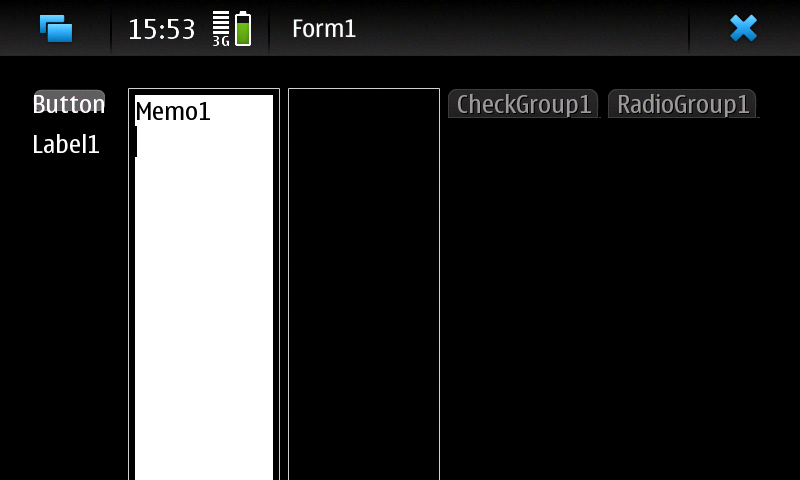 | |
| 241 | 241 | ||
| 242 | 242 | ## APPENDIX A: Testing console programs | |
| 243 | 243 | ||
| 244 | 244 | ### Create a TestARM.pas | |
| 245 | 245 | ||
| 246 | 246 | - Type: | |
| 247 | 247 | ||
| 248 | 248 | ``` bash | |
| 249 | 249 | mkdir ~/dev/TestARM/ | |
| 250 | 250 | gedit ~/dev/TestARM/TestARM.pas | |
| 251 | 251 | ``` | |
| 252 | 252 | ||
| 253 | 253 | - Paste this code: | |
| 254 | 254 | ||
| 255 | 255 | ``` pascal | |
| 256 | 256 | program test; | |
| 257 | 257 | begin | |
| 258 | 258 | writeln('DATE ',{$i %DATE%}); | |
| 259 | 259 | writeln('FPCTARGET ',{$i %FPCTARGET%}); | |
| 260 | 260 | writeln('FPCTARGETCPU ',{$i %FPCTARGETCPU%}); | |
| 261 | 261 | writeln('FPCTARGETOS ',{$i %FPCTARGETOS%}); | |
| 262 | 262 | writeln('FPCVERSION ',{$i %FPCVERSION%}); | |
| 263 | 263 | end. | |
| 264 | 264 | ``` | |
| 265 | 265 | ||
| 266 | 266 | - Type: | |
| 267 | 267 | ||
| 268 | 268 | ``` bash | |
| 269 | 269 | cd ~/dev/TestARM/ | |
| 270 | 270 | fpc -Tlinux -Parm -XParm-linux- TestARM.pas | |
| 271 | 271 | ``` | |
| 272 | 272 | ||
| 273 | 273 | ### Time to run | |
| 274 | 274 | ||
| 275 | 275 | - Transfer TestARM on device | |
| 276 | 276 | - Generally you must give executable permission to *TestARM* directly on the device: | |
| 277 | 277 | ||
| 278 | 278 | ``` bash | |
| 279 | 279 | chmod +x /path/where/is/TestAMR | |
| 280 | 280 | ./path/where/is/TestAMR | |
| 281 | 281 | ``` | |
| 282 | 282 | ||
| 283 | 283 | ## Appendix B: Target libs | |
| 284 | 284 | ||
| 285 | 285 | You need target libs to assemble and link binary file. You can find them into the SDK of your device or into the device itself. | |
| 286 | 286 | ||
| 287 | 287 | E.g. for Nokia N900 you need to copy /lib/* and /usr/lib/* (no subdirs needed) that are present in the Nokia N900 root and you must merge all files to ~/lazarus/fpc/libcross/\ | |
| 288 | 288 | Finally, you need to rename each library *not found* by linker (ld) to the file name searched by linker itself.\ | |
| 289 | 289 | E.g. if you got this error | |
| 290 | 290 | ||
| 291 | 291 | `libX11.so not found (or incompatible)` | |
| 292 | 292 | ||
| 293 | 293 | and you have a file called *libX11.so.6.2.0*, then you need to rename it into *libX11.so* | |
| 294 | 294 | ||
| 295 | 295 | ## See also | |
| 296 | 296 | ||
| 297 | 297 | - [[Android]] Article on setting up cross-compiling on Windows for Android on ARM | |
| 298 | 298 | - [[Cross compiling]] for cross compiling from Linux, macOS and Windows along with other useful cross-compilation information. | |
| 299 | 299 | ||
| 300 | 300 | --- | |
| 301 | 301 | *From the Free Pascal wiki, page "Setup Cross Compile For ARM", as it stood on 2020-11-26 after a change by Trev, out of the wiki's dump of 2024-05-26. Copyright stays with the author who wrote it, according to the old wiki's [[Licensing]] page. If you have concerns about this material, [message the admin](/wiki-contact).* |