

Sample Graphics/es: what changed
Revision 0 to 1. Removed lines have a minus sign; added lines have a plus sign.
Title: Sample Graphics/es
| Old | New | Line | |
|---|---|---|---|
| 1 | + | ## Galería de Gráficos | |
| 2 | + | ||
| 3 | + | Esta galería es para mostrar los diseños que pueden ser creados desde Lazarus y sus herramientas de dibujo, como BGRABitmap. | |
| 4 | + | ||
| 5 | + | La mayoría de los ejemplos están incluidos en los paquetes [[BGRABitmap]] y [[BGRAControls]]. | |
| 6 | + | ||
| 7 | + | ### gdgfx | |
| 8 | + | ||
| 9 | + | **Nombre:** gdgfx 'Gráficos Degradados' | |
| 10 | + | ||
| 11 | + | **Autor:** [[Lainz]] | |
| 12 | + | ||
| 13 | + | **Descripción:** Muestra como crear botones y degradados con y sin transparencia en Lazarus usando [[BGRABitmap]] y una versión mejorada de [[Double Gradient]] que soporta alpha. | |
| 14 | + | ||
| 15 | + | **Notas:** Testeado en Win32. La descarga incluye la versión usada de BGRABitmap y DoubleGradient. | |
| 16 | + | ||
| 17 | + | **Imágen:** 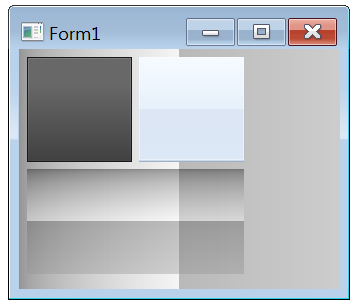 | |
| 18 | + | ||
| 19 | + | Arriba-Izquierda: 'como el boton de instalación de flash player' / Arriba-Derecha: 'como la barra del explorador de win7' / Abajo: degradado doble con alpha / Fondo: igual que abajo. | |
| 20 | + | ||
| 21 | + | **Descargar:** [gdgfx.7z (60.01 KB)](http://www.mediafire.com/?c8z6go12fmb5zcm) | |
| 22 | + | ||
| 23 | + | #### Botón Flash Player | |
| 24 | + | ||
| 25 | + | Agrega un nuevo TPaintBox, establece 'btn1' como su nombre. Ve al evento OnPaint y agrega este código: | |
| 26 | + | ||
| 27 | + | ``` pascal | |
| 28 | + | var | |
| 29 | + | tempbmp1, tempbmp2: TBGRABitmap; | |
| 30 | + | begin | |
| 31 | + | // Fondo Degradado | |
| 32 | + | tempbmp1:=TBGRABitmap.Create(btn1.Width,btn1.Height,BGRA(104,104,104,255)); | |
| 33 | + | tempbmp1.Canvas.GradientFill(Rect(1,Round(btn1.Height*0.25),btn1.Width-1,btn1.Height-1),$686868,$404040,gdVertical); | |
| 34 | + | ||
| 35 | + | // Borde Recuadro | |
| 36 | + | tempbmp1.Canvas.Brush.Color:=$181818; | |
| 37 | + | tempbmp1.Canvas.FrameRect(btn1.ClientRect); | |
| 38 | + | ||
| 39 | + | // Degradado de Luz | |
| 40 | + | tempbmp2:=TBGRABitmap.Create(btn1.Width,btn1.Height,BGRA(0,0,0,0)); | |
| 41 | + | tempbmp2.GradientFill(1,1,btn1.Width-1,btn1.Height-1, | |
| 42 | + | BGRA(255,255,255,34), | |
| 43 | + | BGRA(255,255,255,10), gtLinear, | |
| 44 | + | PointF(btn1.ClientRect.Right,btn1.ClientRect.Top), | |
| 45 | + | PointF(btn1.ClientRect.Right,btn1.ClientRect.Bottom), | |
| 46 | + | dmDrawWithTransparency,True,False); | |
| 47 | + | tempbmp2.AlphaFillRect(2,2,btn1.Width-2,btn1.Height-2,0); | |
| 48 | + | ||
| 49 | + | // Fusionar Bitmaps | |
| 50 | + | tempbmp1.Canvas.Draw(0,0,tempbmp2.Bitmap); | |
| 51 | + | ||
| 52 | + | // Pintar en Canvas | |
| 53 | + | btn1.Canvas.Draw(0,0,tempbmp1.Bitmap); | |
| 54 | + | ||
| 55 | + | // Liberar Bitmaps | |
| 56 | + | tempbmp1.Free; | |
| 57 | + | tempbmp2.Free; | |
| 58 | + | end; | |
| 59 | + | ``` | |
| 60 | + | ||
| 61 | + | #### Barra del Explorador de Windows 7 | |
| 62 | + | ||
| 63 | + | Agrega un nuevo TPaintBox, establece 'btn2' como su nombre. Ve al evento OnPaint y agrega este código: | |
| 64 | + | ||
| 65 | + | ``` pascal | |
| 66 | + | var | |
| 67 | + | backBmp, lightBmp: TBGRABitmap; | |
| 68 | + | gradBmp: TBitmap; | |
| 69 | + | begin | |
| 70 | + | // Gradiente Degradado | |
| 71 | + | gradBmp := DoubleGradientFill( | |
| 72 | + | btn2.ClientRect, | |
| 73 | + | $FFFAF5,$FAF0E6, | |
| 74 | + | $F4E6DC,$F7E9DD, | |
| 75 | + | gdVertical,gdVertical,gdVertical,0.5); | |
| 76 | + | ||
| 77 | + | // Usar como Fondo | |
| 78 | + | backBmp := TBGRABitmap.Create(gradBmp); | |
| 79 | + | gradBmp.Free; | |
| 80 | + | ||
| 81 | + | // Degradado de Luz | |
| 82 | + | lightBmp:= TBGRABitmap.Create(btn2.Width,btn2.Height,BGRA(0,0,0,0)); | |
| 83 | + | lightBmp.Rectangle(0,0,btn2.Width,btn2.Height-2, | |
| 84 | + | BGRA(255,255,255,100), | |
| 85 | + | dmSet); | |
| 86 | + | lightBmp.SetHorizLine(0,btn2.Height-1,btn2.Width-1,BGRA(160,175,195,255)); | |
| 87 | + | lightBmp.SetHorizLine(0,btn2.Height-2,btn2.Width-1,BGRA(205,218,234,255)); | |
| 88 | + | ||
| 89 | + | // Fusionar Bitmaps | |
| 90 | + | backBmp.PutImage(0,0,lightBmp,dmDrawWithTransparency); | |
| 91 | + | lightBmp.Free; | |
| 92 | + | ||
| 93 | + | // Pintar en Canvas | |
| 94 | + | backBmp.Draw(btn2.Canvas,0,0,True); | |
| 95 | + | backBmp.Free; | |
| 96 | + | end; | |
| 97 | + | ``` | |
| 98 | + | ||
| 99 | + | #### Degradado Doble con Alpha | |
| 100 | + | ||
| 101 | + | Agrega un nuevo TPaintBox, establece 'btn3' como su nombre. Ve al evento OnPaint y agrega este código: | |
| 102 | + | ||
| 103 | + | ``` pascal | |
| 104 | + | var | |
| 105 | + | myBitmap: TBGRABitmap; | |
| 106 | + | begin | |
| 107 | + | myBitmap:= DoubleGradientAlphaFill( | |
| 108 | + | btn3.ClientRect, | |
| 109 | + | BGRA(0,0,0,100),BGRA(255,255,255,100), | |
| 110 | + | BGRA(100,100,100,100),BGRA(150,150,150,100), | |
| 111 | + | gdVertical,gdVertical,gdVertical,0.5); | |
| 112 | + | btn3.Canvas.Draw(0,0,myBitmap.Bitmap); | |
| 113 | + | myBitmap.Free; | |
| 114 | + | end; | |
| 115 | + | ``` | |
| 116 | + | ||
| 117 | + | ### Barras de Progreso | |
| 118 | + | ||
| 119 | + | Una barra de progreso es un componente en una interfáz gráfica de usuario que cubre el progreso de una tarea, como una descarga o transferencia de archivo. | |
| 120 | + | ||
| 121 | + | #### Barra de Progreso Flash Player | |
| 122 | + | ||
| 123 | + |  'Como la barra de progreso del instalador de flash player'. Requiere [[BGRABitmap]] y [[Double Gradient]] con Alpha. | |
| 124 | + | ||
| 125 | + | Agrega un nuevo TPaintBox, establece 'progressbar' como su nombre. Ve al evento OnPaint y agrega este código: | |
| 126 | + | ||
| 127 | + | ``` pascal | |
| 128 | + | var | |
| 129 | + | ABitmap, ABitmap2: TBGRABitmap; ARect: TRect; | |
| 130 | + | begin | |
| 131 | + | // Inicialización | |
| 132 | + | // Self.Color:=$004D4D4D; | |
| 133 | + | ABitmap:=TBGRABitmap.Create(progressbar.Width,progressbar.Height); | |
| 134 | + | ARect:=progressbar.ClientRect; | |
| 135 | + | ||
| 136 | + | // Porcentaje de Progreso | |
| 137 | + | ARect.Right:=Round(ABitmap.Width*0.75); | |
| 138 | + | ||
| 139 | + | // Fondo Degradado | |
| 140 | + | ABitmap.Canvas.GradientFill(progressbar.ClientRect,$303030,$323232,gdVertical); | |
| 141 | + | ||
| 142 | + | // Borde del Fondo | |
| 143 | + | ABitmap.Rectangle(0,0,ABitmap.Width,ABitmap.Height,BGRA(28,28,28,255),dmSet); | |
| 144 | + | ||
| 145 | + | // Progreso Degradado | |
| 146 | + | ABitmap2:=DoubleGradientAlphaFill( | |
| 147 | + | ARect, | |
| 148 | + | BGRA(102,163,226,255),BGRA(83,135,186,255), | |
| 149 | + | BGRA(75,121,175,255),BGRA(56,93,135,255), | |
| 150 | + | gdVertical,gdVertical,gdVertical,0.5); | |
| 151 | + | ||
| 152 | + | // Borde del Progreso | |
| 153 | + | ABitmap2.Rectangle(0,0,ARect.Right,ARect.Bottom,BGRA(28,28,28,255),dmSet); | |
| 154 | + | ||
| 155 | + | // Luz del Progreso | |
| 156 | + | ABitmap2.Rectangle(1,1,ARect.Right-1,ARect.Bottom-1,BGRA(153,212,255,100),dmDrawWithTransparency); | |
| 157 | + | ||
| 158 | + | // Fusionar Bitmaps | |
| 159 | + | ABitmap.Canvas.Draw(0,0,ABitmap2.Bitmap); | |
| 160 | + | ||
| 161 | + | // Dibujar Bitmap | |
| 162 | + | progressbar.Canvas.Draw(0,0,ABitmap.Bitmap); | |
| 163 | + | ||
| 164 | + | // Liberar Bitmaps | |
| 165 | + | ABitmap.Free; | |
| 166 | + | ABitmap2.Free; | |
| 167 | + | end; | |
| 168 | + | ``` | |
| 169 | + | ||
| 170 | + | Puedes cambiar el 'Porcentaje' del progreso cambiando esta linea: | |
| 171 | + | ||
| 172 | + | ``` pascal | |
| 173 | + | // Porcentaje del Progreso - 33% | |
| 174 | + | ARect.Right:=Round(ABitmap.Width*0.33); | |
| 175 | + | ||
| 176 | + | // Porcentaje del Progreso - 90% | |
| 177 | + | ARect.Right:=Round(ABitmap.Width*0.90); | |
| 178 | + | ``` | |
| 179 | + | ||
| 180 | + | --- | |
| 181 | + | *From the Free Pascal wiki, page "Sample Graphics/es", as it stood on 2020-02-26 after a change by Trev, out of the wiki's dump of 2024-05-26. Copyright stays with the author who wrote it, according to the old wiki's [[Licensing]] page. If you have concerns about this material, [message the admin](/wiki-contact).* | |
| 182 | + | Category: Castellano | |
| 183 | + | Category: Español |