

SQLdb Tutorial4: what changed
Revision 1 to 2. Removed lines have a minus sign; added lines have a plus sign.
| Old | New | Line | |
|---|---|---|---|
| 1 | 1 | ## Introduction | |
| 2 | 2 | ||
| 3 | 3 | This tutorial is an attempt to demonstrate the use of [[Data module|Lazarus Data Modules]] to isolate the data access components of a project from the program logic associated with the access. Such isolation makes program maintenance and debugging easier. | |
| 4 | 4 | ||
| 5 | 5 | The tutorial was developed using Windows 7 and SQLite3 as the database, with Lazarus 1.0.8 with FPC 2.6.2; however it should work with earlier versions. Similarly, other DBMS and Operating Systems should require minimal change, if any. | |
| 6 | 6 | ||
| 7 | 7 | ## Why use datamodules? | |
| 8 | 8 | ||
| 9 | 9 | Simple - after following the Lazarus Tutorials: | |
| 10 | 10 | ||
| 11 | 11 | - [[SQLdb Tutorial0]] | |
| 12 | 12 | - [[SQLdb Tutorial1]] | |
| 13 | 13 | - [[SQLdb Tutorial2]] | |
| 14 | 14 | - [[SQLdb Tutorial3]] | |
| 15 | 15 | ||
| 16 | 16 | developing a 'real' application becomes harder. 'Form1' grows to an exponential size handling the different Events and Database Queries. | |
| 17 | 17 | ||
| 18 | 18 | Isolating each table access into a single datamodule makes debugging and maintenance so much easier. An application may have any number of datamodules - a small application with just one or 2 tables can probably suffice with just one Datamodule - a larger application could probably benefit from having a data module for each table or view. | |
| 19 | 19 | ||
| 20 | 20 | The sample shown here uses just 2 tables with simple queries, but it can be expanded to include more options with each table. | |
| 21 | 21 | ||
| 22 | 22 | ## Getting started | |
| 23 | 23 | ||
| 24 | 24 | In the Lazarus IDE, create a new Application and then click File --\> New --\> Data Module | |
| 25 | 25 | ||
| 26 | - | ||
| 27 | - | ||
| 28 | - | ||
| 29 | - | ||
| 26 | + | 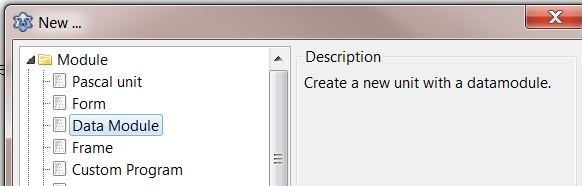 | |
| 30 | 27 | ||
| 31 | 28 | You will be presented with a window as if you selected 'New Form': | |
| 32 | 29 | ||
| 33 | - | ||
| 34 | - | ||
| 35 | - | ||
| 36 | - | ||
| 30 | + | 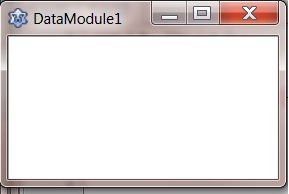 | |
| 37 | 31 | ||
| 38 | 32 | The difference is this window/form will only accept non-visual components. In fact, look at your Component Palette: it has been greatly reduced to only allow selection of ONLY non-visual components. | |
| 39 | 33 | ||
| 40 | 34 | ## Everyone has their own way | |
| 41 | 35 | ||
| 42 | 36 | Your use of data modules will vary to suit your own needs. but as an example, I have at least 2 data modules: | |
| 43 | 37 | ||
| 44 | 38 | Unit: DataModule1 On this module I 'drop' a *T*Connection* and a *TSQLTransaction*. | |
| 45 | 39 | ||
| 46 | - | ||
| 47 | - | ||
| 48 | - | ||
| 49 | - | ||
| 40 | + | 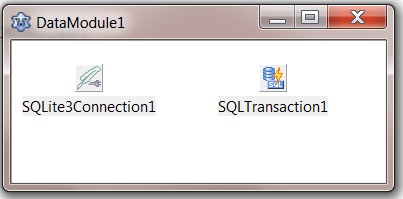 | |
| 50 | 41 | ||
| 51 | 42 | DataModule1 is used as the connection for all queries. | |
| 52 | 43 | ||
| 53 | 44 | I then create a DataModuleN for each table or view. | |
| 54 | 45 | ||
| 55 | - | ||
| 56 | - | ||
| 57 | - | ||
| 58 | - | ||
| 46 | + | 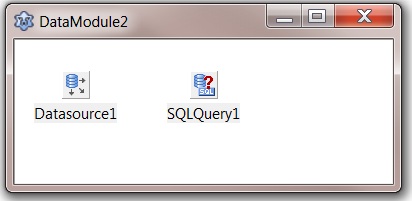 | |
| 59 | 47 | ||
| 60 | 48 | Each DataModuleN will need to have the DataModule1 unit (unit2 in this example) added to the USES clause to connect to the database. | |
| 61 | 49 | ||
| 62 | 50 | From here everything is the same as stated in [[SQLdb Tutorial1]]. The components are connected in the same way and access is identical. | |
| 63 | 51 | ||
| 64 | 52 | ## More uses of data modules | |
| 65 | 53 | ||
| 66 | 54 | ### Additional components | |
| 67 | 55 | ||
| 68 | 56 | In this example, DataModule1 had nothing more than a Connection and Transaction, but in a 'real' application, this container would typically also hold global non-visual components to be used by the application. | |
| 69 | 57 | ||
| 70 | 58 | For example, Load and Save INI settings, *TOpenDialog*, *TSaveDialog*, etc. The concept here is to isolate data access from the business logic of an application. A change in data source for any application is never a minimal task, but having the datasources isolated will make the change much easier. | |
| 71 | 59 | ||
| 72 | 60 | ### Debugging | |
| 73 | 61 | ||
| 74 | 62 | Debugging a program is also a difficult task. By separating data access and business logic, the code to be viewed is halved. Data access and business logic can be tested separately to at least halve the problem. | |
| 75 | 63 | ||
| 76 | 64 | The importance of the *DataModule* will become even more obvious when developing other applications using the same database and tables. The data module can of course be reused in the new application. | |
| 77 | 65 | ||
| 78 | 66 | --- | |
| 79 | 67 | *From the Free Pascal wiki, page "SQLdb Tutorial4", as it stood on 2017-02-24 after a change by FTurtle, out of the wiki's dump of 2024-05-26. Copyright stays with the author who wrote it, according to the old wiki's [[Licensing]] page. If you have concerns about this material, [message the admin](/wiki-contact).* |