

SQLdb Tutorial3: what changed
Revision 1 to 2. Removed lines have a minus sign; added lines have a plus sign.
| Old | New | Line | |
|---|---|---|---|
| 1 | 1 | ## Overview | |
| 2 | 2 | ||
| 3 | 3 | In this tutorial, you will learn how to | |
| 4 | 4 | ||
| 5 | 5 | - make your application suitable for multiple databases, including using a login form | |
| 6 | 6 | - get database data into normal controls (instead of database controls) | |
| 7 | 7 | - get data out of the controls and back into the database | |
| 8 | 8 | - execute parametrized queries. | |
| 9 | 9 | ||
| 10 | 10 | ## Multi database support | |
| 11 | 11 | ||
| 12 | 12 | Using any database and a login form, you can support multiple different database servers/embedded libraries that SQLDB supports. | |
| 13 | 13 | ||
| 14 | 14 | Advantages: | |
| 15 | 15 | ||
| 16 | 16 | - the user/programmer can dynamically use any sqldb t*connection, so he can choose between dbs | |
| 17 | 17 | ||
| 18 | 18 | Disadvantages: | |
| 19 | 19 | ||
| 20 | 20 | - More complicated SQL will likely need to still be adapted. Each database has its own dialect; it is of course possible to call db-specific SQL, this can grow into a maintenance problem. | |
| 21 | 21 | - You can't use T*connection specific properties (like *TIBConnection.Dialect* to set Firebird dialect). | |
| 22 | 22 | ||
| 23 | 23 | To use multi-database support, instead of your specific T*Connection such as *TIBConnection*, use *TSQLConnector* (not *TSQLConnection*), which dynamically (when the program is running) chooses the specific T*Connection to use based on its *ConnectorType* property: | |
| 24 | 24 | ||
| 25 | 25 | ``` pascal | |
| 26 | 26 | uses | |
| 27 | 27 | ... | |
| 28 | 28 | var | |
| 29 | 29 | Conn: TSQLConnector; | |
| 30 | 30 | begin | |
| 31 | 31 | Conn:=TSQLConnector.Create(nil); | |
| 32 | 32 | try | |
| 33 | 33 | // ...actual connector type is determined by this property. | |
| 34 | 34 | // Make sure the ChosenConfig.DBType string matches | |
| 35 | 35 | // the connectortype (e.g. see the string in the | |
| 36 | 36 | // T*ConnectionDef.TypeName for that connector . | |
| 37 | 37 | Conn.ConnectorType:=ChosenConfig.DBType; | |
| 38 | 38 | // the rest is as usual: | |
| 39 | 39 | Conn.HostName:='DBSERVER'; | |
| 40 | 40 | Conn.DatabaseName:='bigdatabase.fdb'; | |
| 41 | 41 | Conn.UserName:='SYSDBA'; | |
| 42 | 42 | Conn.Password:='masterkey'; | |
| 43 | 43 | try | |
| 44 | 44 | Conn.Open; | |
| 45 | 45 | ``` | |
| 46 | 46 | ||
| 47 | 47 | ## Login form | |
| 48 | 48 | ||
| 49 | 49 | As mentioned in [[SQLdb Tutorial1]], a user should login to the database using a form (or perhaps a configuration file that is securely stored), not via hardcoded credentials in the application. Besides security considerations, having to recompile the application whenever the database server information changes is not a very good idea. | |
| 50 | 50 | ||
| 51 | 51 | In *dbconfiggui.pas*, we will set up a login form that pulls in default values from an ini file, if it exists. This allows you to set up a default connection with some details (database server, database name) filled out for e.g. enterprise deployments. In the form, the user can add/edit his username/password, and test the connection before going further. | |
| 52 | 52 | ||
| 53 | - | ||
| 54 | - | ||
| 55 | - | ||
| 56 | - | ||
| 53 | + | 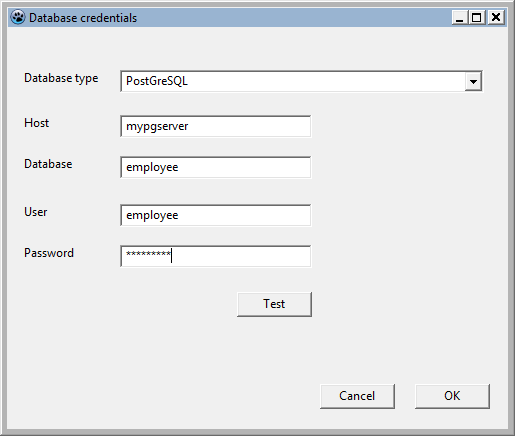 | |
| 57 | 54 | ||
| 58 | 55 | We use a separate dbconfig.pas unit with a *TDBConnectionConfig* class to store our chosen connection details. This class has support for reading default settings from an ini file. | |
| 59 | 56 | ||
| 60 | 57 | This allows use without GUI login forms (e.g. when running unattended/batch operations), and allows reuse in e.g. web applications. | |
| 61 | 58 | ||
| 62 | 59 | This *TDBConnectionConfig* class is surfaced in the login form as the *Config* property, so that the main program can show the config form modally, detect an OK click by the user and retrieve the selected configuration before closing the config form. | |
| 63 | 60 | ||
| 64 | 61 | ### Connection test callback function | |
| 65 | 62 | ||
| 66 | 63 | To keep the login form flexible (it may be used with other database layers like Zeos), we implement the test section as a callback function and let the main program deal with it. | |
| 67 | 64 | ||
| 68 | 65 | The definition in the login form in *dbconfiggui.pas*: | |
| 69 | 66 | ||
| 70 | 67 | ``` pascal | |
| 71 | 68 | type | |
| 72 | 69 | TConnectionTestFunction = function(ChosenConfig: TDBConnectionConfig): boolean of object; | |
| 73 | 70 | ``` | |
| 74 | 71 | ||
| 75 | 72 | The main form must implement a function that matches this definition to handle the test request from the config form. | |
| 76 | 73 | ||
| 77 | 74 | The callback function takes the config object passed on by the config form, and uses that to construct a connection with the chosen database type. It then simply tries to connect with the server; if it is succesful, it sets the function result to true, otherwise the result stays false. | |
| 78 | 75 | ||
| 79 | 76 | Because database connection attempts to non-existing servers can have a long timeout, we indicate to the user that he must wait by setting the cursor to the hourglass icon. | |
| 80 | 77 | ||
| 81 | 78 | ``` pascal | |
| 82 | 79 | uses | |
| 83 | 80 | ... | |
| 84 | 81 | dbconfig, dbconfiggui | |
| 85 | 82 | ... | |
| 86 | 83 | procedure TForm1.FormCreate(Sender: TObject); | |
| 87 | 84 | LoginForm:=TDBConfigForm.Create(self); | |
| 88 | 85 | try | |
| 89 | 86 | // The test button on dbconfiggui will link to this procedure: | |
| 90 | 87 | ... this links the callback in ''dbconfiggui.pas'' to the ConnectionTest function here... | |
| 91 | 88 | LoginForm.ConnectionTestCallback:=@ConnectionTest; | |
| 92 | 89 | ... | |
| 93 | 90 | function TForm1.ConnectionTest(ChosenConfig: TDBConnectionConfig): boolean; | |
| 94 | 91 | // Callback function that uses the info in dbconfiggui to test a connection | |
| 95 | 92 | // and return the result of the test to dbconfiggui | |
| 96 | 93 | var | |
| 97 | 94 | // Generic database connector... | |
| 98 | 95 | Conn: TSQLConnector; | |
| 99 | 96 | begin | |
| 100 | 97 | result:=false; | |
| 101 | 98 | Conn:=TSQLConnector.Create(nil); | |
| 102 | 99 | Screen.Cursor:=crHourglass; | |
| 103 | 100 | try | |
| 104 | 101 | // ...actual connector type is determined by this property. | |
| 105 | 102 | // Make sure the ChosenConfig.DBType string matches | |
| 106 | 103 | // the connectortype (e.g. see the string in the | |
| 107 | 104 | // T*ConnectionDef.TypeName for that connector . | |
| 108 | 105 | Conn.ConnectorType:=ChosenConfig.DBType; | |
| 109 | 106 | Conn.HostName:=ChosenConfig.DBHost; | |
| 110 | 107 | Conn.DatabaseName:=ChosenConfig.DBPath; | |
| 111 | 108 | Conn.UserName:=ChosenConfig.DBUser; | |
| 112 | 109 | Conn.Password:=ChosenConfig.DBPassword; | |
| 113 | 110 | try | |
| 114 | 111 | Conn.Open; | |
| 115 | 112 | result:=Conn.Connected; | |
| 116 | 113 | except | |
| 117 | 114 | // Result is already false | |
| 118 | 115 | end; | |
| 119 | 116 | Conn.Close; | |
| 120 | 117 | finally | |
| 121 | 118 | Screen.Cursor:=crDefault; | |
| 122 | 119 | Conn.Free; | |
| 123 | 120 | end; | |
| 124 | 121 | end; | |
| 125 | 122 | ``` | |
| 126 | 123 | ||
| 127 | 124 | Finally, the code in *dbconfiggui.pas* that actually calls the callback is linked to the Test button. It tests if the callback function is assigned (to avoid crashes), for completeness also checks if there is a valid configuration object and then simply calls the callback function: | |
| 128 | 125 | ||
| 129 | 126 | ``` pascal | |
| 130 | 127 | ... | |
| 131 | 128 | TDBConfigForm = class(TForm) | |
| 132 | 129 | ... | |
| 133 | 130 | private | |
| 134 | 131 | FConnectionTestFunction: TConnectionTestFunction; | |
| 135 | 132 | public | |
| 136 | 133 | property ConnectionTestCallback: TConnectionTestFunction write FConnectionTestFunction; | |
| 137 | 134 | ... | |
| 138 | 135 | procedure TDBConfigForm.TestButtonClick(Sender: TObject); | |
| 139 | 136 | begin | |
| 140 | 137 | // Call callback with settings, let it figure out if connection succeeded and | |
| 141 | 138 | // get test result back | |
| 142 | 139 | if assigned(FConnectionTestFunction) and assigned(FConnectionConfig) then | |
| 143 | 140 | if FConnectionTestFunction(FConnectionConfig) then | |
| 144 | 141 | showmessage('Connection test succeeded.') | |
| 145 | 142 | else | |
| 146 | 143 | showmessage('Connection test failed.') | |
| 147 | 144 | else | |
| 148 | 145 | showmessage('Error: connection test code has not been implemented.'); | |
| 149 | 146 | end; | |
| 150 | 147 | ``` | |
| 151 | 148 | ||
| 152 | 149 | ### Additions/modifications | |
| 153 | 150 | ||
| 154 | 151 | Possible additions/modifications for the login form: | |
| 155 | 152 | ||
| 156 | 153 | - Add command line arguments handling for dbconfig to preload suitable defaults, so the program can be used in batch scripts, shortcuts etc | |
| 157 | 154 | - Add a "Select profile" combobox in the login form; use multiple profiles in the ini file that specify database type and connection details. | |
| 158 | 155 | - Hide database type combobox when only one database type supported. | |
| 159 | 156 | - Hide username/password when you're sure an embedded database is selected. | |
| 160 | 157 | - Add support for specifying port number, or instance name with MS SQL Server connector | |
| 161 | 158 | - Add support for trusted authentication for dbs that support it (Firebird, MS SQL): disable ussername/password controls | |
| 162 | 159 | - If an embedded database is selected but the file does not exist: show a confirmation request and create the database | |
| 163 | 160 | - Create a command-line/TUI version of the login form (e.g. using the curses library) for command-line applictions | |
| 164 | 161 | ||
| 165 | 162 | Updates to this article/the code warmly welcomed. | |
| 166 | 163 | ||
| 167 | 164 | ## Getting database data into normal controls | |
| 168 | 165 | ||
| 169 | 166 | > **Note:** Before starting this section, please make sure you have set up the sample employee database as specified in [[SQLdb Tutorial0|SQLdb Tutorial0#Requirements]] | |
| 170 | 167 | ||
| 171 | 168 | In previous tutorials, data-bound controls were covered: special controls such as the [[TDBGrid]] that can bind its contents to a [[TDataSource]], get updates from that source and send user edits back. | |
| 172 | 169 | ||
| 173 | 170 | It is also possible to programmatically retrieve database content and fill any kind of control (or variable) with that content. As an example, we will look at filling a stringgrid with some salary details for the sample employee database table. | |
| 174 | 171 | ||
| 175 | 172 | On the main form, let's add a [[TStringGrid]] and retrieve the data (e.g. via a procedure *LoadSalaryGrid* called in the *OnCreate* event): | |
| 176 | 173 | ||
| 177 | 174 | ``` pascal | |
| 178 | 175 | // Load from DB | |
| 179 | 176 | try | |
| 180 | 177 | if not FConn.Connected then | |
| 181 | 178 | FConn.Open; | |
| 182 | 179 | if not FConn.Connected then | |
| 183 | 180 | begin | |
| 184 | 181 | ShowMessage('Error connecting to the database. Aborting data loading.'); | |
| 185 | 182 | exit; | |
| 186 | 183 | end; | |
| 187 | 184 | ||
| 188 | 185 | // Lowest salary | |
| 189 | 186 | // Note: we would like to only retrieve 1 row, but unfortunately the SQL | |
| 190 | 187 | // used differs for various dbs. As we'll deal with db dependent SQL later | |
| 191 | 188 | // in the tutorial, we leave this for now. | |
| 192 | 189 | // MS SQL: 'select top 1 '... | |
| 193 | 190 | FQuery.SQL.Text:='select ' + | |
| 194 | 191 | ' e.first_name, ' + | |
| 195 | 192 | ' e.last_name, ' + | |
| 196 | 193 | ' e.salary ' + | |
| 197 | 194 | 'from employee e ' + | |
| 198 | 195 | 'order by e.salary asc '; | |
| 199 | 196 | // ISO SQL+Firebird SQL: add | |
| 200 | 197 | //'rows 1 '; here and below... won't work on e.g. PostgreSQL though | |
| 201 | 198 | FTran.StartTransaction; | |
| 202 | 199 | FQuery.Open; | |
| 203 | 200 | SalaryGrid.Cells[1,1]:=FQuery.Fields[0].AsString; // i.e. Cells[Col,Row] | |
| 204 | 201 | SalaryGrid.Cells[2,1]:=FQuery.Fields[1].AsString; | |
| 205 | 202 | SalaryGrid.Cells[3,1]:=FQuery.Fields[2].AsString; | |
| 206 | 203 | FQuery.Close; | |
| 207 | 204 | // Always commit(retain) an opened transaction, even if only reading | |
| 208 | 205 | // this will allow updates by others to be seen when reading again | |
| 209 | 206 | FTran.Commit; | |
| 210 | 207 | ... | |
| 211 | 208 | end; | |
| 212 | 209 | except | |
| 213 | 210 | on D: EDatabaseError do | |
| 214 | 211 | begin | |
| 215 | 212 | MessageDlg('Error', 'A database error has occurred. Technical error message: ' + | |
| 216 | 213 | D.Message, mtError, [mbOK], 0); | |
| 217 | 214 | end; | |
| 218 | 215 | end; | |
| 219 | 216 | ``` | |
| 220 | 217 | ||
| 221 | 218 | Things to note: we catch database errors using try..except. You'll notice we forgot to roll back the transaction in case of errors - which is left as an exercise to the reader. | |
| 222 | 219 | ||
| 223 | 220 | We *Open* the query object, thereby asking *FQuery* to query the database via its *SQL* statement. Once this is done, we're on the first row of data. We simply assume there is data now; this is actually a programming error: it would be tidier to check for *FQuery.EOF* being true (or *FQuery.RecordCount* being \>0). | |
| 224 | 221 | ||
| 225 | 222 | Next, we retrieve the data from the first row of results. If we wanted to move to the next row, we'd use *FQuery.Next*, but that is not necessary here. We put the results in the stringgrid, giving the lowest salary in the list. A similar approach can be taken for the highest salary. | |
| 226 | 223 | ||
| 227 | 224 | ## Adapting SQL for various databases | |
| 228 | 225 | ||
| 229 | 226 | As we noticed above, various databases support various versions of SQL (either in addition to or in contradiction to the official ISO SQL standards). Fortunately, you can customize your application based on which DB it ends up using, which will be demonstrated by getting the standard deviation of the employees' salaries - built into e.g. PostgreSQL SQL but not available by default in e.g. Firebird. | |
| 230 | 227 | ||
| 231 | 228 | In our LoadSalaryGrid procedure, we'll use the SQL for PostgreSQL and build a code solution for all other databases. First detect which database is loaded, below the other lines add: | |
| 232 | 229 | ||
| 233 | 230 | ``` pascal | |
| 234 | 231 | ... | |
| 235 | 232 | SalaryGrid.Cells[3,2]:=FQuery.Fields[2].AsString; | |
| 236 | 233 | FQuery.Close; | |
| 237 | 234 | // Always commit(retain) an opened transaction, even if only reading | |
| 238 | 235 | FTran.Commit; | |
| 239 | 236 | //end of existing code | |
| 240 | 237 | ||
| 241 | 238 | if FConn.ConnectorType = 'PostGreSQL' then | |
| 242 | 239 | begin | |
| 243 | 240 | // For PostgreSQL, use a native SQL solution: | |
| 244 | 241 | FQuery.SQL.Text:='select stddev_pop(salary) from employee '; | |
| 245 | 242 | FTran.StartTransaction; | |
| 246 | 243 | FQuery.Open; | |
| 247 | 244 | if not FQuery.EOF then | |
| 248 | 245 | SalaryGrid.Cells[3,3]:=FQuery.Fields[0].AsString; | |
| 249 | 246 | FQuery.Close; | |
| 250 | 247 | // Always commit(retain) an opened transaction, even if only reading | |
| 251 | 248 | FTran.Commit; | |
| 252 | 249 | end | |
| 253 | 250 | else | |
| 254 | 251 | begin | |
| 255 | 252 | // For other database, use the code approach: | |
| 256 | 253 | ....see below... | |
| 257 | 254 | end; | |
| 258 | 255 | ``` | |
| 259 | 256 | ||
| 260 | 257 | Notice the use of *ConnectorType*; the string used must match exactly. We also properly check for empty results from the query (which might happen if the employee table is empty). | |
| 261 | 258 | ||
| 262 | 259 | ... now let's implement a code-based solution for other databases that do not support standard deviation: | |
| 263 | 260 | ||
| 264 | 261 | ``` pascal | |
| 265 | 262 | // For other databases, use the code approach: | |
| 266 | 263 | // 1. Get average of values | |
| 267 | 264 | FQuery.SQL.Text:='select avg(salary) from employee '; | |
| 268 | 265 | FQuery.Open; | |
| 269 | 266 | if FQuery.EOF then | |
| 270 | 267 | SalaryGrid.Cells[3,3]:='No data' | |
| 271 | 268 | else | |
| 272 | 269 | begin | |
| 273 | 270 | Average:=FQuery.Fields[0].AsFloat; | |
| 274 | 271 | FQuery.Close; | |
| 275 | 272 | // 2. For each value, calculate the square of (value-average), and add it up | |
| 276 | 273 | FQuery.SQL.Text:='select salary from employee where salary is not null '; | |
| 277 | 274 | FQuery.Open; | |
| 278 | 275 | while not FQuery.EOF do | |
| 279 | 276 | begin | |
| 280 | 277 | DifferencesSquared:=DifferencesSquared+Sqr(FQuery.Fields[0].AsFloat-Average); | |
| 281 | 278 | Count:=Count+1; | |
| 282 | 279 | FQuery.Next; | |
| 283 | 280 | end; | |
| 284 | 281 | // 3. Now calculate the average "squared difference" and take the square root | |
| 285 | 282 | if Count>0 then //avoid division by 0 | |
| 286 | 283 | SalaryGrid.Cells[3,3]:=FloatToStr(Sqrt(DifferencesSquared/Count)) | |
| 287 | 284 | else | |
| 288 | 285 | SalaryGrid.Cells[3,3]:='No data'; | |
| 289 | 286 | end; | |
| 290 | 287 | FQuery.Close; | |
| 291 | 288 | ``` | |
| 292 | 289 | ||
| 293 | 290 | Note that we use *FQuery.EOF* to check for empty data (and avoid division by zero errors etc). The loop shows how to: | |
| 294 | 291 | ||
| 295 | 292 | - retrieve a database value into a variable | |
| 296 | 293 | - use *FQuery.Next* to move to the next record | |
| 297 | 294 | - properly check if the query dataset has hit the last record, then stop retrieving data. | |
| 298 | 295 | ||
| 299 | 296 | The resulting screen should show something like this - note the use of a decimal comma - while your computer may show a decimal point depending on your locale: | |
| 300 | 297 | ||
| 301 | - | ||
| 302 | - | ||
| 303 | - | ||
| 304 | - | ||
| 298 | + | 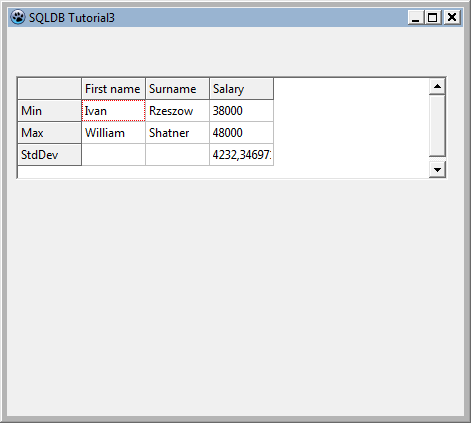 | |
| 305 | 299 | ||
| 306 | 300 | ### Revisiting our lowest/highest salary | |
| 307 | 301 | ||
| 308 | 302 | *This section gives some more useful details on SQL but is not required to work through for the rest of the tutorial* | |
| 309 | 303 | ||
| 310 | 304 | Now we know how to deal with detecting various database connections, we can adjust the SQL that gets the lowest and highest salary as well to make use of db specific functionality. | |
| 311 | 305 | ||
| 312 | 306 | An example: this would work for MS SQL Server by limiting the number of returned rows to just the first: | |
| 313 | 307 | ||
| 314 | 308 | ``` SQL | |
| 315 | 309 | select top 1 | |
| 316 | 310 | e.first_name, e.last_name, e.salary | |
| 317 | 311 | from employee e | |
| 318 | 312 | order by e.salary asc | |
| 319 | 313 | ``` | |
| 320 | 314 | ||
| 321 | 315 | to get the lowest salary. | |
| 322 | 316 | ||
| 323 | 317 | This efficiently returns one record. Other databases use other syntax, such as the ISO ROWS 1. The diligent SQL student will soon learn not to miss out that important part and request entire large recordsets just for one required record! | |
| 324 | 318 | ||
| 325 | 319 | Let's briefly examine other ways to achieve the same thing, that are worth knowing. | |
| 326 | 320 | ||
| 327 | 321 | Another way to retrieve the record(s) with the minimum salary would be :'' | |
| 328 | 322 | ||
| 329 | 323 | ``` SQL | |
| 330 | 324 | SELECT e.first_name, e.last_name, e.salary FROM employee e WHERE e.salary=(SELECT min(salary) FROM employee) | |
| 331 | 325 | ``` | |
| 332 | 326 | ||
| 333 | 327 | SQL students would greatly benefit from researching Common Table Expressions. | |
| 334 | 328 | ||
| 335 | 329 | A CTE allows a virtual temporary table to be used in a following expression, allowing you to clearly code some very complex queries that otherwise may not be possible. Knowing about CTEs will catapult you ahead of colleagues who have never heard of them! For example the above may be rewritten (example in Microsoft SQL Server syntax) as : '' | |
| 336 | 330 | ||
| 337 | 331 | ``` SQL | |
| 338 | 332 | WITH TheMinimum as | |
| 339 | 333 | ( | |
| 340 | 334 | SELECT min(salary) as MinimumPay FROM Employee | |
| 341 | 335 | ) | |
| 342 | 336 | SELECT e.first_name, e.last_name, e.salary FROM Employee e WHERE e.salary=(SELECT MinimumPay FROM TheMinimum) | |
| 343 | 337 | ``` | |
| 344 | 338 | ||
| 345 | 339 | Several such temporary tables may be chained together, each using the results from the previous tables. You can treat these virtual tables as though they were real tables in the database, using JOINs to link recordsets together. And it can be very useful for quick tests using hardcoded data - this can be run without any database connection : | |
| 346 | 340 | ||
| 347 | 341 | ``` SQL | |
| 348 | 342 | WITH TestEmployee as | |
| 349 | 343 | ( | |
| 350 | 344 | SELECT 'Fred' as first_name, 'Bloggs' as last_name, 10500 as salary | |
| 351 | 345 | UNION | |
| 352 | 346 | SELECT 'Joe' as first_name, 'Public' as last_name, 10000 as salary | |
| 353 | 347 | UNION | |
| 354 | 348 | SELECT 'Mike' as first_name, 'Mouse' as last_name, 11000 as salary | |
| 355 | 349 | ), | |
| 356 | 350 | TheMinimum as | |
| 357 | 351 | ( | |
| 358 | 352 | SELECT min(salary) as MinimumPay FROM TestEmployee | |
| 359 | 353 | ) | |
| 360 | 354 | SELECT e.first_name, e.last_name, e.salary FROM TestEmployee e WHERE e.salary=(SELECT MinimumPay FROM TheMinimum) | |
| 361 | 355 | ``` | |
| 362 | 356 | ||
| 363 | 357 | You can end up with quite long strings for the code of such SQL queries, but it is only *one* query and may be called from anywhere where you are limited to a simple single expression - it can be useful to answer complex queries without resorting to functions or stored procedures. | |
| 364 | 358 | ||
| 365 | 359 | ## Getting data out of normal controls into the database | |
| 366 | 360 | ||
| 367 | 361 | Previously, we have seen: | |
| 368 | 362 | ||
| 369 | 363 | - how to let SQLDB update the database with data-bound controls (earlier tutorials) | |
| 370 | 364 | - how to get data out of the database using queries (the section above) | |
| 371 | 365 | ||
| 372 | 366 | You can also execute SQL to get arbitrary data back into the database via code. This allows you to use variables or controls that have no db aware equivalent such as sliders or custom controls to enter data into the database, at the expense of a bit more coding. | |
| 373 | 367 | ||
| 374 | 368 | As an example, we are going to allow the user to change the lowest and highest salary in the stringgrid. | |
| 375 | 369 | ||
| 376 | 370 | For ease of editing, set the grid's *Options*/*goEditing* to true; then assign the procedure below to the OnValidate event for the grid, which will be called every time a user has finished updating the grid. | |
| 377 | 371 | ||
| 378 | 372 | ### Parameterized queries | |
| 379 | 373 | ||
| 380 | 374 | The following code also demonstrates how to use parameterized queries to avoid SQL injection, fiddling with quoting for string values, date formatting, etc. | |
| 381 | 375 | ||
| 382 | 376 | As you can see in the code, you can name your parameters whatever you wish and prefix them with : in the SQL. In code, you can set/get their values by *\<somequery\>.Params.ParamByName('\<thename\>').As'\<variabletype\>'; the code demonstrates*.AsFloat*and*.AsString''. | |
| 383 | 377 | ||
| 384 | 378 | Parameterized queries are especially useful (and can be much faster) if you run the same query, only with different parameters, in a loop (think e.g. bulk loading of data). | |
| 385 | 379 | ||
| 386 | 380 | Continuing with our example: after having set up the query SQL and parameters, the transaction is started (and later on committed) as usual, then the query is run by calling *ExecSQL* (which does not return a result set; if the SQL statement were e.g. a SELECT or INSERT...RETURNING that does return data, you would use *Open* as in the examples above): | |
| 387 | 381 | ||
| 388 | 382 | ``` pascal | |
| 389 | 383 | procedure TForm1.SalaryGridValidateEntry(sender: TObject; aCol, aRow: Integer; | |
| 390 | 384 | const OldValue: string; var NewValue: String); | |
| 391 | 385 | begin | |
| 392 | 386 | // Only these cells have min and max salary: | |
| 393 | 387 | if (aCol=3) and ((aRow=1) or (aRow=2)) then | |
| 394 | 388 | begin | |
| 395 | 389 | // Allow updates to min and max salary if positive numerical data is entered | |
| 396 | 390 | if StrToFloatDef(NewValue,-1)>0 then | |
| 397 | 391 | begin | |
| 398 | 392 | // Storing the primary key in e.g. a hidden cell in the grid and using that in our | |
| 399 | 393 | // update query would be cleaner, but we can do it the hard way as well: | |
| 400 | 394 | FQuery.SQL.Text:='update employee set salary=:newsalary '+ | |
| 401 | 395 | ' where first_name=:firstname and last_name=:lastname and salary=:salary '; | |
| 402 | 396 | FQuery.Params.ParamByName('newsalary').AsFloat:=StrToFloatDef(NewValue,0); | |
| 403 | 397 | FQuery.Params.ParamByName('firstname').AsString:=SalaryGrid.Cells[1,aRow]; | |
| 404 | 398 | FQuery.Params.ParamByName('lastname').AsString:=SalaryGrid.Cells[2,aRow]; | |
| 405 | 399 | FQuery.Params.ParamByName('salary').AsFloat:=StrToFloatDef(OldValue,0); | |
| 406 | 400 | FTran.StartTransaction; | |
| 407 | 401 | FQuery.ExecSQL; | |
| 408 | 402 | FTran.Commit; | |
| 409 | 403 | LoadSalaryGrid; //reload standard deviation | |
| 410 | 404 | end | |
| 411 | 405 | else | |
| 412 | 406 | begin | |
| 413 | 407 | // Notify user that his input was wrong... he'll be wondering otherwise: | |
| 414 | 408 | Showmessage('Invalid salary entered.'); | |
| 415 | 409 | NewValue:=OldValue; | |
| 416 | 410 | end; | |
| 417 | 411 | end | |
| 418 | 412 | else | |
| 419 | 413 | begin | |
| 420 | 414 | // Silently discard edits to any other cells | |
| 421 | 415 | NewValue:=OldValue; | |
| 422 | 416 | end; | |
| 423 | 417 | end; | |
| 424 | 418 | ``` | |
| 425 | 419 | ||
| 426 | 420 | Note how we forgot to add a try..except block to this code to nicely catch database errors and display a sensible error message. If you are running the Firebird sample EMPLOYEE database for this tutorial, try to change the salary to a very low value (say 1) and see what happens. | |
| 427 | 421 | ||
| 428 | 422 | Finally, while this example showed an UPDATE SQL query, you could just as well run INSERT queries to insert new data programmatically. Also, you can use parameters in any kind of SQL query (SELECT, UPDATE, etc) as long as you use them for fields, not for table/view/procedure names. | |
| 429 | 423 | ||
| 430 | 424 | ## Summary | |
| 431 | 425 | ||
| 432 | 426 | This tutorial explained: | |
| 433 | 427 | ||
| 434 | 428 | - how to code for multiple database types | |
| 435 | 429 | - how to use a login form to decouple db access configuration from your program | |
| 436 | 430 | - how to retrieve and update data programmatically | |
| 437 | 431 | ||
| 438 | 432 | ## Code | |
| 439 | 433 | ||
| 440 | 434 | Since November 2012, the code can be found in \$(lazarusdir)examples/database/sqldbtutorial3 | |
| 441 | 435 | ||
| 442 | 436 | If you have an older version (e.g. Lazarus 1.0.2), you can also download the code via [the Lazarus SVN website](http://svn.freepascal.org/svn/lazarus/trunk/examples/database/sqldbtutorial3/) | |
| 443 | 437 | ||
| 444 | 438 | ## See also | |
| 445 | 439 | ||
| 446 | 440 | - [[SQLdb Tutorial0]]: Instructions for setting up sample tables/sample data for the tutorial series. | |
| 447 | 441 | - [[SQLdb Tutorial1]]: First part of the DB tutorial series, showing how to set up a grid that shows database data | |
| 448 | 442 | - [[SQLdb Tutorial2]]: Second part of the DB tutorial series, showing editing, inserting etc. | |
| 449 | 443 | - [[SQLdb Tutorial4]]: Fourth part of the DB tutorial series, showing how to use data modules | |
| 450 | 444 | - [[Lazarus Database Overview]]: Information about the databases that Lazarus supports. Links to database-specific notes. | |
| 451 | 445 | - [[SQLdb Package]]: information about the SQLdb package | |
| 452 | 446 | - [[SQLdb Programming Reference]]: an overview of the interaction of the SQLdb database components | |
| 453 | 447 | - [using parameters](http://www.freepascal.org/docs-html/fcl/sqldb/usingparams.html) | |
| 454 | 448 | - [[SqlDBHowto]]: information about using the SQLdb package | |
| 455 | 449 | - [[Working With TSQLQuery]]: information about TSQLQuery | |
| 456 | 450 | ||
| 457 | 451 | --- | |
| 458 | 452 | *From the Free Pascal wiki, page "SQLdb Tutorial3", as it stood on 2024-03-28 after a change by Ariben, out of the wiki's dump of 2024-05-26. Copyright stays with the author who wrote it, according to the old wiki's [[Licensing]] page. If you have concerns about this material, [message the admin](/wiki-contact).* |