

SQLdb Tutorial3/fr: what changed
Revision 2 to 3. Removed lines have a minus sign; added lines have a plus sign.
| Old | New | Line | |
|---|---|---|---|
| 1 | + | --- | |
| 2 | + | [[Portal:Databases|**Portail de la base de données**]] | |
| 3 | + | Références: · [[Databases/fr|Information générale]] · [[Database libraries/fr|Bibliothèques]] · [[Database field type/fr|Types de champ]] · [[Data Controls tab/fr|Contrôles]] · [[Lazarus DB Faq/fr|FAQ]] · [[SqlDBHowto/fr|Comment faire en SQL ?]] · [[Working With TSQLQuery/fr|Travailler avec TSQLQuery]] · [[How to write in-memory database applications in Lazarus/FPC/fr|Applications de base de données en mémoire]] · Tutoriels/articles pratiques : · [[Lazarus Database Overview/fr|Vue d'ensemble]] · [[SQLdb Tutorial0/fr|0 - Configuration de la base de données]] · [[SQLdb Tutorial1/fr|1 - Commençons]] · [[SQLdb Tutorial2/fr|2 - Edition]] · 3 - Requêtes · [[SQLdb Tutorial4/fr|4 - Modules de données]] · [[SQLdb Programming Reference/fr|Référence de programmation SQLdb]] · Bases de données · [[Advantage Database Server/fr|Advantage]] \- [[MySQLDatabases/fr|MySQL]] \- [[mssqlconn/fr|MSSQL]] \- [[postgres/fr|Postgres]] \- [[Firebird/fr|Interbase]] \- [[Firebird/fr|Firebird]] \- [[Oracle/fr|Oracle]] \- [[ODBCConn/fr|ODBC]] \- [[TParadox/fr|Paradox]] \- [[SQLite/fr|SQLite]] \- [[Lazarus Tdbf Tutorial/fr|dBASE]] \- [[MS Access/fr|MS Access]] \- [[Zeos tutorial/fr|Zeos]] | |
| 4 | + | ||
| 5 | + | ||
| 1 | 6 | ## Vue d'ensemble | |
| 2 | 7 | ||
| 3 | - | ||
| 8 | + | Dans ce tutoriel, vous allez apprendre comment : | |
| 4 | 9 | ||
| 5 | - | ||
| 6 | - | ||
| 7 | - | ||
| 8 | - | ||
| 10 | + | * Rendre votre application adapté à de multiples bases de données, y compris avec une fiche de connexion. | |
| 11 | + | * Obtenir des données de la base dans des contrôle normaux (au lieu de contrôles sensibles aux données). | |
| 12 | + | * Extraire les données des contrôles et les retourner dans la base de données | |
| 13 | + | * Exécuter des requêtes paramétrées. | |
| 9 | 14 | ||
| 10 | 15 | ## Support Multi-database | |
| 11 | 16 | ||
| 12 | - | ||
| 13 | - | ||
| 14 | - | ||
| 17 | + | En utilisant n'importe quelle base de données et une fiche de connexion, vous pouvez prendre en charge plusieurs serveurs de base de données/bibliothèques intégrées compatibles avec SQLDB. | |
| 15 | 18 | ||
| 16 | - | ||
| 19 | + | Avantages : | |
| 17 | 20 | ||
| 18 | - | ||
| 21 | + | * L'utilisateur/programmeur peut utiliser dynamiquement toute T*Connection de SQLdb, donc il peut choisir entre plusieurs SGBD. | |
| 19 | 22 | ||
| 20 | - | ||
| 21 | - | ||
| 23 | + | Inconvénients : | |
| 22 | 24 | ||
| 23 | - | ||
| 25 | + | * Un SQL plus compliqué sera demandé pour être encore adapté. Chaque SGBD a son propre dialecte ; c'est bien sûr possible d'appeler du SQL spécifique au SGBD, mais cela peut augmenter les problèmes de maintenance. | |
| 26 | + | * Vous ne pouvez pas utiliser les propriétés spécifiques des T*Connection (telles que _TIBConnection.Dialect_ pour définir le dialecte Firebird). | |
| 24 | 27 | ||
| 25 | - | ||
| 28 | + | Pour utiliser la prise en charge des bases multiples, à la place de votre T*Connection spécifique tel que _TIBConnection_ , utilisez _TSQLConnector_ (et non pas _TSQLConnection_), qui, à l'exécution du programme, choisit le T*Connection spécifique qui doit être utilisé dans sa propriété _ConnectorType_ : | |
| 29 | + | ``` | |
| 26 | 30 | uses | |
| 27 | - | ||
| 28 | - | ||
| 29 | - | ||
| 30 | - | ||
| 31 | - | ||
| 32 | - | ||
| 33 | - | ||
| 34 | - | ||
| 35 | - | ||
| 36 | - | ||
| 37 | - | ||
| 38 | - | ||
| 39 | - | ||
| 40 | - | ||
| 41 | - | ||
| 42 | - | ||
| 43 | - | ||
| 44 | - | ||
| 31 | + | ... | |
| 32 | + | var | |
| 33 | + | Conn: TSQLConnector; | |
| 34 | + | begin | |
| 35 | + | Conn:=TSQLConnector.Create(nil); | |
| 36 | + | try | |
| 37 | + | // ...actual connector type is determined by this property. | |
| 38 | + | // Make sure the ChosenConfig.DBType string matches | |
| 39 | + | // the connectortype (e.g. see the string in the | |
| 40 | + | // T*ConnectionDef.TypeName for that connector . | |
| 41 | + | Conn.ConnectorType:=ChosenConfig.DBType; | |
| 42 | + | // the rest is as usual: | |
| 43 | + | Conn.HostName:='DBSERVER'; | |
| 44 | + | Conn.DatabaseName:='bigdatabase.fdb'; | |
| 45 | + | Conn.UserName:='SYSDBA'; | |
| 46 | + | Conn.Password:='masterkey'; | |
| 47 | + | try | |
| 48 | + | Conn.Open; | |
| 45 | 49 | ``` | |
| 46 | 50 | ||
| 47 | 51 | ## Fiche de connexion | |
| 48 | 52 | ||
| 49 | - | ||
| 53 | + | Comme indiqué dans [[SQLdb Tutorial1/fr|SQLdb Tutorial1]], un utilisateur devrait se connecter à une base de données via une fiche (ou peut-être un fichier de configuration enregistré de manière sécurisée), et non à travers des accréditations (_credentials_) dans l'application. Outre les considérations de sécurité, avoir à recompiler l'application dès que les informations de sécurité sur serveur de base de données changent n'est pas une bonne idée. | |
| 50 | 54 | ||
| 51 | - | ||
| 55 | + | Dans _dbconfiggui.pas_ , nous implanterons une fiche de connexion qui tire les valeurs par défaut d'un fichier ini, s'il existe. Cela vous permet de configurer une connexion par défaut avec quelques détails (serveur et nom de la base de données) rempli pour les dépliements en entreprise p.ex. | |
| 52 | 56 | ||
| 53 | - | ||
| 57 | + | Dans la fiche, l'utilisateur peut ajouter/modifier son nom d'utilisateur et son mot de passe et tester la connexion avant d'aller plus loin. | |
| 54 | 58 | ||
| 55 | - | ||
| 59 | + | [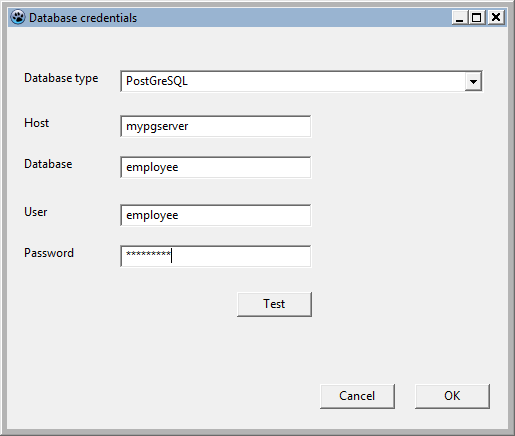](</File:dbloginform.png>) | |
| 56 | 60 | ||
| 57 | - | ||
| 61 | + | Nous utilisons une unité dbconfig.pas séparée avec une classe _TDBConnectionConfig_ pour stocker les détails de notre connexion choisie. Cette classe prend en charge la lecture des réglages par défaut du fichier ini. | |
| 58 | 62 | ||
| 59 | - | ||
| 63 | + | Ceci permet l'emploi sans fiche de connexion IHM (p.ex. l'exécution d'opérations batch), et permet la réutilisation dans les applications Web. | |
| 60 | 64 | ||
| 61 | - | ||
| 65 | + | Cette classe _TDBConnectionConfig_ apparaît dans la fiche de connexion comme propriété _Config_ , afin que le programme principal puisse afficher le formulaire de configuration de manière modale, détecter un clic OK par l'utilisateur et récupérer la configuration sélectionnée avant de fermer le formulaire de configuration. | |
| 62 | 66 | ||
| 63 | 67 | ### Fonction de rappel de test de connexion | |
| 64 | 68 | ||
| 65 | - | ||
| 66 | - | ||
| 67 | - | ||
| 69 | + | Pour garder la fiche de connexion flexible (elle pourrait être utilisée avec d'autres couches d'accès aux données comme Zeos), nous implémentons la section test comme une fonction de rappel et laissons le programme principal traiter avec. | |
| 68 | 70 | ||
| 69 | - | ||
| 71 | + | La définition dans la fiche de connexion dans _dbconfiggui.pas_ : | |
| 72 | + | ``` | |
| 70 | 73 | type | |
| 71 | - | ||
| 74 | + | TConnectionTestFunction = function(ChosenConfig: TDBConnectionConfig): boolean of object; | |
| 72 | 75 | ``` | |
| 73 | 76 | ||
| 74 | - | ||
| 75 | - | ||
| 76 | - | ||
| 77 | + | La fiche principale doit implémenter une fonction avec la même signature pour gérer la requête de test depuis la fiche de configuration. | |
| 77 | 78 | ||
| 78 | - | ||
| 79 | + | La fonction de rappel prend l'objet config transmis par la fiche de configuration et l'utilise pour construire une connexion avec le type de base de données choisie. Il essaie simplement de se connecter au serveur ; si il réussit, le résultat de la fonction prend la valeur True, sinon le résultat reste False. | |
| 79 | 80 | ||
| 80 | - | ||
| 81 | + | Parce que des essais de connexion de base de données à es serveurs inexistant peut avoir de longs temps morts (_timeout_), nous indiquons à l'utilisateur qu'il doit attendre en mettant le sablier comme curseur de souris. | |
| 82 | + | ``` | |
| 81 | 83 | uses | |
| 82 | - | ||
| 83 | - | ||
| 84 | - | ||
| 85 | - | ||
| 86 | - | ||
| 87 | - | ||
| 88 | - | ||
| 89 | - | ||
| 90 | - | ||
| 91 | - | ||
| 92 | - | ||
| 93 | - | ||
| 94 | - | ||
| 95 | - | ||
| 96 | - | ||
| 97 | - | ||
| 98 | - | ||
| 99 | - | ||
| 100 | - | ||
| 101 | - | ||
| 102 | - | ||
| 103 | - | ||
| 104 | - | ||
| 105 | - | ||
| 106 | - | ||
| 107 | - | ||
| 108 | - | ||
| 109 | - | ||
| 110 | - | ||
| 111 | - | ||
| 112 | - | ||
| 113 | - | ||
| 114 | - | ||
| 115 | - | ||
| 116 | - | ||
| 84 | + | ... | |
| 85 | + | dbconfig, dbconfiggui | |
| 86 | + | ... | |
| 87 | + | procedure TForm1.FormCreate(Sender: TObject); | |
| 88 | + | LoginForm:=TDBConfigForm.Create(self); | |
| 89 | + | try | |
| 90 | + | // The test button on dbconfiggui will link to this procedure: | |
| 91 | + | ... this links the callback in ''dbconfiggui.pas'' to the ConnectionTest function here... | |
| 92 | + | LoginForm.ConnectionTestCallback:=@ConnectionTest; | |
| 93 | + | ... | |
| 94 | + | function TForm1.ConnectionTest(ChosenConfig: TDBConnectionConfig): boolean; | |
| 95 | + | // Callback function that uses the info in dbconfiggui to test a connection | |
| 96 | + | // and return the result of the test to dbconfiggui | |
| 97 | + | var | |
| 98 | + | // Generic database connector... | |
| 99 | + | Conn: TSQLConnector; | |
| 100 | + | begin | |
| 101 | + | result:=false; | |
| 102 | + | Conn:=TSQLConnector.Create(nil); | |
| 103 | + | Screen.Cursor:=crHourglass; | |
| 104 | + | try | |
| 105 | + | // ...actual connector type is determined by this property. | |
| 106 | + | // Make sure the ChosenConfig.DBType string matches | |
| 107 | + | // the connectortype (e.g. see the string in the | |
| 108 | + | // T*ConnectionDef.TypeName for that connector . | |
| 109 | + | Conn.ConnectorType:=ChosenConfig.DBType; | |
| 110 | + | Conn.HostName:=ChosenConfig.DBHost; | |
| 111 | + | Conn.DatabaseName:=ChosenConfig.DBPath; | |
| 112 | + | Conn.UserName:=ChosenConfig.DBUser; | |
| 113 | + | Conn.Password:=ChosenConfig.DBPassword; | |
| 114 | + | try | |
| 115 | + | Conn.Open; | |
| 116 | + | result:=Conn.Connected; | |
| 117 | + | except | |
| 118 | + | // Result is already false | |
| 119 | + | end; | |
| 120 | + | Conn.Close; | |
| 121 | + | finally | |
| 122 | + | Screen.Cursor:=crDefault; | |
| 123 | + | Conn.Free; | |
| 124 | + | end; | |
| 117 | 125 | end; | |
| 118 | - | ||
| 119 | - | ||
| 120 | - | ||
| 121 | - | ||
| 122 | - | ||
| 123 | - | ||
| 124 | 126 | ``` | |
| 125 | 127 | ||
| 126 | - | ||
| 127 | - | ||
| 128 | - | ||
| 129 | - | ||
| 130 | - | ||
| 131 | - | ||
| 132 | - | ||
| 133 | - | ||
| 134 | - | ||
| 135 | - | ||
| 128 | + | Finalement, le code dans _dbconfiggui.pas_ qui appelle réellement la fonction de rappel est relie au bouton de Test. Il test si la fonction de rappel est affectée (pour éviter les plantages), pour la complétude, contrôlez aussi qu'il y a un objet de configuration valide et puis appelez la fonction de rappel : | |
| 129 | + | ``` | |
| 136 | 130 | ... | |
| 137 | - | ||
| 138 | - | ||
| 139 | - | ||
| 140 | - | ||
| 141 | - | ||
| 142 | - | ||
| 143 | - | ||
| 144 | - | ||
| 145 | - | ||
| 146 | - | ||
| 147 | - | ||
| 148 | - | ||
| 131 | + | TDBConfigForm = class(TForm) | |
| 132 | + | ... | |
| 133 | + | private | |
| 134 | + | FConnectionTestFunction: TConnectionTestFunction; | |
| 135 | + | public | |
| 136 | + | property ConnectionTestCallback: TConnectionTestFunction write FConnectionTestFunction; | |
| 137 | + | ... | |
| 138 | + | procedure TDBConfigForm.TestButtonClick(Sender: TObject); | |
| 139 | + | begin | |
| 140 | + | // Call callback with settings, let it figure out if connection succeeded and | |
| 141 | + | // get test result back | |
| 142 | + | if assigned(FConnectionTestFunction) and assigned(FConnectionConfig) then | |
| 143 | + | if FConnectionTestFunction(FConnectionConfig) then | |
| 144 | + | showmessage('Connection test succeeded.') | |
| 145 | + | else | |
| 146 | + | showmessage('Connection test failed.') | |
| 147 | + | else | |
| 148 | + | showmessage('Error: connection test code has not been implemented.'); | |
| 149 | + | end; | |
| 149 | 150 | ``` | |
| 150 | 151 | ||
| 151 | 152 | ### Ajouts/modifications | |
| 152 | 153 | ||
| 153 | - | ||
| 154 | + | Possibles ajouts/modifications pour la fiche de connexion : | |
| 154 | 155 | ||
| 155 | - | ||
| 156 | - | ||
| 157 | - | ||
| 158 | - | ||
| 159 | - | ||
| 160 | - | ||
| 161 | - | ||
| 162 | - | ||
| 156 | + | * Ajouter les arguments de ligne de commande pour dbconfig pour pré-charger les valeurs par défaut adaptées, ainsi le programme peut être utilisé dans des scripts batch, raccourcis, etc... | |
| 157 | + | * Ajout d'une combobox "Sélection de profil" dans la fiche de connexion : utiliser de multiples profils dans le fichier ini qui spécifient le type de base de données et les détais de connexion. | |
| 158 | + | * Masquer la combobox type de base de données quand celle-ci est unique. | |
| 159 | + | * Masquer les nom de connexion/mot de passe quand vous êtes sûr qu'une base de données incorporée est sélectionnée. | |
| 160 | + | * Ajouter la prise en charge du numéro de port ou du nom d'instance avec le connecteur MS SQL Server. | |
| 161 | + | * Ajouter la prise en charge de l'authentification de confiance (_trusted authentication_) pour la prise en charge des SGBD qui la supporte (Firebird, MS SQL) : désactiver les contrôles nom de connexion/mot de passe. | |
| 162 | + | * Si une base de donnée incorporée est sélectionnée mais que le fichier n'existe pas : Montrer une boîte de confirmation et créer la base de données. | |
| 163 | + | * Créer une version en ligne de commande (Text UI) de la fiche de connexion (p.ex. en utilisant la bibliothèque Curses) pour les applications en mode console. | |
| 163 | 164 | ||
| 164 | - | ||
| 165 | + | Mettre à jour cet article/le code serait chaleureusement apprécié. | |
| 165 | 166 | ||
| 166 | 167 | ## Obtention de données de la base dans des contrôles non liés aux données | |
| 167 | 168 | ||
| 168 | - | ||
| 169 | - | ||
| 170 | - | ||
| 171 | - | ||
| 172 | - | ||
| 169 | + |  **Remarque:** Before starting this section, please make sure you have set up the sample employee database as specified in [[SQLdb Tutorial0|SQLdb Tutorial0#Requirements]] | |
| 173 | 170 | ||
| 174 | - | ||
| 171 | + | In previous tutorials, data-bound controls were covered: special controls such as the [[TDBGrid]] that can bind its contents to a [[TDataSource]], get updates from that source and send user edits back. | |
| 175 | 172 | ||
| 176 | - | ||
| 177 | - | ||
| 178 | - | ||
| 179 | - | ||
| 180 | - | ||
| 181 | - | ||
| 182 | - | ||
| 183 | - | ||
| 184 | - | ||
| 185 | - | ||
| 173 | + | It is also possible to programmatically retrieve database content and fill any kind of control (or variable) with that content. As an example, we will look at filling a stringgrid with some salary details for the sample employee database table. | |
| 186 | 174 | ||
| 187 | - | ||
| 188 | - | ||
| 189 | - | ||
| 190 | - | ||
| 191 | - | ||
| 192 | - | ||
| 193 | - | ||
| 194 | - | ||
| 195 | - | ||
| 196 | - | ||
| 197 | - | ||
| 198 | - | ||
| 199 | - | ||
| 200 | - | ||
| 201 | - | ||
| 202 | - | ||
| 203 | - | ||
| 204 | - | ||
| 205 | - | ||
| 206 | - | ||
| 207 | - | ||
| 208 | - | ||
| 209 | - | ||
| 210 | - | ||
| 211 | - | ||
| 212 | - | ||
| 213 | - | ||
| 214 | - | ||
| 215 | - | ||
| 216 | - | ||
| 217 | - | ||
| 175 | + | On the main form, let's add a [[TStringGrid]] and retrieve the data (e.g. via a procedure _LoadSalaryGrid_ called in the _OnCreate_ event): | |
| 218 | 176 | ``` | |
| 177 | + | // Load from DB | |
| 178 | + | try | |
| 179 | + | if not FConn.Connected then | |
| 180 | + | FConn.Open; | |
| 181 | + | if not FConn.Connected then | |
| 182 | + | begin | |
| 183 | + | ShowMessage('Error connecting to the database. Aborting data loading.'); | |
| 184 | + | exit; | |
| 185 | + | end; | |
| 186 | + | ||
| 187 | + | // Lowest salary | |
| 188 | + | // Note: we would like to only retrieve 1 row, but unfortunately the SQL | |
| 189 | + | // used differs for various dbs. As we'll deal with db dependent SQL later | |
| 190 | + | // in the tutorial, we leave this for now. | |
| 191 | + | // MS SQL: 'select top 1 '... | |
| 192 | + | FQuery.SQL.Text:='select ' + | |
| 193 | + | ' e.first_name, ' + | |
| 194 | + | ' e.last_name, ' + | |
| 195 | + | ' e.salary ' + | |
| 196 | + | 'from employee e ' + | |
| 197 | + | 'order by e.salary asc '; | |
| 198 | + | // ISO SQL+Firebird SQL: add | |
| 199 | + | //'rows 1 '; here and below... won't work on e.g. PostgreSQL though | |
| 200 | + | FTran.StartTransaction; | |
| 201 | + | FQuery.Open; | |
| 202 | + | SalaryGrid.Cells[1,1]:=FQuery.Fields[0].AsString; // i.e. Cells[Col,Row] | |
| 203 | + | SalaryGrid.Cells[2,1]:=FQuery.Fields[1].AsString; | |
| 204 | + | SalaryGrid.Cells[3,1]:=FQuery.Fields[2].AsString; | |
| 205 | + | FQuery.Close; | |
| 206 | + | // Always commit(retain) an opened transaction, even if only reading | |
| 207 | + | // this will allow updates by others to be seen when reading again | |
| 208 | + | FTran.Commit; | |
| 209 | + | ... | |
| 210 | + | end; | |
| 211 | + | except | |
| 212 | + | on D: EDatabaseError do | |
| 213 | + | begin | |
| 214 | + | MessageDlg('Error', 'A database error has occurred. Technical error message: ' + | |
| 215 | + | D.Message, mtError, [mbOK], 0); | |
| 216 | + | end; | |
| 217 | + | end; | |
| 218 | + | ``` | |
| 219 | 219 | ||
| 220 | - | ||
| 220 | + | Things to note: we catch database errors using try..except. You'll notice we forgot to roll back the transaction in case of errors - which is left as an exercise to the reader. | |
| 221 | 221 | ||
| 222 | - | ||
| 222 | + | We _Open_ the query object, thereby asking _FQuery_ to query the database via its _SQL_ statement. Once this is done, we're on the first row of data. We simply assume there is data now; this is actually a programming error: it would be tidier to check for _FQuery.EOF_ being true (or _FQuery.RecordCount_ being >0). | |
| 223 | 223 | ||
| 224 | - | ||
| 224 | + | Next, we retrieve the data from the first row of results. If we wanted to move to the next row, we'd use _FQuery.Next_ , but that is not necessary here. We put the results in the stringgrid, giving the lowest salary in the list. A similar approach can be taken for the highest salary. | |
| 225 | 225 | ||
| 226 | 226 | ## Adaptations du SQL aux divers SGBD | |
| 227 | 227 | ||
| 228 | - | ||
| 229 | - | ||
| 230 | - | ||
| 231 | - | ||
| 232 | - | ||
| 233 | - | ||
| 234 | - | ||
| 235 | - | ||
| 236 | - | ||
| 237 | - | ||
| 238 | - | ||
| 228 | + | As we noticed above, various databases support various versions of SQL (either in addition to or in contradiction to the official ISO SQL standards). Fortunately, you can customize your application based on which DB it ends up using, which will be demonstrated by getting the standard deviation of the employees' salaries - built into e.g. PostgreSQL SQL but not available by default in e.g. Firebird. | |
| 239 | 229 | ||
| 240 | - | ||
| 241 | - | ||
| 242 | - | ||
| 243 | - | ||
| 244 | - | ||
| 245 | - | ||
| 246 | - | ||
| 247 | - | ||
| 248 | - | ||
| 249 | - | ||
| 250 | - | ||
| 251 | - | ||
| 252 | - | ||
| 253 | - | ||
| 254 | - | ||
| 255 | - | ||
| 256 | - | ||
| 230 | + | In our LoadSalaryGrid procedure, we'll use the SQL for PostgreSQL and build a code solution for all other databases. First detect which database is loaded, below the other lines add: | |
| 257 | 231 | ``` | |
| 258 | - | ||
| 259 | - | ||
| 232 | + | ... | |
| 233 | + | SalaryGrid.Cells[3,2]:=FQuery.Fields[2].AsString; | |
| 234 | + | FQuery.Close; | |
| 235 | + | // Always commit(retain) an opened transaction, even if only reading | |
| 236 | + | FTran.Commit; | |
| 237 | + | //end of existing code | |
| 238 | + | ||
| 239 | + | if FConn.ConnectorType = 'PostGreSQL' then | |
| 240 | + | begin | |
| 241 | + | // For PostgreSQL, use a native SQL solution: | |
| 242 | + | FQuery.SQL.Text:='select stddev_pop(salary) from employee '; | |
| 243 | + | FTran.StartTransaction; | |
| 244 | + | FQuery.Open; | |
| 245 | + | if not FQuery.EOF then | |
| 246 | + | SalaryGrid.Cells[3,3]:=FQuery.Fields[0].AsString; | |
| 247 | + | FQuery.Close; | |
| 248 | + | // Always commit(retain) an opened transaction, even if only reading | |
| 249 | + | FTran.Commit; | |
| 250 | + | end | |
| 251 | + | else | |
| 252 | + | begin | |
| 253 | + | // For other database, use the code approach: | |
| 254 | + | ....see below... | |
| 255 | + | end; | |
| 256 | + | ``` | |
| 260 | 257 | ||
| 261 | - | ||
| 258 | + | Notice the use of _ConnectorType_ ; the string used must match exactly. We also properly check for empty results from the query (which might happen if the employee table is empty). | |
| 262 | 259 | ||
| 263 | - | ||
| 264 | - | ||
| 265 | - | ||
| 266 | - | ||
| 267 | - | ||
| 268 | - | ||
| 269 | - | ||
| 270 | - | ||
| 271 | - | ||
| 272 | - | ||
| 273 | - | ||
| 274 | - | ||
| 275 | - | ||
| 276 | - | ||
| 277 | - | ||
| 278 | - | ||
| 279 | - | ||
| 280 | - | ||
| 281 | - | ||
| 282 | - | ||
| 283 | - | ||
| 284 | - | ||
| 285 | - | ||
| 286 | - | ||
| 287 | - | ||
| 288 | - | ||
| 289 | - | ||
| 260 | + | ... now let's implement a code-based solution for other databases that do not support standard deviation: | |
| 290 | 261 | ``` | |
| 262 | + | // For other databases, use the code approach: | |
| 263 | + | // 1. Get average of values | |
| 264 | + | FQuery.SQL.Text:='select avg(salary) from employee '; | |
| 265 | + | FQuery.Open; | |
| 266 | + | if FQuery.EOF then | |
| 267 | + | SalaryGrid.Cells[3,3]:='No data' | |
| 268 | + | else | |
| 269 | + | begin | |
| 270 | + | Average:=FQuery.Fields[0].AsFloat; | |
| 271 | + | FQuery.Close; | |
| 272 | + | // 2. For each value, calculate the square of (value-average), and add it up | |
| 273 | + | FQuery.SQL.Text:='select salary from employee where salary is not null '; | |
| 274 | + | FQuery.Open; | |
| 275 | + | while not FQuery.EOF do | |
| 276 | + | begin | |
| 277 | + | DifferencesSquared:=DifferencesSquared+Sqr(FQuery.Fields[0].AsFloat-Average); | |
| 278 | + | Count:=Count+1; | |
| 279 | + | FQuery.Next; | |
| 280 | + | end; | |
| 281 | + | // 3. Now calculate the average "squared difference" and take the square root | |
| 282 | + | if Count>0 then //avoid division by 0 | |
| 283 | + | SalaryGrid.Cells[3,3]:=FloatToStr(Sqrt(DifferencesSquared/Count)) | |
| 284 | + | else | |
| 285 | + | SalaryGrid.Cells[3,3]:='No data'; | |
| 286 | + | end; | |
| 287 | + | FQuery.Close; | |
| 288 | + | ``` | |
| 291 | 289 | ||
| 292 | - | ||
| 290 | + | Note that we use _FQuery.EOF_ to check for empty data (and avoid division by zero errors etc). The loop shows how to: | |
| 293 | 291 | ||
| 294 | - | ||
| 295 | - | ||
| 296 | - | ||
| 292 | + | * retrieve a database value into a variable | |
| 293 | + | * use _FQuery.Next_ to move to the next record | |
| 294 | + | * properly check if the query dataset has hit the last record, then stop retrieving data. | |
| 297 | 295 | ||
| 298 | - | ||
| 296 | + | The resulting screen should show something like this - note the use of a decimal comma - while your computer may show a decimal point depending on your locale: | |
| 299 | 297 | ||
| 300 | - | ||
| 298 | + | [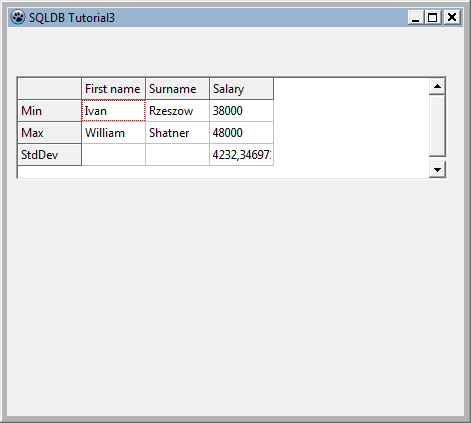](</File:sqldbtutorial3mainform.png>) | |
| 301 | 299 | ||
| 302 | 300 | ### Repenser notre salaire plus élévé/plus bas | |
| 303 | 301 | ||
| 304 | - | ||
| 305 | - | ||
| 306 | - | ||
| 302 | + | _This section gives some more useful details on SQL but is not required to work through for the rest of the tutorial_ | |
| 307 | 303 | ||
| 308 | - | ||
| 304 | + | Now we know how to deal with detecting various database connections, we can adjust the SQL that gets the lowest and highest salary as well to make use of db specific functionality. | |
| 309 | 305 | ||
| 310 | - | ||
| 306 | + | An example: this would work for MS SQL Server by limiting the number of returned rows to just the first: | |
| 307 | + | ``` | |
| 311 | 308 | select top 1 | |
| 312 | - | ||
| 313 | - | ||
| 314 | - | ||
| 309 | + | e.first_name, e.last_name, e.salary | |
| 310 | + | from employee e | |
| 311 | + | order by e.salary asc | |
| 315 | 312 | ``` | |
| 316 | 313 | ||
| 317 | - | ||
| 318 | - | ||
| 319 | - | ||
| 314 | + | to get the lowest salary. | |
| 320 | 315 | ||
| 321 | - | ||
| 316 | + | This efficiently returns one record. Other databases use other syntax, such as the ISO ROWS 1. The diligent SQL student will soon learn not to miss out that important part and request entire large recordsets just for one required record! | |
| 322 | 317 | ||
| 323 | - | ||
| 318 | + | Let's briefly examine other ways to achieve the same thing, that are worth knowing. | |
| 324 | 319 | ||
| 325 | - | ||
| 320 | + | Another way to retrieve the record(s) with the minimum salary would be : | |
| 321 | + | ``` | |
| 326 | 322 | SELECT e.first_name, e.last_name, e.salary FROM employee e WHERE e.salary=(SELECT min(salary) FROM employee) | |
| 327 | 323 | ``` | |
| 328 | 324 | ||
| 329 | - | ||
| 330 | - | ||
| 331 | - | ||
| 325 | + | SQL students would greatly benefit from researching Common Table Expressions. | |
| 332 | 326 | ||
| 333 | - | ||
| 327 | + | A CTE allows a virtual temporary table to be used in a following expression, allowing you to clearly code some very complex queries that otherwise may not be possible. Knowing about CTEs will catapult you ahead of colleagues who have never heard of them! For example the above may be rewritten (example in Microsoft SQL Server syntax) as : | |
| 328 | + | ``` | |
| 334 | 329 | WITH TheMinimum as | |
| 335 | - | ||
| 336 | - | ||
| 337 | - | ||
| 338 | - | ||
| 330 | + | ( | |
| 331 | + | SELECT min(salary) as MinimumPay FROM Employee | |
| 332 | + | ) | |
| 333 | + | SELECT e.first_name, e.last_name, e.salary FROM Employee e WHERE e.salary=(SELECT MinimumPay FROM TheMinimum) | |
| 339 | 334 | ``` | |
| 340 | 335 | ||
| 341 | - | ||
| 342 | - | ||
| 343 | - | ||
| 336 | + | Several such temporary tables may be chained together, each using the results from the previous tables. You can treat these virtual tables as though they were real tables in the database, using JOINs to link recordsets together. And it can be very useful for quick tests using hardcoded data - this can be run without any database connection : | |
| 337 | + | ``` | |
| 344 | 338 | WITH TestEmployee as | |
| 345 | - | ||
| 346 | - | ||
| 347 | - | ||
| 348 | - | ||
| 349 | - | ||
| 350 | - | ||
| 351 | - | ||
| 352 | - | ||
| 353 | - | ||
| 354 | - | ||
| 355 | - | ||
| 356 | - | ||
| 339 | + | ( | |
| 340 | + | SELECT 'Fred' as first_name, 'Bloggs' as last_name, 10500 as salary | |
| 341 | + | UNION | |
| 342 | + | SELECT 'Joe' as first_name, 'Public' as last_name, 10000 as salary | |
| 343 | + | UNION | |
| 344 | + | SELECT 'Mike' as first_name, 'Mouse' as last_name, 11000 as salary | |
| 345 | + | ), | |
| 346 | + | TheMinimum as | |
| 347 | + | ( | |
| 348 | + | SELECT min(salary) as MinimumPay FROM TestEmployee | |
| 349 | + | ) | |
| 350 | + | SELECT e.first_name, e.last_name, e.salary FROM TestEmployee e WHERE e.salary=(SELECT MinimumPay FROM TheMinimum) | |
| 357 | 351 | ``` | |
| 358 | 352 | ||
| 359 | - | ||
| 353 | + | You can end up with quite long strings for the code of such SQL queries, but it is only _one_ query and may be called from anywhere where you are limited to a simple single expression - it can be useful to answer complex queries without resorting to functions or stored procedures. | |
| 360 | 354 | ||
| 361 | 355 | ## Obtention de données hors des contrôles normaux dans la base de données | |
| 362 | 356 | ||
| 363 | - | ||
| 357 | + | Previously, we have seen: | |
| 364 | 358 | ||
| 365 | - | ||
| 366 | - | ||
| 359 | + | * how to let SQLDB update the database with data-bound controls (earlier tutorials) | |
| 360 | + | * how to get data out of the database using queries (the section above) | |
| 367 | 361 | ||
| 368 | - | ||
| 362 | + | You can also execute SQL to get arbitrary data back into the database via code. This allows you to use variables or controls that have no db aware equivalent such as sliders or custom controls to enter data into the database, at the expense of a bit more coding. | |
| 369 | 363 | ||
| 370 | - | ||
| 364 | + | As an example, we are going to allow the user to change the lowest and highest salary in the stringgrid. | |
| 371 | 365 | ||
| 372 | - | ||
| 366 | + | For ease of editing, set the grid's _Options_ /_goEditing_ to true; then assign the procedure below to the OnValidate event for the grid, which will be called every time a user has finished updating the grid. | |
| 373 | 367 | ||
| 374 | 368 | ### Requête paramétrée | |
| 375 | 369 | ||
| 376 | - | ||
| 377 | - | ||
| 378 | - | ||
| 370 | + | The following code also demonstrates how to use parameterized queries to avoid SQL injection, fiddling with quoting for string values, date formatting, etc. | |
| 379 | 371 | ||
| 380 | - | ||
| 372 | + | As you can see in the code, you can name your parameters whatever you wish and prefix them with : in the SQL. In code, you can set/get their values by _< somequery>.Params.ParamByName('<thename>').As'<variabletype>'; the code demonstrates _.AsFloat _and_.AsString _._ | |
| 381 | 373 | ||
| 382 | - | ||
| 374 | + | Parameterized queries are especially useful (and can be much faster) if you run the same query, only with different parameters, in a loop (think e.g. bulk loading of data). | |
| 383 | 375 | ||
| 384 | - | ||
| 376 | + | Continuing with our example: after having set up the query SQL and parameters, the transaction is started (and later on committed) as usual, then the query is run by calling _ExecSQL_ (which does not return a result set; if the SQL statement were e.g. a SELECT or INSERT...RETURNING that does return data, you would use _Open_ as in the examples above): | |
| 377 | + | ``` | |
| 385 | 378 | procedure TForm1.SalaryGridValidateEntry(sender: TObject; aCol, aRow: Integer; | |
| 386 | - | ||
| 387 | - | ||
| 388 | - | ||
| 389 | - | ||
| 390 | - | ||
| 391 | - | ||
| 392 | - | ||
| 393 | - | ||
| 394 | - | ||
| 395 | - | ||
| 396 | - | ||
| 397 | - | ||
| 398 | - | ||
| 399 | - | ||
| 400 | - | ||
| 401 | - | ||
| 402 | - | ||
| 403 | - | ||
| 404 | - | ||
| 405 | - | ||
| 406 | - | ||
| 407 | - | ||
| 379 | + | const OldValue: string; var NewValue: String); | |
| 408 | 380 | begin | |
| 409 | - | ||
| 410 | - | ||
| 411 | - | ||
| 381 | + | // Only these cells have min and max salary: | |
| 382 | + | if (aCol=3) and ((aRow=1) or (aRow=2)) then | |
| 383 | + | begin | |
| 384 | + | // Allow updates to min and max salary if positive numerical data is entered | |
| 385 | + | if StrToFloatDef(NewValue,-1)>0 then | |
| 386 | + | begin | |
| 387 | + | // Storing the primary key in e.g. a hidden cell in the grid and using that in our | |
| 388 | + | // update query would be cleaner, but we can do it the hard way as well: | |
| 389 | + | FQuery.SQL.Text:='update employee set salary=:newsalary '+ | |
| 390 | + | ' where first_name=:firstname and last_name=:lastname and salary=:salary '; | |
| 391 | + | FQuery.Params.ParamByName('newsalary').AsFloat:=StrToFloatDef(NewValue,0); | |
| 392 | + | FQuery.Params.ParamByName('firstname').AsString:=SalaryGrid.Cells[1,aRow]; | |
| 393 | + | FQuery.Params.ParamByName('lastname').AsString:=SalaryGrid.Cells[2,aRow]; | |
| 394 | + | FQuery.Params.ParamByName('salary').AsFloat:=StrToFloatDef(OldValue,0); | |
| 395 | + | FTran.StartTransaction; | |
| 396 | + | FQuery.ExecSQL; | |
| 397 | + | FTran.Commit; | |
| 398 | + | LoadSalaryGrid; //reload standard deviation | |
| 399 | + | end | |
| 400 | + | else | |
| 401 | + | begin | |
| 402 | + | // Notify user that his input was wrong... he'll be wondering otherwise: | |
| 403 | + | Showmessage('Invalid salary entered.'); | |
| 404 | + | NewValue:=OldValue; | |
| 405 | + | end; | |
| 406 | + | end | |
| 407 | + | else | |
| 408 | + | begin | |
| 409 | + | // Silently discard edits to any other cells | |
| 410 | + | NewValue:=OldValue; | |
| 411 | + | end; | |
| 412 | 412 | end; | |
| 413 | - | ||
| 414 | - | ||
| 415 | - | ||
| 416 | - | ||
| 417 | - | ||
| 418 | - | ||
| 419 | - | ||
| 420 | 413 | ``` | |
| 421 | 414 | ||
| 422 | - | ||
| 415 | + | Note how we forgot to add a try..except block to this code to nicely catch database errors and display a sensible error message. If you are running the Firebird sample EMPLOYEE database for this tutorial, try to change the salary to a very low value (say 1) and see what happens. | |
| 423 | 416 | ||
| 424 | - | ||
| 417 | + | Finally, while this example showed an UPDATE SQL query, you could just as well run INSERT queries to insert new data programmatically. Also, you can use parameters in any kind of SQL query (SELECT, UPDATE, etc) as long as you use them for fields, not for table/view/procedure names. | |
| 425 | 418 | ||
| 426 | 419 | ## Résumé | |
| 427 | 420 | ||
| 428 | - | ||
| 421 | + | Ce tutoriel a expliqué : | |
| 429 | 422 | ||
| 430 | - | ||
| 431 | - | ||
| 432 | - | ||
| 423 | + | * Comment coder pour de multiples types de base de données. | |
| 424 | + | * Comment utiliser un fiche de connexion pour découpler votre programme la configuration de l'accès à la base de données. | |
| 425 | + | * comment récupérer et mettre à jour vos données par la programmation. | |
| 433 | 426 | ||
| 434 | 427 | ## Code | |
| 435 | 428 | ||
| 436 | - | ||
| 429 | + | Depuis Novembre 2012, le code peur être trouvé dans $(lazarusdir)examples/database/sqldbtutorial3. | |
| 437 | 430 | ||
| 438 | - | ||
| 431 | + | Si vous avez une version plus ancienne (p.ex. Lazarus 1.0.2), vous pouvez aussi télécharger le code via le [site web SVN de Lazarus](<http://svn.freepascal.org/svn/lazarus/trunk/examples/database/sqldbtutorial3/>). | |
| 439 | 432 | ||
| 440 | 433 | ## Voir aussi | |
| 441 | 434 | ||
| 442 | - | ||
| 443 | - | ||
| 444 | - | ||
| 445 | - | ||
| 446 | - | ||
| 447 | - | ||
| 448 | - | ||
| 449 | - | ||
| 450 | - | ||
| 451 | - | ||
| 452 | - | ||
| 435 | + | * [[SQLdb Tutorial0/fr|SQLdb Tutorial0]] : Instructions pour configurer les tables et les données d'exemple pour la série de tutoriels. | |
| 436 | + | * [[SQLdb Tutorial1/fr|SQLdb Tutorial1]] : 1re partie de la série de tutoriels sur les bases de données, montrant comment configurer une grille pour afficher les données. | |
| 437 | + | * [[SQLdb Tutorial2/fr|SQLdb Tutorial2]] : 2e partie de la série de tutoriels, montrant l'édition, l'insertion, etc. | |
| 438 | + | * SQLdb Tutorial3 : 3e partie de la série de tutoriels, montrant comment développer pour des bases de données multiples et utiliser une fiche de connexion. | |
| 439 | + | * [[SQLdb Tutorial4/fr|SQLdb Tutorial4]] : 4e partie de la série de tutoriels, montrant comment utiliser les modules de données. | |
| 440 | + | * [[Lazarus Database Overview/fr|Vue d'ensemble des bases de données pour Lazarus]] : Information sur les bases de données supportées par Lazarus. Redirige vers des notes spécifiques à certaines bases de données. | |
| 441 | + | * [[SQLdb Package/fr|Paquet SQLdb]] : Information sur le paquetage SQLdb. | |
| 442 | + | * [[SQLdb Programming Reference/fr|Référence de programmation SQLdb]] : Une vue d'ensemble de l'interaction entre les composants de bases de données SQLdb. | |
| 443 | + | * [[SqlDBHowto/fr|SqlDBHowto]] : Information sur l'utilisation du paquet SQLdb. | |
| 444 | + | * [[Working With TSQLQuery/fr|Travailler avec TSQLQuery]] : Informations sur TSQLQuery. | |
| 445 | + | * [utilisation des paramètres](<http://www.freepascal.org/docs-html/fcl/sqldb/usingparams.html>) | |
| 453 | 446 | ||
| 454 | 447 | --- | |
| 455 | - | ||
| 448 | + | *From the Free Pascal wiki, page "SQLdb Tutorial3/fr", as the Internet Archive kept it on 2025-03-15, last changed on 2020-02-27. Copyright stays with the author who wrote it, according to the old wiki's [[Licensing]] page. If you have concerns about this material, [message the admin](/wiki-contact).* |