

SQLDBRestBridge: what changed
Revision 2 to 3. Removed lines have a minus sign; added lines have a plus sign.
| Old | New | Line | |
|---|---|---|---|
| 1 | 1 | ## Purpose | |
| 2 | 2 | ||
| 3 | 3 | More and more applications move to Web: today Pas2JS allows to program pascal for the web. | |
| 4 | 4 | ||
| 5 | 5 | Data needs to be stored on a server, and REST is the architecture of choice these days for doing so. Most often, the data ends up in a database. | |
| 6 | 6 | ||
| 7 | 7 | So, an easy way to make data available through a REST service is needed. | |
| 8 | 8 | ||
| 9 | 9 | The `SQLDBRestBridge` unit in *fpc/packages/fcl-web/src/restbridge/sqldbrestbridge.pp* offers a means to expose any database that can be accessed by SQLDB using a REST API. | |
| 10 | 10 | ||
| 11 | 11 | It is not meant as a general REST API framework, for this other frameworks exist. It is also not a RPC framework. | |
| 12 | 12 | ||
| 13 | 13 | The design is such that a complete database can be exposed using a single line of code, with reasonable default settings. | |
| 14 | 14 | ||
| 15 | 15 | ### What does it do ? | |
| 16 | 16 | ||
| 17 | 17 | Basically, `SQLDBRestBridge` can be used in a FCL-Web application to turn it into a REST server: | |
| 18 | 18 | ||
| 19 | 19 | The server will then accept the usual REST GET/POST/PUT/Delete commands and automatically translate these to the appropriate database CRUD (Create/Read/Update/Delete) statements. | |
| 20 | 20 | ||
| 21 | 21 | It can be used simply: one line of code is enough to expose a complete database in this way. | |
| 22 | 22 | ||
| 23 | 23 | Or it can be completely customized and fine tuned: The schema can be completely specified: all SQL statements can be specified, field lists can be defined, aliases can be given, business rules can be implemented. | |
| 24 | 24 | ||
| 25 | 25 | The resulting server can be used in a client/server setup (using pas2js as a client, for example) to serve data without needing to writing all the plumbing code needed in a REST server. | |
| 26 | 26 | ||
| 27 | 27 | ### What it does not do ? | |
| 28 | 28 | ||
| 29 | 29 | - This is a server-side technology. | |
| 30 | 30 | ||
| 31 | 31 | ||
| 32 | 32 | To consume the data served by this component, you need to write a client. | |
| 33 | 33 | ||
| 34 | 34 | No assumptions are made about the client, except that it knows how to execute HTTP requests, and that it understands one of the available data formats. | |
| 35 | 35 | ||
| 36 | 36 | - This does not expose objects as REST resources. | |
| 37 | 37 | ||
| 38 | 38 | ||
| 39 | 39 | Using some tricks, this could be done, but this is not a design goal. | |
| 40 | 40 | ||
| 41 | 41 | Eventually, all data ends up in a database, and this component uses a direct mechanism to achieve that. | |
| 42 | 42 | ||
| 43 | 43 | ## Features | |
| 44 | 44 | ||
| 45 | 45 | ### SQL Database side. | |
| 46 | 46 | ||
| 47 | 47 | 1. Every REST resource is defined by up to 4 SQL statements, corresponding to the 4 CRUD operations. | |
| 48 | 48 | 2. The CRUD Statements can be auto generated on the fly, based on a table name and field definitions. | |
| 49 | 49 | 3. For every field, an alias can be provided. | |
| 50 | 50 | 4. The following client-side types are available, automatically mapped from the native database type: | |
| 51 | 51 | 1. String | |
| 52 | 52 | 2. 64-bit integer | |
| 53 | 53 | 3. 32-bit integer | |
| 54 | 54 | 4. Boolean | |
| 55 | 55 | 5. Date, Time, DateTime | |
| 56 | 56 | 6. Blob (base64-encoded) | |
| 57 | 57 | 5. Support for a sequence to generate IDs is built-in. | |
| 58 | 58 | 6. Full control over which operations (GET,POST,PUT,DELETE) are allowed. | |
| 59 | 59 | 7. Resources are collected in a schema. | |
| 60 | 60 | 8. Multiple schemas can be attached to the service. | |
| 61 | 61 | 9. Multiple databases (connections) can be defined. | |
| 62 | 62 | 10. A schema can be tied to a single connection, or connections can share a schemas (use case: a different connection per client). | |
| 63 | 63 | 11. Business processor components can be hooked to a resource, to make it easier to implement business logic. | |
| 64 | 64 | 12. SQL Statements can contain parameters, values for the parameters will be picked up from the request URL. | |
| 65 | 65 | 13. Support to get custom datasets. | |
| 66 | 66 | 14. Support for client-side provided SQL SELECT statements (optional, disabled by default) | |
| 67 | 67 | 15. Full support for configuration through an `.ini` file out of the box. | |
| 68 | 68 | ||
| 69 | 69 | ### HTTP side | |
| 70 | 70 | ||
| 71 | 71 | 1. Authentication is handled using the HTTP protocol. | |
| 72 | 72 | 2. Basic authentication is included by default, but is completely pluggable. | |
| 73 | 73 | 3. Basic authentication can look up valid users in a database (by default the database being exposed) | |
| 74 | 74 | 4. Output format can be fixed or detected per request (`?fmt=format`). Detection based on content-type is also available. | |
| 75 | 75 | 5. list of fields to include in output can be specified in the URL:\ | |
| 76 | 76 | `fl=field1,field2` | |
| 77 | 77 | 6. Field list of fields to exclude from output can be specified in the URL:\ | |
| 78 | 78 | `fe=field1,field2` | |
| 79 | 79 | 7. Various output formats are available out of the box | |
| 80 | 80 | 1. JSON (the default) | |
| 81 | 81 | 2. XML (a custom format) | |
| 82 | 82 | 3. CSV (for in and output) | |
| 83 | 83 | 4. CDS (Format used by Delphi `TClientDataset`) | |
| 84 | 84 | 5. Planned: ADO data packets (as used by MS Access) | |
| 85 | 85 | 8. A factory pattern is used, new formats can be added at will. | |
| 86 | 86 | 9. Simple URL schemes. 2 basic schemes are available | |
| 87 | 87 | BASEURL/Resource/ | |
| 88 | 88 | BASEURL/Resource/ID | |
| 89 | 89 | ||
| 90 | 90 | or using the connection as prefix: | |
| 91 | 91 | ||
| 92 | 92 | BASEURL/Connection/Resource/ | |
| 93 | 93 | BASEURL/Connection/Resource/ID | |
| 94 | 94 | 10. Support for introspection/discovery or metadata: | |
| 95 | 95 | BASEURL/metadata/ | |
| 96 | 96 | ||
| 97 | 97 | returns the list of available resources and their operation. | |
| 98 | 98 | ||
| 99 | 99 | BASEURL/metadata/resourcename | |
| 100 | 100 | ||
| 101 | 101 | returns the structure of the resource: fields, types, etc. | |
| 102 | 102 | 11. `limit` and `offset` parameters for paging of results: | |
| 103 | 103 | BASEURL/resourcename?limit=10 | |
| 104 | 104 | BASEURL/resourcename?limit=10&Offset=50 | |
| 105 | 105 | ||
| 106 | 106 | A maximum limit can be enforced. When the SQL statements support it, the limit and offset are translated to SQL fetch/offset clauses. | |
| 107 | 107 | 12. Sort order can be specified in the request URL, if the resource definition allows it, using `?sort=fieldname`. The ability to sort can be specified on a field basis. | |
| 108 | 108 | BASEURL/resourcename?sort=MyField | |
| 109 | 109 | BASEURL/resourcename?sort=MyField%20desc | |
| 110 | 110 | ||
| 111 | 111 | Multiple sort fields can be specified, separated by a comma. | |
| 112 | 112 | 13. Filtering can be specified on a field basis in the request URL, and the filter operation is translated to SQL Where: | |
| 113 | 113 | BASEURL/resourcename?MyField=10 | |
| 114 | 114 | BASEURL/resourcename?MyField_null=1 | |
| 115 | 115 | BASEURL/resourcename?MyField_null=0 | |
| 116 | 116 | BASEURL/resourcename?MyField_lt=10 | |
| 117 | 117 | BASEURL/resourcename?MyField_lte=10 | |
| 118 | 118 | BASEURL/resourcename?MyField_gt=10 | |
| 119 | 119 | BASEURL/resourcename?MyField_gte=10 | |
| 120 | 120 | ||
| 121 | 121 | is translated to a SQL where clause: | |
| 122 | 122 | ||
| 123 | 123 | (MyField=10) | |
| 124 | 124 | (MyField is null) | |
| 125 | 125 | (MyField is not null) | |
| 126 | 126 | (MyField<10) | |
| 127 | 127 | (MyField_lte<=10) | |
| 128 | 128 | (MyField>10) | |
| 129 | 129 | (MyField>=10) | |
| 130 | 130 | ||
| 131 | 131 | The ability to filter on a field can be specified in the schema for each field. | |
| 132 | 132 | 14. The request can specify whether metadata should be included in the response: | |
| 133 | 133 | BASEURL/resourcename?metadata=1 | |
| 134 | 134 | 15. The request can specify whether the result should be human-readable or not | |
| 135 | 135 | BASEURL/resourcename?humanreadable=1 | |
| 136 | 136 | ||
| 137 | 137 | If set to 1, the request result will be formatted. Not all formats support this. | |
| 138 | 138 | ||
| 139 | 139 | ## Available Components | |
| 140 | 140 | ||
| 141 | 141 | ### TSQLDBRestSchema | |
| 142 | 142 | ||
| 143 | 143 | Unit: *fpc/packages/fcl-web/src/restbridge/sqldbrestschema.pp* | |
| 144 | 144 | ||
| 145 | 145 | Represents a REST schema : a list of available resources, with their allowed operations, fields definitions, SQL statements. A schema can be designed visually using a [[SQLDBRestSchemaEditor]] in a separate application or in the lazarus IDE. | |
| 146 | 146 | ||
| 147 | 147 | #### Properties | |
| 148 | 148 | ||
| 149 | 149 | - **Resources** A collection of resources. Each item is of type *TSQLDBRestResource* | |
| 150 | 150 | - **ConnectionName** Set this to a connection name if you want all resources of this schema to use this connection. | |
| 151 | 151 | ||
| 152 | 152 | #### Methods | |
| 153 | 153 | ||
| 154 | 154 | - **SaveToFile** save the resource definitions to file (as JSON) | |
| 155 | 155 | ||
| 156 | 156 | ```delphi | |
| 157 | 157 | Procedure SaveToFile(Const aFileName : UTF8String); | |
| 158 | 158 | ``` | |
| 159 | 159 | ||
| 160 | 160 | - **SaveToStream** save the resource definitions to stream (as JSON). | |
| 161 | 161 | ||
| 162 | 162 | ```delphi | |
| 163 | 163 | Procedure SaveToStream(Const aStream : TStream); | |
| 164 | 164 | ``` | |
| 165 | 165 | ||
| 166 | 166 | - **AsJSON** return the resource definitions as a JSON object. | |
| 167 | 167 | ||
| 168 | 168 | ```delphi | |
| 169 | 169 | function AsJSON(const aPropName: UTF8String=''): TJSONData; | |
| 170 | 170 | ``` | |
| 171 | 171 | ||
| 172 | 172 | If specified, **aPropName** is the name of the property below which all definitions are stored. | |
| 173 | 173 | ||
| 174 | 174 | - **LoadFromFile** Load the resource definitions from a JSON file. | |
| 175 | 175 | ||
| 176 | 176 | ```delphi | |
| 177 | 177 | Procedure LoadFromFile(Const aFileName : UTF8String); | |
| 178 | 178 | ``` | |
| 179 | 179 | ||
| 180 | 180 | - **LoadFromStream** Load the resource definitions from a JSON file. | |
| 181 | 181 | ||
| 182 | 182 | ```delphi | |
| 183 | 183 | Procedure LoadFromStream(Const aStream : TStream); | |
| 184 | 184 | ``` | |
| 185 | 185 | ||
| 186 | 186 | - **FromJSON** Load the resource definitions from a JSON file. | |
| 187 | 187 | ||
| 188 | 188 | ```delphi | |
| 189 | 189 | Procedure FromJSON(aData: TJSONData;const aPropName: UTF8String=''); | |
| 190 | 190 | ``` | |
| 191 | 191 | ||
| 192 | 192 | If specified, **aPropName** is the name of the property below which all definitions are located. | |
| 193 | 193 | ||
| 194 | 194 | - **PopulateResourceFields** create resource fields based on table name. | |
| 195 | 195 | ||
| 196 | 196 | ```delphi | |
| 197 | 197 | procedure PopulateResourceFields(aConn: TSQLConnection; aRes: TSQLDBRestResource; aMinFieldOpts : TRestFieldOptions = []); | |
| 198 | 198 | ``` | |
| 199 | 199 | ||
| 200 | 200 | *PopulateResourceFields* populates the field definitions in *aRes* by checking the table in database connection *aConn*. Every created field gets at least *aMinFieldOptions* in its *Options* property. | |
| 201 | 201 | ||
| 202 | 202 | - **PopulateResources** creates a resource definition for each table in a database connection. | |
| 203 | 203 | ||
| 204 | 204 | ```delphi | |
| 205 | 205 | procedure PopulateResources(aConn: TSQLConnection; aTables: array of string; aMinFieldOpts: TRestFieldOptions= []); | |
| 206 | 206 | Procedure PopulateResources(aConn : TSQLConnection; aTables : TStrings = Nil; aMinFieldOpts : TRestFieldOptions = []); | |
| 207 | 207 | ``` | |
| 208 | 208 | ||
| 209 | 209 | - *PopulateResources* retrieves the list of tables from *aConn*, creates a resource definition for the table and calls *PopulateResourceFields* to fill the resource with fields. If *aTables* is specified, definitions will only be created for the tables in that list. | |
| 210 | 210 | ||
| 211 | 211 | ### TSQLDBRestDispatcher | |
| 212 | 212 | ||
| 213 | 213 | Unit: *fpc/packages/fcl-web/src/restbridge/sqldbrestbridge.pp* | |
| 214 | 214 | ||
| 215 | 215 | #### Properties | |
| 216 | 216 | ||
| 217 | 217 | - **Active** (Boolean) Register or unregister HTTP routes. | |
| 218 | 218 | - **Connections** (TSQLDBRestConnectionList) List of database connections to connect to. | |
| 219 | 219 | - **Schemas** (TSQLDBRestSchemaList) List of REST schemas to serve | |
| 220 | 220 | - **BasePath** (UTF8String) Base URL for REST URLS. | |
| 221 | 221 | - **DefaultConnection** (UTF8String) Default connection to use if none is detected from request/schema | |
| 222 | 222 | - **Strings** (TRestStringsConfig Property) Input/Output strings configurations | |
| 223 | 223 | - **OutputOptions** (TRestOutputOptions) default Output options, modifiable by query. One or more of | |
| 224 | 224 | ||
| 225 | 225 | 1. *ooMetadata* Send metadata in request | |
| 226 | 226 | 2. *ooSparse* Do not send null values (if format allows it) | |
| 227 | 227 | 3. *ooHumanReadable* Pretty-print output. | |
| 228 | 228 | ||
| 229 | 229 | - **InputFormat** (string) Name of Input format to use for all requests. | |
| 230 | 230 | - **OutputFormat** (string) Name of Output format to use for all requests. | |
| 231 | 231 | - **DispatchOptions** (TRestDispatcherOptions) Dispatcher options. One or more of | |
| 232 | 232 | ||
| 233 | 233 | 1. *rdoConnectionInURL* Use the connection as a path element in the URL. | |
| 234 | 234 | 2. *rdoExposeMetadata* Expose the metadata URL. | |
| 235 | 235 | 3. *rdoConnectionResource* Expose the connection resource, allowing to manage connections through the REST protocol. | |
| 236 | 236 | 4. *rdoCustomView* allow the use of a customview URL (Select SQL specified in request) | |
| 237 | 237 | 5. *rdoEmptyCorsDomainToOrigin* if the CORDAllowedOrigins is empty, then the request server will be echoed to the client. | |
| 238 | 238 | 6. *rdoHandleCORS* Handle CORS preflight request. | |
| 239 | 239 | 7. *rdoAccessCheckNeedsDB* This controls when the access check is done for resources: before or after a connection with the database is made. If you need to make additional queries on a database to decide whether access is granted (such as checking ACLs in the Db) then this option should be enabled. | |
| 240 | 240 | ||
| 241 | 241 | - **AdminUserIDs** A list of user IDs (one per line) which are allowed to use the connection resource. If empty, all users can use it. | |
| 242 | 242 | - **LogOptions** Logging options. Logging happens through the OnLog event handler. This property controls which events are logged. The following values can be specified: | |
| 243 | 243 | ||
| 244 | 244 | 1. *rloUser* Include username in log messages, when available | |
| 245 | 245 | 2. *rtloHTTP* Log HTTP request (remote, URL) | |
| 246 | 246 | 3. *rloResource* Log resource requests (operation, resource) | |
| 247 | 247 | 4. *rloConnection* Log database connections (connect to database) | |
| 248 | 248 | 5. *rloAuthentication* Log authentication attempt | |
| 249 | 249 | 6. *rloSQL* Log SQL statements. (not on user-supplied connection) | |
| 250 | 250 | 7. *rloResultStatus* Log result status. | |
| 251 | 251 | ||
| 252 | 252 | - **LogSQLOptions** SQL Logging options. if rloSQL is specified, this option controls which SQLDB events are logged for new connections. | |
| 253 | 253 | - **Authenticator** (TRestAuthenticator) Authenticator for requests. If *OnBasicAuthentication* is set, this can be left empty. | |
| 254 | 254 | - **EnforceLimit** (Integer) If larger than zero, Enforce a limit on output results. | |
| 255 | 255 | - **CORSAllowedOrigins** (String) Comma separated list of Domains that are allowed to use this REST service. If empty, * will be returned in preflight request. | |
| 256 | 256 | - **CORSMaxAge** (Integer) Value for HTTP *Access-Control-Max-Age* header. If zero, the header is not sent. | |
| 257 | 257 | - **CORSAllowCredentials** (Boolean) value for HTTP header *Access-Control-Allow-Credentials*. Set to false not to send the header | |
| 258 | 258 | ||
| 259 | 259 | #### Methods | |
| 260 | 260 | ||
| 261 | 261 | - **ExposeDatabase** exposes a database as a REST service. This will creates a connection definition with the provided parameters and calls **ExposeConnection** with this definition. | |
| 262 | 262 | ```delphi | |
| 263 | 263 | Function ExposeDatabase(Const aType,aHostName,aDatabaseName,aUserName,aPassword : String; aTables : Array of String; aMinFieldOp | |
| 264 | 264 | Function ExposeDatabase(Const aType,aHostName,aDatabaseName,aUserName,aPassword : String; aTables : TStrings = nil; aMinFieldOpt | |
| 265 | 265 | ``` | |
| 266 | 266 | ||
| 267 | 267 | The connection gets the name **ConnectionN**, where N is a unique number, and the schema is named **SchemaConnectionN**. The Tables and aMinFieldOpt arguments are the same as in the *PopulateResources* call of **TSQLDBRestSchema** | |
| 268 | 268 | - **ExposeConnection** exposes a database (represented by *aConnection*) as a REST service. This will create a schema with a resource definition. | |
| 269 | 269 | ```delphi | |
| 270 | 270 | Function ExposeConnection(Const aConnection : TSQLDBRestConnection; aTables : TStrings = nil; aMinFieldOpts : TRestFieldOptions | |
| 271 | 271 | ``` | |
| 272 | 272 | ||
| 273 | 273 | The Tables and aMinFieldOpt arguments are the same as in the *PopulateResources* call of **TSQLDBRestSchema** | |
| 274 | 274 | ||
| 275 | 275 | ### TRestBasicAuthenticator | |
| 276 | 276 | ||
| 277 | 277 | Unit: *fpc/packages/fcl-web/src/restbridge/sqldbrestauth.pp* | |
| 278 | 278 | ||
| 279 | 279 | This class implements HTTP Basic authentication for the SQLDB REST Dispatcher | |
| 280 | 280 | ||
| 281 | 281 | - AuthConnection (TSQLConnection) a SQL connection that will be used to run the SQL. By default the connection of the request is used. Set this if your users are in a separate database. | |
| 282 | 282 | - AuthenticateUserSQL (TStrings) an SQL Statement that will be executed on the connection (AuthConnection or connection of the request). This must contain 2 parameters **userName** and **password** and return a single field. This field will be used as **UserID** (available in the rest of the request flow. | |
| 283 | 283 | - DefaultUserName (UTF8String) a valid username, not in the database. | |
| 284 | 284 | - DefaultPassword (UTF8String) password of a default user. | |
| 285 | 285 | - DefaultUserID (UTF8String) the user ID reported if the default user is authenticated. | |
| 286 | 286 | - AuthenticationRealm : (UTF8String) Real sent in the **WWW-Authenticate** challenge to the client. | |
| 287 | 287 | - OnBasicAuthentication (event) triggered when basic authentication is requested. Here you can enter custom code to validate the user. | |
| 288 | 288 | ||
| 289 | 289 | ### TSQLDBRestModule | |
| 290 | 290 | ||
| 291 | 291 | Unit: *fpc/packages/fcl-web/src/restbridge/sqldbrestmodule.pp* | |
| 292 | 292 | ||
| 293 | 293 | - This is a simple **TWebModule** descendant which is usable in Lazarus IDE. It has a single *Dispatcher* property which must be set to a **TSQLDBRestDispatcher** instance. | |
| 294 | 294 | ||
| 295 | 295 | ### TSQLDBRestResource | |
| 296 | 296 | ||
| 297 | 297 | Unit: *fpc/packages/fcl-web/src/restbridge/sqldbrestschema.pp* | |
| 298 | 298 | ||
| 299 | 299 | This is a collection item, found in the 'Resources' property of the **TSQLDBRestSchema**. It represents a single REST resource. | |
| 300 | 300 | ||
| 301 | 301 | #### properties | |
| 302 | 302 | ||
| 303 | 303 | It has the following properties: | |
| 304 | 304 | ||
| 305 | 305 | - **Fields** (TSQLDBRestFieldList) A list of fields that will be included in the output, or can be supplied in the input. | |
| 306 | 306 | - **Enabled** (Boolean) Is this resource enabled ? | |
| 307 | 307 | - **InMetadata** (Boolean) Should this resource be shown in the metadata list ? | |
| 308 | 308 | - **ConnectionName** (UTF8String) Connection name to use for this resource. | |
| 309 | 309 | - **TableName** (UTF8String) Database table name. This must only be specified if the SQL is auto generated. | |
| 310 | 310 | - **ResourceName** (UTF8String) Name of this resource as exposed to the outside world. | |
| 311 | 311 | - **AllowedOperations** (TRestOperations) The operations allowed on this resources (Get/Put/Post/Delete/Options/Head) | |
| 312 | 312 | - **SQLSelect** (TStrings) SQL select statement for a GET request. Left empty, it is autogenerated based on the table name. The where clause uses the fields with the *foInKey* flag set for single resources. | |
| 313 | 313 | - **SQLInsert** (TStrings) SQL INSERT statement for a POST request. Left empty, it is autogenerated based on the table name. | |
| 314 | 314 | - **SQLUpdate** (TStrings) SQL UPDATE statement for a PUT request. Left empty, it is autogenerated based on the table name. The where clause uses the fields with the *foInKey* flag set. | |
| 315 | 315 | - **SQLDelete** (TStrings) SQL DELETE statement for a DELETE request. Left empty, it is autogenerated based on the table name. The where clause uses the fields with the *foInKey* flag set. | |
| 316 | 316 | - *'SQL* an array of SQL statements, based on the previous ones. | |
| 317 | 317 | - **BusinessProcessor** (TSQLDBRestCustomBusinessProcessor) at runtime this contains the business processor for this resource (if any) | |
| 318 | 318 | ||
| 319 | 319 | #### Events | |
| 320 | 320 | ||
| 321 | 321 | The following events are available: | |
| 322 | 322 | ||
| 323 | 323 | - **OnResourceAllowed** (TSQLDBRestAllowResourceEvent) Called to check whether the user is allowed to access this resource. | |
| 324 | 324 | - **OnAllowedOperations** (TSQLDBRestAllowedOperationsEvent) Called to allow to fine-tune the allowed operations for the user. | |
| 325 | 325 | - **OnGetDataset** (TSQLDBRestGetDatasetEvent) You can return a custom dataset for GET operations. | |
| 326 | 326 | - **OnCheckParams** (TSQLDBRestCheckParamsEvent) You can check the INSERT/UPDATE/DELETE SQL Statement parameters in this request/ | |
| 327 | 327 | - **OnAllowRecord** (TSQLDBRestAllowRecordEvent) Called for each record, you can ddecide whether the record should be included in the output. | |
| 328 | 328 | ||
| 329 | 329 | Note: when set, the corresponding event in the business processor is not triggered. | |
| 330 | 330 | ||
| 331 | 331 | #### Methods | |
| 332 | 332 | ||
| 333 | 333 | The following methods exist: | |
| 334 | 334 | ||
| 335 | - | ||
| 335 | + | ``` pascal | |
| 336 | + | Function GetDataset(aContext : TBaseRestContext; aFieldList : TRestFieldPairArray; aOrderBy : TRestFieldOrderPairArray; aLimit, aOffset : Int64) : TDataset; | |
| 337 | + | ``` | |
| 336 | 338 | ||
| 337 | 339 | Get the custom dataset for this resource. | |
| 338 | 340 | ||
| 339 | - | ||
| 341 | + | ``` pascal | |
| 342 | + | function GenerateDefaultSQL(aKind: TSQLKind): UTF8String; virtual; | |
| 343 | + | ``` | |
| 340 | 344 | ||
| 341 | 345 | Get the default SQL for this resource if none was specified. | |
| 342 | 346 | ||
| 343 | - | ||
| 347 | + | ``` pascal | |
| 348 | + | function GetFieldList(aListKind: TFieldListKind): UTF8String; | |
| 349 | + | ``` | |
| 344 | 350 | ||
| 345 | 351 | Return a list of fields as a string, separated by a correct separator token | |
| 346 | 352 | ||
| 347 | - | ||
| 353 | + | ``` pascal | |
| 354 | + | function GetFieldArray(aListKind: TFieldListKind): TSQLDBRestFieldArray; | |
| 355 | + | ``` | |
| 348 | 356 | ||
| 349 | 357 | Return a list of fields, similar to GetFieldList, but returns the raw fields. | |
| 350 | 358 | ||
| 351 | - | ||
| 359 | + | ``` pascal | |
| 360 | + | Function GetResolvedSQl(aKind : TSQLKind; Const AWhere : UTF8String; Const aOrderBy : UTF8String = ; aLimit : UTF8String = ) : UTF8String; | |
| 361 | + | ``` | |
| 352 | 362 | ||
| 353 | 363 | Return the actual SQL Statement that will be executed, with macros | |
| 354 | 364 | ||
| 355 | - | ||
| 365 | + | ``` pascal | |
| 366 | + | Procedure PopulateFieldsFromFieldDefs(Defs : TFieldDefs; aIndexFields : TStringArray; aProcessIdentifier : TProcessIdentifier; aMinFieldOpts : TRestFieldOptions); | |
| 367 | + | ``` | |
| 356 | 368 | ||
| 357 | 369 | Populate the fields collection from a TFieldDefs collection. | |
| 358 | 370 | ||
| 359 | 371 | ### TSQLDBRestField | |
| 360 | 372 | ||
| 361 | 373 | Unit: *fpc/packages/fcl-web/src/restbridge/sqldbrestschema.pp* | |
| 362 | 374 | ||
| 363 | 375 | The TSQLDBREstResource has a collection of fields (TSQLDBRestField) that determine the output fields of the REST resource | |
| 364 | 376 | ||
| 365 | 377 | It has the following properties; | |
| 366 | 378 | ||
| 367 | 379 | - FieldName (UTF8String Read FFieldName Write FFieldName; | |
| 368 | 380 | - PublicName (UTF8String Read GetPublicName Write FPublicName; | |
| 369 | 381 | - GeneratorName (String) name of a generator to privide a unique value. | |
| 370 | 382 | - FieldType (TRestFieldType) Data type of the exposed field.One of (the names speak for themselves) | |
| 371 | 383 | - rftInteger | |
| 372 | 384 | - rftLargeInt | |
| 373 | 385 | - rftFloat | |
| 374 | 386 | - rftDate | |
| 375 | 387 | - rftTime | |
| 376 | 388 | - rftDateTime | |
| 377 | 389 | - rftString | |
| 378 | 390 | - rftBoolean | |
| 379 | 391 | - rftBlob (sent as base64-encoded data) | |
| 380 | 392 | - NativeFieldType (TFieldType) Native database field type of this field. | |
| 381 | 393 | - Options (TRestFieldOptions) options for this field. One of more of: | |
| 382 | 394 | - foInKey This is a key field. | |
| 383 | 395 | - foInInsert The field can be inserted (if statement is autogenerated) | |
| 384 | 396 | - foInUpdate The field can be updated (if statement is autogenerated) | |
| 385 | 397 | - foRequired A field value is required. | |
| 386 | 398 | - foFilter Filtering is allowed on this field. | |
| 387 | 399 | - foOrderBy Ordering is allowed on this field. | |
| 388 | 400 | - foOrderByDesc Ordering (descendent) is allowed on this field. | |
| 389 | 401 | - Filters (TRestFieldFilters) Allowed filter expressions for this field. One or more of: | |
| 390 | 402 | - rfEqual | |
| 391 | 403 | - rfLessThan | |
| 392 | 404 | - rfGreaterThan | |
| 393 | 405 | - rfLessThanEqual | |
| 394 | 406 | - rfGreaterThanEqual | |
| 395 | 407 | - rfNull | |
| 396 | 408 | - MaxLen (integer) for string fields, the maximum allowed length of the field. | |
| 397 | 409 | ||
| 398 | 410 | ### TSQLDBRestBusinessProcessor | |
| 399 | 411 | ||
| 400 | 412 | Unit: *fpc/packages/fcl-web/src/restbridge/sqldbrestschema.pp* | |
| 401 | 413 | ||
| 402 | 414 | This class serves to implement any business rules you want to attach to your rest resource. You can drop one TSQLDBRestBusinessProcessor instance per resource on a module, set the schema and resource name (a list of resource names is available in the Object Inspector) and implement the events. | |
| 403 | 415 | ||
| 404 | 416 | The following properties and events are available: | |
| 405 | 417 | ||
| 406 | 418 | - **Schema** : The schema in which the resource resides. | |
| 407 | 419 | - **ResourceName** The resource for which the business rules are valid. | |
| 408 | 420 | - **OnGetDataset** : Event called when you want to create a custom dataset. You must free the dataset yourself. | |
| 409 | 421 | - **OnCheckParams** : Event in which you can verify whether the parameters for insert/update/delete/select queries are OK. | |
| 410 | 422 | - **OnAllowResource** : Event to decide whether a property is allowed for a request. You can use this e.g. to forbid certain users from accessing a resource. | |
| 411 | 423 | - **OnAllowedOperations** : Event to decide whether a REST operation is allowed for a request. You can use this to forbid certain users from writing to a resource, but allow them to read. | |
| 412 | 424 | - **OnAllowRecord** : Called for each record which will be output. This can be used to prevent certain records from being streamed to the output. Note that if *Limit* is specified, this will not be taken into account, i.e. if the limit is 10, and you forbid 2 records from being streamed at this point, only 8 records will be returned. | |
| 413 | 425 | ||
| 414 | 426 | All calls get passed a TRestContext instance. This contains 2 properties and a method: | |
| 415 | 427 | ||
| 416 | - | ||
| 428 | + | ``` pascal | |
| 429 | + | Function GetVariable(Const aName : UTF8String; aSources : TVariableSources; Out aValue : UTF8String) : Boolean; | |
| 430 | + | ``` | |
| 417 | 431 | ||
| 418 | 432 | Call this to get a HTTP Query variable, header,... The function returns true if the variable was found. | |
| 419 | 433 | ||
| 420 | - | ||
| 434 | + | ```text | |
| 435 | + | Property UserID : UTF8String | |
| 436 | + | ``` | |
| 421 | 437 | ||
| 422 | 438 | This will be set when calling. | |
| 423 | 439 | ||
| 424 | - | ||
| 440 | + | ```text | |
| 441 | + | Property Data : TObject | |
| 442 | + | ``` | |
| 425 | 443 | ||
| 426 | 444 | You can attach data to this if you want to. It will be kept for the duration of the request. You are responsible for freeing this data, though. | |
| 427 | 445 | ||
| 428 | 446 | ## Special Resources | |
| 429 | 447 | ||
| 430 | 448 | ### metaData | |
| 431 | 449 | ||
| 432 | 450 | The */baseURL/metaData* resource lists all the resources defined in the schema, together with the allowed operations. | |
| 433 | 451 | ||
| 434 | 452 | The usual formats and parameters are supported. | |
| 435 | 453 | ||
| 436 | 454 | ### metaData/resourceName | |
| 437 | 455 | ||
| 438 | 456 | The */baseURL/metaData/resourceName* resource lists all the fields in the **resourceName** resource, together with the properties. | |
| 439 | 457 | ||
| 440 | 458 | The usual formats and parameters are supported for this resource. | |
| 441 | 459 | ||
| 442 | 460 | ### customview | |
| 443 | 461 | ||
| 444 | 462 | The customView resource is special. Its availability must be enabled using the *Dispatcher*'s Options. When *rdoCustomView* is included in the options, the | |
| 445 | 463 | ||
| 446 | - | ||
| 464 | + | ```text | |
| 465 | + | baseURL/customView | |
| 466 | + | ``` | |
| 447 | 467 | ||
| 448 | 468 | URL becomes available. It allows the client to specify an SQL Select statement using the *SQL* parameter: | |
| 449 | 469 | ||
| 450 | - | ||
| 470 | + | ```text | |
| 471 | + | baseURL/customView?SQL=select count(*) as thecount from person | |
| 472 | + | ``` | |
| 451 | 473 | ||
| 452 | 474 | (you must encode the sql using the usual URI encoding mechanism, it is omitted for readability reasons here) The usual parameters for fieldlists, format are supported, but not the *limit* and *offset* parameters. | |
| 453 | 475 | ||
| 454 | 476 | The engine will check that only SELECT statements passed on. Nevertheless, this is an inherently less safe mechanism which should only be used in case of need. | |
| 455 | 477 | ||
| 456 | 478 | ### _connection | |
| 457 | 479 | ||
| 458 | 480 | This is a resource that allows you to manage the connections through REST. This can be useful in development environments, where you can simply create a single binary that does not need any configuration, the whole configuration can be done through REST, including the management of the available connections. | |
| 459 | 481 | ||
| 460 | 482 | Because this is security-wise a dangerous option to enable, it is disabled by default, and must be enabled explicitly with the *rdoConnectionResource* option of the dispatcher. | |
| 461 | 483 | ||
| 462 | 484 | Use cases are a development environment where this can be used to confiure the restserver from within the IDE. When moving to production, the option can be disabled, and only fixed and known connections will be allowed/ | |
| 463 | 485 | ||
| 464 | 486 | ## Available Output formats | |
| 465 | 487 | ||
| 466 | 488 | ### JSON (the default) | |
| 467 | 489 | ||
| 468 | 490 | - A simple JSON object encapsulating data, metadata and possibly error nodes. | |
| 469 | 491 | - rows are exported as JSON objects, field names are property names of the object. | |
| 470 | 492 | - Name: 'json' | |
| 471 | 493 | - Content-type: 'application/json' | |
| 472 | 494 | - Input and output. | |
| 473 | 495 | - Data by default under 'data' | |
| 474 | 496 | - Metadata by default under 'metaData' | |
| 475 | 497 | - Errors reported under 'error' | |
| 476 | 498 | - Property names are configurable in REST dispatcher. | |
| 477 | 499 | ||
| 478 | 500 | ### XML (a custom format) | |
| 479 | 501 | ||
| 480 | 502 | - A simple XML document encapsulating data, metadata and possibly error nodes, under a root element 'datapacket' | |
| 481 | 503 | - rows are exported as XML elements (named 'row') , the contents as text in the element. | |
| 482 | 504 | - Name: 'xml' | |
| 483 | 505 | - Content-type: 'text/xml' | |
| 484 | 506 | - Input and output. | |
| 485 | 507 | - Data by default under 'data' | |
| 486 | 508 | - Metadata by default under 'metadata' | |
| 487 | 509 | - Errors reported under 'error' | |
| 488 | 510 | - Element names are configurable in REST dispatcher. | |
| 489 | 511 | ||
| 490 | 512 | ### CSV | |
| 491 | 513 | ||
| 492 | 514 | - Simple comma-separated CSV list. | |
| 493 | 515 | - Name: 'csv' | |
| 494 | 516 | - Content-type: 'text/csv' | |
| 495 | 517 | - Input and output. | |
| 496 | 518 | - Separator: Comma | |
| 497 | 519 | - Quotes when needed. | |
| 498 | 520 | - Metadata means first line contains fieldnames. | |
| 499 | 521 | ||
| 500 | 522 | ### CDS | |
| 501 | 523 | ||
| 502 | 524 | - XML package using the XMLFormat used by Delphi `TClientDataset`. | |
| 503 | 525 | - Name: 'cds' | |
| 504 | 526 | - Content-type: 'text/csv' | |
| 505 | 527 | - Input and output. | |
| 506 | 528 | ||
| 507 | 529 | A Delphi demo program is provided. | |
| 508 | 530 | ||
| 509 | 531 | ### ADO | |
| 510 | 532 | ||
| 511 | 533 | - XML format as used by ADO recordsets (as used by MS Access) | |
| 512 | 534 | - Name: 'ado' | |
| 513 | 535 | - Input and output. | |
| 514 | 536 | ||
| 515 | 537 | ## Ini file Support | |
| 516 | 538 | ||
| 517 | 539 | The following classes can load/save their configuration settings from/to an .ini file | |
| 518 | 540 | ||
| 519 | 541 | - TSQLDBRestDispatcher | |
| 520 | 542 | - TRestBasicAuthenticator | |
| 521 | 543 | - TSQLDBRestConnection | |
| 522 | 544 | - TRestStringsConfig | |
| 523 | 545 | ||
| 524 | 546 | The support for this is implemented in 2 units; | |
| 525 | 547 | ||
| 526 | 548 | - the sqldbauthini unit has a type helper for the TRestBasicAuthenticator class. | |
| 527 | 549 | - The sqldbrestini unit has the type helpers for TSQLDBRestDispatcher and TSQLDBRestConnection and TRestStringsConfig. | |
| 528 | 550 | ||
| 529 | 551 | The helpers implement LoadFromFile/SaveToFile methods, as well as LoadFromIni/SaveToIni methods. There are some options to control the level of depth. | |
| 530 | 552 | ||
| 531 | 553 | The schemas (if so required) are saved as JSON files in the same directory as the .ini file, using the name of the schema as the filename. | |
| 532 | 554 | ||
| 533 | 555 | ## Lazarus Support | |
| 534 | 556 | ||
| 535 | 557 | Requires Lazarus 2.1+ | |
| 536 | 558 | ||
| 537 | 559 | Lazarus support for the SQLDB REST Bridge is implemented in 2 packages under the **components/sqldbrest** directory: | |
| 538 | 560 | ||
| 539 | 561 | 1. The design/sqldbrestschemadesigner.lpk package. | |
| 540 | 562 | 2. The lazsqldbrest.lpk package. | |
| 541 | 563 | ||
| 542 | 564 | The latter package registers the **TSQLDBRestDispatcher**, **TSQLDBRestSchema** and **TRestBasicAuthenticator** components on the component palette: The former includes the schema editor. They should be compiled and installed in the order presented here. | |
| 543 | 565 | ||
| 544 | 566 |  | |
| 545 | 567 | ||
| 546 | 568 | Additionally it registers some component- and property editors. In particular the GUI schema editor can be called from the **TSQLDBRestSchema** component context menu. | |
| 547 | 569 | ||
| 548 | 570 | The GUI schema editor is included in the IDE, it is discussed in a separate page [[SQLDBRestSchemaEditor]] | |
| 549 | 571 | ||
| 550 | 572 | Further integration with Lazarus is planned: 1. Let the IDE act as a REST server. (alternatively, add a tool with a menu entry under tools for easy configuration) | |
| 551 | 573 | ||
| 552 | 574 | Lazarus support can work with FPC 3.0.4. To make this work, the files can be copied from SVN or a 3.2 release to the lazarus components/sqldbrest/src directory. | |
| 553 | 575 | ||
| 554 | 576 | To this end, | |
| 555 | 577 | ||
| 556 | 578 | 1. create a directory **src** below the **components/sqldbrest directory** (where the package is located) | |
| 557 | 579 | 2. copy all files in directory | |
| 558 | 580 | ||
| 559 | - | ||
| 581 | + | ```text | |
| 582 | + | fpc/packages/fcl-web/src/restbridge | |
| 583 | + | ``` | |
| 560 | 584 | ||
| 561 | 585 | ||
| 562 | 586 | to the new *src* directory | |
| 563 | 587 | ||
| 564 | - | ||
| 588 | + | ```text | |
| 589 | + | lazarus/components/sqldbrest/src | |
| 590 | + | ``` | |
| 565 | 591 | ||
| 566 | 592 | 1. compile the **lazarus/components/sqldbrest/design/sqldbrestschemadesigner.lpk** package. It has unitpath ../src, so it should find the files in the *src* directory. | |
| 567 | 593 | 2. compile the **lazarus/components/sqldbrest/lazsqldbrest.lpk** package. | |
| 568 | 594 | ||
| 569 | 595 | ## Pas2JS Support | |
| 570 | 596 | ||
| 571 | 597 | The SQLDB Rest bridge will be integrated in the compile server that comes with pas2JS: This means that pas2js will come with a toll that | |
| 572 | 598 | ||
| 573 | 599 | - Can recompile your web project on the fly | |
| 574 | 600 | - Can serve files on disc | |
| 575 | 601 | - Can act as a REST server. | |
| 576 | 602 | ||
| 577 | 603 | So no actual server is needed during development. | |
| 578 | 604 | ||
| 579 | 605 | ## Usage | |
| 580 | 606 | ||
| 581 | 607 | ### In a fcl-web application. | |
| 582 | 608 | ||
| 583 | 609 | The rest bridge was designed to be simple to use. | |
| 584 | 610 | ||
| 585 | 611 | #### Expose a single database, no authentication. | |
| 586 | 612 | ||
| 587 | 613 | Simple expose of a database. Run the following code in the startup of your program (for example, DoRun of the web application class, or startup code of the program) | |
| 588 | 614 | ||
| 589 | 615 | ```delphi | |
| 590 | 616 | FDisp:=TSQLDBRestDispatcher.Create(Self); | |
| 591 | 617 | FDisp.ExposeDatabase( | |
| 592 | 618 | 'postgres','localhost','expensetracker','me','secret' | |
| 593 | 619 | ,Nil, | |
| 594 | 620 | [foFilter,foInInsert,foInUpdate,foOrderByDesc]); | |
| 595 | 621 | FDisp.Active:=True; | |
| 596 | 622 | FDisp.SaveToFile('demo.ini'); | |
| 597 | 623 | ``` | |
| 598 | 624 | ||
| 599 | 625 | This exposes all tables of the database 'expenstracker', allows to filter,update and sort on all fields. The connection will be named 'Connection1', the schema 'SchemaConnection1' | |
| 600 | 626 | ||
| 601 | 627 | The configuration will be saved in a file called 'demo.ini'.\ | |
| 602 | 628 | It can be reused to quickly set up a REST dispatcher. | |
| 603 | 629 | ||
| 604 | 630 | #### Expose single database, HTTP Basic authentication. | |
| 605 | 631 | ||
| 606 | 632 | Similar to the previous example, but with HTTP BASIC authentication for a single user: | |
| 607 | 633 | ||
| 608 | 634 | ```delphi | |
| 609 | 635 | FAuth:=TRestBasicAuthenticator.Create(Self); | |
| 610 | 636 | FAuth.DefaultUserName:='me'; | |
| 611 | 637 | FAuth.DefaultPassword:='secret'; | |
| 612 | 638 | FDisp:=TSQLDBRestDispatcher.Create(Self); | |
| 613 | 639 | FDisp.Authenticator:=Fauth; | |
| 614 | 640 | FDisp.ExposeDatabase( | |
| 615 | 641 | 'postgres','localhost','expensetracker','me','secret' | |
| 616 | 642 | ,Nil, | |
| 617 | 643 | [foFilter]); | |
| 618 | 644 | FDisp.Active:=True; | |
| 619 | 645 | ``` | |
| 620 | 646 | ||
| 621 | 647 | This exposes all tables of the database 'expenstracker', allows to filter,update and sort on all fields. The connection will be named 'Connection1', the schema 'SchemaConnection1'. No updates are possible: the fields will not be in update/insert statements. Sorting is also not allowed. | |
| 622 | 648 | ||
| 623 | 649 | #### Expose single database, HTTP Basic authentication (2) | |
| 624 | 650 | ||
| 625 | 651 | Smilar to the previous example, but with HTTP BASIC authentication, using the database to authenticate a user: | |
| 626 | 652 | ||
| 627 | 653 | ```delphi | |
| 628 | 654 | FAuth:=TRestBasicAuthenticator.Create(Self); | |
| 629 | 655 | FAuth.AuthenticateUserSQL.Text:='select uID from users where (uLogin=:UserName) and (uPassword=:Password)'; | |
| 630 | 656 | FDisp:=TSQLDBRestDispatcher.Create(Self); | |
| 631 | 657 | FDisp.Authenticator:=Fauth; | |
| 632 | 658 | FDisp.ExposeDatabase( | |
| 633 | 659 | 'postgres','localhost','expensetracker','me','secret' | |
| 634 | 660 | ,['projects','expenses'], | |
| 635 | 661 | []); | |
| 636 | 662 | FDisp.Active:=True; | |
| 637 | 663 | ``` | |
| 638 | 664 | ||
| 639 | 665 | Here only the 'projects' and 'expenses' tables are exposed, read-only. | |
| 640 | 666 | ||
| 641 | 667 | #### Using a Config file and schema files. | |
| 642 | 668 | ||
| 643 | 669 | Start a dispatcher, loading the file demo.ini. The dioSkipReadSchemas tells it not to load schema files, the schemas will be created from the connections. | |
| 644 | 670 | ||
| 645 | 671 | ```delphi | |
| 646 | 672 | FDisp:=TSQLDBRestDispatcher.Create(Self); | |
| 647 | 673 | FDisp.LoadFromFile('demo.ini',[dioSkipReadSchemas]); | |
| 648 | 674 | FDisp.Active:=True; | |
| 649 | 675 | ``` | |
| 650 | 676 | ||
| 651 | 677 | The .ini file can be created using SaveToFile on a configured dispatcher instance. | |
| 652 | 678 | ||
| 653 | 679 | ### In the lazarus IDE. | |
| 654 | 680 | ||
| 655 | 681 | To work in the lazarus IDE with the SQLDB Rest bridge, you must install the **lazsqldbrest** package, which can be found in the directory components/sqldbrest. | |
| 656 | 682 | ||
| 657 | 683 | #### Using a datamodule | |
| 658 | 684 | ||
| 659 | 685 | In this approach, a datamodule is created that is in memory throughout the whole lifetime of the application (fcl-web application) | |
| 660 | 686 | ||
| 661 | 687 | 1. Create a HTTP server application or FCGI application. (a CGI will also work but is very inefficient) | |
| 662 | 688 | 2. Add a plain datamodule to the application. | |
| 663 | 689 | 3. Drop a TSQLDBRestSchema class from the 'FCL-Web' tab of the component palette | |
| 664 | 690 | 4. Edit the schema (property resources), or import it from file using the component editor context menu | |
| 665 | 691 | 5. Drop a TSQLDBRestDispatcher class from the 'FCL-Web' tab of the component palette | |
| 666 | 692 | 6. Edit the connections | |
| 667 | 693 | 7. Add an item to the Schemas property and point it to the TSQLDBRestSchema added previously | |
| 668 | 694 | 8. For HTTP Basic authentication, add a TRESTBAsicAuthenticator class, and set the TSQLDBRestDispatcher instance's Authentocator property to it. | |
| 669 | 695 | ||
| 670 | 696 | The end result should look more or less like this: | |
| 671 | 697 | ||
| 672 | 698 | 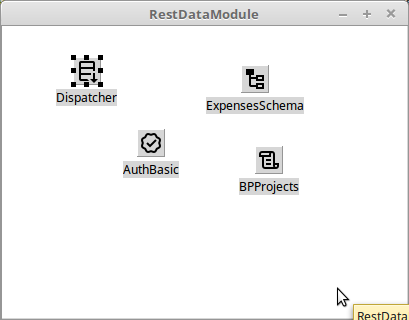 | |
| 673 | 699 | ||
| 674 | 700 | That's it. The project is ready to run. | |
| 675 | 701 | ||
| 676 | 702 | #### Using a SQLDBRestdatamodule | |
| 677 | 703 | ||
| 678 | 704 | This approach is basically the same as the previous one. | |
| 679 | 705 | ||
| 680 | 706 | 1. Create a HTTP application | |
| 681 | 707 | 2. Under File - New, create a SQLDB Rest Bridge Module. | |
| 682 | 708 | 3. Drop a SQLDBRestDispatcher component on the module. | |
| 683 | 709 | 4. The Dispatcher property of the module should be set to the SQLDBRestDispatcher component. | |
| 684 | 710 | 5. Set up the component as required, as in the previous example. | |
| 685 | 711 | ||
| 686 | 712 | ## Examples | |
| 687 | 713 | ||
| 688 | 714 | ### FPC | |
| 689 | 715 | ||
| 690 | 716 | - in FPC Packages, the fcl-web/examples/restbridge directory, there is a small example that serves a expenses tracker database. | |
| 691 | 717 | - The directory (delphiclient) below contains a small Delphi project that shows how to connect a TClientDataset to the SQLDB Rest bridge. | |
| 692 | 718 | ||
| 693 | 719 | ||
| 694 | 720 | Design time view: | |
| 695 | 721 | ||
| 696 | 722 | 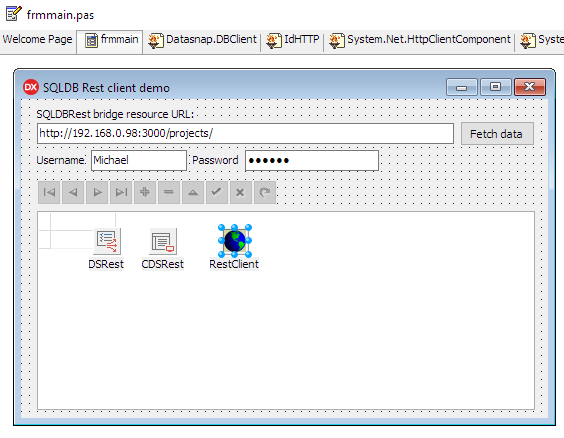 | |
| 697 | 723 | ||
| 698 | 724 | Run time view: | |
| 699 | 725 | ||
| 700 | 726 | 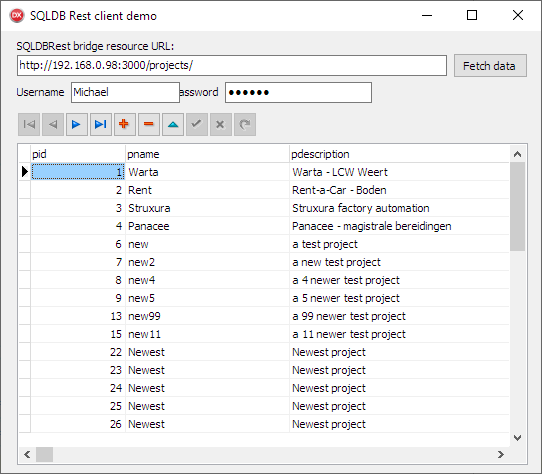 | |
| 701 | 727 | ||
| 702 | 728 | ### Lazarus | |
| 703 | 729 | ||
| 704 | 730 | Requires Lazarus 2.1+ | |
| 705 | 731 | ||
| 706 | 732 | There are 2 server examples available, and several client examples. The client examples are all the same, they just use a different kind of *TDataset* to show the data coming from the server: the **buf**, **json** and **CSV** formats are demonstrated in this way. | |
| 707 | 733 | ||
| 708 | 734 | #### Server examples | |
| 709 | 735 | ||
| 710 | 736 | - The lazarus/components/sqldbrest/demo/restbridge directory contains the same example program restserver.lpi, using a datamodule. | |
| 711 | 737 | - The lazarus/components/sqldbrest/demo/restmodule directory contains the same example program demorestmodule.lpi, using a SQLDB Rest Web datamodule. | |
| 712 | 738 | ||
| 713 | 739 | #### TBufDataset client example | |
| 714 | 740 | ||
| 715 | 741 | - The lazarus/components/sqldbrest/demo/bufclient directory contains a demo, that shows how to load data from a SQLDB REST bridge server in a TBUFDataset dataset. It uses the 'buf' format to do so. | |
| 716 | 742 | ||
| 717 | 743 | ||
| 718 | 744 | 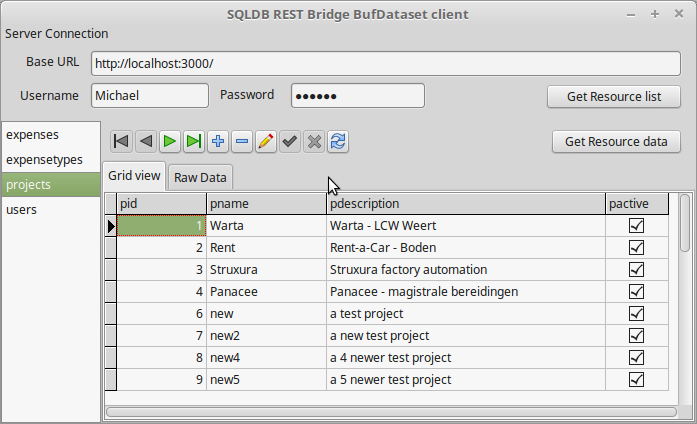 | |
| 719 | 745 | ||
| 720 | 746 | ||
| 721 | 747 | 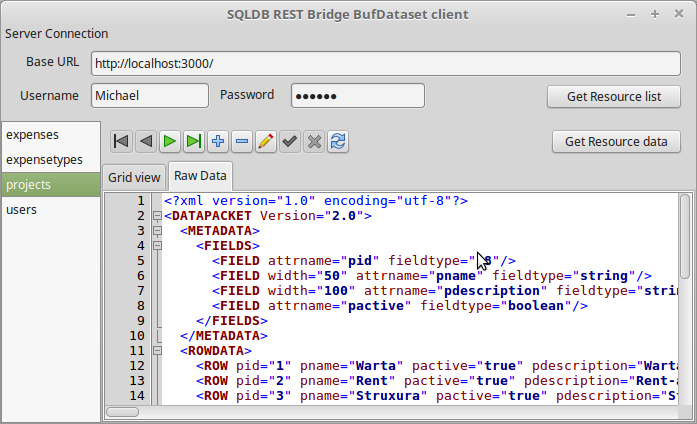 | |
| 722 | 748 | ||
| 723 | 749 | it also demonstrates how to use the metadata resource of the server to list the available resources | |
| 724 | 750 | ||
| 725 | 751 | #### TJSONDataset client example | |
| 726 | 752 | ||
| 727 | 753 | - The lazarus/components/sqldbrest/demo/jsonclient directory contains a demo that is similar to the bufclient demo: | |
| 728 | 754 | ||
| 729 | 755 | ||
| 730 | 756 | it shows how to load data from a SQLDB REST bridge server in a TBaseJSONDataset dataset, using the 'csv' format | |
| 731 | 757 | ||
| 732 | 758 | 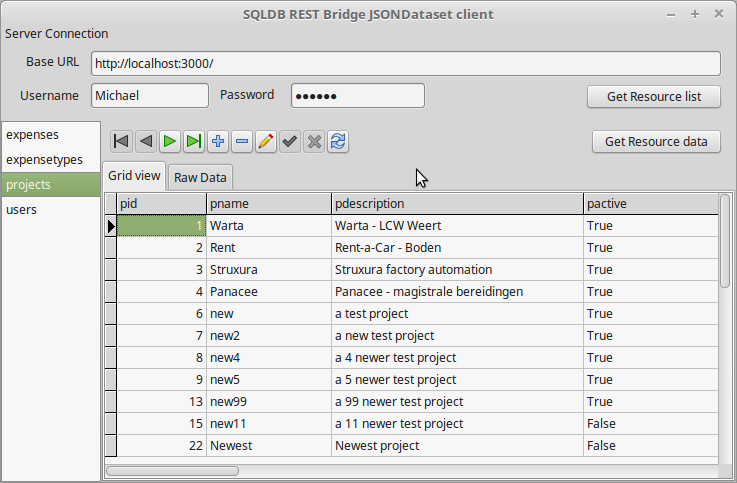 | |
| 733 | 759 | ||
| 734 | 760 | ||
| 735 | 761 | 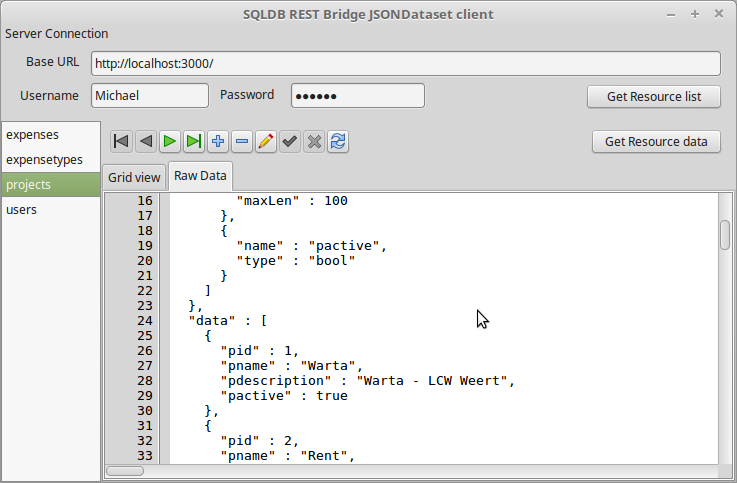 | |
| 736 | 762 | ||
| 737 | 763 | Like the bufdataset demo, it also demonstrates how to use the metadata resource of the server to list the available resources | |
| 738 | 764 | ||
| 739 | 765 | #### TCSVDataset client example | |
| 740 | 766 | ||
| 741 | 767 | - The lazarus/components/sqldbrest/demo/csvclient directory contains a demo that is similar to the bufclient demo: | |
| 742 | 768 | ||
| 743 | 769 | ||
| 744 | 770 | it shows how to load data from a SQLDB REST bridge server in a TCSVDataset dataset, using the 'csv' format | |
| 745 | 771 | ||
| 746 | 772 | ### Pas2JS | |
| 747 | 773 | ||
| 748 | 774 | Requires pas2js 1.5+ | |
| 749 | 775 | ||
| 750 | 776 | - A similar application to the lazarus buffclient/jsonclient programs exists for pas2JS in pas2js/demo/restbridge/simple/restbridgeclient.lpi | |
| 751 | 777 | ||
| 752 | 778 | ||
| 753 | 779 | 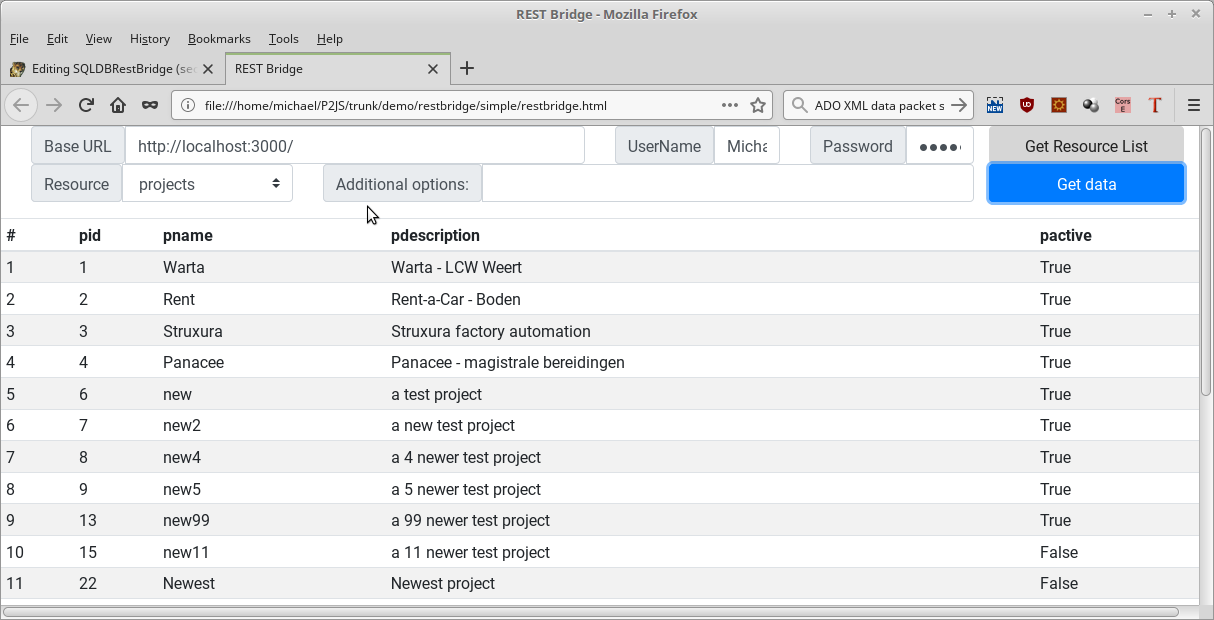 | |
| 754 | 780 | ||
| 755 | 781 | ## TODO | |
| 756 | 782 | ||
| 757 | 783 | The following extensions are still planned: | |
| 758 | 784 | ||
| 759 | 785 | - Support for `?q=filterexpression` in URL filters. | |
| 760 | 786 | - Connection management API. (zero-config service) | |
| 761 | 787 | - Use HTTP credentials to connect to the database. | |
| 762 | 788 | - Unknown query params are now ignored. Allow to check for valid query parameters and raise error if unknown query param is encountered. | |
| 763 | 789 | ||
| 764 | 790 | --- | |
| 765 | 791 | *From the Free Pascal wiki, page "SQLDBRestBridge", as it stood on 2023-03-01 after a change by Michael, out of the wiki's dump of 2024-05-26. Copyright stays with the author who wrote it, according to the old wiki's [[Licensing]] page. If you have concerns about this material, [message the admin](/wiki-contact).* | |
| 766 | 792 | Category: Databases |