

SQLDBRestBridge/ru: what changed
Revision 1 to 2. Removed lines have a minus sign; added lines have a plus sign.
| Old | New | Line | |
|---|---|---|---|
| 1 | 1 | ## Цель | |
| 2 | 2 | ||
| 3 | 3 | Все больше и больше приложений перемещаются в Интернет: сегодня Pas2JS позволяет программировать паскаль для Интернета. | |
| 4 | 4 | ||
| 5 | 5 | Данные должны храниться на сервере, и REST сегодня является предпочтительной архитектурой для этого. Чаще всего данные попадают в базу данных. | |
| 6 | 6 | ||
| 7 | 7 | Поэтому необходим простой способ сделать данные доступными через службу REST. | |
| 8 | 8 | ||
| 9 | 9 | Модуль `SQLDBRestBridge` предлагает средство для раскрытия любой базы данных, к которой SQLDB может получить доступ, используя REST API. | |
| 10 | 10 | ||
| 11 | 11 | Это не подразумевается как общая структура REST API, для этого существуют другие платформы. Это также не структура RPC. | |
| 12 | 12 | ||
| 13 | 13 | Конструкция такова, что полная база данных может быть представлена с использованием одной строки кода с разумными настройками по умолчанию. | |
| 14 | 14 | ||
| 15 | 15 | ### Что компонент делает? | |
| 16 | 16 | ||
| 17 | 17 | По сути, этот компонент можно использовать в приложении FCL-Web для превращения его в REST-сервер: | |
| 18 | 18 | ||
| 19 | 19 | Затем сервер примет обычные команды REST GET/POST/PUT/Delete и автоматически переведет их в соответствующую базу данных CRUD (создание/чтение/обновление/удаление). | |
| 20 | 20 | ||
| 21 | 21 | Его можно использовать просто: одной строки кода достаточно, чтобы таким образом представить полную базу данных. | |
| 22 | 22 | ||
| 23 | 23 | Или это может быть полностью настроено и точно подкручено: схема может быть полностью определена: все операторы SQL могут быть заданы, могут быть определены списки полей, могут быть заданы псевдонимы, могут быть реализованы бизнес-правила. | |
| 24 | 24 | ||
| 25 | 25 | Полученный в результате сервер можно использовать в установке клиента/сервера (например, используя pas2js в качестве клиента) для обслуживания данных без необходимости написания всего необходимого сантехнического кода на REST-сервере. | |
| 26 | 26 | ||
| 27 | 27 | ### Чего компонент не делает? | |
| 28 | 28 | ||
| 29 | 29 | - Это технология на стороне сервера. | |
| 30 | 30 | ||
| 31 | 31 | ||
| 32 | 32 | Чтобы использовать данные, обслуживаемые этим компонентом, вам нужно написать клиент. | |
| 33 | 33 | ||
| 34 | 34 | Нет никаких предположений относительно клиента, за исключением того, что он знает, как выполнять HTTP-запросы, и что он понимает один из доступных форматов данных. | |
| 35 | 35 | ||
| 36 | 36 | - Он не предоставляет объекты в качестве ресурсов REST. | |
| 37 | 37 | ||
| 38 | 38 | ||
| 39 | 39 | Используя некоторые приемы, это можно сделать, но это не цель проекта. | |
| 40 | 40 | ||
| 41 | 41 | В конечном итоге все данные попадают в базу данных, и этот компонент использует прямой механизм для достижения этой цели. | |
| 42 | 42 | ||
| 43 | 43 | ## Характеристики | |
| 44 | 44 | ||
| 45 | 45 | ### На стороне базы данных SQL | |
| 46 | 46 | ||
| 47 | 47 | 1. Каждый ресурс REST определяется до 4 операторов SQL, соответствующих 4 операциям CRUD. | |
| 48 | 48 | 2. Операторы CRUD могут быть автоматически сгенерированы на лету на основе имени таблицы и определений полей. | |
| 49 | 49 | 3. Для каждого поля можно указать псевдоним. | |
| 50 | 50 | 4. Доступны следующие типы на стороне клиента, автоматически сопоставленные с собственным типом базы данных: | |
| 51 | 51 | 1. String | |
| 52 | 52 | 2. 64-bit integer | |
| 53 | 53 | 3. 32-bit integer | |
| 54 | 54 | 4. Boolean | |
| 55 | 55 | 5. Date, Time, DateTime | |
| 56 | 56 | 6. Blob (base64-encoded) | |
| 57 | 57 | 5. Встроена поддержка последовательностей для генерации идентификаторов. | |
| 58 | 58 | 6. Полный контроль над тем, какие операции (GET, POST, PUT, DELETE) разрешены. | |
| 59 | 59 | 7. Ресурсы собраны в схему. | |
| 60 | 60 | 8. К сервису могут быть прикреплены несколько схем. | |
| 61 | 61 | 9. Могут быть заданы несколько баз данных (соединений). | |
| 62 | 62 | 10. Схема может быть привязана к одному соединению, или соединения могут совместно использовать схемы (вариант использования: другое соединение для клиента). | |
| 63 | 63 | 11. Компоненты бизнес-процессоров могут быть подключены к ресурсу, чтобы упростить реализацию бизнес-логики. | |
| 64 | 64 | 12. Выражения SQL могут содержать параметры, значения для параметров будут взяты из URL запроса. | |
| 65 | 65 | 13. Поддержка для получения пользовательских наборов данных. | |
| 66 | 66 | 14. Поддержка клиентских операторов SQL SELECT (необязательно, по умолчанию отключено) | |
| 67 | 67 | 15. Полная поддержка конфигурации через файл `.ini` из коробки. | |
| 68 | 68 | ||
| 69 | 69 | ### На стороне HTTP | |
| 70 | 70 | ||
| 71 | 71 | 1. Аутентификация обрабатывается с использованием протокола HTTP. | |
| 72 | 72 | 2. Базовая аутентификация включена по умолчанию, но полностью подключаема. | |
| 73 | 73 | 3. Обычная аутентификация может искать действительных пользователей в базе данных (по умолчанию база данных незащищенная). | |
| 74 | 74 | 4. Выходной формат может быть зафиксирован или определен для каждого запроса (`?Fmt=format`). Обнаружение по типу контента также доступно. | |
| 75 | 75 | 5. Список полей для включения в вывод можно указать в URL:\ | |
| 76 | 76 | `fl=field1,field2` | |
| 77 | 77 | 6. Список полей, исключаемых из вывода, может быть указан в URL:\ | |
| 78 | 78 | `fe=field1,field2` | |
| 79 | 79 | 7. Различные форматы вывода доступны из коробки | |
| 80 | 80 | 1. JSON (по умолчанию) | |
| 81 | 81 | 2. XML (пользовательский формат) | |
| 82 | 82 | 3. CSV (для ввода и вывода) | |
| 83 | 83 | 4. CDS (Формат, используемый Delphi'йским `TClientDataset`) | |
| 84 | 84 | 5. Запланировано: пакеты данных ADO (как он используется MS Access) | |
| 85 | 85 | 8. Используется заводской шаблон, новые форматы могут быть добавлены по желанию. | |
| 86 | 86 | 9. Простые схемы URL. Доступны 2 основные схемы | |
| 87 | 87 | BASEURL/Resource/ | |
| 88 | 88 | BASEURL/Resource/ID | |
| 89 | 89 | ||
| 90 | 90 | или используя соединение в качестве префикса: | |
| 91 | 91 | ||
| 92 | 92 | BASEURL/Connection/Resource/ | |
| 93 | 93 | BASEURL/Connection/Resource/ID | |
| 94 | 94 | 10. Поддержка самоанализа/обнаружения или метаданных: | |
| 95 | 95 | BASEURL/metadata/ | |
| 96 | 96 | ||
| 97 | 97 | возвращает список доступных ресурсов и их операций. | |
| 98 | 98 | ||
| 99 | 99 | BASEURL/metadata/resourcename | |
| 100 | 100 | ||
| 101 | 101 | возвращает структуру ресурса: поля, типы и т. д. | |
| 102 | 102 | 11. параметры `limit` и `offset` для подкачки результатов: | |
| 103 | 103 | BASEURL/resourcename?limit=10 | |
| 104 | 104 | BASEURL/resourcename?limit=10&Offset=50 | |
| 105 | 105 | ||
| 106 | 106 | Может быть применен максимальный лимит. Когда операторы SQL поддерживают это, `limit` и `offset` переводятся в предложения fetch/offset \[языка\] SQL. | |
| 107 | 107 | 12. Порядок сортировки можно указать в URL-адресе запроса, если это позволяет определение ресурса, используя `?Sort=fieldname`. Возможность сортировки может быть указана на основе поля. | |
| 108 | 108 | BASEURL/resourcename?sort=MyField | |
| 109 | 109 | BASEURL/resourcename?sort=MyField%20desc | |
| 110 | 110 | 13. Фильтрация может быть указана на основе поля в URL-адресе запроса, и операция фильтрации преобразуется в SQL-предложение Where: | |
| 111 | 111 | BASEURL/resourcename?MyField=10 | |
| 112 | 112 | BASEURL/resourcename?MyField_null=1 | |
| 113 | 113 | BASEURL/resourcename?MyField_null=0 | |
| 114 | 114 | BASEURL/resourcename?MyField_lt=10 | |
| 115 | 115 | BASEURL/resourcename?MyField_lte=10 | |
| 116 | 116 | BASEURL/resourcename?MyField_gt=10 | |
| 117 | 117 | BASEURL/resourcename?MyField_gte=10 | |
| 118 | 118 | ||
| 119 | 119 | переводится в SQL-предложение WHERE: | |
| 120 | 120 | ||
| 121 | 121 | (MyField=10) | |
| 122 | 122 | (MyField is null) | |
| 123 | 123 | (MyField is not null) | |
| 124 | 124 | (MyField<10) | |
| 125 | 125 | (MyField_lte<=10) | |
| 126 | 126 | (MyField>10) | |
| 127 | 127 | (MyField>=10) | |
| 128 | 128 | ||
| 129 | 129 | Возможность фильтрации по полю можно указать в схеме для каждого поля. | |
| 130 | 130 | 14. Запрос может указать, должны ли метаданные быть включены в ответ: | |
| 131 | 131 | BASEURL/resourcename?metadata=1 | |
| 132 | 132 | 15. Запрос может указывать, должен ли результат быть понятным для человека или нет | |
| 133 | 133 | BASEURL/resourcename?humanreadable=1 | |
| 134 | 134 | ||
| 135 | 135 | Если установлено значение 1, результат запроса будет отформатирован. Не все форматы поддерживают это. | |
| 136 | 136 | ||
| 137 | 137 | ## Доступные компоненты | |
| 138 | 138 | ||
| 139 | 139 | ### TSQLDBRestSchema | |
| 140 | 140 | ||
| 141 | 141 | Представляет схему REST: список доступных ресурсов с их разрешенными операциями, определения полей, операторы SQL. | |
| 142 | 142 | ||
| 143 | 143 | #### Свойства | |
| 144 | 144 | ||
| 145 | 145 | - **Resources**: коллекция ресурсов. Каждый пункт имеет тип *TSQLDBRestResource* | |
| 146 | 146 | - **ConnectionName**: установите это для имени соединения, если вы хотите, чтобы все ресурсы этой схемы использовали это соединение. | |
| 147 | 147 | ||
| 148 | 148 | #### Методы | |
| 149 | 149 | ||
| 150 | 150 | - **SaveToFile** сохраняет определения ресурса в файл (как JSON) | |
| 151 | 151 | ||
| 152 | 152 | ```delphi | |
| 153 | 153 | Procedure SaveToFile(Const aFileName : UTF8String); | |
| 154 | 154 | ``` | |
| 155 | 155 | ||
| 156 | 156 | - **SaveToFile** сохраняет определения ресурсов в поток (как JSON) | |
| 157 | 157 | ||
| 158 | 158 | ```delphi | |
| 159 | 159 | Procedure SaveToStream(Const aStream : TStream); | |
| 160 | 160 | ``` | |
| 161 | 161 | ||
| 162 | 162 | - **AsJSON** возвращает определения ресурса в виде объекта JSON | |
| 163 | 163 | ||
| 164 | 164 | ```delphi | |
| 165 | 165 | function AsJSON(const aPropName: UTF8String=''): TJSONData; | |
| 166 | 166 | ``` | |
| 167 | 167 | ||
| 168 | 168 | Если указано, **aPropName** - это имя свойства, ниже которого хранятся все определения. | |
| 169 | 169 | ||
| 170 | 170 | - **LoadFromFile** загружает определения ресурсов из файла JSON | |
| 171 | 171 | ||
| 172 | 172 | ```delphi | |
| 173 | 173 | Procedure LoadFromFile(Const aFileName : UTF8String); | |
| 174 | 174 | ``` | |
| 175 | 175 | ||
| 176 | 176 | - **LoadFromStream** загружает определения ресурсов из потока JSON | |
| 177 | 177 | ||
| 178 | 178 | ```delphi | |
| 179 | 179 | Procedure LoadFromStream(Const aStream : TStream); | |
| 180 | 180 | ``` | |
| 181 | 181 | ||
| 182 | 182 | - **FromJSON** загружает определения ресурсов из файла JSON | |
| 183 | 183 | ||
| 184 | 184 | ```delphi | |
| 185 | 185 | Procedure FromJSON(aData: TJSONData;const aPropName: UTF8String=''); | |
| 186 | 186 | ``` | |
| 187 | 187 | ||
| 188 | 188 | Если указано, **aPropName** - имя свойства, под которым расположены все определения. | |
| 189 | 189 | ||
| 190 | 190 | - **PopulateResourceFields** создает поля ресурсов на основе имени таблицы | |
| 191 | 191 | ||
| 192 | 192 | ```delphi | |
| 193 | 193 | procedure PopulateResourceFields(aConn: TSQLConnection; aRes: TSQLDBRestResource; aMinFieldOpts : TRestFieldOptions = []); | |
| 194 | 194 | ``` | |
| 195 | 195 | ||
| 196 | 196 | *PopulateResourceFields* заполняет определения полей в *aRes*, проверяя таблицу в соединении с базой данных *aConn*. Каждое созданное поле получает как минимум *aMinFieldOptions* в его свойстве *Options* | |
| 197 | 197 | ||
| 198 | 198 | - **PopulateResources** создает определение ресурса для каждой таблицы в соединении с базой данных | |
| 199 | 199 | ||
| 200 | 200 | ```delphi | |
| 201 | 201 | procedure PopulateResources(aConn: TSQLConnection; aTables: array of string; aMinFieldOpts: TRestFieldOptions= []); | |
| 202 | 202 | procedure PopulateResources(aConn : TSQLConnection; aTables : TStrings = Nil; aMinFieldOpts : TRestFieldOptions = []); | |
| 203 | 203 | ``` | |
| 204 | 204 | ||
| 205 | 205 | - *PopulateResources* извлекает список таблиц из *aConn*, создает определение ресурса для таблицы и вызывает *PopulateResourceFields*, чтобы заполнить ресурс полями. Если указано *aTables*, определения будут создаваться только для таблиц в этом списке. | |
| 206 | 206 | ||
| 207 | 207 | ### TSQLDBRestDispatcher | |
| 208 | 208 | ||
| 209 | 209 | #### Свойства | |
| 210 | 210 | ||
| 211 | 211 | - **Active** (Boolean) Регистрирует или отменяет регистрацию HTTP маршрутов | |
| 212 | 212 | - **Connections** (TSQLDBRestConnectionList) Список подключений к базе данных для соединения | |
| 213 | 213 | - **Schemas** (TSQLDBRestSchemaList) Список схем REST для обслуживания | |
| 214 | 214 | - **BasePath** (UTF8String) Базовый URL для REST URL | |
| 215 | 215 | - **DefaultConnection** (UTF8String) Соединение по умолчанию для использования, если ни одно не обнаружено из запроса/схемы | |
| 216 | 216 | - **Strings** (TRestStringsConfig Property) Конфигурации строк ввода/вывода | |
| 217 | 217 | - **OutputOptions** (TRestOutputOptions) Параметры вывода по умолчанию, изменяемые по запросу. Один или несколько из: | |
| 218 | 218 | ||
| 219 | 219 | 1. *ooMetadata* отправка метаданных в запросе | |
| 220 | 220 | 2. *ooSparse* не отправлять null-значения (если формат позволяет) | |
| 221 | 221 | 3. *ooHumanReadable* "человекочитабельная" печать | |
| 222 | 222 | ||
| 223 | 223 | - **InputFormat** (string) - Имя формата ввода, используемого для всех запросов. | |
| 224 | 224 | - **OutputFormat** (string) - Имя формата вывода, используемого для всех запросов. | |
| 225 | 225 | - **DispatchOptions** (TRestDispatcherOptions) - Опции диспетчера. Один или несколько из | |
| 226 | 226 | ||
| 227 | 227 | 1. *rdoConnectionInURL* - использовать соединение в качестве элемента пути в URL | |
| 228 | 228 | 2. *rdoExposeMetadata* - выставлять URL метаданных | |
| 229 | 229 | 3. *rdoCustomView* - разрешить использование пользовательского URL-адреса (выбирается SQL, указанный в запросе) | |
| 230 | 230 | 4. *rdoHandleCORS* - обрабатывать предпосылаемый запрос CORS | |
| 231 | 231 | 5. *rdoAccessCheckNeedsDB* - эта \[опция\] контролирует, когда проверка доступа выполняется для ресурсов: до или после установления соединения с базой данных. Если вам необходимо выполнить дополнительные запросы к базе данных, чтобы решить, предоставляется ли доступ (например, проверка ACL в БД), этот параметр должен быть включен | |
| 232 | 232 | ||
| 233 | 233 | - **Authenticator** (TRestAuthenticator) - аутентификатор для запросов. Если установлено значение *OnBasicAuthentication*, его можно оставить пустым. | |
| 234 | 234 | - **EnforceLimit** (Integer) - если больше нуля, установить ограничение на выходные результаты. | |
| 235 | 235 | - **CORSAllowedOrigins** (String) - Разделенный запятыми список доменов, которым разрешено использовать эту службу REST. Если пусто, в предварительном запросе будет возвращено *. | |
| 236 | 236 | ||
| 237 | 237 | #### Методы | |
| 238 | 238 | ||
| 239 | 239 | - **ExposeDatabase** выставляет базу данных в качестве службы REST. Это создаст определение соединения с предоставленными параметрами и вызовет **ExposeConnection** с этим определением. | |
| 240 | 240 | ```delphi | |
| 241 | 241 | Function ExposeDatabase(Const aType,aHostName,aDatabaseName,aUserName,aPassword : String; aTables : Array of String; aMinFieldOpt) | |
| 242 | 242 | Function ExposeDatabase(Const aType,aHostName,aDatabaseName,aUserName,aPassword : String; aTables : TStrings = nil; aMinFieldOpt) | |
| 243 | 243 | ``` | |
| 244 | 244 | ||
| 245 | 245 | The connection gets the name **ConnectionN**, where N is a unique number, and the schema is named **SchemaConnectionN**. The Tables and aMinFieldOpt arguments are the same as in the *PopulateResources* call of **TSQLDBRestSchema** | |
| 246 | 246 | - **ExposeConnection** exposes a database (represented by *aConnection*) as a REST service. This will create a schema with a resource definition. | |
| 247 | 247 | ```delphi | |
| 248 | 248 | Function ExposeConnection(Const aConnection : TSQLDBRestConnection; aTables : TStrings = nil; aMinFieldOpts : TRestFieldOptions | |
| 249 | 249 | ``` | |
| 250 | 250 | ||
| 251 | 251 | The Tables and aMinFieldOpt arguments are the same as in the *PopulateResources* call of **TSQLDBRestSchema** | |
| 252 | 252 | ||
| 253 | 253 | ### TRestBasicAuthenticator | |
| 254 | 254 | ||
| 255 | 255 | This class implements HTTP Basic authentication for the SQLDB REST Dispatcher | |
| 256 | 256 | ||
| 257 | 257 | - AuthConnection (TSQLConnection) a SQL connection that will be used to run the SQL. By default the connection of the request is used. Set this if your users are in a separate database. | |
| 258 | 258 | - AuthenticateUserSQL (TStrings) an SQL Statement that will be executed on the connection (AuthConnection or connection of the request). This must contain 2 parameters **userName** and **password** and return a single field. This field will be used as **UserID** (available in the rest of the request flow. | |
| 259 | 259 | - DefaultUserName (UTF8String) a valid username, not in the database. | |
| 260 | 260 | - DefaultPassword (UTF8String) password of a default user. | |
| 261 | 261 | - DefaultUserID (UTF8String) the user ID reported if the default user is authenticated. | |
| 262 | 262 | - AuthenticationRealm : (UTF8String) Real sent in the **WWW-Authenticate** challenge to the client. | |
| 263 | 263 | - OnBasicAuthentication (event) triggered when basic authentication is requested. Here you can enter custom code to validate the user. | |
| 264 | 264 | ||
| 265 | 265 | ### TSQLDBRestModule | |
| 266 | 266 | ||
| 267 | 267 | - This is a simple **TWebModule** descendant which is usable in Lazarus IDE. It has a single *Dispatcher* property which must be set to a **TSQLDBRestDispatcher** instance. | |
| 268 | 268 | ||
| 269 | 269 | ### TSQLDBRestResource | |
| 270 | 270 | ||
| 271 | 271 | This is a collection item, found in the 'Resources' property of the **TSQLDBRestSchema**. It represents a single REST resource. | |
| 272 | 272 | ||
| 273 | 273 | #### properties | |
| 274 | 274 | ||
| 275 | 275 | It has the following properties: | |
| 276 | 276 | ||
| 277 | 277 | - **Fields** (TSQLDBRestFieldList) A list of fields that will be included in the output, or can be supplied in the input. | |
| 278 | 278 | - **Enabled** (Boolean) Is this resource enabled ? | |
| 279 | 279 | - **InMetadata** (Boolean) Should this resource be shown in the metadata list ? | |
| 280 | 280 | - **ConnectionName** (UTF8String) Connection name to use for this resource. | |
| 281 | 281 | - **TableName** (UTF8String) Database table name. This must only be specified if the SQL is auto generated. | |
| 282 | 282 | - **ResourceName** (UTF8String) Name of this resource as exposed to the outside world. | |
| 283 | 283 | - **AllowedOperations** (TRestOperations) The operations allowed on this resources (Get/Put/Post/Delete/Options/Head) | |
| 284 | 284 | - **SQLSelect** (TStrings) SQL select statement for a GET request. Left empty, it is autogenerated based on the table name. The where clause uses the fields with the *foInKey* flag set for single resources. | |
| 285 | 285 | - **SQLInsert** (TStrings) SQL INSERT statement for a POST request. Left empty, it is autogenerated based on the table name. | |
| 286 | 286 | - **SQLUpdate** (TStrings) SQL UPDATE statement for a PUT request. Left empty, it is autogenerated based on the table name. The where clause uses the fields with the *foInKey* flag set. | |
| 287 | 287 | - **SQLDelete** (TStrings) SQL DELETE statement for a DELETE request. Left empty, it is autogenerated based on the table name. The where clause uses the fields with the *foInKey* flag set. | |
| 288 | 288 | - *'SQL* an array of SQL statements, based on the previous ones. | |
| 289 | 289 | - **BusinessProcessor** (TSQLDBRestCustomBusinessProcessor) at runtime this contains the business processor for this resource (if any) | |
| 290 | 290 | ||
| 291 | 291 | #### Events | |
| 292 | 292 | ||
| 293 | 293 | The following events are available: | |
| 294 | 294 | ||
| 295 | 295 | - **OnResourceAllowed** (TSQLDBRestAllowResourceEvent) Called to check whether the user is allowed to access this resource. | |
| 296 | 296 | - **OnAllowedOperations** (TSQLDBRestAllowedOperationsEvent) Called to allow to fine-tune the allowed operations for the user. | |
| 297 | 297 | - **OnGetDataset** (TSQLDBRestGetDatasetEvent) You can return a custom dataset for GET operations. | |
| 298 | 298 | - **OnCheckParams** (TSQLDBRestCheckParamsEvent) You can check the INSERT/UPDATE/DELETE SQL Statement parameters in this request/ | |
| 299 | 299 | - **OnAllowRecord** (TSQLDBRestAllowRecordEvent) Called for each record, you can ddecide whether the record should be included in the output. | |
| 300 | 300 | ||
| 301 | 301 | Note: when set, the corresponding event in the business processor is not triggered. | |
| 302 | 302 | ||
| 303 | 303 | #### Methods | |
| 304 | 304 | ||
| 305 | 305 | The following methods exist: | |
| 306 | 306 | ||
| 307 | 307 | ` Function GetDataset(aContext : TBaseRestContext; aFieldList : TRestFieldPairArray; aOrderBy : TRestFieldOrderPairArray; aLimit, aOffset : Int64) : TDataset;` | |
| 308 | 308 | ||
| 309 | 309 | Get the custom dataset for this resource. | |
| 310 | 310 | ||
| 311 | 311 | ` function GenerateDefaultSQL(aKind: TSQLKind): UTF8String; virtual;` | |
| 312 | 312 | ||
| 313 | 313 | Get the default SQL for this resource if none was specified. | |
| 314 | 314 | ||
| 315 | 315 | ` function GetFieldList(aListKind: TFieldListKind): UTF8String;` | |
| 316 | 316 | ||
| 317 | 317 | Return a list of fields as a string, separated by a correct separator token | |
| 318 | 318 | ||
| 319 | 319 | ` function GetFieldArray(aListKind: TFieldListKind): TSQLDBRestFieldArray;` | |
| 320 | 320 | ||
| 321 | 321 | Return a list of fields, similar to GetFieldList, but returns the raw fields. | |
| 322 | 322 | ||
| 323 | 323 | ` Function GetResolvedSQl(aKind : TSQLKind; Const AWhere : UTF8String; Const aOrderBy : UTF8String = `*`; aLimit : UTF8String =`*`) : UTF8String;` | |
| 324 | 324 | ||
| 325 | 325 | Return the actual SQL Statement that will be executed, with macros | |
| 326 | 326 | ||
| 327 | 327 | ` Procedure PopulateFieldsFromFieldDefs(Defs : TFieldDefs; aIndexFields : TStringArray; aProcessIdentifier : TProcessIdentifier; aMinFieldOpts : TRestFieldOptions);` | |
| 328 | 328 | ||
| 329 | 329 | Populate the fields collection from a TFieldDefs collection. | |
| 330 | 330 | ||
| 331 | 331 | ### TSQLDBRestField | |
| 332 | 332 | ||
| 333 | 333 | The TSQLDBREstResource has a collection of fields (TSQLDBRestField) that determine the output fields of the REST resource | |
| 334 | 334 | ||
| 335 | 335 | It has the following properties; | |
| 336 | 336 | ||
| 337 | 337 | - FieldName (UTF8String Read FFieldName Write FFieldName; | |
| 338 | 338 | - PublicName (UTF8String Read GetPublicName Write FPublicName; | |
| 339 | 339 | - GeneratorName (String) name of a generator to privide a unique value. | |
| 340 | 340 | - FieldType (TRestFieldType) Data type of the exposed field.One of (the names speak for themselves) | |
| 341 | 341 | - rftInteger | |
| 342 | 342 | - rftLargeInt | |
| 343 | 343 | - rftFloat | |
| 344 | 344 | - rftDate | |
| 345 | 345 | - rftTime | |
| 346 | 346 | - rftDateTime | |
| 347 | 347 | - rftString | |
| 348 | 348 | - rftBoolean | |
| 349 | 349 | - rftBlob (sent as base64-encoded data) | |
| 350 | 350 | - NativeFieldType (TFieldType) Native database field type of this field. | |
| 351 | 351 | - Options (TRestFieldOptions) options for this field. One of more of: | |
| 352 | 352 | - foInKey This is a key field. | |
| 353 | 353 | - foInInsert The field can be inserted (if statement is autogenerated) | |
| 354 | 354 | - foInUpdate The field can be updated (if statement is autogenerated) | |
| 355 | 355 | - foRequired A field value is required. | |
| 356 | 356 | - foFilter Filtering is allowed on this field. | |
| 357 | 357 | - foOrderBy Ordering is allowed on this field. | |
| 358 | 358 | - foOrderByDesc Ordering (descendent) is allowed on this field. | |
| 359 | 359 | - Filters (TRestFieldFilters) Allowed filter expressions for this field. One or more of: | |
| 360 | 360 | - rfEqual | |
| 361 | 361 | - rfLessThan | |
| 362 | 362 | - rfGreaterThan | |
| 363 | 363 | - rfLessThanEqual | |
| 364 | 364 | - rfGreaterThanEqual | |
| 365 | 365 | - rfNull | |
| 366 | 366 | - MaxLen (integer) for string fields, the maximum allowed length of the field. | |
| 367 | 367 | ||
| 368 | 368 | ### TSQLDBRestBusinessProcessor | |
| 369 | 369 | ||
| 370 | 370 | This class serves to implement any business rules you want to attach to your rest resource. You can drop one TSQLDBRestBusinessProcessor instance per resource on a module, set the schema and resource name (a list of resource names is available in the Object Inspector) and implement the events. | |
| 371 | 371 | ||
| 372 | 372 | The following properties and events are available: | |
| 373 | 373 | ||
| 374 | 374 | - **Schema** : The schema in which the resource resides. | |
| 375 | 375 | - **ResourceName** The resource for which the business rules are valid. | |
| 376 | 376 | - **OnGetDataset** : Event called when you want to create a custom dataset. You must free the dataset yourself. | |
| 377 | 377 | - **OnCheckParams** : Event in which you can verify whether the parameters for insert/update/delete/select queries are OK. | |
| 378 | 378 | - **OnAllowResource** : Event to decide whether a property is allowed for a request. You can use this e.g. to forbid certain users from accessing a resource. | |
| 379 | 379 | - **OnAllowedOperations** : Event to decide whether a REST operation is allowed for a request. You can use this to forbid certain users from writing to a resource, but allow them to read. | |
| 380 | 380 | - **OnAllowRecord** : Called for each record which will be output. This can be used to prevent certain records from being streamed to the output. Note that if *Limit* is specified, this will not be taken into account, i.e. if the limit is 10, and you forbid 2 records from being streamed at this point, only 8 records will be returned. | |
| 381 | 381 | ||
| 382 | 382 | All calls get passed a TRestContext instance. This contains 2 properties and a method: | |
| 383 | 383 | ||
| 384 | 384 | ` Function GetVariable(Const aName : UTF8String; aSources : TVariableSources; Out aValue : UTF8String) : Boolean;` | |
| 385 | 385 | ||
| 386 | 386 | Call this to get a HTTP Query variable, header,... The function returns true if the variable was found. | |
| 387 | 387 | ||
| 388 | 388 | ` Property UserID : UTF8String` | |
| 389 | 389 | ||
| 390 | 390 | This will be set when calling. | |
| 391 | 391 | ||
| 392 | 392 | ` Property Data : TObject` | |
| 393 | 393 | ||
| 394 | 394 | You can attach data to this if you want to. It will be kept for the duration of the request. You are responsible for freeing this data, though. | |
| 395 | 395 | ||
| 396 | 396 | ## Special Resources | |
| 397 | 397 | ||
| 398 | 398 | ### metaData | |
| 399 | 399 | ||
| 400 | 400 | The */baseURL/metaData* resource lists all the resources defined in the schema, together with the allowed operations. | |
| 401 | 401 | ||
| 402 | 402 | The usual formats and parameters are supported. | |
| 403 | 403 | ||
| 404 | 404 | ### metaData/resourceName | |
| 405 | 405 | ||
| 406 | 406 | The */baseURL/metaData/resourceName* resource lists all the fields in the **resourceName** resource, together with the properties. | |
| 407 | 407 | ||
| 408 | 408 | The usual formats and parameters are supported for this resource. | |
| 409 | 409 | ||
| 410 | 410 | ### customview | |
| 411 | 411 | ||
| 412 | 412 | The customView resource is special. Its availability must be enabled using the *Dispatcher*'s Options. When *rdoCustomView* is included in the options, the | |
| 413 | 413 | ||
| 414 | 414 | ` baseURL/customView` | |
| 415 | 415 | ||
| 416 | 416 | URL becomes available. It allows the client to specify an SQL Select statement using the *SQL* parameter: | |
| 417 | 417 | ||
| 418 | 418 | ` baseURL/customView?SQL=select count(*) as thecount from person` | |
| 419 | 419 | ||
| 420 | 420 | (you must encode the sql using the usual URI encoding mechanism, it is omitted for readability reasons here) The usual parameters for fieldlists, format are supported, but not the *limit* and *offset* parameters. | |
| 421 | 421 | ||
| 422 | 422 | The engine will check that only SELECT statements passed on. Nevertheless, this is an inherently less safe mechanism which should only be used in case of need. | |
| 423 | 423 | ||
| 424 | 424 | ### _connection | |
| 425 | 425 | ||
| 426 | 426 | (Work in progress) This is a resource that allows you to manage the connections through REST. This can be useful in development environments, where you can simply create a single binary that does not need any configuration, the whole configuration can be done through REST, including the management of the available connections. | |
| 427 | 427 | ||
| 428 | 428 | Because this is security-wise a dangerous option to enable, it is disabled by default, and must be enabled explicitly with the *rdoConnectionResource* option of the dispatcher. | |
| 429 | 429 | ||
| 430 | 430 | Use cases are a development environment where this can be used to confiure the restserver from within the IDE. When moving to production, the option can be disabled, and only fixed and known connections will be allowed/ | |
| 431 | 431 | ||
| 432 | 432 | ## Available Output formats | |
| 433 | 433 | ||
| 434 | 434 | ### JSON (the default) | |
| 435 | 435 | ||
| 436 | 436 | - A simple JSON object encapsulating data, metadata and possibly error nodes. | |
| 437 | 437 | - rows are exported as JSON objects, field names are property names of the object. | |
| 438 | 438 | - Name: 'json' | |
| 439 | 439 | - Content-type: 'application/json' | |
| 440 | 440 | - Input and output. | |
| 441 | 441 | - Data by default under 'data' | |
| 442 | 442 | - Metadata by default under 'metaData' | |
| 443 | 443 | - Errors reported under 'error' | |
| 444 | 444 | - Property names are configurable in REST dispatcher. | |
| 445 | 445 | ||
| 446 | 446 | ### XML (a custom format) | |
| 447 | 447 | ||
| 448 | 448 | - A simple XML document encapsulating data, metadata and possibly error nodes, under a root element 'datapacket' | |
| 449 | 449 | - rows are exported as XML elements (named 'row') , the contents as text in the element. | |
| 450 | 450 | - Name: 'xml' | |
| 451 | 451 | - Content-type: 'text/xml' | |
| 452 | 452 | - Input and output. | |
| 453 | 453 | - Data by default under 'data' | |
| 454 | 454 | - Metadata by default under 'metadata' | |
| 455 | 455 | - Errors reported under 'error' | |
| 456 | 456 | - Element names are configurable in REST dispatcher. | |
| 457 | 457 | ||
| 458 | 458 | ### CSV | |
| 459 | 459 | ||
| 460 | 460 | - Simple comma-separated CSV list. | |
| 461 | 461 | - Name: 'csv' | |
| 462 | 462 | - Content-type: 'text/csv' | |
| 463 | 463 | - Input and output. | |
| 464 | 464 | - Separator: Comma | |
| 465 | 465 | - Quotes when needed. | |
| 466 | 466 | - Metadata means first line contains fieldnames. | |
| 467 | 467 | ||
| 468 | 468 | ### CDS | |
| 469 | 469 | ||
| 470 | 470 | - XML package using the XMLFormat used by Delphi `TClientDataset`. | |
| 471 | 471 | - Name: 'cds' | |
| 472 | 472 | - Content-type: 'text/csv' | |
| 473 | 473 | - Input and output. | |
| 474 | 474 | ||
| 475 | 475 | A Delphi demo program is provided. | |
| 476 | 476 | ||
| 477 | 477 | ### ADO | |
| 478 | 478 | ||
| 479 | 479 | - XML format as used by ADO recordsets (as used by MS Access) | |
| 480 | 480 | - Name: 'ado' | |
| 481 | 481 | - Input and output. | |
| 482 | 482 | ||
| 483 | 483 | ## Ini file Support | |
| 484 | 484 | ||
| 485 | 485 | The following classes can load/save their configuration settings from/to an .ini file | |
| 486 | 486 | ||
| 487 | 487 | - TSQLDBRestDispatcher | |
| 488 | 488 | - TRestBasicAuthenticator | |
| 489 | 489 | - TSQLDBRestConnection | |
| 490 | 490 | - TRestStringsConfig | |
| 491 | 491 | ||
| 492 | 492 | The support for this is implemented in 2 units; | |
| 493 | 493 | ||
| 494 | 494 | - the sqldbauthini unit has a type helper for the TRestBasicAuthenticator class. | |
| 495 | 495 | - The sqldbrestini unit has the type helpers for TSQLDBRestDispatcher and TSQLDBRestConnection and TRestStringsConfig. | |
| 496 | 496 | ||
| 497 | 497 | The helpers implement LoadFromFile/SaveToFile methods, as well as LoadFromIni/SaveToIni methods. There are some options to control the level of depth. | |
| 498 | 498 | ||
| 499 | 499 | The schemas (if so required) are saved as JSON files in the same directory as the .ini file, using the name of the schema as the filename. | |
| 500 | 500 | ||
| 501 | 501 | ## Lazarus Support | |
| 502 | 502 | ||
| 503 | 503 | Lazarus support for the SQLDB REST Bridge is in the lazsqldbrest.lpk package, under the fpweb directory. It registers the TSQLDBRestDispatcher, TSQLDBRestSchema and TRestBasicAuthenticator components on the component palette: | |
| 504 | 504 | ||
| 505 | - | ||
| 506 | - | ||
| 507 | - | ||
| 508 | - | ||
| 505 | + |  | |
| 509 | 506 | ||
| 510 | 507 | Additionally it registers some component- and property editors: | |
| 511 | 508 | ||
| 512 | 509 | Further integration with Lazarus is planned: 1. Add a nicer schema editor 1. Let the IDE act as a REST server. (alternatively, add a tool with a menu entry under tools for easy configuration) | |
| 513 | 510 | ||
| 514 | 511 | Lazarus support can work with FPC 3.0.4. To make this work, the files can be copied from SVN or a 3.2 release to the lazarus fpweb directory. | |
| 515 | 512 | ||
| 516 | 513 | To this end, | |
| 517 | 514 | ||
| 518 | 515 | 1. create a directory **src** below the **components/fpweb directory** (where the package is located) | |
| 519 | 516 | 2. copy all files in directory | |
| 520 | 517 | ||
| 521 | 518 | ` packages/fcl-web/src/restbridge de` | |
| 522 | 519 | ||
| 523 | 520 | ||
| 524 | 521 | to directory | |
| 525 | 522 | ||
| 526 | 523 | ` lazarus/components/fpweb/src` | |
| 527 | 524 | ||
| 528 | 525 | 1. compile the lazsqldbrest.lpk package. It should find the files in the src directory and use them. | |
| 529 | 526 | ||
| 530 | 527 | ## Pas2JS Support | |
| 531 | 528 | ||
| 532 | 529 | The SQLDB Rest bridge will be integrated in the compile server that comes with pas2JS: This means that pas2js will come with a toll that | |
| 533 | 530 | ||
| 534 | 531 | - Can recompile your web project on the fly | |
| 535 | 532 | - Can serve files on disc | |
| 536 | 533 | - Can act as a REST server. | |
| 537 | 534 | ||
| 538 | 535 | So no actual server is needed during development. | |
| 539 | 536 | ||
| 540 | 537 | ## Usage | |
| 541 | 538 | ||
| 542 | 539 | ### In a fcl-web application. | |
| 543 | 540 | ||
| 544 | 541 | The rest bridge was designed to be simple to use. | |
| 545 | 542 | ||
| 546 | 543 | #### Expose a single database, no authentication. | |
| 547 | 544 | ||
| 548 | 545 | Simple expose of a database. Run the following code in the startup of your program (for example, DoRun of the web application class, or startup code of the program) | |
| 549 | 546 | ||
| 550 | 547 | ```delphi | |
| 551 | 548 | FDisp:=TSQLDBRestDispatcher.Create(Self); | |
| 552 | 549 | FDisp.ExposeDatabase( | |
| 553 | 550 | 'postgres','localhost','expensetracker','me','secret' | |
| 554 | 551 | ,Nil, | |
| 555 | 552 | [foFilter,foInInsert,foInUpdate,foOrderByDesc]); | |
| 556 | 553 | FDisp.Active:=True; | |
| 557 | 554 | FDisp.SaveToFile('demo.ini'); | |
| 558 | 555 | ``` | |
| 559 | 556 | ||
| 560 | 557 | This exposes all tables of the database 'expenstracker', allows to filter,update and sort on all fields. The connection will be named 'Connection1', the schema 'SchemaConnection1' | |
| 561 | 558 | ||
| 562 | 559 | The configuration will be saved in a file called 'demo.ini'.\ | |
| 563 | 560 | It can be reused to quickly set up a REST dispatcher. | |
| 564 | 561 | ||
| 565 | 562 | #### Expose single database, HTTP Basic authentication. | |
| 566 | 563 | ||
| 567 | 564 | Similar to the previous example, but with HTTP BASIC authentication for a single user: | |
| 568 | 565 | ||
| 569 | 566 | ```delphi | |
| 570 | 567 | FAuth:=TRestBasicAuthenticator.Create(Self); | |
| 571 | 568 | FAuth.DefaultUserName:='me'; | |
| 572 | 569 | FAuth.DefaultPassword:='secret'; | |
| 573 | 570 | FDisp:=TSQLDBRestDispatcher.Create(Self); | |
| 574 | 571 | FDisp.Authenticator:=Fauth; | |
| 575 | 572 | FDisp.ExposeDatabase( | |
| 576 | 573 | 'postgres','localhost','expensetracker','me','secret' | |
| 577 | 574 | ,Nil, | |
| 578 | 575 | [foFilter]); | |
| 579 | 576 | FDisp.Active:=True; | |
| 580 | 577 | ``` | |
| 581 | 578 | ||
| 582 | 579 | This exposes all tables of the database 'expenstracker', allows to filter,update and sort on all fields. The connection will be named 'Connection1', the schema 'SchemaConnection1'. No updates are possible: the fields will not be in update/insert statements. Sorting is also not allowed. | |
| 583 | 580 | ||
| 584 | 581 | #### Expose single database, HTTP Basic authentication (2) | |
| 585 | 582 | ||
| 586 | 583 | Smilar to the previous example, but with HTTP BASIC authentication, using the database to authenticate a user: | |
| 587 | 584 | ||
| 588 | 585 | ```delphi | |
| 589 | 586 | FAuth:=TRestBasicAuthenticator.Create(Self); | |
| 590 | 587 | FAuth.AuthenticateUserSQL.Text:='select uID from users where (uLogin=:UserName) and (uPassword=:Password)'; | |
| 591 | 588 | FDisp:=TSQLDBRestDispatcher.Create(Self); | |
| 592 | 589 | FDisp.Authenticator:=Fauth; | |
| 593 | 590 | FDisp.ExposeDatabase( | |
| 594 | 591 | 'postgres','localhost','expensetracker','me','secret' | |
| 595 | 592 | ,['projects','expenses'], | |
| 596 | 593 | []); | |
| 597 | 594 | FDisp.Active:=True; | |
| 598 | 595 | ``` | |
| 599 | 596 | ||
| 600 | 597 | Here only the 'projects' and 'expenses' tables are exposed, read-only. | |
| 601 | 598 | ||
| 602 | 599 | #### Using a Config file and schema files. | |
| 603 | 600 | ||
| 604 | 601 | Start a dispatcher, loading the file demo.ini. The dioSkipReadSchemas tells it not to load schema files, the schemas will be created from the connections. | |
| 605 | 602 | ||
| 606 | 603 | ```delphi | |
| 607 | 604 | FDisp:=TSQLDBRestDispatcher.Create(Self); | |
| 608 | 605 | FDisp.LoadFromFile('demo.ini',[dioSkipReadSchemas]); | |
| 609 | 606 | FDisp.Active:=True; | |
| 610 | 607 | ``` | |
| 611 | 608 | ||
| 612 | 609 | The .ini file can be created using SaveToFile on a configured dispatcher instance. | |
| 613 | 610 | ||
| 614 | 611 | ### In the lazarus IDE. | |
| 615 | 612 | ||
| 616 | 613 | To work in the lazarus IDE with the SQLDB Rest bridge, you must install the **lazsqldbrest** package, which can be found in the directory components/fpWeb. | |
| 617 | 614 | ||
| 618 | 615 | #### Using a datamodule | |
| 619 | 616 | ||
| 620 | 617 | In this approach, a datamodule is created that is in memory throughout the whole lifetime of the application (fcl-web application) | |
| 621 | 618 | ||
| 622 | 619 | 1. Create a HTTP server application or FCGI application. (a CGI will also work but is very inefficient) | |
| 623 | 620 | 2. Add a plain datamodule to the application. | |
| 624 | 621 | 3. Drop a TSQLDBRestSchema class from the 'FCL-Web' tab of the component palette | |
| 625 | 622 | 4. Edit the schema (property resources), or import it from file using the component editor context menu | |
| 626 | 623 | 5. Drop a TSQLDBRestDispatcher class from the 'FCL-Web' tab of the component palette | |
| 627 | 624 | 6. Edit the connections | |
| 628 | 625 | 7. Add an item to the Schemas property and point it to the TSQLDBRestSchema added previously | |
| 629 | 626 | 8. For HTTP Basic authentication, add a TRESTBAsicAuthenticator class, and set the TSQLDBRestDispatcher instance's Authentocator property to it. | |
| 630 | 627 | ||
| 631 | 628 | The end result should look more or less like this: | |
| 632 | 629 | ||
| 633 | - | ||
| 634 | - | ||
| 635 | - | ||
| 636 | - | ||
| 630 | + | 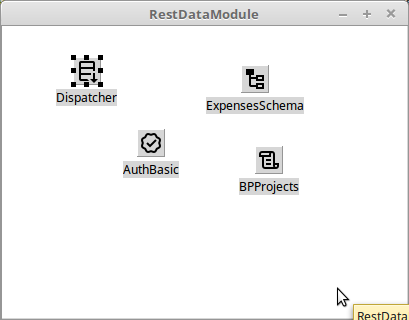 | |
| 637 | 631 | ||
| 638 | 632 | That's it. The project is ready to run. | |
| 639 | 633 | ||
| 640 | 634 | #### Using a SQLDBRestdatamodule | |
| 641 | 635 | ||
| 642 | 636 | This approach is basically the same as the previous one. | |
| 643 | 637 | ||
| 644 | 638 | 1. Create a HTTP application | |
| 645 | 639 | 2. Under File - New, create a SQLDB Rest Bridge Module. | |
| 646 | 640 | 3. Drop a SQLDBRestDispatcher component on the module. | |
| 647 | 641 | 4. The Dispatcher property of the module should be set to the SQLDBRestDispatcher component. | |
| 648 | 642 | 5. Set up the component as required, as in the previous example. | |
| 649 | 643 | ||
| 650 | 644 | ## Examples | |
| 651 | 645 | ||
| 652 | 646 | ### FPC | |
| 653 | 647 | ||
| 654 | 648 | - in FPC Packages, the fcl-web/examples/restbridge directory, there is a small example that serves a expenses tracker database. | |
| 655 | 649 | - The directory (delphiclient) below contains a small Delphi project that shows how to connect a TClientDataset to the SQLDB Rest bridge. | |
| 656 | 650 | ||
| 657 | 651 | ||
| 658 | 652 | Design time view: | |
| 659 | 653 | ||
| 660 | - | ||
| 661 | - | ||
| 662 | - | ||
| 663 | - | ||
| 654 | + | 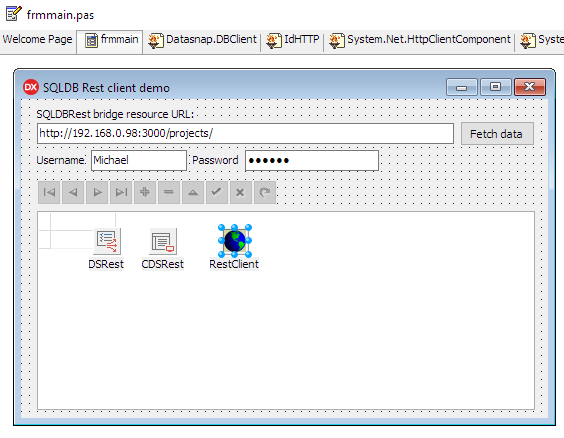 | |
| 664 | 655 | ||
| 665 | 656 | Run time view: | |
| 666 | 657 | ||
| 667 | - | ||
| 668 | - | ||
| 669 | - | ||
| 670 | - | ||
| 658 | + | 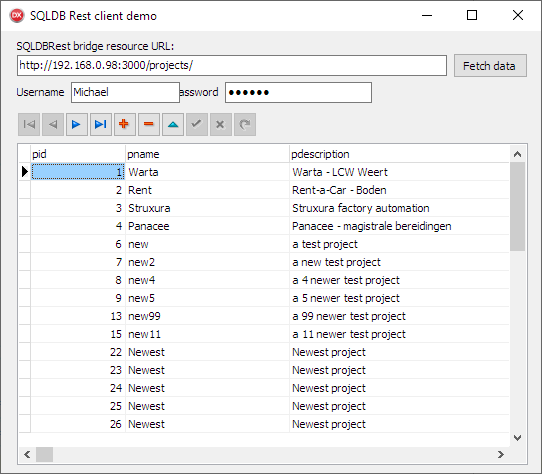 | |
| 671 | 659 | ||
| 672 | 660 | ### Lazarus | |
| 673 | 661 | ||
| 674 | 662 | There are 2 server examples available, and several client examples. The client examples are all the same, they just use a different kind of *TDataset* to show the data coming from the server: the **buf**, **json** and **CSV** formats are demonstrated in this way. | |
| 675 | 663 | ||
| 676 | 664 | #### Server examples | |
| 677 | 665 | ||
| 678 | 666 | - The demo/restbridge directory of Lazarus/Components contains the same example program, using a datamodule. | |
| 679 | 667 | - The demo/restmodule directory of Lazarus/Components contains the same example program, using a SQLDB Rest Web datamodule. | |
| 680 | 668 | ||
| 681 | 669 | #### TBufDataset client example | |
| 682 | 670 | ||
| 683 | 671 | - The demo/bufclient directory contains a demo that shows how to load data from a SQLDB REST bridge server in a TBUFDataset dataset. It uses the 'buf' format to do so. | |
| 684 | 672 | ||
| 685 | 673 | ||
| 686 | - | ||
| 687 | - | ||
| 688 | - | ||
| 689 | - | ||
| 674 | + | 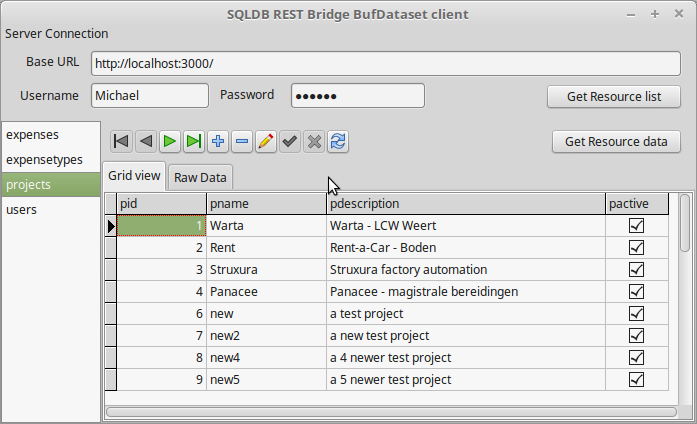 | |
| 690 | 675 | ||
| 691 | 676 | ||
| 692 | - | ||
| 693 | - | ||
| 694 | - | ||
| 695 | - | ||
| 677 | + | 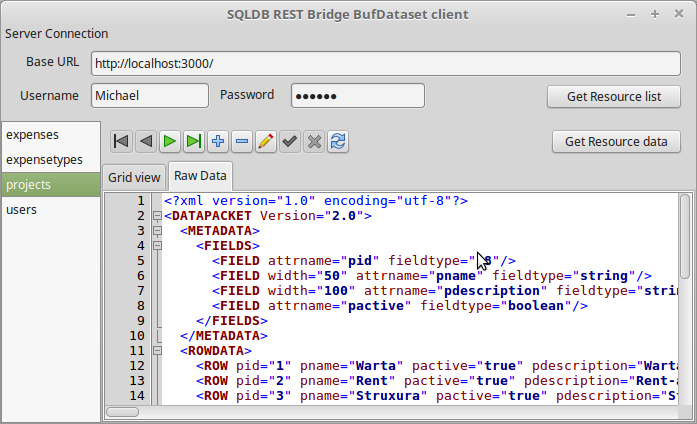 | |
| 696 | 678 | ||
| 697 | 679 | it also demonstrates how to use the metadata resource of the server to list the available resources | |
| 698 | 680 | ||
| 699 | 681 | #### TJSONDataset client example | |
| 700 | 682 | ||
| 701 | 683 | - The demo/jsonclient directory contains a demo that is similar to the bufclient demo: | |
| 702 | 684 | ||
| 703 | 685 | ||
| 704 | 686 | it shows how to load data from a SQLDB REST bridge server in a TBaseJSONDataset dataset, using the 'csv' format | |
| 705 | 687 | ||
| 706 | - | ||
| 707 | - | ||
| 708 | - | ||
| 709 | - | ||
| 688 | + | 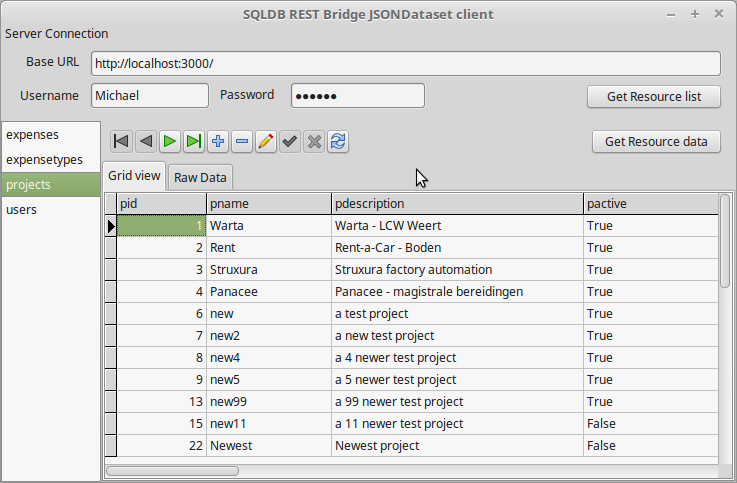 | |
| 710 | 689 | ||
| 711 | 690 | ||
| 712 | - | ||
| 713 | - | ||
| 714 | - | ||
| 715 | - | ||
| 691 | + | 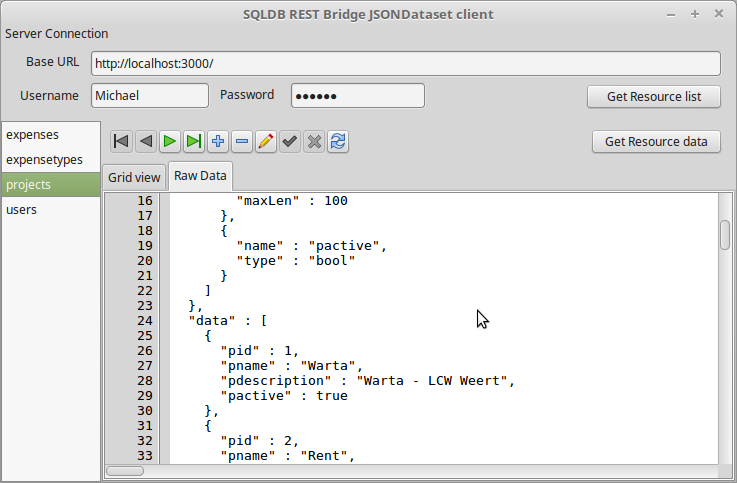 | |
| 716 | 692 | ||
| 717 | 693 | Like the bufdataset demo, it also demonstrates how to use the metadata resource of the server to list the available resources | |
| 718 | 694 | ||
| 719 | 695 | #### TCSVDataset client example | |
| 720 | 696 | ||
| 721 | 697 | - The demo/csvclient directory contains a demo that is similar to the bufclient demo: | |
| 722 | 698 | ||
| 723 | 699 | ||
| 724 | 700 | it shows how to load data from a SQLDB REST bridge server in a TCSVDataset dataset, using the 'csv' format | |
| 725 | 701 | ||
| 726 | 702 | ### Pas2JS | |
| 727 | 703 | ||
| 728 | 704 | - A similar application to the lazarus bufflien/jsonclient programs exists for pas2JS in demo/restbridge/simple | |
| 729 | 705 | ||
| 730 | 706 | ||
| 731 | - | ||
| 732 | - | ||
| 733 | - | ||
| 734 | - | ||
| 707 | + | 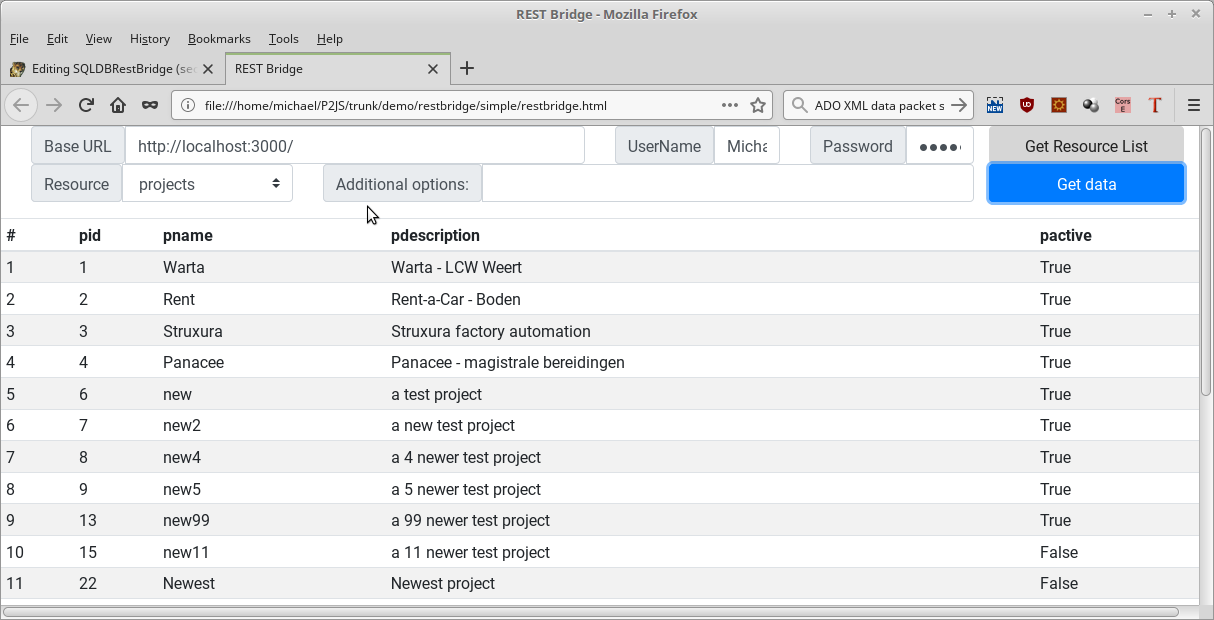 | |
| 735 | 708 | ||
| 736 | 709 | ## TODO | |
| 737 | 710 | ||
| 738 | 711 | The following extensions are still planned: | |
| 739 | 712 | ||
| 740 | 713 | - Support for `?q=filterexpression` in URL filters. | |
| 741 | 714 | - Connection management API. (zero-config service) | |
| 742 | 715 | - Use HTTP credentials to connect to the database. | |
| 743 | 716 | - Unknown query params are now ignored. Allow to check for valid query parameters and raise error if unknown query param is encountered. | |
| 744 | 717 | ||
| 745 | 718 | --- | |
| 746 | 719 | *From the Free Pascal wiki, page "SQLDBRestBridge/ru", as it stood on 2023-09-25 after a change by Zoltanleo, out of the wiki's dump of 2024-05-26. Copyright stays with the author who wrote it, according to the old wiki's [[Licensing]] page. If you have concerns about this material, [message the admin](/wiki-contact).* | |
| 747 | 720 | Category: Databases/ru | |
| 748 | 721 | Category: Russian |